
Your calendar should fill with confirmed appointments, not no-shows and endless email threads. The right appointment booking software fixes the problem by automating scheduling, reminders, payments, and intake so bookings move from interest to confirmed time without you living in your inbox.
What appointment booking software does
Appointment booking software is an online scheduling system that lets customers choose a service, pick an available time, and receive confirmations automatically. Behind the scenes, it keeps staff calendars accurate, enforces your policies, and captures the information you need to deliver the service.
Most teams adopt it for one of these reasons:
- Stop calendar ping-pong: A self-serve booking page removes the “what times work?” loop and replaces it with real-time availability.
- Reduce no-shows: Automated reminders and clear cancellation rules cut down missed appointments and last-minute surprises.
- Standardize intake: Booking forms collect the details you need up front, so your team starts each appointment prepared.
- Scale without adding admins: More bookings can flow through the same system because the coordination work is automated.
How appointment booking software works end to end
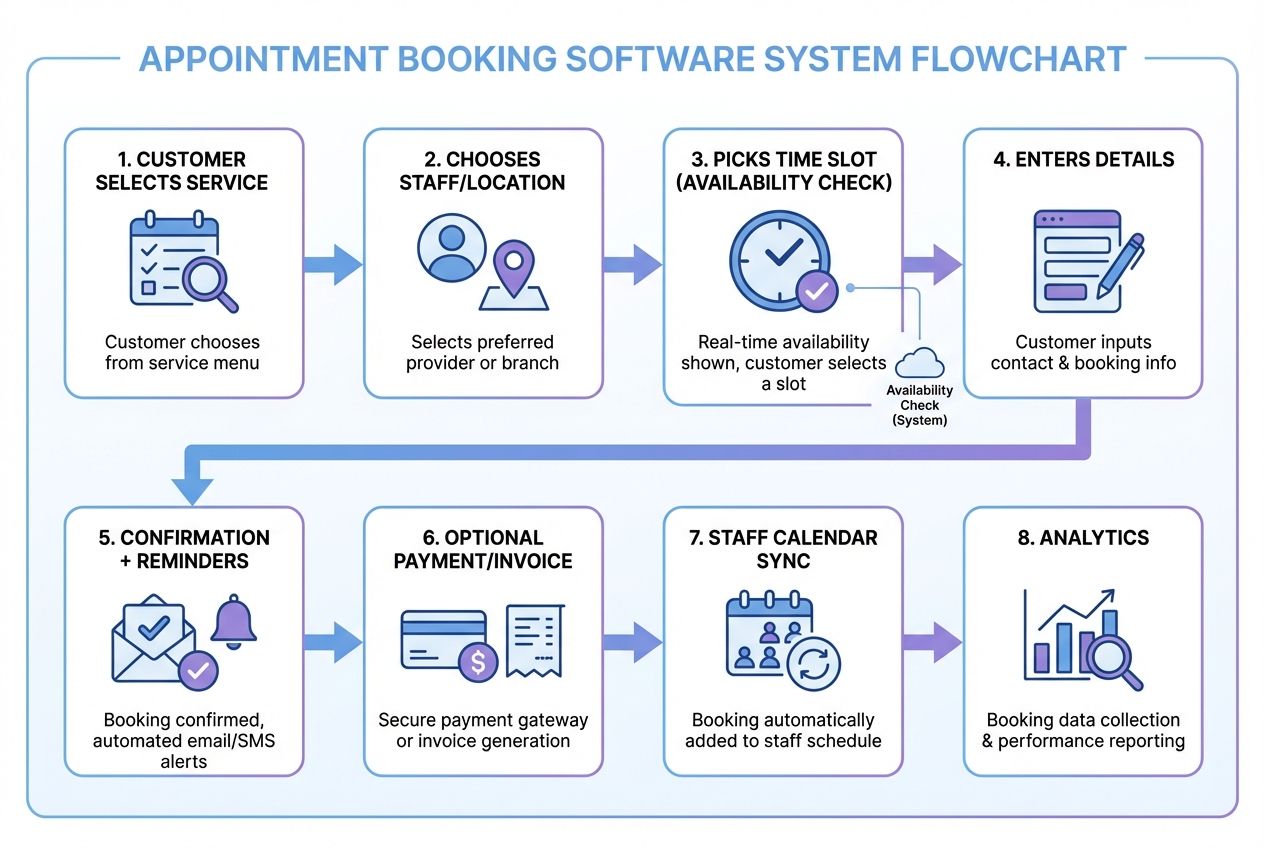
A solid booking setup typically follows the same sequence:
- Service selection: The customer chooses what they want and how long it takes.
- Resource matching: The system routes by staff member, location, room, or equipment.
- Availability check: Open slots are calculated using working hours, buffers, travel rules, and existing events.
- Data capture: The customer provides contact details and any intake form answers.
- Confirmation and reminders: Email and short message service (SMS) notifications reduce drop-offs and no-shows.
- Payment and policy enforcement: Deposits, prepayment, cancellation windows, and reschedule rules are applied.
- Team execution: Staff see the appointment in their calendar with the right context.
- Follow-up and reporting: Post-visit messages, rebooking prompts, and analytics show what is working.
The features that matter most in appointment booking software
It is easy to get distracted by long feature lists. These are the capabilities that consistently change outcomes.
- Real-time availability: It prevents double-booking and removes manual confirmation steps by showing only valid slots.
- Booking rules and buffers: It protects delivery quality by enforcing setup time, travel time, and lead times.
- Automated reminders: It reduces no-shows by sending confirmations, day-before reminders, and day-of prompts.
- Intake forms and custom questions: It improves preparedness by collecting the right information before the appointment.
- Payments and deposits: It increases commitment and stabilizes cash flow, especially for high-demand time slots.
- Calendar synchronization: It keeps staff schedules accurate by syncing to existing calendars and internal schedules.
- Multi-staff and multi-location routing: It scales operations by matching appointments to the right person and place.
- Reporting: It reveals patterns like peak demand, staff utilization, and service-level profitability.
How to choose appointment booking software that fits your business
In our opinion, the most practical way to choose is to score options against your operating reality, not the vendor demo. The goal is to buy or build something that makes your scheduling system truthful and low-touch.
Use this decision table to keep it objective.
| Decision factor | What to look for | Why it matters |
|---|---|---|
| Scheduling complexity | Multiple services, variable durations, buffers, travel rules | Complex rules break generic tools fast and create hidden admin work |
| Customer experience | Fast booking, mobile-friendly pages, clear policies | A smoother flow converts more interest into booked time |
| Payments | Deposits, prepay, invoices, refunds | Payment workflows reduce no-shows and shorten your cash cycle |
| Intake and data | Custom fields, conditional questions, file uploads | Better intake reduces back-and-forth and improves service quality |
| Team and permissions | Roles, approvals, visibility controls | Protects customer data and reduces operational errors |
| Integrations | Calendar sync, email, customer relationship management (CRM), accounting | Integration prevents duplicate data entry and mismatched systems |
| Customization | Custom flows, branded portals, unique routing logic | Customization is what makes the tool fit your operation instead of forcing workarounds |
In our opinion, this shortcut is useful when you need a quick first pass:
- Standard scheduling: If your process is standard and you mainly need a clean booking page, an off-the-shelf scheduler may be enough.
- Complex routing and approvals: If your booking is tied to approvals, staffing rules, membership tiers, or multi-step intake, expect to need either deep customization or a custom build.
How to set up appointment booking software in a way that actually reduces admin
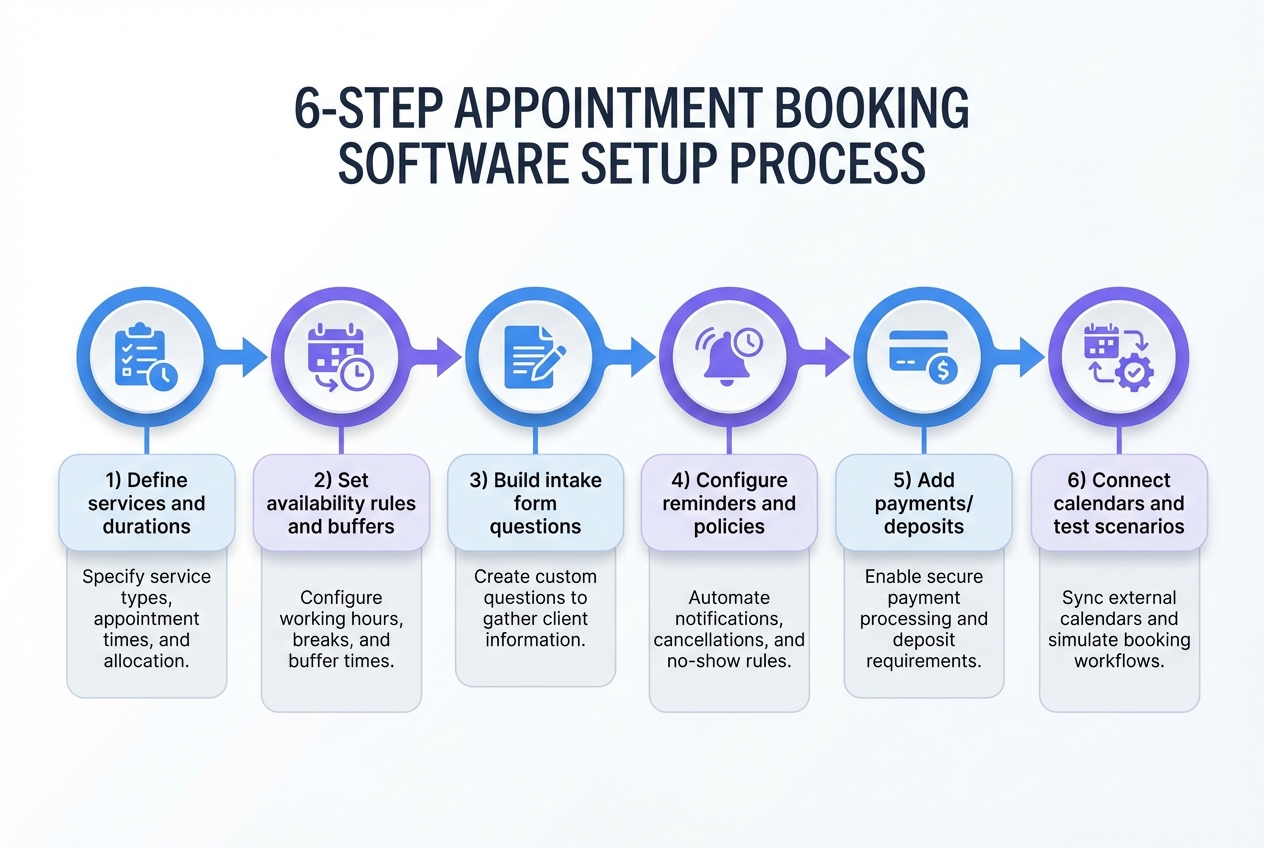
A booking page going live is only step one. The real target is a scheduling system that creates correct bookings with minimal intervention. Set up your system in this order.
1) Map your services around outcomes, not just durations
Start by listing what customers buy. Then define how delivery actually works.
- Name services as customers understand them: Your booking page should read like a menu, not internal jargon.
- Standardize durations and buffers: Add prep and wrap-up time so your calendar reflects reality.
- Define prerequisites: If a service requires a form, deposit, or approval, bake it into the booking flow.
The goal is fewer exceptions that force manual intervention.
2) Build your availability rules so the calendar stays truthful
Availability is where most scheduling systems succeed or fail.
- Working hours and breaks: Reflect real constraints, including lunch and non-negotiable blocks.
- Lead times: Require minimum notice so you are not forced into last-minute chaos.
- Capacity limits: For teams, define how many concurrent appointments can be handled.
The goal is customers see fewer valid-but-impossible slots.
3) Design intake that makes the first appointment smoother
Intake is a quality control step. It sets your team up to deliver a consistent service without follow-up messages.
- Collect only what you will use: Too many fields hurt conversion.
- Ask operational questions: Location, preferences, relevant history, or required documents.
- Use conditional questions where possible: Show only what applies to that service.
The goal is your team starts each appointment with context and fewer follow-up messages.
4) Configure reminders and policies to protect your schedule
Reminders and policies should reflect your margins and your capacity.
- Reminders: Confirmation immediately, then another reminder close to the appointment.
- Rescheduling rules: Make it easy for customers to reschedule within a window you can support.
- Cancellation policy: Align it with your costs and demand.
The goal is fewer no-shows and fewer awkward disputes.
5) Add payments only after scheduling is stable
Payments amplify whatever you built. When scheduling logic is still shaky, charging people creates more support work.
- Decide what you need: Deposit vs full prepayment vs pay later.
- Clarify refund rules: Make them visible before confirmation.
- Keep the receipt and invoice flow simple: Customers should understand what they paid for.
The goal is higher commitment and more predictable revenue.
6) Connect calendars and test with real scenarios
Before you send traffic to your booking link, stress test it.
- Test edge cases: Back-to-back bookings, staff time-off, last-minute reschedules, and partial payments.
- Confirm notifications: Make sure customers and staff get the right message at the right time.
- Run a short pilot: Start with one service or one team before rolling it out.
The goal is fewer surprises during launch week.
When it makes sense to build custom appointment booking software
Off-the-shelf booking tools are great until your business model stops fitting the default flow. In our opinion, building custom is justified when the “workarounds” become a hidden operating cost.
Common signals include:
- You have multi-step workflows: Approvals, pre-qualification, or internal routing before confirmation.
- You sell packages or memberships: Entitlements, credits, and tiered access need custom logic.
- You run multi-location operations: Different calendars, staffing constraints, and policies by branch.
- You need a branded portal: Client accounts, history, files, and rebooking in one place.
- You want operational automation: Booking triggers downstream workflows like task assignments, follow-ups, or reporting.
This is where an artificial intelligence (AI) app builder can be a leverage point. Instead of stitching together tools and living with compromises, you can describe the workflow you actually run and generate the app around it.
Building appointment booking software with QuantumByte
If you want customization without a long build cycle, QuantumByte is designed for this exact gap: founders and operators who know the workflow, but do not want to manage a dev team.
We recommend starting by prototyping the booking flow first, validating it quickly, and only then expanding into the full operational system. In our opinion, this approach keeps you focused on outcomes (fewer admin hours, fewer no-shows, cleaner handoffs) instead of building “features” that do not change operations.
Start with a prototype you can validate quickly
Use QuantumByte to define the screens, data, and roles for your booking process, then validate it with real users.
As a practical speed test, we look for proof that a non-technical operator can go from idea to working flow in one sitting. One demo story the QuantumByte team has shared is that comedian Aziz Ansari created an app for his movie "Good Fortune" within minutes, despite having no prior experience with app builders. In our opinion, that is the bar to hold any “customizable and fast” platform to.
- Describe your booking flow in plain language: Services, staff rules, buffers, intake questions, and policies.
- Generate the core screens: Service selection, calendar picker, intake form, confirmation, and staff view.
- Validate the flow with a small group: Catch confusing steps before you scale.
Go from booking page to an internal operations system
The real win is when booking triggers operations automatically.
Examples you can implement in a custom build:
- Intake to task routing: When someone books, create internal tasks for prep and assignment.
- Approval gates: Require staff confirmation for high-value appointments or special cases.
- Customer portals: Let customers reschedule, update details, and view invoices.
If you want to explore the builder experience directly, start with our basic plan.
When you should use an enterprise approach
If you are rolling out scheduling across departments, locations, or regulated workflows, you will usually need governance, roles, and a unified operational view. QuantumByte’s enterprise offering is designed around those needs on the our Enterprise page.
Once your booking flow is working, treat it like core infrastructure. A scheduling system touches revenue, customer trust, and sensitive data, so it needs basic guardrails even when you start small.
Security, privacy, and accessibility basics you should not skip
Booking systems collect personally identifiable information (PII) like names, emails, phone numbers, and appointment history. Treat that data as sensitive from day one.
- Protect PII by default: NIST SP 800-122 is a practical reference for how organizations should think about safeguarding PII, especially confidentiality, access control, and incident response.
- If you take card payments, follow PCI DSS: The Payment Card Industry Data Security Standard (PCI DSS) defines security requirements for environments where payment account data is stored, processed, or transmitted.
- If you are in healthcare, understand HIPAA: The Health Insurance Portability and Accountability Act (HIPAA) Privacy Rule sets standards to protect individually identifiable health information.
- Make booking accessible: The W3C Web Content Accessibility Guidelines (WCAG) are the core standard for accessible web content.
With the fundamentals handled, the next step is execution quality. Most booking systems fail because of avoidable setup and adoption mistakes, not because the software cannot create a calendar invite.
Common mistakes that make booking software feel installed but not useful
Teams usually fail in the same ways.
- Overcomplicating the booking page: Too many services and form fields reduce conversions and increase abandonment.
- Copying someone else’s policies: Your cancellation and deposit rules need to match your margins and demand.
- Ignoring staff experience: If staff cannot see context quickly, the system creates friction instead of removing it.
- No operational follow-through: A booking page is only the front door. The real system is everything that happens after someone chooses a time, including prep, delivery, follow-up, and reporting.
What you covered and what to do next
You now have a clear picture of what appointment booking software should do, which features drive outcomes, how to choose the right approach, and how to set up scheduling so it reduces admin. You also saw, in our opinion, the clearest signals for when a custom build is worth it and how an AI app builder like QuantumByte can take you from a basic booking flow to a fuller operations system.
If you are serious about eliminating manual scheduling work, start by prototyping your real workflow, testing it quickly, and then scaling what works. Grab a basic plan and start validating a booking flow before committing to a bigger rollout.
Frequently Asked Questions
What is the best appointment booking software?
The best appointment booking software is the one that matches your scheduling complexity and operational workflow. In our opinion, if you have straightforward needs, a standard scheduler can work. If you need approvals, multi-location routing, membership logic, or branded portals, you will usually get better results with a custom build or a highly customizable platform.
Can appointment booking software reduce no-shows?
Yes. Automated confirmations and reminders, combined with clear cancellation and rescheduling policies, typically reduce missed appointments because customers get prompted at the right times and understand the rules before they commit.
Should I require deposits or full prepayment?
In our opinion, use deposits when you want commitment without adding checkout friction. Use full prepayment when the service is standardized and your refund policy is clear. The right choice depends on demand, no-show risk, and your ability to resell cancelled slots.
What data should I collect during booking?
Collect only what you will use to deliver the service well: contact details, the minimum intake needed for readiness, and any operational fields that affect scheduling (location, staff preference, or required documents). If you need deeper intake, consider splitting it into booking-time essentials and a follow-up form.
Is building custom appointment booking software expensive?
It can be, if you start with a traditional build. Cost rises with integrations, roles, multi-location logic, and compliance needs. In our opinion, AI app builders can reduce the time and cost of getting to a working prototype and help you validate the workflow before you invest in a full rollout.
How does QuantumByte fit into appointment booking?
QuantumByte fits when you want the booking flow to match how your business actually operates, including custom intake, routing, and downstream workflows. You can start by prototyping a booking experience and then expand into an internal system your team uses every day using QuantumByte and Packets.