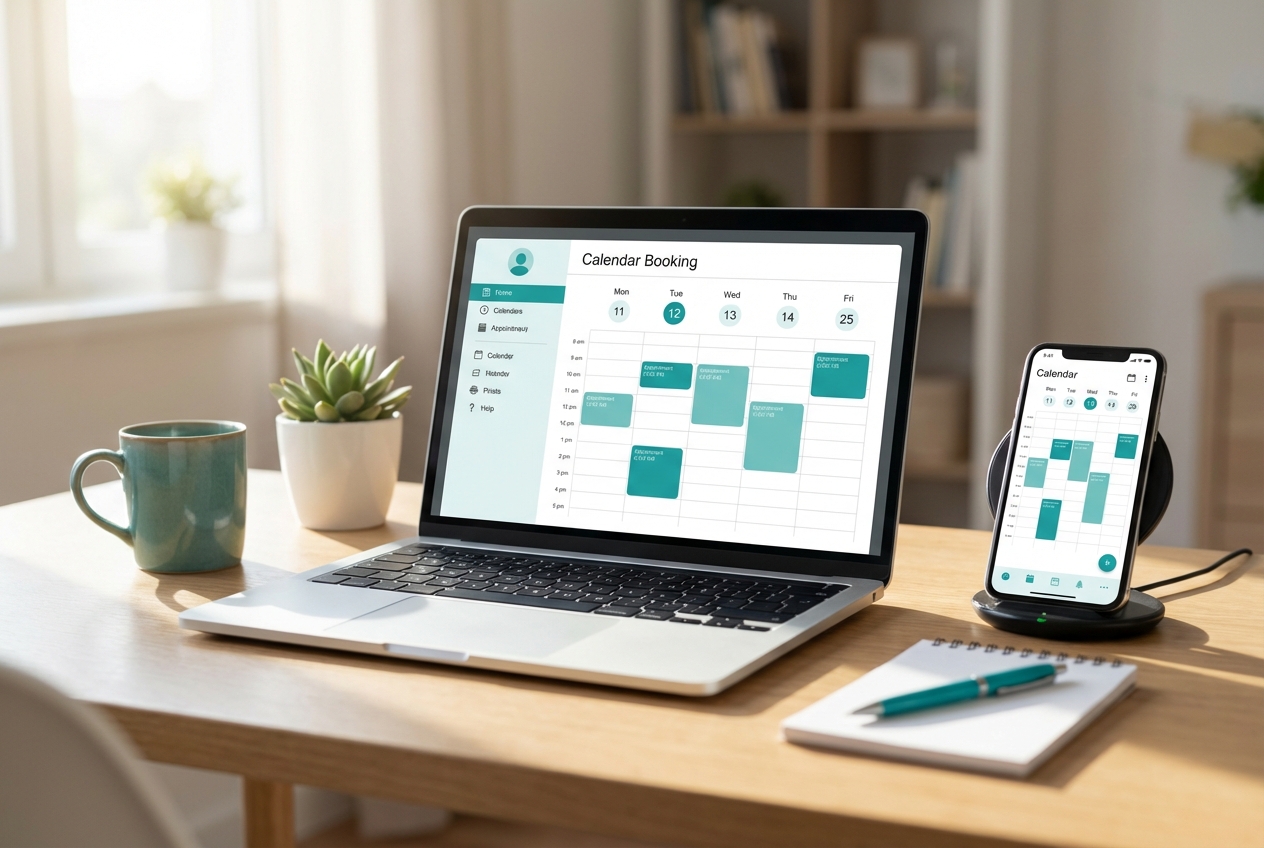
If bookings are still coming in through DMs, phone calls, and messy calendar back-and-forth, you are paying for it in no-shows, gaps in your day, and admin hours you never get back. This guide shows you how to build booking and scheduling software that matches how your business actually runs, from availability rules to payments and reminders.
What booking and scheduling software needs to do
At its core, booking and scheduling software is a set of flows and rules that turn intent ("I want Tuesday at 3") into an appointment that is reserved, confirmed, and easy to manage.
A production-ready system usually includes:
- A customer booking flow: A public-facing page that lets someone pick a service, time, and optional add-ons, then enter contact details.
- An availability engine: Rules that determine which time slots are actually bookable.
- A reservation layer: Temporary holds that prevent double-booking while someone is checking out.
- Confirmation and reminders: Email and Short Message Service (SMS) messages that reduce no-shows.
- An admin dashboard: A place for you and your team to reschedule, cancel, block time, and manage staff.
- Integrations: Calendar sync, payments, and optionally customer relationship management (CRM) or invoicing.
If you build these pieces deliberately, you avoid the classic failure mode: a nice booking page on the front, with chaotic manual fixes behind the scenes.
How booking and scheduling software works end to end
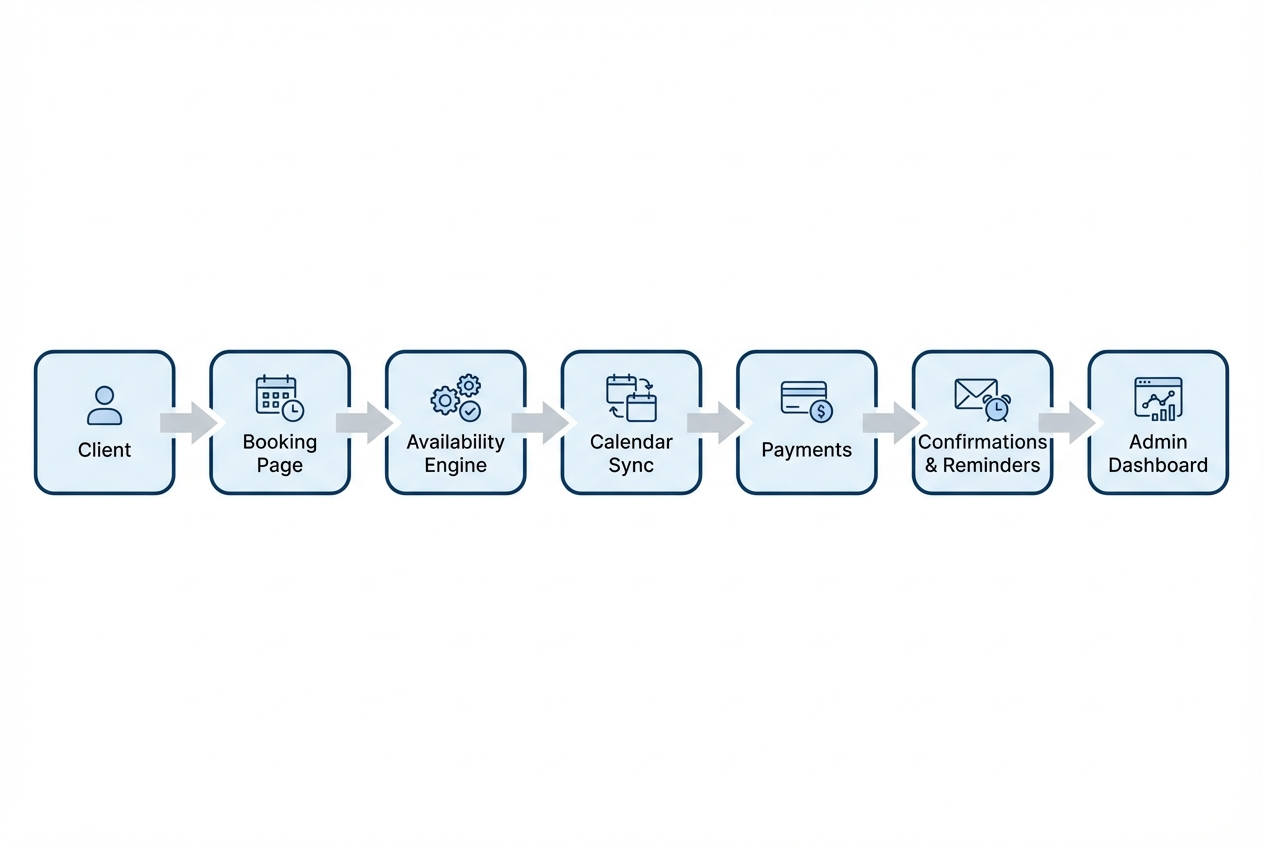
A clean mental model makes build decisions easier. The simplest robust sequence looks like this:
- Client selects a service: The system learns duration, buffers, price, and any constraints.
- Availability engine computes slots: It applies hours, staff calendars, lead time, and capacity.
- Client selects a slot: The system places a temporary hold (reservation) to avoid race conditions.
- Optional payment step: The booking is confirmed only after payment (or deposit) succeeds.
- Event is created and synced: A calendar event is stored in your database and optionally pushed to external calendars.
- Notifications are sent: Confirmation now; reminders later; follow-ups after the appointment.
- Admin actions remain authoritative: Reschedules, cancellations, blocks, and overrides are managed in one place.
To support interoperability, many systems also generate ICS calendar invites using the iCalendar format (RFC 5545).
Decide whether to buy, customize, or build
Not every team should build from scratch. Use this decision table to choose the right path.
| Scenario | Best fit | Why |
|---|---|---|
| You only need a basic booking link and reminders | Off-the-shelf tool (Calendly, Acuity, etc.) | Fastest time to value, minimal setup |
| You need a booking flow that matches your service logic (multi-step intake, capacity rules, custom deposits) | Custom build on a flexible platform | You keep speed while fitting your real process |
| You need strict governance, roles, auditability, or multi-department workflows | Enterprise build | You need controls, reporting, and scalable operations |
A practical rule: if you are constantly working around the tool with manual steps, you are already paying the cost of a custom system, just in time and mistakes instead of software.
If you are trying to decide whether a custom build makes sense financially, it helps to skim how QuantumByte frames product building for founders in its company manifesto, then compare that to what you get at each tier on the pricing section.
Define your booking model before you touch a builder
Most booking projects fail because the data model is vague. Get these definitions sharp first. It will make every later step simpler.
Core entities to define
- Services: What is being booked (duration, price, buffers, location type, prep time).
- Staff or resources: Who or what is being booked (a person, a room, a piece of equipment).
- Availability rules: Working hours, breaks, holidays, time-off, and exceptions.
- Capacity: One-on-one, group sessions, or limited seats per slot.
- Customer record: Name, email, phone, and any intake fields you need.
- Booking status: Tentative, confirmed, canceled, completed, no-show.
Rules that cause real-world scheduling pain
Write these down early:
- Lead time: How soon can a client book? This prevents last-minute chaos.
- Minimum notice for reschedule: This protects your calendar from constant churn.
- Buffers: Setup and teardown time are often where profitability disappears.
- Overbooking policy: Usually never, but some businesses allow controlled overbooking for certain services.
- Multi-service bundles: If a client books "consult + follow-up", decide whether it reserves multiple slots up front.
If you want a founder-friendly way to translate these rules into an app blueprint quickly, QuantumByte’s workflow-first approach on the Packets platform is built for describing real business operations and turning them into working screens, data, and roles without months of development.
Build booking and scheduling software step by step
This is the practical build path that keeps you out of the weeds. The goal is a system that is accurate, auditable, and easy to operate.
Step 1: Create your service catalog and booking constraints
Start by making services explicit. This improves both customer clarity and backend correctness.
- Service name and description: Make selection obvious and reduce wrong bookings.
- Duration: Choose one duration per service whenever possible. Variant durations create complexity.
- Price and payment policy: Full payment, deposit, or pay later.
- Buffers: Add pre-buffer and post-buffer fields, not just a vague padding.
The goal is your booking user interface can generate reliable slot lengths, and your availability engine has fewer edge cases.
Step 2: Model availability like a rules engine
Avoid the trap of store a list of times. You want rules that can handle exceptions.
Build availability with:
- Weekly schedule templates: Default working hours per staff member.
- Exceptions: Holidays, sick days, special events.
- Time zone handling: Store times consistently and present in the customer’s time zone.
- Capacity checks: For group bookings, availability is seats remaining, not slot exists.
The goal is "Can I book this?" becomes a deterministic answer, not a manual judgment call.
Step 3: Design the customer booking flow
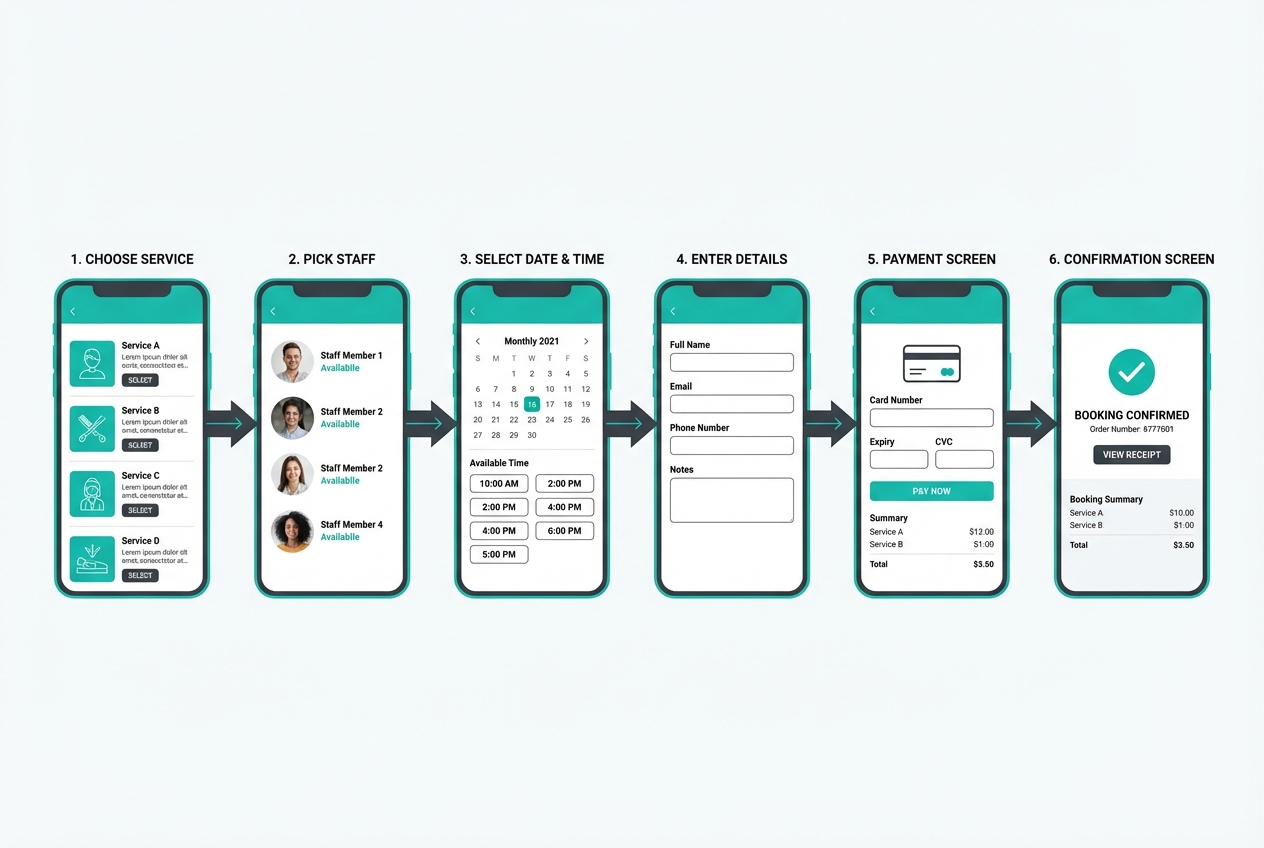
A booking flow is a conversion funnel. Keep it simple, but do not skip validation.
Recommended flow:
- Choose service: The client selects the specific offering from your catalog, which sets the duration, buffers, and pricing rules so every later step stays consistent.
- Choose staff or "any available": This decides whether availability is computed for a specific person or for a pool, which is the difference between simple scheduling and scalable operations.
- Pick date and time: The client sees only valid slots, which reduces back-and-forth and prevents bookings that your team will later have to fix.
- Enter contact details and intake questions: You capture what you need to deliver the service and to follow up, and you reduce day-of friction by collecting context upfront.
- Pay (optional): If you take a deposit or full payment, this step turns a tentative selection into a commitment and gives you a clean checkpoint to confirm the booking.
- Receive confirmation: The system returns a clear success state (and sends messages) so the client knows they are booked and your team can treat the slot as real.
Make sure your user interface:
- Prevents invalid selections: If a slot cannot be booked, do not show it.
- Supports rescheduling: A reschedule link reduces inbound admin messages.
- Handles mobile well: Most service bookings happen on a phone.
Accessibility matters too. If your booking page is hard to use with a keyboard or screen reader, you will lose bookings and create support load. WCAG 2.2 is the core guidance for web accessibility.
Step 4: Add reservations to prevent double-booking
Two customers can click the same slot within seconds. If you only check then insert, you will double-book.
A safer pattern:
- Create a short-lived hold: Reserve the slot for a few minutes while checkout happens.
- Confirm on completion: Convert the hold to a confirmed booking only when the flow finishes.
- Expire automatically: Expired holds should free the slot.
The goal is even at higher traffic, bookings remain consistent.
Step 5: Implement payments in a way that stays truthful
If you take payment, your booking state should be driven by verified payment events.
- Deposit vs full payment: Deposits reduce no-shows while keeping the booking decision easy.
- Refund and cancellation policy: Make it visible before payment.
- Payment confirmation: Mark bookings as confirmed only after you have a true success signal from your payment processor.
The goal is your calendar reflects reality, and your team is not arguing with payment screenshots.
Step 6: Calendar sync and ICS invites
Even if you are not doing deep calendar integrations, sending a calendar invite reduces missed appointments.
Two common approaches:
- ICS invite attachment: Generate an iCalendar event based on RFC 5545.
- Two-way calendar sync: Useful for staff who live in Google Calendar or Outlook, but it adds complexity around conflicts and permissions.
The goal is customers and staff can trust that their calendar reflects the booking.
Step 7: Confirmations, reminders, and post-appointment follow-ups
Messaging is where booking software pays for itself.
Build a basic lifecycle:
- Immediate confirmation: Email (and optionally SMS) with details, location, and reschedule link.
- Reminder cadence: One reminder far enough in advance to adjust plans, and another close to the appointment.
- Aftercare message: Review request, next-step booking, or receipt.
If SMS is part of your strategy, you will want a reliable message pipeline and clear opt-in handling. For a broader look at building messaging automation, QuantumByte’s guide on building an SMS chatbot is a useful companion. You can also browse more build patterns in the broader QuantumByte articles library when you are mapping your automation roadmap.
Step 8: Build the admin dashboard your team will actually use
Your dashboard is your operations center. If it is clunky, your team will revert to spreadsheets and DMs.
Minimum admin capabilities:
- Search bookings: By customer name, phone, email, or booking ID.
- Reschedule and cancel: With reason codes and optional refund triggers.
- Block time: Personal time, meetings, or staff shortages.
- Staff management: Permissions, working hours, time off.
- Audit trail: Who changed what, and when.
This is also where custom software beats generic tools. You can shape the dashboard to match your process instead of forcing your process into someone else’s interface.
Step 9: Add roles, permissions, and security baselines
Booking data is sensitive: contact details, appointment history, sometimes medical or financial context.
At a minimum, enforce:
- Role-based access control: Staff should only see what they need to do their job.
- Least privilege: Give the smallest set of permissions by default.
- Secure session handling: Treat admin access like a real application, not a shared password.
For a structured security requirements baseline, the OWASP ASVS is a practical reference for designing and testing web application security.
If you are building for regulated environments, review our approach to governance and controlled environments on Enterprise.
Step 10: Test with real calendar edge cases, then launch in phases
Do not launch until you have tested the cases that create refunds and bad reviews.
Test scenarios like:
- Back-to-back bookings with buffers: Ensure buffers are respected across services.
- Time zone mismatch: Customer books in one time zone, staff operates in another.
- Cancellation windows: Verify the system enforces policy consistently.
- Simultaneous bookings: Confirm holds prevent conflicts.
Launch in phases:
- Private beta: A few friendly customers.
- Soft launch: A percentage of your bookings.
- Full rollout: Replace your old method and remove the alternative.
The goal is you avoid big bang launches that flood your inbox with exceptions.
What to include in your first version vs later versions
A good first version is narrow, accurate, and easy to operate.
Start with these features
- Single-service bookings: Ship the simplest flow first.
- Manual staff assignment: If you are unsure about any available, assign staff manually at first.
- Email confirmations: Reliable and low compliance overhead.
- Admin reschedule and cancel: Non-negotiable for operations.
Add these once the basics are stable
- Packages and memberships: Better monetization, more complex billing rules.
- Multi-location routing: Adds complexity to availability and staff assignment.
- Waitlists: Useful when demand exceeds supply.
- Advanced reporting: Utilization, revenue by service, no-show rates.
If you want a fast path from rules on paper to a working app, start on the Packets plan. It is designed for founders who want speed without giving up the ability to customize flows as they learn.
Common pitfalls and how to avoid them
These issues show up repeatedly in booking and scheduling software projects.
- Building the user interface before the rules: A pretty booking page will not save you if availability is wrong. Define services, buffers, and policies first.
- Skipping reservations: Without holds, you will double-book under load. Implement temporary holds early.
- Mixing requested and confirmed states: Keep booking status strict, especially when payments or approvals exist.
- Letting staff override without audit: Overrides will happen, but your system should record them so you can fix root causes.
- Ignoring accessibility: Booking is revenue. Follow established guidance like WCAG 2.2 so customers can actually complete the flow.
Where QuantumByte fits if you want custom booking flows without a long build
Off-the-shelf schedulers are fine until your business needs real differentiation: multi-step intake, deposits, capacity rules, or workflows that involve more than one team.
QuantumByte is a strong fit when:
- You want founder-speed: Move from description to a working app fast, then iterate.
- You want business-ready templates: Start from proven building blocks instead of reinventing admin screens.
- You need customization without months of engineering: Adjust the flow as your service evolves.
You can get started with our basic plan in a matter of minutes and bring your vision to life today.
Recap: what you now know how to build
You now have a practical blueprint for building booking and scheduling software that is reliable in the real world. That includes defining the service and availability model, preventing double-booking with reservations, handling payments truthfully, syncing calendars with standards like iCalendar, shipping confirmations and reminders, and running the system from an admin dashboard with roles and security baselines.
Frequently Asked Questions
What is the difference between booking software and scheduling software?
Booking software typically focuses on the customer-facing flow to reserve an appointment. Scheduling software is broader, covering internal planning, staff allocation, resource constraints, and operational reporting. Many products do both, but the distinction matters when you design your data model and admin controls.
Do I need two-way calendar sync to run a booking system?
No. Many businesses do well with a single source of truth in the booking system plus ICS invites for customers and staff. Two-way sync becomes important when staff must keep personal and work calendars reconciled automatically, but it adds complexity around conflicts and permissions.
How do I prevent double-booking?
Use a reservation (hold) mechanism. When a customer selects a slot, place a short-lived hold, then confirm the booking only after checkout or final confirmation completes. Also enforce uniqueness at the database level so the system cannot insert two confirmed bookings for the same resource and time.
Should I require deposits?
Deposits are often a practical middle ground. They reduce no-shows and protect your time without creating too much friction for the customer. The best policy depends on your average appointment value, lead time, and how painful last-minute cancellations are for your business.
What is the fastest way to build a custom scheduling app as a founder?
Start with a clear model of services, availability rules, and booking states. Then choose a platform that lets you generate and iterate quickly without locking you into a rigid template. Our basic plan is designed for founders who want speed while keeping the option to customize workflows as they scale.