
You lose jobs when quoting takes too long, and you lose profit when the quote is wrong. The right construction quoting software fixes both by turning your estimating, approvals, and follow-up into one clean workflow that your team can repeat on every project.
This guide is for owners, general contractors, remodelers, and specialty trades who are tired of rebuilding quotes from scratch, chasing signatures, and reconciling "what we sold" with "what we built."
Quick verdict on construction quoting software
If you want the fastest path to cleaner quotes and fewer missed follow-ups, pick software that can do three things well: build repeatable templates, produce professional client-facing proposals, and keep changes controlled after approval.
Best fit when you need:
- Quote speed with consistency: You bid similar work repeatedly (kitchens, roofs, service calls, tenant improvements) and want templates, assemblies, and margin rules.
- A clean handoff to delivery: You want the approved scope to flow into scheduling, work orders, and invoicing without retyping.
- Change order control: You need a simple process to price changes, get approval, and keep a clear audit trail.
Not the best fit when you need:
- Full project controls first: If your immediate pain is complex project management (submittals, requests for information, multi-phase scheduling), a heavy construction management suite may matter more than quoting.
Minimum must-haves to insist on:
- Template-based proposals: So your brand, terms, and line items stay consistent.
- Approval and e-sign: So the quote becomes a signed agreement quickly.
- Integrations: Especially accounting and payments, so you stop duplicating data.
Feature checklist for construction quoting software
The checklist below is the practical short list. If a tool cannot handle these reliably, it will not hold up once your job volume grows.
- Estimate templates and assemblies: Reusable line items for common tasks (demo, framing, finish, cleanup) so your team does not rebuild estimates from zero.
- Labor, material, and subcontractor costing: Separate cost buckets make it easier to protect margin and explain pricing when needed.
- Margin and markup rules: Configure defaults by job type or customer type so you are not relying on memory for pricing.
- Alternates and options: Present "good, better, best" packages without creating three separate quotes.
- Scope of work clarity: Strong inclusions and exclusions reduce disputes, especially on remodels where assumptions are common.
- Photos, plans, and attachments: Tie documentation directly to the quote so the context does not get lost in text messages.
- Versioning and approvals: Track revisions and approval history, which matters when scope changes mid-stream.
- Change orders: A structured flow to price changes, send them, get approval, and keep the job total accurate.
- Deposit and progress invoicing: Collect deposits and bill milestones without manual invoice creation.
- Mobile-first usability: Your field team should be able to review scope, capture site notes, and trigger updates.
- Reporting: At minimum, you want quote pipeline, win rate by job type, and margin by job type.
Workflow fit for contractors and agencies
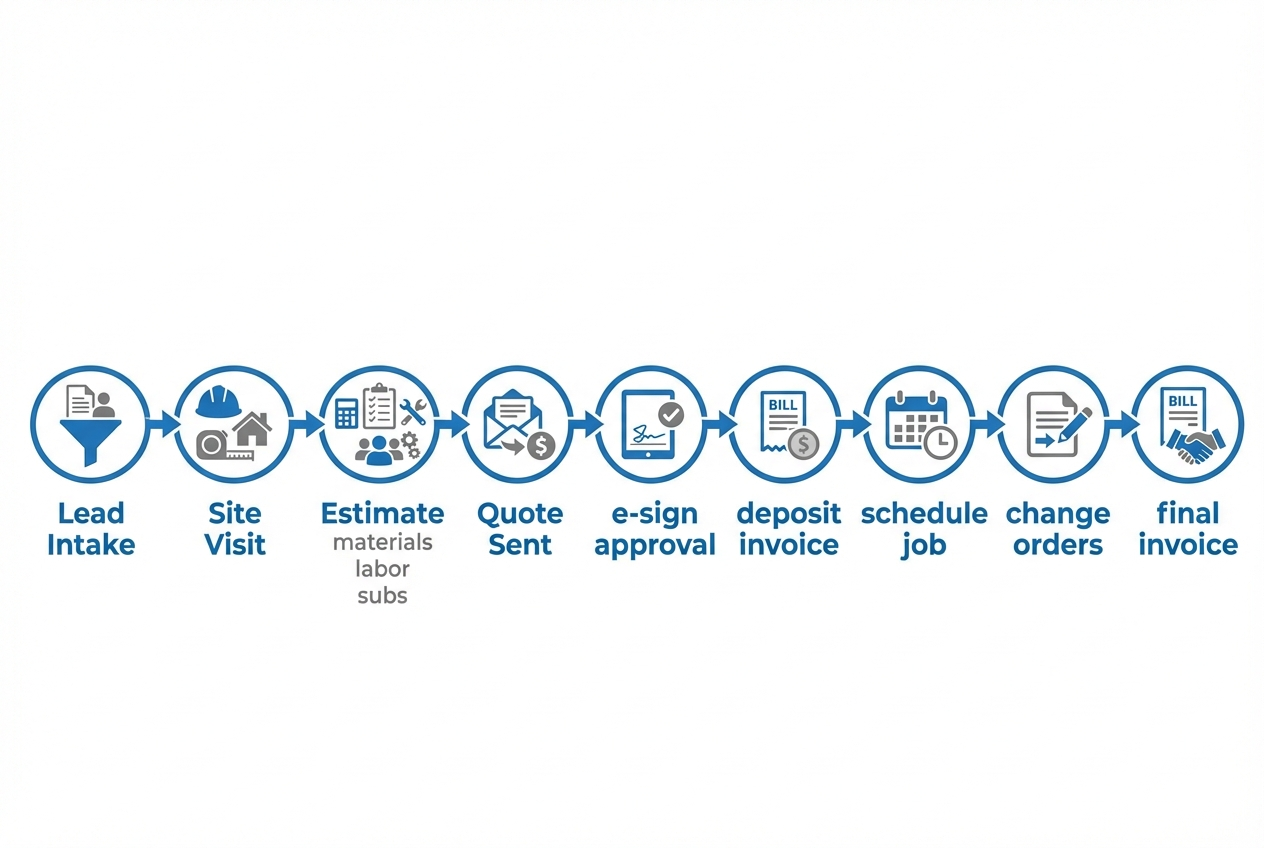
Construction quoting software works best when it matches how you actually sell and deliver work. You are aiming for a repeatable quote-to-cash system that reduces back-and-forth, locks the scope after approval, and keeps invoicing aligned with what the customer accepted.
A quoting workflow that fits most contractors
- Lead intake becomes a job record: Your CRM (Customer Relationship Management) or intake form should create a single job record with customer details, address, job type, and target start window. The outcome is fewer lost leads and less re-entry.
- Site visit notes feed the estimate: Field notes, photos, and measurements should attach to the job record. The outcome is fewer scope gaps when you build the estimate later.
- Estimate builds from templates: Your estimator selects assemblies and adjusts quantities, allowances, and exclusions. The outcome is faster quote turnaround with fewer pricing errors.
- Quote is sent with clear options: Package tiers and alternates make it easier for the client to say "yes" while preserving margin. The outcome is higher close rate without discounting everything.
- Approval triggers next steps: Once the client approves (ideally with e-signature), the system should trigger deposit invoicing, scheduling, and internal handoff. The outcome is less time chasing paperwork.
- Change orders stay structured: Changes are inevitable. The software should turn "can you also..." into a priced change order with approval before work starts. The outcome is fewer unpaid extras.
- Final invoice matches the approved scope: Invoicing should reflect the latest approved total, including change orders. The outcome is cleaner books and fewer payment disputes.
Contractors vs. agencies that support contractors
Some businesses "sell construction," others "sell estimating." The workflows differ.
- General contractors (GCs): Need strong change orders, subcontractor line items, and a clean handoff to scheduling.
- Specialty trades: Often need speed, mobile quoting, deposits, and quick conversions to invoices.
- Design-build firms: Need options, allowances, and version control, because scope evolves.
- Estimating agencies: Need intake forms, standardized templates by trade, and deliverable tracking. They may not need scheduling, but they do need clean collaboration and revision history.
If you also rent tools or equipment, quoting usually gets messy fast. Linking equipment, delivery, and damage deposits to the estimate is where many generic tools fall short. The patterns are similar to what is covered in our guide to equipment rental software workflows.
Integrations that matter most
Integrations are where quoting software either becomes your system of record, or becomes "yet another tool." Prioritize the four categories below.
| Integration type | Why it matters | Common options | Questions to ask before you buy |
|---|---|---|---|
| CRM and lead intake | Keeps customer data clean and speeds up follow-up. | HubSpot, Pipedrive, Salesforce, web forms. | Can a new lead automatically create a job record? Can you track quote status in the pipeline? |
| Accounting | Prevents double entry and mismatched totals. | QuickBooks, Xero, NetSuite (enterprise). | Does it sync customers, invoices, and payments? How are tax, discounts, and change orders handled? |
| Payments | Improves cash flow by collecting deposits fast. | Stripe, card and ACH (Automated Clearing House). | Can you send a payment link with the approved quote? Can deposits map to the right job and invoice? |
| E-signature | Shortens time-to-approval and creates a clear audit trail. | DocuSign, Adobe Acrobat Sign, native e-sign. | Does it capture signer identity, time stamps, and the signed version of the quote? |
Two compliance notes worth knowing:
- E-sign legality in the US: Under the Electronic Signatures in Global and National Commerce Act (E-SIGN Act), a contract or signature generally cannot be denied legal effect solely because it is in electronic form.
- Payment data protection: If you accept card payments, you should understand that the Payment Card Industry Data Security Standard (PCI DSS) provides a baseline of technical and operational requirements designed to protect payment account data. In practice, most contractors prefer payment providers that keep sensitive card data out of their own systems.
If Stripe is on your shortlist, Stripe’s documentation provides a clear overview of ways to accept payments, including Payment Links and Stripe Checkout, in its payments overview.
Pricing expectations and cost drivers
Construction quoting software is usually priced in tiers. The exact pricing varies widely, but the cost drivers are consistent across vendors.
The cost drivers that move your price up or down
- User seats: More office staff, estimators, and field users typically increases cost.
- Feature tier: Change orders, advanced reporting, multi-company support, or deeper integrations often sit in higher tiers.
- Job volume: Some products scale pricing with the number of active jobs, quotes, or customers.
- Payments and processing: Payment processing has its own fees, separate from your quoting software subscription.
- Implementation support: Data migration, templates, and training can add cost if you need hands-on help.
| Cost driver | What it changes operationally | What to decide upfront |
|---|---|---|
| Templates and catalog complexity | Determines how fast you can produce accurate quotes. | How many job types do you quote repeatedly? Who owns maintaining templates? |
| Change order rigor | Affects margin protection and dispute prevention. | Do you require approval before work starts, every time? |
| Accounting integration depth | Controls how much re-entry and reconciliation you will do. | Are invoices and payments your priority, or full job costing? |
| Mobile usability | Impacts adoption in the field. | Which steps must happen on-site (photos, measurements, approvals)? |
| Reporting | Determines if you can improve win rate and margin over time. | Which metrics do you review monthly (win rate, cycle time, gross margin)? |
A practical way to think about budget
If your quoting process is currently in spreadsheets and email, the real cost is usually hidden in:
- Slow turnaround time: Delays reduce close rates because customers move on or pressure you into rushed discounts.
- Uncaptured changes: Missed change orders turn legitimate additional work into free work.
- Admin re-entry: Re-typing the same data into accounting, scheduling, and email creates errors and burns hours every week.
For teams that want to build a lightweight internal tool or a custom quote-to-invoice flow without committing to a large construction suite, we publish transparent tiering on our pricing page, including a low-cost prototype tier and a "go live" tier. What matters most is whether you can validate your workflow quickly before you standardize it.
Alternatives and competitors
There is no single "best" tool for every contractor. The right choice depends on whether your biggest pain is quoting speed, project complexity, or operational handoffs.
Below is a grounded comparison of common categories you will run into.
| Option | Best for | Watch-outs |
|---|---|---|
| Buildertrend / CoConstruct (residential platforms) | Quoting plus client portal plus project workflow for remodelers and home builders. | Can feel heavy if you only need fast quoting, and customization is limited to how the product is designed. |
| Procore (enterprise construction management) | Larger, complex projects with deep project controls and stakeholder management. | Often more than you need for small teams focused on quote speed; implementation and governance matter. |
| Jobber / Housecall Pro (service business tools) | High-velocity service work with scheduling-first operations. | Strong for service dispatch, sometimes less flexible for complex construction estimating and change orders. |
| ServiceTitan (field service at scale) | Larger service organizations needing robust dispatch, reporting, and operational controls. | Typically a bigger commitment in setup, process change, and cost. |
| STACK / PlanSwift (estimating tools) | Estimators who want takeoff and detailed estimating workflows. | Great at estimating, but you may still need a separate system for proposals, approvals, payments, and handoff. |
| Custom build (internal tool or client portal) | Companies whose quoting process is a competitive advantage and must be unique. | You own the workflow decisions, maintenance, and integrations. The upside is control. |
If you want a deeper look at how "estimate-to-schedule" workflows differ by trade, our comparison guides for plumbing scheduling software and landscaping scheduling software show the real operational gaps that appear when quoting is disconnected from scheduling.
Build vs buy for construction quoting software
"Buy" is usually best when your process matches the category standard and you value a proven, packaged workflow.
"Build" becomes the better call when your quoting workflow is how you win. Examples:
- Pricing rules are unusual: You quote with bundles, minimums, zone pricing, memberships, or other logic that off-the-shelf tools cannot represent cleanly.
- Approvals are multi-step: Your change order process needs multiple internal sign-offs before it is allowed to go to a customer.
- A client portal is central: You need quotes, selections, documents, and payments to live together, not scattered across email threads.
- Ops must trigger automatically: You want quote acceptance to kick off procurement, scheduling, subcontractor requests, or internal tasking without manual handoffs.
Where Quantum Byte fits
If you are caught between rigid off-the-shelf software and expensive custom development, we built our platform for the middle ground: you describe the workflow, and the platform helps you turn it into a working app quickly.
That matters specifically for quoting because quoting is rarely "just quoting." It is a chain:
- Lead intake: Capture the customer details once and create a job record your whole team can work from.
- Site visit notes: Attach photos, measurements, and field notes to the job so the estimate is built on real context.
- Estimate templates: Reuse assemblies, scope language, and pricing logic so quotes are faster and more consistent.
- Proposal generation: Produce a clean, client-facing proposal without exporting and reformatting documents.
- Approvals and e-sign: Move from quote to signed agreement quickly with a clear record of what was accepted.
- Deposit collection: Take deposits as soon as a job is approved to protect cash flow and reduce no-shows.
- Change orders: Turn "can you also" into priced, approved changes before the work happens.
- Invoicing handoff: Keep billing aligned with the latest approved scope so your books match your operations.
When you build, you can match your real process instead of forcing your process to match a vendor’s screens.
Practical starting points if you go this route:
- Define your data model first: Use our AI app builder prompt templates to specify the objects you need (customers, jobs, line items, change orders) so the app has a solid foundation.
- Prototype before you automate: Start with a clickable workflow so estimators and project leads can pressure-test it on real jobs. We have a simple prototype tier for fast validation before deeper integrations.
- Plan for enterprise coordination: If you are a larger contractor or multi-branch operator, our enterprise offering is designed for unified, cross-department operations rather than one isolated quoting tool.
For broader automation ideas (beyond quoting), our guide on automating business processes is a strong reference for turning manual admin into software-driven workflows.
Implementation timeline you can actually follow
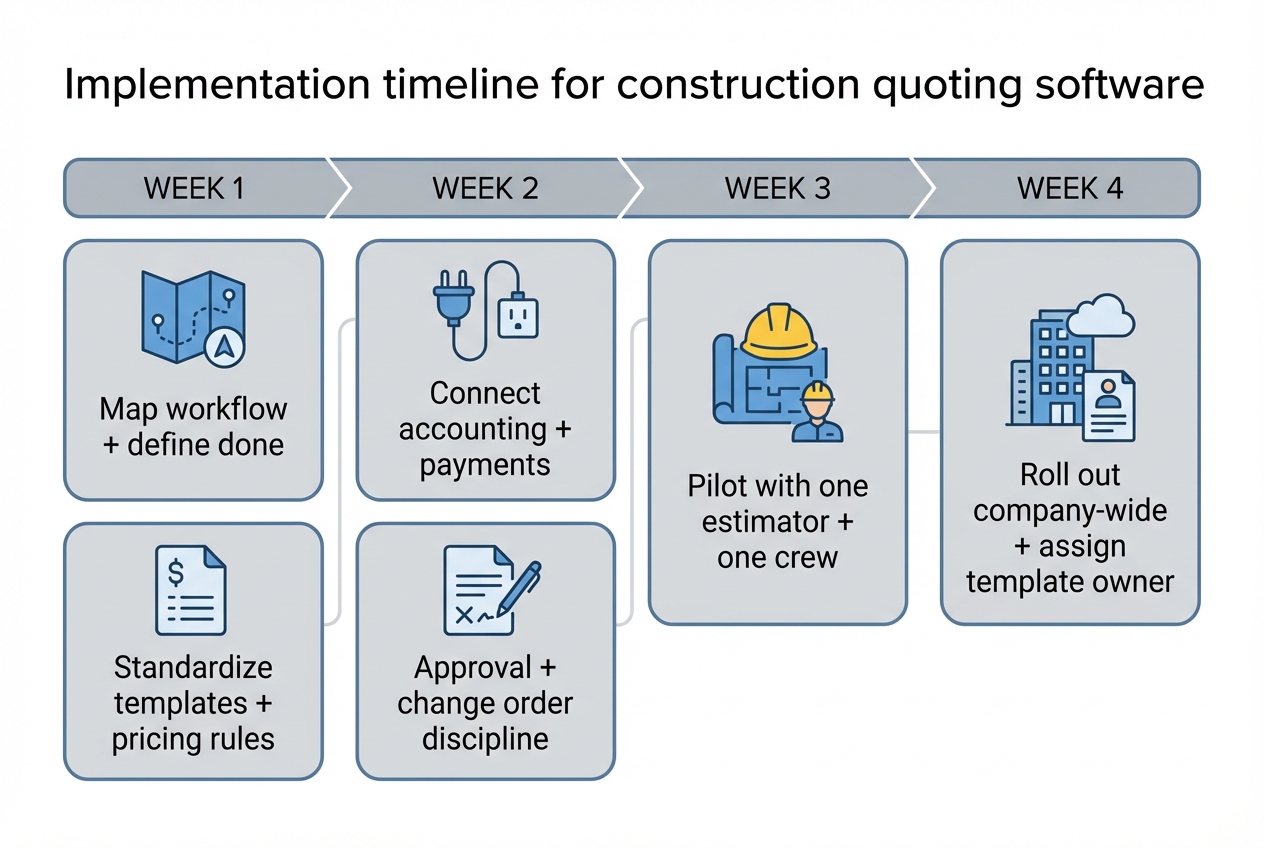
A successful rollout is less about training and more about designing a workflow your team will accept. The timeline below assumes you are moving from spreadsheets, PDFs, or a basic quoting tool.
-
Week 1: Map your quote workflow and define "done." Write down what triggers a quote, what must be included, who approves pricing, and what happens after acceptance. The outcome is clarity. Without it, your software choice will be driven by demos instead of requirements.
-
Week 1: Standardize your templates and pricing rules. Pick 3 to 5 job types that represent most of your revenue. Build a template for each with:
- Inclusions and exclusions: Spell out assumptions so you reduce disputes and scope creep.
- Common line items and assemblies: Reuse the work you quote repeatedly so speed does not degrade quality.
- Margin rules and allowances: Make profitability consistent, even when different people build the quote.
The outcome is speed without sacrificing consistency.
-
Week 2: Connect accounting and payments first. Integrations are where teams feel immediate relief. Start by deciding:
- Invoice system of record: Decide whether invoices live in your accounting system or your quoting system, and make everything else follow that rule.
- Deposit handling: Define how deposits are recorded and applied so the job balance is always accurate.
- Tax application: Set clear rules for taxable vs non-taxable items so totals match what your accountant expects.
The outcome is less re-entry and fewer reconciliation surprises.
-
Week 2: Build your approval and change order discipline. Define one rule and enforce it: no change work starts until it is priced and approved. Your software should make this easy, not bureaucratic.
-
Week 3: Pilot with one estimator and one crew. Choose a small slice of work where mistakes are survivable. Measure:
- Quote turnaround time: Track how long it takes from site visit to sent proposal so you can prove the new workflow is faster.
- Approval time: Measure time-to-sign so you can spot friction in proposal presentation and e-sign.
- Change order capture rate: Verify whether changes are being priced and approved consistently before work starts.
The outcome is a workflow that survives the real world, not just a clean demo.
-
Week 4: Roll out company-wide and lock the template owner. Assign a single owner for templates and pricing rules. The tool does not stay clean by accident.
If you are building a custom workflow, use the same timeline, but replace "configure the product" with "iterate the prototype." Our approach is designed for that style of rollout, where you get to a usable version quickly and refine based on real jobs. You can explore the platform starting from our homepage.
What you now have
You now have a clear buying and implementation framework for construction quoting software:
- Features that protect speed and margin: You know which capabilities matter most for consistent quoting and change order control.
- A quote-to-cash workflow: You have a practical model for turning leads into approved scope, deposits, and accurate invoicing.
- Integrations that prevent re-entry: You can prioritize CRM, accounting, payments, and e-signature based on operational impact.
- A competitor lens that stays grounded: You can evaluate products based on handoffs and adoption, not just demo polish.
- A clear build vs buy decision: You can choose packaged software when your process is standard, and consider building when your workflow is a competitive edge.
Frequently Asked Questions
What is the difference between construction quoting software and estimating software?
Estimating software focuses on costing and takeoff accuracy. Construction quoting software focuses on turning the estimate into a client-facing proposal, getting approval, and moving the approved scope into delivery and invoicing. Some platforms do both, but many specialize.
Can quoting software handle change orders properly?
Yes, if it supports structured change orders with versioning and approvals. The key is operational: you need a consistent rule that change work requires a priced, approved change order before it starts.
Are electronic signatures legally valid for construction quotes?
In general, yes. Under the E-SIGN Act, a signature or contract generally cannot be denied legal effect solely because it is in electronic form. You should still confirm any state-specific requirements and your own contract language.
What integrations should I prioritize first?
Start with accounting and payments. CRM can come next. E-signature is valuable if your current approval step is slow or inconsistent.
How do I stop my team from going back to spreadsheets?
Make the new workflow faster than the old one. That usually means templates, one-click proposal generation, and automatic handoffs to invoicing and scheduling. Also designate an owner for templates so the system stays updated.
Should I build a custom quoting app instead of buying software?
Build when your workflow is genuinely unique or when you need quoting to trigger internal operations automatically. Buy when your process is standard and you want a proven package. If you are in the middle, an AI app builder can be a pragmatic compromise because you can prototype fast, validate, and then decide how far to go.
Start building
If you want construction quoting software that matches your workflow instead of forcing you into someone else’s screens, build a prototype and pressure-test it on real jobs.
Start with us because we are:
- Founder-friendly: You can move quickly without hiring a dev team.
- Plug-and-play, then customizable: Templates get you moving, and you can still tailor the workflow to how you sell and deliver.
- Fast without locking you in: Prototype first, then go live when the flow is right.