
If your CPA landing page is getting traffic but not turning visitors into booked calls or qualified leads, the issue is usually a page that feels unclear, untrustworthy, or hard to act on.
This guide walks you through how to build a CPA landing page that converts, from the offer and copy to forms, compliance, and the systems behind the page.
What a CPA landing page needs to accomplish
A CPA landing page is a single-purpose page built to drive one primary action, such as requesting a consultation, submitting an intake form, or booking a call. Unlike a full website homepage, it removes distractions and answers the exact questions a prospective client is thinking.
A high-performing CPA landing page consistently does three things:
- Makes the offer instantly clear: Visitors should understand who you help, what you do, and what happens next within seconds.
- Earns trust quickly: Professional credentials, clear positioning, and proof matter more in accounting than in most niches.
- Moves the prospect forward: The call to action (CTA) should feel low risk and obvious, not like a commitment to a complex engagement.
Start with the offer and the conversion goal
Before you write or design anything, decide what “success” is for this page. You want one main conversion event that matches your service line and your capacity.
Common CPA landing page goals:
- Book a discovery call: Best when you sell higher-value packages and want to pre-qualify.
- Request a callback: Useful when you want control over scheduling or run a seasonal workflow.
- Submit an intake form: Ideal for tax prep and bookkeeping where structured inputs speed up quoting.
- Download a checklist or guide: Best when you are building a pipeline and following up via email.
Then define the offer in one sentence:
- Who: A specific client type (for example, “US-based SaaS founders”, “real estate investors”, “multi-entity small businesses”).
- Outcome: What they get (for example, “clean books by the 10th”, “tax-ready financials”, “quarterly tax estimates”).
- Next step: What they do now (for example, “book a 15-minute fit call”).
If you already have multiple services, resist the urge to put them all on one page. Create one page per intent.
How to build a CPA landing page in 10 practical steps
This is the simplest build sequence that keeps you out of design rabbit holes and gets you to a publish-ready page.
Step 1: Pick one client segment
Start by choosing a segment you can speak to with specifics. “Small business taxes” is broad. “Two-owner S-Corps doing $500k to $3M in revenue” is a segment.
Why this matters: specificity makes your copy feel like it was written for the prospect, which lowers skepticism fast.
Expected outcome: better message match, fewer “tire-kicker” leads, and higher conversion from the same traffic.
Step 2: Choose one primary action
Decide the single action you want a prospect to take on this page. A single CTA is easier to scan and easier to measure.
Why this matters: multiple actions split attention and make it harder for someone to commit.
Expected outcome: cleaner analytics, clearer intent signals, and a smoother path from interest to next step.
Step 3: Write the hero section first
Write your hero section before anything else: the headline, subheadline, and CTA. If it is vague, the rest of the page cannot recover.
Why this matters: most visitors decide within seconds whether this is relevant. The hero either earns the scroll or loses it.
Expected outcome: more people continue down the page, and more of the right people click your CTA.
Step 4: Add a trust bar
Add a small, high-visibility trust bar near the top. Think credentials, service area, and security cues you can honestly support.
Why this matters: accounting is a high-trust purchase. Prospects want to see “signals of legitimacy” early, before they share information.
Expected outcome: higher form-start rate and fewer drop-offs caused by uncertainty.
Step 5: Explain your service as a simple process
Describe your service as a clear sequence, usually three to five steps. Keep it operational and free of jargon.
Why this matters: prospects are often deciding based on risk, not price. A transparent process reduces perceived risk.
Expected outcome: fewer “how does this work?” questions on calls and more confident prospects.
Step 6: Build a “what you get” section
Translate your work into concrete deliverables and clear outputs.
Why this matters: prospects buy certainty. “Monthly bookkeeping” is abstract, but “reconciled accounts and tax-ready financials each month” feels tangible.
Expected outcome: stronger perceived value and fewer mismatched expectations.
Step 7: Handle objections with risk reducers
Address the objections you know are already in the prospect’s head. Pricing approach, timelines, boundaries, and fit are the usual triggers.
Why this matters: unanswered objections force people to guess, and guessing usually leads to leaving.
Expected outcome: better lead quality and fewer calls with poor-fit prospects.
Step 8: Add testimonials carefully
If you use testimonials, pick specific ones that describe a situation and what changed. Avoid inflated claims.
Why this matters: testimonials are persuasive only when they feel real and typical. In professional services, vague praise reads like marketing.
Expected outcome: more trust without creating compliance risk or unrealistic expectations.
Step 9: Design your form and qualification flow
Make the form short and purposeful. Ask only what you need to route, quote, or schedule.
Why this matters: forms kill conversions quietly. Every extra field increases friction, especially on mobile.
Expected outcome: more completed submissions without sacrificing qualification.
Step 10: Set up tracking and QA before launch
Before you publish, verify analytics events, form delivery, mobile layout, and accessibility basics.
Why this matters: you cannot optimize what you cannot measure, and you cannot measure what is broken.
Expected outcome: reliable data from day one and fewer “silent failures” like missing submissions or broken scheduling.
CPA landing page structure that works
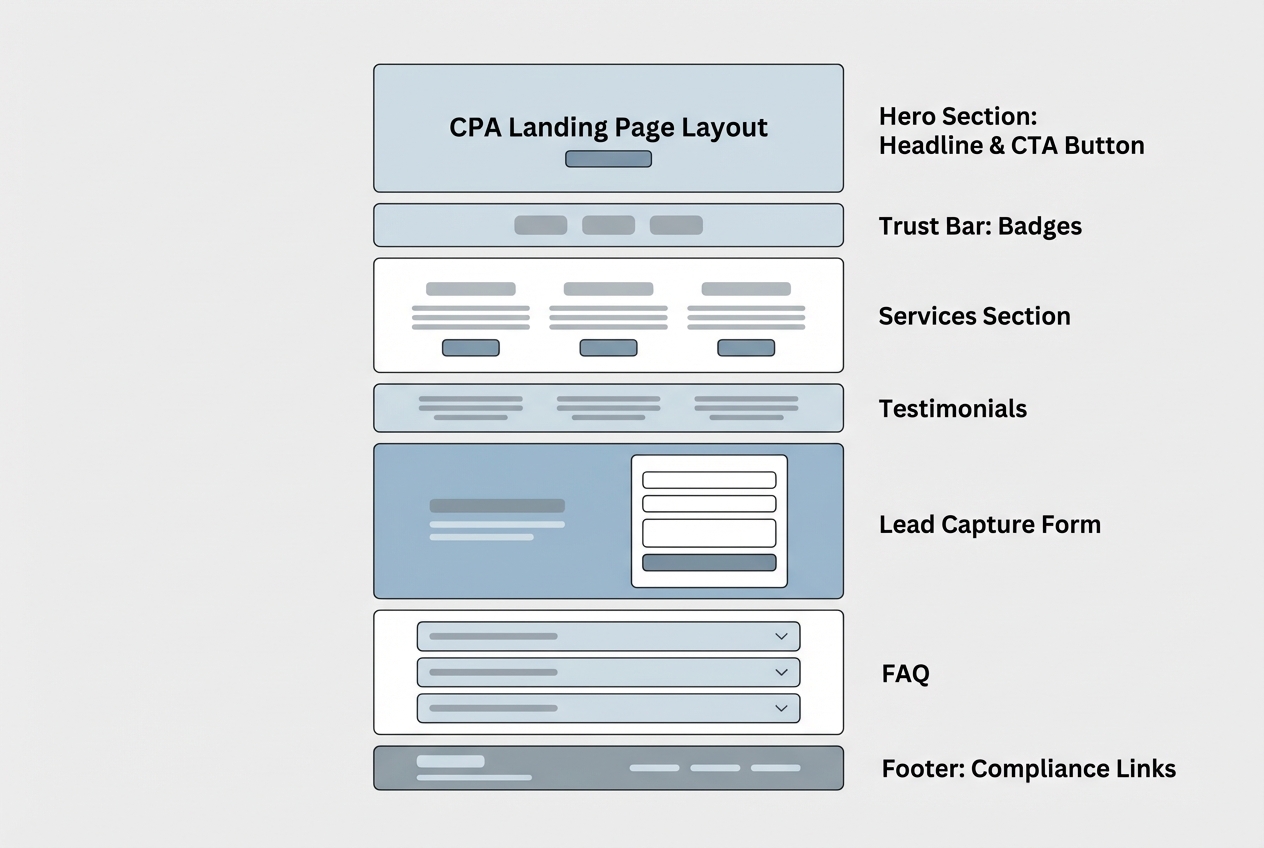
Use this section order for most CPA offers. It matches how prospects evaluate professional services: clarity first, proof next, then the commitment.
Hero section
Your hero should do the heavy lifting.
- Headline: Name the outcome and who it is for.
- Subheadline: Add a constraint, a timeline, or a differentiator.
- Primary CTA button: One action, one verb.
- Secondary CTA link (optional): For example, “See pricing approach” or “How it works”.
Examples you can adapt to your niche:
- Example for tax planning: “Tax planning for agency owners who want predictable quarterly payments.”
- Example for monthly close: “Monthly bookkeeping that closes clean, so you can make decisions faster.”
Trust bar
This is where you reduce risk.
- Credentials: Licensure and professional membership statements you can stand behind.
- Security cues: “Secure file upload” or “Encrypted intake” only if it is true.
- Service area: State licensing and geographic scope where relevant.
“How it works” process
Keep it simple and operational. Prospects want to know what working with you feels like.
- Step 1: Intake and fit check.
- Step 2: Review and scope.
- Step 3: Engagement and delivery.
- Step 4: Ongoing cadence (if recurring).
Services and deliverables
Avoid generic lists like “taxes, bookkeeping, consulting.” Instead, anchor deliverables to outcomes.
- Bookkeeping deliverables: Categorized transactions, monthly reconciliation, clean financial statements.
- Tax deliverables: Filing, extensions, estimated payments, year-end planning.
- CFO support deliverables: Cash flow forecasting, KPI reviews, scenario planning.
Proof and social validation
Testimonials and logos can help, but specificity matters more.
- Use detailed testimonials: Mention the situation and what changed.
- Avoid sweeping claims: Especially around “saving” large amounts without context.
Primary conversion section
Place a short form or scheduler after you have established clarity and trust. Repeating the CTA in the footer is fine, but it should point to the same action.
Copy that converts for CPA services
CPA prospects are often skeptical, time-poor, and worried about mistakes. Your copy should feel calm, specific, and operational.
Write a stronger headline
A strong CPA landing page headline typically includes:
- Audience clarity: Who you serve.
- Outcome: The business result.
- Scope control: What you do and do not do.
Use this template:
- Headline template: “{Service} for {client type} who want {outcome} without {pain}.”
Make your differentiator concrete
“Accurate” and “reliable” are table stakes. Better differentiators describe your workflow.
- Proactive cadence: For example, “monthly close by the 10th” if you can deliver it.
- Communication model: Set expectations, such as “responses within 1 business day.”
- Tooling and collaboration: Explain how clients upload files and track requests.
Use risk reducers without discounting your value
Risk reducers increase conversion because they reduce ambiguity.
- Clear next step: Explain what happens after the form or booking.
- Fit boundaries: Say who you are not a fit for.
- Pricing approach: Even a simple range or “starting at” can reduce unqualified leads.
Forms and scheduling that do not scare off qualified leads
Your form is where conversions die quietly. The goal is to collect enough information to route and qualify, without making the first step feel like onboarding.
The minimum viable CPA lead form
Ask for inputs that help you decide fit and urgency.
- Name and email: Use business email if your client base is business-heavy.
- Service type: Bookkeeping, tax prep, tax planning, advisory.
- Entity and complexity signal: For example, “single-member LLC”, “S-Corp”, “multi-entity”.
- Timing: “Need help this week”, “this month”, “this quarter”.
- One open text field: “What prompted you to reach out?”
A practical way to keep quality high is to split the process:
- Step 1: Short form to capture intent.
- Step 2: Confirmation page with scheduler and a longer intake for qualified leads.
Accessibility basics for higher conversion
Accessible forms are usually easier to complete for everyone, not just users with disabilities.
- Clear labels: WCAG 2.1 (Web Content Accessibility Guidelines 2.1) expects that “labels or instructions are provided” when user input is required, so users know what data is expected, including format guidance when needed. Follow the WCAG 2.1 guidance for labels or instructions when designing your lead capture.
- Readable error messages: Tell the user what to fix in text. Do not rely on color alone.
- Mobile-first spacing: Make fields easy to tap, and keep the form short on small screens.
Trust, ethics, and compliance for CPA marketing pages
A CPA landing page is marketing, but it sits inside a regulated, reputation-driven profession. Build trust by staying precise.
Avoid misleading advertising and claims
The American Institute of Certified Public Accountants (AICPA) Code of Professional Conduct includes an advertising rule stating that a member in public practice shall not seek to obtain clients through advertising or solicitation that is false, misleading, or deceptive. The guidance also highlights examples like creating unjustified expectations of favorable results or implying an ability to influence a regulatory body. Keep your page consistent with these principles as outlined in the AICPA advertising rule in this AICPA Code of Professional Conduct excerpt.
Practical takeaways for your CPA landing page:
- Be careful with outcome promises: Replace “We will maximize your refund” with “We will prepare and file based on the information provided and applicable rules.”
- Avoid implied guarantees: Especially around audits, penalties, or specific savings.
- Describe your process: Process claims are safer and often more persuasive than big-number outcomes.
Testimonials must be clear and properly disclosed
If you use testimonials, remember they are advertising claims.
The Federal Trade Commission (FTC) explains that endorsements must be honest and not misleading, and that “material connections” (payment, free services, employment) should be disclosed clearly and conspicuously when they might affect how people evaluate the endorsement. The FTC also notes that if an endorsement does not reflect typical consumer experience, advertisers must disclose what generally expected results look like. See the FTC’s guidance in FTC’s Endorsement Guides: What People Are Asking.
Handle sensitive information with care
Even before a client signs, you may receive personal financial data.
- Collect less upfront: Do not request Social Security numbers (SSNs) on a first-touch landing page.
- Explain what you collect and why: Add a short privacy note near the form.
- Use secure upload only when it is truly secure: If you offer file upload, confirm your implementation is appropriate.
Tooling options for building your CPA landing page
You can ship a CPA landing page with almost any modern website stack. The right choice depends on how much you want the landing page to connect to your actual delivery workflow.
Common build paths
| Option | Best for | Trade-offs |
|---|---|---|
| Template website builders | Simple pages that point to email/phone | Limited customization for intake logic and client workflows |
| Landing page platforms | Fast A/B testing and campaigns | Can become another disconnected tool stack |
| Custom development | Complex needs, unique branding, deep integrations | Higher cost and longer timelines |
| AI app builder with templates | Founder-led teams that want speed plus workflow automation | Requires clear specs and a plan for your intake and follow-up |
If your “landing page” is really the front door to a workflow (lead qualification, document requests, status tracking), an AI app builder can save time because you are not stitching five tools together.
QuantumByte is a strong fit when you want founder-friendly speed but still need real customization behind the page. It combines pre-built templates for common business features with natural-language prompting, so you can ship quickly and still shape the workflow to match how your firm actually operates.
If you want to build the landing page and the intake flow from one spec, start here: build your Packet. The reason this approach works is simple: you stop treating the landing page as a “pretty page” and start treating it as the front door to a system.
A real-world example of that speed: comedian Aziz Ansari used QuantumByte to create an app for his movie “Good Fortune” within minutes, despite having no prior experience building apps. That is the kind of pace that lets you iterate your offer and funnel without waiting weeks for a dev cycle.
For larger firms with stricter needs around security, roles, or integrations, an enterprise build path is typically the better fit than patching together multiple point solutions.
Connect the landing page to a real intake workflow
A CPA landing page converts better when the follow-up is fast and the next step is clear.
A simple, effective workflow looks like this:
- Form submission: Captures core details.
- Auto-response email: Confirms receipt and sets expectations.
- Qualification rules: Routes to the right service line or staff member.
- Scheduler or callback: Moves the lead into a time slot.
- Structured intake: Collects documents and details after fit is confirmed.
The practical goal is consistency: every qualified lead should get the same timely follow-up, and every engagement should start with the same baseline information.
Launch and optimize without guesswork
Optimization is easier when you know what you are testing and why.
QA before you publish
Test the page like a prospect would.
- Mobile usability: Confirm the CTA and form are usable on a small screen.
- Form delivery: Verify submissions reach the right inbox or system.
- Calendar flow: Confirm time zones, confirmations, and reminders.
- Trust links: Privacy and contact details are easy to find.
Instrumentation you should have on day one
You do not need a complex analytics setup to get useful insight.
- Conversion event: Track form submits or booked calls.
- CTA clicks: Track hero button clicks and form start events.
- Source tracking: Use UTM parameters for ads and partnerships.
What to test first
Avoid random changes. Start with high-leverage elements.
- Offer framing: “Free consult” vs “15-minute fit call” often changes lead quality.
- Hero headline: Make it more specific to the segment.
- Form length: Remove one field at a time and watch lead quality.
- Trust placement: Move key trust elements closer to the hero.
What you now have
You now have a complete, practical blueprint for a CPA landing page:
- A clear goal and offer: One page, one primary action.
- A proven structure: Hero, trust, process, deliverables, proof, and conversion.
- Copy principles that fit CPAs: Specific, calm, process-driven messaging.
- Forms that convert: Minimal fields, accessible design, and a better qualification flow.
- Compliance guardrails: Avoid misleading claims and handle testimonials responsibly.
- A launch plan: QA, tracking, and a focused testing strategy.
If you want to go beyond a static page and build a CPA landing page that is directly connected to how you qualify, onboard, and serve clients, QuantumByte is one of the fastest ways to get there without giving up flexibility. Start with our basic pricing plans to get started.
Frequently Asked Questions
What should I put on a CPA landing page?
Include a clear offer and segment, a single primary CTA, trust signals (credentials, service area, security language you can support), a simple “how it works” process, concrete deliverables, careful testimonials, and a short lead form or scheduler.
Should a CPA landing page list pricing?
If you can share a starting point, a range, or a clear pricing model, it often improves lead quality by filtering out poor-fit inquiries. If your work varies widely, explain what determines price and what the prospect will receive after submitting the form (for example, a scoped quote after a quick review).
How long should a CPA landing page be?
Long enough to resolve the prospect’s main uncertainties: fit, trust, process, and next step. For high-trust services like accounting, slightly longer pages often perform well because they reduce perceived risk.
Can I use client testimonials on my CPA landing page?
Yes, but ensure they are honest, not misleading, and that any material connections are disclosed. Also avoid implying that exceptional outcomes are typical without clear context, consistent with the FTC’s endorsement guidance.
What is the best CTA for a CPA landing page?
For most CPA services, “Book a 15-minute fit call” or “Request a consultation” works well because it sets expectations and feels low risk. If you have a strong intake workflow, “Get a quote” can work, but only if the follow-up is fast and the form is not overwhelming.