
This guide is for business owners and ops leads who send estimates or quotes regularly, contractors, consultants, agencies, field services, and anyone who has to turn scope into a number before work starts. If that’s you, you already know that this is where deals move forward or stall: slow or inconsistent estimates cost you wins and create rework. Estimate software exists to fix that. It gives you one place to build estimates from templates, track what’s sent and what’s pending, and move approved work into scheduling or invoicing without retyping or dropping balls. Below we cover what to look for, when it’s worth switching from spreadsheets, and how to implement it so your team actually uses it.
What estimate software does
Estimate software is a system for creating, sending, tracking, and updating price estimates for products or services. In practical terms, it helps you:
- Standardize pricing: Keep labor, materials, packages, and markups consistent across your team.
- Speed up quoting: Reuse templates, assemblies, and saved line items instead of rebuilding every estimate from scratch.
- Reduce scope confusion: Present clear inclusions, exclusions, assumptions, and optional add-ons.
- Track sales follow-up: See which estimates were viewed, accepted, declined, or left open.
- Convert work faster: Turn approved estimates into a work order and an invoice without retyping.
A quick terminology note matters because it affects how you configure your workflow. Bench summarizes the practical distinction between an estimate and a quote: estimates are best-available projections that can change as details change, while quotes are typically fixed-price offers for a defined scope and timeframe.
Estimate, quote, and invoice: the clean difference
Set this up with operational clarity so your team sends the right document at the right time, with the right expectations.
- Estimate: A best-available price projection based on current information and assumptions.
- Quote (quotation): A formal offer to deliver a defined scope at a defined price, typically within a defined validity window.
- Invoice: The bill requesting payment for completed work or delivered goods.
GoCardless frames the timing clearly, including the quote versus invoice split: quotes are provided before work begins, invoices after work is complete.
If your business sells services with variable scope, you will often do all three.
When you need estimate software instead of a spreadsheet
Spreadsheets work until you hit complexity. These are the tipping points:
- You have multiple services or packages: You need templates, bundles, and consistent add-ons.
- Your costs change: Material prices, subcontractor rates, and travel fees shift, and spreadsheets drift out of date.
- You want approvals and audit trails: You need a record of what was sent, when it was accepted, and by whom.
- You want clean handoffs: Sales, ops, and finance should not be copying and pasting between tools.
- You want faster cashflow: The longer estimates sit, the more deals die quietly.
If your pipeline is messy before the estimate, tighten the front end first. The patterns in lead management automations map cleanly to estimating because better lead capture creates better scope, and better scope creates better pricing.
Core features that matter in estimate software
If you only remember one thing, remember this: view estimate software as a comprehensive workflow engine rather than a simple tool for generating PDFs.
- Customer and job records: A lightweight Customer Relationship Management (CRM) view that ties the customer, location, and job history together.
- Line items and assemblies: Reusable labor and material components, with quantities, unit costs, and markups.
- Templates: Prebuilt estimate layouts for your most common job types.
- Taxes, discounts, and deposits: Configurable rules so totals are correct and consistent.
- Options and alternates: Good-better-best packages and optional add-ons that increase average order value.
- Approvals: E-signature or an approve action that locks the version and triggers the next step.
- Document output: Clean Portable Document Format (PDF) exports and email delivery.
- Estimate-to-invoice conversion: The fastest path from approval to billing.
- Permissions and roles: Sales can draft, managers can approve, finance can finalize.
- Reporting: Win rate, average turnaround time, estimate value by service, and pipeline status.
If you want a practical view of what should be automated around quoting and approvals inside a sales system, the section on quote and proposal automation in CRM sales automation is directly relevant.
Build vs buy: choosing the right approach
You can buy off-the-shelf estimate tools, or you can build a custom workflow that fits your operations. The right choice depends on how specific your process is.
| Approach | Best for | Strengths | Tradeoffs |
|---|---|---|---|
| Off-the-shelf estimating app | Standard service businesses with common workflows | Fast setup, mature features, integrations | You adapt to the tool, limited customization, feature bloat costs |
| Spreadsheet + PDF template | Very early-stage, low volume | Flexible, cheap | Manual errors, no tracking, no audit trail |
| Custom estimate software | Teams with unique pricing logic, approvals, and handoffs | Fits your process, automates handoffs, creates a durable system | Requires clear requirements and a build path |
In my opinion, custom estimate software pays off when the estimate also drives operations, such as scheduling, procurement, subcontractors, change orders, and invoicing. That is where generic tools tend to create workarounds and friction.
If you are exploring a build path, it helps to understand the mechanics of AI-driven builders. Our walkthrough on how an AI app builder works is a solid primer for thinking in data, screens, and logic instead of features alone.
How estimate software works as a system
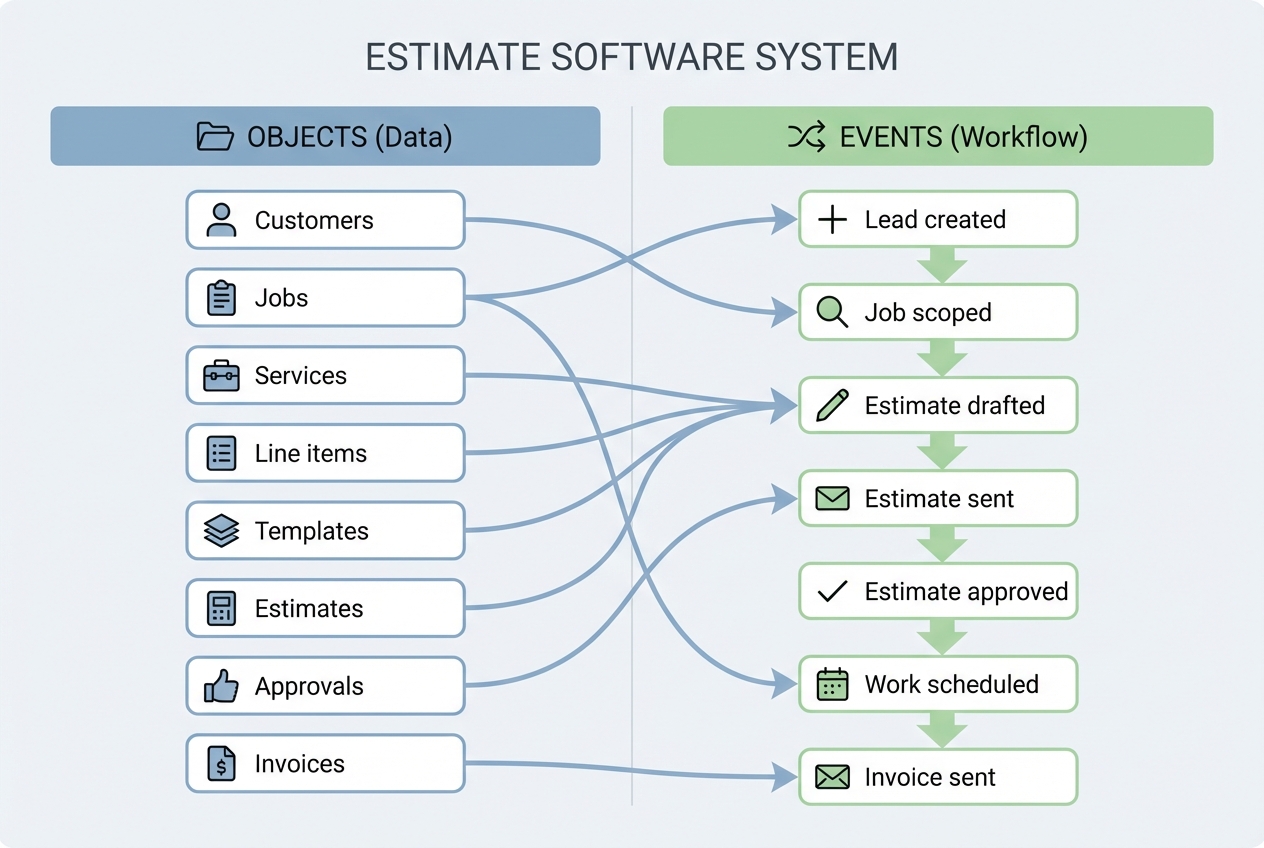
At a systems level, estimate software is a set of connected objects and events:
- Objects (data): Customers, jobs, services, line items, taxes, templates, estimates, approvals, invoices.
- Events (workflow): Lead created, job scoped, estimate drafted, estimate sent, estimate approved, work scheduled, invoice sent.
If you design these connections well, your business stops relying on memory for what should happen next. The software does it.
How to build estimate software for your business
This is the practical path to building estimate software that works in the real world, without overbuilding.
1) Define the estimate lifecycle you actually run
Start with your current process, not your ideal one. Write the lifecycle in plain language:
- Draft: Internal version while you refine scope and pricing.
- Sent: Delivered to the customer with a timestamp.
- Viewed: Optional, useful if you want sales follow-up timing.
- Approved / Declined: Customer decision captured.
- Converted: Turned into a work order and invoice.
Then decide what changes are allowed in each state.
- Draft edits: Unlimited.
- Sent edits: Only via revise and resend (creates a new version).
- Approved edits: Only via change order.
2) Model your data tables before you design screens
You will move faster if you get the data model right first. Here is a minimal, sane schema:
| Table | Purpose | Must-have fields |
|---|---|---|
| Customers | Who you sell to | Name, email, phone, billing address, service address |
| Jobs | One customer request | Customer ID, job address, job type, status, notes |
| Services | Reusable offerings | Name, default price or rate, category |
| Line items | The estimate content | Description, qty, unit, unit cost, markup, taxable |
| Estimates | The document and totals | Job ID, estimate number, status, subtotal, tax, total, expiry date |
| Approvals | Acceptance record | Estimate ID, approved by, approval date, signature or confirmation |
| Invoices | Billing output | Estimate ID, invoice number, amount due, due date, status |
3) Design screens around decisions, not navigation
Estimate software users do not want a dashboard. They want to complete a job in one sitting.
Build screens that match the workflow:
- Create job: Capture scope, site details, and photos.
- Build estimate: Add line items, packages, taxes, and options.
- Review and send: Generate PDF, email, and set validity window.
- Customer approval: Accept, decline, or request changes.
- Convert: Create work order and invoice.
A good rule: every screen should answer what is the next action.
4) Implement pricing logic that stays explainable
You want pricing logic that is consistent and defensible.
- Cost + markup: Store your cost, apply a markup, show the result.
- Rate card for labor: Keep labor rates by role (owner, tech, apprentice).
- Optionality: Present add-ons as clear options, not hidden fees.
- Versioning: If you resend, create a new version number.
Also write your assumptions into the estimate template (access constraints, disposal fees, permit fees, material availability). This is where disputes are won or lost.
5) Automate the handoff after approval
Approval should trigger real work.
- Scheduling: Create a booking or job date.
- Operations: Generate a work order with the agreed scope.
- Finance: Create the invoice (and deposit request if you use deposits).
If you keep these disconnected, you will retype data, and retyping is where margins leak.
If your handoff depends on billing speed, it is worth reviewing a dedicated flow for invoice automation so approval and completion can reliably trigger invoicing.
6) Add guardrails: permissions, audit trails, and templates
As soon as more than one person touches estimates, you need control.
- Roles: Limit who can change pricing or discounts.
- Audit trail: Capture who changed what and when.
- Template library: Standardize your top job types.
Templates are how you scale quality. They also make new hires productive faster.
7) Pilot with one service line, then expand
Pick one high-volume service and run the system end-to-end for two weeks.
What you are validating:
- Turnaround time: Can you draft and send faster?
- Error rate: Are totals and taxes correct?
- Conversion: Are approvals easier?
- Handoff quality: Does ops get what they need without clarification?
Only after you pass those tests should you expand to more services and more pricing rules.
Where we fit if you want custom estimate software fast
If your workflow is straightforward, an off-the-shelf tool may be enough. But if you want estimate software that matches how your business actually sells and delivers, building custom can be the shortest path to clarity.
If you are considering a custom solution that is quick to build, easy to change as your process evolves, and future-proof so you are not locked into a vendor roadmap, Quantum Byte is built for you. Templates let you set up your estimating workflow in minutes; the AI builder turns your instructions into custom software that accommodates your approvals, pricing rules, and handoffs, so your team does not have to learn and onboard on a whole new platform. To turn your workflow into a working app without a long build cycle, start with our prototype tier.
Implementation tips that prevent painful rework
Small decisions up front save you months.
- Define estimate validity windows: Quotes often need a fixed expiration so you are not stuck with outdated costs. Bench notes that quotes are commonly time-limited to protect against changing labor and material costs.
- Separate scope from price: Keep scope text reusable, but allow pricing to be recalculated.
- Use options to increase value ethically: Present upgrades as clear alternates so customers can choose intentionally and your totals stay transparent.
- Log versions automatically: Every resend creates a new version. Never overwrite.
- Decide what approval means: Is it a signature, a checkbox, a reply email, or a portal action? Pick one and bake it into the workflow.
If you run appointment-based work, it also helps to study how other verticals connect scheduling and estimates so you avoid broken handoffs. The workflow notes in plumbing scheduling software are a useful reference even if you are not a plumber.
Common mistakes to avoid
These errors show up in almost every estimating system rebuild.
- Building the PDF first: A beautiful PDF does not fix broken data and workflow.
- No change-order process: If scope changes, you need a formal step. Otherwise the invoice becomes the fight.
- Too many fields on day one: Start minimal, then expand based on real usage.
- No single source of truth: If the spreadsheet, email thread, and estimating tool disagree, your team will pick the most convenient one.
Wrapping up what you built
Estimate software is a workflow engine: it standardizes pricing, clarifies scope, captures approvals, and converts approved work into scheduling and invoicing.
The build path is straightforward when you keep it disciplined:
- Lifecycle states: Define lifecycle states and permissions.
- Data model first: Model data tables before screens.
- Decision-based screens: Design screens around decisions.
- Post-approval automation: Automate the post-approval handoff.
- Pilot and expand: Pilot with one service line, then expand.
For productizing this into a sellable tool later, the white label app builder guide is a useful next read.
Frequently Asked Questions
Is estimate software the same as quoting software?
Estimate software often includes quoting, but they are not always the same. Estimates are typically best-effort projections, while quotes are commonly treated as more formal and fixed-price offers. Many tools support both by letting you draft an estimate, then lock it into a quote for approval.
What should an estimate include to reduce disputes?
Include scope, line-item breakdown, assumptions, exclusions, taxes, discounts, validity window, and an explicit approval action. Also include what happens if scope changes (a change order) so the process is predictable.
Can I build estimate software for my niche business?
Yes. The key is modeling your data (customers, jobs, line items, estimates, approvals, invoices) and defining the lifecycle states first. Once that foundation is stable, you can layer niche logic like assemblies, rate cards, or industry-specific compliance fields.
How do I prevent my team from changing prices inconsistently?
Use templates and a controlled line-item library, restrict who can override markups and discounts, and log changes in an audit trail. The goal is to make the right way the easy way.
When should I choose an enterprise solution?
Choose enterprise when you need stronger permissions, cross-functional workflows, deeper reporting, or you are coordinating estimating across multiple locations or departments. In that case, start at QuantumByte Enterprise and design the estimate workflow as part of your broader operations system.