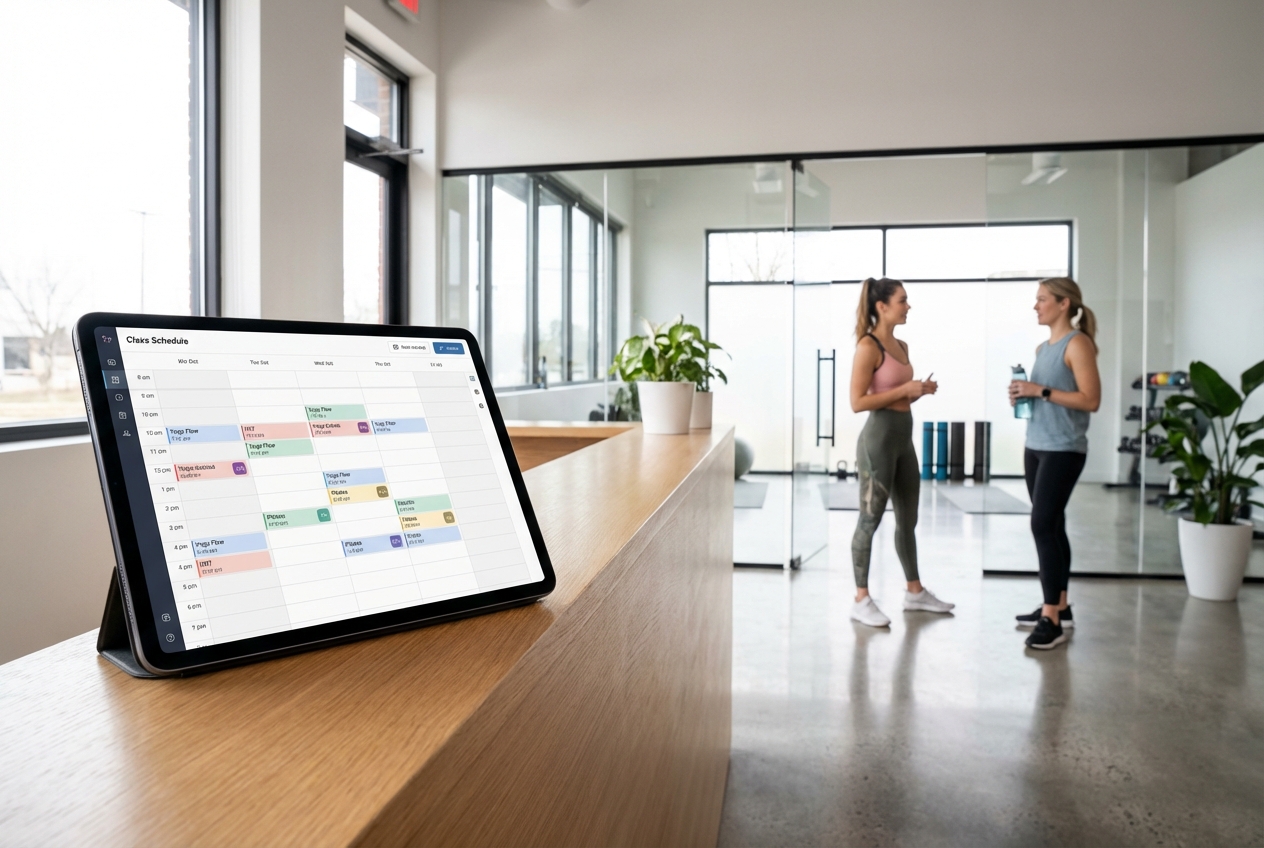
If you are juggling instructor availability, last-minute cancellations, and payment follow-ups, fitness class scheduling software is how you get your time back without sacrificing client experience. The goal is simple: let clients book in seconds, keep class capacity accurate, and make your operations run without constant manual checks.
What fitness class scheduling software needs to handle
At a minimum, fitness class scheduling software should do three jobs well: sell spots, keep your calendar truthful, and reduce admin.
Key capabilities to require up front:
- Class calendar and capacity rules: Define recurring classes, one-off events, caps per class, and shared resources like rooms or equipment so you do not overbook.
- Self-serve booking and account management: Let clients book, cancel, rebook, and manage passes without messaging your team.
- Waitlists and backfilling: Automatically fill openings when someone cancels, with clear time windows and client notifications.
- Payments and entitlements: Support drop-ins, class packs, memberships, intro offers, and comp passes, with rules for what can be booked.
- Automated reminders: Reduce no-shows with short message service (SMS) and email reminders, plus calendar invites.
- Instructor scheduling: Assign instructors, enforce availability, and handle substitutions without breaking the published schedule.
- Reporting: Track occupancy, revenue per class, retention, and cancellation reasons so your schedule improves over time.
If you already use separate tools, treat scheduling as the system of record and integrate everything else around it rather than letting every tool own the truth.
How fitness class scheduling software works
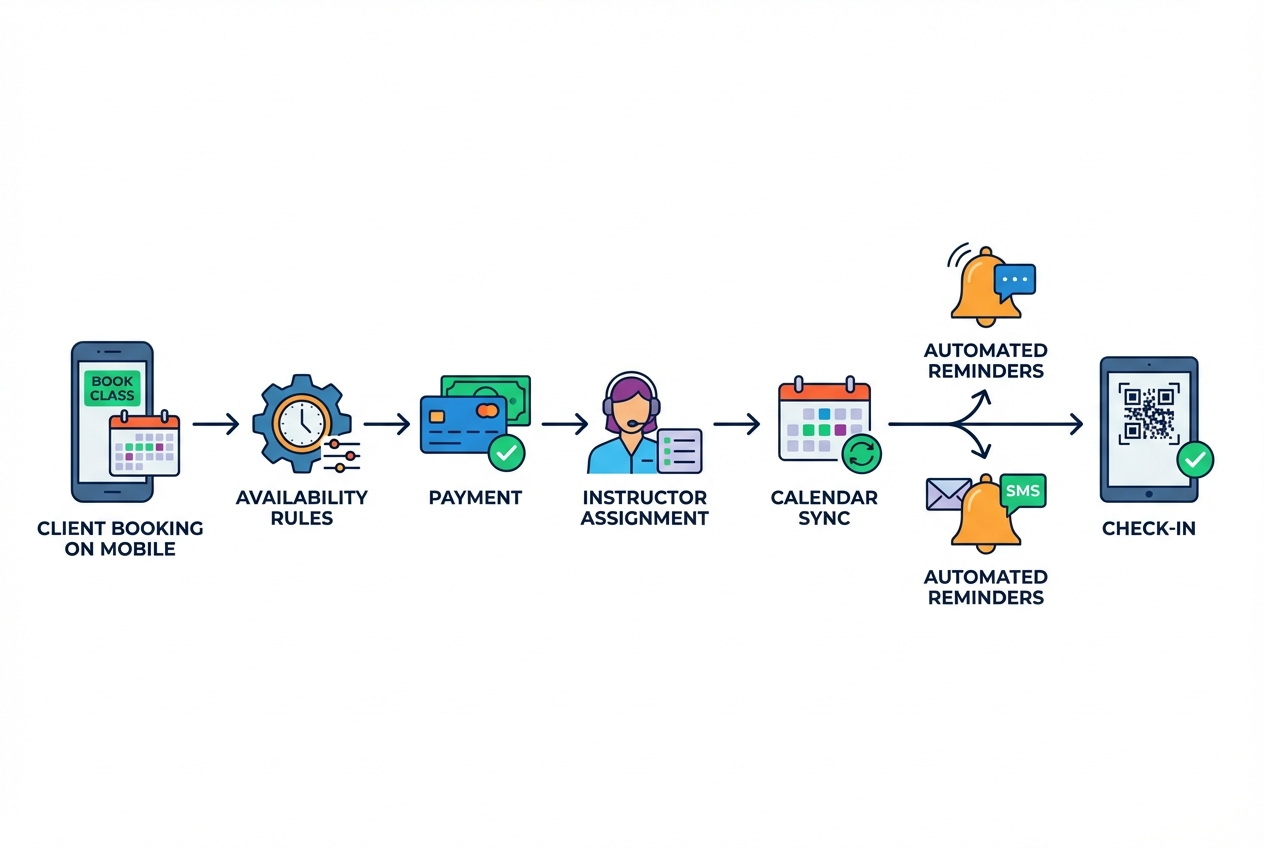
A reliable scheduling system is essentially a rules engine wrapped around a calendar.
Here is the underlying flow you are designing:
- Client selects a class: From a public schedule, a membership portal, or a booking link.
- System validates eligibility: Checks membership status, pass balance, intro-offer limits, age rules, and prerequisites.
- System checks capacity: Applies caps, room constraints, and any reserved spots.
- Client confirms payment or entitlement: Charges a card, consumes a pass, or reserves under membership.
- Booking is recorded: A single record becomes the source of truth for attendance, revenue, and messaging.
- Notifications are triggered: Confirmation plus automated reminders, plus waitlist messages when needed.
- Staff runs check-in: Attendance updates the booking status and feeds reporting.
When this flow is consistent, your front desk stops being a human sync layer.
Step 1: Map your fitness class scheduling software rules
Before you touch any tool, write down the rules that currently live in your team’s heads. This prevents the two most common failures: building a beautiful booking page that breaks on edge cases, or buying a tool that forces you into awkward workarounds.
Capture these rule sets:
- Capacity rules: Maximum attendees, minimum attendees to run, and any special caps (e.g., "beginner reformer has 6, mixed level has 10").
- Waitlist rules: How many waitlist spots, how far before class you auto-promote someone, and how long they have to confirm.
- Cancellation policy: Your cutoff window, late-cancel fees, and exceptions (weather, instructor illness, first-time courtesy).
- Booking windows: Earliest booking date, same-day rules, and blackout periods for private events.
- Entitlement logic: What memberships can book what classes, how packs expire, rollover rules, and guest passes.
- Resource constraints: Rooms, equipment, parking capacity, or hybrid in-person plus livestream spots.
Practical output you want from this step:
- Booking policy document: A one-page document that staff can reference and that you can link near checkout.
- Launch exceptions list: A short list of edge cases you will intentionally not support at launch.
Step 2: Design a booking experience clients actually finish
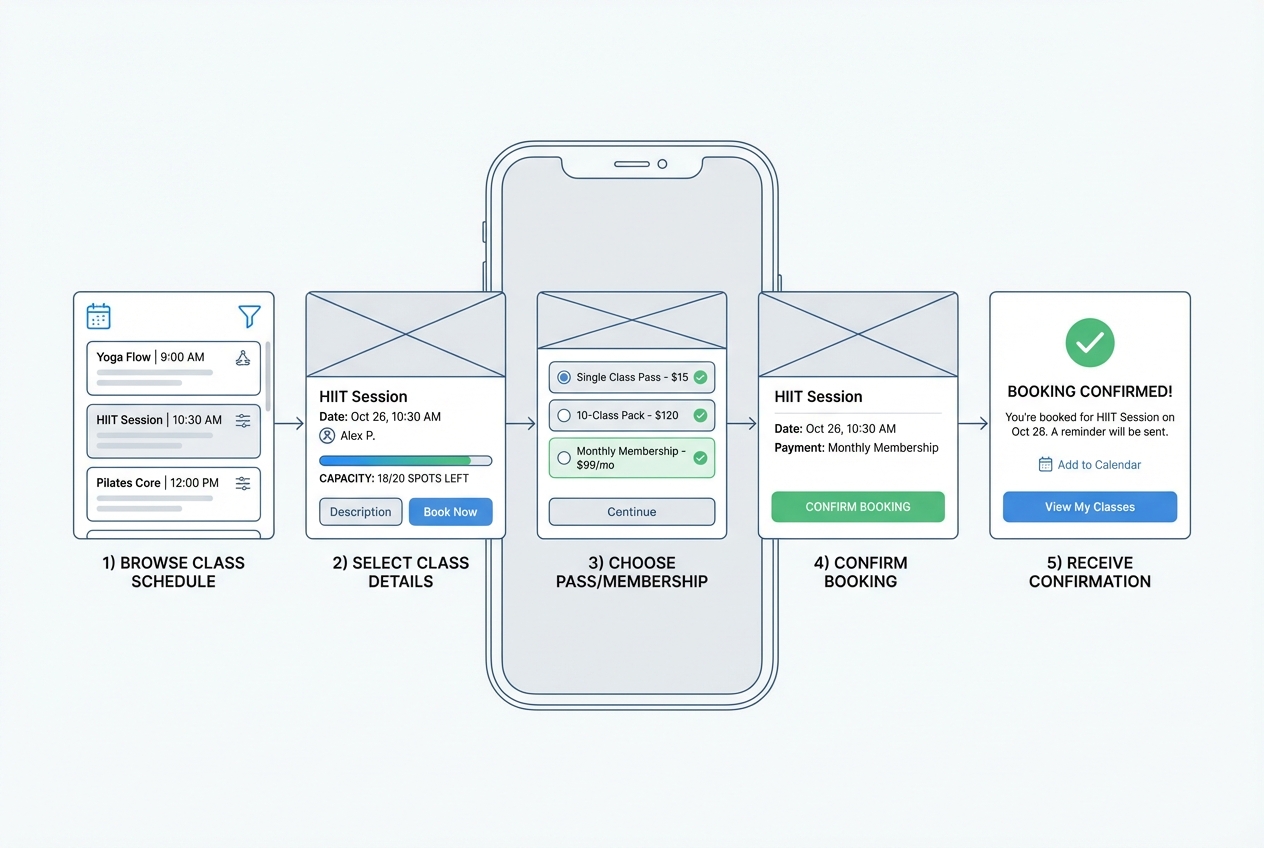
The fastest way to lose revenue is friction at the exact moment someone wants to commit.
Build your client experience around these principles:
- Few steps to checkout: Class selection, login or email capture, payment or pass selection, confirmation. Anything beyond that should be optional.
- Mobile-first layout: Most bookings happen on a phone. Treat desktop as a bonus, not the baseline.
- Clear policy disclosure: Put cancellation rules and waitlist rules right where people click "Confirm," not buried in an email.
- Accessible interactions: If you publish a web booking experience, align with WCAG 2.2 so clients can book using keyboards, screen readers, and readable contrast.
A simple test: ask a new client to book on their phone while you stay silent. Every pause is a conversion leak.
The goal is clients can find a class, understand the rules, and complete booking quickly on mobile with fewer support messages and fewer abandoned checkouts.
Step 3: Set up payments, passes, and memberships without creating risk
Scheduling ties directly to revenue. Every booking rule affects what you can sell and how reliably you collect it.
Structure your commercial logic:
- Drop-in: Single class purchase.
- Pack: Fixed number of classes, possibly with an expiry.
- Membership: Recurring billing with booking privileges and limits.
- Intro offer: Strict constraints (one per customer, time-limited, restricted class types).
Compliance and security constraints matter here:
- Avoid storing card data yourself: Use a payment provider that handles card storage and processing to reduce scope and risk.
- Know what secure handling implies: The PCI Security Standards Council PCI DSS document library is the authoritative reference for Payment Card Industry Data Security Standard (PCI DSS) requirements.
If you want fewer disputes, make what happens when you cancel as explicit as the price.
The goal is you can sell drop-ins, packs, and memberships confidently, with fewer billing exceptions and clearer entitlement enforcement at the time of booking.
Step 4: Build staff operations that reduce admin, not add it
Client-facing booking is only half the work. The other half is preventing back-office chaos.
Design a staff view that supports:
- Instructor availability and substitutions: Availability rules, time-off, and a clean handoff when instructors swap.
- Roster and attendance states: Booked, attended, no-show, late-cancel, comp, and staff.
- Check-in workflow: Fast check-in that works even when the internet is unreliable.
- Operational notes: Flags like "new client," "injury note," or "needs waiver," stored with appropriate access controls.
If you run multiple locations, separate location schedules but keep unified client profiles and entitlements.
The goal is your front desk runs sessions off a single, reliable roster, instructors see what they need without chasing messages, and attendance data stays clean for reporting.
Step 5: Automate confirmations, reminders, and waitlist messages
Most studios do not need more marketing. They need fewer manual messages.
Automations that typically pay off immediately:
- Booking confirmations: Include the address, arrival guidance, cancellation cutoff, and what to bring.
- Reminder cadence: One reminder the day before, another a few hours before for early mornings.
- Waitlist promotions: Immediate message when a spot opens, with an expiration window.
- Post-class follow-up: Ask for feedback, suggest the next class, and offer an easy rebook link.
Keep reminders aligned with your brand voice, but prioritize clarity over cleverness.
The goal is fewer no-shows, fewer manual texts and emails from staff, and faster backfilling from the waitlist when cancellations happen.
Step 6: Sync calendars the right way
Clients and instructors live in Google and Outlook. Your scheduler should integrate without creating duplicate sources of truth.
Two practical approaches:
- Calendar subscriptions: Publish schedules as feeds so people can view updates automatically.
- Invites per booking: Send a calendar invite when a client books so the event is anchored in their day.
If you want broad compatibility, understand the standard format many systems use. RFC 5545 defines iCalendar, the core specification for representing events and scheduling data.
Rule to keep you sane: your scheduling database is the authority; calendar systems are downstream displays.
The goal is instructors and clients stay in sync with schedule changes without your team reconciling mismatched calendars or duplicate bookings.
Step 7: Protect client data and prevent common web app failures
Scheduling systems contain personal data, attendance patterns, and payment-adjacent information. Treat it as sensitive, even if you are not in a regulated industry.
Security and governance basics:
- Role-based access control: Give instructors what they need (rosters, schedules) without exposing billing or private notes.
- Audit trails: Track changes to bookings, refunds, and policy overrides.
- Abuse prevention: Rate-limit public booking endpoints and protect against automated abuse.
For web application risk prioritization, use a recognized baseline like the OWASP Top 10, which represents the most critical web application security risks to be aware of.
The goal is fewer data leaks, fewer "mystery" booking changes, and a more resilient system that protects client trust as your schedule volume grows.
Step 8: Launch in a controlled way, then iterate
Do not big bang your schedule migration the week you run a promotion.
A calm rollout plan:
- Start with one program: For example, only morning classes for two weeks.
- Run parallel for a short window: Keep the old tool read-only while the new system proves its integrity.
- Instrument what matters: Occupancy by class, waitlist conversion, cancellation reasons, support tickets, and time-to-book.
- Tighten policies after reality hits: Your first policy set is a hypothesis. Your second version is the business.
Buy vs build: choosing the right path for your studio
Off-the-shelf schedulers can work well when your workflows are standard. Custom systems win when your business model is specific or when scheduling touches multiple internal processes.
In our view, the decision becomes easier when you measure it against two realities: how often you hit policy exceptions (late cancels, waitlist edge cases, complex entitlements) and how much staff time you spend reconciling conflicting tools.
| Option | Best for | Tradeoffs to accept |
|---|---|---|
| Off-the-shelf scheduler | Getting started fast with conventional memberships and classes | You adapt to the tool’s workflow, integrations can be limited, and unique policies become workarounds |
| Custom-built scheduling app | Studios with distinctive rules, multi-location complexity, or deeper internal automation needs | You must design your rules and data model, and you need a platform or team to build and maintain it |
| Hybrid | Using an existing scheduler while building custom add-ons around it | Split sources of truth and ongoing integration overhead |
If your team is spending hours per week reconciling spreadsheets, direct messages, and payment exceptions, you have already outgrown simple scheduling.
Building custom scheduling software with an AI app builder
If you want custom workflows without a traditional build cycle, an AI app builder is often the pragmatic middle ground.
We believe this works best when you already know your policies and want software to follow them, not the other way around. QuantumByte is built for founders and operators who know how their studio should run but do not want to manage a development team. You describe your scheduling needs in plain English, generate a working app flow, then iterate as your policies evolve.
The speed piece matters in practice. In our view, a good litmus test is whether a non-technical operator can go from idea to a usable prototype quickly. Comedian Aziz Ansari used QuantumByte to create an app for his movie "Good Fortune" within minutes, despite having no prior experience building apps. That is the standard you should expect if you are trying to move fast without hiring.
A practical build sequence:
- Describe your booking model in business terms: Class types, capacities, locations, instructors, and cancellation rules.
- Generate the core app flow: Client booking, entitlements, and admin roster management.
- Add the studio-specific edges: Waitlist promotion windows, instructor substitution rules, multi-location pass logic.
- Publish and test with a small cohort: Validate that policies behave correctly before rolling out to all clients.
If you want to prototype a custom scheduler quickly, start with our basic tier and upgrade as you need/
Common pitfalls that break scheduling projects
These issues show up across studios, even when the user interface looks great.
- Building without policy clarity: If your cancellation and waitlist rules are not explicit, you will end up coding exceptions forever.
- Letting multiple tools be the truth: If your calendar tool, payment tool, and spreadsheet all disagree, staff will revert to manual judgment.
- Ignoring instructor workflows: If instructors cannot see rosters, substitutions, and notes cleanly, your front desk inherits the burden.
- Skipping accessibility: Poor contrast, unlabeled form fields, and keyboard traps reduce bookings and create real exclusion risk.
- Weak role permissions: Over-sharing client info or billing details is both a trust and compliance problem.
What you should have after following this guide
You now have a clear blueprint for fitness class scheduling software that does more than publish a calendar. You mapped the rules that govern bookings, designed a client journey that converts, structured payments and entitlements responsibly, built staff operations that scale, and covered integrations, security, and rollout.
If you want to go from blueprint to a working app without a long build cycle, QuantumByte is a strong fit because it blends founder-friendly speed with real customization. Start from the core platform overview to see how quickly you can get to a usable scheduler.
Frequently Asked Questions
What is the difference between appointment scheduling and fitness class scheduling software?
Appointment scheduling is typically one-to-one and resource-light (one provider, one time slot). Fitness class scheduling software is one-to-many, requiring capacity control, waitlists, instructor assignment, and entitlement logic for packs and memberships.
Do I need a custom system if I run a single studio?
Not always. If your classes, memberships, and policies are standard, an off-the-shelf tool can be enough. Consider custom when you have unique booking rules, multi-program complexity (in-person, livestream, hybrid), or when admin time and policy exceptions are starting to cost you real revenue.
How do I reduce no-shows without annoying clients?
Use clear policies, send two reminders at predictable times, and make rescheduling easy. Most frustration comes from surprise late-fee rules or confusing waitlist promotions, not from reminders themselves.
Should I sync bookings to Google Calendar for clients?
Yes, but keep your scheduling system as the source of truth. Calendar events are helpful for visibility, while the scheduler should control capacity, entitlements, and attendance states.
What should I prioritize if I am building from scratch?
Start with correctness over features: class creation, capacity, entitlements, cancellation rules, and an admin roster view. Then add reminders, waitlists, calendar sync, and reporting once the core policy engine behaves predictably.
When should I consider an enterprise-grade approach?
If scheduling is only one part of a broader operational system (multi-location governance, cross-team workflows, deeper analytics, or complex permissions), an enterprise platform becomes valuable. In that case, review the enterprise offering to assess fit.