
You are not short on classes. You are losing time to no-shows, front-desk interruptions, and manual membership and session admin. The right gym booking software turns booking into a self-serve flow that fills classes and protects your staff time.
This guide shows you exactly what to build (and what to avoid), how to roll it out without chaos, and when it makes sense to buy off-the-shelf versus building a tailored system.
What gym booking software should do
At a minimum, gym booking software lets members reserve a time slot, pay when required, and get a confirmation. In practice, the best systems go further and run the business rules that keep operations predictable.
Key outcomes you should target:
- Higher class fill rate: Members see real-time capacity and waitlists, so they commit early and cancellations backfill fast.
- Lower admin load: Bookings, reminders, and payment status run automatically instead of living in DMs and spreadsheets.
- Fewer disputes: Clear policies (late cancel, no-show fees, refund rules) are enforced the same way every time.
- Cleaner reporting: You can answer basic questions quickly (utilization, instructor performance, peak hours, retention signals).
How gym booking software works end to end
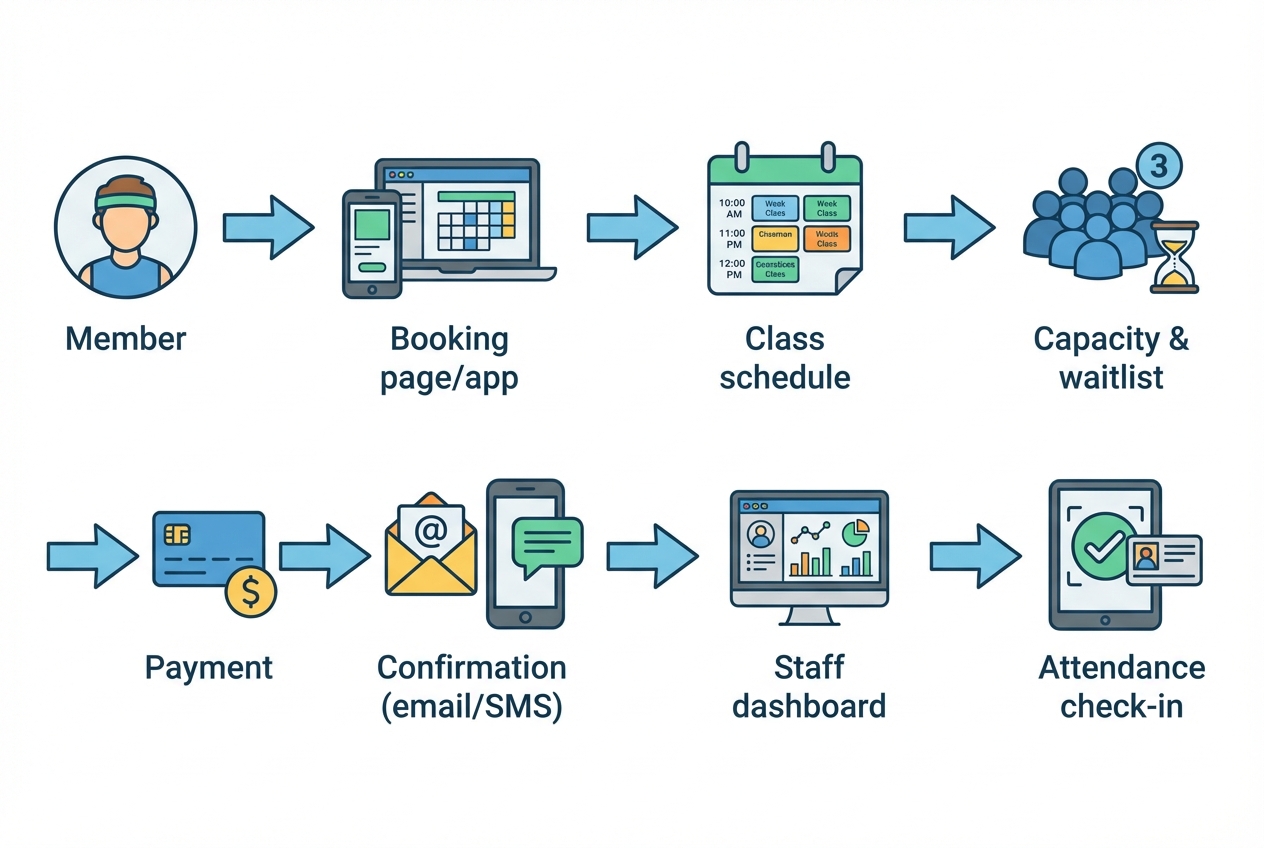
A typical booking flow has a few moving parts. If you design them deliberately, the system feels simple to members while still handling the messy edge cases.
- Discovery: A member finds a class or service from your website, landing page, or an app.
- Eligibility check: The system confirms they have an active membership, credits, or a valid payment method.
- Capacity control: Slots are reserved, waitlists are maintained, and overbooking rules are enforced.
- Payment and policy enforcement: Charges, deposits, or credit deductions happen according to your rules.
- Comms: Confirmation and reminders go out (email/SMS), including cancel and reschedule links.
- Staff operations: Coaches see rosters, check-in status, and notes, and can take quick actions.
- Analytics: Bookings and attendance feed utilization, revenue, and retention reporting.
Choose your gym booking software approach
You typically have three paths. The best choice depends on whether your gym is standard or whether your offer has unique rules that off-the-shelf tools fight against.
Buy an off-the-shelf platform
This is ideal when your needs are conventional and speed matters more than custom workflows.
Common options:
- Mindbody: Strong ecosystem for studios and classes; can be heavy if you want something lean.
- ABC Glofox: Gym-focused membership management with class booking built in.
- Zen Planner: Popular in boutique gyms and martial arts; good for memberships and scheduling.
- Square Appointments: Simple scheduling and payments; better for session-based services than complex memberships.
Where these can fall short:
- Rigid policies: Your real cancellation and credit logic may not map cleanly.
- Limited staff tooling: You end up with extra spreadsheets or tools for internal ops.
- Brand and funnel constraints: Booking experiences can feel templated and conversion suffers.
Build a custom system
This path makes sense if you have specific rules, multiple locations, business-to-business (B2B) corporate packages, hybrid memberships, or you want booking to be a differentiator.
What custom solves:
- Exact policy enforcement: Deposits, credits, holds, no-show fees, and exemptions.
- Custom packaging: Bundles, family plans, corporate credits, intro offers, rolling cycles.
- Workflow automation: Lead capture to onboarding to reactivation campaigns.
The risk is cost and time. Traditional development can take months.
Build fast with an AI app builder
If you want custom behavior but you do not want a long engineering cycle, an AI app builder is the middle ground.
QuantumByte is designed for founders and operators who want software that fits their business without taking on a full product build. You can start from a working base, then refine booking rules and dashboards as you learn.
Define requirements before you touch software
You will save days of rework if you decide your rules upfront. Keep this short. A one-page spec is enough.
Member experience requirements
- Booking surface: Decide whether booking starts from your site, a mobile-first page, or a member portal.
- Login and identity: Define whether members must create an account, or can book as a guest for trial sessions.
- Friction policy: Make it easy for returning members. Make it safe for first-timers.
Booking logic requirements
- Capacity rules: Per-class capacity, per-instructor limits, equipment constraints, and hold windows.
- Waitlist behavior: Auto-promote from waitlist, promotion deadlines, and confirmation windows.
- Cancellation and late-cancel: Time cutoffs, fee triggers, and exemptions (injury, coach cancellation).
Payments and packaging requirements
- What you sell: Memberships, class packs, PT (personal training) sessions, deposits, drop-ins.
- When you charge: At booking, at attendance, at month start, or on invoice.
- Refund and chargeback handling: What is automated vs escalated.
Staff operations requirements
- Roster view: Daily schedule, check-in view, and member notes.
- Overrides: Allow staff to comp a fee, add a manual booking, or mark attendance.
- Permissions: Coach vs front desk vs owner capabilities.
Build gym booking software in 8 practical steps
This is the build sequence that prevents the most common failure mode: building a beautiful booking page that breaks when reality hits.
1) Map your offer into bookable units
Start with what members actually book.
- Classes: Group sessions with a schedule and a capacity.
- Appointments: 1:1 sessions with an instructor, duration, and buffer time.
- Facilities: Open gym slots, courts, sauna, or equipment bays.
The goal is you can describe every reservation as one of the above, with consistent fields.
2) Design the core data model
A clean data model keeps your policies enforceable and your reporting trustworthy.
Minimum entities:
- Member: Profile, contact details, membership status, and consent flags.
- Membership or package: Plan type, credits, billing period, and eligibility rules.
- Service: The thing being booked (class type, appointment type, facility).
- Schedule: Recurring sessions, exceptions, instructor assignment, location.
- Booking: Status (reserved, cancelled, attended, no-show), timestamps, source.
- Payment record: Charge, refund, credit deduction, or invoice reference.
The goal is every policy you care about can be implemented with data you already store.
3) Implement availability and capacity rules
This is where most booking systems either feel effortless or feel broken.
- Capacity enforcement: Never rely on staff watching the count. Enforce it in the booking transaction.
- Reservation holds: Decide how long a slot is held during checkout before it returns to inventory.
- Concurrency safety: Ensure two members cannot grab the last spot at the same time.
The goal is you can trust that "3 spots left" is true.
4) Add waitlists that actually reduce no-shows
Waitlists are only useful if they move fast and do not create confusion.
- Auto-promotion window: Promote from waitlist only if there is enough time for the member to show up.
- Confirmation deadline: If promoted members do not accept quickly, the spot goes to the next person.
- Policy clarity: Members should see whether promotion triggers an automatic charge.
The goal is cancellations backfill and classes stay full.
5) Build payments with security boundaries
If you take card payments, treat payment data as its own zone. In many setups, your booking app should never store raw card details.
The PCI Security Standards Council maintains PCI DSS for entities that store, process, or transmit payment account data. In practice, this usually means using a payment processor checkout flow and storing only tokens and receipts.
The goal is you can charge correctly without creating unnecessary compliance exposure.
6) Set up identity, authentication, and permissions
Do not ship a staff dashboard without role-based access control.
- Member authentication: Keep it simple, but strong. Follow modern password guidance such as NIST SP 800-63B, which states memorized secrets "SHALL be at least 8 characters" and systems "SHOULD NOT require memorized secrets to be changed arbitrarily" unless compromised.
- Staff roles: Separate what coaches can see from what owners can change.
- Auditability: Track who comped a fee or edited attendance.
The goal is your system stays trustworthy as you add staff and locations.
7) Automate notifications and operational workflows
Booking software pays off when it replaces repetitive admin.
- Confirmations: Immediate confirmation with calendar links.
- Reminders: Timed reminders with a one-tap cancel/reschedule path.
- Post-class flows: Ask for feedback, offer an upsell, or trigger a reactivation workflow after missed sessions.
The goal is fewer no-shows and fewer "can you move me to..." messages.
8) Ship a staff-ready dashboard
Members see the booking UI. Your team lives in the dashboard.
What to include on day one:
- Today view: Sessions, rosters, waitlists, and capacity.
- Check-in: Fast attendance marking, ideally mobile-friendly.
- Member lookup: Membership status, remaining credits, notes.
- Exceptions: Coach cancellation flow, mass message, and refund queue.
The goal is front desk and coaches stop using workarounds.
A practical build path with QuantumByte
If you want custom gym booking software without a long dev cycle, QuantumByte fits the pattern most gyms need: ship a working version quickly, then iterate on rules.
A founder-friendly approach:
- Start from a working base: Get a prototype live fast and validate the booking flow before you polish.
- Iterate from real usage: Add waitlist logic, credits, and staff dashboards based on real edge cases.
- Scale up when needed: Move from a simple build to more operational tooling as you grow.
If your gym is part of a larger operation and you need centralized control, more advanced permissions, and ops automation, consider our Enterprise plan. If you are building your first version, our basic plan is the fastest way to get started.
Integrations that matter for gyms
Most gyms do not need every integration. They need the few that reduce friction.
- Payments: Use a processor that supports subscriptions, one-off charges, and refunds.
- Email and SMS: Confirmations and reminders. Keep a clear opt-in history.
- Calendar: Add-to-calendar for members and staff scheduling.
- Analytics: Track funnel drop-offs (view schedule → start booking → pay → attend).
- Access control: If you run door access, consider membership status syncing.
Privacy and compliance basics you should not skip
Even small gyms handle sensitive personal data. Your duty is to collect less, store it safely, and explain what you do.
- Consent and transparency: If you operate in or serve people in the European Union, Regulation (EU) 2016/679 (GDPR) is the baseline legal framework for personal data processing.
- Least privilege: Staff accounts should only access what they need to do their job.
- Retention rules: Decide how long you keep attendance history and payment records.
- Security priorities: Use the OWASP Top 10 as a practical awareness baseline. It represents "a broad consensus about the most critical security risks to web applications."
Rollout plan that avoids front-desk chaos
A good rollout is a controlled migration, not a big bang.
Pilot with a single program
Pick one predictable segment: a single class type, a single location, or personal training bookings.
- Set clear rules: Cancellation cutoff, late-cancel fees, and what happens on coach cancellations.
- Train staff on exceptions: The pilot will surface edge cases. Decide who can override what.
Run parallel operations briefly
Keep old processes in place for a short overlap if needed, but keep one system as source of truth.
- Member messaging: Give simple instructions and a deadline.
- Support path: Provide one channel for booking issues. Do not let it scatter across Instagram and email.
Expand once metrics stabilize
Track these before expanding:
- No-show rate trend: Should move down when reminders and policies work.
- Waitlist conversion: Are cancellations backfilling?
- Staff time: Fewer manual changes per day is the real win.
What gym booking software costs to run
Software fees are only one line item. Staff time spent working around rigid tools, manual exceptions, and broken workflows often becomes the larger operating cost.
Budget categories:
- Platform fees: Monthly subscription, per-location costs, per-staff fees.
- Payment processing: Transaction fees, chargebacks, refunds.
- Messaging: SMS can become a real line item at scale.
- Operations overhead: Training, policy enforcement, and support.
If you are comparing tiers, our pricing page will let you compare and estimate the build cost, then weigh it against the cost of staying stuck with a booking flow you cannot adapt.
Common mistakes that make booking systems fail
These are patterns that repeatedly create churn and staff pain.
- Building for happy path only: Real life includes late cancellations, coach substitutions, and membership holds. If you do not model them, you will handle them manually forever.
- No policy clarity: Members tolerate rules they understand. They revolt against surprises.
- Ignoring permissions: One shared staff login is not simple. It is a future incident.
- Overcomplicating onboarding: Make first booking easy, then deepen the experience after the first win.
- No operational dashboard: If staff cannot handle exceptions quickly, they will bypass the system.
Wrapping up: what you now know how to build
Gym booking software works when it enforces capacity, payments, policies, and staff workflows with minimal friction for members. You now have a practical build sequence, a clear feature set to prioritize, and rollout guidance that protects your operations.
If you want to build a custom booking flow without signing up for months of development, QuantumByte is a strong fit because it is designed for founders who need speed and control. Start by scoping your first version and then choose a build tier on our pricing page.
Frequently Asked Questions
What is gym booking software?
Gym booking software is a system that lets members reserve classes, appointments, or facility time slots, often with integrated payments, waitlists, reminders, and a staff dashboard for rosters and check-ins.
Do I need gym booking software if I only offer group classes?
Yes, if you have capacity limits or no-shows. Even a simple class schedule benefits from real-time capacity control, automated reminders, and a waitlist that backfills cancellations.
What features should gym booking software include first?
Start with capacity enforcement, clear cancellation rules, automated confirmations and reminders, and a staff roster/check-in screen. Add packages, credits, and advanced automation after the core workflow is stable.
Is it better to use Mindbody or build something custom?
Mindbody can be a good fit when your gym runs standard classes and you want an established ecosystem. If your pricing, credits, memberships, or operational workflows are unique, custom software can outperform off-the-shelf tools because it matches your rules exactly.
How do I handle payments safely in booking software?
Use a payment processor checkout flow and store only tokens and receipts, not raw card details. The PCI Security Standards Council maintains PCI DSS standards for protecting payment account data (PCI SSC).