
OpenClaw has been all the rave. The local, self-hosted personal AI assistant designed to take actions on your behalf (email, calendar, scripts, files) while keeping your context on your machine, not in a walled garden, as described on the official OpenClaw site, but key to being able to leverage the capabilities of OpenClaw is creating a systematic workflow.
In practice, OpenClaw workflows are the "do-this-exactly" layer you put underneath the agent.
They are often implemented through OpenClaw's workflow tooling called Lobster, which the project describes as a typed, local-first workflow shell and macro engine that runs YAML (YAML Ain't Markup Language) or JSON (JavaScript Object Notation) workflows with steps, environment variables, conditions, and approval gates in the Lobster repository.
If you are building any kind of repeatable operation (onboarding, quoting, invoice follow-ups, support triage), workflows are how you keep the agent helpful instead of unpredictable.
Why OpenClaw workflows matter for founders and operators
OpenClaw shines when the work touches local files, private data, or tools you do not want to pipe through five cloud services.
Here is what you get when you build workflow-first:
-
Repeatability: You can run the same playbook every time, with the same steps in the same order. That is how you turn "I did it once" into "I can do it daily."
-
Lower cognitive load: Instead of remembering 12 micro-steps, you give the agent a single workflow name and let the pipeline do the rest.
-
Safer automation: Approval gates let you keep humans in control for risky actions like sending emails, editing production data, or posting publicly.
-
Easier handoff: A workflow is documentation that runs. That makes it far easier to share with a teammate than a long chat transcript.
If you are systemizing your business, this business process automation guide pairs well with what you are building here.
How OpenClaw workflows are structured
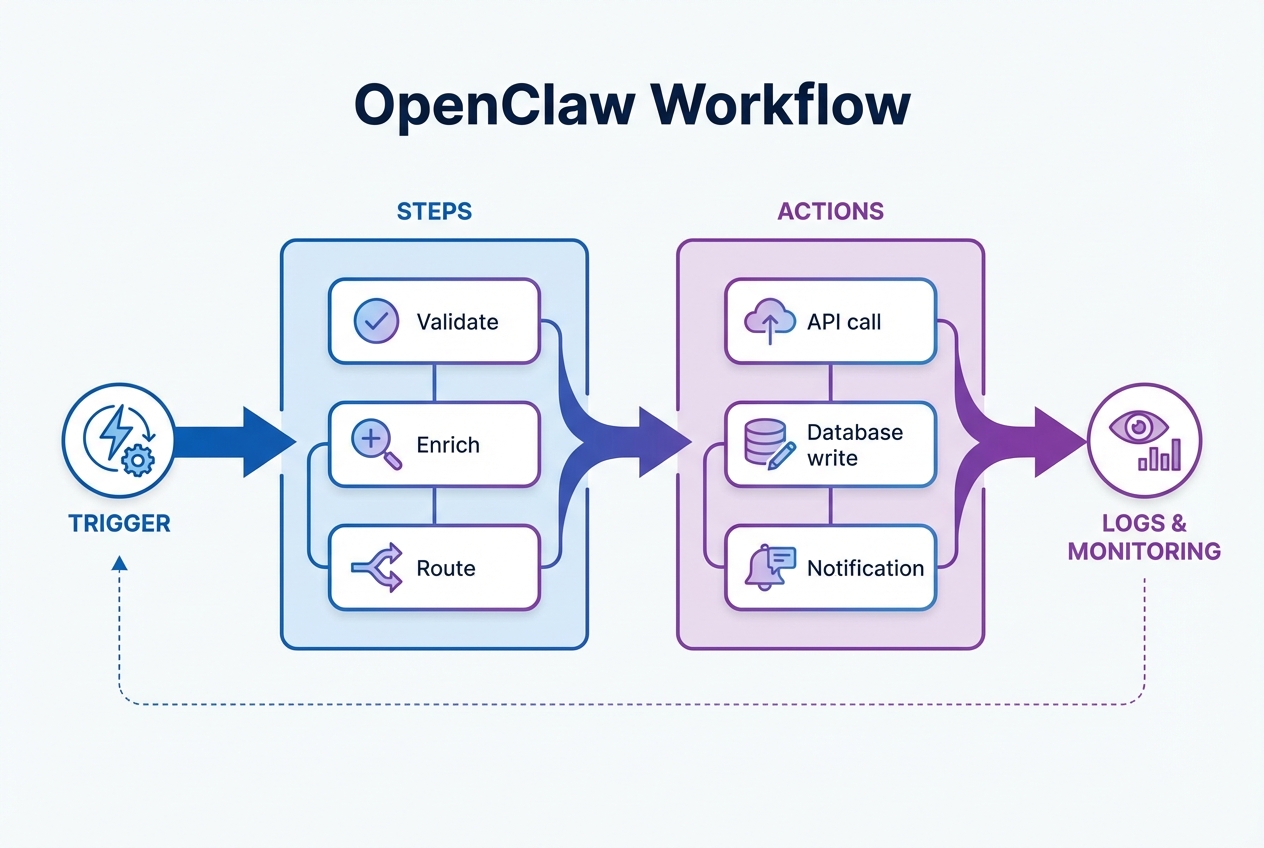
Most OpenClaw workflows follow a simple pattern:
-
Trigger: What starts the workflow (a message, a schedule, a file change, or a manual run).
-
Steps: A sequence of actions that do the work (read a file, call a tool, transform output, write results).
-
Data passing: Each step produces outputs that later steps can reuse.
-
Guards: Conditions and approvals that block or reroute the workflow.
-
Outputs: A final artifact (a report, a file, a ticket, a message, a commit).
In Lobster terms, workflows are commonly defined as YAML or JSON files with:
-
Steps: Discrete actions you can reason about and test.
-
Env: Environment variables, which are inputs you can keep consistent across runs (application programming interface (API) keys, folder paths, default email recipients).
-
Condition: Logic that decides whether a step runs.
-
Approval gates: A "stop and confirm" moment before high-impact actions.
This structure is why workflows are such a good bridge from "agent can do things" to "business can rely on it."
A practical OpenClaw workflows design checklist
Use this checklist before you automate anything important.
-
Define the outcome: Write one sentence that describes the finished result (example: "Send a draft follow-up email and save a copy to the client folder").
-
List the inputs: Identify what the workflow needs (file path, customer name, invoice ID, due date, email thread URL).
-
Make each step small: Smaller steps are easier to debug and safer to approve.
-
Add approval gates early: Put approvals right before irreversible actions (send, delete, publish, charge).
-
Limit tool permissions: Give the workflow only what it needs. Avoid "full shell access" unless you truly need it.
-
Log what matters: Save the inputs, the step outputs, and the final result somewhere you can review.
-
Version your workflows: Treat workflows like code. When you change them, track the change.
If you later decide to turn a workflow into a full product, this guide to AI app builder prompts can help you translate the checklist into screens, data models, and actions.
OpenClaw workflow examples you can copy
These examples are intentionally simple. The goal is to show patterns you can reuse.
Example 1: Client onboarding assistant
Goal: Collect details, create a folder structure, draft an onboarding email, and prepare a checklist.
-
Step 1 (Collect): Ask for missing info (company name, main contact, start date, services).
-
Step 2 (Create): Create local folders and files from templates.
-
Step 3 (Draft): Generate a draft email and checklist.
-
Step 4 (Approve): Ask for approval before sending.
-
Step 5 (Send): Send the email and store a copy.
Example 2: Quote-to-invoice follow-up
Goal: Detect quotes that have not converted, draft follow-ups, and queue them.
-
Step 1 (Find): Pull a list of outstanding quotes.
-
Step 2 (Score): Classify which ones deserve a follow-up now.
-
Step 3 (Draft): Write a short follow-up email per quote.
-
Step 4 (Approve): Require approval for the send list.
-
Step 5 (Send): Send and log the outcome.
If you want to see how a workflow becomes a real operational system, this breakdown of accounts payable workflow automation shows multi-step routing and approvals in action.
Example 3: Daily ops report
Goal: Pull data from a few sources, summarize it, and post it to your team chat.
-
Step 1 (Pull): Gather yesterday's metrics.
-
Step 2 (Summarize): Generate a plain-English narrative.
-
Step 3 (Flag): Highlight anomalies.
-
Step 4 (Approve): Approve the final message if it goes to a broad channel.
Safety and governance for OpenClaw workflows
Once workflows touch money, customers, or production systems, safety stops being optional.
Two principles matter most.
Human approval for risky actions
The OWASP AI Agent Security Cheat Sheet recommends requiring explicit approval for high-impact or irreversible actions and using risk-based autonomy (low-risk can run automatically, high-risk requires review). For OpenClaw workflows, that maps cleanly to approval gates before:
-
External communications: Emails, social posts, outbound messages.
-
Destructive actions: Deleting files, overwriting folders, removing records.
-
Financial actions: Refunds, invoices, payments, pricing changes.
Least privilege tool access
That same OWASP guidance emphasizes granting agents the minimum tools and permission scope required for the task. In workflow terms:
-
Scope file tools: Restrict to specific directories, not your entire disk.
-
Scope API tools: Use tokens that only allow the endpoints the workflow needs.
-
Separate trust levels: Keep "internal ops" workflows separate from anything user-triggered.
If you are building workflows that impact regulated or high-stakes operations, NIST's definition of validation is a solid north star: confirm, with objective evidence, that the system meets requirements for its intended use before you let it run unattended.
OpenClaw workflows vs Zapier, Make, n8n, and custom apps
Not every workflow belongs inside an AI agent runtime. Here is a practical way to choose.
| Option | Best for | Strengths | Tradeoffs |
|---|---|---|---|
| OpenClaw workflows | Local-first automations with private context | Strong privacy posture, agent-friendly pipelines, approvals and conditions | You own setup and ops; integrations vary by skills/tools |
| Zapier / Make | Software-as-a-service (SaaS)-to-SaaS automation | Fast to connect popular tools, low setup | Less control, costs scale with volume, limited local context |
| n8n | Self-hosted integration workflows | Good control, visual builder, flexible | Still requires hosting and maintenance |
| Custom app | Core operations and sellable products | Best user experience (UX), strongest control, real permissions and data models | Higher build effort unless you use an AI builder |
If your workflow is becoming the product, or it needs a real interface, you eventually want a custom app.
When to turn OpenClaw workflows into a real app
OpenClaw workflows are great for:
-
Personal ops: You run it yourself, you know the edge cases, and a chat-driven interface is fine.
-
Founder-led processes: You want speed, and you can tolerate a little roughness while you prove the process.
-
Internal automations: The workflow saves time, but nobody needs a polished front end.
You should consider turning a workflow into an app when:
-
Other people need it: The moment teammates or customers rely on it, chat-driven ops gets fragile.
-
You need permissions: Apps give you real role-based access control (RBAC), so you can decide who can do what.
-
You need structured data: Workflows can pass outputs, but apps shine with durable databases.
-
You need a clean UX: Forms, dashboards, and status pages reduce errors and training time.
At that stage, the problem is no longer automation but structure. You need role-based access control, durable data models, clear user interfaces, and audit trails, which are things workflows are not designed to handle long-term. This is where many founders hit friction: the workflow works, but scaling it means rewriting everything as a traditional app.
QuantumByte exists for exactly that transition. Instead of rebuilding from scratch, you describe the workflow you already validated and shape it into a real application with permissions, forms, dashboards, and structured data -- without losing the speed that got you there.
When you hit that point, QuantumByte is built for the handoff from "working workflow" to "real app." You describe the system in plain English, then shape it in a canvas and ship in days.
Key takeaways you can act on today
You now have the practical map for using OpenClaw workflows as a serious operating system, not a toy automation.
-
Start with one workflow: Pick a single repeatable process and make it reliable.
-
Add approvals and least privilege: Treat safety as part of the workflow design, not a later patch.
-
Decide your endgame: If the workflow becomes critical, graduate it into a real app with a user interface and durable data.
If you do decide to productize, this playbook on apps that make millions is a solid next read.
Frequently Asked Questions
What are OpenClaw workflows used for?
OpenClaw workflows are used to run repeatable, multi-step automations under an AI agent, especially when the work touches local files, scripts, and private context. They help you standardize steps, add approvals, and reduce randomness.
Are OpenClaw workflows the same as Lobster?
Not exactly. OpenClaw is the agent platform. Lobster is a workflow shell and macro engine used to define and run workflows (often in YAML or JSON), including conditions and approval gates, as described in the Lobster repository.
How do I keep OpenClaw workflows safe?
Use risk-based approvals and least-privilege tool permissions. The OWASP AI Agent Security Cheat Sheet specifically recommends explicit approval for high-impact actions and scoping tools to the minimum permissions needed.
Should I build an app instead of a workflow?
Build a workflow when you are validating a process and running it yourself. Build an app when other people need it, you need permissions and structured data, or you plan to sell it.
Can OpenClaw workflows replace Zapier?
Sometimes. If your automations are mostly SaaS-to-SaaS and you want speed over control, Zapier is hard to beat. If you want local-first privacy, tool-level control, and agent-friendly pipelines with approvals, OpenClaw workflows can be a better fit.