
A vibe coding chatbot is a chatbot you build by describing what you want and letting an Artificial Intelligence model generate the code, flows, and user interface (UI), then you refine it with tight feedback loops.
We covered no-code vs vibe coding, which captures the core distinction: no-code is visual assembly with guardrails, while vibe coding is prompting an AI model to write code. The upside is leverage. The tradeoff is you must supervise quality.
In practice, vibe coding works best when you:
-
Focus on one outcome: Start with a single business result you can measure, so the bot does fewer things and does them reliably.
-
Treat prompts like requirements: Write prompts the way you would write a product spec, with clear rules and acceptance criteria.
-
Iterate in small loops: Build small, test fast, and improve based on real conversations, not assumptions.
When you should be vibe coding a chatbot
A chatbot is not automatically the right product shape. Vibe coding helps when your goal is speed-to-value and learning, not perfection on day one.
Use this approach when:
-
Repetitive high-friction workflow: Think intake forms, status updates, triage, onboarding, or internal questions that keep interrupting your day.
-
Clear definition of done: "It qualifies leads and books calls" is better than "It helps with sales."
-
A v1 with guardrails is acceptable: Early versions should do fewer things, more reliably.
-
Custom behavior is required: If off-the-shelf bots cannot match your process, building can be the smarter route. This build vs buy framework is a useful way to pressure-test the decision.
How vibe coding chatbots work
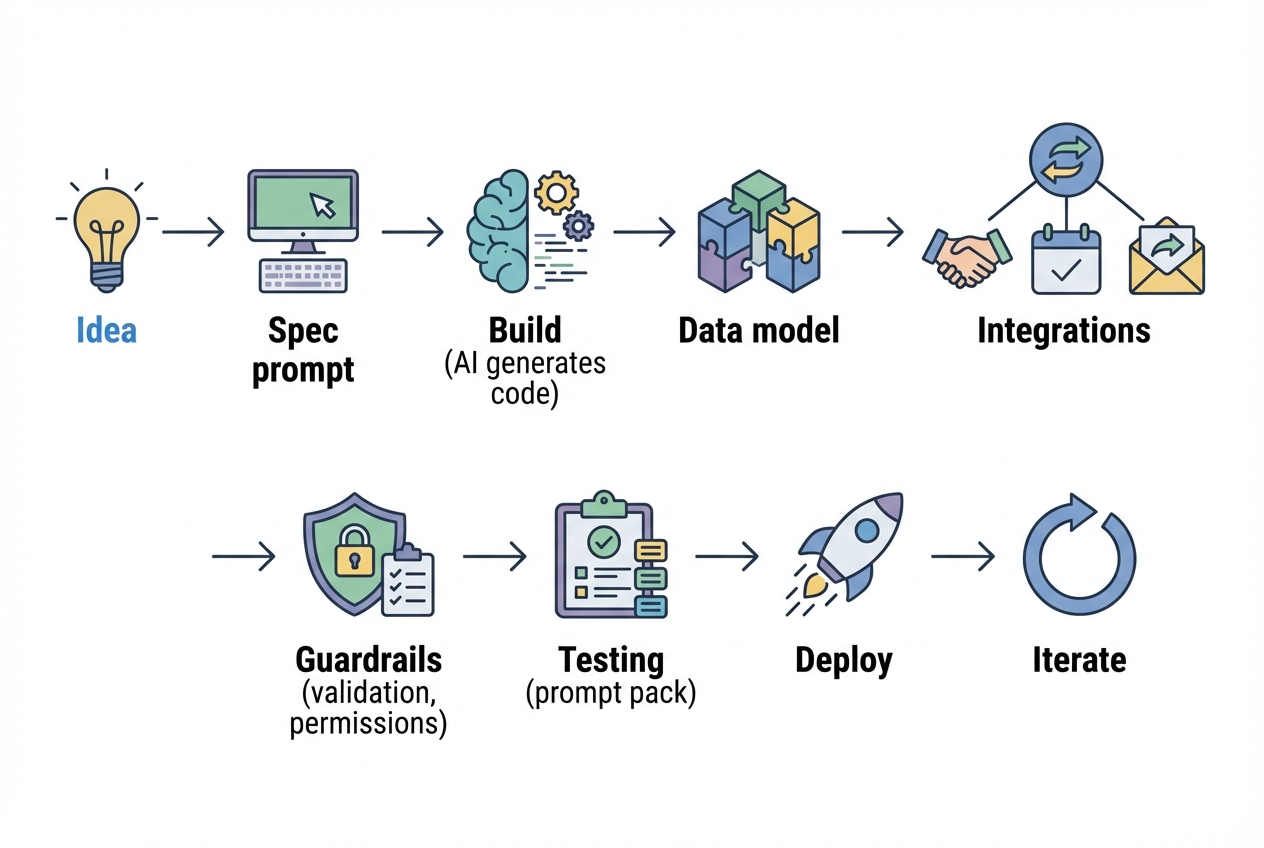
The winning pattern is simple: you turn "vibe" into "spec," then into "system."
Most teams fail because they skip the middle.
A practical workflow looks like this:
-
Intent: Define the user, the job, and the boundaries.
-
Prompted build: Use an AI assistant to generate screens, Application Programming Interface (API) calls, business rules, and data storage.
-
Guardrails: Add validation, permissions, and safe defaults.
-
Integrations: Connect to your real tools (Customer Relationship Management (CRM), calendar, email, billing).
-
Verification: Test with real conversations, not imagined ones.
-
Release: Deploy early, observe failures, tighten the system.
If you are using an AI app builder, this conversation-first approach is a feature, not a bug. We covered how an AI app builder works, which describes the ideal flow as a back-and-forth dialogue where the AI asks targeted questions to refine your vision before it generates the application.
How to build a vibe coding chatbot step by step
This is the calm path that gets you to a working chatbot without the guesswork.
1. Pick one user and one job
Start by writing one sentence:
"My chatbot helps [one user] achieve [one outcome] by [one main action]."
Examples:
-
Clinic scheduling: "It helps a clinic receptionist book appointments by collecting intake details and proposing available slots."
-
Rental screening: "It helps a landlord screen renters by asking a standard set of questions and scoring the answers."
If you cannot write this sentence, your chatbot is not ready to build. Narrowing the job reduces hallucinations, reduces branching logic, and makes testing real.
2. Define the boundary conditions
Your first build should explicitly say what the bot will not do.
Include boundaries like:
-
Scope boundary: "Only answer questions about products A and B, not general advice."
-
Data boundary: "Never request Social Security numbers or banking passwords."
-
Action boundary: "Draft emails, but do not send them without confirmation."
This step saves you later when you add integrations.
3. Write the chatbot's operating spec as a prompt
This is the single highest leverage part of vibe coding.
Borrow two proven prompt habits:
-
OpenAI delimiter guidance: OpenAI recommends you put instructions at the beginning of the prompt and use delimiters like ### or triple quotes to separate instructions from context.
-
Anthropic structure guidance: Anthropic notes that Claude responds well to clear, explicit instructions and benefits from structured formatting, including XML-style tags, in its prompting best practices.
A strong operating spec includes:
-
Role: Who the assistant is in your business.
-
Goal: The job it must complete.
-
Inputs: What it can ask the user for.
-
Outputs: The exact format you want.
-
Rules: What it must never do.
-
Escalation: When it should hand off to a human.
Example structure you can reuse:
-
System rules: "You are an intake assistant for X. Your job is Y. You must follow the flow below."
-
Flow: "Ask these questions in this order. Confirm before booking."
-
Output contract: "Return JSON with fields: ..."
4. Design the conversation like a funnel
Most chatbots feel smart until a user goes off-script. Your job is to keep the experience focused.
Design your conversation in phases:
-
Start: Confirm the intent in one question.
-
Collect: Gather only the minimum data needed.
-
Validate: Confirm key details and handle missing fields.
-
Act: Perform the action or produce the output.
-
Close: Summarize what happened and what is next.
For operational chatbots, it helps to map this to a real automation strategy. We covered automating business processes, which is a useful mental model because it forces you to think in inputs, rules, and outcomes, not chat for chat's sake.
5. Choose your build path: code-first, builder-first, or hybrid
Pick the path that matches your speed and risk tolerance.
| Build path | Best for | Strengths | Tradeoffs |
|---|---|---|---|
| Code-first (DIY) | Teams with engineers and strong review practices | Maximum control and customization | Slower start, higher upfront effort |
| AI app builder | Founders who want a working prototype fast | Fast iteration, less setup friction | Needs oversight for edge cases |
| Hybrid (builder + experts) | Teams who want speed plus reliability | Prototype quickly, then harden critical parts | Requires clear handoff and specs |
If you want the builder-first path, QuantumByte is a founder-friendly application that allows you to build chatbots for your specific needs. With QuantumByte's enterprise plan, you also have the option to hand off the hardened parts to an expert team so you are not stuck rebuilding later.
6. Model your data early
Chatbot failures often look like AI mistakes, but the root cause is usually missing structure.
Define:
-
Entities: The things you store (Lead, Appointment, Ticket, Invoice).
-
Fields: The minimal attributes required.
-
States: The stages (New, Waiting, Scheduled, Closed).
-
Permissions: Who can read or edit what.
This is where your chatbot stops being a toy and becomes a product.
7. Add integrations in one direction first
Integrations are where value shows up. They are also where bugs multiply.
Start with read-only or draft-only actions:
-
Draft emails: Create a draft, but do not send it.
-
Propose time slots: Suggest options, but do not book until the user confirms.
-
Create draft tickets: Open a ticket in Draft status for review.
As you scale, choose the automations that move revenue or save real time first. We covered high-impact processes to automate, which is a solid shortlist for founders deciding what to connect next.
8. Build security and guardrails like a grown-up product
Vibe coding does not change your responsibility. If the bot touches customer data, treat it like production software from day one.
Use two practical anchors:
-
NIST SSDF baseline: NIST describes the Secure Software Development Framework (SSDF) as "a core set of high-level secure software development practices" that can be integrated into your Software Development Life Cycle (SDLC) to reduce vulnerabilities in released software in NIST SP 800-218.
-
OWASP secure coding checklist: OWASP's Secure Coding Practices checklist covers the areas you should systematically review, including input validation, authentication and password management, session management, and access control.
Implement guardrails that match your risk:
-
Authentication: Require sign-in for anything that exposes private data.
-
Authorization: Restrict actions by role (admin vs staff vs customer).
-
Input validation: Reject unsafe or unexpected input, server-side.
-
Logging: Log actions and failures without leaking secrets.
-
Secrets management: Keep API keys out of prompts and client-side code.
9. Test with a prompt pack instead of ad hoc conversations
Create a small library of test conversations that you run every time you change prompts, flows, or integrations.
Include:
-
Happy paths: Ideal users who answer clearly and follow the expected flow.
-
Missing information: Users who skip a required field or give partial answers.
-
Conflicting answers: Users who change their mind midway or provide mismatched details.
-
Off-topic requests: Users who ask for unrelated help that could derail the flow.
-
Prompt injection attempts: Users who try to extract hidden instructions or override rules.
A chatbot that passes your prompt pack is stable enough to ship.
Common failure modes and how to fix them
These are the mistakes that burn weeks.
-
Over-broad scope: Narrow the job and rewrite the operating spec so the bot has fewer allowable actions.
-
Unstable outputs: Force an output contract (JSON schema, fixed fields, or fixed templates) and validate it.
-
Regression drift: Version your prompts and keep your prompt pack tests so "it worked yesterday" does not become your normal.
-
Bad data capture: Add confirmations and server-side validation. Treat user-provided data as untrusted.
-
Integration chaos: Add one integration at a time and start with draft-only actions.
Turning a chatbot into something you can sell
If you are a solopreneur, your edge is speed and focus. You can win by solving one painful niche problem in a clean, repeatable way.
A simple way to choose the niche:
-
Pick a market you understand: Domain knowledge cuts your support load and helps you speak the customer's language.
-
Pick a workflow that repeats weekly: Repetition is where automation creates real leverage.
-
Pick an outcome tied to money or time: If the benefit is fuzzy, retention will be fuzzy.
When you are ready to productize, keep the packaging clean:
-
Pricing: Sell outcomes, not tokens or messages.
-
Onboarding: Use the bot to set itself up with the user's data.
-
Support: Log conversations and add a handoff-to-human path.
One note of opinion: the most effective chatbot products prioritize the underlying workflow over the chat interface itself. Chat is a great UI, but the workflow is what creates lasting value.
What you now have
You now have a practical path to build a vibe coding chatbot that ships fast and holds up in the real world:
-
Definition and boundaries: A tight definition of the job, boundaries, and what success looks like.
-
Operating spec: A structured prompt that makes outputs more predictable.
-
Data and integrations plan: A data model and integration approach that creates real business value.
-
Security guardrails: Secure development habits grounded in NIST and OWASP.
-
Testing discipline: A prompt pack approach that prevents regressions as you iterate.
If you want to move from idea to a working prototype quickly, an AI builder such as QuantumByte can help you compress weeks into days.
Frequently Asked Questions
What is the difference between a vibe coding chatbot and a no-code chatbot?
A vibe coding chatbot is built by prompting an AI model to generate code and logic from natural language. A no-code chatbot is assembled from visual components with predefined constraints. This comparison of no-code vs vibe coding summarizes it as a flexibility vs guardrails tradeoff.
Do I need to know how to code to build a vibe coding chatbot?
You do not need to be a full-time engineer to start, but you do need to think clearly about requirements, testing, and data. The more your bot touches real systems, the more important basic engineering habits become.
How do I stop a chatbot from making things up?
You reduce hallucinations by narrowing scope, requiring structured outputs, and forcing the bot to ask clarifying questions when required information is missing. In production, you also back responses with real data sources and validate outputs before taking actions.
What should I build first: the prompt or the integrations?
Build the prompt-based operating spec first, then add integrations one at a time. Start with draft-only actions so mistakes are reversible.
When should I use an agency or an expert team?
Use experts when reliability, security, or complex integrations become the bottleneck, or when the chatbot becomes mission-critical. A hybrid path often wins: prototype quickly, then harden the parts that touch money, permissions, and customer data.