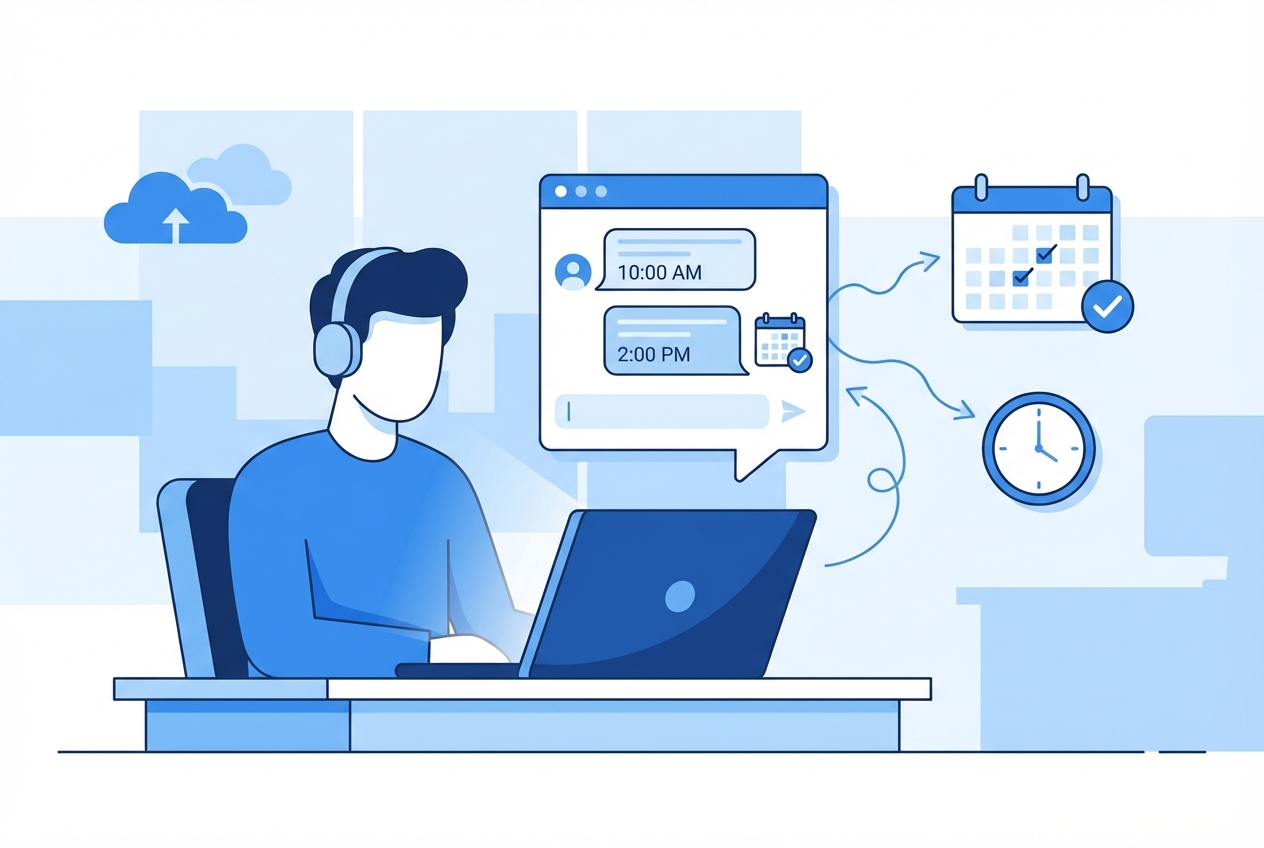
This guide walks you through how to build a booking chatbot, one that takes customers from "I'm interested" to "You're scheduled" without the back-and-forth. You'll learn how to design the conversation flow, check availability, handle edge cases, and choose the right integrations for web chat, SMS, or WhatsApp.
What a booking chatbot does
A booking chatbot is a conversational interface that collects booking intent, checks availability, and confirms an appointment using a scheduling system (calendar, booking tool, or custom database). The best booking chatbots feel simple to the customer while staying strict behind the scenes about rules and data.
Common outcomes you can automate safely:
- Appointment scheduling: Collect service, date/time preferences, and confirm the slot.
- Rescheduling and cancellation: Enforce your rules, update the calendar, and keep a clean audit trail.
- Intake before booking: Ask qualifying questions (location, budget, symptoms, project type) and route accordingly.
- Lead capture when full: Offer waitlists, alternative times, or a callback request.
Where a booking chatbot is usually a bad idea:
- High-touch consultative sales: If you need deep discovery before you can even quote, use the bot for intake and handoff, not full booking.
- Complex multi-resource scheduling: If you require multiple staff, rooms, equipment, and constraints, you need stronger scheduling logic than "pick a time."
Decide where your booking chatbot will live
Channel choice changes your technical requirements and your customer experience.
- Website chat: Best for converting website traffic into booked calls. Easy to embed, easiest to measure.
- SMS: Best for local services and follow-ups. Requires tighter consent and better handling of short replies.
- WhatsApp: Great in regions where WhatsApp is the default. It comes with strict opt-in and messaging rules.
- Google entry points: Useful when customers find you via Google Search or Maps and want quick answers before booking.
Two channel rules that matter early:
- Opt-in rules on WhatsApp: WhatsApp requires businesses to obtain opt-in before messaging, with supported opt-in methods including website, SMS, phone (Interactive Voice Response (IVR)), and in-person flows, per Meta's documentation on getting opt-in for WhatsApp Business messaging.
- Message windows on WhatsApp via Twilio: If you use Twilio's WhatsApp application programming interface (API), note the "customer service window" is valid for 24 hours after the most recently received user message, as described in Twilio's WhatsApp API docs. Outside that window, you generally need message templates.
What you need before you build
Your booking rules
Write these down in plain language first.
- Services: Names customers recognize, plus internal IDs.
- Duration: Per service (and whether buffers exist before/after).
- Working hours: Per team member or shared calendar.
- Lead time: Minimum notice (for example, same-day cutoff).
- Policies: Cancellation window, reschedule limits, deposits.
- Capacity: One-to-one, group sessions, or limited seats.
Your data model
Even if you are using an off-the-shelf calendar, you still need a consistent internal model.
- Customer profile: Name, email, phone, consent status.
- Booking request: Service type, preferred times, notes, channel.
- Appointment record: Confirmed time, staff/resource, status, external calendar event ID.
- Audit trail: Who changed what, and when.
Your integration choice
Most booking chatbots should start with one of these:
- Calendar-first: Use Google Calendar or Microsoft Outlook as the source of truth.
- Scheduling-product-first: Use Calendly, Acuity, or similar.
- Custom-first: Use your own database and expose availability via your own logic.
If you want calendar-first on Google Calendar, the key technical primitive is creating events programmatically. Google's Calendar API provides an events.insert method for "Creates an event," documented in the Google Calendar API reference for events.insert.
How to build a booking chatbot
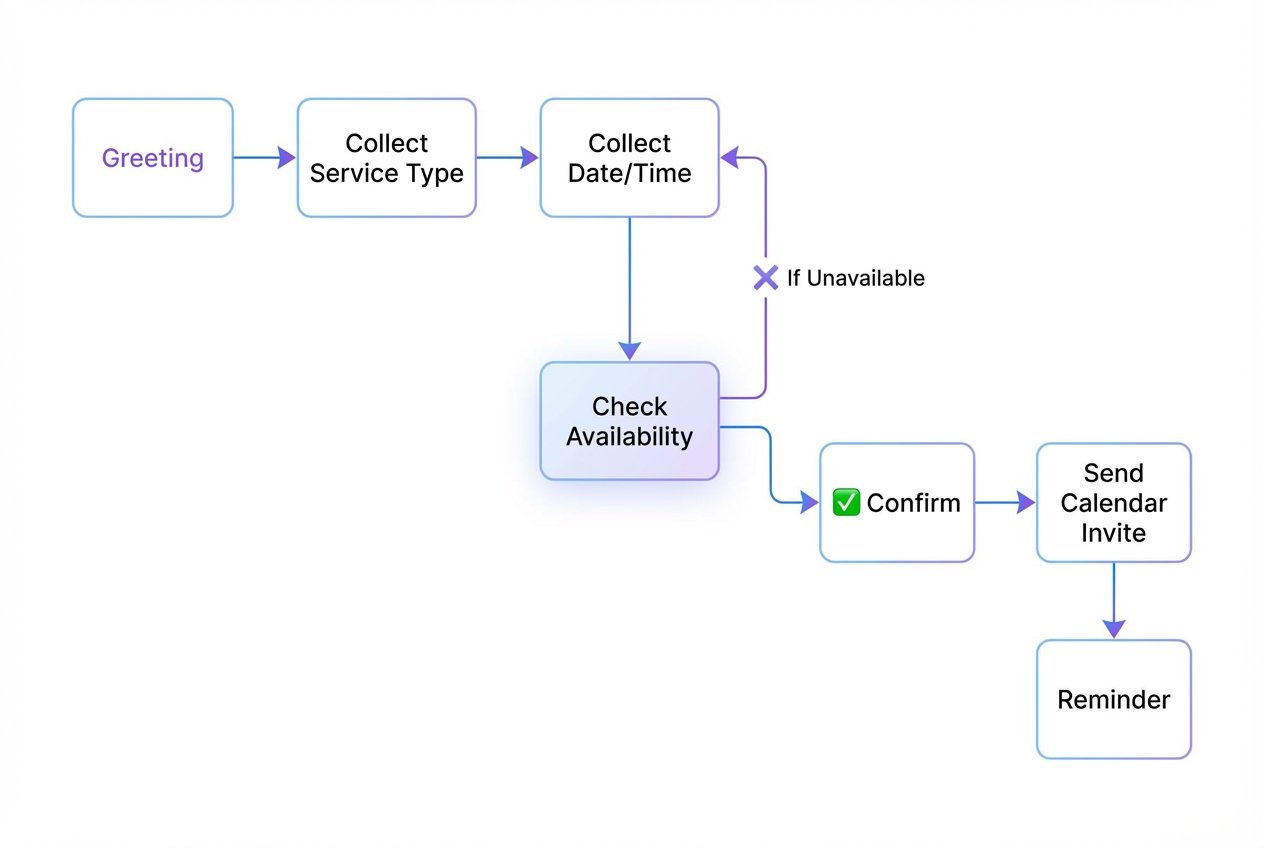
Step 1: Define the conversation outcome
Treat your booking chatbot as a purpose-built flow with a clear finish line. If the customer reaches that finish line, a real appointment exists in your system, and both sides know what happens next.
Pick one primary outcome:
- Book a new appointment: Move a new lead from intent to a confirmed time slot on the right calendar.
- Reschedule an appointment: Verify the existing booking, release the old slot, and confirm a new one under your reschedule rules.
- Cancel an appointment: Confirm identity, apply your cancellation policy, and reliably free capacity.
- Join a waitlist: Capture contact details and preferences so you can fill openings without manual outreach.
Then define what "done" means.
- Done: Appointment is confirmed, customer receives confirmation, and your calendar reflects the booking.
- Not done: Customer says "thanks" but no event exists, or the event exists without the customer's contact details.
Step 2: Turn your booking rules into decision points
This is where most bots fail. They ask questions, but they do not enforce constraints.
Build your decision points explicitly:
- Service selection: Map customer wording ("haircut", "trim", "fade") to a service.
- Location selection: If you serve multiple locations, make it mandatory.
- Time constraints: Enforce lead time and business hours.
- Capacity constraints: If a slot can hold only one booking, lock it.
If you cannot express a rule as "if X, then Y," it is probably too fuzzy to automate.
Step 3: Design the minimum booking flow
Start with fewer questions than you think, but make each one do real work.
Intent and service: Start by asking what they want to book. The goal is to translate casual language into a specific service (and sometimes a staff member) so you can calculate the correct duration and show valid availability.
Time preference: Ask for a day first, then narrow to a window like morning, afternoon, or evening. This reduces back-and-forth and helps you return actual slots instead of vague "we're available next week" responses.
Availability options: Offer 2 to 5 concrete time slots that match the rules you wrote down. The expected outcome is a clean, low-effort choice for the customer, and a lower chance they abandon the conversation.
Contact and consent: Confirm name and the best contact method (email or phone), then capture permission to send reminders. This step protects your follow-up and avoids the operational mess of "booked but unreachable."
Confirmation: Summarize the booking in a single message and ask if they want to add notes. Your expected outcome is clarity: the customer knows the exact time zone, location/link, and how to change the booking if needed.
Use short messages. Confirm details in one final summary.
Step 4: Implement availability checking
Availability is your truth serum. If it is wrong, the bot is worse than manual scheduling.
You have three common approaches:
- Read from a calendar: Query busy times for the staff calendar(s), then compute free slots.
- Read from a scheduling API: Let a scheduling product produce available times.
- Read from your own database: This is best when you have multi-resource constraints.
If you go the Calendly route, Calendly provides a Scheduling API aimed at building scheduling directly into apps, described in Calendly's developer documentation.
Step 5: Create the booking and send confirmations
Once the customer picks a slot, you need atomic behavior:
- Reserve: Create the appointment record (or a "pending" hold if you support it).
- Confirm: Create the calendar event and attach customer details.
- Notify: Send the confirmation message and any email/SMS.
Key confirmation elements:
- Time zone clarity: Always include time zone, especially for remote appointments.
- Location or link: Address for in-person or meeting link for remote.
- Change path: "Reply RESCHEDULE" or "Use this link to change."
Step 6: Handle edge cases with clean fallbacks
A booking chatbot earns trust by handling failures gracefully.
- No availability: Offer nearest alternatives, a waitlist, or a callback request.
- Ambiguous answers: Ask one clarifying question, then present choices.
- Multiple intents: If the user asks two things, answer briefly then steer back to booking.
- Human handoff: Provide a clear escalation route for VIP customers and complex cases.
When you do human handoff, include context:
- Customer summary: Service, preferred windows, urgency.
- Conversation transcript: Last 10 messages are usually enough.
- Suggested next action: "Offer next Tue/Thu after 3 PM."
Booking chatbot message templates that work
These are patterns you can adapt without turning your bot into a script.
- Greeting with intent capture: "I can book, reschedule, or cancel an appointment. What do you need?" This sets scope and reduces random chatting.
- Service disambiguation: "Is this for A, B, or C?" Keep options to three when possible to reduce cognitive load.
- Slot offering: "Here are the next times I can do: 2:00 PM, 3:30 PM, or 5:00 PM. Which works?" Concrete slots close faster than open-ended questions.
- Consent prompt: "Can I text appointment reminders to this number?" This keeps you aligned with messaging compliance expectations.
- Reschedule framing: "No problem. Do you want the earliest available, or a specific day?" This guides the user to a solvable constraint.
Add the admin panel your team actually needs
At minimum, build screens for:
- Upcoming appointments: Filter by staff, service, status, and date.
- Customer record: Past appointments, notes, no-shows, preferences.
- Availability overrides: Holiday closures, emergency blocks, capacity changes.
- Conversation audit: What the bot asked, what the customer answered, and why it chose a slot.
Testing your booking chatbot before launch
Avoid "checklist theater." You want high-signal testing that surfaces scheduling bugs.
Focus on scenarios that break systems:
- Time zones: Customer in a different time zone, staff calendar in local time.
- Back-to-back bookings: Ensure buffers are enforced.
- Reschedule collisions: Rescheduling should free the old slot and reserve the new slot.
- Cancellation rules: Enforce your policy consistently and log exceptions.
- Messaging compliance: Confirm opt-in and opt-out behaviors match your channel.
Tip: run 20 to 30 scripted test conversations that mirror real customer behavior.
Measure what matters and improve the bot weekly
If you are serious about bookings, measure the funnel.
- Booking completion rate: How many conversations end in a confirmed appointment.
- Drop-off points: Where customers stop responding. Often it is the consent step or too many questions.
- Time to confirmation: How many messages to reach a booking.
- Escalation rate: How often the bot needs a human.
- No-show rate by source: Identify channels that need stronger reminders or deposits.
When you find a weak spot, fix it with small changes:
- Shorten the flow: Remove any question that does not change routing, pricing, or availability.
- Offer better slots: Present earlier options, or align slot suggestions with service duration.
- Improve clarity: Replace "Choose a time" with "Pick one of these times."
Booking chatbot options compared
Different tools solve different slices of the problem. Use this table to choose based on what you are actually building.
| Option | Best for | Strengths | Trade-offs |
|---|---|---|---|
| Scheduling tool + embed (Calendly/Acuity) | Simple appointment scheduling | Fast setup, proven UX, fewer edge cases | Limited custom intake and internal workflows; customization can be constrained |
| Chatbot builder (ManyChat, etc.) + scheduling integration | Marketing-first chat flows | Strong campaign tooling, quick channel deployment | Can get brittle when rules, auditing, and custom admin needs grow |
| Custom development | Complex scheduling logic at scale | Full control over data, logic, and experience | Slowest path; requires ongoing engineering and maintenance |
| AI app builder + custom workflow logic | Founders who need speed and customization | Rapid iteration, tailored intake and admin tooling | Still requires clear requirements and thoughtful testing |
If you already feel the pull toward "we need an admin view," "we need routing rules," or "we need a portal," you are on the path to building a real app. In that world, consider QuantumByte's application builder - it's founder friendly interface facilitates the building of applications within minutes, tailored to each business' specific requirements.
Wrapping up: your booking chatbot blueprint
A booking chatbot is a small automation that quickly turns into a core operational system. Done well, it saves hours of admin work and removes friction for customers.
You now have:
- Clear definition: A practical baseline for what a booking chatbot should do, and what it should not.
- Build prerequisites: The booking rules, data model, and integration choices that prevent double-bookings and messy reschedules.
- Step-by-step build path: A build approach from flow design to availability checks, confirmations, and fallbacks.
- Channel constraints: The messaging realities that matter, especially for WhatsApp opt-in and message windows.
- Tooling trade-offs: A way to choose between scheduling tools, chatbot builders, custom development, and AI app builders based on your actual requirements.
Frequently Asked Questions
What is the difference between a booking chatbot and a scheduling page?
A scheduling page is a user interface for picking a time. A booking chatbot can qualify the lead, apply business rules, choose the right service or staff member, and handle reschedules and cancellations conversationally.
Can a booking chatbot book into Google Calendar?
Yes. You can create and update events through the Google Calendar API. The core operation is creating an event using events.insert, described in the Google Calendar API documentation for events.insert.
Do I need WhatsApp opt-in for a booking chatbot?
If you message customers on WhatsApp, you must obtain opt-in before messaging. Meta documents the requirement and supported methods in its guide on getting opt-in for WhatsApp Business messaging.
How do I prevent double-bookings?
Use a single source of truth for availability, create bookings atomically (reserve then confirm), and log every change. If you support holds, ensure they expire and release slots automatically.
Should I build this with a chatbot tool or an app builder?
If your flow is marketing-first and simple, a chatbot tool can work. If you need custom intake, routing rules, internal dashboards, or a client portal, you are building software, and an app builder approach is usually the faster and more maintainable path.
How long should a booking chatbot conversation be?
As short as possible while still enforcing your rules. Aim to collect only what changes availability, routing, or policy enforcement, then confirm the booking and stop.