
Dispatch chaos costs you twice: angry customers on the phone and wasted technician hours on the road. The right HVAC dispatch software turns that mess into a repeatable system. You book faster, route smarter, and scale without hiring more office staff every time you add a truck.
What HVAC dispatch software should do
At its core, HVAC dispatch software is field service management (FSM) software built for HVAC teams. It helps you schedule jobs, assign technicians, and keep the day moving. Salesforce's overview of field service management is a useful baseline if you want your team aligned on what FSM covers.
Strong HVAC dispatch software should deliver five outcomes.
-
Capture demand fast: Turn calls, web forms, and maintenance requests into jobs with the right details (address, equipment type, urgency, warranty, and notes) so nothing gets lost in a sticky-note pile.
-
Prioritize what matters: Separate no-heat emergencies from tune-ups, and make that priority visible so your team dispatches with intent.
-
Build a schedule that survives reality: Create a plan that can handle cancellations, parts delays, and surprise overtime without collapsing by noon.
-
Assign the right tech, not just any tech: Match by skill, certification, location, and availability so first-time fix rate goes up.
-
Close the loop: Convert job completion into invoices, photos, notes, and follow-ups so you get paid faster and customers come back.
If your current tool does "calendar scheduling" but not the rest, it is closer to a digital whiteboard than a true dispatch system.
How HVAC dispatch software works in practice
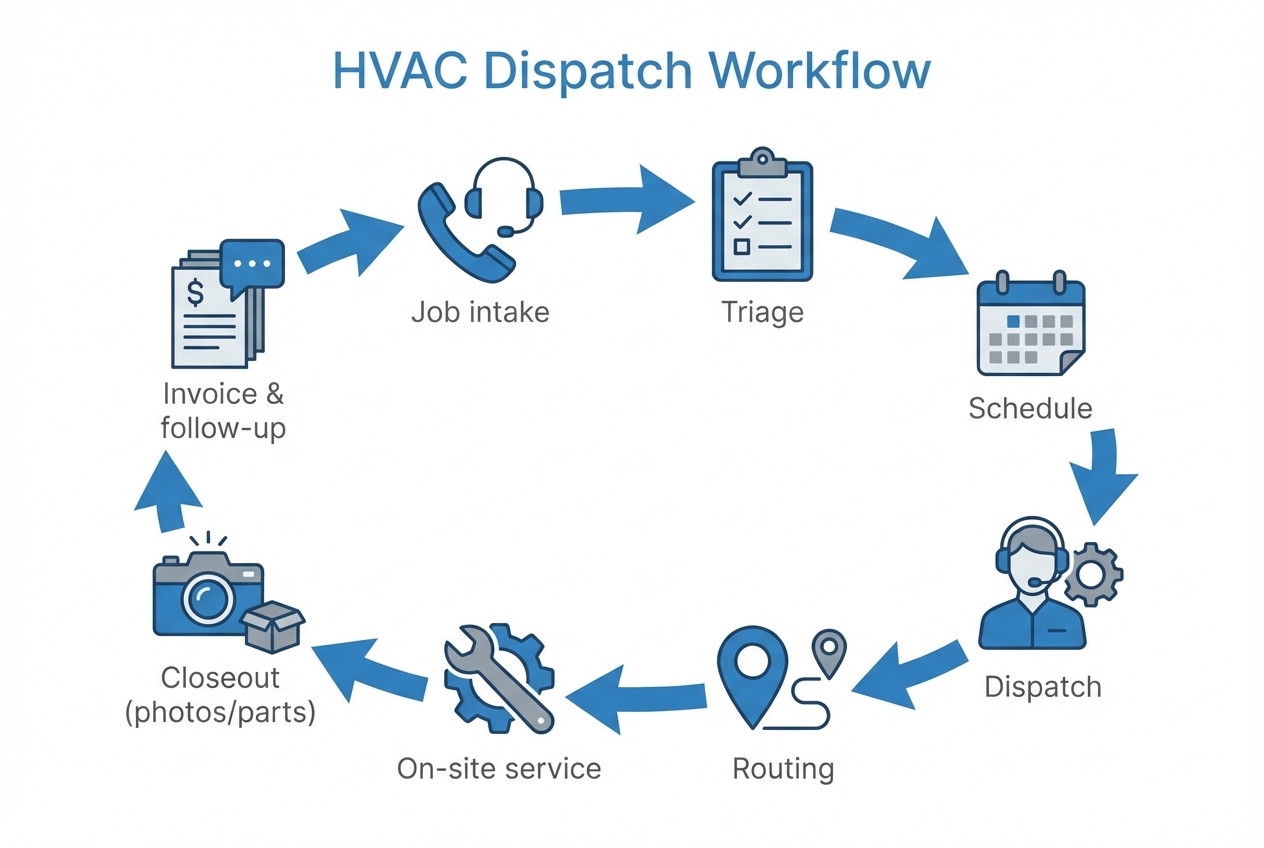
A practical dispatch system follows a simple loop.
- Job intake: A request comes in and becomes a job with structured fields.
- Triage: You set priority, time window, and whether it needs a specific skill.
- Scheduling: You place the job into a day and time slot.
- Dispatch: You assign a technician (and sometimes a helper).
- Routing: You reduce drive time and deadhead gaps.
- Execution: The tech updates status, captures photos, and logs parts used.
- Billing and follow-up: The office invoices, collects payment, and triggers a review request or maintenance reminder.
NetSuite's guidance is not HVAC-specific, but the practical tips map well to service businesses. Their article on dispatching field service techs is a strong reference for triage, scheduling, and routing.
Build vs buy vs hybrid for HVAC dispatch software
You have three realistic paths. The best choice depends on how unique your workflow is and how fast you need to move.
| Approach | Best for | Pros | Cons |
|---|---|---|---|
| Buy off-the-shelf FSM | Common workflows, fast rollout | Quick setup, mature mobile apps, proven billing features | You bend your process to the tool, custom logic can get expensive or impossible |
| Build custom dispatch | Unique service models, complex rules, multi-branch ops | Exact-fit workflow, competitive advantage, your data stays structured for analytics | Requires product thinking, integrations, and ongoing ownership |
| Hybrid (start bought, extend custom) | Most growing HVAC shops | Speed now, customization where it counts (intake rules, scheduling logic, dashboards) | Requires clear boundaries to avoid two sources of truth |
If you are weighing custom work, QuantumByte's guide on when to build vs buy can help you spot the signs that your dispatch process has outgrown a generic tool.
How to choose HVAC dispatch software that will not break at 30 calls a day
Before you compare vendors, define what "good dispatch" means for your business. The fastest way is to turn your pain points into clear requirements.
Start with your workflow, not features
Write down how a job moves today, from call to payment. Then circle every point where you lose time or create rework.
-
Call handling and intake: Do you need caller ID lookup, service agreement lookups, or scripted questions for after-hours triage?
-
Scheduling rules: Do you dispatch by zone, by skill, by membership tier, or by promised arrival window?
-
Field updates: Do techs need offline mode, photo capture, equipment details, or quote approvals?
-
Invoicing and payments: Do you need deposits, financing links, card-on-file, or batch invoicing?
Decide what data must be structured
Dispatch falls apart when key details live only in free-text notes. At minimum, plan structured fields for:
-
Customer and site: Name, address, access notes, preferred contact method.
-
Equipment: Unit type, brand, model, serial, install date, warranty status.
-
Job classification: Emergency vs routine, maintenance plan, callback, estimate-only.
-
Parts and labor: Common parts used, labor codes, and what triggers a second trip.
Make mobile experience a non-negotiable
If technicians hate the app, they will update jobs at the end of the day. That leaves dispatch blind.
-
Fast status changes: En route, on site, completed, needs parts.
-
Photos and notes: Proof of work and context for future calls.
-
Customer messaging: Simple "on the way" updates reduce inbound calls.
Treat security as a feature
Dispatch systems store addresses, access notes, and sometimes payment data. Your baseline should include role-based access, audit logs, and secure defaults.
If you are building a web app, the Open Worldwide Application Security Project (OWASP) Top 10 is a widely used starting point for common web security risks. OWASP's Top 10 overview is a clear place to align your team on what can go wrong.
How to implement HVAC dispatch software step by step
Implementation goes smoother when you treat it like an operations upgrade. Make the process decisions. Clean the data. Train in short loops.
1) Map the dispatch process you want to run
Aim for one page. You want clarity, not perfection.
-
Define the intake questions: What do you always need to know before scheduling?
-
Define triage rules: What counts as emergency, and who approves exceptions?
-
Define job types: Maintenance, repair, install, inspection, warranty, callback.
Outcome: a shared dispatch playbook your team can follow.
2) Build a clean data model before you migrate anything
A data model is simply "what objects exist and how they relate." For dispatch, that usually includes customers, sites, equipment, technicians, jobs, job statuses, and invoices.
Outcome: fewer duplicates, cleaner reporting, and less confusion in the field.
3) Set roles and permissions early
Do not wait until go-live to decide who can edit schedules, discount invoices, or view customer lists.
-
Dispatcher: Can assign, move, and reprioritize jobs.
-
Technician: Can update assigned jobs, log parts, and upload photos.
-
Manager: Can override, view performance dashboards, and approve exceptions.
-
Accounting: Can invoice, reconcile payments, and run tax reports.
Outcome: fewer accidental changes and better accountability.
4) Set up the dispatch board and schedule views
Your dispatch board is your control center. It should answer three questions fast: what is unassigned, what is at risk, and who is available.
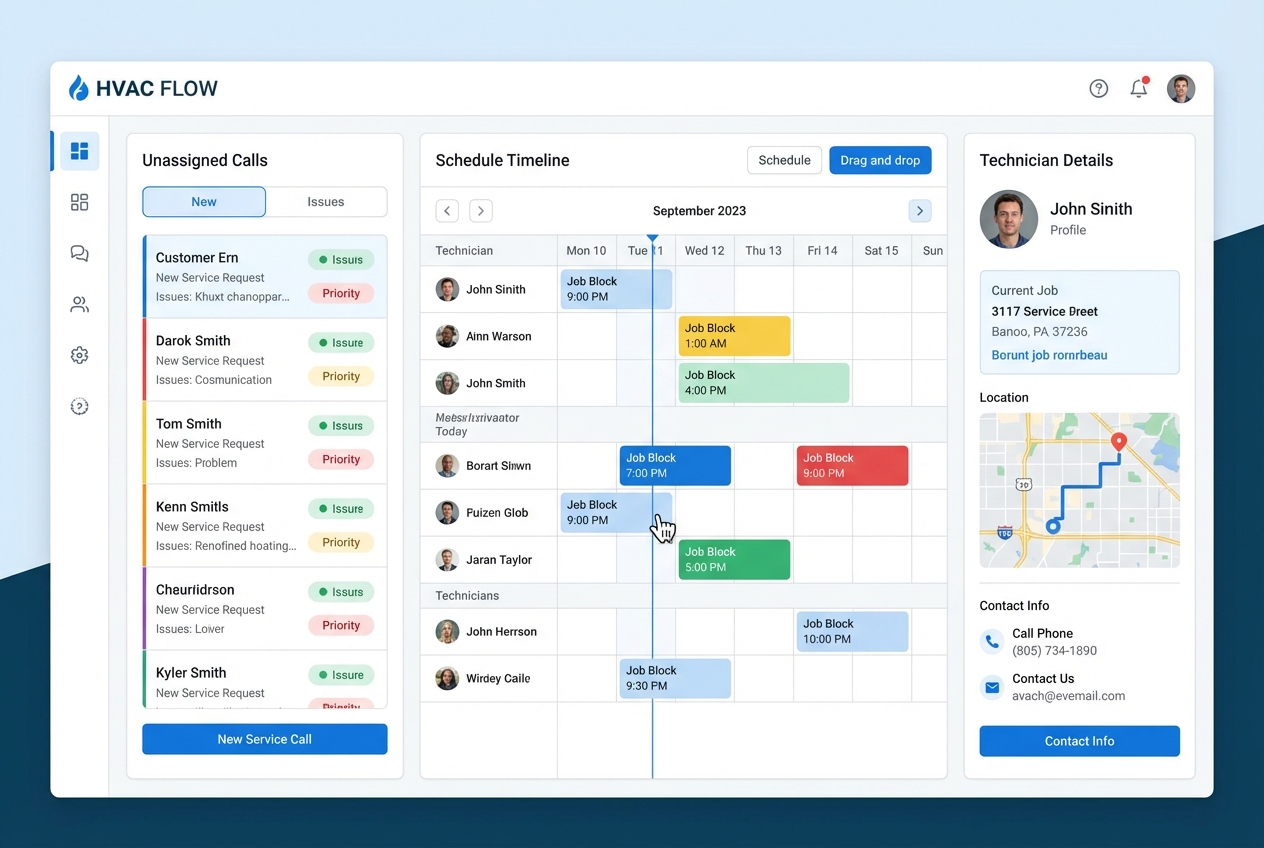
Configure:
-
Unassigned queue: New requests waiting for triage.
-
Day view timeline: Drag-and-drop jobs into time windows.
-
Tech availability: Paid time off (PTO), on-call rotations, skill tags.
Outcome: dispatchers stop searching and start deciding.
5) Add routing support that fits your operation
If you dispatch more than a few techs, routing becomes a real lever.
-
Cluster by area: Reduce drive time and late arrivals.
-
Respect time windows: Protect promised arrival windows, especially for maintenance plans and priority customers.
-
Handle re-optimization: When a priority call comes in, your schedule should adapt without guesswork.
If you are building custom routing, Google's Route Optimization Application Programming Interface (API) overview is a useful reference for how modern routing systems think about objectives, constraints, and time windows. See Google's Route Optimization API overview.
Outcome: fewer windshield hours and more billable work.
6) Integrate the essentials, but avoid integration addiction
Integrations help when they remove double entry. They hurt when they create multiple sources of truth.
Prioritize:
-
Communications: Call tracking, SMS confirmations, "tech en route" updates.
-
Accounting: Invoices and payments flowing to your accounting system.
-
Inventory basics: Parts used and reorder triggers, even if lightweight.
Outcome: your office stops reconciling five tools at 7 p.m.
7) Train in short loops and redesign the parts that fail
Training works best when it mirrors real days.
-
Dispatcher drills: Practice a morning rush, a no-show, and an emergency add-on.
-
Tech drills: Start job, add photos, mark needs-parts, complete invoice notes.
-
Exception drills: Callback handling, warranty rules, and reschedules.
Outcome: fewer workarounds and higher adoption.
8) Go live in phases, then tighten the system
Start with one branch, one service line, or one crew for a week. Fix friction fast. Then roll out.
Outcome: controlled change instead of a company-wide scramble.
How to build custom HVAC dispatch software without waiting months
If you are productizing a niche HVAC workflow or running a fast-growing service operation, custom dispatch can unlock leverage. The key is to build the smallest version that runs your real day.
Write a spec your future self will thank you for
Do not start with "build me HVAC dispatch software." Start with clear inputs and outputs.
-
Define the screens: Intake, dispatch board, technician mobile view, job detail, invoice summary.
-
Define status rules: What changes when a job moves to "en route" or "needs parts."
-
Define notifications: What triggers SMS, internal alerts, or manager approvals.
Outcome: a build plan that is easy to estimate, test, and improve.
Use an AI app builder for the first 80%, then bring in experts for the edge cases
This is the fastest path when you want speed but still need real operations fit.
-
Rapid prototyping: Turn requirements into screens, data tables, and workflows quickly so your team can test with real calls.
-
Expert finishing: Add the hard parts later, like deep integrations, tricky permissions, multi-branch logic, and messy data cleanup.
If you want to spec your system in a way an AI builder can actually build, QuantumByte's guide on AI app builder prompts is a practical reference.
Outcome: a working prototype you can validate in the field before you invest in every edge case.
If you want to build a dispatch prototype right away, you can easily create a "Dispatch MVP" with QuantumByte with your intake form, dispatch board, and technician mobile flow.
Price and scope the build like an operator
Custom software is a system you improve over time. Plan it in phases so you ship value early.
-
Start with a Phase 1 MVP: Intake, scheduling, assignment, status updates, and basic reporting.
-
Phase 2 adds leverage: Routing optimization, advanced triage rules, customer messaging automation.
-
Phase 3 adds advantage: Predictive maintenance triggers, membership growth flows, and analytics.
Outcome: a roadmap that protects cash flow while still moving you toward a defensible system.
Metrics that prove your dispatch system is working
You do not need 40 dashboards. You need a few numbers that reflect customer experience and operational flow.
-
Time to schedule: How long it takes from inbound request to confirmed appointment.
-
On-time arrival rate: Whether your promised windows match reality.
-
First-time fix rate: Whether the right tech and right info were dispatched.
-
Jobs per tech per day: A practical throughput measure that highlights routing and gaps.
-
Callback rate: A quality signal that often points to intake, triage, or job notes.
Once you can see these reliably, you can tune dispatch as a system instead of managing it like a daily fire drill.
Common mistakes to avoid when rolling out HVAC dispatch software
These are the failure modes that quietly kill adoption.
-
Trying to migrate every historical record: Move what you need to operate. Archive the rest.
-
Leaving statuses vague: If "in progress" means five different things, dispatch cannot manage risk.
-
Ignoring the technician's workflow: If updates take too many taps, data will arrive late or not at all.
-
Letting exceptions become the process: Define who can override rules and how those overrides get reviewed.
Turning dispatch into a scalable advantage
HVAC dispatch software is not just a tool. It is a commitment to clarity in how work flows through your business.
You covered what dispatch software must do, how it works day to day, and how to choose a system that holds up under real call volume. You also walked through a phased implementation approach, plus a practical way to build custom dispatch without waiting months.
Frequently Asked Questions
What is HVAC dispatch software, exactly?
HVAC dispatch software is a scheduling and coordination system that helps your office intake service requests, prioritize them, assign the right technician, reduce drive time, and track job completion through invoicing and follow-up.
Is HVAC dispatch software different from field service management software?
Field service management (FSM) is the broader category that includes dispatch plus inventory, customer communication, mobile field workflows, and reporting. HVAC dispatch software is often an HVAC-focused FSM tool or a dispatch-first subset of FSM.
When should I build custom HVAC dispatch software?
Build custom when you have dispatch rules that off-the-shelf tools cannot handle well, like strict service zones, membership tiers, unusual pricing logic, multi-branch routing, or specialized approvals. It also makes sense when dispatch is a core differentiator you want to own.
What features matter most for a small HVAC business?
Start with fast intake, a clear dispatch board, technician mobile updates, customer notifications, and a clean handoff to invoicing. Advanced analytics and heavy automation only help after the basics are solid.
Can I start with a prototype before replacing my current system?
Yes. A controlled prototype lets you validate your data model and workflow with one team before a full rollout. This reduces risk and makes training feel real.
How long does it take to implement dispatch software?
Some off-the-shelf tools can be configured quickly, but the real timeline depends on process alignment, data cleanup, integrations, and training. A phased go-live often beats a big-bang switch because you fix friction early while protecting customer experience.