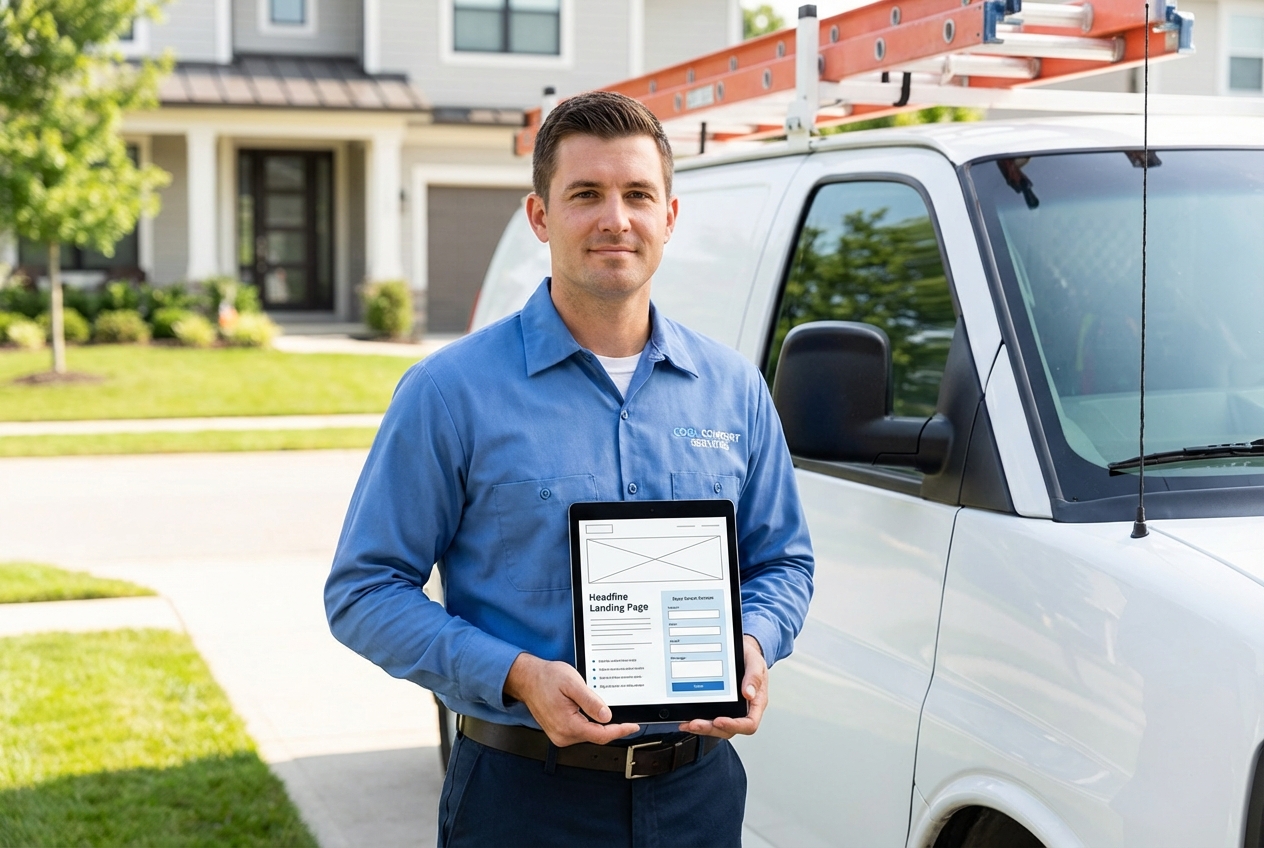
You do not need a "pretty" website. You need an hvac landing page that turns local search and ad clicks into booked calls, with enough trust signals that a homeowner feels safe hiring you today.
This guide shows you how to build one that converts on mobile, tracks every lead source, and plugs cleanly into scheduling and dispatch so you do not lose jobs to slow follow-up.
What an HVAC landing page must do
An hvac landing page is a single-purpose page designed to get one action from one visitor segment (usually a call or a booked appointment). It is not your entire website.
A strong HVAC (heating, ventilation, and air conditioning) landing page does three jobs fast:
- Match intent: A person searching "AC repair near me" should land on an AC repair page, not a generic homepage.
- Remove uncertainty: Licenses, insurance, reviews, pricing approach, and availability answer the "can I trust you?" question.
- Reduce friction: One clear call to action, a short form, and tap-to-call on mobile make it easy to book.
If you want a deeper view of how operational follow-up affects conversion, the lead-handling workflow matters as much as the page itself. The dispatch perspective in our guide on HVAC dispatch software is a good companion read.
Step 1: Choose one conversion goal and one audience
Most HVAC landing pages underperform because they ask visitors to do five things (call, email, request a quote, join a newsletter, browse services) and do none of them well.
Start with a single primary conversion goal:
- Calls now: Best for emergency AC repair, no-cool calls, weekend service.
- Booked appointment: Best for tune-ups, maintenance plans, non-urgent repair, installation consults.
- Estimate request: Best for replacement leads when you want to qualify before scheduling.
Then lock the audience:
- Emergency repair: People in pain, speed matters, "today" and "now" language works.
- Seasonal tune-up: People planning ahead, incentives and reminders work.
- Replacement: People shopping, financing and proof (warranties, certifications) work.
A practical way to keep this disciplined is to write one sentence:
"After clicking this page, the visitor should ____."
If you cannot finish that sentence with one action, your page is not specific enough.
Step 2: Pick the right page type for the traffic source
Your hvac landing page should change depending on where the click came from.
Local search (SEO)
Organic visitors typically compare 2 to 4 options. They want proof, service areas, and clarity.
Build a location-intent page:
- Service + city: "AC Repair in Mesa"
- Service area coverage: Neighborhood list and map
- Local proof: Reviews mentioning the city, local licensing information
Paid ads (Google Ads, Local Services Ads)
Paid traffic is expensive. Your page must be tight.
Build an offer-intent page:
- One offer: "$79 diagnostic fee" or "Same-day service slots"
- One path: Call or booking, not both equally
- Message match: The headline should repeat the promise from the ad
Referral (Google Business Profile, Nextdoor, Facebook)
Referral traffic is trust-forward. Lead with social proof and availability.
Build a proof-intent page:
- Review highlights: Specific, recent, and relevant
- Credentials: Licensed, insured, background-checked techs
- Fast contact: Tap-to-call and short form
Step 3: Write above-the-fold copy that gets the click or call
Above the fold means what a visitor sees before scrolling on a phone. Treat it as your decision window.
Include these elements, in this order:
- A direct headline: "AC Repair Today in [City]" beats clever slogans.
- A short subheadline: Clarify who you help and what happens next.
- One primary call to action: "Call Now" or "Schedule Service."
- Trust anchors: License, insurance, rating, and a short guarantee.
Here are copy blocks you can adapt.
Headline formulas
- Service + speed + location: "Same-Day AC Repair in Phoenix"
- Service + reassurance: "No-Cool? We Diagnose and Fix AC Issues Fast"
- Replacement: "AC Replacement Consults With Financing Options"
Subheadline examples
- Immediate availability: "Talk to a licensed technician, confirm pricing, and get the next available appointment in minutes."
- Quality assurance: "Upfront diagnostics, clear options, and clean work. Serving [City] and nearby neighborhoods."
Call to action rules
- One primary action: If you want calls, make booking secondary.
- Make it specific: "Schedule Service" is clearer than "Submit."
- Reduce anxiety: Add microcopy like "Response in 10 minutes during business hours." Only promise what you can reliably meet.
Step 4: Use a proven HVAC landing page layout that converts on mobile
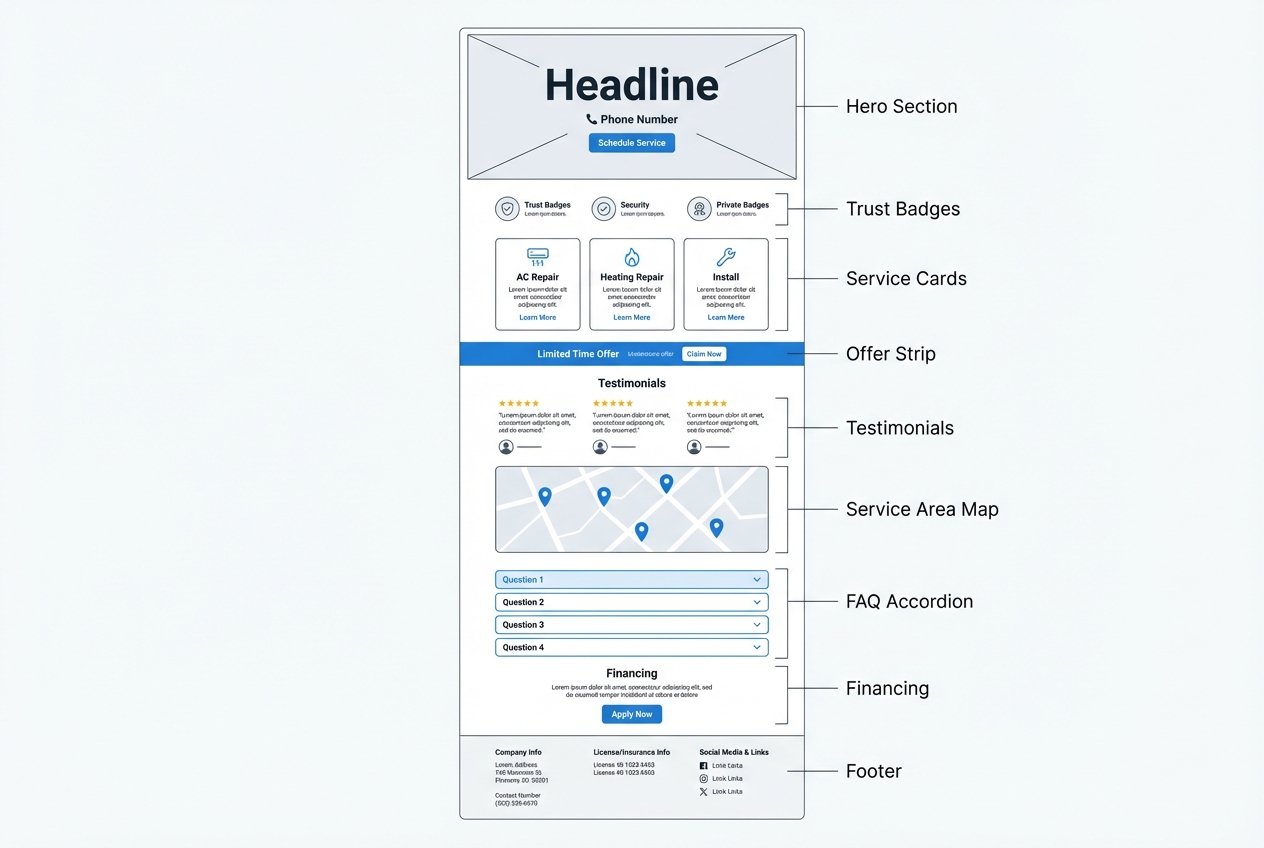
A mobile-first layout is not optional. Google uses mobile content for indexing and ranking under mobile-first indexing, and most HVAC leads arrive on phones.
Use this structure as your default:
- Hero block: Headline, subheadline, primary call to action, tap-to-call, and one trust line.
- Trust row: Rating, review count, "licensed and insured," and any certifications you can legitimately display.
- Service cards: 3 to 6 cards that match your intent (AC repair, heating repair, maintenance, installation).
- Offer strip: A single, clear offer (diagnostic fee, seasonal tune-up, same-day slots).
- How it works: 3 steps, simple language.
- Testimonials: Specific and recent.
- Service area: Short list plus a simple map image.
- Frequently asked questions: Objection handling.
- Financing and warranties (if relevant): Keep it factual.
- Footer: License number (where applicable), insurance note, address, and contact.
What to keep "sticky" on mobile
Sticky elements help, but only if they do not block content.
- Sticky call button: Use a phone icon and "Call" label.
- Sticky schedule button: Only if booking is your primary goal.
- Avoid sticky chat popups: Too many overlays reduce trust and can hurt usability.
Step 5: Design the form and booking flow to reduce friction
If you want booked jobs, your form should capture only what dispatch needs while making it effortless for a homeowner to request service.
Aim for the smallest set of fields that still lets you dispatch correctly.
A high-converting HVAC form (minimum)
- Name: The customer’s full name.
- Phone number: The best number to call or text for confirmation.
- Address or ZIP code: Where service is needed, used to confirm coverage and route the job.
- Issue type: A short dropdown to route and prep the technician, like "No cool," "Strange noise," "Maintenance," or "Replace system."
- Preferred time window: A simple availability choice such as morning, afternoon, or evening.
Helpful friction reducers
- Instant confirmation: After submit, show "We received your request" and the next step.
- Spam protection without pain: Use modern bot detection that does not force puzzles.
- Clear expectation setting: Tell them whether you will text, call, or email.
Call-first vs book-first
Choose one based on how your operation runs.
| Scenario | Best primary action | Why it works |
|---|---|---|
| Emergency repair, after-hours, no-cool | Call now | You can triage fast and allocate the right tech immediately. |
| High lead volume, predictable job types | Book appointment | Booking reduces back-and-forth and keeps the calendar full. |
| Replacement consults and high-ticket installs | Request estimate | Qualification prevents wasted site visits and improves close rate. |
Step 6: Add trust and proof without creating legal risk
HVAC is a high-trust purchase. People invite you into their home. Proof is not optional.
Trust elements that actually move decisions
- Licensed and insured: State it plainly. If your state issues a license number, include it.
- Photo of real technicians: Clean uniforms, real trucks. Avoid generic stock photos in the body content if you can.
- Clear service area: People want to know you serve their neighborhood.
- Reviews that mention outcomes: "Fixed our AC same day," "Clean install," "Explained options."
Testimonial and review rules to follow
If you publish reviews, do it cleanly. The Federal Trade Commission endorsement guides emphasize that endorsements must be truthful and not misleading, and material connections should be disclosed.
Practical implications for your landing page:
- Do not edit reviews to change meaning: Shortening is fine, altering is not.
- Disclose incentives: If you offered a discount for a review, disclose it.
- Use real customer context: First name and last initial is common. Do not invent names.
Step 7: Make your hvac landing page fast, trackable, and easy to improve
Speed and measurement are how you protect your ad spend and compound results.
Performance: what to check
Run PageSpeed Insights to audit mobile and desktop performance.
Also monitor user experience using Core Web Vitals, which focus on loading performance, interactivity, and visual stability.
Common HVAC landing page fixes that move the needle:
- Compress hero images: Use modern formats and right-size to mobile.
- Limit heavy scripts: Too many third-party widgets can slow the page.
- Keep the layout stable: Avoid late-loading banners that push content down.
Measurement: track every lead source
If you run multiple campaigns, UTM (Urchin Tracking Module) parameters are how you avoid guessing.
Google’s official guidance on building tracked URLs is here: Campaign URL Builder and UTM parameters.
A clean naming approach you can stick to:
- utm_source: google, facebook, nextdoor
- utm_medium: cpc, organic, referral
- utm_campaign: ac_repair_phoenix, tuneup_spring
Then connect conversions:
- Call tracking: Use a dedicated number per campaign when possible.
- Form conversions: Track thank-you page views or submit events.
- Booked appointments: Track the final confirmation event, not just the button click.
Step 8: Connect the landing page to scheduling and operations
A landing page that generates leads you cannot respond to quickly will still feel like it "doesn’t work." The leak is usually between the form and the first real contact.
If you want to tighten that loop, build your landing page as part of a simple intake system:
- Lead capture: Form submission creates a structured lead record.
- Auto-routing: Assign by ZIP code, service line, or availability.
- Customer messaging: Automatic text confirmation and reminders.
- Dispatch handoff: Put the job on the calendar with the right details.
If you are mapping this end-to-end, it helps to think beyond the page itself and treat it as a workflow. The playbook in how to automate business processes explains that shift well.
Where QuantumByte fits (when you want more than a page)
Website builders like WordPress, Webflow, Leadpages, and Unbounce can produce a solid landing page. The limitation shows up when you want the page to behave like software, not just content.
QuantumByte is useful when you want your hvac landing page connected to a lightweight internal tool: intake, scheduling requests, lead routing, and a simple dashboard for follow-up. Because it is an AI app builder, you can describe the exact flow you want and generate a working first version quickly, then refine it.
If you are a larger HVAC operator (multiple crews, multiple service lines, or multi-location), it can also be worth exploring enterprise-grade builds so permissions, routing logic, and reporting stay clean as you grow.
If you want prompts that produce predictable outputs, these AI app builder prompts are a strong starting point.
Step 9: Publish, test, and iterate without breaking what works
Once your page is live, improvements should be measured, not guessed.
What to test first
Start with changes that affect the decision moment.
- Headline: Clarity usually wins over cleverness.
- Offer framing: "Diagnostic fee applied to repair" vs "flat diagnostic fee."
- Primary call to action: Call-first vs book-first.
- Trust row: License and insurance line placement can matter.
How to test safely
- Change one variable at a time: Otherwise you will not know what caused the result.
- Wait for enough volume: Low traffic needs longer test windows.
- Protect the mobile version: Always review changes on a real phone.
A copy-and-paste HVAC landing page blueprint
Use this as a build spec you can hand to a developer, a marketing contractor, or an AI builder.
Page sections and what each must include
- Hero: Headline, subheadline, tap-to-call, one primary button, one trust line.
- Services: 3 to 6 cards aligned to intent, each with a one-sentence outcome.
- Offer: One offer, one sentence explaining eligibility, one call to action.
- How it works: 3 steps that describe what happens after they reach out.
- Proof: Reviews, photos, certifications you can verify.
- Service area: Cities, ZIP codes, or neighborhoods you actually cover.
- FAQ: Answers that handle price anxiety, timing, warranties, and guarantees.
- Footer: License information (where applicable), contact, hours, and policies.
A simple content checklist that prevents "thin" pages
- Outcome language: Write benefits people feel, not just services you offer.
- Local specificity: Cities and neighborhoods improve relevance and trust.
- Clear next step: Visitors should never wonder what happens after they click.
Building it fast without sacrificing control
If you are moving quickly, templates help. If you are scaling, flexibility matters.
A practical approach is to start with a fast first version, then layer in your real operational flow (lead routing, scheduling, confirmations). That is where tools built for founders can save weeks.
QuantumByte is designed around that founder workflow: create a working version quickly, then keep iterating. You can start from the main platform at QuantumByte and expand later if your needs become more complex.
When you are ready to turn your hvac landing page into a more complete system, select a basic pricing plan to get started.
Recap: what you should have after following this guide
You now have a clear method to build an hvac landing page that does not just "look nice," but reliably produces bookable jobs:
- Goal alignment: A single conversion goal aligned to one visitor intent
- Decision-window messaging: Above-the-fold copy that prioritizes speed and trust
- Mobile-first structure: A layout that supports calls or scheduling without friction
- Low-friction intake: A short form and booking flow that captures only what dispatch needs
- Compliant proof: Trust elements that reduce uncertainty while staying legally clean
- Measurement foundation: Performance and tracking so you can improve results over time
- Operational handoff: A plan for fast follow-up so leads do not die after submission
If you want to build the page and the intake workflow together, start with our basic pricing tier to get started.
Frequently Asked Questions
What is the best call to action for an HVAC landing page?
In our opinion, the best call to action is the one that matches your operational reality. If you can answer calls quickly and triage jobs, "Call now" usually converts best for repair intent. If you have disciplined scheduling and strong follow-up, "Schedule service" can reduce back-and-forth and increase booked appointments.
How long should an HVAC landing page be?
Long enough to remove doubt, short enough to stay scannable on a phone. For emergency repair, keep it tighter and prioritize contact. For replacement and installation, include more proof, financing information, and a clearer process.
Should I use a separate landing page for each service?
Yes, when you have different intent. AC repair, heating repair, maintenance, and replacement each have different objections and urgency. Separate pages help message match and improve conversion rates.
Do I need a separate landing page for each city?
Only if you can make it genuinely local. If you can include true service area coverage, local proof, and accurate information, city pages can work well. Avoid thin pages that just swap the city name.
What tools should I use to build an HVAC landing page?
If you only need the page, a website or landing page builder can work. If you need the page plus lead intake, routing, and simple internal workflows, an AI app builder can be a better fit. QuantumByte is strongest when you want a landing page connected to a practical back-office flow without waiting on a full custom build.
How do I track which ads and keywords are generating booked jobs?
Use UTM parameters for every campaign and connect events for calls, form submissions, and booked confirmations. Google’s documentation on building tracked URLs is a solid baseline: UTM parameters and Campaign URL Builder.