
You are probably chasing one of two outcomes with OpenClaw: a private AI assistant that actually takes actions for you, or a faster way to turn your workflows into software you can sell. OpenClaw can be worth it, but only when you accept what it really is: a powerful, self-hosted agent that you must operate like a security-sensitive system.
Is OpenClaw worth it for you?
In short, it depends on the type of user you are, and our perspective is that OpenClaw is worth using for tehnical operators, but not for non-technical users.
For technical operators, founders, and power users who want a self-hosted assistant inside chat apps, OpenClaw can be worth it if you are willing to do setup, sandboxing, and ongoing safety work. OpenClaw is explicitly positioned as an agent that runs on your machine and works through the chat apps you already use, which is the core value if you care about privacy and control.
The decision comes down to one question:
-
Do you want an agent to act for you? OpenClaw is a fit when you want autonomous actions (email, calendar, browser control) and you can manage risk.
-
Do you want software that runs your business? You may be better served by building a focused internal tool or micro-Software-as-a-Service (SaaS) instead of wiring an agent into your accounts.
What OpenClaw is and what it is not
OpenClaw is an open-source personal AI assistant and agent platform that runs on your own computer and can interact through messaging surfaces. It is designed to do real tasks like inbox and calendar work, not just chat.
What it is:
-
A self-hosted AI agent: You run it where you choose, including your laptop, homelab, or a virtual private server (VPS).
-
A chat-first control plane: The promise is that your assistant follows you into WhatsApp, Telegram, Slack, Microsoft Teams, and similar surfaces.
-
A tool runner: It can be configured to use tools like web fetch, browser control, shell execution, and file access.
What it is not:
-
Not a plug-and-play business app: It will not magically become your customer portal, billing system, or inventory workflow without you defining structure, guardrails, and data models.
-
Not "set it and forget it" automation: Any agent that can take actions can also take the wrong actions.
We have a full guide on how to use OpenClaw if you want a deeper dive into all the set-up and configuration options
The OpenClaw decision map
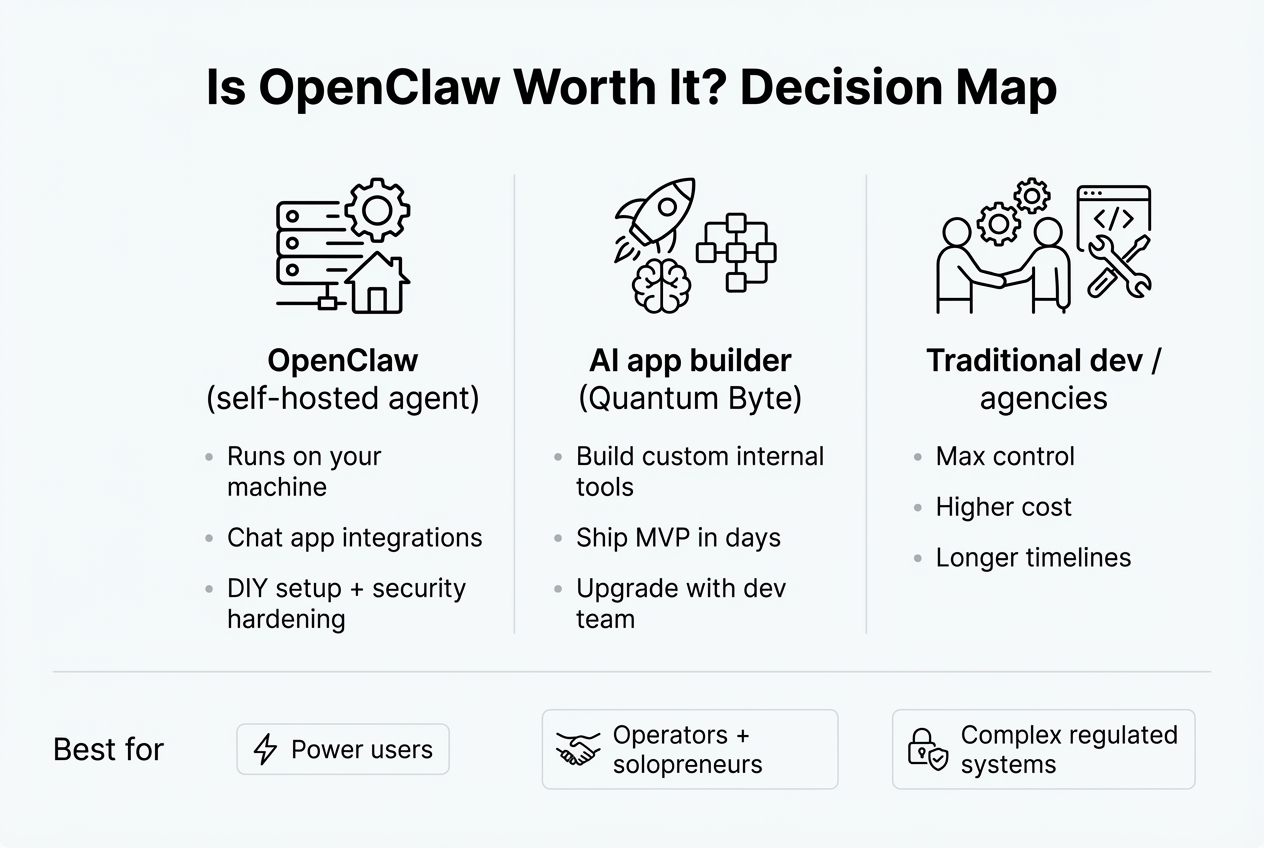
Use this as a simple filter:
-
If you are optimizing your own daily execution: OpenClaw can be a strong fit.
-
If you are trying to scale a service business: An internal tool that standardizes delivery usually beats an agent that "kinda helps."
-
If you are productizing expertise into a SaaS: You typically want repeatable workflows and a clean user experience, not a personal agent glued to your accounts.
Real benefits that make OpenClaw worth it
OpenClaw's value is real when your goal is high-leverage personal automation with privacy.
-
Local control and privacy: OpenClaw's core pitch is "runs on your machine," which keeps data, context, and keys closer to you than a typical software-as-a-service (SaaS) assistant.
-
Chat-based convenience: If you live in messaging apps, managing automation from chat can feel faster than opening dashboards.
-
Hackability: Being open source makes it easier to inspect, extend, and wire into your own systems.
A practical way to think about it: OpenClaw is a power tool. It is not a consumer appliance.
The tradeoffs you cannot ignore
OpenClaw is only "worth it" if you can live with these costs.
-
Setup and ops overhead: You are running software, not signing up for a hosted app. Expect configuration, updates, and troubleshooting.
-
Model and API costs: While OpenClaw is open source, you will likely bring your own model provider keys. Your bill depends on how often the agent runs and what models you choose.
-
Risk management becomes your job: An agent with access to browser sessions, email, or shell commands increases your blast radius.
Security and safety: the make-or-break factor
If you remember one thing, remember this: the more useful the agent is, the more dangerous it can be.
OpenClaw's own documentation stresses deliberate control over who can talk to the bot, where it can act, and what it can touch. It recommends using sandboxing and running a built-in security audit command to catch common misconfigurations.
Here is a grounded, security-first checklist you can actually use.
-
Lock down who can message it: Treat every chat surface as an attack surface. If it can receive untrusted content, it can be manipulated.
-
Sandbox execution: Run tools in a containerized sandbox where possible. OpenClaw documents Docker-based sandboxing and notes sandboxing is opt-in.
-
Be extremely careful with browser control: OpenClaw warns that enabling browser control can expose logged-in sessions if the agent uses your everyday browser profile.
-
Audit regularly: OpenClaw documents a security audit mode, including deep checks and optional fixes.
You also need to treat the "skills" ecosystem as untrusted software. A 2026 Semgrep security write-up cites findings that approximately 12% of audited ClawHub skills were actively malicious (386 out of 2,857) and argues you must sandbox the execution layer rather than assuming the model's reasoning is secure.
If you cannot commit to this level of discipline, OpenClaw is not worth it.
Who should use OpenClaw
OpenClaw is worth it when you match the tool to the user.
-
Power users who value privacy: You want a self-hosted agent because you do not want sensitive context sitting in a vendor's black box.
-
Operators who live in chat: You want workflows triggered and managed in chat, not in a separate admin user interface (UI).
-
Builders comfortable with guardrails: You are willing to spend time setting permissions, approvals, and sandbox boundaries.
Who should skip OpenClaw
You should skip OpenClaw if your real goal is scalable software, not a personal agent.
-
You need a repeatable business system: A client onboarding portal, job tracking, delivery checklists, and billing flows should be deterministic.
-
You want to sell software: Customers pay for consistent outcomes, not "my agent sometimes does it."
-
You cannot afford security mistakes: If a wrong action could leak credentials or move money, the upside has to be very high.
If your goal is scalable software, you should consider an AI app builder. These builders let's you easily describe what you want to build, iterate on it, and finally ship it to production.
OpenClaw vs alternatives: the practical comparison
If you are deciding where to invest time, compare by outcome, not hype.
| Category | OpenClaw | AI app builder + dev support (QuantumByte) | Traditional custom development |
|---|---|---|---|
| Primary outcome | Personal agent that takes actions in your tools | Custom apps that standardize workflows and can become products | Fully bespoke systems for complex requirements |
| Best for | Technical power users and automation tinkerers | Service businesses and solopreneurs productizing a workflow | Regulated, complex, long-lived systems |
| Setup burden | High (self-hosting, policies, sandboxing) | Low to moderate (you describe, iterate, publish) | High (spec, build, quality assurance (QA), deploy) |
| Security posture | You own the risk surface; must sandbox | Lower blast radius when apps are purpose-built | Depends on vendor and process; usually formal controls |
| Time to first value | Fast for personal automations if you can configure | Fast for minimum viable products (MVPs) and internal tools | Slowest path, but most controlled |
If your end goal is turning chaos into a scalable system, a focused app often beats an agent.
A better path when your real goal is scale
If you are a founder, OpenClaw might be a distraction when your bottleneck isn't typing speed; it is the lack of structured systems. Here are three software assets that compound over time.
-
A delivery operating system (OS) for your service: Turn your process into steps, forms, approvals, and dashboards so you can hire and delegate without quality dropping.
-
A client portal: Reduce back-and-forth, set expectations, and create a clean handoff between sales and delivery.
-
A niche micro-SaaS: Productize one painful workflow for one specific audience. Use these micro-SaaS ideas and micro-SaaS examples to pressure-test demand.
If you want to move fast without building something brittle, a better pattern is this: prototype with AI, then harden only the parts that actually affect revenue, trust, or scale.
That is exactly what QuantumByte is built for. Founders use it to turn messy workflows into real systems -- whether that's a delivery OS, a client portal, or a focused micro-SaaS. You can spin up the first version in minutes, then layer in engineering depth only where it matters.
When you are ready to turn a workflow into an app you can run or sell, find out more about QuantumByte's services here.
And if you want to sanity-check cost and risk before committing, this internal build vs buy framework makes the tradeoffs explicit.
If you do choose OpenClaw: a safe starter plan
You can reduce regret by narrowing scope.
-
Start with read-only workflows: Use it for summaries, drafts, reminders, and planning before giving it write access.
-
Create a "clean room" environment: Use separate accounts, a separate browser profile, and minimal permissions.
-
Sandbox from day one: Treat sandboxing as required, not optional, especially if the agent can execute commands or browse.
-
Avoid random skills: Only install skills you can review, and assume marketplaces will contain malicious or sloppy code.
-
Keep it boring: The best automation is predictable. Avoid giving it broad tool access "just in case."
Conclusion
OpenClaw is worth it when you want a self-hosted, chat-based AI agent and you are willing to operate it with serious security discipline. The official docs emphasize sandboxing, audit tooling, and reducing exposure, and third-party security research highlights why you should treat agent skills as untrusted code.
If your real objective is scaling a business or selling software, you will usually get more leverage by building a focused app that standardizes a workflow. If you want that faster path without months of back-and-forth, QuantumByte's model is designed for quick iteration and a clean handoff when you need deeper engineering.
Frequently Asked Questions
Is OpenClaw free
OpenClaw is open source and available via its public source link from the official site. In practice, you may still pay for model providers and any infrastructure you run it on.
Is OpenClaw safe to run on my main computer
It can be, but only with guardrails. OpenClaw's security documentation recommends sandboxing and calls out high-risk features like browser control if your browser profile has logged-in sessions. If you are unsure, start in a sandboxed environment or separate machine.
What is the biggest risk with OpenClaw
The biggest risk is giving an agent broad execution capability in a world full of untrusted inputs (emails, webpages, chat messages). Third-party security analysis also warns that skill ecosystems can include malicious code, so you should treat skills as untrusted software and enforce constraints at the execution layer.
Should I use OpenClaw to build a SaaS
Usually no. OpenClaw can help you automate your own work, but customers buy consistent workflows, predictable permissions, and stable product behavior.
If you are productizing a workflow, build an app with a clear data model and a user experience you control. As a starting point, outline the workflow steps, define the core objects (customers, projects, invoices, tickets), then decide which integrations are required versus "nice to have."