
You are trying to pick the right field service software without burning weeks on demos, migrations, and buyer’s remorse. This jobber vs housecall pro breakdown is for owner-operators and growing home service teams who need scheduling, dispatch, estimates, invoices, and payments to run cleanly in the real world.
Quick verdict: Jobber vs Housecall Pro
| Category | Jobber | Housecall Pro |
|---|---|---|
| Best for | Clean estimate-to-invoice workflows and a polished client experience | Faster “get started” feel for many small teams, strong focus on phone and booking workflows |
| Scheduling and dispatch | Strong core scheduling, route planning, and job management | Strong scheduling and dispatch, built for high job volume and fast booking |
| Automation | Strong reminders and workflow automation as you move up tiers | Strong customer communication and operational automation focus |
| Accounting and integrations | Broad marketplace via Jobber integrations | Strong QuickBooks positioning and common payments workflows |
| Pricing expectation (annual billing) | Starts lower at entry tier | Higher entry price, especially for solo |
| Bottom line | Pick Jobber if you want a lower-cost entry point and a very structured, “professionalized” workflow | Pick Housecall Pro if your business lives and dies by booking speed, call handling, and getting jobs onto the calendar fast |
Feature checklist for a service business
Use this checklist to pressure-test both products against how your business actually runs (not how the marketing video says it runs).
- Online booking and lead capture: If you rely on inbound demand, you want a frictionless way for customers to request service, pick time windows, and receive confirmations.
- Scheduling and dispatch: You need drag-and-drop scheduling, technician assignment, and a clear day view that does not collapse under reschedules and emergency calls.
- Estimates to invoices: Look for fast quote creation, customer approval flows, and one smooth handoff into invoicing so you do not retype line items.
- Payments: Card and bank payments should be easy for customers and easy for your office to reconcile.
- Customer communication: Automated texts and emails reduce no-shows and stop your team from spending all day on reminders.
- Job forms and checklists: Standardized on-site workflows protect quality (photos, notes, signatures, part usage) and reduce call-backs.
- Team permissions: The moment you hire, you need role-based access so technicians do not see payroll data and admin users do not accidentally edit job history.
- Reporting: You want visibility into revenue by service line, technician performance, and job profitability as you scale.
If you are still mapping the workflows you want to standardize, start by documenting what should be automated first using this automate business processes guide.
Workflow fit for contractors and agencies
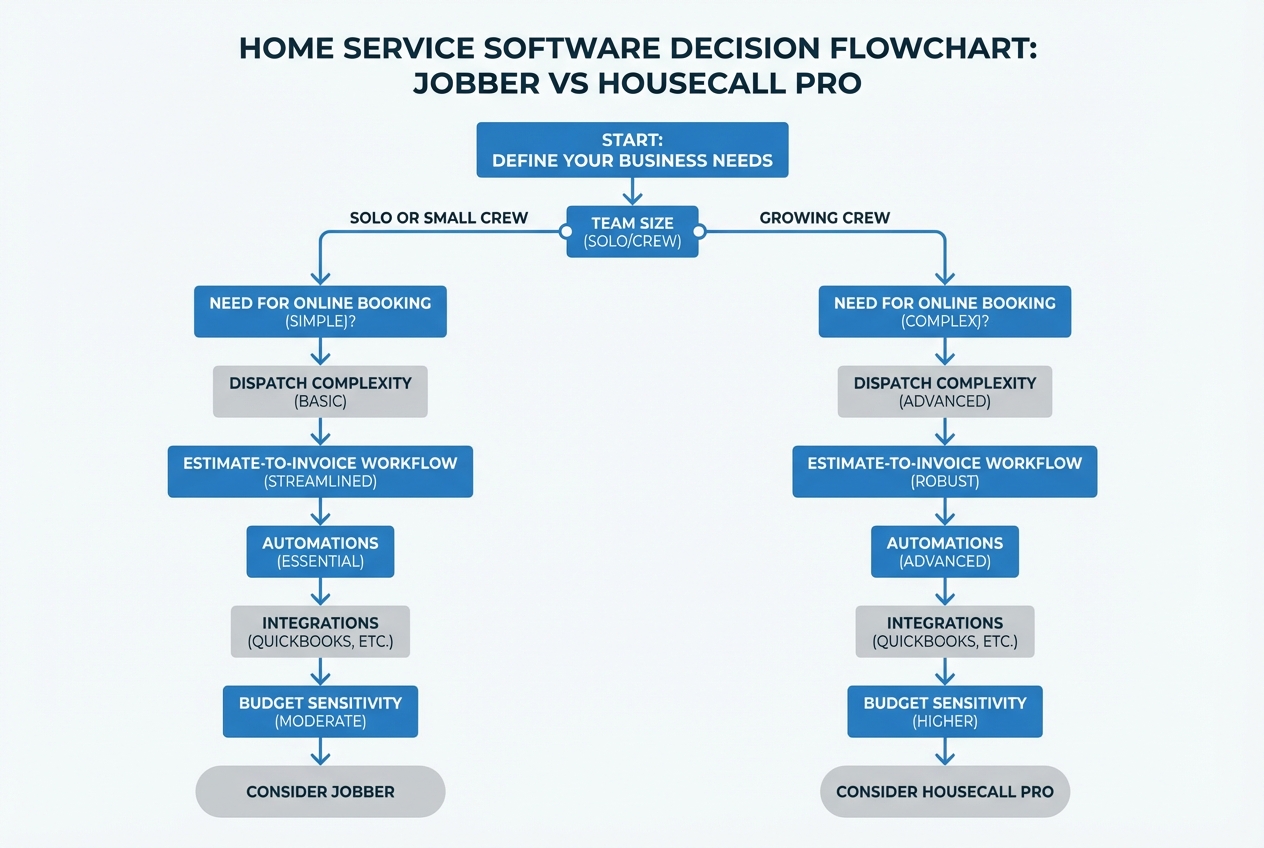
If you are a solo operator
- Jobber is usually the value pick: The entry plan starts lower and can cover the core admin loop: schedule, estimate, invoice, collect payment.
- Housecall Pro can still win if booking is everything: If most of your growth depends on customers self-booking quickly and you want heavier front-office assistance, Housecall Pro can justify the higher starting price.
If you run a small crew (2 to 8 users)
- Jobber fits teams that want a clean, repeatable process: Think maintenance plans, recurring service, and a consistent field checklist.
- Housecall Pro fits teams that run high job volume: If your office is constantly juggling calls, reschedules, and tight windows, the product direction tends to align with that kind of operational tempo.
If you are an agency or multi-brand operator
Neither platform is truly “custom software.” You can make them work, but you will feel the edges when you need things like:
- Multi-brand management: Multiple brands with different pricing rules tend to require separate workflows, reporting, and permissions that off-the-shelf tools only partially support.
- Dispatch constraints: Unusual dispatch rules (zones, compliance requirements, travel rules) can force manual decisions that do not scale with volume.
- Commercial billing complexity: Net terms, purchase orders, and multi-site approvals often create exceptions that are hard to standardize.
This is where teams often move toward building a lightweight internal layer, even if they keep Jobber or Housecall Pro as the system of record for scheduling.
For examples of how vertical workflows get opinionated, see pest control scheduling and routing software and equipment rental booking and inspections.
Integrations: CRM, accounting, payments, e-sign
Integrations are where “good enough” tools either become a reliable operating system or a daily reconciliation project.
Accounting
- Jobber: Jobber’s integrations marketplace highlights sync options for common accounting tools (including QuickBooks Online). This matters if you want invoices and payments to land cleanly in your books.
- Housecall Pro: Housecall Pro emphasizes its QuickBooks integration as a streamlined estimate-to-invoice-to-accounting path.
Payments
What to validate in a trial (for both products):
- Deposit collection: Can you take a deposit at booking or after estimate approval?
- Refunds and adjustments: Can the office issue refunds without a “call the owner” workflow?
- Reconciliation: Are fees and payouts visible enough that your bookkeeper is not guessing?
E-sign and approvals
Even if you do not need a formal “e-sign product,” you do need frictionless customer approvals. Your goal is simple: fewer “I never approved that” disputes and faster time-to-cash.
What this means in practice
If you live inside QuickBooks, prioritize the platform that:
- Invoice alignment: Matches your invoice structure (line items, taxes, discounts) so you are not rebuilding invoices manually.
- Payment posting: Posts payments in a way your accountant likes, including how fees, tips, and partial payments are recorded.
- Low cleanup overhead: Does not require constant manual cleanup when jobs get rescheduled, refunded, or adjusted.
If you are building custom workflows, use this AI app builder prompts guide to define data models and approval flows clearly before anyone builds or configures anything.
Pricing expectations and cost drivers
Pricing changes. Always confirm on the vendor’s current pricing page, and budget for add-ons like additional users, messaging, and marketing modules.
Plan snapshots (annual billing)
| Vendor | Plan | Price (monthly, billed annually) | Included users (as listed) | Best fit |
|---|---|---|---|---|
| Jobber | Core | $29/mo | 1 user | Solo operators getting organized |
| Jobber | Connect | $99/mo | 5 users | Small teams that need stronger workflows |
| Jobber | Grow | $149/mo | 10 users | Teams that want deeper operations and reporting |
| Jobber | Plus | $529/mo | 15 users | Larger teams that want premium add-ons |
| Housecall Pro | Basic | $59/mo | 1 user | Solo operators who want Housecall Pro’s approach |
| Housecall Pro | Essentials | $149/mo | Up to 5 users | Crews running more volume |
| Housecall Pro | MAX | $299/mo | Up to 8 users | Scaling teams with heavier operational needs |
Cost drivers you should model before you buy
- User seats: If you are hiring technicians, your per-user cost trajectory matters more than month-one pricing.
- Booking and communications volume: High message volume can expose hidden costs or plan limitations.
- Add-on modules: Marketing tools, phone handling, and premium support can move your effective spend meaningfully.
- Operational complexity: The more edge cases you have (commercial terms, multi-location, special dispatch rules), the more you will pay in workarounds, even if the subscription is “reasonable.”
Alternatives and competitors to consider
If neither product fits, these are common alternatives service businesses evaluate:
- ServiceTitan: A heavyweight platform for larger operations that need deep dispatch, sales, and reporting, and can support a bigger implementation.
- FieldEdge: A field service management (FSM) option often evaluated by teams that want tighter back-office workflows and service agreement handling.
- Service Fusion: A practical pick for many small to midsize service teams that want scheduling, estimates, invoicing, and customer management without moving upmarket.
- Kickserv: A simpler toolset that can work for smaller teams that prioritize basic job management and speed over advanced customization.
- Thryv: A broader small-business suite that combines scheduling and payments with marketing and customer communication tools.
The right alternative depends on what is breaking today: dispatch chaos, invoicing lag, low close rates, or back-office reporting.
Build vs buy: when you should consider Quantum Byte
If Jobber or Housecall Pro is 80% right, you do not need to rip it out. The common win is building a small, custom layer around your unique workflow.
This is the “build” use case we designed our platform for: turning your operations into a real app without starting from a blank canvas. You can build:
- Dispatch console: A dispatch view that matches your zones, travel rules, and service constraints so the office stops making “tribal knowledge” decisions.
- Technician app: A mobile workflow with your exact checklists, required photos, and required notes so quality does not depend on who is on the truck.
- Customer portal: A portal that fits your approval steps, billing terms, and follow-ups so you reduce friction and get paid faster.
- Internal KPI dashboard: A weekly operations (ops) dashboard that mirrors how you actually manage the business, not just what the software happens to report.
To scope this properly, start by translating your workflow into clear requirements using AI app builder prompts, then pressure-test build cost tradeoffs using software pricing tradeoffs.
For larger or multi-department operations, our enterprise platform is the right path when governance, unified data, and cross-functional workflows become non-negotiable.
Implementation timeline: what to expect
A clean rollout is less about the tool and more about sequencing.
Typical timeline for switching tools
- Week 1: Workflow mapping
- Define your job types, service areas, pricing rules, and required job form fields.
- Week 2: Data migration and setup
- Import customers, set up services, configure notifications, connect accounting.
- Week 3: Field rollout
- Train technicians on the mobile workflow, checklists, and photo requirements.
- Week 4: Back-office hardening
- Tighten permissions, fix edge cases, standardize invoice rules, finalize reporting.
How to avoid the most common failure mode
- Do not migrate everything at once: Move active customers and open jobs first.
- Pick one “golden workflow”: For example, estimate approval to invoice to payment. Make it perfect. Then expand.
If you decide to build a custom layer alongside your field service platform, the same sequencing still applies. Document the workflow first, then build the smallest layer that eliminates your worst bottleneck.
Wrapping up: which one should you choose?
If you want the simplest, most defensible decision:
- Choose Jobber when: You want a lower-cost starting point, a structured estimate-to-invoice workflow, and a polished customer experience that scales with a small team.
- Choose Housecall Pro when: Your growth depends on booking speed and front-office throughput, and you are comfortable paying more from day one to support that pace.
My stance: Jobber is the better default for most small service businesses because the entry price is lower and the core workflow is straightforward to standardize. Housecall Pro wins when your operation is booking-heavy and you need the product’s strengths to keep the calendar full.
When neither fits your workflow cleanly, that is usually the signal to build the missing layer instead of forcing your team into workarounds.
Frequently Asked Questions
Is Jobber cheaper than Housecall Pro?
Yes at the entry level, based on the vendors’ annual-billing pricing pages. Jobber’s Core plan starts at $29/mo billed annually, while Housecall Pro’s Basic plan is $59/mo billed annually.
Which is better for QuickBooks?
Both support QuickBooks workflows, but Housecall Pro positions QuickBooks more prominently via its QuickBooks integration. Jobber offers QuickBooks Online via its integrations marketplace. The practical answer is: test the exact sync behavior you need (invoice structure, taxes, payments) with your accountant.
Which is better for a multi-location service business?
Either can work early on, but multi-location and multi-brand complexity tends to expose limitations in any off-the-shelf tool. Many teams keep Jobber or Housecall Pro for scheduling, then build custom dispatch rules, reporting, or portals when the operation outgrows standard workflows.
Can I use Jobber or Housecall Pro and still build custom software?
Yes. A common pattern is: keep the field service tool as the core system, then build a lightweight internal app for your differentiators (routing rules, specialized forms, approvals, commercial billing logic).
Start building
If you have outgrown one-size-fits-all workflows, build the missing pieces instead of forcing your team into workarounds. We built our platform for founders and business owners who want speed without giving up control.
The key advantage is marrying customizability with speed: you can start from plug-and-play templates, then use natural-language prompting to reshape the app around how you actually sell and deliver service. We have seen non-technical founders go from idea to working app in minutes, and the same speed applies to field service workflows.
Start with the self-serve plans on our pricing to generate a working internal app from prompts and templates, then iterate as your operation scales.