
You want to ship software faster, without hiring a full team, and vibe coding looks like the shortcut. The problem is that the limitations of vibe coding show up the moment your app meets real users, real data, and real edge cases.
If you are a business owner trying to turn chaos into a clean internal system, or a solopreneur productizing expertise into a SaaS (Software as a Service), this guide helps you keep the speed without inheriting a fragile product.
-
Define vibe coding clearly: You will know what it is and what it is not, so you can choose it on purpose.
-
Spot the real failure points: You will learn where AI-generated code tends to break first in production.
-
Decide where it fits: You will get simple rules for when vibe coding is a great move and when it is risky.
-
Add production gates early: You will see a workflow that keeps momentum while improving reliability.
-
Ship with confidence: You will leave with a checklist you can run before real users touch the system.
Limitations of vibe coding
The upside is obvious - fast prototypes.
The catch is also obvious once you have shipped, you have a working screens before you have a working system.
A practical definition that matches how most teams use it is in Cloudflare's explainer on AI vibe coding.
Why vibe coding feels so fast
Vibe coding compresses the early phase of product work. The phase where you normally write boilerplate, wire up forms, and build basic CRUD (Create, Read, Update, Delete) flows.
That speed is real when:
-
Your scope is narrow: A small workflow app, a simple dashboard, or a lightweight automation tool.
-
Your data model is simple: Few entities, few relationships, little history, and no complicated permissions.
-
Your risk is low: Internal tools that can tolerate occasional bugs, or prototypes meant for learning.
This is exactly why many founders start with an AI app builder and only bring in engineers later.
The core limitations of vibe coding
The limitations of vibe coding are not about whether the app runs. They are about whether it keeps running, stays safe, and stays understandable as it grows.
Here are the constraints you should plan for from day one.
| Limitation | What it looks like in real life | What to do about it |
|---|---|---|
| Shallow system understanding | A change in one feature breaks two others because nobody truly understands the flow end-to-end. | Write a simple architecture note and keep it updated. Treat it like a map of your app. |
| Brittle edge cases | Works in the happy path, fails on odd inputs, time zones, retries, or partial data. | Add tests for the top failure paths before you add features. |
| Inconsistent patterns | Three different ways to validate input, log errors, or handle auth (authentication). | Define a small set of patterns and force the AI to follow them with a house rules prompt. |
| Debugging turns into prompt roulette | You keep re-prompting until it seems fixed, but the root cause stays hidden. | Reproduce issues with logs, isolate the failing function, then change the smallest piece. |
| Security blind spots | Unsafe serialization, weak secrets handling, missing validation, risky dependencies. | Run security checks and code review before production. Use OWASP guidance (linked below). |
| Performance surprises | Slow queries, N+1 database calls, bloated client bundles. | Add basic performance budgets and profiling before you scale traffic. |
| Hard-to-maintain codebase | You fear touching anything because it might collapse. | Refactor early. Small refactors are cheap. Large rewrites are brutal. |
| Integration complexity | Payments, email, CRM (Customer Relationship Management), accounting, and webhooks drift out of sync. | Lock down contracts, version your APIs (Application Programming Interfaces), and add monitoring. |
Where vibe coding shines and where it breaks
You will get the best outcomes when you treat vibe coding like a rapid drafting tool, not the full writing process.
Good fits:
-
Proof-of-concept MVPs (Minimum Viable Products): You want signal, not perfection.
-
Internal tools: Dashboards, trackers, and lightweight workflow apps.
-
Single-player SaaS: A niche product with limited roles and a simple data model.
Risky fits:
-
Apps with complex permissions: Multi-tenant SaaS, role-based access control, approval chains.
-
Systems that touch money or sensitive data: Payments, payroll, healthcare, identity.
-
Products that must pass audits: Compliance expectations push you toward documented controls.
If you are deciding between approaches, our guide on no-code vs vibe coding is a solid decision framework. The reality is that vibe coding often becomes a third path: faster than traditional builds, but still needing engineering discipline.
The hidden costs: security, compliance, and reliability
Speed is only a win if it does not create long-term drag. The biggest drag is risk.
Security risk is not theoretical
When people vibe code, they often accept output because it works. That is exactly how vulnerabilities slip through.
- AI-generated code can include weaknesses: A research study on Copilot-generated snippets found that 29.6% of the generated code snippets had security weaknesses in their dataset. Do not treat that number as universal, but treat it as a warning that looks fine is not a security guarantee.
Overreliance is a known LLM risk
The OWASP Top 10 for Large Language Model Applications calls out risks like insecure output handling and overreliance. Both map directly to the limitations of vibe coding, because the output is often executable code.
OWASP's Top 10 for LLM Applications is a practical checklist for what can go wrong when you connect an LLM to real systems.
You still need a secure software process
Vibe coding does not replace a secure development lifecycle. It only changes how the first draft is produced.
NIST's Secure Software Development Framework (SSDF) makes this simple: review human-readable code, and test executable code as part of building secure software. This practice is far from bureaucracy; it ensures your product remains safe rather than just being a cool demo.
A practical workflow to move from vibes to a shippable product
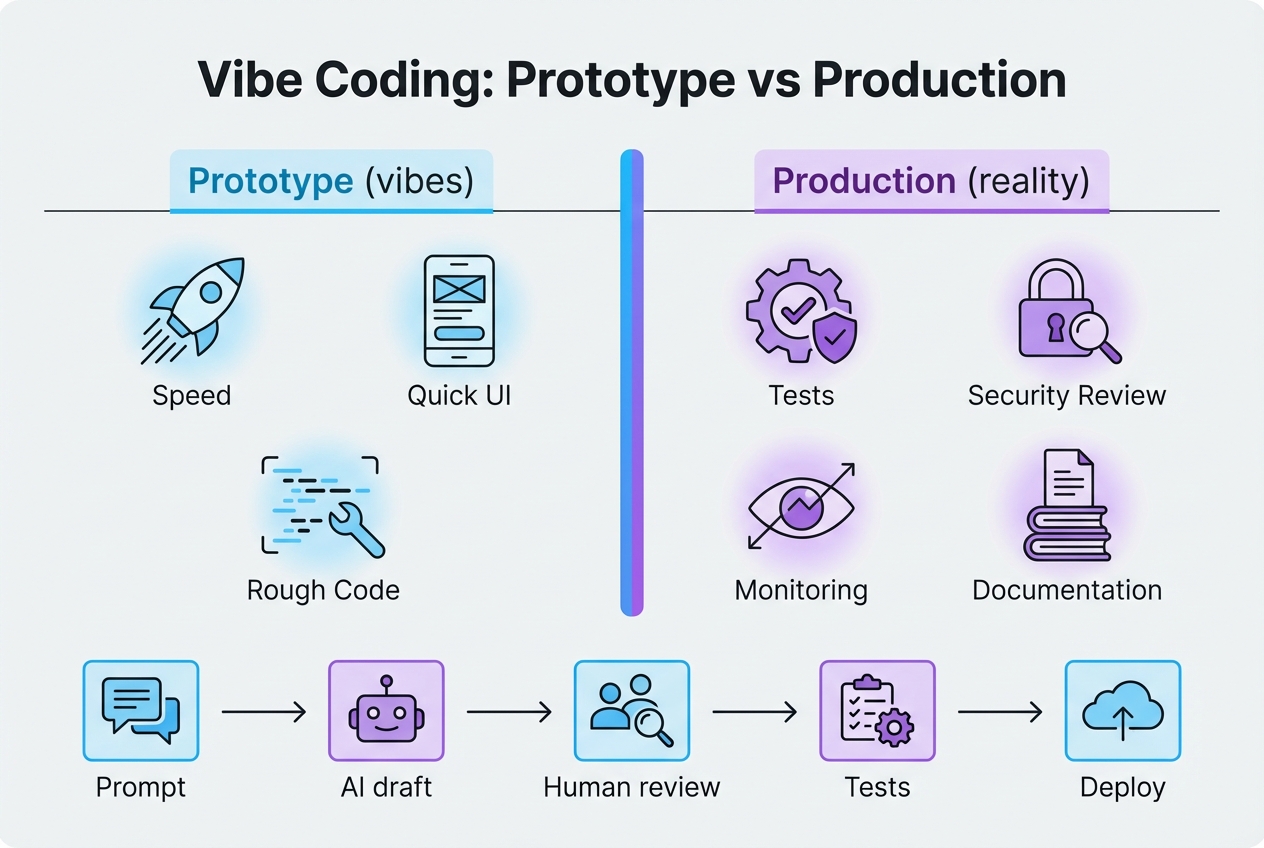
If you want to keep the speed while avoiding the limitations of vibe coding, run a two-lane workflow: one lane for fast iteration, one lane for production hardening.
1) Define the one sentence win
If you cannot describe the win, you cannot test it.
-
One sentence win: "This app reduces invoice follow-ups by routing exceptions to the right person within 1 hour."
-
Non-goal: "It does everything."
2) Lock the data model early
Most rework comes from a sloppy data model.
-
Entities: The nouns in your business (Customer, Order, Project, Task).
-
Relationships: How they connect (one-to-many, many-to-many).
-
Ownership: Who can see what.
3) Generate the draft, but force structure
Your prompts should enforce consistency.
-
Define house rules: Naming, folder structure, error handling, validation style.
-
Require explanations: Make the model explain the changes and why they are safe.
-
Keep changes small: One feature per prompt, not five.
If you want examples of disciplined prompting loops and checkpoint habits, we cover a range of tool specific guides from Replit, to ChatGPT, to Cursor.
4) Add the production gates before you scale features
Do not wait until launch week.
-
Gate 1, correctness: Basic unit tests, plus a few end-to-end tests for core flows.
-
Gate 2, security: Input validation, auth checks, secrets scanning, dependency review.
-
Gate 3, reliability: Logging, error reporting, and alerts for the key user journeys.
5) Ship small, monitor hard
The first version should be small enough that you can understand it.
-
Monitor: Errors, latency, and user drop-off.
-
Fix fast: Patch the top issues before adding new features.
-
Document decisions: A short why-we-did-it-this-way note saves weeks later.
Production-ready checklist for AI-built apps
Use this as your no-drama checklist before real users touch the system.
Build quality
-
Clear inputs and outputs: Every core function should state what it expects and returns.
-
Predictable patterns: Validation, errors, and logging should look the same across the codebase.
-
Readable code: If you cannot read it, you cannot own it.
Testing
-
Unit tests: Cover core logic and edge cases.
-
Integration tests: Cover database reads and writes, and external APIs.
-
End-to-end tests: Cover the top user journeys.
Security
-
Authentication and authorization: Auth answers who are you, authorization answers what can you do. Build both explicitly.
-
Input validation: Assume all inputs can be hostile.
-
Secrets handling: No keys in code. Use environment variables and secret managers.
-
Dependency hygiene: Pin versions, review new packages, and keep an update routine.
Operations
-
Logging you can act on: Errors should include context, not just stack traces.
-
Monitoring and alerting: You need to know when sign-ups fail, when payments fail, and when background jobs stall.
-
Backup and recovery: If your database disappears, you need a plan.
When to bring in experts
Vibe coding works until it does not. The right time to bring in expert engineering is when the cost of a mistake is higher than the cost of building it right.
Bring in experts when:
-
You are handling sensitive data: Personal data, health data, financial data.
-
You need real permissions: Roles, audit trails, and multi-tenant data separation.
-
Your app is becoming a product: Support load grows, bugs cost reputation.
-
You are integrating many systems: Payments, accounting, CRM, webhooks, analytics.
This is also where a hybrid approach shines: use AI to get to a working draft fast, then have professionals harden the parts that must not break.
QuantumByte is built around that hybrid path. You can prototype quickly with the app builder plans on QuantumByte, then pull in our in-house team for expert engineering when you hit the limits of vibe coding.
A practical next step if you want to build this month
If your goal is to turn an idea into a working app without a long hiring cycle, start by building the smallest version that proves the workflow.
You can map the flow, create a first draft, and see where the limitations of vibe coding show up for your exact use case. If you want a fast way to do that, you can start with QuantumByte's web builder.
Once you see what breaks, you will know whether you need:
-
A tighter prompt and better structure: You are close, just undisciplined.
-
A production hardening sprint: Tests, security, reliability, and monitoring.
-
A deeper rebuild of one subsystem: Usually auth, data model, or integrations.
If you are weighing whether to keep patching or move to a more deliberate build path, this guide on build vs buy decisions is a helpful way to frame cost, risk, and control.
What you now know
You can absolutely use vibe coding to move fast. You just cannot skip ownership.
You now have:
-
A clear definition: What vibe coding is, and why it feels so effective at the start.
-
A limitations map: The common failure modes that turn speed into fragility.
-
A hardening workflow: A practical path for turning AI drafts into production-ready systems.
-
A production checklist: Testing, security, and operations checks you can run before launch.
-
A hiring trigger list: Clear signs it is time to bring in experienced engineers.
If you keep the speed but add gates for quality, you get the upside without the cliff.
Frequently Asked Questions
Is vibe coding the same as no-code?
No. No-code tools limit what you can build through predefined components. Vibe coding generates custom code through prompts, which can be more flexible but also easier to break.
Can vibe-coded apps be secure?
Yes, but only if you treat AI output as a draft. You still need code review, testing, and security checks. OWASP's Top 10 for LLM Applications is a practical place to start.
What is the biggest limitation of vibe coding for SaaS founders?
Maintainability. The day you start getting support tickets, you need predictable patterns, tests, and logs. Without those, every fix becomes a risky prompt loop.
How do I know if I should rebuild instead of patching?
Rebuild when the core data model is wrong, permissions are inconsistent, or the codebase is too tangled to test. Patch when the architecture is sound and the issues are local.
Does QuantumByte replace developers?
No. QuantumByte helps you get to a working app fast, then bridges the gap with an in-house team for the parts that require deep engineering. That hybrid model is often the cleanest way to outgrow the limitations of vibe coding without losing momentum.