
Mariana Tek vs Mindbody: comparison summary
This mariana tek vs mindbody comparison focuses on what actually breaks in real studio operations: scheduling edge cases, billing, reporting, and the member experience.
| Category | Mariana Tek | Mindbody | What to verify in your demo/contract |
|---|---|---|---|
| Best for | Premium boutique studios that want a highly branded, tightly curated member experience. See Mariana Tek. | Studios that need broad coverage across classes, appointments, retail, and multi-service operations. See Mindbody. | Your exact service mix (classes only vs hybrid), number of locations, and how much you rely on add-ons. |
| Client experience and branding | Strong when your brand and UX consistency are the product (app, booking flow, in-studio moments). | Solid, but often optimized for breadth and configurability across many business types. | Walk through a first-time client journey end-to-end and count steps, taps, and friction points. |
| Classes vs appointments | Often a great fit for class-driven boutiques; hybrid studios should validate private-session scheduling edge cases. | Typically the safer default when you do a lot of appointments alongside classes. | Resource scheduling, recurring appointments, packages that blend classes + privates, and staff substitution rules. |
| Payments and membership controls | Can be excellent for membership-first studios, but confirm processing options and operational workflows (freezes, holds, proration). | Mature billing surface area; confirm what is native vs add-on and what is locked to certain payment setups. | PCI scope boundaries and who is responsible for what in your payments setup per PCI DSS. |
| Reporting and reconciliation | Can be strong for boutique metrics; still stress-test reporting accuracy against your real scenarios. | Broad reporting and operational coverage; still validate for your specific revenue types and payouts. | Run a reconciliation test: “what you sold” vs “what you were paid” vs refunds/chargebacks. |
| Integrations and API | Often positioned as an open ecosystem; confirm two-way sync and data export details. | Broad ecosystem; confirm integration depth (not just availability). | Two-way sync, webhooks, export formats, and what happens when data conflicts. |
| Support and onboarding | Often sold with a higher-touch boutique support posture. | Scale support model; can work well, but ask for response-time expectations in writing. | Named onboarding resources, timelines, and escalation paths. |
| Multi-location controls | Works for multi-location brands, but confirm role permissions and reporting rollups. | Common choice for multi-location and mixed-service businesses. | Role-based access control, location-level pricing rules, and cross-location membership policies. |
| Typical dealbreakers | If you are heavy on private appointments and complex resource scheduling, verify early so you do not force-fit. | If you want a “minimal steps, maximal brand polish” client journey, you may fight complexity and add-ons. | Do a 30-minute “front desk stress test” (see below) before you commit. |
Quick verdict: choose based on your studio archetype
If you are comparing mariana tek vs mindbody, the cleanest way to decide is to match the platform to your studio model, not the marketing message.
| Studio archetype | Default pick | Why | Watch out for |
|---|---|---|---|
| Single-location boutique membership studio (Pilates, barre, cycling, HIIT) | Mariana Tek | When the member experience is the differentiator, a polished journey can directly protect retention and referrals. Customers may also pay up to a 16% premium for great experience, and 32% stop doing business with a brand they love after one bad experience, per PwC. | Validate your edge cases: freezes, hold fees, late-cancel rules, and anything involving private sessions. |
| Franchise or multi-location brand | Depends | If the brand promise is premium and uniform across locations, Mariana Tek can shine. If locations vary (services, appointment-heavy, retail), Mindbody can be the safer operational umbrella. | Permissions, consolidated reporting, and whether pricing and policies can be controlled centrally. |
| Hybrid studio (classes + privates + semi-private) | Mindbody (unless you confirm Mariana Tek handles your private scheduling perfectly) | Hybrid operations get complicated fast: resources, rooms, staff schedules, and packages that mix credits. Mindbody is often selected for “it covers everything” breadth. | Do not assume “appointments” support equals “your appointment model” support. |
| Wellness multi-service (massage, medspa, PT + classes) | Mindbody | Broader workflows across appointments, staff scheduling, and retail typically matter more than the most boutique UI polish. | Add-on sprawl: confirm which features are native vs paid modules. |
Three workflows that usually decide it:
- Intro offers that convert: Can you sell a 2-week intro, limit redemption rules, and auto-convert to membership with clean disclosures?
- Waitlists at peak times: Can you auto-promote from waitlist, notify instantly, and enforce late-cancel fees without manual cleanup?
- Series packs and mixed credits: Can you sell 10-class packs, private-session packs, and hybrid packs, and make the remaining balance obvious to members?
Feature checklist that actually matters day-to-day
Most “feature lists” are useless because they ignore operator reality. Use this checklist to keep demos honest.
Must-haves for most studios:
- Scheduling and capacity controls: Waitlists, capacity caps, teacher substitutions, room/resource constraints, and blackouts.
- Membership and pass logic: Freezes, holds, proration rules, contract terms, and clean upgrade/downgrade workflows.
- Payments and refunds: Saved cards, refunds, partial refunds, chargebacks, and receipts that match payouts.
- Client profiles and notes: Flags, health notes, waiver status, and staff visibility controls.
- Staff permissions: Front desk vs manager vs owner, plus audit trails for key actions.
Nice-to-haves (valuable, but not worth breaking operations for):
- Marketing automation: Segments, drip campaigns, and win-back flows.
- Custom dashboards: If you already have a BI tool, exports matter more than built-in charts.
- Advanced branding: Great for premium positioning, but only if it does not compromise the basics above.
Live demo script (ask both vendors to do these in real time):
- Create a new client, sell an intro offer, and show the exact cancellation and renewal terms the client sees.
- Book into a full class, join the waitlist, then promote from waitlist and apply the right policy.
- Freeze a membership today, unfreeze it early, and show what happens to billing dates and prorations.
- Collect a late-cancel fee automatically and show the audit log.
- Move a client from a 6:00pm class to a 7:00pm class without breaking credits.
- Process a partial refund and show where it appears in reporting.
- Export a full client list with contact details, memberships, and last visit date.
- Create a front desk user and prove they cannot see payroll or edit pricing.
Premium client experience audit
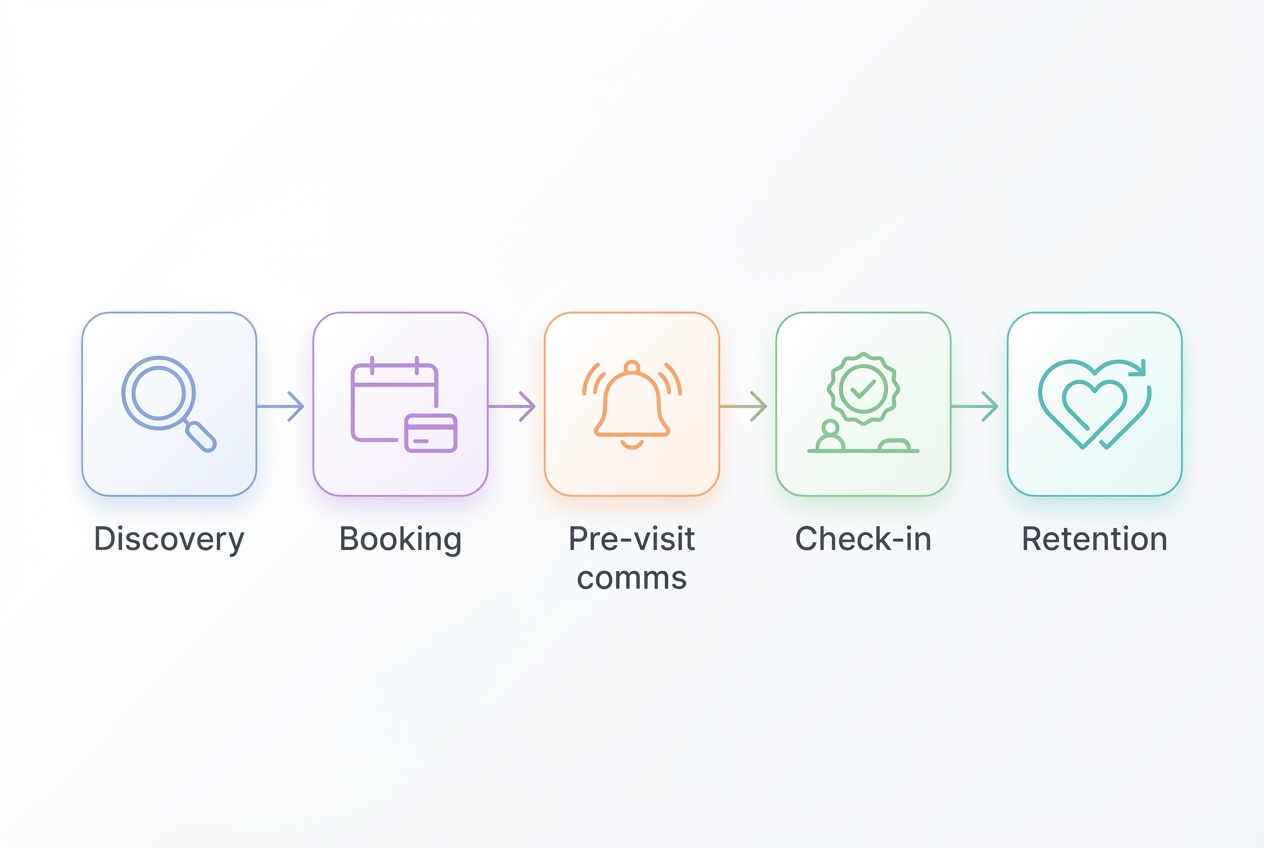
“Premium experience” is not vibes. It is a set of predictable friction points you can score.
Here is a simple 5-stage rubric you can use in trials, grounded in usability principles from Nielsen Norman Group’s heuristics like visibility of system status, error prevention, consistency, and user control.
- Discovery: How quickly can a new client find the right class and understand prerequisites?
- Booking: How many steps to book, pay, and confirm? Are errors prevented (for example, booking the wrong location)?
- Pre-visit comms: Does the system send the right reminders, parking details, and policy notices automatically?
- Check-in and in-studio: Can staff check someone in quickly when the lobby is chaotic? Is there immediate feedback that they are in the right class?
- Retention: Can members see credits, renewal dates, and upcoming bookings without hunting? Can they self-serve changes confidently?
Why this matters: a single bad experience can cost you a loyal client. Globally, 32% of customers stop doing business with a brand they love after one bad experience, according to PwC.
What to test and screenshot during trials:
- Taps-to-book: Count interactions from “open app” to “booking confirmed.”
- Cancellation clarity: Can a member cancel or reschedule with clear consequences and a visible confirmation state?
- Saved payment and receipts: Is the receipt easy to understand and does it match what actually happens in payouts?
- Credit visibility: Can a member instantly see remaining classes or sessions, plus expiration and renewal rules?
Workflow fit: classes, appointments, and hybrid operations
Your studio’s mix drives everything.
- Recurring classes and workshops: Both platforms can support standard group schedules, workshops, and capacity controls. What differentiates them is usually how smooth it feels for members and how much admin work it creates for staff.
- Private sessions and appointments: This is where misfits show up. If you sell privates, ask for a dedicated appointment demo using your real constraints: room resources, instructor availability, package redemption rules, and cancellation fees.
- Semi-private and resource scheduling: The hard part is not “can it book an appointment,” it is “can it enforce the right resource rules without staff babysitting it.”
Front desk stress test (run this with your highest-volume hour):
- Peak check-in: Can staff check in 20 people in 5 minutes without UI lag or mistakes?
- Waitlist churn: Can you handle last-minute drops without leaving empty spots?
- Last-minute swaps: Can you move clients between sessions and keep credits and policies correct?
Also take community feedback seriously, but treat it as a hypothesis. If you see comments about reporting accuracy or support slowdowns in forums, use that as a prompt to validate with a pilot and written commitments, not as a final verdict.
Integrations, APIs, and data portability
Integrations are where “all-in-one” promises go to die. Ask questions that reveal sync quality and data ownership.
What you must confirm:
- Two-way vs one-way sync: If your CRM, email/SMS tool, or door access system only syncs one way, you may create double entry.
- Webhooks and event triggers: Can you trigger automations when someone buys an intro offer, no-shows, or cancels?
- Exports and portability: Can you export clients, purchases, attendance history, and notes in usable formats?
- SSO and security options: For staff-facing access, ask about single sign-on and multi-factor authentication expectations. Use NIST SP 800-63 as your baseline framing for authentication assurance and MFA.
Compliance note: if your platform stores, processes, or transmits cardholder data, architecture matters. PCI DSS defines the standard and helps you understand what responsibility stays with the platform versus your business.
Integration categories to check (even if you do not use them today): email/SMS, CRM, accounting, payroll, BI, door access, waivers/e-sign, marketing automation.
Pricing expectations: total cost drivers
Do not compare “starting at” prices. Model total cost drivers instead.
Cost-driver checklist:
- Base subscription: Often varies by location count and feature tier.
- Per-location fees: Especially important for multi-location brands.
- Staff seats: Admin, front desk, and manager access can change costs.
- Onboarding and support: Implementation packages, training, and premium support.
- Payment processing: Rates, payout schedules, and whether you can bring your own processor.
- Add-ons and modules: Marketing, texting, advanced reporting, branded apps.
- Usage-based fees: SMS, email volume, or API usage.
- Hardware: Check-in devices, card readers, kiosks.
- Migration services: Data cleanup, import assistance, and parallel billing support.
Questions to ask sales (get answers in writing):
- Contract length and renewals: Month-to-month vs annual, plus auto-renew terms.
- Annual increases: What is the cap, if any?
- Termination terms: Notice windows, early termination fees, and what you keep.
- Data export fees and timelines: How fast can you get a full export if you leave?
- Cancellation and “click to cancel” expectations: Your membership cancellation flow should be as easy as signup, with clear disclosures and consent. Use the FTC’s guidance on the amended Negative Option Rule as a checklist, via the FTC Business Blog.
Risks and dealbreakers to evaluate before you sign
A platform can look perfect in a guided demo and still fail in production. Validate these failure modes.
- Reliability and performance: Ask how the system behaves during peak load and what uptime commitments exist.
- Reporting accuracy: Reconcile a week of real transactions, not sample data.
- Support responsiveness: Ask for response-time targets by severity and escalation paths.
- Add-on sprawl: Identify which critical workflows depend on paid modules.
- Migration complexity: Legacy membership terms and historical attendance are where migrations break.
- Payments lock-in: If you cannot choose processors or negotiate rates, your long-term cost control shrinks.
- Role-based permissions gaps: If you cannot restrict pricing edits or refund permissions, you create fraud and error risk.
Pilot plan checklist:
- Run parallel billing for one cycle: Compare invoices and payouts.
- Test refunds and chargebacks: Confirm how they appear in reports.
- Export everything once: Clients, purchases, attendance, and notes.
- Verify taxes: Retail and service tax rules can be tricky.
- Test staff permissions: Prove front desk limits in a real login.
Alternatives if neither is a clean fit
If you discover misfit, pick an alternative based on what you are optimizing for:
- Modern boutique simplicity: Momence is often considered when you want a cleaner, newer-feeling operator experience.
- Budget-friendly broad suite: Vagaro is commonly evaluated when cost sensitivity is high and you want broad scheduling and POS coverage.
- Gym-first management: Virtuagym can fit membership-heavy gyms with a strong operational backbone.
- Boutique studio operator focus: Glofox and Zen Planner are frequently compared for gyms and studios that want membership management and class scheduling without enterprise complexity.
- Boutique positioning: StudioGrowth is positioned specifically around boutique yoga, fitness, and Pilates operations.
Build vs buy: getting a premium experience without platform lock-in
Sometimes the real requirement is: you want Mariana Tek-level polish in a few key client moments, plus Mindbody-level operational breadth, without accepting the rigid constraints of either.
A pragmatic approach is a custom “app layer” around your system(s):
- Client-facing layer: Branded onboarding, intro funnels, policy disclosures, and self-serve changes that match your studio’s voice.
- Ops layer: Internal dashboards for exceptions like failed payments, expiring memberships, or waitlist anomalies.
- Automation layer: Triggered follow-ups after first visit, no-show recovery flows, and staff task routing.
This is where Quantum Byte can be a good fit when off-the-shelf software is close, but not quite right. You can use templates for common building blocks (booking, landing pages, intake forms), then customize quickly using natural-language prompting.
A concrete use case: build a “new client funnel + intro pack + automated follow-ups” app that standardizes your premium experience, plus an internal exceptions dashboard so staff only touch what needs human judgment.
Implementation timeline: what goes live first, what comes later
Plan a phased rollout so you do not create chaos for staff or members.
- Discovery and data audit (week 0-1): Inventory memberships, packs, waivers, staff roles, and reporting needs.
- Configuration (week 1-2): Build schedules, pricing, policies, and permissions.
- Payments setup (week 2): Configure processors, taxes, receipts, and refund rules.
- Staff training (week 2-3): Front desk workflows first, then manager reporting.
- Soft launch (week 3): Limited classes, real transactions, daily reconciliation.
- Full launch (week 4): Cut over memberships and public schedules.
- Post-launch optimization (week 5+): Fix edge cases, tighten policies, and add automation.
Minimum viable launch:
- Core schedule, payments, check-in, membership billing, and basic reporting.
Phase 2 enhancements:
- Automations, deeper integrations, custom dashboards, and premium experience polish.
What this means for you
- If you are building a boutique studio where the app and booking journey are part of the product, Mariana Tek is often the better starting point.
- If you run a hybrid or multi-service operation and need broad operational coverage, Mindbody is often the safer default.
- If you want premium experience and flexibility without getting boxed in, consider adding a custom layer (or building targeted internal tools) so your operations and your brand do not have to compromise.
Next steps checklist:
- Book both demos and run the demo script above.
- Validate total cost drivers, not just base subscription.
- Pilot billing for one cycle and reconcile payouts.
- Confirm integration sync depth and data export guarantees.
Frequently Asked Questions
Mariana tek vs mindbody price
Pricing usually depends on location count, feature tier, onboarding needs, and payments setup. The best way to compare is to request a written quote from both vendors, then map every line item to your real workflows (texting, marketing, reporting, branded app, additional staff logins).
Mariana tek vs mindbody cost
Total cost is typically driven by add-ons, onboarding, payment processing, and multi-location complexity, not just the subscription. Before you sign, confirm contract length, annual increases, support level, and data export terms, and make sure your cancellation and billing flows meet “click to cancel” expectations described by the FTC.
How much is Mariana Tek per month
There is no universal public monthly price that applies to every studio. Treat any “starting at” figure you see online as incomplete. Ask Mariana Tek for a quote based on your class volume, locations, and whether you need appointments, and request a complete list of add-ons and implementation fees.
Mariana Tek pricing Reddit
Reddit threads can be useful for spotting what to validate, like support experiences or add-on surprises, but they are rarely apples-to-apples because studios have different sizes, services, and contracts. Use Reddit to build your question list, then confirm answers in writing during sales and onboarding.
Mariana Tek login
For members, login is typically through the studio’s branded app experience if the studio uses Mariana Tek. For staff or owners, access is usually provided during onboarding and may differ by studio and role. If you are unsure, start with your studio’s support contact or the vendor’s main site at Mariana Tek.
Start building
If you are close to choosing Mariana Tek or Mindbody but still need a more premium funnel, cleaner self-serve flows, or internal ops automation, a custom app layer can bridge the gap.
Start with Quantum Byte to:
- Launch fast: Use plug-and-play templates for booking, client portals, and common studio workflows.
- Customize without a long dev cycle: Adjust policies, packages, and flows by describing what you want.
- Scale like a real product: You are not locked into someone else’s roadmap.
If you want to explore that approach, the next step is simple: define the one client journey or internal workflow you want to improve first, then build that as a focused layer before you attempt a full platform overhaul.