
Change orders go sideways when details slip during pricing and approval. Construction change order tracking closes that gap by turning every change into a visible, approved, and auditable workflow.
If you are still chasing email threads, paper tickets, or half-updated spreadsheets, you are working harder than you should. A clean system gives you speed, clarity, and fewer disputes.
What construction change order tracking really means
Construction change order tracking is the system you use to capture, price, approve, issue, and close contract changes, with a clear trail from the first request to final sign-off.
In standard construction contract language, a change order is the written document that implements an agreed change to the work, including updates to price and time. The American Institute of Architects (AIA) explains that AIA Document G701 is used for implementing changes in the work agreed to by the owner, contractor, and architect, including changes to contract sum and contract time in one executed document.
A practical tracking system answers four questions for every change:
-
Origin: Who requested it, and why?
-
Scope: What is changing in scope?
-
Impact: What does it do to cost and schedule?
-
Approval: Who approved it, and when?
Why change orders become profit and schedule killers
Most teams fail change management in predictable ways. Fixing these is often more important than buying new software.
-
Scope is vague: If the description reads like "add outlet in room," your field and accounting teams will interpret it differently, and your closeout will be a fight.
-
Approval happens after work starts: Once the crew has started, you lose leverage. You also lose clarity on what was "base contract" versus "extra."
-
Cost detail is missing: Lump sums without backup make owners suspicious and slow approvals.
-
Schedule impacts are hand-wavy: When days are not tracked at the change level, the project baseline becomes fiction.
-
Documents are scattered: If drawings, photos, Requests for Information (RFI), emails, and proposals are not linked to the change, the "why" disappears.
The goal is fast decisions with clean documentation.
The change order workflow that stays clean under pressure
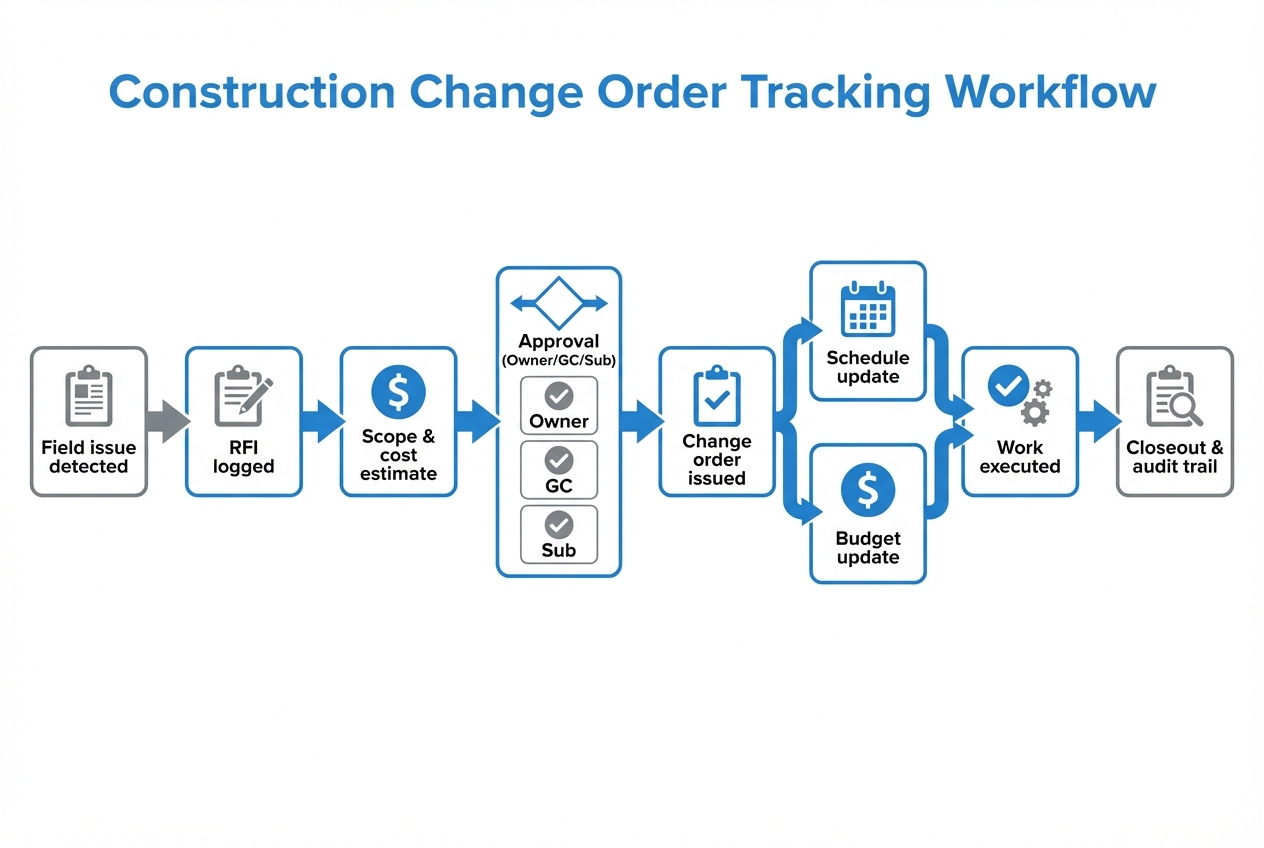
A reliable construction change order tracking workflow is simple enough to run in the field and strict enough to survive a dispute.
-
Capture the issue in the field: Create a change request the moment you see a scope shift, then attach enough evidence that someone off-site can understand it.
-
Record: Create a change request record while the details are fresh.
-
Evidence: Attach photos, marked-up drawings, and location info so the request stands on its own.
-
-
Log the RFI when scope is unclear: Use an RFI to remove ambiguity before you price the work or send crews back for rework.
-
Purpose: Use RFIs to clarify design intent before you price or build.
-
Traceability: Link the RFI to the change request so the answer becomes part of the audit trail.
-
-
Build a priced scope with backup: Price the change in a way that is easy to audit, not just easy to submit.
-
Breakdown: Itemize labor, materials, equipment, subcontractor quotes, and markups.
-
Assumptions: Note assumptions and exclusions so reviewers know exactly what they are approving.
-
-
Route approvals in the right order: Follow the chain your contract expects so the approval is defensible later.
-
Sequence: Follow the agreed chain, often subcontractor to general contractor (GC) to owner/architect.
-
Proof: Capture who approved, when, and under what terms.
-
-
Issue the formal change order: Convert the approved request into the executed contract modification document that controls billing and time.
- Conversion: Turn an approved request into the executed contract modification document.
-
Update budget and schedule baselines: Treat cost and time impacts as first-class data, not side notes.
-
Rollups: Ensure your change log rolls up totals for approved and pending impacts.
-
Visibility: Make schedule impact visible at both the project level and the individual change level.
-
-
Execute work and close it out: Verify completion, reconcile final costs, and lock the record so it stays clean through closeout.
-
Verification: Confirm completion, collect tickets, and finalize costs.
-
Locking: Close and lock the record so it cannot be quietly rewritten later.
-
This lines up with widely used contract language. For example, ConsensusDocs defines a change order as a written order signed after execution of the agreement indicating changes in the scope of the work, the contract price, or contract time.
What to track on every change order
If you want fewer arguments and faster approvals, track the same core data every time.
Required fields for a change order log
Use this as your minimum dataset.
| Field | What it captures | Why it matters |
|---|---|---|
| Change ID | Unique number (CO-001, COR-014, etc.) | Prevents duplicates and missing paperwork |
| Project | Project name / job number | Enables rollups and reporting |
| Status | Draft, priced, submitted, approved, executed, closed | Shows the bottleneck instantly |
| Requested by | Owner, architect, GC, subcontractor, field | Helps manage patterns and accountability |
| Scope description | What is changing | Reduces disputes and rework |
| Reason code | Design change, unforeseen condition, owner request, code, coordination | Makes trend reporting possible |
| Cost impact | Labor, material, equipment, markup, tax | Speeds review and reduces friction |
| Schedule impact | Calendar days, milestone affected | Keeps your baseline honest |
| Approvers + timestamps | Who approved and when | Creates an audit trail |
| Attachments | RFI, sketches, photos, proposal, signed PDF | One record, complete context |
Optional fields that unlock better control
-
Not-to-exceed value: Useful when you need to start quickly but still want a hard cap.
-
Cost code mapping: Keeps job costing clean and reduces rework when accounting needs the numbers.
-
Location tags: Adds useful context (building, floor, room, area, gridline) and improves reporting on repeated issues.
Best practices that reduce disputes
These are habits, not software features. Good software just makes them automatic.
-
Get it in writing early: Negotiate and approve changes before authorizing work when possible. The Washington State Auditor's Office advises teams to retain supporting documentation from the first request through the executed change order and approve changes before work begins when possible.
-
Standardize the pricing format: Use the same template every time so reviewers do not have to decode your proposal.
-
Force clear scope language: Include what is included and excluded. If it touches finish work, say it.
-
Track schedule like money: If a change adds days, capture the reason and the affected milestone, not just "+3 days."
-
Keep one source of truth: One system should hold the log, approvals, and attachments.
Tools for construction change order tracking
You have three realistic paths. The right choice depends on project volume, approval complexity, and how much you want to automate.
| Option | Best for | Where it breaks |
|---|---|---|
| Spreadsheet change order log | Low volume, simple jobs, one decision maker | Version control, missing attachments, weak audit trail |
| Construction PM platforms (Procore, Autodesk Construction Cloud, Buildertrend) | Teams that want a full suite today | Cost, rigid workflows, "you do it their way" data model |
| Custom change order tracker | Teams with a unique workflow or reporting needs | Requires setup, and you need an owner for the process |
If you already live in Procore or Autodesk Construction Cloud, you can make it work. But if your pain is "our process is different," a custom tracker often wins because it matches how you operate.
If you want to build around your exact approval flow, QuantumByte's approach is built for rapid prototyping. Their workflow is designed to get a working internal tool in front of your team quickly, then extend it when real-world edge cases show up. If approvals are your biggest bottleneck, it also helps to borrow patterns from dedicated approval workflow software.
A simple template you can adopt this week
If you do nothing else, implement these three templates.
1) Change request intake template
-
Summary: A short description of the issue or request.
-
Detailed scope: What is changing, where it is located, and what success looks like.
-
Reason code: The category (design change, unforeseen condition, owner request, code, coordination) you will report on later.
-
Photos or sketch: Visual proof that removes ambiguity and speeds review.
-
Location: Building, floor, room, area, or gridline so the field team can act fast.
-
Requested by: The person or party initiating the change (owner, architect, GC, subcontractor, field).
-
Needed-by date: When a decision is required to avoid delay or rework.
2) Pricing breakdown template
-
Labor: Roles, hours, and rates, plus any overtime assumptions.
-
Materials: Line items with quantities and unit costs so the math is reviewable.
-
Equipment: Rentals, lifts, or specialty tools tied to the change.
-
Sub quotes: Attached subcontractor proposals and any comparison notes.
-
Markups: The agreed percentages and rules from your contract.
-
Assumptions and exclusions: What is included, what is excluded, and what conditions could change the price.
3) Approval and issuance template
-
Approver chain: Names, roles, and timestamps so the path is defensible later.
-
Approval conditions: Not-to-exceed limits, schedule notes, or partial approvals that change how the work is executed.
-
Issued document: The signed PDF or executed form that actually modifies the contract.
Even if you stay in spreadsheets, forcing these three templates will tighten your process fast.
How to build a custom change order tracking system without a huge budget
A custom system sounds heavy until you break it into small, valuable pieces.
Step 1: Decide what "done" looks like
Define outcomes in plain language:
-
One live log: Everyone sees the same status, without version fights.
-
No missing backup: Every change includes photos, RFIs, and pricing detail.
-
Approvals are trackable: You can point to who approved, when, and what they approved.
-
Budget rolls up automatically: Approved and pending totals update without manual math.
Step 2: Model your workflow
Keep it tight. Most teams need 6 to 8 statuses:
-
Draft: Captured but not ready for pricing review.
-
Priced: Scope is clear and costs are built with backup.
-
Submitted: Formally sent for review and approval.
-
Returned: Sent back for clarification, revisions, or more detail.
-
Approved: Accepted with cost and time impacts agreed.
-
Executed: Issued as a contract modification and released for field execution.
-
Closed: Verified complete, final costs reconciled, record locked.
Step 3: Add rules that prevent chaos
-
Required fields per status: You cannot submit without scope and pricing.
-
Permission by role: Subs can draft; GC can submit; owner can approve.
-
Audit trail: Track edits, approvals, and file uploads.
Step 4: Start with a minimum viable product (MVP)
Minimum viable means it solves the problem today, not every problem forever.
A minimum viable tool focuses on solving immediate problems while remaining flexible for future growth.
A strong MVP for construction change order tracking includes:
-
Change log: A searchable list with filters by status, originator, and cost code.
-
Mobile intake: A simple form your field team will actually use on-site.
-
Attachments: Photo and file uploads that stay tied to the change.
-
Approval routing: A defined chain with timestamps and comments.
-
PDF export: A clean output you can send for signatures and store for closeout.
If you want to move quickly, QuantumByte's builder is a practical way to test an internal change order tracker before you commit to a long implementation. You can start building a change order tracker using QuantumByte.
Reporting that helps you manage, not just record
Tracking is only half the win. The other half is turning your log into decisions.
The dashboards worth building
-
Aging report: Changes sitting in "submitted" longer than your target window.
-
Pending exposure: Total pending cost and time impact, separate from approved.
-
Reason code trends: Design changes versus unforeseen conditions, tracked over time.
-
Top originators: Where requests are coming from, so you can prevent repeat issues.
Weekly operating rhythm
-
Review: Go through submitted and returned changes and assign next actions.
-
Commit: Agree on what needs pricing this week and who owns each item.
-
Close: Close out executed changes so the log stays honest.
This aligns with general change control thinking in project management. The Project Management Institute (PMI) describes change control as a process that justifies or rejects a change request to limit spurious changes and prevent cost overruns or missed milestones.
Integrations that make change orders faster
Integrations are where you turn admin into automation.
-
Accounting: Sync cost codes and committed costs so you stop double entry.
-
Document management: Link RFIs, drawings, and photos to each change.
-
Scheduling: Push approved time impacts into your schedule system.
If you are operating at a higher scale and need governance, single sign-on (SSO), or deeper controls, QuantumByte's enterprise offering is built to tailor customizations for businesses.
Common mistakes to avoid
These failures show up in almost every "we need a better change order process" cleanup.
-
Letting the field bypass the log: If the crew can do change work without a record, you will lose revenue.
-
Treating approvals as verbal: Verbal approvals turn into "I never agreed to that" later.
-
Mixing change requests and change orders: Track both, but keep them distinct. A request is a proposal. A change order is executed.
-
Ignoring closeout: Old "executed but not closed" items hide final costs.
Picking your next step
If you want the fastest path to cleaner construction change order tracking, choose the smallest step that creates leverage.
-
If you have low volume: Standardize templates and enforce required fields.
-
If you have medium volume: Move to a single system of record with attachments and approvals.
-
If you have high volume or unique workflows: Build a custom tracker that matches your process and reporting.
What you now have in your toolkit
You now have a practical definition of construction change order tracking, a field-tested workflow, a data checklist for every change, documentation best practices, and a clear way to choose between spreadsheets, construction platforms, or a custom app. You also have a blueprint for building an MVP tracker your team will actually use.
Frequently Asked Questions
What is the difference between a change request and a change order?
A change request is a proposed change that is being documented and priced. A change order is the executed contract modification with approved cost and time impacts.
What should be included in a change order log?
At minimum: a unique ID, status, scope description, reason code, cost impact, schedule impact, approver names and timestamps, and all supporting attachments (RFIs, photos, proposals, signed documents).
Who should approve construction change orders?
It depends on your contract, but common approval paths include subcontractor and GC review, then owner and architect approval. The key is that the approver chain is defined upfront and recorded in the system.
Can I track change orders in Excel or Google Sheets?
Yes for low volume, but it breaks down when you need attachment control, audit trails, approvals, and reliable version history. That is when a dedicated platform or a custom tracker becomes worth it.
When does a custom tracker make more sense than Procore or Autodesk Construction Cloud?
A custom tracker makes sense when your workflow is unique, your reporting needs are specific, or you want a lightweight tool your team can adopt fast without paying for a full suite. It also helps when you need to connect change orders to your internal processes in a way off-the-shelf tools do not support.