
Online booking for pilates classes works when you treat it like a small system you are designing, not a widget you are installing: model your class types and resources first, then layer payments, packs, reminders, and distribution links on top.
Who this blueprint is for
This is for Pilates studio owners, managers, and instructors who need to set up online booking for a real schedule with real constraints (reformers, rooms, instructors, packs, memberships, waitlists, and policies).
It’s not for customers searching for “online Pilates classes” to take from home.
By the end, you will have:
- A configured timetable with capacity rules that do not oversell reformer spots
- Sellable products (drop-ins, packs, memberships) that apply to the right sessions
- Automated confirmations and reminders that actually fire and are compliant
- A tested flow for booking, rescheduling, cancellation, waitlist promotion, and refunds
Prerequisites to decide before you touch any software:
- Offerings list: Class types you run (mat, reformer levels, privates, semi-privates) with duration and price.
- Policy defaults: Late cancel and no-show rules, plus the reschedule window.
- Payments setup: An account with a payment processor your booking tool supports.
- Distribution access: Ability to add booking links to your site and social profiles.
Quick verdict: the minimum setup that works in 48 hours
If you need something live fast, ship the smallest setup that prevents the two biggest studio headaches: oversold capacity and revenue leakage.
Non-negotiables for day one:
- A schedule with capacity: Recurring sessions with a hard cap that reflects equipment and instructor limits.
- Payment at booking (or deposits): For reformer and privates, collect up front or take a deposit so “maybe” bookings do not block inventory.
- Confirmation + at least one reminder: A confirmation immediately, plus one reminder timed far enough ahead to allow a reschedule.
- A cancellation cutoff: Enforced by the system, not by you manually.
- A basic waitlist: Even a simple waitlist is better than “DM us and we’ll see.”
Common failure modes to avoid on day one:
- Overselling reformer spots: You capped by room size, not by equipment count.
- A late-cancel policy that is not enforced: You wrote it on the website, but the system does not charge or decrement credits.
- Reminders that never arrive: Numbers are unsubscribed, email goes to spam, or messages send without consent.
What you can defer to week 2 to 4 without breaking the business:
- Membership tiers and freeze rules
- Advanced promos and segmentation
- Accounting exports and deeper reporting
- Complex intro funnels with approvals
Feature checklist
Use this as a buyer checklist. If a platform cannot do the must-haves, you will end up patching it with manual work.
Booking must-haves
- Group classes and private appointments: Groups need capacity and waitlists; privates need instructor availability and buffers.
- Recurring schedules: You should be able to generate repeating sessions and edit exceptions.
- Capacity limits: Per session, with the ability to cap by resource.
- Self-serve reschedule/cancel: With rule enforcement.
- Waitlist: With clear promotion behavior.
Payments and products
- Checkout at booking: Full payment or deposit.
- Packs and credits: Credits that apply only to eligible class types.
- Memberships: Auto-renewing subscriptions with booking rules.
- Refund rules: Partial or full refunds, credits back, and clear receipts.
- Gift cards and promo codes: Optional, but useful.
Communications
- Branded confirmations: Time, location, instructor, and policy details.
- Email and SMS reminders: At least one channel.
- Calendar invites: Google and Outlook-friendly.
- Post-class follow-ups: Simple “how did it feel?” and rebook prompts.
Integrations
- Calendar sync: Google Calendar and Outlook.
- Payments: Your preferred processor.
- Email marketing: Newsletter tool sync.
- Accounting exports: CSV at minimum.
Admin and staff
- Instructor permissions: Staff should see only what they need.
- Sub coverage workflow: Easy instructor swaps without breaking bookings.
- Attendance and check-in: Faster than paper.
Accessibility and consent
- Accessible forms: Especially on mobile. WCAG describes the core principles and conformance levels that modern booking flows should aim for, including being perceivable, operable, understandable, and robust per the WCAG overview.
- SMS opt-out support: Your tool should honor standard opt-out keywords like STOP and handle consent expectations described in the CTIA Messaging Principles and Best Practices.
Booking architecture for Pilates: a simple data model you can copy
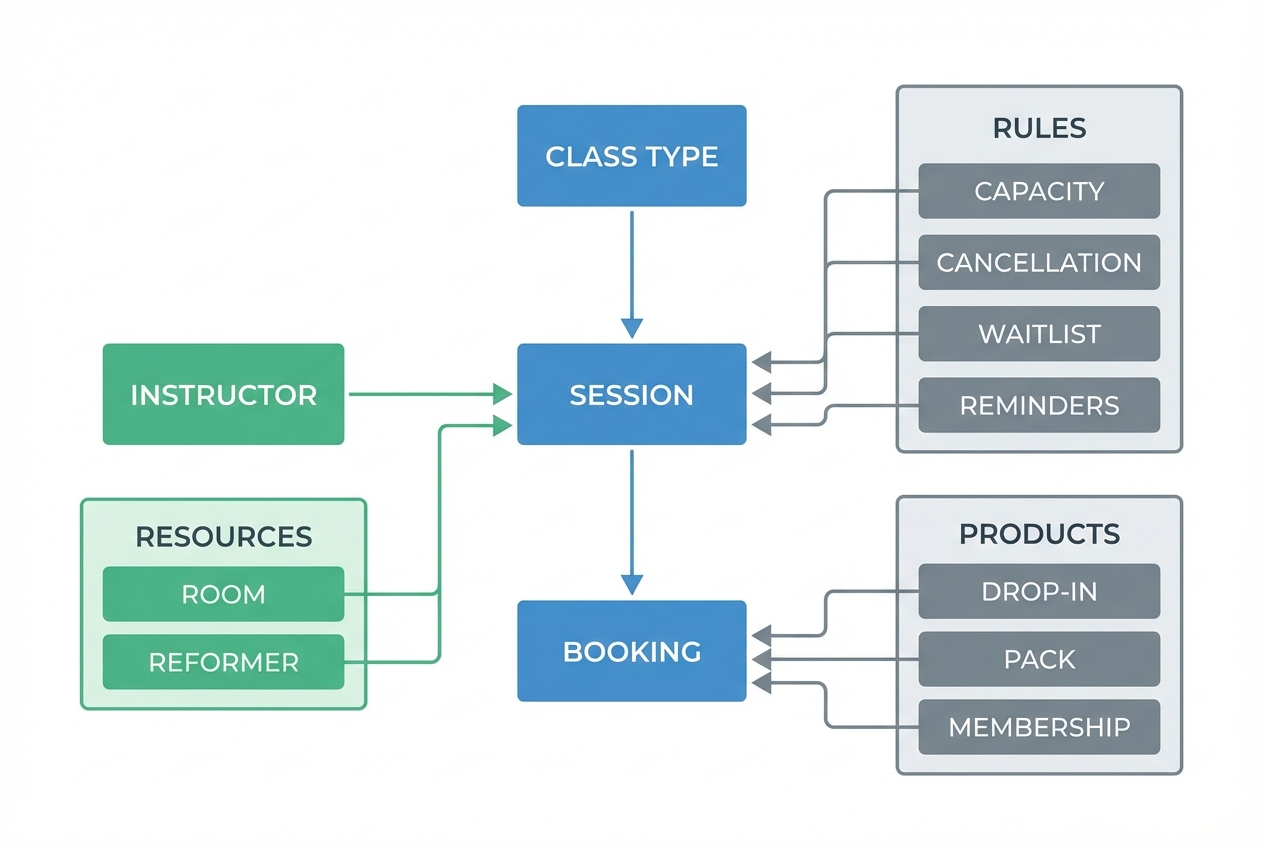
Most booking setups fail because the studio never defines what the “things” are in the system. Copy this model first, then implement it in any platform.
- Class type: The template clients recognize (name, duration, level, modality). Example: Reformer Foundations (Level 1).
- Session: A scheduled occurrence of a class type at a specific date and time.
- Instructor: The staff member delivering the session or appointment.
- Resource (room + equipment): The constrained inventory. In Pilates, this is often the reformers, chairs, towers, and sometimes mats.
- Capacity: The maximum bookable spots for that session.
- Client profile: Contact info, consent status, purchase history, and eligibility tags (for prerequisites).
- Pack or credits: A prepaid product that grants a number of bookings under rules.
- Membership: A recurring subscription with usage rules.
- Booking rules: Cancellation window, late-cancel fee, no-show handling, booking window, and waitlist behavior.
- Comms rules: Confirmation and reminders, plus post-class follow-ups.
Pilates-specific resource logic
For reformer and equipment-based classes, capacity is not “how many people fit in the room.” Capacity should be the minimum of:
- Equipment count available
- Instructor-to-client ratio you consider safe and high quality
- A buffer for swaps and maintenance
A practical default: set capacity to equipment count minus one if you frequently have a machine down or you like a “float” spot for last-minute swaps.
Naming conventions that make booking self-explanatory
Clear names reduce admin questions and misbookings.
- Level + modality: “Reformer Foundations (Level 1)”
- Special equipment: “Reformer Jumpboard (Level 2)”
- Broad entry: “Mat Flow (All Levels)”
- Appointments: “Private 1:1” and “Semi-private 2:1”
The key branching decision: classes vs appointments
Most platforms treat these differently:
- Privates and semi-privates: Model as appointments where the primary resource is the instructor (and optionally a room or reformer).
- Group sessions: Model as classes where the primary resource is the room and equipment pool.
If you try to run privates as group classes, you will fight the software. If you try to run group sessions as appointments, you will lose clean capacity and waitlist behavior.
Edge cases to plan for before launch
- Mixed packages: Packs that include both privates and classes. Decide how credits map (example: 1 private = 2 class credits) and enforce it.
- Shareable packs: Family packs can work, but only if the platform supports household sharing cleanly.
- Multi-location studios: Decide whether credits can be used at both locations.
- Intro funnels with prerequisites: If clients must do Foundations first, you need eligibility controls or manual approval for higher levels.
Step-by-step setup: schedules, capacity, and waitlists
Start with structure, not dates.
- Build class templates
- Duration: 45, 50, or 60 minutes.
- Location and room: Make the room explicit if you have more than one.
- Default instructor: You can override per session later.
- Equipment requirement: Reformer, chair, tower, or “none” for mat.
- Capacity: Use the resource logic above.
Expected outcome: you have a small library of reusable class types that match how you sell.
- Generate recurring sessions
Create the repeating timetable for the next 4 to 8 weeks. Keep it short enough that you can adjust quickly.
Expected outcome: clients can book real dates and times, and you can see utilization by class type.
- Configure waitlist behavior
Decide these settings explicitly:
- Auto-promote vs manual: Auto saves admin time but requires clear payment rules.
- Hold window: How long a promoted client has to claim the spot.
- Payment capture timing: Charge immediately on promotion, or require manual confirmation.
- Waitlist cutoff: How close to class start you allow promotions.
Expected outcome: a canceled spot reliably becomes an offered spot, without you messaging people manually.
- Enforce reschedule and cancellation rules
Make sure self-serve actions release inventory correctly.
Expected outcome: when someone cancels, the spot returns to availability and the waitlist logic triggers.
- Verify it with a capacity stress test
- Book a session to capacity.
- Cancel one booking.
- Confirm the inventory increases by exactly one.
- Confirm the waitlist promotion behaves the way you configured.
Expected outcome: you trust the system before customers depend on it.
Packages, credits, memberships: rules that prevent revenue leakage
Your products should match how Pilates is actually sold: a mix of drop-ins, packs, and memberships.
Pick your primary units and map them to rules
- Drop-in: Simple, best for visitors.
- 5, 10, 20 packs: Best for regulars who are not ready to subscribe.
- Unlimited membership: Best for consistent clients, but only if you can handle demand.
For each pack, define:
- Expiration: A clear time window.
- Shareability: Single-user by default unless you have a strong reason.
- Eligible class types: Mat only, reformer only, or both.
- Upgrade paths: How you handle someone switching products mid-cycle.
Membership rules to define up front
- Billing cadence: Monthly is simplest.
- Freeze policy: Allowing pauses reduces churn, but needs limits.
- Rollover behavior: Decide if unused credits roll over or expire.
- Booking priority: Members often expect to book further ahead.
- Late-cancel handling: Either a fee or a credit penalty. Do not rely on manual enforcement.
Intro offers that route people to the right level
A first-timer product works best when it controls where clients start.
Options:
- Foundations class: Good for group onboarding.
- Intro private: Higher revenue, more personalized.
- Assessment: Ideal if you have injury screening requirements.
Expected outcome: beginners do not accidentally book an advanced reformer session and have a bad first experience.
Verification steps
- Purchase a pack as a test client.
- Book a session with credits.
- Late-cancel the session.
- Confirm the system either charges the fee or decrements the correct amount.
Expected outcome: you do not discover revenue leakage after 50 clients have bought the wrong thing.
Payments and compliance basics
Payments are where “convenient” turns into risky if you store the wrong data.
Use a booking platform’s hosted checkout or a well-supported processor integration so your studio is not storing card data. PCI DSS applies to entities that store, process, or transmit cardholder data, and it defines baseline requirements to protect payment account data per the PCI DSS standard.
In plain English for a Pilates studio:
- Do: Use hosted payment pages or tokenized card storage handled by the processor.
- Don’t: Store card numbers in spreadsheets, notes, or custom fields in your booking tool.
Deposits vs full payment
- Full payment: Best for most group classes.
- Deposits: Useful for high-demand slots, privates, and workshops where you want commitment but still expect reschedules.
Tie deposits to your cancellation window so the system can enforce what happens on late cancel.
Refund and dispute readiness
Put the policy in the confirmation message. Make it timestamped and unambiguous.
Verification steps:
- Run a test checkout in test mode.
- Confirm tax and add-ons behave correctly if you use them.
- Process a refund end-to-end and verify the receipt.
Reminders and follow-ups: a simple timing matrix
Automated reminders are not a nice-to-have. Reminder systems have been shown to improve attendance and reduce non-attendance in scheduled appointments in a systematic review of healthcare reminder interventions, including reminders delivered by SMS and phone in many studies, as summarized in Interventions to Reduce Unnecessary Absenteeism for Scheduled Appointments in Healthcare.
Use this simple timing matrix and adjust based on your audience.
| Message | When | Channel | Purpose |
|---|---|---|---|
| Confirmation | Immediately after booking | Email (and optionally SMS) | Lock in time, location, and policy details |
| Reminder 1 | 24 hours before | SMS or email | Give time to reschedule within the cutoff |
| Reminder 2 (optional) | 2 to 3 hours before | SMS | Helps early mornings and busy professionals |
| Post-class follow-up | Same day | Reinforce progress and prompt rebooking |
What to include in every reminder:
- Start time and timezone: Especially if you offer virtual sessions.
- Location details: Parking, entry code, studio suite number.
- Cancellation cutoff: “Cancel by X to avoid a fee.”
- What to bring: Socks, water, grip socks policy.
- Prerequisites: If Level 2 requires Foundations, say it.
SMS consent and opt-out basics
If you text clients, treat consent as a first-class setting.
The CTIA Messaging Principles and Best Practices describes expectations around consent and standardized opt-out handling (including STOP). Configure your system so:
- Clients explicitly opt in to SMS reminders.
- Opt-out keywords are honored automatically.
- Your staff can see a client’s consent status.
Deliverability checks
Before launch, send test messages:
- To at least two phone carriers in your area.
- To multiple email providers.
Expected outcome: reminders land reliably and opt-out actually stops future messages.
Booking buttons everywhere: website embeds and social links
You can have a perfect schedule and still lose bookings if people cannot find it in one click.
Decide between:
- Embedded widget: Better brand continuity, but more moving parts.
- Hosted booking page: Faster to launch and usually fewer bugs.
Placement checklist:
- Website header: “Book Now” should be visible on mobile.
- Schedule page: The full timetable lives here.
- Instructor pages: Add a “Book with [Instructor]” path for privates.
- Google Business Profile: Add your appointment URL.
- Instagram bio and Facebook CTA: One link, not a messy list.
Tracking requirement:
- UTM parameters: Add UTMs to booking links so you can tell whether bookings came from Google, Instagram, or email.
Implementation timeline: day 1 setup → week 4 optimization
A phased launch is how you keep control while customers start using the system.
Day 1 to 2: go live with a clean core
- Architecture model implemented
- Core schedule for 4 to 8 weeks
- One product: drop-in
- One pack: a simple multi-class pack
- Payments working
- Confirmation + one reminder
Definition of done: a test client can purchase and book successfully without your help.
Week 1: lock policies and distribution
- Cancellation and no-show rules enforced
- Waitlist behavior finalized
- Intro offer created
- Staff roles and permissions set
- Booking links placed across web and social
Definition of done: customers can discover booking from any channel and complete checkout.
Week 2: add memberships and your real pricing strategy
- Membership tiers
- Peak vs off-peak pricing if you use it
- Promo codes and gift cards if needed
- Email list sync
- Basic exports for accounting
Definition of done: your best customers can buy the product you actually want them on.
Week 4: optimize using real demand signals
- Review utilization by class type and times
- Adjust reminder timing and copy
- Refine class mix based on waitlists and cancellations
Definition of done: you are changing the schedule based on data, not gut feel.
Pre-launch test plan and common failure modes
Run this test script before you announce anything.
Test script:
- Create a test client profile.
- Buy a pack.
- Book a class.
- Reschedule within the allowed window.
- Cancel within the allowed window.
- Join a waitlist.
- Trigger reminders.
- Process a refund.
- Run instructor check-in or attendance.
Common failure modes:
- Double-booked equipment: Resources were never modeled, so capacity is wrong.
- Packs apply to the wrong class type: Credits are not restricted, so clients book privates with group credits.
- Late-cancel leakage: Policy exists, but fees are not collected or credits are not decremented.
- Staff permissions are too broad: Everyone can edit pricing or issue refunds.
- Opt-outs are ignored: SMS keeps sending after STOP.
Accessibility and privacy basics
Booking is part of customer experience, and it should work for everyone.
- Accessibility: WCAG outlines how to make interfaces more usable across devices and assistive tech, and it is the baseline reference most teams use when discussing accessible web experiences per the WCAG overview.
- Privacy and security: If you collect personal information through booking, follow the FTC’s guidance on building a data security plan, including taking stock of what you collect, minimizing it, securing it, and planning ahead, as described in Protecting Personal Information: A Guide for Business.
Operational safeguards:
- Weekly: Review the policy text shown in confirmations.
- Monthly: Export bookings and client lists as backups.
Alternatives and competitors: when to pick a studio platform vs a simple scheduler
The right tool depends on how “Pilates-specific” your operations are.
- All-in-one studio suites: Best when you need complex memberships, staff management, and deeper reporting.
- Modern boutique platforms: Best when you want a cleaner client experience and solid packs, memberships, and waitlists without heavy legacy complexity.
- Lightweight schedulers: Best for very small studios or instructors doing mostly privates with simple payments.
Selection criteria that matter most for Pilates:
- Resource modeling: Can you cap by reformer count and room?
- Mixed products: Can one client buy both classes and privates cleanly?
- Waitlist automation: Can you set a hold window and payment behavior?
- Integrations: Calendar, email, accounting, and payments.
- Fee clarity: Ask for total cost including payment processing, SMS fees, and add-on modules.
When you request a demo, do not ask for a feature tour. Ask them to implement your hardest edge case: “Reformer allocation plus a mixed pack that includes privates and group credits.”
Build vs buy: when a custom booking flow is worth it
Off-the-shelf tools are enough if you have one location, a standard class mix, and simple packs.
Custom becomes worth it when your studio has rules that software cannot express without workarounds:
- Complex resource constraints (multiple equipment types, rotating availability)
- Hybrid offerings (classes + privates + on-demand)
- A unique intro funnel (approval steps, assessments, prerequisites)
- Corporate partnerships (custom billing, credits by employee)
- A fully branded portal with logic that matches how you actually operate
If you are in that bucket, a builder like Quantum Byte can be a practical middle path. Instead of forcing your workflow into a rigid scheduler, you can build a tailored booking portal that matches your data model, booking rules, and client experience, while still integrating payments and messaging.
A sensible “custom build first” scope:
- Data model: Class types, sessions, instructors, resources, products.
- Rules engine: Capacity, eligibility, cancellation, waitlist behavior.
- Payments: Use a processor integration so you are not storing card data.
- Messaging: Email and SMS with consent handling.
What to do next
Follow this order and you will avoid 90% of setup pain:
- Define your booking architecture (class types, sessions, resources, rules)
- Build the schedule and enforce capacity
- Add products (drop-ins first, then packs, then memberships)
- Configure payments safely
- Turn on confirmations and reminders
- Put booking buttons everywhere with tracking
- Run the pre-launch test script
If your current tool cannot model reformer capacity, mixed packs, or a clean intro funnel without manual work, it may be time to build your own booking flow instead of fighting someone else’s. A founder-friendly platform like Quantum Byte is designed for that exact moment: you get templates for common booking components, but you can still customize the logic so it matches your studio.
Start minimal, launch within 48 hours, then use the week-4 loop to tighten pricing, reminders, and class mix based on real demand.
Start building
If off-the-shelf booking tools are already forcing compromises, build the version that matches your studio instead.
Start with Quantum Byte to:
- Launch fast: Use plug-and-play templates for booking, client portals, and common studio workflows.
- Customize without a long dev cycle: Adjust policies, packages, and flows by describing what you want.
- Scale like a real product: You are not locked into someone else’s roadmap.