
OpenClaw has been all the rave recently, promising a great many possibilities with an AI agent that's able to control your whole computer. It can access your files and run shell commands. It can also control your browser. In some setups, it can even read messages. But with that, naturally comes valid and warranted security concerns, since OpenClaw is able to touch the things that matter most.
This guide shows you how to assess your risk fast, harden OpenClaw the right way, and decide when it is smarter to replace agent-style automation with a safer, purpose-built app.
What OpenClaw is and why security concerns come up
OpenClaw is a personal AI assistant and agent framework you run on your own devices. That local-first design can be a strength. You keep control.
But it also creates a sharp edge:
-
Tool execution: It can run tools that act like you, including terminal commands, browser automation, and file operations.
-
Chat-driven instructions: It can receive instructions from chat channels.
-
Skills and integrations: It can be extended with skills and integrations.
Those are exactly the ingredients that security teams worry about.
Here is the mental model to keep you grounded:
-
High privilege: The more access an agent has, the more damage a single mistake can cause.
-
Indirect control: The agent can be influenced by prompts that arrive through chat, web pages, or documents.
-
Supply chain risk: Skills, plugins, and dependencies can hide risky behavior if you install them blindly.
If you treat OpenClaw like a friendly chatbot, you will under-secure it. Treat it like an automation server with credentials.
A quick triage to size your OpenClaw risk
Before you change anything, classify your setup in plain English. This tells you how strict you need to be.
-
Runtime location: A personal laptop is different from a shared workstation or a server.
-
Reachable systems: Local filesystem only is different from internal tools, cloud dashboards, and production environments.
-
Who can message it: Only you is different from group chats or external contacts.
-
Secret exposure: API keys, Secure Shell (SSH) keys, browser sessions, and password manager exports change the stakes.
If any of these are true, treat your deployment as high risk:
-
Shell command execution: This is effectively remote administration.
-
Business data access: Customer lists, invoices, support tickets, contracts, and analytics raise the impact of a single bad action.
-
Non-localhost exposure: Any exposed network surface increases attack options.
-
Casual community skill installs: This is the classic software supply chain problem.
How to assess OpenClaw security concerns step by step
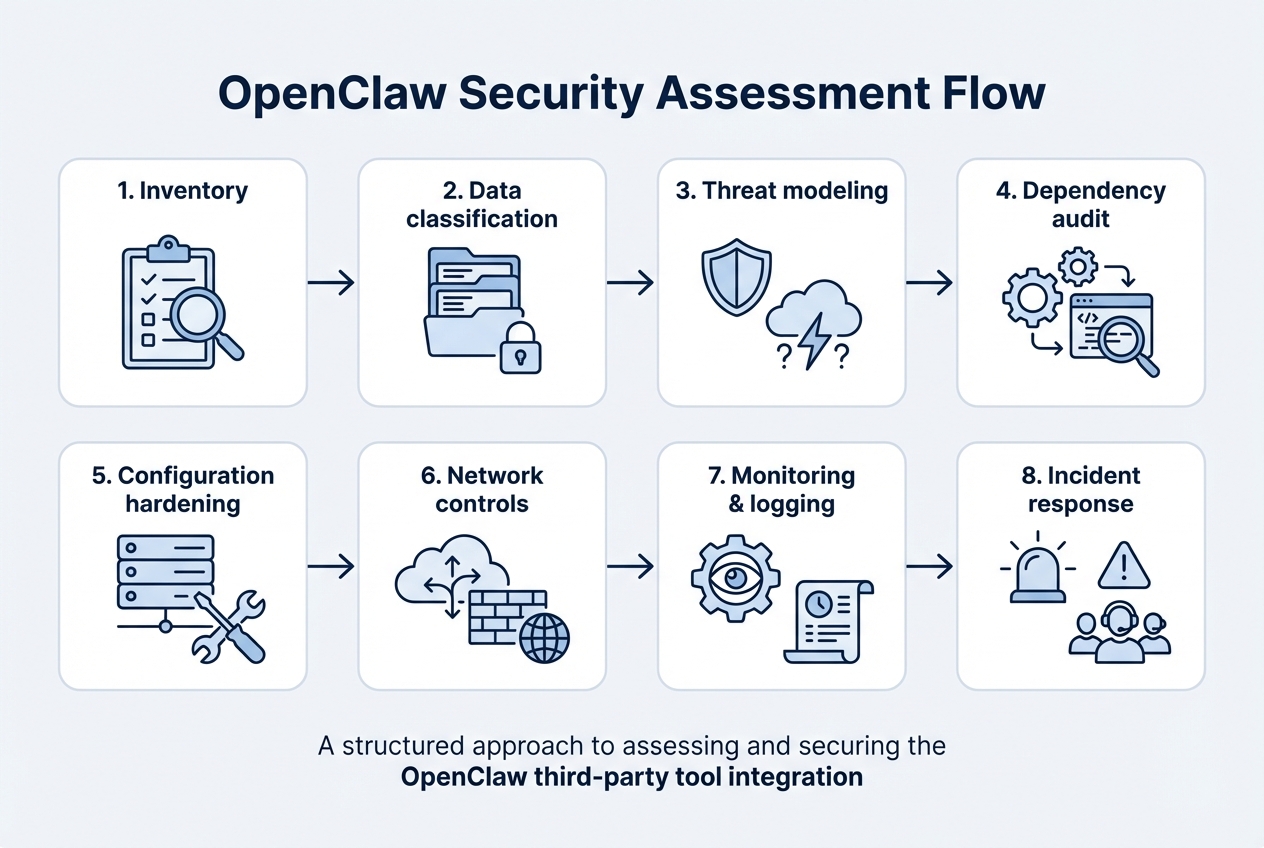
1) Take stock of what OpenClaw can do in your environment
Start by listing capabilities, not just features.
Write down:
-
Enabled tools: Note whether shell, browser, email, calendar, and file access are turned on.
-
Enabled connectors: List Slack, Telegram, WhatsApp, Discord, and iMessage connections.
-
Config and state storage: Identify where state, caches, and configuration files live.
-
Run identity: Record which accounts it runs as, such as your user, a dedicated user, or root.
Expected outcome: you know what you must restrict.
2) Decide what data it can touch
You do not need a compliance framework to do this well. Use three buckets:
-
Public data: Safe to leak.
-
Internal data: Would hurt, but not catastrophic.
-
Sensitive data: Could cause financial loss, legal risk, or customer trust damage.
Then map where that data lives:
-
Local folders: Identify which directories include sensitive work.
-
Email inbox: Flag threads that include invoices, contracts, or customer details.
-
Cloud storage: Map access to Google Drive and Dropbox folders.
-
CRM system: Treat any Customer Relationship Management (CRM) records as sensitive by default.
-
Databases: Document any direct connections, exports, or admin consoles.
Expected outcome: you know which actions must be sandboxed or removed entirely.
3) Make a threat model of the top attack paths
Threat modeling means listing the most likely ways things go wrong.
Focus on realistic paths:
-
Prompt injection: The agent reads a web page or email with hidden instructions. It follows them and runs unsafe actions.
-
Malicious skill or dependency: A plugin does something you did not intend.
-
Credential leakage: Secrets end up in logs, chat transcripts, or model prompts.
-
Overexposed gateway: Someone who should not reach the service can reach it.
Expected outcome: you can defend what actually matters, instead of guessing.
4) Audit dependencies and skills like a supply chain
This is where many OpenClaw security concerns show up.
OWASP calls this risk category "Software and Data Integrity Failures" and warns about relying on plugins and libraries from untrusted sources. Their prevention guidance includes consuming dependencies from trusted repositories and using tools that check for known vulnerable components.
Practically, that means:
-
Prefer trusted skills: Start with official or well-reviewed skills instead of random repos.
-
Review execution scope: Check what a skill can execute, including shell, network calls, and file writes.
-
Pin dependency versions: Lock versions so updates do not surprise you.
Expected outcome: you reduce the odds that you install a Trojan horse.
5) Run OpenClaw's own security audit and fix the "footguns"
OpenClaw includes a built-in security audit command and guidance. Start with the official docs and follow them exactly.
Use the [security documentation](Use the security documentation and audit tooling described, including openclaw security audit and (when appropriate) openclaw security audit --fix.
) and audit tooling described in the OpenClaw Gateway security guide, including openclaw security audit and (when appropriate) openclaw security audit --fix.
The goal is to close the common misconfigurations that cause most real-world exposures.
6) Patch known vulnerabilities fast
Agent tools move quickly. That is good for features, but it can be dangerous if you stay on older versions.
At minimum:
-
Track releases: Know what version you are on and what changed.
-
Subscribe to advisories: Get notified when security fixes land.
-
Update quickly: Prioritize security updates as essential operational work instead of treating them as optional cleanup.
For example, the National Vulnerability Database (NVD) lists CVE-2026-24763, a command injection issue fixed in OpenClaw version 2026.1.29.
Expected outcome: you avoid getting stuck on a vulnerable build.
The hardening moves that matter most
This is the part that turns "cool agent demo" into "safe enough for real work."
Lock down network exposure
The goal is simple: minimize who can reach the gateway and from where.
-
Bind to localhost: When possible, only allow the local machine to connect.
-
Use private connectivity: If you need remote access, prefer an encrypted private network over open internet exposure.
-
Require authentication: Treat it like an admin panel, because it is.
Restrict what the agent is allowed to do
Do not rely on "the model will behave." Build guardrails.
-
Remove dangerous tools: If you do not need shell access, do not enable it.
-
Reduce file permissions: Give access to a working folder, not your entire home directory.
-
Separate identities: Run OpenClaw under a dedicated operating system (OS) user with minimal permissions.
Control who can trigger actions
If the agent listens in group chats, your risk changes instantly.
-
Require explicit mentions: Only respond when tagged.
-
Allowlist trusted senders: Pair or allowlist direct messages so identity is confirmed before sensitive actions.
-
Split chat and execution: Casual chat should not be able to run tools.
Treat secrets like radioactive material
You cannot secure an agent if it can casually see your keys.
-
Use secure secret storage: Prefer environment variables or a secrets manager over hardcoding keys in configs.
-
Rotate keys: Especially after you change skills or integrations.
-
Limit token scope: Use read-only tokens when possible.
How to use a safer architecture when you still want automation
If you want automation without agent risk, move from "freeform tool execution" to "approved workflows." That shift is where most teams win.
A safe pattern looks like this:
-
Intent interpretation: The AI helps interpret what the user wants.
-
Approved action mapping: Your system converts intent into a small set of allowed actions.
-
Auditable logging: Every action is logged with context.
-
Sensitive approvals: High-impact actions require approval.
This is also where many founders stop wrestling with OpenClaw and start building a focused internal tool instead.
By using QuantumByte, you can turn a workflow into a controlled app in days, not months, then tighten permissions and add audit trails as your operations grow. If you want to prototype that approach quickly, start with a small approval-first operations app using QuantumByte.
When you should replace OpenClaw with a purpose-built app
OpenClaw can be a strong fit for personal automation and controlled experiments. But it is a poor fit when you need predictable behavior, auditability, or compliance.
Consider replacing it if you need any of the following:
-
Repeatable workflows: Your process must run the same way every time.
-
Role-based access: Different users need different permissions.
-
Audit logs: You must prove what happened and who approved it.
-
Stable integrations: You want maintainable connections to your systems of record.
Custom software acts as a safety feature here rather than a luxury.
If you are deciding between "agent tool" and "build it," QuantumByte's breakdown in build vs buy software is a useful frame, especially when security and data control are the deciding factors.
If your needs are enterprise-grade, we have an enterprise offering that is the better choice for strict controls, cross-team workflows, and tighter governance.
How to align your approach with secure development standards
Even if you are not a security team, it helps to borrow from proven standards.
The NIST Secure Software Development Framework (SSDF) describes a core set of secure practices that reduce vulnerabilities and mitigate the impact of exploitation. You can translate that into agent reality like this:
-
Prepare: Define what OpenClaw is allowed to access and why.
-
Protect: Harden configuration, restrict permissions, and keep dependencies trustworthy.
-
Build with security in mind: Pin versions, review skills, and test dangerous paths.
-
Respond: Log actions and create an incident plan.
If that sounds like a lot, that is the point. Treat tool-enabled agents as powerful software rather than simple toys.
Monitoring and incident response for OpenClaw
Hardening reduces risk. Monitoring catches what slips through.
Set up:
-
Action logs: Record tool calls, file writes, and network requests.
-
Sensitive-action alerts: Trigger alerts for shell commands, credential access, and outbound uploads.
-
Permission reviews: Periodically check what skills are installed and what permissions changed.
Have an incident plan ready:
-
Contain: Disable tool execution, revoke tokens, and shut down the gateway.
-
Eradicate: Remove the malicious skill, patch the version, and correct configuration.
-
Recover: Restore from a known-good state and rotate credentials again.
-
Learn: Add a new guardrail so the same class of issue cannot repeat.
If you want to operationalize this without building a full platform, a lightweight internal automation request app can give you approvals, logs, and role-based access from day one. QuantumByte is designed for exactly this kind of system-building, and our automation workflows guide shows what that looks like in practice.
A practical reference setup you can copy
If you are keeping OpenClaw, aim for a setup with these traits:
-
Dedicated machine or user account: Limits blast radius.
-
Local-only gateway or private access: Reduces exposure.
-
Minimal tool surface area: Enable only what the workflow truly needs.
-
Sandboxed execution: Contain high-risk actions.
-
Strict chat controls: Use pairing, allowlists, and explicit mentions.
-
Regular audits and updates: Keep your posture current as the ecosystem changes.
If you are replacing OpenClaw, aim for:
-
Explicit workflows: A small set of approved flows reduces attack surface.
-
Role-based permissions: Avoid shared superuser behavior.
-
Audit trails by default: Every action has context and accountability.
What you now have
You now have a practical way to approach OpenClaw security concerns without fear or guesswork:
-
Risk sizing: You sized your risk based on access, exposure, and data sensitivity.
-
Step-by-step assessment: You followed an assessment process that prioritizes real attack paths.
-
Hardening priorities: You focused on the moves that change outcomes, including network exposure, permissions, secrets, and trusted dependencies.
-
Operational readiness: You set up monitoring and an incident plan so you are not scrambling later.
-
Build versus replace clarity: You saw when it makes sense to replace agent-style automation with a safer, purpose-built app.
If your next step is to move from agent automation to approved workflows with audit logs, start a small prototype in QuantumByte and iterate from there.
Frequently Asked Questions
Is OpenClaw safe to use?
OpenClaw can be safe enough for personal use if you keep it local, restrict tools, and follow the official hardening guidance. Risk rises fast when it has shell access, business credentials, or exposure beyond localhost.
What is the biggest security risk with OpenClaw?
The biggest risk is high-privilege automation triggered indirectly. Prompt injection through chat or web content can push a tool-enabled agent into running unsafe actions, especially if it can execute shell commands or browse with an authenticated session.
Should I let OpenClaw run on a server?
Only if you can secure it like an admin service. That means strict authentication, minimal network exposure, least-privilege permissions, and strong logging. For many small teams, a purpose-built internal app is safer than running a general-purpose agent on a server.
How often should I update OpenClaw?
Update promptly when security fixes are released, and review release notes. Agent ecosystems change quickly, and staying current helps you avoid known vulnerabilities.
When should I build my own tool instead of using OpenClaw?
Build your own tool when you need repeatable workflows, role-based access, approvals, and audit logs. Those needs are common once you are automating revenue, customer data, or operational processes. A focused app gives you control that general agents struggle to match.
Can QuantumByte help replace OpenClaw-style automations?
Yes, when your goal is controlled automation instead of freeform tool execution. QuantumByte can help you turn your workflow into a permissioned app with audit trails, and you can start quickly today.