
If your calendar is running your business instead of supporting it, you need personal trainer scheduling software that does more than book a slot. The goal is simple: reduce admin, protect your time, and make it effortless for clients to pay, show up, and rebook.
What personal trainer scheduling software should handle for you
An effective scheduling system for personal trainers is a workflow, not a calendar. At minimum, it should cover five jobs end-to-end.
- Service setup and rules: Define what clients can book, how long sessions are, where you deliver them (in-person, online, hybrid), and what happens when they cancel.
- Availability management: Prevent double-bookings, enforce buffers between sessions, and respect time zones for remote training.
- Intake and qualification: Collect goals, injuries, Physical Activity Readiness Questionnaire (PAR-Q) style readiness info, and preferences before the first session so you are not improvising on the call.
- Payments and package redemption: Require payment to confirm, support packs and memberships, and handle taxes in a way that matches your business.
- Automation and communication: Send confirmations and reminders, handle reschedules, and trigger follow-ups so rebooking is the default.
If any one of these is weak, you feel it every week: gaps in your day, last-minute cancellations, late payments, and endless messages.
Step-by-step: Design your booking flow before you pick tools
A clean booking flow prevents most scheduling problems because it removes ambiguity. Build it on paper first, then implement it in whatever platform you choose.
1) Define your bookable inventory
Start by deciding what a client can actually schedule. Keep it tight at first.
- 1:1 sessions: Your primary revenue driver. Define session lengths (for example: 45, 60, 75 minutes) and where they happen.
- Assessments: A separate service with a different price, intake, and script. Treat it like a product.
- Virtual check-ins: Shorter, higher-frequency sessions that should be easy to book and reschedule.
The goal is every booking option maps to a real delivery process, not a generic appointment.
2) Decide what information you must collect before confirming
If you only collect name and email, you will pay for it in direct messages.
- Goals and constraints: What they are trying to achieve and what limits them.
- Readiness and safety: Basic health flags, injury history, and training experience.
- Preferences: Training location, equipment access, preferred times.
The goal is you can run an assessment with context and reduce cancellations caused by mismatched expectations.
3) Set availability with buffers that protect your day
Your schedule is not just free time. Build in reality.
- Travel buffers: If you train clients in different locations, add time between sessions.
- Prep and reset: Give yourself a buffer for notes, equipment resets, and hydration.
- Capacity limits: Cap sessions per day or per time block so you do not burn out.
The goal is the system enforces boundaries so you do not have to.
4) Lock in payment rules early
In my opinion, the most reliable way to reduce no-shows is to make confirmation meaningful.
- Pay-to-book: Require payment to confirm, especially for assessments.
- Package redemption: Let clients book against prepaid credits.
- Membership billing: If you run recurring plans, make renewals and failed-payment handling part of the workflow.
If you process card payments, align your approach with Payment Card Industry Data Security Standard (PCI DSS) responsibilities. Stripe’s guide explains how your payment integration changes your compliance scope in practical terms: Stripe PCI compliance guide.
The goal is fewer “I’ll pay later” gaps and less awkward follow-up.
5) Automate confirmations, reminders, and follow-ups
Use automation for the moments that cause most revenue leakage.
- Confirmation message: Send immediately with location, meeting link, and policy summary.
- Reminder sequence: One the day before and one shortly before the session is a common pattern.
- Post-session follow-up: Prompt the next booking while motivation is highest.
The goal is clients feel guided, and rebooking becomes a system behavior.
6) Make calendar sync a requirement, not a nice-to-have
If your scheduling tool is separate from your actual calendar, mistakes are inevitable.
Look for support for calendar interoperability standards such as iCalendar, formally defined in RFC 5545.
The goal is your personal calendar and business bookings stay consistent across devices.
7) Build for accessibility from day one
A booking page that is hard to read, navigate, or complete loses clients quietly.
Use the Web Content Accessibility Guidelines (WCAG) as your baseline for web accessibility.
The goal is fewer drop-offs and a more professional experience for every client.
8) Set data and privacy expectations
If you store intake data, you are holding sensitive information, even if it is not clinical.
If you have clients in the European Union (EU) or you market to them, understand your obligations under the General Data Protection Regulation (GDPR). The European Commission’s overview is a clean place to start: EU data protection overview.
The goal is you reduce risk and build trust with clear handling and retention practices.
Scheduling templates that work for most training businesses
These are common patterns you can implement quickly.
Template A: Assessment-first funnel
- Assessment booking: Client books a paid assessment.
- Structured intake: Mandatory form before the session.
- Offer mapping: After assessment, the system offers the right next step (package or membership).
Best for: trainers who want higher conversion quality and fewer mismatched clients.
Template B: Package-based training with credits
- Package purchase: Client buys 5, 10, or 20 sessions.
- Credit redemption: Each booking consumes a credit.
- Auto-renew prompt: When credits are low, trigger a renewal offer.
Best for: in-person training where clients value commitment but dislike subscriptions.
Template C: Membership with booking limits
- Recurring billing: Weekly or monthly membership.
- Fair usage rules: For example, “up to X sessions per month” enforced by the system.
- Waitlist: If your prime slots fill, a waitlist prevents lost demand.
Best for: hybrid and online trainers with predictable delivery capacity.
Off-the-shelf tools vs custom personal trainer scheduling software
Off-the-shelf is fast. Custom is flexible. The right choice depends on how unique your workflow is and how much you want the system to grow with you.
| Approach | Best for | Strengths | Typical limitations |
|---|---|---|---|
| Calendar-first schedulers (Calendly, Acuity Scheduling) | Solo trainers who just need booking and reminders | Quick setup, clean booking pages, good calendar sync | Intake, packages, memberships, and client portals can feel bolted-on or require extra tools |
| Fitness platforms (Mindbody, Trainerize and similar) | Trainers who want a broader fitness business suite | Classes, memberships, sometimes client programming | Can be complex, less flexible on custom workflows, and you may pay for features you do not use |
| Custom personal trainer scheduling software | Trainers building a premium or differentiated experience | Tailored intake, rules, packages, and automation that match your brand | Requires a build step and clear requirements to avoid scope creep |
In my opinion, if you are mostly solving “let clients pick a time,” start with an off-the-shelf scheduler. If you are solving “run the entire client lifecycle,” custom becomes more compelling.
How to build custom personal trainer scheduling software without hiring a dev team
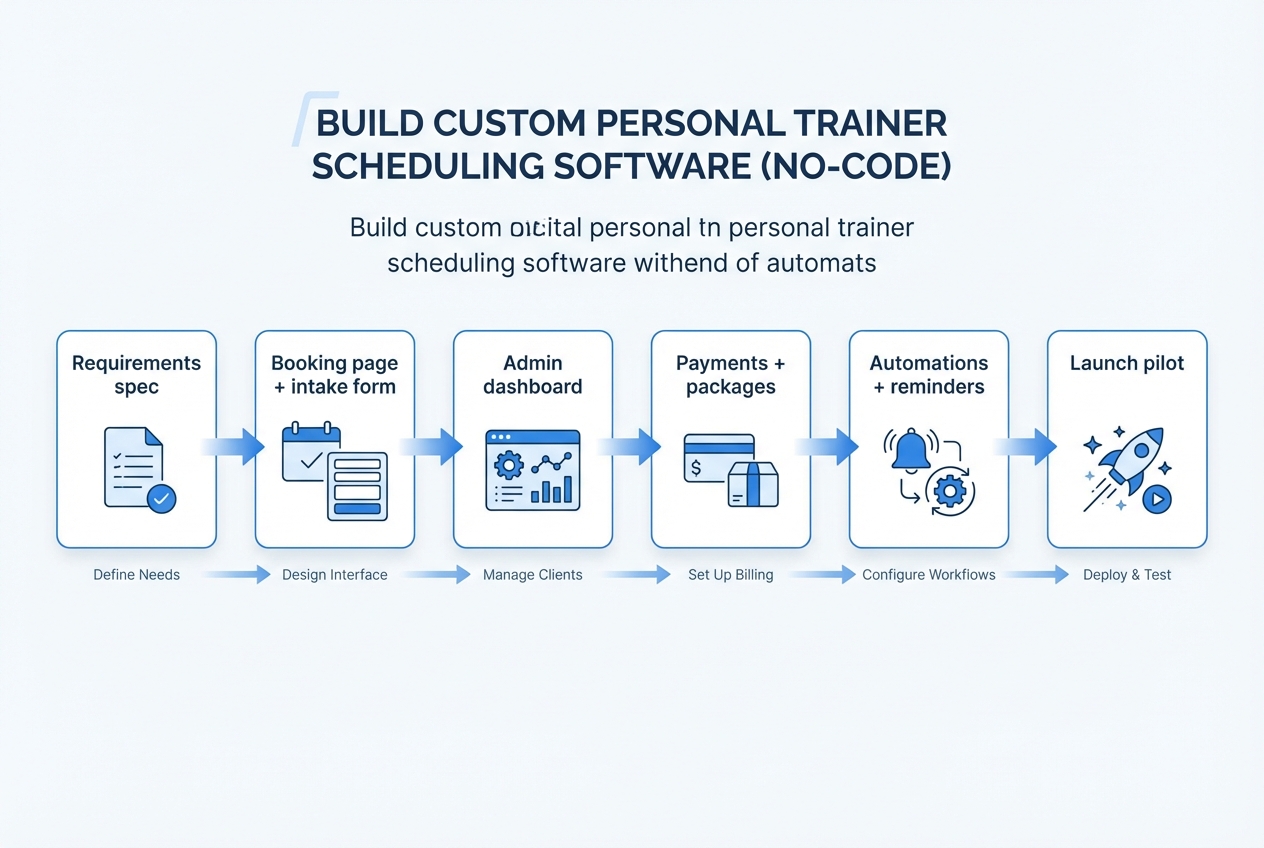
Modern AI app builders let you generate a working booking experience plus an admin tool without turning your training business into a long software project. If you want speed but still care about having your exact policies enforced, a builder like QuantumByte’s AI app builder can be a practical path.
Step 1: Write your requirements as a single booking spec
Keep it plain language. Include:
- Services and durations: What clients can book.
- Rules: Buffers, cancellation windows, no-show policy.
- Data capture: What fields you need at booking and what fields you need at onboarding.
- Payments: Pay-to-book, packages, memberships.
- Messaging: Email and Short Message Service (SMS) reminders, confirmation content.
The goal is you have one source of truth that prevents “we built a calendar, but not the business” mistakes.
Step 2: Generate a first version, then tighten the workflow
Move fast, but do not ship chaos.
- Build the booking page: Make it simple, mobile-first, and focused on one primary action.
- Add intake forms: Only ask what you will use.
- Create the admin view: You need a dashboard for today’s sessions, upcoming sessions, and unpaid sessions.
The goal is you can run real bookings end-to-end, then improve based on where clients and staff actually get stuck.
Step 3: Add a receptionist layer if messages are your bottleneck
If you lose time in back-and-forth, build a front door that handles common actions.
- Answer FAQs: Pricing, locations, availability windows.
- Route leads: New inquiry vs existing client.
- Start bookings: Send the right booking link based on what they ask.
The goal is fewer repetitive messages, faster response times, and a booking experience that feels “always on” without you being always on.
Step 4: Implement packages and recurring billing cleanly
If you sell memberships, do not leave renewals to memory.
- Credits and redemption: Define exactly how many sessions a package includes and when a credit is consumed.
- Membership rules: Decide how unused sessions work (carryover vs expire) and what happens when payment fails.
- Upgrade and pause paths: Make it easy to switch plans without manual admin.
The goal is clients can buy, book, and stay current without you reconciling payments against sessions every week.
Step 5: Launch on a small slice of your business
Start with either:
- Segment: New clients only.
- Service line: One service line (assessments).
- Location: One location.
The goal is you validate the flow in real life, then expand without breaking trust with existing clients.
A realistic launch plan for the first 14 days
You do not need a perfect system to get value. You need a system you can operate.
Days 1 to 3: Nail the core booking path
Focus on one thing: a client can book, pay (or redeem a credit), and receive confirmation.
- Outcome to look for: No manual steps for a standard booking.
Days 4 to 7: Add protections and policies
Now tighten the edges.
- Outcome to look for: Cancellations and reschedules follow rules without you negotiating in chat.
Days 8 to 14: Layer in retention automation
This is where scheduling turns into growth.
- Outcome to look for: Rebooking prompts, package top-ups, and “next session” nudges are consistent.
Common pitfalls that make scheduling systems fail
Most scheduling issues are not technical. They are workflow issues.
- Too many booking options: More choice creates more confusion. Start with fewer services and expand.
- No buffer logic: If you do not protect transitions, the day collapses under travel and prep time.
- Intake as an afterthought: If data collection is optional, it will not happen.
- Payments disconnected from confirmation: If payment is not part of the workflow, you will chase it.
- No ownership of the system: Someone has to maintain it weekly, even if it is a short recurring check-in.
What you should take away
Personal trainer scheduling software should protect your time, reduce no-shows, and make it easy for clients to commit. Start by designing your flow, then choose the simplest tool that can enforce it.
In my opinion, once your business is selling packages, enforcing policies, and running retention follow-ups, custom scheduling becomes a strategic advantage. If you want founder-speed setup with templates you can still tailor to your policies, QuantumByte is a strong fit. Compare tiers and decide what you want to ship first.
If you are mapping a broader roadmap beyond scheduling, it also helps to scan the pricing tiers. For multi-location studios, review the enterprise capabilities before you commit to a tool that cannot scale with governance.
Frequently Asked Questions
What is the best personal trainer scheduling software?
The best personal trainer scheduling software is the one that enforces your rules (buffers, cancellations), collects the right intake, and ties confirmation to payment or package credits. If your workflow is standard, an off-the-shelf scheduler can work. If you need packages, memberships, and custom automation, a custom-built system is often the better long-term fit.
Should I require payment to book personal training sessions?
In my opinion, yes for most training businesses. Requiring payment (or redeeming a package credit) at booking reduces no-shows and eliminates payment chasing. You can still allow exceptions for specific clients, but your default should be “confirmed equals paid or credited.”
How do I reduce cancellations and reschedules?
Reduce them by making policies enforceable in the system: a clear cancellation window, automated reminders, and frictionless rescheduling that still respects your availability. Also collect intake early so clients feel committed before the first session.
Do I need a client portal for scheduling?
Not always. A client portal is helpful when you want clients to see remaining credits, upcoming sessions, and policies in one place. If you are scaling beyond a small roster or selling packages, a portal usually pays off quickly.
Is custom scheduling software worth it for a solo trainer?
It can be, if your business model depends on packages, memberships, specialized intake, or a premium experience that off-the-shelf tools cannot represent cleanly. If you are still validating demand, start simple and move to custom once you have a repeatable flow.