
Pilates appointment scheduling software is only “right” for your business if it can model privates and duets as both a time slot and a set of rules around credits, partners, and equipment. If your scheduler can’t handle those edge cases cleanly, you end up doing manual fixes all week: moving partners, adjusting packages, chasing waivers, and explaining billing mistakes.
This guide is not a generic top-10 list. It’s a duet-first buying and setup playbook so you can pick a tool (or decide to build) with confidence.
Quick fit: which tool type wins for privates + duets
Use these buckets to self-segment in 30 seconds.
- Solo instructor (mostly privates, occasional duet): Choose an appointment-first scheduler that supports packages, intake forms, and tight availability controls. You care more about reducing schedule gaps than about full studio management.
- Boutique studio (privates + duets are the core revenue): Prioritize per-person credits, flexible cancellation rules, and staff permissions. If you have Reformers, you also need true resource scheduling.
- Class-forward studio (full schedule of group classes plus some privates): Choose an all-in-one studio platform built around class rosters, memberships, and waitlists, then verify it still handles duets without awkward workarounds.
- Reformer- or equipment-constrained studio: Any tool that cannot reserve equipment explicitly will cause overbooking. Resource scheduling is non-negotiable.
The deciding variables that actually change outcomes (and your admin load):
- Duet mechanics: Do you track credits per person, or per appointment? Can you handle partner swaps and one-person late cancels?
- Packages and entitlement logic: Can one client be on a membership and the other on a pack, in the same duet?
- Resource scheduling: Can a session require 1 instructor plus 2 Reformers, and block them automatically?
- Integrations: Payments, waivers/intake, reminders, and accounting exports.
- Total cost drivers: Staff seats, SMS fees, package modules, branded app add-ons, and feature gating.
The unique angle in this article is a duet-first model: pairing, credits per person, split payments, partner swaps, and equipment constraints. Most vendor pages gloss over those details.
The duet-first scheduling framework
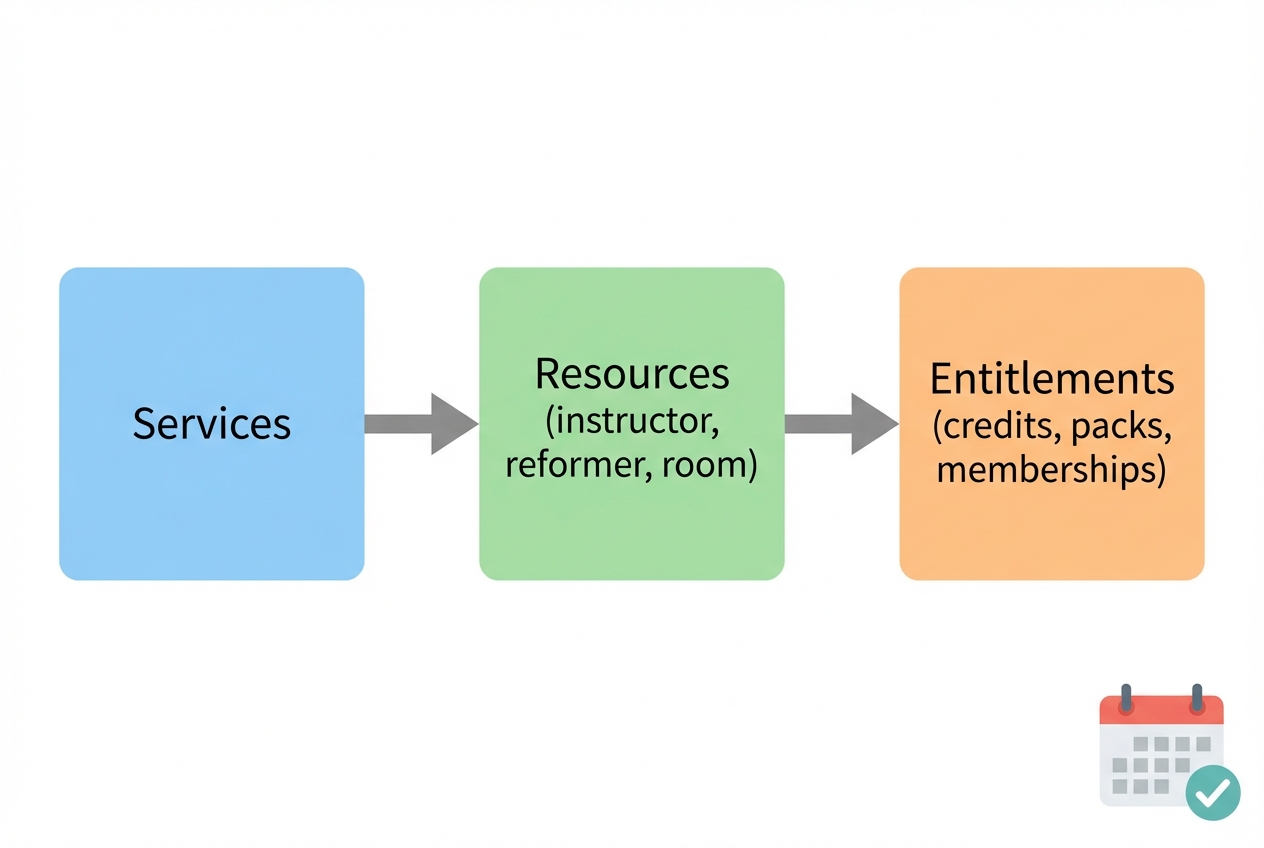
The cleanest way to evaluate any scheduler is to ask whether it can model three entities, without hacks:
- Services: What you sell (55-min private, 55-min duet, 30-min private, semi-private trio, etc.).
- Resources: What gets consumed (instructor, room, Reformers, towers, chairs).
- Entitlements: What the client “spends” to book (single session, 10-pack, duet pack, unlimited membership, intro offer).
If a platform treats everything like “one appointment with one client,” duets will constantly break.
The duet edge cases you must support
Duets are where scheduling systems reveal their limits:
- Two clients in one slot: Both need confirmations, reminders, and waivers, not just the payer.
- One partner cancels: You need a rule for whether the duet converts to a private, reschedules, or forfeits one person’s credit.
- Partner swap: Client A keeps their recurring time, but Client B changes week to week.
- Uneven entitlements: One client is on a membership, the other uses a pack, or one has a comp credit.
- Payments: Sometimes one person pays, sometimes you split the charge, sometimes you invoice later.
If a vendor can’t explain how they handle these without “your front desk can adjust it,” assume you’ll be doing manual work forever.
Decision matrix: pick the right category of tool
Two questions select the right product category faster than any feature checklist.
| You need per-person entitlement tracking for duets | You do not need per-person entitlement tracking for duets | |
|---|---|---|
| You need true resource scheduling | Choose an all-in-one studio platform with equipment resources, or go custom. | Choose an equipment-capable studio platform, even if duets are simplified. |
| You do not need true resource scheduling | Choose a tool that supports packages and multi-client bookings, or go custom if partner swaps are frequent. | A basic appointment scheduler can work well. |
Concrete example you can use in every demo
A 55-minute duet on Reformers is the test case:
- Service: 55-min duet
- Resources required: 1 instructor + 2 Reformers
- Entitlements consumed: Each client uses 1 duet credit
- Cancellation rule: If one client no-shows inside the cutoff, only that person loses the credit
If the tool cannot pass this scenario end-to-end (booking, reminders, credit consumption, and reporting), it’s not duet-first.
Feature checklist
Use this as your requirements list before you get on sales calls.
Client booking experience
- Self-serve booking page: Clients can book without calling, and you can control who can see what.
- Booking rules: Minimum notice, maximum advance window, and automatic buffers between sessions.
- Waitlists and “hide full sessions”: Classes should disappear or show as waitlisted when full, depending on your preference.
- Mobile-first flow: If the booking flow is clunky on a phone, your team becomes the booking department.
Payments and packages
- Payment processor support: Confirm Stripe, Square, or PayPal support if that matters to you.
- Package/membership sales: Packs for privates, packs for duets, intro offers, recurring memberships.
- Card-on-file behavior: If you save cards or charge cancellation fees, you are in a higher risk category for disputes and compliance.
Staff operations
- Roles and permissions: Instructors should see what they need, not your full revenue dashboard.
- Payroll and pay rates: If instructor compensation varies by service type (private vs duet), payroll reporting matters.
- Session notes: You need a place to store goals, contraindications, and progression notes per client.
Resource controls
- Equipment booking: Reformers, towers, rooms, and any hard capacity constraint should be reservable.
- Rules per service: A duet should reserve two equipment slots, a private reserves one.
Automations
- Reminders: Email and SMS reminders, plus confirmations and follow-ups.
- Policy enforcement: Cancellation cutoffs, late cancel fees, no-show rules.
Calendar interoperability
- One-way vs two-way sync: Understand whether the system only pushes events out, or truly syncs.
- .ics export support: Portability matters when you switch tools or reconcile schedules. The standard event format is defined by RFC 5545 (iCalendar).
Workflow fit for private sessions and duets
Features don’t matter if the workflow is awkward. These best practices reduce gaps, reduce admin, and stop billing cleanup.
Design availability to reduce schedule gaps
Instructors on Reddit talk about the same pain: scattered bookings create dead time. Fix this in configuration.
- Office hours (clustered availability): Make bookable blocks (for example, 9–1 and 4–7) instead of “available all day.”
- Buffers: Add reset time so sessions don’t overlap and you don’t run late.
- Minimum notice: Same-day booking sounds convenient until it ruins your day. Require notice that matches your prep time.
- Service-specific availability: If duets require equipment or a specific room, only show times that can actually support them.
Evaluate duet booking flows
Most platforms end up supporting one of these patterns. Decide which you want, then test it.
- Client invites partner: Client A books and adds Client B. Best for recurring duets if your platform can enforce waivers per person.
- Staff books both: Best when duets are common but partner swaps happen.
- “Bring a partner” add-on: Simple, but often breaks credit tracking and reporting.
If a platform cannot require intake/waiver for the second person, you’ll constantly have missing paperwork.
Cancellation and rescheduling rules that stay fair
Duets require per-person policy decisions.
- Per-person cancellation (best for fairness): Each client has their own cutoff and consequence.
- Per-appointment cancellation (simpler, more conflict): If one cancels, the whole appointment changes.
Either can work. What matters is that the platform can apply your rule automatically, not via manual adjustments.
Notes and intake without oversharing
Store what instructors need (injuries, goals, programming notes), but restrict access. The FTC’s guidance on protecting personal information is clear on minimizing what you collect and controlling access.
Demo acceptance tests
Bring this script to every vendor demo:
- Book a duet where both clients receive confirmations.
- Consume credits per person from different package types.
- Swap the partner on a recurring duet without creating duplicates.
- Late cancel one person and verify only that person’s credit is forfeited or fee applied.
- Refund or reschedule and confirm reporting stays accurate.
Integrations map: lead → intake/waiver → payment → reminders → accounting
Think in systems, not “does it integrate.” You want a clean chain of custody for client data and money.
- Lead capture: Website form or landing page that creates a client record and tags the lead (new, postnatal, rehab-focused, athlete, etc.).
- Intake and waiver: Digital forms attached to the person, not just the appointment. In duets, both people must complete this.
- Payment: Package purchase, card-on-file, refunds, and cancellation fees.
- Reminders and confirmations: Email plus SMS if you use it.
- Accounting export: Payouts, refunds, tax breakdowns, and package sales.
Reminders: they’re worth automating
Appointment reminders have measurable impact in healthcare settings. A systematic review and meta-analysis found reminders improved attendance overall (pooled relative risk 1.11) and that SMS reminders in particular improved attendance (relative risk 1.14) in the included studies, according to J Hosp Manag Health Policy. Your studio is not a hospital, but the takeaway holds: consistent reminders reduce forgetfulness and last-minute chaos.
Calendar sync: understand what “sync” really means
- iCalendar (.ics) export: This is basic portability and is built on the iCalendar standard defined in RFC 5545.
- Two-way sync claims: If a vendor says “two-way calendar sync,” ask what protocol they use and how conflicts are handled. CalDAV is a standard protocol for accessing and managing remote calendars, defined in RFC 4791. Many systems do not implement true two-way behavior.
Pricing expectations and cost drivers
Scheduling software pricing rarely tracks your revenue. It tracks complexity.
The levers that usually raise cost:
- Staff/instructor count: More logins or staff profiles.
- Client volume: Some platforms gate contacts, appointments, or messages.
- Locations: Multi-location support is often a higher tier.
- SMS charges: Many tools charge per text or bundle small quotas.
- Packages/memberships: Packs and recurring billing are frequently gated.
- Branded app add-ons: Useful, but often expensive for small studios.
When “free” tiers work:
- Solo instructor
- Mostly privates
- No complicated packages
- No equipment constraints
When “free” tiers break:
- Multi-instructor scheduling
- Duet-heavy credit rules
- Membership billing
- Automated SMS reminders
- Equipment and room constraints
Pricing questions to ask every vendor:
- What is billed per staff seat vs per location?
- Are packages and memberships included, or an add-on?
- Is SMS included, metered, or third-party?
- Are there limits on appointments, clients, or forms?
- Do higher tiers unlock resource/equipment booking?
Alternatives and competitors
These are credible options that repeatedly show up in Pilates studio discussions and in survey-based comparisons like PilatesBridge. The goal here is fit, not hype.
| Tool | Best for | Pilates-specific strengths | Limitations to watch | Who should avoid |
|---|---|---|---|---|
| Acuity Scheduling | Solo instructors, private-first | Solid appointment flow; flexible availability rules; straightforward client self-booking | Duet credit accounting and partner swaps can become manual depending on setup | Studios that need equipment constraints and robust memberships |
| Mindbody | All-in-one studio ops | Strong ecosystem for classes, memberships, and staff ops | Can be heavy if you mainly sell privates and duets; duet edge cases may require operational workarounds | Instructors who want lightweight scheduling and fast setup |
| Vagaro | Mixed wellness businesses | Good when your business spans multiple service types beyond Pilates | Pilates-specific resource logic (Reformer counts, duet credits per person) may not be first-class | Equipment-constrained studios that need strict resource booking |
| WellnessLiving | Studios needing equipment booking | Explicit equipment and resource ideas are a strong fit for Reformers | Verify how duets handle per-person credits, waivers, and cancellations | Duet-heavy studios if per-person entitlement tracking is weak |
| Walla | Class-forward Pilates studios | Often positioned for modern class experiences and studio workflows | Confirm how privates and duets are modeled, especially partner swaps and split payments | Private-session-first businesses that rarely run classes |
| TeamUp | Boutique fitness with clear schedules | Solid for structured rosters and memberships | Verify appointment-first flows if privates and duets are a large share | High-variance duet workflows requiring custom policy logic |
| Arketa | Modern wellness brands | Strong booking and marketing orientation | Confirm operational depth: staff permissions, reporting, and duet accounting | Studios that need complex equipment constraints |
| Momence | Memberships, packs, and community | Packs and memberships are central | Validate duet logic, partner management, and equipment constraints | Reformer studios that cannot tolerate overbooking |
| Bookeo | Budget-conscious scheduling | Simple booking foundation | Often requires careful configuration for Pilates-specific entitlements | Studios that need robust staff pay + resource logic |
How to use this shortlist:
- If you’re private-first and want speed, start with lightweight appointment tools, then test duet scenarios hard.
- If you’re equipment-constrained, start with platforms that explicitly support resource booking.
- If your studio is growing and your workflows are unique, consider whether “almost fits” will cost more in admin than a custom build.
Security and consent checks
This is not legal advice. It’s a buyer checklist so you don’t accidentally pick a tool that creates avoidable risk.
Payments: know your PCI scope
If your scheduling system stores, processes, or transmits cardholder data, you are in PCI DSS scope at some level. Start with the official PCI DSS standard and ask your vendor:
- Who stores the card data? (You want tokenization and a payment processor vault, not raw cards in the scheduler.)
- What payment pages are hosted by whom? Redirected checkout reduces your exposure.
- How are refunds and disputes handled? You need an auditable trail.
SMS reminders: consent and opt-out mechanics
If you send SMS reminders, your platform must support consent collection and easy opt-out. The FCC’s TCPA implementing rule makes clear that “calls” include text messages and sets requirements around consent and revocation, as described in 47 CFR § 64.1200.
Operationally, you want:
- Recorded consent: Who opted in, when, and how.
- Opt-out keywords: STOP and similar should be honored automatically.
- Channel control: Ability to disable SMS per client and fall back to email.
Personal data: keep it minimal and controlled
Scheduling systems can quietly become your health-adjacent data store. Follow small-business security basics from the FTC: collect only what you need, restrict access, secure accounts (strong passwords and multi-factor authentication where available), and have an incident plan.
Build vs buy: when a custom scheduler is the better move
Off-the-shelf tools are great until your competitive advantage lives in the exceptions.
You are a candidate for a custom scheduler if you routinely need:
- True duet credit accounting: Per-person entitlements, mixed packages, and one-person late cancel logic.
- Equipment constraints that never break: 2 Reformers reserved for every duet, specific room requirements, instructor specializations.
- Custom booking flows: Invite-a-partner, split payments, partner swaps on recurring slots.
- Policy automation: Cancellation fees and credit forfeits applied exactly as written.
- Studio-specific reporting: Revenue by service type, instructor utilization, equipment utilization, and package liability.
A custom app can unify booking, entitlements, resources, reminders, and reporting into one workflow instead of bolt-ons.
If you want to go custom without a long build cycle, Quantum Byte is designed for “fast custom”: you start from templates for common business features, then adjust the booking and credit rules using natural-language prompts. That matters when your studio is changing faster than your software can.
Implementation timeline
A clean rollout beats a rushed cutover. Plan 2–4 weeks, depending on data hygiene and how many packages you have in the wild.
Week 1: requirements and data cleanup
- List your services: privates, duets, intro offers, any semi-private formats.
- Define entitlements: packs, memberships, and how credits are consumed.
- Audit client data: duplicates, outdated contact info, missing emails.
- Write policy rules: cancellation cutoffs, late fees, no-show handling.
Week 2: configuration and integrations
- Configure services, staff, availability, and buffers.
- Set up payments and package products.
- Connect intake/waiver workflows.
- Configure reminders (email first, SMS after consent is confirmed).
Week 3: staff training and soft launch
- Train instructors on: notes, viewing schedules, handling duet edge cases.
- Run a soft launch with a subset of clients (for example, new clients only).
- Collect issues and fix configuration, not behavior.
Week 4: full cutover and monitoring
- Move remaining clients to self-serve booking.
- Monitor failed payments, reminder delivery, and no-show rates.
- Keep a backout plan: export schedules weekly during transition.
Data migration checklist
- Clients: names, emails, phone numbers, tags.
- Upcoming appointments: including recurring privates and duets.
- Packages/credits: remaining balances per client.
- Instructor availability: office hours, blocked times, buffers.
- Waivers: migrate if supported; otherwise re-collect on next booking.
Testing script before you go live
- Book private, duet, and class.
- Buy a pack, consume credits, then refund.
- Late cancel one person in a duet.
- Confirm email reminder delivery.
- If using SMS, confirm opt-out works and is recorded.
- Confirm calendar export or sync behaves as promised.
Key takeaways checklist
- Model your business as services, resources, and entitlements before you shop.
- Demand a duet-first demo (partner swap, mixed credits, one-person late cancel).
- Require per-person waivers and reminders for duets, not just the payer.
- Use clustered availability to reduce schedule gaps and protect your day.
- Enforce buffers and minimum notice so sessions don’t pile up or run late.
- Treat equipment as a bookable resource if you have Reformers or limited rooms.
- Verify package and membership logic for both privates and duets.
- Map integrations end-to-end (lead → waiver → payment → reminders → accounting).
- Prefer iCalendar portability via .ics exports grounded in RFC 5545.
- Ask payment-security questions early and understand your PCI DSS exposure.
- Get SMS consent and opt-out right per 47 CFR § 64.1200.
- Plan a 2–4 week rollout with a soft launch and a written testing script.
Frequently Asked Questions
Is there any pilates appointment scheduling software free?
Yes, but “free” usually works only for simple setups: one instructor, mostly privates, minimal packages, and no equipment constraints. The moment you need multiple staff logins, memberships, SMS reminders, or true resource scheduling, you typically move into paid tiers or add-ons. Treat free plans as a trial of workflow fit, not a long-term operating model.
What does Reddit recommend for Pilates scheduling?
Reddit threads tend to favor tools that reduce admin for independent instructors: quick self-booking, simple payments, and control over availability to avoid gaps. Use that input as a reality check, then still run the duet acceptance tests. Community recommendations often reflect what works for privates, not what survives at studio scale.
What is the best pilates appointment scheduling software?
The best tool is the one that passes your duet-first scenarios and matches your constraint level:
- Private-first and lightweight: start with appointment schedulers, but stress-test duets.
- Class-forward: choose a studio platform optimized for rosters and memberships.
- Equipment-constrained: choose a platform with explicit equipment/resource booking.
- Complex duet credits and policies: consider a custom build.
If a vendor can’t show you how they handle partner swaps, mixed packages, and per-person cancellation consequences, it’s not the best choice for a duet-heavy studio.
Is Mindbody good for Pilates studios?
Mindbody can be a strong fit for studios that want an all-in-one system for classes, memberships, and broader studio operations. For private-session and duet-heavy businesses, the key is validating how duets are modeled and how much manual adjustment your staff will need for credits, partner changes, and cancellations. Don’t decide from the feature list. Decide from a live duet-first demo.
Start building a duet-first scheduler
If you keep running into the same walls, duet credits that don’t reconcile, equipment overbooking, partner swaps that break recurring sessions, and cancellation rules your team has to enforce manually, a custom scheduler can pay for itself in saved admin hours and fewer billing headaches.
Quantum Byte is built for founder-operated businesses that want speed without giving up control. You can start from plug-and-play templates and then customize the exact duet logic, resource rules, and policies you run your studio on. It’s the same approach Aziz Ansari used to create an app for his film “Good Fortune” within minutes, without prior app-building experience.
Start here: Start building