
A pilates booking app with payments should do more than take a card at checkout. The best setup for most studios is card-on-file + deposits for high-demand privates, pay-in-full for small group classes, and memberships only when you can run recurring billing with clean cancellation and consent.
Quick verdict: best setup for most Pilates studios
If you want a setup that works on day one and does not create billing drama later, use this default configuration:
- Privates (high demand): Require card on file and take a deposit at booking. Charge the balance automatically after the session or at a defined cutoff.
- Small group classes: Pay-in-full at booking (simpler, fewer edge cases).
- Workshops/series: Pay-in-full upfront (protects your capacity and planning).
- Memberships: Only launch once your cancellation flow is truly self-serve and your staff knows how holds, failed payments, and credit rules work.
Three failure modes to avoid:
- Ambiguous cancellation language: If clients cannot tell when they can cancel, they will assume they can.
- Messy pack credits: If credits expire, roll over, or apply differently depending on class type, expect constant admin tickets.
- Recurring billing without easy cancel: This is how “membership” turns into disputes, complaints, and refund pressure.
The rest of this guide is a configuration blueprint. Use it to evaluate apps quickly and then set one up with fewer no-shows, fewer chargebacks, and cleaner books.
Feature checklist to require in any booking app that takes payments
Before you compare brands, disqualify any tool that cannot do these basics without workarounds.
Payments (non-negotiable)
- Payment processor options: Stripe, Square, and/or PayPal connections.
- Card-on-file: Ability to store a payment method with the processor and charge later.
- Deposits / partial payments: Collect part of the total at booking.
- Refunds/voids: Staff can process refunds with an audit trail.
- Receipts: Automatic receipts and booking confirmations.
- Taxes (if applicable): Sales tax support or at least proper line items.
Products you will actually sell
- Class packs/passes: Configurable expiration and rules.
- Private session packs: Separate from group credits, ideally with different expiry.
- Memberships: Recurring billing plus credit allocation.
- Intro offers: One-time promotional product that cannot be repurchased.
- Gift cards/vouchers: Useful for holidays and referrals.
Booking controls
- Capacity + waitlist: Limits by class and auto-fill rules.
- Cancellation windows: Different rules for privates vs classes.
- Late cancel / no-show fees: Automatic enforcement tied to card-on-file.
- Rescheduling rules: Clear cutoffs and whether fees apply.
Operations and reporting
- Staff roles/permissions: Front desk should not have the same power as the owner.
- Exportable reporting: Transactions, payouts, product sales, client ledger.
- Reconciliation-friendly payouts: Reports that match processor payouts and include fees.
Risk and compliance
- Waivers: e-sign waiver support (or at least form capture).
- Consent capture: Proof that a client agreed to recurring billing terms.
- Dispute evidence access: You should be able to pull receipts, timestamps, and policy acceptance for chargebacks. Stripe’s dispute flow is a good reference point for what merchants need to provide as evidence and how disputed payments can be reversed and assessed fees per the reason code in the Stripe Docs.
Automation
- Email/SMS confirmations and reminders: This is one of the simplest ways to reduce missed sessions.
Workflow fit: privates, group classes, and hybrid studios
Pilates studios are often private-session heavy, or at least run a hybrid model. That changes what “good payments + booking” means. For privates, the cost of a no-show is higher, the schedule is tighter, and rebooking speed matters more.
Use this service-to-rule matrix as your default:
| Service type | Recommended payment rule | Key settings |
|---|---|---|
| Private sessions | Deposit + card-on-file | Cancellation window, late cancel fee, one-click rebook, buffers between sessions |
| Small group classes | Pay-in-full | Capacity, waitlist, no-show fee, easy reschedule cutoff |
| Workshops/series | Pay-in-full upfront | No refunds after cutoff, transfer rules, attendance tracking |
| Intro offer | Pay-in-full | One per client, expiration, auto upsell to pack/membership |
Operational features that matter more than people expect:
- Instructor conflict prevention: You need multi-staff calendars and permissioned schedule editing.
- Buffers and resources: Add buffers between privates (cleanup, equipment reset). If reformers are limited, you need resource-based capacity so you do not oversell equipment.
- Fast rebooking: Privates sell when the client is feeling progress. Your flow should make rebooking the next session almost automatic.
Payments architecture: design the system before you pick settings
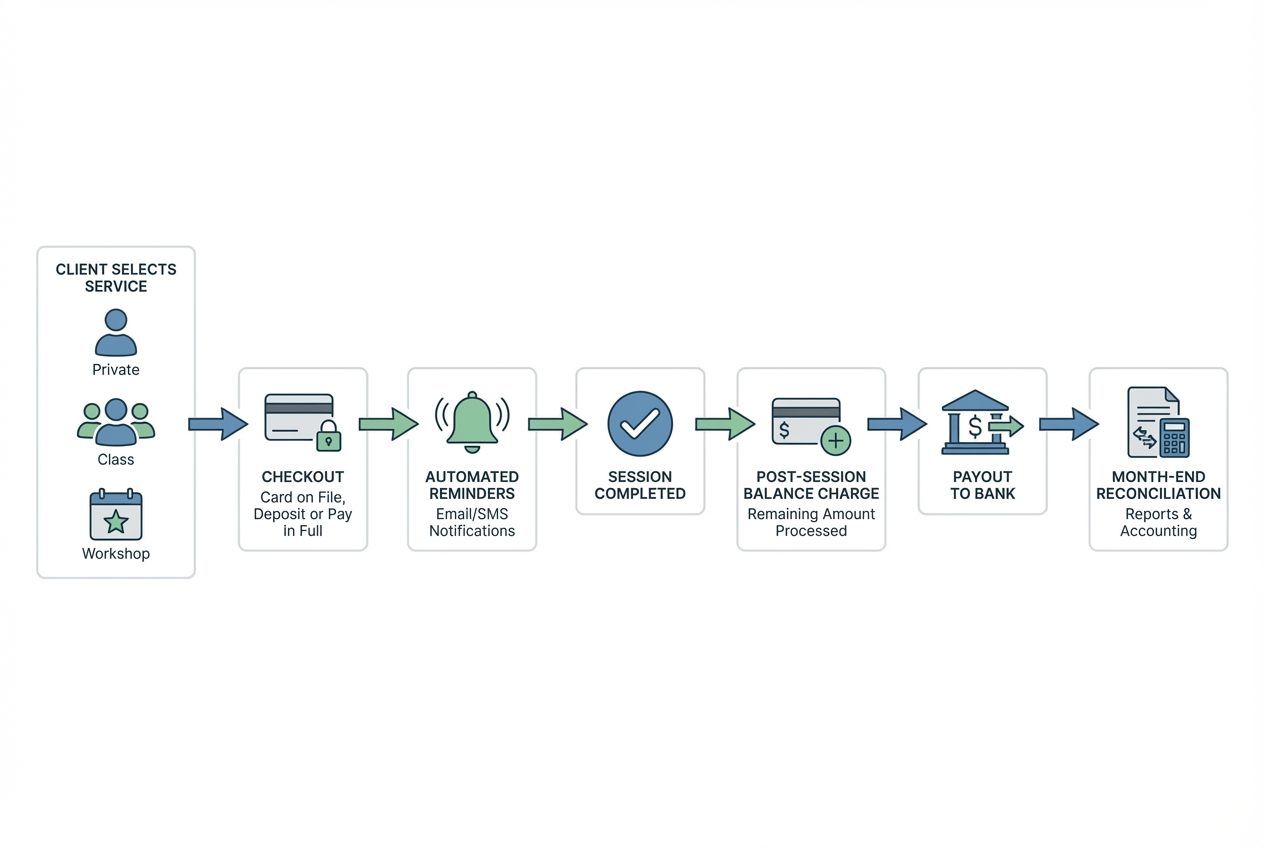
Most billing pain is not caused by “bad software.” It is caused by settings that do not match your policies, and policies that do not match what your staff can enforce.
Think in five layers:
- Policy layer: Cancellation windows, refunds, expirations, holds, late fees.
- Checkout layer: What the client sees, agrees to, and pays right now.
- Settlement layer: How payouts land in your bank (timing, fees, deposits).
- Accounting layer: How you reconcile packs, membership liabilities, and refunds.
- Risk layer: Disputes, consent records, and keeping card data out of your systems.
Here is a “studio payments map” you can literally write down before setup:
- Define what gets charged and when: booking time, post-session, monthly renewal.
- Define fee triggers: late cancel cutoff, no-show fee, reschedule cutoff.
- Define where receipts live: email + client portal.
- Define who can override: owner only for refunds past policy; desk staff can reschedule inside policy.
- Define audit trail: every manual adjustment leaves a note and user stamp.
Minimum viable setup vs growth setup:
| Area | Minimum viable setup (launch fast) | Growth setup (reduce admin long-term) |
|---|---|---|
| Products | 1 private, 1 group class, 1 pack | Multiple packs, intro offer, workshop products |
| Payments | Card-on-file + deposit for privates | Saved cards for all, automated late fees, dunning for memberships |
| Policies | One simple cancellation policy | Service-specific windows and hold rules |
| Reporting | Basic sales + payout export | Client ledger, liability/credits report, month-end checklist |
Deposits and pay-in-full: when to use each, and the exact rules to set
Deposits work when the business problem is commitment, not affordability. You are using the deposit to reduce no-shows and last-minute cancellations for scarce instructor time.
Use pay-in-full when:
- Capacity is limited and demand is steady: group classes and workshops.
- The service is standardized: fewer edge cases and exceptions.
- You want simpler refunds: full transaction tied to one booking.
Use a deposit when:
- A private slot is expensive to hold: the instructor cannot “resell” the hour easily.
- Clients tend to reschedule frequently: deposit creates a real decision.
- You want flexible settlement: deposit now, balance later.
Exact rules to configure (keep them boring and clear):
- Deposit application: Deposit always applies to the final charge (not a separate fee).
- Non-refundable window: “Deposits are non-refundable within X hours of the appointment.”
- Reschedule allowance: “One reschedule allowed with 24+ hours notice; after that, late cancel fees apply.”
- Late cancel/no-show fee: A defined amount or the full session price, but only if your policy is explicit at checkout.
Staff exception handling:
- Limit who can override fees and refunds: Give front desk “reschedule” power, not “free money” power.
- Require a reason note: If someone waives a fee, you want a record for consistency and future disputes.
Class packs and passes: credit rules that won’t create admin tickets
The pack is where studios accidentally create a support desk.
Start with clean pack types:
- Multi-class pass: For group classes only.
- Private session pack: For privates only.
- Intro pack: A small number of classes with a short expiration and one-per-client rule.
Pack rules that prevent confusion:
- Expiration: Pick a single duration per pack and stick to it.
- Transferability: Decide if packs can be shared within a household. If yes, define what “household” means.
- Booking limits: If you want fairness, limit how far in advance a pack holder can book.
- Waitlist conversion: Decide whether a credit is consumed when joining a waitlist or only when the spot is confirmed.
Redemption precedence (this is the hidden admin killer):
- Use oldest credits first: This reduces “my credit expired” complaints.
- Do not let packs apply to the wrong service: If privates and group classes share credits, staff will be manually fixing mistakes.
Copy-ready policy templates (plain language):
- Pack expiration: “Class packs expire 6 months after purchase. We can extend once for 30 days if requested before expiration.”
- Pack refunds: “Unused packs are refundable within 7 days of purchase. After a class is taken, packs are non-refundable.”
- Waitlist credits: “Joining a waitlist does not use a credit. A credit is used only when you are confirmed into class.”
Memberships: recurring billing that stays compliant and easy to cancel
Memberships are powerful, but they also create the highest risk if your terms and cancellation experience are sloppy.
Pick a model you can run operationally:
- Unlimited: Simple for clients, harder for capacity management.
- X-classes-per-month: Balanced, but you must define rollover.
- Credit bank: Flexible, but can get confusing fast.
- Perks-only: Discounts and priority booking without credits. Lowest complexity.
Critical settings to decide upfront:
- Billing cadence and alignment: Monthly on purchase date or fixed calendar date.
- Rollover rule: No rollover, limited rollover, or rollover with expiration.
- Proration: Only if you actually need it. Proration adds edge cases.
Holds/freezes (make it predictable):
- Allow holds for specific reasons: travel, injury, life events.
- Set a maximum hold length and frequency: otherwise holds become a loophole.
- Define what happens to credits during hold: do they pause, expire, or keep accumulating?
Failed payments (dunning):
- Retries: Automatic retries for a limited window.
- Grace period: Keep access for a short period if you want retention, but define the cutoff.
- Escalation workflow: After X failed attempts, staff reaches out once, then access is paused.
Compliance and cancellation reality:
- Make cancellation as easy as sign-up: The Federal Trade Commission’s final “click-to-cancel” rule emphasizes clear disclosure of material terms before collecting billing info, express informed consent before charging, and cancellation that is as easy as signing up, per the FTC press release.
- Keep proof of consent: For negative option programs (including auto-renewals and free trials), the FTC’s guidance highlights keeping records of consent and operational requirements such as simple cancellation through the same medium, per the FTC business guidance.
If your booking app cannot support a clean cancel flow and consent records, do not launch memberships yet. Start with packs.
Checkout experience that increases conversion and reduces disputes
A good checkout flow is not just “fewer clicks.” It is fewer misunderstandings.
Best practices that hold up when a client complains:
- Require card on file for any appointment with a fee trigger: especially privates.
- Show the cancellation policy at checkout: not buried in a footer.
- Put fee triggers in the confirmation message: date/time, cancellation cutoff, and what happens on a late cancel.
Receipts and confirmations should include:
- What they bought: “Private session” vs “Small group reformer.”
- When it happens: with timezone if you have traveling clients.
- What can be charged later: late cancel fee, no-show fee, remaining balance.
Dispute reduction tip: make it easy to produce evidence.
When a chargeback happens, you typically need to respond with documentation tied to the dispute reason. Stripe’s overview of disputes is a practical reminder that a disputed payment can be reversed and you may incur dispute fees, so you want policies, receipts, and acceptance timestamps that are easy to pull.
No-show reduction: reminders, waitlists, and cancellation automation
Automated reminders are one of the few “set it and forget it” features that consistently improves attendance. A systematic review in the medical literature found that appointment reminder systems consistently improve attendance and can also increase cancellations/rescheduling, which helps you refill slots when clients cancel early enough, per the systematic review and evidence synthesis.
Reminder setup that works for studios:
- Timing: Confirmation immediately, then 24 hours before, then 2 hours before.
- Channel: Email by default, SMS for clients who opt in.
- Content: Include the cancel/reschedule link and the cutoff.
Waitlist automation settings to decide:
- Auto-fill rules: When a spot opens, do you offer it to the first person only or broadcast?
- Confirmation window: Give the waitlisted client a short window to accept.
- Auto-charge behavior: If you auto-charge when someone is moved into class, disclose it clearly.
Late cancel/no-show fee design:
- Be consistent within a service type: Clients accept rules that feel fair.
- Do not punish early cancellation: Make it easy to cancel inside the window so you can refill.
Reconciliation and reporting: how to keep books clean with packs and memberships
If you sell packs and memberships, your “sales” view and your “cash in bank” view will not match day-to-day. You need a repeatable month-end rhythm.
Monthly checklist (owner + bookkeeper):
- Match payouts to processor reports: deposits, fees, refunds.
- Review refunds and adjustments: make sure staff notes exist.
- Review disputes: open, won, lost, and any policy changes needed.
- Review outstanding credits: packs sold minus credits used.
- Review membership renewals: failed payments, holds, cancellations.
Exports your booking app should provide:
- Transaction list: itemized sales, taxes, discounts.
- Payout report: what hit your bank, net of fees.
- Client ledger: purchases, bookings, cancellations, fees.
- Outstanding credits/liability report: remaining pack credits.
Security baseline: keep card data out of your systems.
Payment security is a deep topic, but the simple studio rule is: do not store raw card data yourself. Use a booking app that relies on a reputable processor and tokenization. PCI DSS v4.0 is the global baseline for protecting payment account data, as summarized by the PCI Security Standards Council in its overview of PCI DSS v4.0. Your goal is to keep your studio out of unnecessary scope.
Integrations that matter: payments, accounting, marketing, and virtual sessions
Integrations are only valuable when they remove double entry.
Prioritize in this order:
- Payments: Stripe, Square, or PayPal. Verify payout timing, refund handling, and how disputes are surfaced.
- Accounting: QuickBooks or Xero sync, or at least clean exports with product categories and fees.
- Marketing: Email platform tagging based on what clients buy (intro buyer, pack buyer, member).
- Virtual sessions: Zoom or Google Meet links that auto-generate and send in reminders.
- Website/social: Embedded booking page and a single link you can put on Instagram.
Pricing expectations and cost drivers for booking apps with payments
You are paying for three things: booking logic, payments support, and operational reporting.
Common cost drivers:
- Number of staff and locations: More calendars and permissions.
- SMS volume: Reminder texts can add up.
- Membership complexity: Holds, proration, and advanced dunning features.
- POS hardware: If you need tap/swipe in-studio.
- Payment processing: Separate from app subscription. Know your rates and dispute fees.
Quote checklist (use this to compare tools apples-to-apples):
- Does your plan include deposits and card-on-file charging?
- Are packs and memberships first-class features or bolt-ons?
- How do refunds work, and who can issue them?
- What reports can you export for reconciliation?
- Are there add-on fees for SMS, staff seats, and multiple locations?
- How are chargebacks surfaced, and what evidence can you export?
Alternatives and competitors to evaluate
You will see these names often when researching Pilates studio software. Use the checklist in this guide to evaluate them quickly.
| Tool | Best for | What to scrutinize |
|---|---|---|
| Setmore | Simpler scheduling with broad integrations | Deposits flow, pack/membership depth, reporting exports |
| Bookeo | Classes + courses + vouchers | Membership edge cases, refund rules, accounting cleanliness |
| StudioBookings | Budget-conscious studio management | Deposit support, membership holds, reporting depth |
| Mindbody | Larger studios with complex ops | Total cost, setup complexity, reporting learning curve |
| Vagaro | All-in-one marketplace + booking | Membership rules, fee transparency, brand control |
| Acuity Scheduling | Appointment-first businesses | Packs/memberships workarounds, class capacity fit |
| TeamUp | Membership-led studios | Credit logic, holds, cancellations, exports |
| Arketa | Boutique fitness experience | Studio-specific reporting, pack/membership rules |
| Momence | Community + fitness commerce | Membership terms, cancellation UX, payout reporting |
| WellnessLiving | Full studio suite | Implementation time, staff training needs |
| Walla | Boutique studio operations | Private vs class workflows, reporting exports |
Do not get pulled into feature marketing. Ask: can it enforce your policies automatically, and can you reconcile payouts without a spreadsheet marathon?
Build vs buy: when a custom app is the better business decision
Off-the-shelf tools are great when your studio fits the standard mold. But some studios outgrow “one-size-fits-most” quickly.
Building is usually worth it if you have:
- Multiple offerings with different rules: privates, rehab-focused sessions, workshops, corporate classes, retreats.
- A custom client portal: progress tracking, program recommendations, tailored rebooking.
- Automation across tools: purchase triggers sequences, staff tasks, and reporting.
- Unique membership logic: credits that convert between services, custom rollover, or tiered perks.
- A brand-first booking experience: you want the flow to feel like your studio, not a generic widget.
What you should still keep off-the-shelf: payment processing and card storage. Use Stripe/Square/PayPal rails so you do not expand your PCI footprint.
Where Quantum Byte fits (only if you are hitting real limitations):
If you want a tailored booking + payments experience without a long custom-dev cycle, Quantum Byte can help you build a studio-specific flow using templates and natural-language prompting. For example, you can create an “Intro Offer” purchase that triggers:
- The first booking with deposit or pay-in-full
- A post-class prompt to upgrade
- A membership sign-up flow that captures explicit consent and surfaces a self-serve cancel link
That is the kind of workflow that reduces front-desk load and keeps policies consistent.
Implementation timeline: launch in 48 hours vs a 30-day polished rollout
You can launch fast, or you can launch polished. Both are valid. Pick the one that matches your capacity.
48-hour MVP (get paid and booked quickly)
- Create services: 1 private, 1 group class.
- Connect your payment processor.
- Turn on card-on-file requirements.
- Set deposits for privates and pay-in-full for classes.
- Create 1 class pack.
- Enable email and SMS reminders (if you have opt-in).
- Publish the booking link and run test purchases.
30-day rollout (reduce admin and scale cleanly)
- Week 1: Finalize policies (cancellation, refunds, pack expiry) and train staff.
- Week 2: Configure waitlists, late fees, exception permissions, and receipt templates.
- Week 3: Accounting integration or standardized exports; build month-end checklist.
- Week 4: Client migration, membership launch (if ready), and reporting cadence.
Go-live checklist:
- Run 5 end-to-end tests: private deposit, group class purchase, pack redemption, late cancel fee, refund.
- Confirm messaging: confirmations show policy cutoffs.
- Verify staff permissions: who can refund, who can override.
Week-2 cleanup checklist:
- Review cancellations and reschedules: update windows if you see confusion.
- Review support tickets: any pattern means a policy needs clearer language.
- Review payout reconciliation: fix category mapping early.
Pilates payments setup checklist
Use this as your quick build sheet.
Deposits
- Set deposit-required services: privates and any scarce appointment type.
- Define deposit rule: fixed or percentage, and whether it applies to the final price.
- Set cancellation cutoff: define when deposits become non-refundable.
- Lock down overrides: owner-only for refunds outside policy.
Packs and passes
- Create separate packs by service type: privates vs classes.
- Set expiration and extension policy: one extension rule, written plainly.
- Define redemption precedence: oldest credits used first.
- Define waitlist behavior: when a credit is consumed.
Memberships
- Choose the simplest model you can operationalize: perks-only or X-classes-per-month first.
- Set rollover and expiration rules: write them in one sentence.
- Create a self-serve cancel path: as easy as sign-up.
- Store proof of consent: acceptance timestamp, terms shown, and cancellation method.
Reminders and waitlists
- Turn on confirmations: immediately after booking.
- Set reminder cadence: 24 hours and 2 hours.
- Configure waitlist confirmation window: and disclose auto-charge if used.
Reconciliation
- Export monthly payout report: match to bank deposits.
- Review refunds and disputes: ensure notes and evidence exist.
- Export outstanding credits: know your pack liability.
Compliance and security
- Keep card data with the processor: avoid storing card numbers yourself.
- Disclose recurring billing terms clearly: before collecting billing info.
Sanity test (do this before you announce anything)
- Complete 5 test purchases end-to-end: verify receipts, cancellations, refunds, and reports.
Start building a booking + payments flow that matches your studio
If your studio needs deposit logic, pack rules, and membership flows that off-the-shelf tools cannot express cleanly, build the workflow you actually run.
Start building with Quantum Byte’s templates and customizable app builder: Start building. You get a founder-friendly way to create a booking and payments experience that matches your policies, reduces admin follow-ups, and keeps billing rules consistent as you grow.