
Quick verdict: the simplest system that scales
Pilates class pack management scales when your policies are easy to explain, your software enforces them automatically, and your books treat every unredeemed credit as a liability until the class is delivered. If you are handling lots of manual extensions, “one-off” rollovers, or spreadsheet math at month-end, your system is already telling you it is too complex.
The baseline setup that works for most studios:
- Fewer pack types: 2–4 packs you can explain in one sentence.
- Standard expirations: a simple ladder by pack size.
- Limited exceptions: written rules, one owner, logged reason codes.
- A weekly reconciliation habit: catch drift before month-end.
You can implement this in Mindbody, Mariana Tek, WellnessLiving, or a custom tool. The principles stay the same.
Feature checklist for solid class pack operations
Before you tweak policies, make sure your system (software plus process) can handle the full lifecycle without backdoor workarounds.
- Pack lifecycle: purchase, redemption, expiration, refunds, transfers, freezes.
- Credit logic: fractional credits (if you sell semi-privates), waitlist behavior, late-cancel and no-show deductions, staff comps.
- Controls: audit trail, role-based permissions, required reason codes for adjustments, exportable adjustment logs.
- Finance hooks: payment reconciliation, deferred revenue (liability) reporting, exports to accounting (for example, QuickBooks).
- Customer experience: automated “you have X credits left” reminders and a repurchase flow that takes under a minute.
If any one of these is missing, you will feel it later as disputes, manual admin, or messy financials.
Your class pack catalog: fewer options, clearer behavior
Your pack catalog should be designed for enforceability, not creativity.
A clean “good/better/best” set for many studios looks like:
- Intro offer: 3-pack or 5-pack with a short expiration, first-time clients only.
- Core pack: 5-pack and 10-pack, same rules, different price per class.
- High-commitment option: 20-pack or a membership (if recurring revenue fits your model).
A few rules that reduce admin immediately:
- Avoid overlapping packs with different rules: if two products look similar at checkout but behave differently later, you are buying future support tickets.
- Decide if reformer vs mat are separate products: if equipment capacity is the constraint, separate packs prevent overbooking and pricing confusion.
- Tie packs to operations: instructor pay and capacity reporting should not require manual reclassification later.
Expiration and rollover rules: a policy matrix you can actually enforce
The studios that struggle are not “bad at policies.” They are running policies that cannot be enforced consistently.
Use a simple policy matrix. Keep it short enough to train staff in 10 minutes.
| Pack type | Term length | Rollover | Freeze | Transfer | Refund |
|---|---|---|---|---|---|
| Standard packs | 3/6/12 months (by size) | None, or only with repurchase window | Medical only | Household only, admin-only | Prorated before first use only |
| Intro offers | 30 days | None | No | No | No |
| Promos | Fixed (e.g., 60 days) | None | No | No | No |
| Membership credits | Monthly | 1-month cap | Optional | No | No |
| Privates | 6–12 months | Limited | Medical | Named client only | Case-by-case |
A default expiration ladder most studios can enforce:
- 5-pack: 3 months
- 10-pack: 6 months
- 20-pack: 12 months
If you offer rollover, keep it deterministic:
- Allow rollover only when repurchasing within a defined window (for example, within 7 days of expiration), and only up to a cap.
- No unlimited extensions: “just this once” becomes a policy the moment you do it twice.
Write down what qualifies as an exception (medical, travel, studio-initiated cancellations). Then decide what does not qualify.
Cancellations, no-shows, and waitlists: make the rules deterministic
Ambiguity is what causes disputes, manual refunds, and staff inconsistency.
Lock these decisions:
- Late cancel vs no-show: decide if both deduct one credit, or if no-shows deduct more (many studios keep it the same to avoid arguments).
- Cutoff time: a single cutoff across the studio (for example, 12 hours) is easier to enforce than different rules by class type.
- Waitlist auto-add: define when a waitlisted client is moved into class and how long they have to cancel without penalty.
If you allow make-ups, define what “make-up” means operationally:
- New credit: easiest to track, but can inflate liabilities if you do not tag it as a comp.
- Expiration extension: simpler for the customer, harder to audit.
Most studios do best with a dedicated comp credit type and a required reason code.
Refunds, transfers, freezes, and promos: control the exceptions
Exceptions are where reporting breaks. Treat them like a product feature, not an afterthought.
-
Refunds:
- Full refund: only before first redemption.
- Prorated refund: if you offer it, standardize the formula (classes remaining times current per-class price, less a fixed admin fee). Avoid custom math per client.
- Chargebacks: log them as a separate reason code so they do not masquerade as “refunds.”
-
Transfers:
- Best practice: limit to household members or disable entirely.
- Control: admin-only transfer permission plus required documentation note.
-
Freezes:
- Choose one: pause expiration or add days. Pausing is cleaner, but both are workable if your system logs it.
-
Promos and comps:
- Use a distinct product or discount code for comps so your revenue reporting stays readable.
Clean accounting for class packs: deferred revenue and breakage
From an accounting perspective, class packs are not revenue when sold. They are an obligation to deliver future services.
Under ASC 606, prepaid services are generally recorded as a contract liability (deferred revenue) and recognized as revenue as the service is performed. Guidance on customers’ unexercised rights (breakage) explains that if you expect some credits will not be redeemed, you generally recognize expected breakage in proportion to the pattern of redemptions, and if you cannot estimate breakage, you recognize it when the likelihood of redemption becomes remote, as described in the Deloitte ASC 606 Roadmap discussion of breakage.
A minimum viable mapping (even if you are cash-basis for taxes) keeps internal reporting consistent:
- Cash / bank
- Processor clearing (if deposits lag)
- Deferred revenue: class packs
- Class revenue
- Discounts / promos
- Refunds / chargebacks
For breakage estimates, practitioner guidance recommends using historical redemption patterns and updating assumptions over time. It also flags that unclaimed property laws can change whether you should keep unused balances, as covered in KSM’s breakage revenue overview.
Talk to your CPA about your exact accounting basis and local regulations. Still, your operational system should track liabilities correctly.
A studio-friendly month-end workflow
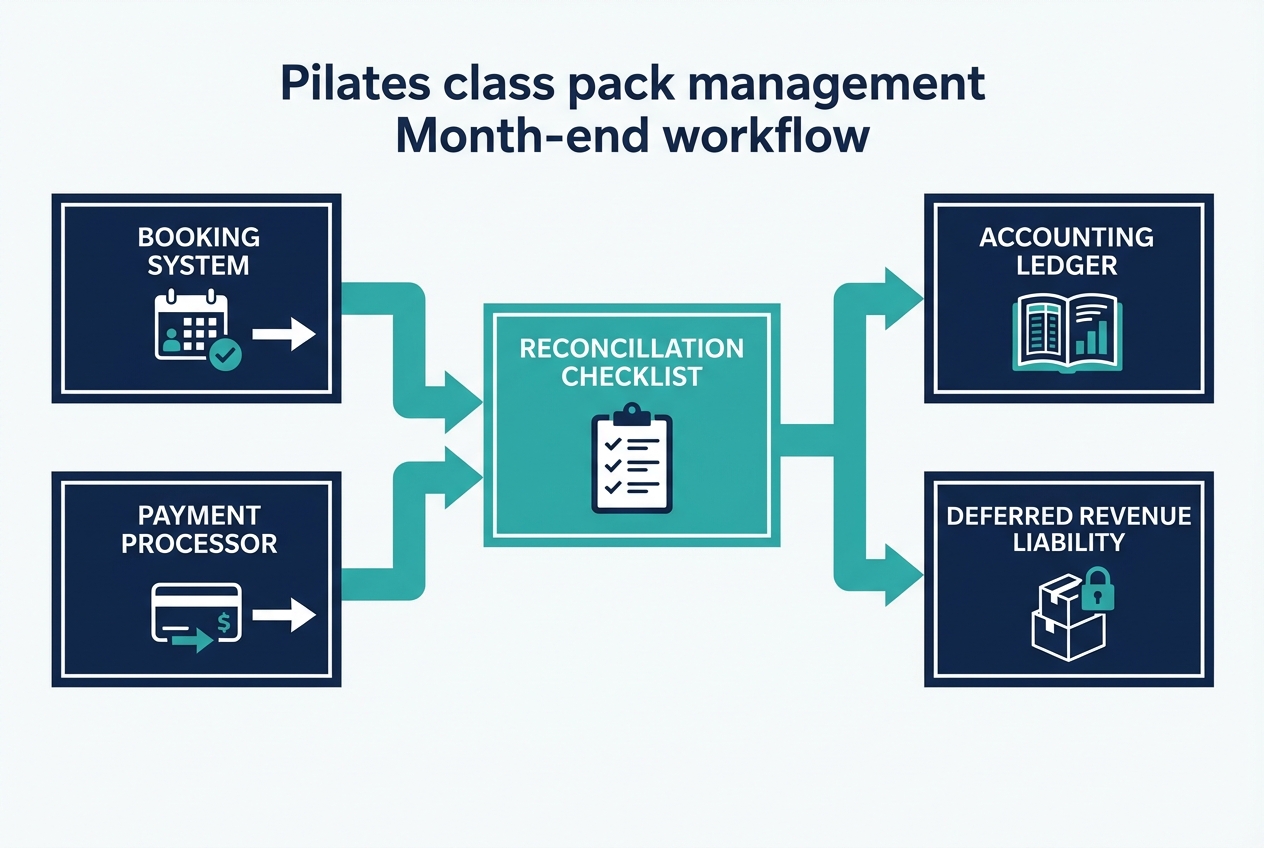
Your goal is simple: the booking system and the general ledger should tell the same story about cash, liabilities, and delivered classes.
Weekly (15 minutes):
- Payment spot-check: compare processor settlements to booking-system sales totals.
- Liability drift check: look for unusual manual adjustments, refunds, or transfers.
Month-end (60–90 minutes): export these reports:
- Sales by product (packs sold, memberships sold)
- Redemptions delivered (classes served)
- Refunds and chargebacks
- Discounts and comps (separately)
- Ending pack liability (unredeemed credits value)
A simple journal entry pattern (conceptual, not legal advice):
- Debit: Deferred revenue (for the value of classes delivered)
- Credit: Class revenue
Then record refunds, chargebacks, and discounts to their own accounts so you can see why net revenue moved.
If you are a US studio thinking “12-month packs mean I can defer taxes for 12 months,” be careful. The advance payment deferral rules can limit deferral to a short window in many cases, as reflected in 26 CFR § 1.451-8 and explained in The Tax Adviser’s overview of advance payments. Align your pack terms to customer behavior and operations first, then validate tax implications with a professional.
Reconciliation controls: keep booking balances aligned with your ledger
Most “mysterious” accounting problems come from uncontrolled adjustments.
Use a three-way tie-out:
- Payment processor settlements: what actually hit the bank.
- Booking system sales and refunds: what your front desk recorded.
- Accounting ledger deposits: what your books say happened.
Controls that prevent chaos:
-
Reason codes for every adjustment:
- Comp: free credit granted
- Admin correction: fixing a booking mistake
- Goodwill extension: documented one-time extension
- Transfer: client-to-client change
- Chargeback: dispute outcome
-
Permissioning: only a small number of admins can extend expirations, transfer credits, or override penalties.
-
Audit trail: export “who changed what and why” monthly and store it with close documentation.
Handle tricky cases with a defined rule, not a judgment call:
- Partial refunds after redemptions: refund only remaining value, never the original pack price.
- Instructor comps: track in comps, not in discounts, so you can measure their cost.
If you want to reduce manual tie-outs over time, the controls in this section pair well with an automated bank reconciliation workflow.
Software workflow fit: off-the-shelf vs custom needs
Off-the-shelf studio software usually fits when you have one location, a small catalog, and low exception volume. You can run a clean operation if your policies are simple and you stop doing one-off favors that the system cannot record.
You likely outgrow the standard stack when you have:
- Multiple locations with cross-location packs
- Complex rollover and freeze logic you actually enforce
- Heavy reporting needs (owner dashboards, cohort usage, liability aging)
- Equipment assignment requirements for reformer studios (reformer-level capacity and assignment)
Must-have capabilities either way:
- Payments integration
- Accounting export (QuickBooks or Xero)
- Email or SMS for reminders
- Data export or API access so you can audit and reconcile
Alternatives and competitors
Instead of chasing a “top 10” list, evaluate tools against your non-negotiables. Most studios only need a category decision first.
Common categories:
- Studio management platforms: scheduling, packs, memberships, POS, reporting.
- Scheduling plus payments tools: lighter-weight booking with simpler reporting.
- Custom internal tool: a pack ledger and reconciliation layer that sits beside your booking system.
Use this comparison template:
| Criteria | All-in-one studio platform | Light scheduling + payments | Custom internal tool |
|---|---|---|---|
| Pack rule flexibility | Medium | Low | High |
| Audit trail and reason codes | Medium | Low | High |
| Exports for accounting | Medium | Medium | High |
| Multi-location support | Medium | Low | High |
| Reformer equipment assignment | Varies | Rare | High (if built) |
| Time to deploy | Fast | Fast | Medium |
Pick the tool category that matches your exception volume and reporting expectations, not the one with the nicest marketing site.
If you are considering building anything custom, it helps to ground the project in practical business process automation principles so you do not rebuild the same manual mess in a new interface.
Build vs buy: when a custom app is the cleanest option
Custom is not about being fancy. It is about making your real rules enforceable and your numbers undeniable.
Build (or add a custom layer) when:
- You have frequent exceptions that must be approved, logged, and reported.
- Month-end close requires spreadsheet reconciliation every time.
- You want a single owner dashboard for liabilities, upcoming expirations, and churn risk.
A practical MVP to build first:
- Pack ledger: every purchase, redemption, expiration, and adjustment as a line item.
- Policy engine: expiration ladder, rollover constraints, freeze behavior.
- Staff adjustment screen: permissions plus required reason codes.
- Accounting exports: delivered-class revenue, ending deferred revenue, refunds, comps.
What not to build yet:
- Custom payments processing
- A complex consumer mobile app
- A full scheduling system if your current scheduler already works
If you want to move fast without losing flexibility, Quantum Byte can be a fit for building an internal pack ledger and reconciliation workflow that matches your studio’s actual policies. The point is not to replace everything. It is to make the messy parts measurable and enforceable.
Implementation timeline: 7 days to clean class pack ops
A realistic rollout is one week if you keep scope tight.
- Day 1–2: finalize pack catalog and the policy matrix; update client-facing policy text.
- Day 3–4: configure software rules, reason codes, and staff permissions.
- Day 5: set up accounting mappings and exports; assign owners for weekly checks and month-end close.
- Day 6: run a parallel test with a small set of purchases, redemptions, late cancels, and a refund.
- Day 7: go live, train staff, and announce the new rules to clients.
Do not skip the parallel test. It is where you discover the edge cases while they are still cheap.
Best-practice checklist to copy into your SOP
Use this as your SOP skeleton.
-
Policy clarity
- Expirations: ladder by pack size, written and visible at checkout
- Rollover: either none, or strictly tied to a repurchase window with a cap
- Freezes: defined eligibility, logged, consistent behavior (pause vs add days)
- Transfers: allowed only under strict conditions, admin-only
- Refunds: standardized formula, cutoff points, and reason codes
- Cancellations: deterministic late-cancel, no-show, waitlist rules
-
System controls
- Audit trail: exportable logs for changes
- Reason codes: required on every adjustment
- Role permissions: limited admins can override key rules
- Exports: sales, redemptions, refunds, comps, ending liability
-
Finance hygiene
- Deferred revenue view: you can see unredeemed value at any time
- Monthly tie-out: processor, booking system, and ledger agree
- Breakage method: documented and reviewed periodically
-
Customer experience
- Reminders: low-friction “you have X credits left” prompts
- Repurchase flow: fast checkout and one-click rebook
- Consistent messaging: website, checkout, and emails match your rules
-
Governance
- One owner for exceptions: prevents policy drift
- One owner for close: prevents accounting surprises
Key takeaways for cleaner books and fewer exceptions
A scale-ready pack system is built on three ideas: simplicity, enforceability, and reconciliation.
Simplify what you sell. Make rules deterministic so staff do not improvise. Then reconcile on a schedule so financial drift never becomes a fire drill.
If your studio is growing and your current software cannot express the rules you actually need, a small custom layer can be the cleanest way to keep operations tight without turning your front desk into a billing department. Quantum Byte is worth considering when you want that custom layer fast, with templates and enough flexibility to match your policies.
Frequently Asked Questions
Pilates class pack management cost
The cost is usually a mix of software fees, payment processing, and the admin time you spend on exceptions.
If your policies are loose, your “cost” shows up as labor: manual extensions, manual refunds, and time spent fixing mistakes. Tight policies reduce that cost even if your software subscription is the same.
If you are budgeting, separate:
- The recurring tool cost (scheduler, SMS, accounting)
- The cost of exceptions (how many per week, and who handles them)
- The cost of messy reporting (extra hours at month-end, CPA cleanup)
The fastest way to reduce total cost is usually not switching tools. It is reducing pack types and enforcing deterministic rollover and expiration rules.
Pilates scheduling software
Pilates scheduling software should do more than show a calendar. For class packs, it must track credit balances accurately under real-world conditions like waitlists, late cancels, and refunds.
At a minimum, look for:
- Pack purchase and redemption tracking
- Automated expiration handling
- Clear late-cancel and no-show deductions
- Audit trails for adjustments
- Exports that support reconciliation and month-end close
If you teach reformer classes, also require equipment-level capacity controls. “Class is full” is not enough if you need specific reformers assigned.
Pilates studio software
Pilates studio software is the broader category that typically includes scheduling, payments, packs, memberships, and reporting.
When class packs are a big part of revenue, prioritize reporting and controls over marketing features:
- Can you export a clean liability report for unredeemed credits?
- Are refunds, transfers, and expiration extensions logged with reason codes?
- Can you restrict who can override rules?
- Can you reconcile sales to processor deposits without spreadsheets?
If the answer is no, you will either accept messy books or build a workflow layer that produces clean exports.
How much is one Club Pilates class
Club Pilates pricing varies by location and by plan, and many locations steer clients toward memberships and class packs rather than single drop-ins.
For your studio, treat competitor pricing as a signal, not a template. The more important question is whether your pack structure drives the behavior you want:
- Intro offer that converts to a core pack or membership
- Expiration terms that encourage consistent attendance
- Policies that are strict enough to be enforceable but clear enough to feel fair
If you benchmark, compare the effective per-class price across similar commitment levels (drop-in vs 4-pack vs 8-pack vs unlimited) and decide where you want to position your value.
Start building
If class-pack rules are already messy in spreadsheets, build the workflow layer before the reporting debt compounds.
Start with Quantum Byte to:
- Launch fast: Use plug-and-play templates for booking, client portals, and common studio workflows.
- Customize without a long dev cycle: Adjust policies, packages, and flows by describing what you want.
- Scale like a real product: You are not locked into someone else’s roadmap.