
Pilates class scheduling software should do three hard things flawlessly: enforce real capacity (people, equipment, rooms), run a waitlist that actually backfills cancellations, and handle packs and memberships without messy edge cases.
If a tool cannot express your studio’s capacity + waitlist + pack rules in plain configuration (not spreadsheets and workarounds), it is the wrong tool, no matter how nice the booking page looks.
Quick verdict: what to buy
Buy based on your operating model, not on brand familiarity.
- Best for solo instructors (privates or small groups): A lightweight scheduler can work if it supports packages/credits, cancellation windows, and clean payment collection. Avoid “appointment-only” tools that treat classes as a workaround.
- Best for reformer-capacity studios: Choose a system that can model either spots (per reformer) or equipment resources, plus true waitlist promotion rules.
- Best for multi-instructor or multi-location studios: Prioritize permissions, reporting, and audit trails (who changed what), plus reliable integrations for payments and accounting.
- Best for privates-heavy hybrids (classes + 1:1): You need both class capacity logic and appointment buffers, plus consistent pack consumption across both.
What to avoid:
- Generic appointment booking that cannot model classes. The classic failure mode is “the class disappears when full,” so you never capture demand and your cancellations do not refill.
- Any pack system that requires manual reconciliation. If clients can buy packs “somewhere else” and you manually mark attendance as paid, you will leak revenue and burn admin hours.
- All-in-one suites that force you into their workflow. All-in-one is worth it when you truly use the extra modules (marketing, POS, staff payroll). If you only need scheduling + payments, complexity becomes a tax.
A simple decision rule you can use in demos:
- If you cannot configure these three policies in under 30 minutes, move on: (1) your reformer capacity rule, (2) your waitlist promotion cutoff and response window, (3) your late-cancel/no-show policy and how it charges (fee vs credit).
Feature checklist for Pilates studios
Bring this list to every trial. Do not let the vendor steer you into a generic tour.
Non-negotiables
- Capacity-based class scheduling: Set a cap per class instance, not just per instructor.
- True waitlist mechanics: Waitlist join, auto-promotion, cutoffs, and notification rules.
- Class packs and credits: Expiry, restrictions, and clear rules for what consumes a credit.
- Payments and receipts: Card-on-file support, refunds, and clean receipts clients can find.
- Staff permissions: Front desk versus instructor versus owner-level controls.
- Client self-serve changes: Cancellation and reschedule flows that enforce your policy.
- Reporting: Attendance, utilization, revenue by product (packs vs memberships), and instructor load.
Pilates-specific adds
- Equipment or spot reservations: Reformer, tower, chair, and “choose your station” setups.
- Resource scheduling: Rooms and equipment as constraints, not just a headcount cap.
- Mixed modality support: Group classes + privates + semi-privates, all under one client account.
Retention and operations adds
- Automated reminders: Email and SMS reminders reduce missed sessions and help clients cancel in time when they cannot attend, which makes it easier to reallocate openings to others.
- Intake and waivers: Digitally signed waivers and basic health intake.
- Series and recurring classes: Consistent scheduling without recreating classes weekly.
- Substitution management: Easy instructor swaps with correct payroll attribution.
Red flags that cause churn
- “Full means hidden”: No waitlist, or waitlist exists but cannot auto-promote.
- Packs sold outside the scheduler: You are forced into manual attendance marking.
- No cancellation window logic: The system cannot enforce late-cancel/no-show consistently.
Workflow fit: choose by studio model
Before comparing products, decide which “inventory” you are actually selling.
- Reformer-only classes: You are selling a limited number of equipment-backed spots.
- Privates-heavy: You are selling instructor time, often with buffers and recurring patterns.
- Hybrid studios: You are selling both, and packs must work across both without confusion.
Decision matrix (use it to shortlist):
| Studio archetype | Required capabilities | Avoid if… |
|---|---|---|
| Reformer-only group classes | Spot or equipment capacity, equipment assignment, waitlist auto-promotion, fast check-in | “Capacity” is only a headcount field and there is no equipment/resource layer |
| Privates-heavy | Appointment buffers, recurring appointments, room constraints, card-on-file enforcement | Reschedule flow is clunky or does not enforce minimum notice |
| Hybrid (classes + privates) | Unified credits across services, consistent cancellation policy, reporting by modality | Packs behave differently in classes vs privates, creating disputes |
If your real pain is “downtime gaps,” focus trials on:
- Buffers and minimum notice: Can you prevent last-minute reshuffles that create dead time?
- Waitlist fill windows: Does the tool backfill in time to save the slot?
Best practice 1: Model capacity correctly
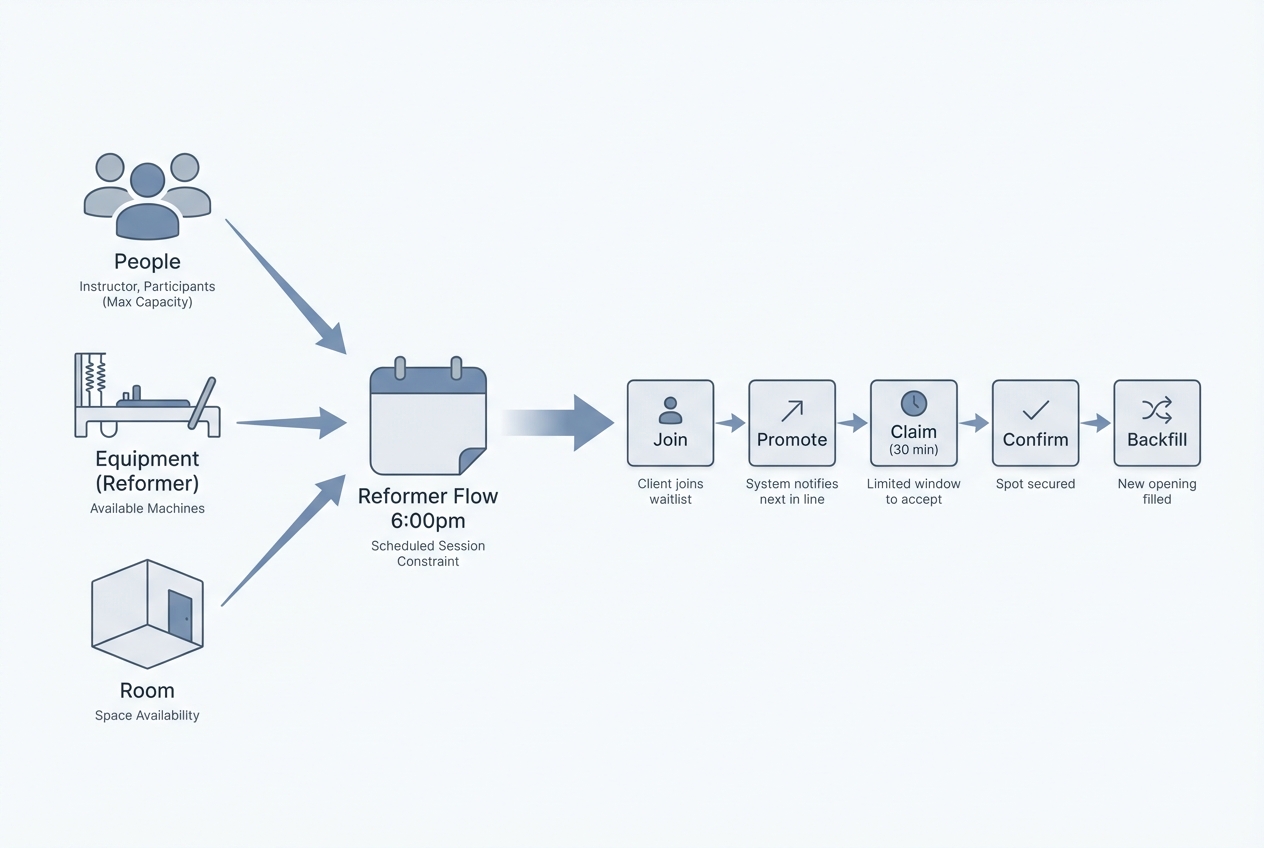
Pilates capacity has three layers. If you model the wrong layer, you will either oversell (chaos) or undersell (lost revenue).
- Headcount cap: The simplest. Works when every attendee uses interchangeable resources and the room is the only constraint.
- Equipment cap: Required when specific equipment defines the experience (reformer, tower, chair) and you cannot exceed physical inventory.
- Room cap: Required when multiple rooms run in parallel or you host overlapping sessions.
Two setup patterns you will see in scheduling tools:
- Spots as inventory (simpler): “10 spots” means “10 reformers.” Clients book a spot, not a specific reformer.
- Use when: Your reformers are functionally equivalent and station assignment happens in-studio.
- Tradeoff: You cannot guarantee a specific station or equipment type.
- Equipment as resources (more precise): Each reformer is a resource, and a booking consumes one resource.
- Use when: You have mixed equipment, accessibility needs, or you sell “premium stations.”
- Tradeoff: More setup and more places to misconfigure.
Concrete examples:
- Reformer Flow (10 reformers): Capacity = 10 equipment-backed spots. Instructor = 1. Room = Studio A.
- Tower Foundations (6 stations): Capacity = 6. If you run it in the same room as reformers, the room becomes a shared constraint.
- Mixed Equipment Circuit (8 total stations, but only 2 chairs): Model equipment resources if chair availability is the real bottleneck.
Operational guardrails you should configure on day one:
- Prevent double-booking: Instructors and rooms should be hard constraints.
- Buffers: Add turnover time for equipment reset and client transitions.
- Class minimums: If you cancel under-enrolled classes, automate the cutoff and message clients early.
Best practice 2: Design waitlists that actually fill classes
A waitlist is only valuable if it reallocates inventory fast. That means your rules must support rapid cancellations and frictionless claiming.
A practical waitlist lifecycle:
- Join: Client taps “Join waitlist.” They see their position and the promotion rules.
- Promotion window opens: When a spot frees up, the system offers it to the next person.
- Claim or auto-add: Either they confirm within a time limit, or you auto-add them.
- Confirmation: They receive a confirmation message with a one-tap cancel/reschedule option.
- Backfill: If they do not respond, the spot immediately moves to the next person.
Recommended policy defaults (adjust to your market):
- Waitlist cutoff time: Stop promoting within a defined window before class (so instructors are not surprised).
- Response window: Give a short claim window, then move on.
- Promotion cadence: One at a time, in order, unless you intentionally “blast” multiple offers close to class time.
- Auto-add vs manual confirm: Auto-add fills better, but it must be paired with clear policy and notifications.
- Late-cancel policy on promoted clients: If you auto-add them, decide whether late-cancel fees apply.
Design your reminders like an operational system, not a “nice-to-have.” Evidence syntheses in healthcare consistently show that appointment reminders improve attendance and can be tuned to reduce wasted slots by prompting timely cancellations and rescheduling, which translates directly to studios trying to backfill last-minute openings. See the 2026 systematic review and meta-analysis and the 2016 realist evidence synthesis for why the reminder content and timing matter, not just the fact that a reminder exists.
Waitlist notification best practices:
- Email + SMS when possible: SMS is higher urgency, email is better for details.
- Include a direct cancel/reschedule path: The goal is to re-enter inventory fast.
- Make the rule explicit: “You have 30 minutes to claim” or “You’re added automatically unless you decline.”
Edge cases you should test in a trial week:
- Multiple waitlists: What happens if a member is waitlisted for two classes that overlap?
- Time zones: Traveling clients should not be penalized by confusing timestamps.
- Instructor-initiated cancellations: Can you cancel a class and automatically notify everyone, including waitlisted clients?
Best practice 3: Set up class packs, memberships, and edge cases up front
Most “billing problems” in Pilates are really policy problems. Fix them before you turn on autopay.
Pack rule checklist
- Expiry date: Define expiry from purchase date or first use.
- Activation date: Decide whether packs start immediately or on first booking.
- Transferability: Can clients share with family or friends?
- Refundability: Define refund rules and how partial use is handled.
- Booking window: Can pack holders book earlier than drop-ins?
- Eligible class types: Which classes consume pack credits?
- Peak/off-peak restrictions: If you have peak pricing, enforce it with rules, not staff judgment calls.
Membership rule checklist
- Billing cadence: Monthly, 4-week, or another cycle.
- Pause/freeze rules: Who qualifies, how many pauses per year, and whether billing shifts.
- Proration rules: If upgrading mid-cycle, how do you handle partial periods?
- Makeups and rollover: Do unused classes expire, rollover, or convert to credits?
- Family accounts: Do you need shared wallets or sub-accounts?
Late cancel vs no-show logic (set this explicitly):
- Late cancel: Client cancels inside your window.
- Option A: Deduct a credit (simple, predictable).
- Option B: Charge a fee (often better for memberships).
- No-show: Client does not attend and does not cancel.
- Recommendation: Make this stricter than late cancel.
What to document so staff and software match your terms:
- Cancellation policy: Window, fees, and exceptions.
- Waitlist terms: Auto-add rules and deadlines.
- Pack and membership terms: Expiry, freezes, transfers.
Integrations that matter: payments, accounting, email, and video
Integrations are not a checklist item. They determine whether your scheduling data becomes an operational system or stays trapped.
Payments checks:
- Card-on-file and receipts: Clients should be able to pay, receive receipts, and see purchase history.
- Refunds and disputes: Make sure you can issue partial refunds and view chargeback status.
- Reduce card data exposure: Prefer platforms where you do not store raw cardholder data yourself. PCI DSS is the baseline security standard for organizations that handle card payments. Using a provider aligned with PCI DSS reduces your risk and your compliance burden.
Accounting checks:
- Exports or syncs you actually need: Payouts, taxes, gift cards, and how packs are recognized.
- Frequency: Daily exports reduce reconciliation pain, but weekly may be enough for a small studio.
Marketing checks:
- Lifecycle triggers from scheduling events: Trial booked, first class attended, pack bought, membership renewal due.
- Segmentation: Ability to message “waitlist joiners” versus “no-shows” differently.
Virtual or hybrid checks:
- Unique session links: Links should be session-specific and sent only to confirmed clients.
Pricing expectations] and cost drivers
You will pay for two different things:
- Software subscription: What the platform charges for features and staff access.
- Payment processing: Per-transaction fees from the payment processor.
Common cost drivers to watch:
- Staff logins and permission tiers: Front desk and instructor accounts may be billed differently.
- Locations: Multi-location usually changes pricing.
- SMS usage: Reminders and waitlist texts are often metered.
- Marketing modules: Email campaigns, automations, and CRM add-ons.
- POS and retail: If you sell merch, POS can add cost.
- Branded client app: Often an add-on.
- Advanced reporting: Sometimes locked behind higher tiers.
Questions that reveal real total cost in a sales call:
- Is SMS billed per message, per bundle, or included?
- Do waitlists have limits by tier?
- Are pack restrictions (expiry, class-type rules, peak/off-peak) included or gated?
- Are refunds and chargeback tools included?
To estimate affordability, compare effective monthly cost against active clients and average bookings, not just sticker price.
Compliance and trust best practices
Studios run on trust. Your scheduling software is now part of your compliance posture.
Payments:
- Use PCI-aligned payment flows: Avoid systems that encourage exporting, emailing, or storing raw card details. Anchor your requirements to PCI DSS expectations.
Recurring memberships:
- Make cancellation as easy as signup: The FTC’s final “click-to-cancel” rule emphasizes simplifying cancellation for recurring subscriptions and memberships, and aligning cancellation friction with enrollment friction. Use it as a design standard for your membership UX and support processes, not just legal coverage. See the Federal Trade Commission announcement for the policy direction.
SMS reminders and marketing:
- Capture consent and honor opt-outs: If you send automated texts, you need a clear consent capture and reliable opt-out handling. FCC guidance implementing the Telephone Consumer Protection Act (TCPA) notes that consumers can revoke consent by reasonable means and that opt-out keywords must be honored. See FCC 24-24.
Operationally:
- Keep an audit trail: Track who comped a fee, who moved a client, and who canceled a class. It resolves disputes quickly.
Accessibility best practices for booking pages
Accessibility is not only for edge cases. It reduces abandoned bookings and “I can’t check out” support messages.
Use the WCAG 2 Overview as your north star, then apply these practical checks to your booking flow:
- Keyboard navigation: A client should be able to complete booking without a mouse.
- Clear labels and helpful errors: Fields should have visible labels, and error messages should explain exactly what to fix.
- Tap targets on mobile: Buttons and calendar controls should be easy to hit with one hand.
- Avoid timeouts during checkout: If you do have timeouts, warn users and allow extensions.
- Accessible authentication: Do not rely on a single channel only (for example, SMS-only verification) if it blocks users.
Minimum acceptance test (15 minutes):
- Book a class on your phone using one thumb.
- Book a class on a laptop using only the keyboard.
- Turn on a basic screen reader and confirm form fields are announced sensibly.
Alternatives and competitors: how to compare in a trial week
Instead of reading another roundup, run a structured 7-day trial with a scorecard. Test the workflows that create the most admin load.
7-day trial scorecard
| Test | What “good” looks like | How to fail fast |
|---|---|---|
| Capacity model | Can represent your real constraints (spots, equipment, rooms) | You have to “fake” a class as an appointment type |
| Waitlist promotion | Auto-promotes with clear cutoff and response rules | Full classes disappear or waitlist requires manual outreach |
| Pack edge cases | Expiry, restrictions, freezes, and overrides exist and are auditable | Pack rules are vague or require staff to “remember” |
| Cancellation enforcement | Late cancel vs no-show is automatic and consistent | Fees depend on staff judgment and manual adjustments |
| Payment flow | Card-on-file, receipts, refunds, clean checkout UX | Clients struggle to pay or you cannot trace receipts |
| Staff usability | Instructors can view rosters, notes, and changes quickly | Staff need owner access for simple tasks |
| Reporting | Utilization, attendance, and revenue by product are easy to pull | Reports are unclear or not exportable |
Typical positioning you will see:
- All-in-one studio suites: Stronger on integrated marketing, POS, and staff management, but can be heavier to configure.
- Lightweight schedulers: Faster to start, but often weaker on true waitlists, equipment constraints, and complex packs.
Questions to ask support that reveal limitations quickly:
- How does waitlist promotion work inside the last X hours before class?
- Can promoted clients be auto-added, and can they be charged if they late-cancel?
- Can a pack be restricted to specific class types and time windows?
- Can I reserve specific equipment, or only limit headcount?
Build vs buy: when a custom scheduler is the better business move
Off-the-shelf tools are ideal when your policies fit the platform. Build when your policies are the product.
Triggers that suggest building:
- Non-standard pack rules: Complex expiry, rollover, family sharing, or peak restrictions that you want enforced automatically.
- Custom waitlist fairness: Priority tiers, member-first windows, or different rules per class type.
- Multi-resource constraints: Equipment + rooms + instructors, especially with mixed modalities.
- Scheduling as part of a bigger internal system: Sales pipeline, retention outreach, instructor performance, and operations dashboards in one place.
Tradeoffs to be honest about:
- Maintenance and ownership: Someone must own changes and QA.
- Integrations: Payments, email, and accounting still need careful implementation.
- Requirements clarity: If you cannot write down your policies, you cannot build them.
If you are in the “build” bucket, Quantum Byte can be a fast path: you start from proven booking and scheduling templates, then customize policies (capacity rules, waitlist flows, pack logic) by describing what you want in plain language, instead of hiring a full dev team first.
What to prototype first (tight MVP scope):
- Class catalog and schedule
- Capacity rules (people/equipment/rooms)
- Waitlist flow and notifications
- Pack purchase and credit consumption
- Admin dashboard for overrides and audit logs
Implementation timeline: launch without breaking your studio week
A clean rollout is mostly sequencing.
- Policy decisions (day 1): Capacity model, cancellation windows, waitlist rules, pack and membership terms.
- Data cleanup (days 2 to 3): Remove duplicate clients, confirm active packs, standardize class names.
- Configuration (days 3 to 5): Build classes, resources, packs, membership products, notifications.
- Staff training (day 6): Front desk and instructors practice on test accounts.
- Soft launch (week 2): New clients book on the new system first, then migrate the rest.
- Full cutover (week 3): Move everyone, lock the old system, and monitor daily.
Migration checklist:
- Clients: Names, emails, phone numbers, and consent status.
- Products: Packs and memberships, including expiry and remaining credits.
- Class templates: Names, durations, instructors, resources, buffers.
- Waivers: Re-import or create a re-sign plan.
- Payment tokens: If tokens cannot migrate, plan an on-file card recollection campaign.
Week 1 success metrics:
- Booking conversion: Are clients completing checkout without help?
- No-show behavior: Are reminders and policies working?
- Waitlist fill rate: Are cancellations being backfilled?
- Support load: Track issues per 100 bookings so you can fix the real friction.
Owner checklist: Pilates scheduling best practices
Use this as your go-live gate.
Capacity setup
- Define constraints: Decide whether each class is capped by headcount, equipment, room, or a combination.
- Simulate double-booking: Attempt to book the same instructor and room in two overlapping sessions and confirm the system blocks it.
- Add buffers: Configure turnover time for transitions and equipment reset.
Waitlists
- Set promotion rules: Confirm cutoff time, response window, and whether promotion is auto-add or confirm-first.
- Run a waitlist simulation: Create two test clients, fill a class, add both to the waitlist, cancel one booking, and verify promotion and messaging behavior.
- Test last-minute behavior: Cancel inside the cutoff window and confirm the system behaves exactly as staff expects.
Packs and memberships
- Write pack terms: Expiry, activation, transfer, restrictions, and refunds.
- Enforce late cancels: Confirm late cancel and no-show actions (fee vs credit) are automatic.
- Test edge overrides: Ensure staff can override with an audit trail.
Reminders
- Enable reminders: Turn on email and SMS where appropriate and include direct paths to cancel/reschedule.
Integrations
- Confirm payment flow: Successful purchase, receipt, refund, and dispute visibility.
- Confirm accounting exports: Validate what the report includes before month-end.
Compliance and accessibility
- Verify PCI posture: Ensure payment handling aligns with PCI DSS.
- Make cancellation easy: Align membership cancellation UX with the direction of the FTC’s click-to-cancel rule.
- Honor SMS opt-outs: Confirm STOP-style opt-outs are handled per FCC TCPA guidance.
- Do a quick WCAG pass: Keyboard-only and mobile booking should work cleanly per WCAG guidance.
Go/no-go gate
- Staff can create a class, with correct capacity and buffers.
- A client can buy a pack, book a class, and see credits decrement.
- A client can join a waitlist, get promoted, and confirm attendance.
- Cancellation policy is enforced, and receipts are logged.
Start building a scheduler that matches your studio
If you keep running into “we can’t model that” during trials, you are not being picky. You are protecting your operations.
Start with a proven booking foundation, then customize capacity rules, waitlist logic, and pack policies to match how your studio actually runs with Quantum Byte.
You get a founder-friendly path from an entry tier to more advanced builds as you scale, without locking your business into someone else’s idea of how Pilates scheduling should work.