
Pilates instructor scheduling software should do three things reliably: translate real availability into bookable slots, handle substitute coverage without confusion, and produce payroll-ready reporting without spreadsheet gymnastics. If you are a solo instructor, you can get away with a simpler setup. If you run a multi-instructor studio (especially with mixed employee and contractor instructors), the “easy” tools break down fast when swaps, late cancels, and payout rules pile up.
Quick verdict: what “good” looks like for Pilates scheduling
A scheduling system is “good” when it removes weekly admin, not just when it has a booking page.
Your three non-negotiables:
- Availability rules you can trust: Buffers, lead times, break rules, multiple locations, and equipment constraints (like Reformer availability) must be configurable.
- Substitute coverage workflow: Instructors can request swaps, managers can approve them, clients are notified automatically, and the original vs substitute instructor is tracked.
- Payroll-ready outputs: You can export earnings by pay period with exceptions (late cancels/no-shows), and you can audit changes.
Why most tools fail in practice: booking is the easy part. Exceptions are the whole game. The moment you need “swap instructor, keep the client, adjust pay, record what happened” you find out whether you bought scheduling software or just a calendar.
Feature checklist to compare tools in 10 minutes
Use this checklist to short-list 2 to 3 tools before you invest time in demos and trials.
Must-have
- Client booking experience: Mobile-friendly booking, reschedule/cancel rules, intake forms, and confirmation messaging.
- Availability depth: Buffers, lead time/cutoff rules, recurring availability, and overrides for one-off changes.
- Capacity + waitlists: Caps for group classes, waitlist auto-fill rules, and clear client notifications.
- Packages and memberships: Class packs, recurring memberships, auto-renew, pause/freeze, and proration rules. If your “membership rules” are more complex than the platform can model, the fastest way to clarify requirements is to borrow a spec format like these AI app builder prompts and write your rules in plain English before you pick a vendor.
- Staff permissions: Role-based access (owner/manager/instructor/front desk) with audit logs.
- Reminders: Automated email/SMS with configurable timing.
- Payments: Stored payment methods, autopay for memberships, refunds, and clear fee reporting.
- Reporting and exports: Filters by pay period, instructor, location, class type, and change history.
- Support and migration: Data import options, onboarding help, and a real plan for moving packages and client history.
Nice-to-have (often Pilates-specific)
- Adjacent-slot nudges: Shows clients availability immediately before or after an existing booking to reduce 30 to 60-minute gaps.
- Resource scheduling: Equipment as a bookable resource (Reformers, chairs) so you do not oversell.
- Multi-location travel buffers: Auto-add travel time when an instructor moves between sites.
- Late-cancel/no-show handling for pay: Rules that decide whether the instructor gets paid, at what rate, and whether it changes if the slot gets refilled.
Best-practice availability setup that reduces dead time
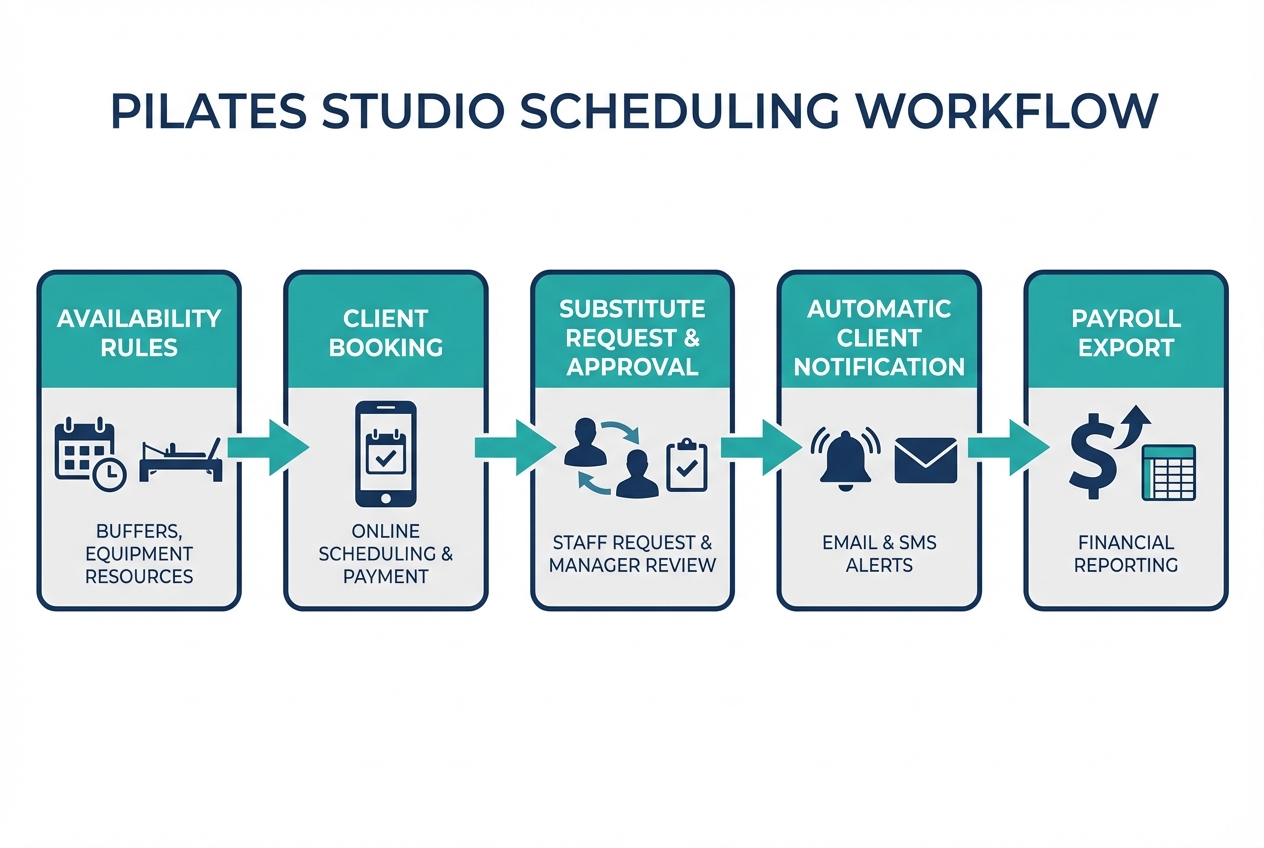
The best availability setup is one your calendar can enforce automatically. These rules prevent “Swiss cheese days” and protect your energy.
Start with a baseline rule set:
- Buffers: Add setup/cleanup buffers around sessions (private and semi-private usually need more than group).
- Lead time and cutoff: Stop last-minute bookings that throw off your day.
- Max daily teaching hours: Cap the number of hours you can be booked in a day (and optionally per session type).
- Break rules: Protect lunch and short recovery breaks.
- Location blocks: If you teach at two studios (or studio + home visits), block travel and keep locations from overlapping.
- Equipment constraints: Track Reformers as resources so “capacity” is not just headcount.
- Duration variants: Support 50/55/60-minute formats so your day stays aligned to real transitions.
A practical example configuration
- Private session (55 minutes): 55-minute appointment + 10-minute buffer after.
- Semi-private (55 minutes): 55-minute appointment + 15-minute buffer after (more client transitions).
- Group class (50 minutes): 50-minute class + 10-minute buffer before (setup) + 10-minute buffer after.
- Booking cutoff: No new bookings inside 6 hours for privates; 12 hours for group classes.
- Gap protection: If a 55-minute private ends at 10:05, prefer showing 10:15, 10:20, or 10:30 start times for the next booking rather than 11:00.
That last point matters. In instructor communities, “show me adjacent availability” comes up constantly because it directly determines your take-home pay. Even a great marketing funnel cannot save a calendar that creates unbookable gaps.
Reminder timing that actually improves attendance
Automated reminders are not just “nice.” They measurably improve attendance. A systematic review and meta-analysis found appointment reminders improved attendance versus usual care, with a pooled risk ratio of 1.11 in favor of reminders in the studied healthcare settings (Journal of Hospital Management and Health Policy). The context is different, but the operational lesson holds: reminders reduce forgetfulness.
A simple reminder setup that works for Pilates:
- At booking: Confirmation email with cancellation policy and location details.
- 24 hours before: Primary reminder (email and/or SMS).
- 2 to 3 hours before: Short SMS reminder for early mornings or high no-show clients.
Substitute coverage workflow that doesn’t break client trust
Sub coverage fails when it is ad hoc. Clients get confused, instructors do not know what they are paid, and managers have no audit trail.
Set roles and permissions first:
- Owner/manager: Approves swaps, edits pay rules, can view audit logs.
- Instructor: Can request a sub, propose swap options, add a reason code.
- Front desk (optional): Can communicate with clients and move bookings, but cannot change pay rules.
- Client visibility: Clients should see the current instructor name and any required prep notes, not internal swap details.
A studio-grade swap workflow (step-by-step)
- Sub request is created: Instructor selects the class/session, proposes a substitute, and selects a reason code (illness, travel, emergency, planned time off).
- Manager approval: Approver confirms the substitute is eligible (certifications, training, studio policy).
- Client notification is sent: Email and SMS are triggered immediately.
- Roster and instructor assignment update: Substitute becomes the instructor of record for attendance and notes.
- Pay rule is applied: The payout changes based on your policy (flat coverage rate, normal rate, or split).
- Record is retained: Original instructor, substitute instructor, timestamps, approval status, and notifications are logged.
What to log for an audit trail
- Original instructor and substitute instructor: Names and IDs.
- Timestamps: Request time, approval time, client notification time.
- Reason code and notes: Optional notes for management.
- Client notification status: Sent, delivered (if supported), failed.
- Payout rule applied: Which rule was used and why.
Exception handling rules (decide these in advance)
- Same-day swap: Require manager approval and auto-send SMS, not just email.
- Waitlist fills after swap: Decide whether the sub receives the upside of extra attendees.
- Client cancels after swap: Decide whether the original instructor or sub receives a cancellation payout.
Client-facing message templates
- Planned coverage: “Hi [Name], your session on [Day, Time] will be taught by [Instructor]. Everything else stays the same. Reply to this message if you have questions.”
- Same-day coverage: “Quick update: [Instructor] will be teaching your class today at [Time]. See you soon.”
Payroll-friendly scheduling: capture the right data from day one
“Payroll-friendly” means your scheduling software captures the fields you need to pay instructors correctly, even when reality happens. If you want a clean model for how to structure approvals, exception handling, and audit-ready exports, Quantum Byte’s guide to payroll workflow automation maps well to studio operations.
First, confirm the pay models the tool can support:
- Flat per class/session: Same payout regardless of attendees.
- Per-head (per attendee): Payout changes with attendance.
- Revenue split: Instructor gets a percentage of paid revenue.
- Hourly: Common for employee instructors or admin shifts.
- Hybrids: Base rate + per-head bonus, or hourly floor + revenue share.
Field-level payroll readiness checklist (what your exports should include)
- Session ID: Unique identifier for audit and reconciliation.
- Class/session type: Private, semi-private, group, workshop.
- Date and start/end time: Including time zone if you have multiple locations.
- Duration: For hourly pay or minimum call-time rules.
- Location and room/resource: Useful for capacity and travel.
- Instructor ID: Stable identifier, not just a name.
- Substitute flag: Whether the instructor was swapped.
- Original instructor ID: If a swap occurred.
- Attendance count: Headcount at time of service.
- Amount paid: What the client actually paid.
- Discount/comp flag: So you do not pay revenue share on free sessions unless you intend to.
- Late-cancel fee/no-show fee: Distinct fields, not mixed into revenue.
- Refund flag and refund date: Revenue changes must flow into payout adjustments.
- Payout rule ID: Which compensation rule generated the payout.
- Exception notes/reason codes: For manual overrides.
Map exceptions to pay (and put it in writing)
- Late cancel: Pay the instructor full, partial, or none.
- No-show: Same as late cancel, but many studios treat it differently.
- Waitlist backfill: If the slot is refilled, do you remove the late-cancel payout and pay normal? Or keep the fee and pay normal?
Employee recordkeeping implications (US)
If you have employee instructors, your scheduling data should support time and pay records. The U.S. Department of Labor notes employers must keep records including hours worked each day and total hours worked each workweek, and retain payroll records generally for 3 years and supporting time records like schedules and timecards for 2 years (U.S. Department of Labor, Fact Sheet #21). Even if payroll runs elsewhere, your scheduling system should be able to produce clear worktime and session histories.
Contractor vs employee considerations for subs
Studios often treat substitute instructors as contractors, especially when coverage is occasional. Classification is not a “preference,” and the IRS outlines factors like behavioral control, financial control, and the relationship of the parties (IRS). Operationally, this matters because your scheduling system should support different pay calculations and reporting for employees versus contractors.
Payments, memberships, and compliance basics
If your scheduling software takes payments, your selection criteria should include security and authorization, not just convenience.
Card payments and PCI basics
Prefer tools that tokenize card payments and keep you out of the business of storing card data. The baseline standard here is the PCI Data Security Standard (PCI DSS), which applies to organizations that store, process, or transmit cardholder data, or can impact the cardholder data environment. In practice, you want your booking system and payment processor to minimize your exposure.
ACH for recurring memberships
If you use ACH for memberships, confirm the tool captures compliant authorizations. NACHA emphasizes that authorizations must be clearly identifiable with clear terms, you must be able to prove authorization and provide a copy, and revocation instructions must be provided (NACHA).
Demo-day questions that prevent payment surprises:
- Who is the merchant of record? The studio or the platform?
- How do failed payments work? Dunning emails, retry logic, grace periods.
- Do exports reconcile cleanly? Payments, refunds, fees, and payouts should line up.
Integrations that matter: payroll, accounting, email/SMS, and video
A reliable studio stack moves data in one direction: bookings drive payments, payments drive payouts, payouts feed payroll, payroll reconciles to accounting. If you are thinking beyond “calendar + payments,” Quantum Byte’s guide on how to automate business processes is a useful way to spot where a studio stack usually breaks.
Integration buckets to evaluate
- Payroll: Direct integration or clean exports for pay periods.
- Accounting: QuickBooks/Xero export compatibility (even if via CSV).
- Payments: Stripe/PayPal support depending on your needs.
- Email/SMS: Native messaging or connection to an SMS provider.
- Calendar: Google Calendar and Apple Calendar sync.
- Video: Zoom/Google Meet links for virtual sessions.
Export quality criteria (what “good CSV” actually means)
- Consistent IDs: Client ID, instructor ID, session ID.
- Clear timestamps: Including time zone.
- Change logs: Swaps, cancellations, refunds.
- Pay period filtering: So payroll is not a manual re-sort.
A lightweight monthly reconciliation routine
- Compare attendance report vs payout report (did every taught session get paid once?).
- Compare payment report vs revenue report (do refunds and discounts show up?).
- Sample 10 sessions with swaps and late cancels to verify the exception rules behave as intended.
Pricing expectations and the real cost drivers
You cannot choose pricing intelligently until you know what drives it.
Common pricing levers to check:
- Staff count and locations: Multi-location almost always costs more.
- Booking volume: Some tools price by appointments/classes.
- SMS fees: Often billed separately.
- Payment processing: Separate from software subscription.
- Add-ons: Payroll/commissions, branded apps, advanced reporting.
- Onboarding and migration: One-time fees, especially for data imports.
When low-cost tools fit:
- Solo instructor, one location, simple pay model, no substitutes.
When they get expensive (or risky):
- Multi-instructor studio with frequent swaps, mixed pay models, memberships, and a real need for payroll exports.
Questions to ask sales (tailored to subs + payroll)
- Can a swap automatically change the payout?
- Can I export per-instructor earnings by pay period with exceptions?
- Do late-cancel and no-show fees flow into instructor pay rules?
- Can I see an audit log of schedule changes and approvals?
Alternatives and competitors to consider
You will see the same names repeatedly in Pilates scheduling discussions: Mindbody, Acuity Scheduling, Vagaro, TeamUp, WellnessLiving, Momence, Walla, Arketa, and Bookeo.
Rather than trusting any roundup, test each option against the same lens:
- Best for: Solo, studio, multi-location, hybrid virtual.
- Availability depth: Buffers, resources, travel time.
- Subs workflow: Request, approval, client comms, audit trail.
- Payroll outputs: Pay period exports, exception handling, swap logic.
- Payments and memberships: Freeze, proration, dunning, refunds.
- Integrations: Payroll/accounting exports, calendar sync.
Build vs buy: when off-the-shelf scheduling stops fitting
Buy off-the-shelf scheduling when your operation is standard. Build when your studio’s edge comes from a workflow the tools cannot model. If you are weighing build vs buy as an operator, Quantum Byte’s breakdown of no code vs traditional development is a good sanity check on time, cost, and tradeoffs.
Triggers to buy
- Solo instructor or small studio
- One location
- Simple pay model (flat per session)
- Rare substitutes
- Basic memberships
Triggers to build
- Multi-location with travel buffers
- Multiple pay models at once (hourly employees + revenue share contractors)
- Frequent substitutes and swap approvals
- Strict reporting requirements and audit trails
- Unique membership rules (credits, freezes, “family sharing,” corporate packs)
- Need for a studio-specific client app flow
If you are hitting those triggers, you are no longer shopping for “pilates scheduling.” You are designing operations.
That is where Quantum Byte fits naturally: instead of forcing your studio into someone else’s rules, you can build a scheduling and payout workflow that matches your policies, without running a traditional dev project. A concrete example module many studios need is “Instructor swap approval + automatic payout adjustment + pay-period export,” built as a single internal workflow your staff actually uses.
If you are a larger studio that needs deeper governance, permissions, and integration support, Quantum Byte Enterprise is the path when a “simple booking tool” has turned into a core operational system.
Implementation timeline: go live without chaos
A clean rollout is usually 2 to 4 weeks if you keep scope tight.
Week 1: Configure and decide policies
- Availability rules, buffers, and resources
- Cancellation and late-cancel/no-show policies
- Membership/package rules
- Pay models and exception mapping
- Message templates
Week 2: Clean data and migrate
- Client list and contact preferences
- Packages/memberships and remaining credits
- Waivers and required forms
- Staff profiles, roles, and pay rules
- Schedule templates
Week 3: Train staff and soft launch
- Run staff training with real scenarios: swaps, refunds, waitlists
- Soft launch with a small subset of clients or one class type
Week 4: Full cutover and validate payroll
- Run parallel systems for one pay period
- Compare earnings outputs against your manual expectations
First-month success metrics
- Booking conversion: How many visitors complete booking.
- No-show rate: Especially for privates.
- Schedule gaps: Average idle time between sessions.
- Swap turnaround time: Request to approval time.
- Payroll processing time: Minutes or hours to finalize payroll.
Key takeaways and decision checklist
If you only check five things, check these:
- Availability rules are real-world: Buffers, cutoffs, resources, and multi-location logic.
- Substitute workflow is explicit: Request, approval, client notification, and audit trail.
- Payroll exports are complete: Pay period filters, swap flags, exception fields, and consistent IDs.
- Payments are safe and auditable: PCI-aware setup, clear refunds, membership dunning, and reconciliations.
- Integrations and exports are usable: Not just “we integrate,” but “the data actually ties out.”
A simple decision matrix
- Solo instructor + flat per-session pay: Buy a simple scheduler and focus on availability and reminders.
- Studio + stable team + standard memberships: Buy a studio platform, but validate payroll exports before committing.
- Studio + frequent subs + complex pay rules: Prioritize subs workflow and payroll fields first. If vendors cannot model your exceptions, plan to build.
Start building a Pilates scheduling workflow that fits
If every tool you trial forces you into compromises on swaps, payouts, or reporting, build the workflow you actually run.
- Founder-friendly: You can create an internal ops app for scheduling, subs, and payroll exports without managing a dev team.
- Templates plus customization: Start from proven building blocks (booking, scheduling, staff permissions) and adapt the parts that make your studio unique.
- Fast to launch: Quantum Byte is designed to turn plain-English requirements into working software quickly. Comedian Aziz Ansari used it to create an app for his movie “Good Fortune” within minutes, with no prior app-building experience.
If you want to understand plan options before you commit to anything, Quantum Byte’s platform pricing lays out the tiers and what changes as you need more customization.