
A pilates late cancellation policy works best when it is short, specific, and enforced the same way every time. For most studios, that means a 12-hour window for group classes, a 24-hour window for private sessions, and a stronger consequence for no-shows than late cancels. The rest is definitions, edge cases, and a consistent exception process so you stop arguing at the front desk.
Quick verdict: the simplest policy that still works
If you want a baseline you can publish today and refine later, use this:
- Group classes: Cancel at least 12 hours before class start time to avoid a late-cancel penalty.
- Private sessions: Cancel at least 24 hours before session start time.
- Late cancel vs no-show: Late cancels get a lighter penalty. No-shows get the strongest penalty.
- Consequences by membership type:
- Class packs: Forfeit 1 class credit (optionally add a small flat fee if no-shows are a recurring problem).
- Unlimited memberships: Charge a flat late-cancel fee and a higher no-show fee.
Two common models both work. The mistake is mixing them without explaining why.
- Credit forfeiture model: Cleanest for class packs because the client already “pays per class.”
- Flat fee model: Cleanest for unlimited memberships because there is no class credit to forfeit.
What you will get below: a decision matrix to choose the right windows and penalties, best-practice exception rules, high-dispute edge cases (waitlists, transfers, late arrivals), three copy-paste policy templates, and an automation checklist for Mindbody, Square, and similar systems.
What your policy must define
Most conflicts are not about whether you should charge a fee. They are about ambiguity.
Define these terms in plain language, then restate them in “formal” policy text.
- Late cancellation: Canceling inside your cutoff window (for example, inside 12 hours).
- No-show: Not attending and not canceling before class start time.
- Reschedule/transfer: Moving from one class/session to another.
- Late arrival: Arriving after your cutoff (for example, 5 or 10 minutes after start time).
- Waitlist auto-add: Your system adding a client to class automatically when a spot opens.
- Private session: A 1:1 or small-group session that blocks instructor time.
- Intro/new client offer: Any discounted trial, intro pack, or first-timer promo.
Then lock down three operational details that prevent “but I thought…” arguments:
- Time zone: Always state that cutoffs are calculated in your studio’s local time zone.
- What counts as canceled: Spell out the valid cancellation methods (app/website booking account is best; phone is okay if you want; email is risky unless you have staffed inbox coverage).
- When a waitlist client becomes responsible: For example, “once you are added from the waitlist, the normal cancellation policy applies.”
Concrete example (what to include): “Switching from a 6:00 pm reformer class to a 7:00 pm class at 1:00 pm is still a late cancel if it is inside the 12-hour window.” If you do not state this, you will get a steady stream of “I didn’t cancel, I just moved it” disputes.
Policy design matrix (information gain): choose your window, fee model, and escalation
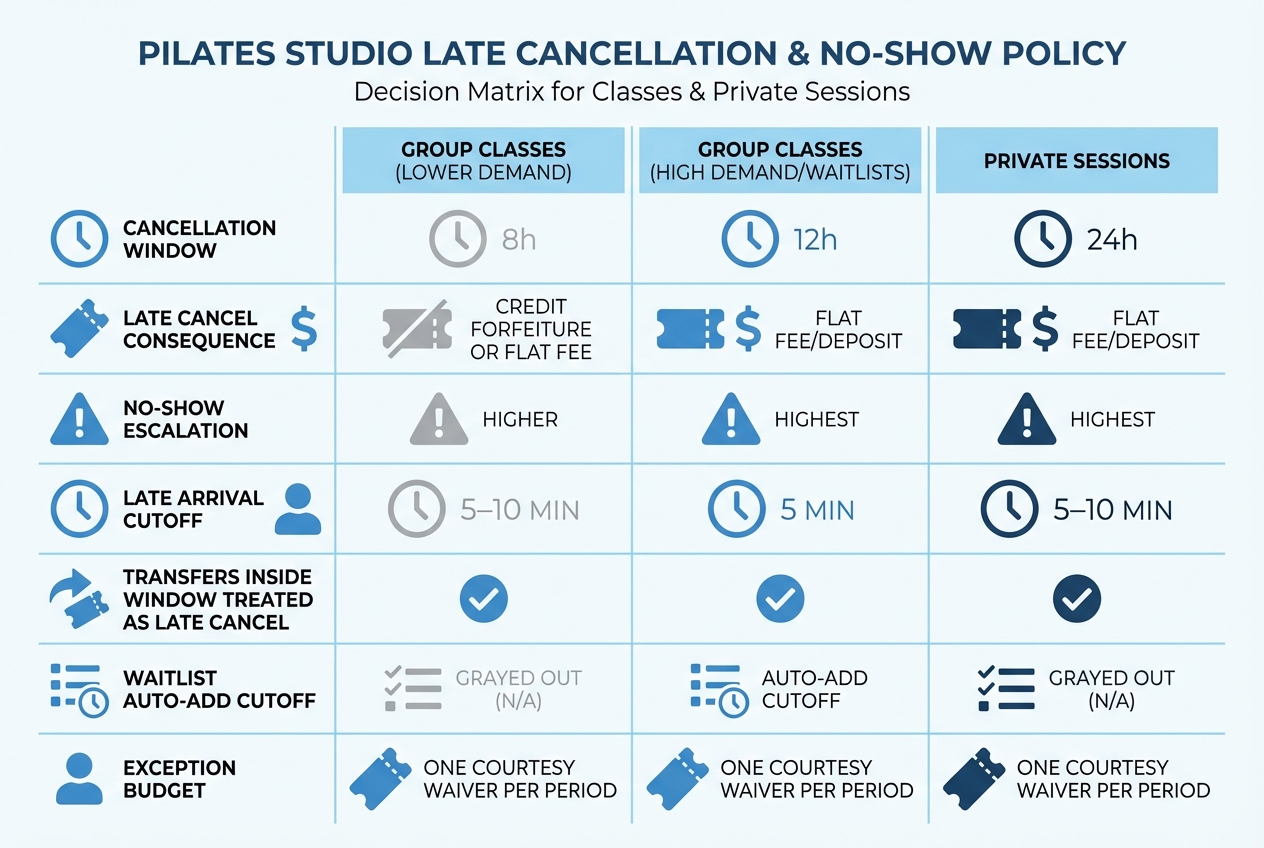
Do not copy another studio’s rules without checking whether their demand, staffing model, and membership mix match yours.
Selection guidance that actually holds up in practice:
- When 8 hours works: Your classes often have open spots, you rarely run waitlists, and you want a lower-friction policy to reduce member churn.
- When 12 hours is safer: Reformer classes fill up, you regularly run waitlists, and an empty spot is lost revenue (or at least lost community goodwill).
- Why 24 hours for privates: A private session blocks instructor time and is harder to backfill. The opportunity cost is materially higher.
Match the fee model to how clients pay:
- Class packs: Credit forfeiture is intuitive. It is also simple to explain: “You reserved a limited-capacity spot.”
- Unlimited memberships: A flat fee is more intuitive because there is no “credit” to take.
Operational tradeoff (be honest about it): stricter windows reduce empty spots but increase friction. Looser windows feel kinder but lead to half-full classes and frustrated waitlisted members.
Fee and credit structure that feels fair
Your goal is a policy that members accept and that you can defend calmly when someone is upset.
Frame fees as compensation, not punishment
Late-cancel and no-show fees work best when they are described as a reasonable estimate of your loss, not as a penalty meant to “teach a lesson.” In contract terms, they function like liquidated damages, which are meant to approximate real costs when exact damages are hard to calculate, and are generally discussed as needing to be reasonable rather than punitive as explained in Cornell’s Liquidated damages overview.
Plain-English rationale you can reuse:
- Capacity is limited: A reformer spot is perishable inventory.
- Instructor time is committed: You staff and schedule based on reservations.
- Waitlists depend on notice: Late cancellations prevent other members from attending.
Make fee disclosure “impossible to miss”
Disputes and chargebacks spike when members feel “surprised” by a mandatory fee.
Best practice:
- Show the policy at point of booking.
- Repeat it in the confirmation email/SMS.
- Include it in the reminder.
- Publish it on your website and in your membership agreement/waiver.
The Federal Trade Commission’s guidance on the Rule on Unfair or Deceptive Fees: Frequently Asked Questions reinforces the principle that mandatory fees should be clearly and conspicuously disclosed, not buried.
If you charge after booking, get clear consent and keep records
If you store a card on file and charge later, treat consent like a real workflow, not a casual checkbox.
- At booking: Tell the client what triggers a charge (late cancel/no-show), how amounts are determined, and when charges may occur.
- In your system: Keep a record that they agreed.
Stripe’s guidance on saving payment methods during payment is a good model for how to collect permission to save and use a payment method for future charges.
Calibrate amounts by membership type
Avoid “gotcha” numbers. You are aiming for behavior change and loss recovery, not a profit center.
One example of clear, member-facing escalation is how Club Pilates explains different consequences by membership type and makes no-show fees higher than late-cancel fees.
Best-practice exception rules
Studios do not lose goodwill because they have a late-cancel policy. They lose goodwill because enforcement feels random.
The fix is an exception system that is documented, limited, and easy for staff to apply.
Use an “exception budget”
Adopt a simple rule you can train in five minutes:
- One courtesy waiver per client per rolling period (for example, per 30 or 60 days).
- Anything beyond that requires manager approval and a reason code.
Why it works:
- It protects your regulars when real life happens.
- It prevents the same person from “emergency-ing” every week.
- It stops staff-by-staff improvisation.
Define what qualifies
You do not need to debate edge cases in real time if your policy already sets expectations.
Permitted exceptions (examples):
- Medical emergency: Sudden illness, injury, ER visit.
- Studio-initiated change: Instructor illness, equipment issue, schedule change by the studio.
- Safety-related interruptions: Severe weather warnings or local emergency directives.
Not permitted (examples):
- Slept in
- Traffic
- Forgot
- Double-booked
Document the process so staff can be consistent
- Where to record it: Add an internal note in the client profile with the reason code.
- Who can override automation: Front desk can apply the one courtesy waiver. Managers can approve additional waivers.
- What to say every time: Use one script (see rollout plan section) so members get the same answer regardless of who is working.
Consistency matters because many studios use automation that charges immediately, and then try to “fix it manually.” That gap is where resentment builds.
Waitlists, late arrivals, and transfers: write the rules people actually argue about
If you only write “12-hour cancellation policy,” you will still have daily disputes. These are the scenarios to cover.
Waitlists
Best-practice rules:
- Auto-add cutoff: State the latest time a client can be automatically added from the waitlist (for example, “up to 2 hours before class”).
- Responsibility transfer: “Once you are added from the waitlist, you are responsible for the booking and normal cancellation rules apply.”
- Payment method requirement: If you charge fees, require a valid card on file for waitlist participation.
Concrete example: “If you join the 6:00 am waitlist and get added at 9:00 pm the night before, canceling at 5:30 am is a late cancel.” That clarity prevents “I didn’t see the notification” conflicts.
Late arrivals
Late arrivals are not just about discipline. They are about safety, class flow, and fairness to people who showed up on time.
Pick a cutoff that matches your class format:
- Reformer classes: Many studios choose a stricter cutoff because equipment setup and safety cues are front-loaded.
- Mat classes: You may allow a slightly longer grace period.
Decide the consequence if someone arrives too late:
- Option A: They forfeit the spot and it is treated like a no-show.
- Option B: They may not enter, but it is treated like a late cancel.
Pick one and state it.
Transfers and reschedules inside the window
This is the most common “loophole attempt.”
Write one sentence that closes it:
- “Transfers or reschedules within the cancellation window are treated as late cancellations unless approved as a one-time courtesy waiver.”
Intro offers and promos
Promos create the biggest exception creep because staff feel bad charging new clients.
If you want promos included, state it clearly:
- “Intro offers and new-client specials are subject to the same late-cancel and no-show rules.”
If you want to soften it, use a controlled alternative:
- “Intro offers follow the standard policy, and each new client receives one courtesy waiver during their first 30 days.”
Copy-paste policy text
These templates are designed to be publish-ready. Replace bracketed fields.
Template 1: Group classes
Plain-English summary: To keep classes full and give waitlisted members a fair chance, please cancel at least 12 hours before class. Late cancels lose the class credit. No-shows may also incur an additional fee.
Policy:
-
Definitions
- Late cancellation: Canceling a reserved class within 12 hours of the class start time.
- No-show: Not attending a reserved class and not canceling before the class start time.
- Transfer/reschedule: Moving your reservation to a different class time.
-
Cancellation window
- Group classes must be canceled at least 12 hours before the scheduled start time to avoid penalties. All times are based on the studio’s local time zone.
-
Late cancellation and no-show consequences (class packs)
- Late cancellations: You will forfeit 1 class credit.
- No-shows: You will forfeit 1 class credit and may be charged a [flat fee of $X].
-
Transfers/reschedules
- Transfers or reschedules within 12 hours of class start time are treated as late cancellations unless approved under our courtesy waiver rule.
-
Waitlist
- If you join a waitlist, you may be automatically added when a spot opens.
- Once you are added from the waitlist, you are responsible for the reservation and the standard cancellation policy applies.
-
Late arrivals
- If you arrive more than [X] minutes after class start time, you may not be allowed to join for safety and class flow.
- If you cannot be admitted due to late arrival, the reservation is treated as a [late cancellation/no-show] and the standard consequence applies.
-
Courtesy waiver (exception budget)
- Each client may request one courtesy waiver for a late cancellation or no-show per [30/60] days.
- Additional waivers require manager approval.
-
How to cancel
- Cancellations must be completed through your online account/app (recommended) or by calling the studio during staffed hours at [phone number]. Emails and social messages are not guaranteed to be processed in time.
-
No refunds
- Class credits, memberships, and fees are non-refundable except where required by law.
Template 2: Group classes
Plain-English summary: Unlimited memberships still reserve limited-capacity spots. Cancel at least 12 hours before class to avoid a late-cancel fee. No-shows are charged a higher fee.
Policy:
-
Definitions
- Late cancellation: Canceling a reserved class within 12 hours of the class start time.
- No-show: Not attending a reserved class and not canceling before the class start time.
-
Cancellation window
- Group classes must be canceled at least 12 hours before the scheduled start time.
-
Fees (unlimited memberships)
- Late cancellations: A fee of $[X] will be charged to the card on file.
- No-shows: A fee of $[Y] will be charged to the card on file.
-
Payment method on file
- By booking classes, you authorize the studio to charge the card on file for late-cancel and no-show fees according to this policy.
-
Transfers/reschedules
- Transfers or reschedules within 12 hours of class start time are treated as late cancellations.
-
Waitlist
- If you join a waitlist, you may be automatically added when a spot opens.
- Once added, your reservation is subject to this policy.
-
Late arrivals
- Arriving more than [X] minutes after the class start time may result in forfeiture of your spot.
- If your spot is forfeited due to late arrival, it is treated as a [no-show] and the standard fee applies.
-
Courtesy waiver
- One courtesy waiver per client per [30/60] days. Additional waivers require manager approval.
-
How to cancel
- Cancel through your online account/app (recommended) or call the studio during staffed hours.
Template 3: Private sessions
Plain-English summary: Private sessions reserve instructor time that is difficult to rebook. Cancel or reschedule at least 24 hours in advance to avoid a fee.
Policy:
-
Definitions
- Late cancellation: Canceling or rescheduling a private session within 24 hours of the session start time.
- No-show: Not attending and not canceling before the session start time.
-
Cancellation window
- Private sessions must be canceled or rescheduled at least 24 hours in advance.
-
Fees
- Late cancellations: A fee of $[X] or [forfeiture of deposit] will apply.
- No-shows: A fee of $[Y] or [full session charge] will apply.
-
Rescheduling
- Reschedules within 24 hours are treated as late cancellations.
-
Late arrivals
- If you arrive more than [X] minutes late, the session may be shortened to respect the next client’s start time.
- If you arrive more than [Y] minutes late, the session may be considered a no-show.
-
Courtesy waiver
- One courtesy waiver per client per [90] days for private sessions. Additional exceptions require manager approval.
-
How to cancel
- Cancel through your booking account/app or call the studio during staffed hours.
Implementation and automation checklist
A policy you enforce manually will drift. Different staff will make different calls, and members will notice.
Aim for automation with clear override rules.
- Set rules by service type: Private sessions should not share the same window as group classes.
- Require card on file when appropriate: Especially for unlimited members and for clients who book frequently.
- Update automated messaging: Confirmation and reminders should restate the cutoff and the fee.
Platform-specific notes:
- If you use Mindbody, you can automate late-cancel and no-show fees by service category and align your messaging, as described in How to automate No-Show and Late Cancel Fees.
- If you use Square Appointments, you can set a custom cancellation window, require a card at booking, and choose a flat or percentage fee, as outlined in Set a custom cancellation policy with Square Appointments.
Payments and consent checklist:
- Collect explicit agreement at booking: If you are saving a payment method, mirror consent patterns like Stripe’s save during payment.
- Log acceptance: Store the timestamp, policy version, and booking channel.
- Make disputes easy to resolve: When someone complains, you should be able to show where they saw the policy.
Where the policy should appear (minimum): booking flow, confirmation email/SMS, reminder, website policy page, membership agreement/waiver, and a short studio sign at the front desk.
What this looks like in practice: a 7-day rollout plan
Rolling out a stricter policy overnight is how you lose good members. Roll it out like a product change.
-
Day 1–2: Finalize rules
- Choose windows and consequences using the design matrix.
- Set your exception budget and reason codes.
- Update your waiver/terms and confirm fee disclosure placements.
-
Day 3–4: Update client-facing touchpoints
- Update website policy text.
- Update booking flow copy.
- Update confirmation and reminder templates.
-
Day 5: Staff training (with scripts)
- Scenario 1: “I was on the waitlist, I didn’t know I got in.”
- Scenario 2: “I called, can you waive it?”
- Scenario 3: “I’m 7 minutes late, can I still join?”
Script that keeps things calm: “I can apply your one courtesy waiver today. After that, we follow the same policy for everyone so the waitlist stays fair.”
-
Day 6: Member announcement
- Announce the effective date.
- If you are tightening rules, consider a one-week grace period where you warn instead of charge.
-
Day 7: Go live and monitor
- Track late cancels/no-shows weekly.
- Do not change the policy every few days. Make one adjustment after 2 to 4 weeks if needed.
Build vs buy: when you outgrow your booking system’s policy controls
Off-the-shelf booking systems are fine until your policy becomes multi-variable.
Common limitations once you scale:
- Different rules for different membership tiers become hard to audit.
- Multi-location studios struggle to enforce the same exception logic.
- Staff overrides are not consistently logged.
- You cannot easily track “courtesy waivers used” without a manual spreadsheet.
Triggers that signal it is time to build a lightweight internal layer:
- You have frequent disputes and need cleaner audit logs.
- You run multiple instructors and see inconsistent front-desk decisions.
- You want approvals (manager-only exceptions) without slowing down service.
- You want reporting that connects late cancels to class types, times, and instructor schedules.
A simple custom tool can include: a policy settings matrix, exception budget tracking, a staff approval workflow, templated messaging, and a dispute-ready history of consent and charges.
If you want that without hiring a dev team, QuantumByte can help you build a studio-specific admin tool quickly. You describe the rules and workflows you want, then generate an internal app for staff to apply exceptions consistently and keep clean records, without replacing your booking system’s policy controls.
Closing: the policy checklist to publish today
Before you publish, confirm each item is explicitly covered.
- Windows set by service type: Group vs private.
- Clear definitions: Late cancel, no-show, transfer, late arrival, waitlist.
- Consequences by membership type: Class packs vs unlimited.
- No-show escalation: Stronger than late cancel.
- Waitlist responsibility: When someone becomes accountable.
- Late arrival rule: Cutoff and what happens to the reservation.
- Transfer rule: Whether reschedules inside the window count as late cancels.
- Exception budget: One courtesy waiver per period, then manager approval.
- Fee transparency: Disclosed at booking and repeated in confirmations and reminders, aligned with the FTC’s guidance on clear fee disclosure in the Unfair or Deceptive Fees FAQ.
- Card-on-file consent: Clear agreement and record-keeping consistent with patterns in Stripe’s save during payment.
- Automation and training: Configure your system and train staff with scripts.
Copy one of the templates, then adjust it using the matrix. Do not invent rules on the fly.
Frequently Asked Questions
Reformer pilates late cancellation policy
Reformer classes usually justify a stricter policy because spots are limited and waitlists are common. A solid default is a 12-hour window for reformer group classes, a clear late-arrival cutoff (often 5 minutes), and a no-show consequence that is higher than a late cancel.
Pilates late cancellation policy pdf
Most studios do better with a web policy page plus the same text inside the waiver/terms and booking flow, because clients actually see it when booking. If you still want a PDF, export the “copy-paste policy text” section above as a one-page document and add your studio name, phone number, and effective date.
Club Pilates late cancel fee reddit
Reddit threads typically show the real failure mode: members get upset when enforcement feels inconsistent across locations or when an app charges automatically but staff “sometimes waive it.” The fix is not arguing online about what is fair. It is writing down definitions, making fees visible at booking, and using a consistent exception budget so everyone gets the same treatment.
Club Pilates late cancellation policy
Club Pilates commonly communicates a 12-hour window and different consequences by membership type. Their help center article is a clear example of that structure and fee escalation for no-shows versus late cancels: see Club Pilates.
Start building a policy and enforcement system that stays consistent
If you are tired of front-desk debates, manual fee reversals, and “who approved this exception?” confusion, build a lightweight enforcement layer that matches how your studio actually runs.
With Quantum Byte, you can generate an internal studio app for:
- Policy settings by class type: One place to manage windows, fees, and escalation.
- Exception budgets and approvals: Track courtesy waivers automatically and route extra waivers to a manager.
- Dispute-ready audit logs: Who changed what, when, and why.
- Automated messaging: Consistent confirmation and reminder templates tied to the exact policy version.
Start building with Quantum Byte.