Pilates online booking software should do two things well: let clients book and pay without back-and-forth, and protect your schedule from last-minute chaos. The fastest path is not “automate everything”. It is automating repeatable business processes while keeping judgment calls and high-touch moments manual.
Quick verdict: the simplest setup that works for most studios
For most solo instructors and small studios, the “default” setup is a lightweight stack that covers the entire client journey:
- A mobile-friendly booking page for privates + classes
- Payments (prepay, deposits, packages, memberships)
- Automated email/SMS reminders
- Waitlist + simple cancellation rules
- A client portal where people can reschedule, cancel, and see credits
The guiding principle is simple: automate what you can express as a clear policy, and keep anything that requires context (injury, travel, relationship, instructor matching) as a human decision.
Also plan a hybrid rollout. Research on online booking shows awareness can be far higher than actual usage (45.11% aware vs 15.61% used in one mixed-methods study), with lower adoption in older groups, which is a good reminder that you should support both self-serve and “text us and we’ll book it” for a while as clients transition to the new system (https://www.jmir.org/2024/1/e51931/).
Feature checklist for Pilates online booking software
Use this list to shortlist tools quickly. If a platform misses multiple “must-haves”, you will feel it within the first month.
Scheduling and booking primitives
- 1:1 sessions: Session types, durations, buffers, and recurring appointments.
- Group classes: Capacity limits, drop-in pricing, and series/workshops.
- Resource-based scheduling: Rooms and equipment (Reformers, towers, chairs) as bookable resources, so you cannot overbook gear.
- Prerequisites and eligibility: Beginner vs intermediate, “intro required” gating, and staff override.
Client experience
- Self-serve reschedule/cancel: Clients can change bookings inside your policy window without contacting you.
- Waitlist join + auto-fill: Clear rules for when someone is auto-added and how they’re notified.
- Account portal: Credits, packages, memberships, and upcoming bookings are visible.
- Branded notifications: Email/SMS templates that sound like your studio, not generic system text.
Payments
- Deposits and prepay: Deposits for high-demand privates, full prepay for workshops, and clean refund handling.
- Packages and credits: 5-pack/10-pack logic, expiration rules, and credit balance visibility.
- Memberships: Recurring billing, member benefits (discounts or included classes), and pause/freeze workflows.
- Promo codes and comping controls: Promo codes for marketing, and a permissioned way for staff to comp a session.
Operations and staff management
- Instructor schedules: Availability rules, time-off, and conflict prevention.
- Substitute workflows: Easy reassignment plus client notification.
- Staff permissions: Front desk vs instructor vs owner access.
- Payroll exports/pay rules: Pay per private, pay per headcount, or tiered rates.
Client management
- Intake questions + waivers: Health considerations, goals, and signed liability waivers tied to the client record.
- Client notes and tags: Notes that stay private to staff, plus tags/segments for messaging.
- Attendance history: Useful for progression and retention conversations.
Reporting that matters to studio owners
- Utilization: How full classes are, and whether prime slots are selling.
- Revenue and payout reconciliation: Sales by product type and clean payout reporting.
- Package liability: Outstanding credits you “owe” in future services.
- Instructor performance: Attendance, revenue contribution, and retention indicators.
Communications
- Reminders and follow-ups: Automated confirmations, reminders, and post-session messages.
- Broadcast messaging: Closures, schedule changes, and promos.
- Two-way texting (optional): Helpful if your client base prefers SMS.
Virtual and hybrid
- Zoom/Meet links: Automatic link injection into the confirmation/reminder for virtual sessions.
Nice-to-haves as you scale
- Branded app: Only worth paying for if your clients will actually use it.
- Multi-location controls: Shared client profiles, cross-location packs, location-based rules.
- Family accounts: One payer managing multiple people.
- API/webhooks: Required if you want custom workflows, dashboards, or deeper integrations. If you are planning that level of extension, you will get better outputs when you spec it the way an app builder expects, using a prompt structure like these AI app builder prompts.
What to automate vs what to keep manual
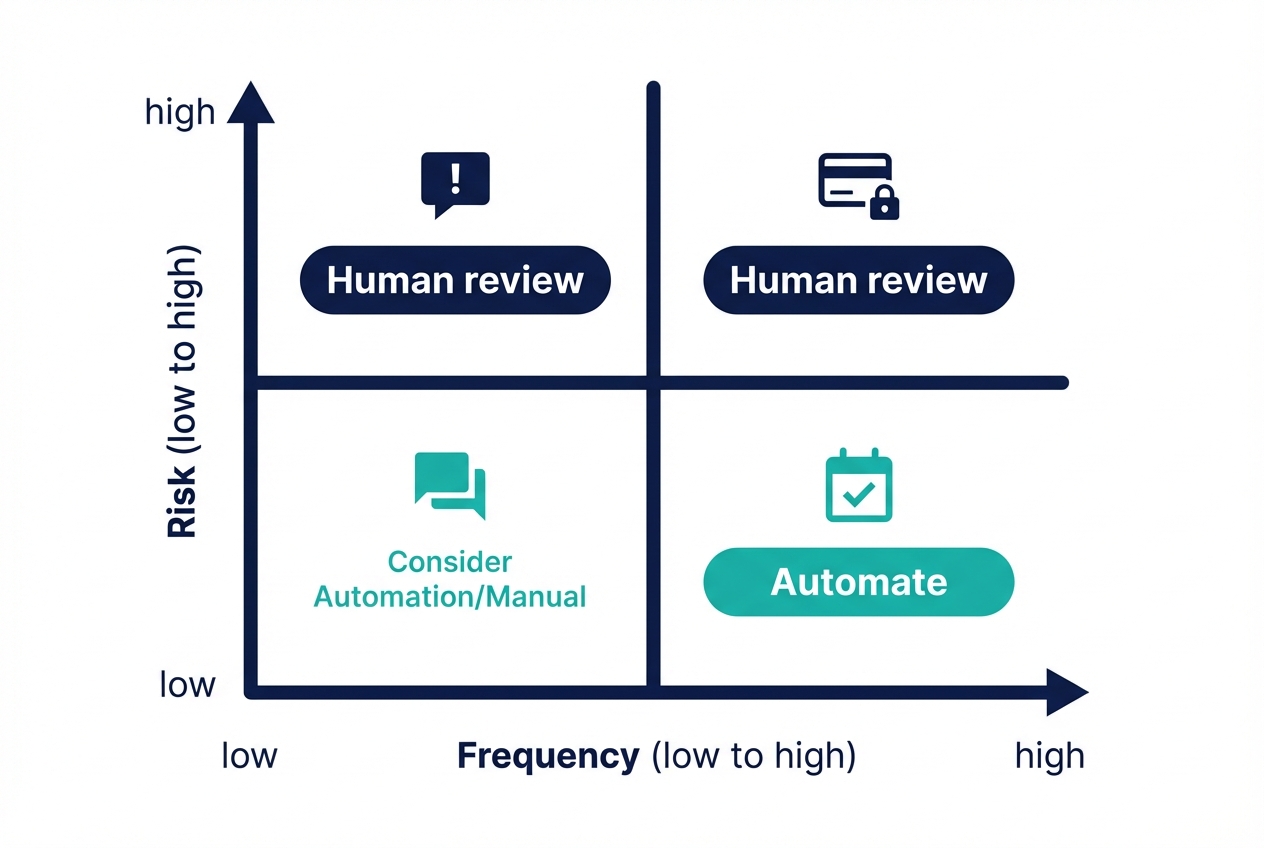
Here is a decision rubric you can apply to every workflow, regardless of the vendor you choose:
- Frequency: Does this happen daily/weekly, or rarely?
- Risk: What is the downside if automation gets it wrong (money, safety, client trust)?
- Variability: Are there many edge cases, or is it consistent?
- Relationship value: Is this a moment where “high touch” increases retention?
If something is high-frequency, low-risk, low-variability, and transactional, automate it. If it is high-risk, high-variability, or relationship-critical, keep it manual or require staff approval.
Automate confidently
- Booking confirmations + reminders: Automated reminders consistently improve attendance across channels like SMS/phone/email, with a systematic review reporting a weighted mean relative change of 34% from baseline non-attendance in one included review. For studios, this is one of the cleanest wins because it reduces “I forgot” without adding staff work.
- Self-serve reschedule/cancel inside policy: The key is reducing friction. Evidence in healthcare scheduling found substantially lower no-show rates for online-booked appointments versus offline-booked in a setting with direct booking (median 1.8% vs 5.9%), and the paper emphasizes that outcomes depend on whether users can autonomously book and cancel. Your takeaway: if clients have to message you to cancel, automation elsewhere will not fully solve no-shows.
- Waitlist fills with a clear time window: Auto-add the next person only if they confirm within a defined window, otherwise it rolls to the next.
- Deposit collection for high-demand slots: Make the rule boring and consistent (for example, “deposit required for first-time privates and peak hours”).
- Renewal and expiry reminders: Credit expiry, membership renewals, and “you have 2 sessions left” nudges.
- Post-class follow-up: Simple “how was it?” or review requests after a first session.
- Basic lead capture: A form that routes leads into “intro offer” versus “private evaluation” based on answers. If you want to handle that intake over chat (web or SMS) instead of a static form, this booking chatbot guide is a solid pattern to copy.
Keep manual (or human-approved) by default
- Exceptions to cancellation policy: Late-cancel fees for illness, travel delays, childcare emergencies. You need discretion here.
- Instructor-client matching: Especially for injuries, prenatal, postnatal, or anxious beginners.
- Medical considerations: Intake answers should inform what happens next, but do not auto-enroll someone into an equipment class based solely on form logic.
- Comping sessions and complex refunds: Automation can create resentment fast if it cannot handle nuance.
- Membership disputes and freezes: These are retention moments. A human response often saves the relationship.
- Special-case rebooking: Travel, rehab, switching goals, or moving from private-heavy to class-heavy scheduling.
Pilates-specific edge cases that should set your automation boundaries
- Equipment-limited classes: Resource scheduling is non-negotiable if “capacity” is not just people, but also Reformers.
- Level prerequisites: Automate the gate (cannot book intermediate without approval), but keep the approval manual.
- Intro pack gating: If you sell an intro pack, enforce it in software. Otherwise clients will accidentally book the wrong thing and staff will end up fixing it.
- Recurring privates: Allow recurring bookings, but keep a manual “exception queue” for travel changes.
- Preventing schedule gaps: Do not expose your entire calendar. Offer curated appointment windows, enforce buffers, and consider rules like “no single-slot holes created within 24 hours” to protect your day.
Policy templates you can copy
- Cancellation window + late fee: “Cancel/reschedule up to 12 hours before class and up to 24 hours before privates. Late cancels are charged a fee or forfeit the credit.”
- Waitlist auto-add rule: “If a spot opens, the next person has 60 minutes to confirm. After that, it moves to the next person.”
- Deposit rule: “A deposit is required for first-time privates and peak-hour appointments. The deposit applies to the session and becomes non-refundable inside the cancellation window.”
- No-show handling: “No-shows forfeit the credit. Repeat no-shows require prepay for future bookings.”
- Package expiry: “Packages expire after X months. Expiry reminders go out at 30/14/3 days.” (Pick the timeframes that match your business, then enforce them consistently.)
Workflow fit: choose software based on how you actually sell sessions
Most “best software” lists ignore the business model question. That is why studios end up paying for features that do not match how they operate.
- Private-heavy studios: You need recurring appointments, curated availability, strong reschedule controls, client notes, and simple package tracking. A great private workflow feels like a calm calendar, not a public free-for-all.
- Group-class heavy studios: Capacity and waitlists matter most, plus resource scheduling for equipment. You also want fast check-in and clean handling of credits.
- Hybrid studios: You need rules that switch smoothly between drop-in, packs, and memberships, plus consistent reminders across both privates and classes.
- Multi-instructor/multi-room setups: Permissions, pay rules, room conflicts, and reporting by instructor are the difference between “manageable” and “we need a full-time admin.”
Integrations you should demand
A booking system that does not fit your stack creates reconciliation work and support tickets.
- Payments: Stripe/Square/PayPal support, deposits, refunds, and a clear answer to whether the vendor is merchant-of-record or you are. If you sell memberships, it is worth understanding how Stripe Subscriptions works behind the scenes so you can ask better questions about renewals, failed payments, and access logic.
- Accounting: QuickBooks/Xero integration is ideal. If not, insist on clean exports and payout reconciliation.
- Email marketing/CRM: Sync to Mailchimp or your CRM, and tagging based on purchases/attendance.
- Calendar sync: Google Calendar/Apple Calendar for instructors. Treat two-way sync carefully; it can create duplicates if misconfigured.
- Video: Zoom/Google Meet links automatically added to confirmations and reminders.
- Waivers: Built-in waiver capture or an integration that stores signed timestamp and waiver version.
- Data portability: Ask about exporting clients, appointments, packages, and financials, plus whether API/webhooks exist for custom workflows.
Pricing expectations and the cost drivers studios miss
Expect pricing to vary based on the real “load” you put on the system, not just how many bookings you have.
Typical cost drivers:
- Staff seats: Owner + instructors + front desk access.
- SMS volume: Reminders are valuable, but SMS overages add up.
- Locations: Multi-location often bumps you into higher tiers.
- Payment processing: Fees depend on processor and setup; clarify whether there are extra platform fees.
- Branded app add-ons: Sometimes priced separately.
- Advanced marketing modules: Often packaged as an add-on.
- API access: Frequently gated to higher plans.
Hidden costs to verify during a trial:
- SMS overages: What happens when you exceed included messages?
- Onboarding fees: Are you paying for setup help?
- Support tiers: Is fast support locked behind higher plans?
- Add-on marketplace fees: Some integrations are paid.
Decision rule: pay for reliability in scheduling and payments. Do not overpay for features you will not operationalize (marketplace discovery, advanced automations) unless it is truly part of your growth plan.
Shortlist of common options
These are frequently evaluated by Pilates studios: Mindbody, WellnessLiving, Vagaro, Setmore, StudioBookings, and Acuity Scheduling. (There are many others, but these show up repeatedly in search results and community discussions.)
A fast way to evaluate any platform is to run the same test script in a free trial.
The 45-minute test script
- Create 1 group class with capacity and a waitlist.
- Create 1 private appointment type with curated availability (only show the times you actually want booked).
- Set up a 5-pack and confirm the client can see remaining credits.
- Require a deposit for a high-demand session type.
- Trigger reminders and confirm messaging is editable and branded.
- Run a basic revenue report (today/week/month) and confirm it matches payouts.
- Export your client list and confirm you can take your data with you.
Best-for mapping
| Tool type | Best for | Watch-outs |
|---|---|---|
| All-in-one studio platforms | Multi-instructor studios that want scheduling, payments, reporting in one place | Can be heavy, expensive, and harder to customize |
| Lightweight schedulers | Solo instructors and small studios prioritizing simplicity | May be weaker on packages, resources, and reporting |
| Pilates-specialist tools | Studios that need class + private nuance and membership logic | Validate integrations and data export before committing |
Also test support quality before you migrate. Ask one real question and see response time and clarity. It predicts your next six months.
Security and privacy checklist
Booking systems touch payments and personal data, so you need a basic security posture even if you are not “technical.”
- Payments belong with payment processors: Use established processors and avoid storing card data yourself. PCI DSS is the baseline set of requirements intended to protect payment account data (https://www.pcisecuritystandards.org/standards/pci-dss/).
- Collect less client data: Follow a minimization mindset. The FTC’s small-business guidance frames it as taking stock of what you collect, scaling down what you keep, locking it, pitching it when you no longer need it, and planning ahead for incidents (https://www.ftc.gov/business-guidance/resources/protecting-personal-information-guide-business-0).
- Use least-privilege access: Instructors do not need payout settings; front desk does not need full exports. Remove access immediately when staff leave.
- Harden daily operations: Turn on 2-factor authentication, use a password manager, require device passcodes, and avoid logging into admin panels on public Wi-Fi.
- Have an incident plan: Know who at the vendor to contact, how to reset access, and how you would notify clients if necessary. If you want a simple structure, the NIST Cybersecurity Framework (CSF) 2.0 functions (Identify, Protect, Detect, Respond, Recover) are a practical way to organize that plan without getting lost in jargon.
Implementation timeline: go live in 7–14 days
You can implement most pilates online booking software in two weeks if you treat it like a rollout, not a “settings project.”
Day 1–2: inventory and decisions
- List your offers (privates, duets, group classes, workshops, intro pack).
- Write your policies (cancellations, waitlist, deposits, no-shows, package expiry).
- Define staff roles and permissions.
- Decide what is automated vs manual using the Frequency/Risk/Variability/Relationship rubric.
Expected outcome: you know what you are building, and you can explain your rules in one page.
Day 3–5: configure scheduling correctly
- Build booking types and durations.
- Add resources (rooms and equipment).
- Set curated availability and buffers to prevent schedule gaps.
- Configure prerequisites and intro gating.
- Implement cancellation and waitlist rules.
Expected outcome: a client can book the right thing, and the system cannot create the wrong kind of overbooking.
Day 5–7: payments, waivers, reminders, and end-to-end testing
- Connect payments and test deposit/prepay flows.
- Set up packages and memberships.
- Add waivers and intake questions.
- Customize confirmation and reminder templates.
- Run the full journey as a client: book, pay, reschedule, cancel, join waitlist.
Expected outcome: the booking flow feels simple and predictable on a phone.
Week 2: migration and phased launch
- Import clients (CSV) and verify fields.
- Soft launch to a subset of clients first.
- Train staff on a front desk playbook for exceptions (policy overrides, comping, injury cases).
- Full launch with clear cutover messaging.
Rollback plan: keep the old system read-only for a short period so you can reference history if something is missing.
Build vs buy: when a custom booking flow is the better move
Buying is usually the right call if you mostly need standard booking + payments + reminders, and you can accept the vendor’s membership/package model.
Consider building or extending if any of these are true:
- You need resource constraints vendors cannot express (equipment plus instructor plus room logic).
- You want complex eligibility (levels, intro gating, safety questionnaires that route differently).
- Your lead intake is unique (different funnels for rehab, athletic performance, prenatal, corporate sessions).
- You want a custom owner dashboard (schedule gaps, utilization, package liability, instructor payout previews) without exporting spreadsheets every week.
- You run multiple brands/locations and want shared client profiles with separate policies.
The middle path is often best: keep a commodity booking engine for the basics, and add a tailored operations layer on top.
This is where Quantum Byte fits naturally. If your studio has outgrown off-the-shelf rules, you can use QuantumByte to build a custom front desk and ops layer (intake flows, exception queues, internal dashboards, staff approvals) while still keeping payments with trusted processors to avoid handling card data directly.
If you want the broader decision framework for this choice across industries (cost, risk, timeline, and what to keep off-the-shelf), use this custom software build vs buy guide as a reference.
Start building
If you are hitting the “last 10%” problems that booking tools do not solve, start with a small build you can ship fast.
Start building with Quantum Byte if you want a founder-friendly path that combines plug-and-play templates with real customization, without waiting months for a developer. If you are comparing options, Quantum Byte’s platform pricing makes it easy to start small and only expand when the workflow proves itself.
A practical first build in 1–2 hours:
- A branded booking + intake flow: Route clients to the right session type based on goals and constraints.
- A cancellation exception queue: Keep policy enforcement automated, but let staff approve edge cases.
- An owner dashboard: See schedule gaps, utilization, and outstanding package credits in one place.