
Pilates scheduling software should do three things flawlessly: schedule by equipment (reformer capacity is not the same as “class size”), sell and redeem packs or memberships without confusing credits, and enforce your studio policies automatically (late cancel, no-show, booking windows). If a tool misses any of those, you will end up managing exceptions all day.
Quick verdict: what “good” Pilates scheduling looks like
A “good” setup is not about having more features. It is about eliminating the three recurring failure points that cost Pilates studios real money and sanity:
- Equipment-based capacity that matches reality (reformers, towers, chairs, rooms).
- Clean monetization (class packs, private packs, intro offers, memberships, autopay).
- Policy enforcement that runs without staff chasing people down.
When a general scheduler is enough:
- You are a solo instructor doing mostly privates.
- You do not need resource scheduling by equipment.
- You sell simple single sessions or one type of pack.
When you need true studio management software:
- You run reformer group classes where “capacity” is defined by equipment, not seats.
- You have multiple instructors, substitutes, and payroll reporting.
- You sell memberships, intro series, or mixed offerings (privates + group + workshops).
This guide is a requirements checklist and rollout plan. Use it to run demos and trials like a buyer, not like someone browsing features.
Feature checklist
Use this list in every demo. If the vendor cannot show it live in under 5 minutes, assume it will become a workaround.
Booking experience
- Self-booking and rescheduling: Clients can book, reschedule, and cancel without staff involvement, with clear deadlines based on your policy.
- Waitlists that actually help: Waitlist auto-notifies, supports time limits to claim a spot, and respects membership or pack eligibility.
- Time zone handling: Important if you teach traveling clients or sell virtual sessions.
- Client profiles that reduce friction: Injury notes, preferred instructor, waiver status, memberships, pack balances.
- Automated confirmations and reminders: Email is table stakes. SMS matters when you are fighting no-shows.
Client monetization
- Separate pack types: Class packs, private packs, duet packs, intro series. Each has different redemption rules.
- Membership logic: Recurring billing, included credits, rollover rules (or explicit “no rollover”), and suspension/freezes.
- Intro offers with guardrails: One per client, expires, and cannot be stacked with other discounts unless you allow it.
- Payments handled safely: The scheduler should use a payment processor’s vaulting, not store raw card details. This is part of why the PCI Data Security Standard (PCI DSS) exists, and why you want vendors that keep card data scope off your plate.
Operations
- Attendance and check-in: Fast check-in, late arrivals, and easy marking for no-shows.
- Instructor substitution: Swap teacher, keep roster intact, notify clients, and track who actually taught for payroll.
- Reporting you will use: Revenue by class type, instructor utilization, pack sales vs redemptions, churn signals for memberships.
- Exports that don’t require manual cleanup: Payroll exports and revenue reports that match your accounting cadence.
Communications
- Transactional templates: Confirmation, reminder, waitlist spot available, class canceled, substitute instructor.
- Broadcast vs transactional separation: Marketing messages should be clearly separated from operational reminders.
- SMS reminders as an attendance lever: Evidence from a Cochrane review found that text message reminders increase attendance compared with no reminders (reported as a relative risk of 1.14). You do not need healthcare-level automation, but you do want the same principle: consistent reminders without manual effort.
Compliance and risk
- Waivers and consent capture: Waiver stored on the client profile with timestamp and versioning, and enforced before first booking.
- Audit logs: For cancellations, refunds, membership changes, and staff actions.
- Roles and permissions: Front desk should not have the same privileges as an owner.
- Data export: You can export client data, visit history, and financial reports without begging support.
- Support expectations: For larger studios, ask about support hours, response times, and uptime practices.
Accessibility for the booking flow
Booking is part of your client experience. Accessibility improvements also reduce friction for everyone. WCAG 2.2 adds practical guidance like Redundant Entry, Consistent Help, and Accessible Authentication that directly apply to checkout and account creation. In a demo, look for:
- A booking flow that does not force retyping the same info multiple times.
- Help links that stay in the same place across steps.
- Login and verification steps that do not block password manager users.
Pilates rules matrix: reformers, privates, duets, and packs
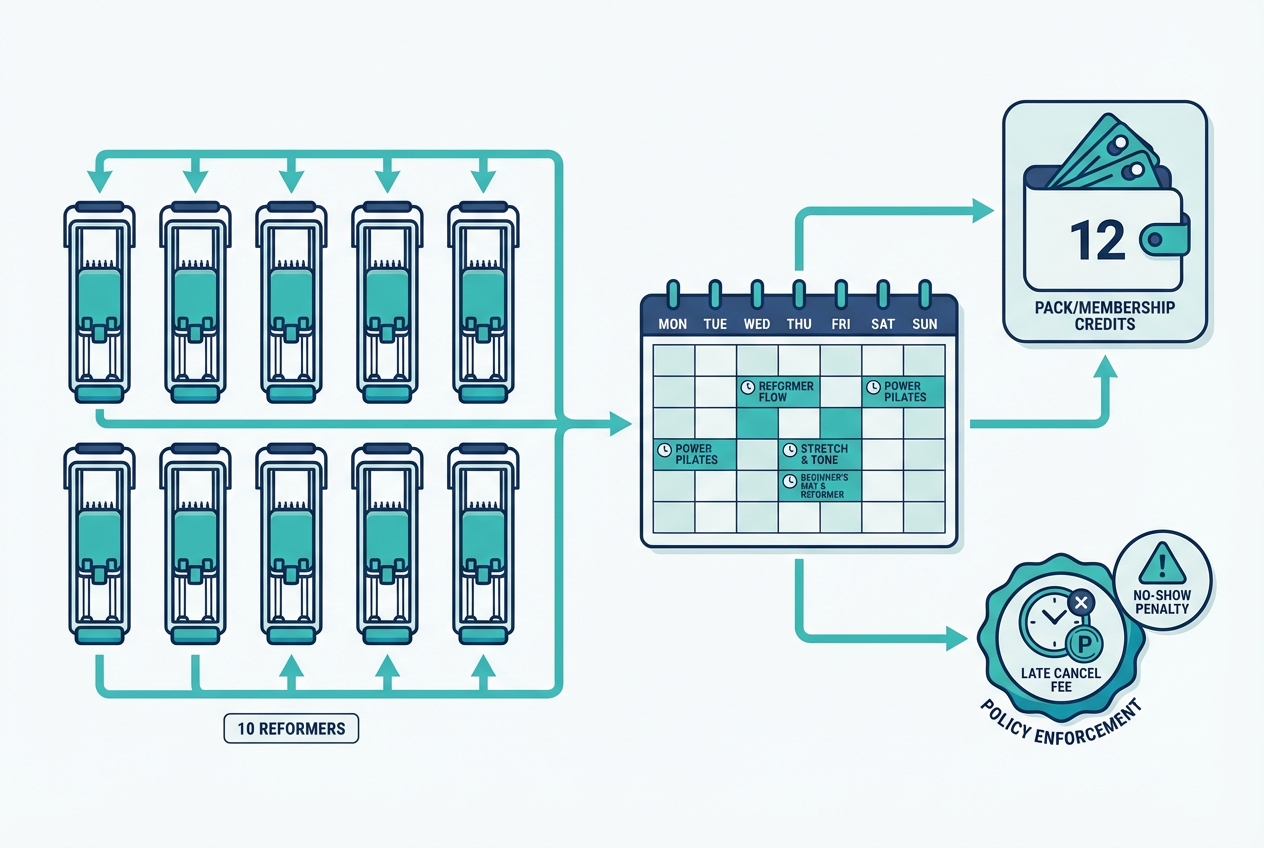
Most scheduling problems come from one place: the software has a simple model, but your business rules are not simple. Your best move is to write your rules down first, then choose a tool that can enforce them.
Fill this matrix for your studio. Then use it as your demo script.
| Offer type | Capacity model | Resource assignment | Booking window | Cancellation rule | Eligibility rules | Pricing unit |
|---|---|---|---|---|---|---|
| Reformer group class | By equipment count (e.g., 10 reformers) | Reformer spot required, optional specific reformer selection | Example: book up to 14 days out | Example: 12-hour late cancel fee, no-show fee | Waiver required, membership or class credit required | Per class credit or membership |
| Mat group class | By room capacity | Room-only, no equipment | Example: book up to 7 days out | Example: 6-hour late cancel | Intro pass allowed | Per class credit |
| Private session | 1 client | Instructor calendar required, optional room | Example: book up to 30 days out | Example: 24-hour late cancel | Prereq intake form required | Per session or private pack |
| Duet / semi-private | 2 clients | Instructor + room + rules for pairing | Example: book up to 21 days out | Example: 24-hour late cancel, special split rules | Must be same price tier or approved pairing | Per person credit or duet pack |
| Intro series | Limited seats and time-bound | Usually class-type based, sometimes equipment-based | Example: must start within 30 days | Stricter reschedule limits | New clients only, one per client | Bundle price with expiry |
How to validate reformer and equipment scheduling in a demo
Do not accept “yes, we support capacity.” Ask them to model resources.
- Can the system treat reformers (or towers) as bookable spots, not just a number?
- Can a client pick a specific spot, or is it auto-assigned?
- Can staff override spot assignment when someone needs a specific setup?
- Can you block equipment for maintenance without canceling the whole class?
If the tool cannot model equipment as a first-class resource, you will eventually run into overbooking or forced manual reassignment.
Pack logic that avoids “credit confusion” at checkout
Credit confusion is a conversion killer. Your system should make it obvious what credit is being used and what it can be used for.
- Separate ledgers: Class credits should not silently redeem against privates unless you explicitly allow it.
- Clear redemption priority: If a client has multiple eligible packs, the system should either let them choose or follow a rule you set.
- Expiry and renewals: Expiry should be visible before purchase and in the client portal.
Instructor constraints and staff-only booking
Pilates has real safety considerations. Sometimes you need staff-only booking.
- Prerequisites for certain classes.
- Restrictions for pregnancy modifications or injury clients.
- Instructor qualifications (who can teach what) so the schedule cannot be staffed incorrectly.
Policy enforcement: automatic or manual
Ask this bluntly: “If someone late-cancels, does the system automatically apply the fee or consume the credit, or does my team have to do follow-up?”
If it requires follow-up, you do not have policy enforcement. You have a reminder.
Workflow fit: the 5 common Pilates business models
Your business model determines the minimum viable stack.
Model 1: Solo instructor
Non-negotiable:
- Booking links per service
- Payments and packages
- Automated reminders
Nice-to-have:
- Intake forms and waivers
- Basic reporting
Trial question to ask: Can a client buy a 10-pack of privates, book against it, and reschedule within policy without emailing you?
Model 2: Small reformer studio
Non-negotiable:
- Equipment-based capacity
- Waitlists
- Pack and membership logic
- Staff calendars
Nice-to-have:
- Branded client app
- Substitute workflows
Trial question to ask: Can the tool prevent the 11th person from booking when you have 10 reformers, even if two instructors are teaching back-to-back?
Model 3: Hybrid studio (privates + group + workshops) with intro funnel
Non-negotiable:
- Multiple offer types and intro series
- Automated messaging for onboarding
- Reporting by offer type
Nice-to-have:
- Segmentation (new client vs active vs churn risk)
Trial question to ask: Can you create a “New Client Intro Series” that is one per person, expires, and cannot be used on workshops?
Model 4: Multi-instructor, multi-room
Non-negotiable:
- Roles and permissions
- Room and equipment resources
- Substitution workflows
- Payroll-ready reporting
Nice-to-have:
- Audit logs for refunds and membership changes
Trial question to ask: Can a front desk user move a client into a different class without being able to change pricing or issue refunds?
Model 5: Multi-location or growth-focused studio
Non-negotiable:
- Scalable reporting by location
- Strong admin controls
- Consistent policy enforcement
- Reliable integrations (payments, accounting, SMS)
Nice-to-have:
- Data exports that support deeper analysis
Trial question to ask: Can you compare utilization and revenue by location without exporting raw data every week?
Integrations blueprint: payments, waivers, accounting, and SMS consent
“All-in-one” is fine if it is true. The safer approach is to design a simple integration blueprint so you can evaluate vendors without being trapped.
Payments: keep card data out of your system
You want a scheduler that integrates with a payment processor and uses tokenization and vaulting. PCI DSS exists to secure environments that store, process, or transmit cardholder data, and applies to merchants and service providers handling card data per the PCI Security Standards Council. Practically, for a studio owner, that translates to one rule:
- Do not pick software that encourages storing raw card details in your own database.
Waivers and consent: enforce before first booking
Requirements:
- Waiver required before booking (or at least before the first paid session).
- Waiver stored with version, timestamp, and signer identity.
- Staff can see waiver status at check-in.
Accounting: decide what must sync and what can stay put
You do not need every data point in accounting. You do need clean reconciliation.
Minimum outputs to plan for:
- Daily payouts and fees
- Refunds and chargebacks
- Discounts and comps
- Gift cards and liabilities
If a vendor claims “QuickBooks integration,” ask what actually syncs and how refunds are represented. Most reconciliation pain comes from missing refund and fee detail.
SMS reminders: set them up, but stay compliant
Reminders work when they are consistent. The same Cochrane evidence that shows improved attendance with messaging reminders also notes cost advantages versus phone call reminders, which maps cleanly to a studio environment: automate what you can.
Compliance checklist for texting:
- Consent captured: Autodialed texts generally require prior consent, and marketing texts can require written consent under FCC guidance outlined in Stop Unwanted Robocalls and Texts.
- Clear opt-out: “Reply STOP” style opt-out, honored immediately.
- Message type separation: Transactional messages (booking confirmations, reminders) should not be mixed with promotions unless you have the appropriate consent.
Security basics for staff accounts
Studios often share logins because it is “easier.” It is also how mistakes and fraud become untraceable.
Set these defaults:
- Unique accounts for each staff member: This aligns with practical small business controls in NIST IR 7621.
- Least-privilege roles: Give staff the minimum permissions they need. The FTC’s Start with Security emphasizes limiting admin rights and controlling access.
- Strong authentication: Turn on multi-factor authentication (MFA) where available.
- Vendor due diligence: Ask where data is stored, how access is logged, and how support staff access your account.
Pricing expectations and cost drivers
Scheduling software pricing rarely depends on “how many classes you run.” It depends on how complex your operation is.
Common cost drivers:
- Staff users: More instructors and front desk users often means higher tiers.
- Active clients or bookings: Some vendors price on contacts or appointments.
- Locations: Multi-location support usually pushes you into higher plans.
- SMS volume: Texting is often billed separately.
- Branded app: Common add-on.
- Marketing modules: Email campaigns, funnels, and segmentation may be separate.
- Equipment or spot booking: Resource scheduling can be a paid feature.
- Onboarding and migration: Setup fees, training, and data import services.
Switching costs to plan for:
- Data migration time
- Staff training time
- Policy reconfiguration
- Contract terms (annual commitments, cancellation windows)
The 30-day “trial math” exercise
Before you commit, run one month like you mean it:
- Run real bookings through the system (group, private, duet).
- Sell the 3 pack types you use most.
- Trigger a late cancel and confirm the fee flow is automatic.
- Export the exact reports you will use for payroll and reconciliation.
- Turn on reminders and validate consent and opt-out.
If you cannot complete those steps in a trial, you are not buying software. You are buying future admin work.
Shortlist of common options and where each tends to fit
Studios typically compare a mix of fitness studio platforms and general schedulers. The right move is to shortlist based on your rules matrix and business model, not brand recognition.
| Tool category / example | Best for | Equipment / spot booking | Packs & memberships | Reporting depth | Typical complexity |
|---|---|---|---|---|---|
| Full studio platforms (Mindbody, WellnessLiving) | Established studios, reformer-heavy schedules, staff ops | Often strong | Often strong | Usually deeper | Higher setup and admin overhead |
| Modern studio tools (Momence, Arketa, Walla, TeamUp, Vagaro) | Hybrid studios, growth features, smoother UX | Varies by vendor | Usually solid | Medium to high | Medium |
| General schedulers (Acuity, Bookeo, Setmore, Setmore alternatives) | Solo instructors, simple privates | Limited | Basic to medium | Basic | Low |
What to validate in every demo, regardless of brand:
- Resource scheduling for reformers and rooms
- Pack logic for privates vs classes
- Automatic policy enforcement (late cancel, no-show)
Implementation timeline: migrate without breaking your schedule
Most migrations fail because studios import messy data and then try to “fix it in the new system.” Do the opposite.
Step 1: Pre-migration cleanup
- Standardize class names and levels.
- Write your cancellation policy in one place.
- Define your pack types and exactly what each one can book.
- Decide on booking windows and waitlist rules.
Step 2: Data migration sequence
Import in this order:
- Clients (and waiver status where possible)
- Products: packs, memberships, intro offers
- Class and appointment templates
- Instructor profiles and availability
- Scheduled sessions
Historical attendance is optional. If importing it will delay go-live, skip it and start fresh.
Step 3: Go-live sequencing
- Staff soft launch: Run front desk and instructor workflows first.
- Small client cohort: Invite 10 to 20 trusted clients to book and give feedback.
- Parallel run (if feasible): Keep the old system read-only for reference while you confirm the new one is correct.
Step 4: Training plan
Train for what actually causes issues:
- Check-in and attendance corrections
- Refund and comp policies
- Membership changes and freezes
- Late cancel and no-show enforcement
Create a single “rules doc” that matches the configuration. When staff members disagree on a rule, your system configuration drifts and your clients feel it.
Step 5: Client communication
- One message that explains what changes (new booking link, new app if required).
- One message that restates key policies.
- A short “how to book” page or video.
Build vs buy: when a custom Pilates app is the smarter move
Buying is usually the right choice when you want proven billing, stable support, and your workflows fit the vendor’s model. Building becomes attractive when you are spending hours each week patching around edge cases.
Build triggers:
- Your pack rules are truly unique (shared credits across modalities, special duet splits, tiered eligibility).
- You need multi-resource constraints (reformer plus tower plus room) that off-the-shelf tools cannot enforce.
- You want full control over the client experience, brand, onboarding, and retention flows.
Buy triggers:
- You need a mature, battle-tested billing and refund workflow.
- You are not ready to own software testing and change management.
- Your studio model is standard and the software already supports it cleanly.
Hybrid approach (often the sweet spot):
- Keep payments and messaging with established providers.
- Build the booking and pack logic layer that enforces your Pilates-specific rules.
If you decide to build, the key risk controls are permissions, audit logs, and testing. Follow a least-privilege model and limit admin rights, as recommended in the FTC’s Start with Security, and keep staff accounts unique and scoped as outlined in NIST IR 7621.
This is also where an AI app builder can be practical. With QuantumByte, studios that have outgrown generic tools can start from scheduling and client-portal templates, then refine the rules (reformer capacity, duet eligibility, pack redemption, late-cancel enforcement) using natural language prompts instead of a long custom development cycle.
Key takeaways and your next step
If you only remember three dealbreakers for pilates scheduling software, make them these:
- Equipment-based capacity (reformers are resources, not just a headcount).
- Pack and membership logic that stays clear at checkout and redemption.
- Automatic policy enforcement that does not rely on staff follow-up.
Next step:
- Fill out the feature checklist for your studio.
- Fill out the rules matrix with your actual policies.
- Run two demos or two trials using the same test script: reformer assignment, duet booking, late cancel flow, pack purchase and redemption, and one payroll or revenue export.
Start building a booking flow that matches your studio
If your studio keeps running into exceptions that off-the-shelf tools cannot model, build the system around your rules instead of bending your rules around the system. Quantum Byte helps founders and studio owners create a Pilates-specific booking flow fast, starting from proven templates and customizing with plain-English prompts.
Start building with Quantum Byte.