
A pilates studio app is only worth building when it meaningfully improves repeat booking and retention without creating a new support and maintenance burden you cannot staff. For many studios, a mobile-first booking page plus automation (confirmations, reminders, waitlists, policies) gets you 80% of the client experience with a fraction of the complexity.
Quick verdict: when a client app is worth it
Most studios should start with the simplest layer that still feels great on a phone, then “earn” the right to a true app.
- Booking page is enough if you are early stage, running a single location, or your bottleneck is filled classes and instructor bandwidth (not repeat booking).
- Progressive web app (PWA) is the sweet spot if you want an app-like feel (saved login, home screen icon, fast repeat checkout) but you do not want App Store and Google Play overhead.
- Native app is justified when you have high client frequency, a real retention problem, and a plan to use push notifications, personalization, or a content library to drive weekly habits.
The tradeoff is simple: a client app can reduce friction and increase “I’ll book again right now” behavior, but it also creates ongoing work (updates, support tickets, OS changes, app store review cycles).
If you only do one thing this week: make your schedule and checkout flow effortless on mobile, then turn on automated confirmations and reminders. Smartphone ownership is near-universal in the U.S. and a mobile-first flow is table stakes for conversion (Pew Research Center).
What people mean by a "pilates studio app"
Studio owners often search “app,” but they are actually comparing three different things:
- Studio management platform (owner-ops): scheduling, packages, memberships, staff access, reports, client profiles.
- Branded client app (client-facing): a downloadable iOS/Android app for booking, account management, promos, and sometimes referrals.
- Mobile-first booking page: a responsive web checkout embedded on your site (sometimes with text/email reminders, waivers, and saved cards).
This is why the search results feel messy. You will see App Store listings for individual studios that emphasize “book classes and view the schedule,” while vendor comparisons focus on the back office (memberships, billing, marketing, reporting).
This guide is written for the owner-operator decision: whether to invest in a branded client app, or win with a strong booking experience first.
Feature checklist: minimum viable stack before you build an app
Before you spend energy on a native app, get the core stack right. If the basics are shaky, an app just makes the problems easier to access.
Minimum viable stack for most Pilates studios:
- Mobile-first schedule and checkout: one-handed browsing, clear class names, and a checkout that does not feel like a form marathon. This matters because clients are booking on phones, not desktops (Pew Research Center).
- Frictionless account creation: allow guest checkout or a low-friction “create account after purchase” flow.
- Packages and memberships: class packs, intro offers, recurring memberships, and freezes.
- Digital waivers and forms: waiver completion should be required before first class, not chased manually.
- Automated confirmations and reminders: reminder systems reduce non-attendance across healthcare-style appointment contexts, which is directionally relevant to reducing no-shows for booked sessions (systematic review).
- Waitlist rules: automatic promotion, cutoff windows, and clear notifications.
- Cancellation and late-cancel policy enforcement: consistent rules, clear cutoffs, and automatic penalties if you use them.
- Basic staff scheduling and roles: instructors should not need admin access to everything to see their roster.
Nice-to-have later (do not lead with these):
- Push notifications: great for habits, but only if you have a messaging strategy.
- Content library or video-on-demand: useful for hybrids and travel weeks.
- Progress and personalization: notes, goals, special populations (prenatal/postnatal), contraindications.
- Referrals: “Invite a friend” loops and tracked credits.
Decision matrix: booking page vs PWA vs native app
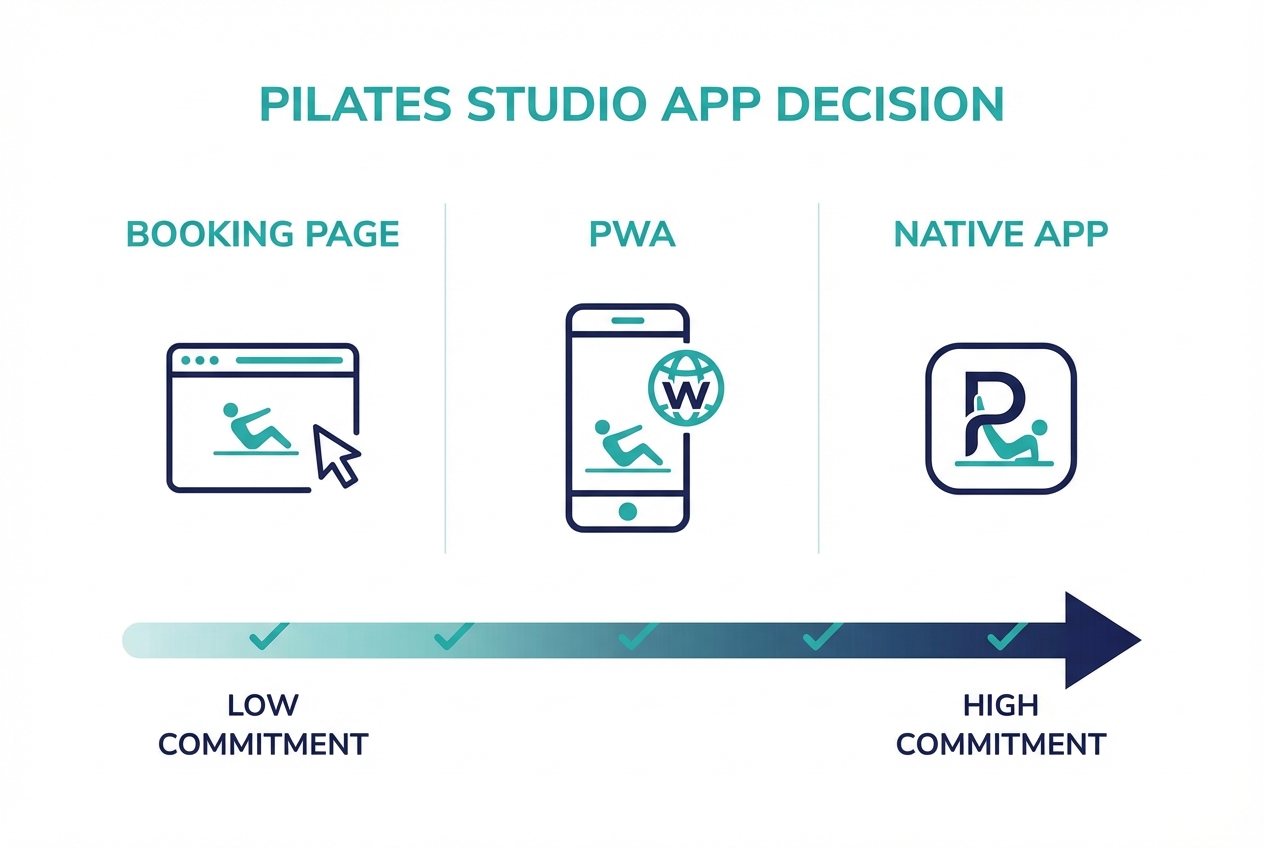
Here is a repeatable scoring model to decide what you should build next. Score each row from 0 to 2, then total it.
| Criteria | 0 points | 1 point | 2 points |
|---|---|---|---|
| How often clients book | 1 to 4x/month | 1 to 2x/week | 3x/week or more |
| Revenue model | Mostly drop-ins | Mix of packs + memberships | Mostly recurring memberships |
| Retention pain | Low churn / stable | Some churn you cannot explain | Retention is a top issue |
| Need for push messaging | Not needed | Occasional promos | Habit-building nudges + operational alerts |
| Content layer | None | Some PDFs or emails | On-demand library or programs |
| Team capacity for support | You are the support desk | Part-time front desk | Dedicated support coverage |
| Operational complexity | One location | Two locations or many instructors | Multi-location + cross-location perks |
| Brand differentiation | Word-of-mouth driven | Some paid marketing | Brand experience is a growth lever |
| Tolerance for app-store overhead | No bandwidth | Maybe later | Yes, you can plan releases |
Scoring thresholds
- 0 to 7: Booking page wins. Improve mobile UX, reminders, and policy automation.
- 8 to 12: Build a PWA layer. You get app-like repeat booking without app stores.
- 13 to 18: Native app is justified. You have enough repeat usage to benefit from push, deeper personalization, and a richer experience.
Example studio profiles (how the matrix typically lands):
- Solo instructor with a small schedule: low support capacity and low app-store tolerance. Usually a booking page decision.
- Boutique studio with 2 locations and memberships: higher repeat booking and real retention goals. Often a PWA decision.
- Multi-location brand with strong marketing and programs: push campaigns, loyalty, and content. Often a native app decision.
Operational gotchas to weight heavily:
- App store release cycles: updates and fixes do not ship instantly.
- Ongoing maintenance: OS updates, device quirks, and dependency updates are forever work.
- Support load increases: clients will message “the app won’t load” instead of “the website is down.”
Client experience that actually moves retention
Clients do not stay because you have “a branded app.” They stay because booking becomes a habit and the experience feels personal.
What tends to matter in real client language:
- Habit-building triggers: rebook prompts, “add to calendar,” and simple routines that make it easy to show up.
- Personalization that reduces anxiety: clear class descriptions for beginners, prenatal/postnatal notes, and “what to expect” guidance.
- Instructor clarity: short bios, cueing style, and who the class is for.
A useful retention flywheel to design for:
- Book: reduce friction (mobile UX, saved payment).
- Show: confirmations and reminders, waitlist automation.
- Feel progress: consistent programming notes, milestones, instructor continuity.
- Rebook: immediate next-step booking (same instructor, same time slot).
You can deliver a lot of this without a native app.
- Booking page or PWA can cover: saved login, faster repeat booking, email/SMS reminders, add-to-calendar, saved payment via your payment provider.
- Native app is where you usually get: push notifications, deeper in-app personalization, offline-ish behavior, and a richer content library experience.
Workflow fit: front desk, instructors, and multi-location operations
Your tech choice needs a clear owner on the operations side. Otherwise, you will create “phantom work” that leaks hours every week.
Decide who owns these jobs:
- Support requests: password resets, booking changes, class credits, refund questions.
- Failed payments and delinquency: follow-up rules, grace periods, membership pauses.
- Waitlist promotions: how far in advance you promote, and when you stop.
- Schedule updates: instructor swaps, substitute approvals, and last-minute changes.
Policy enforcement should be designed into the system:
- Late cancels and no-shows: consistent handling, clear cutoff windows.
- Intro offers: limit rules, eligibility, and expiry.
- Membership freezes: client self-serve versus staff-assisted, with audit logs.
- Capacity rules: reformer counts, equipment assignments if relevant.
Avoid these traps:
- Manual overrides as a habit: they create inconsistent member experiences and staff confusion.
- Multiple systems of record: if your roster lives in one tool and marketing lists in another, duplicates happen fast.
- Unclear ownership of communications: clients should not get three different “official” messages from three different tools.
Integrations you should require
Whether you buy or build, require a short list of integrations before you commit.
Non-negotiable integration categories:
- Payments: use a provider that keeps you out of the business of storing card data. The Payment Card Industry Data Security Standard (PCI DSS) defines baseline requirements for entities that store, process, or transmit cardholder data (PCI Security Standards Council). Practically, this means you should tokenize payments and avoid storing raw card details yourself.
- Email and SMS: confirmations, reminders, waitlist notices, and receipts.
- Accounting export: payouts, refunds, tax categories, and reconciliation.
- CRM and marketing automation: segmentation (new clients, at-risk members, intro-offer conversions).
- E-sign waivers and forms: waiver status should be a first-class attribute on the client profile.
- Analytics and reporting: conversion rate from schedule view to purchase, no-show rate, utilization by class type.
Make accessibility a requirement, not a bonus. WCAG 2.2 is the global standard for accessible web content and it applies to mobile booking flows too (WCAG 2.2). At a minimum, ensure your booking and waiver forms have usable labels, visible focus states, readable contrast, and error messages that help users recover.
Finally, protect your sanity: insist on one source of truth for client profiles so you do not manage duplicates across tools.
Pricing expectations and the real cost drivers
The monthly subscription is rarely the full cost. The real question is total cost of ownership.
Cost buckets to account for:
- Platform subscription: scheduling, billing, staff access.
- Payment processing: percentage + per-transaction fees.
- SMS costs: reminders and operational messages can add up quickly.
- Branded app fees: some vendors charge extra for a white-labeled app.
- Custom development: design, build, QA, and ongoing fixes.
- Maintenance: release management, bug fixes, feature requests, device testing.
- Support burden: someone must answer client issues, especially if you add an app.
- App store overhead: developer accounts, review cycles, compliance prompts.
Hidden-fee categories to explicitly ask about:
- Transaction fees or “checkout fees”: some platforms apply extra fees at checkout depending on plan and payment setup.
- Add-ons for marketing: email, SMS, automation, segmentation.
- Extra staff seats: sometimes each instructor login costs more.
Copy-paste demo questions to uncover total cost:
- What costs extra: memberships, SMS, branded app, marketing automations, staff seats.
- Data ownership: can I export clients, purchase history, attendance, and waivers in bulk.
- Checkout flow: how many steps from schedule to paid booking on mobile.
- Policy automation: late cancel rules, waitlist cutoffs, membership freezes.
Alternatives and competitors: three paths studios actually take
Studios generally choose one of these three approaches.
-
All-in-one studio platforms
- Best when you want a single vendor for scheduling, memberships, marketing, and reporting.
- Examples include Mindbody, WellnessLiving, Vagaro, and Glofox.
-
Website-first booking with a lighter stack
- Best when you sell limited memberships, want a simpler workflow, or prefer best-in-class tools over a monolith.
- Tools like Acuity Scheduling can fit here when your needs are straightforward.
-
Custom build (PWA or native) on top of best-in-class services
- Best when you want a differentiated client experience, custom policies, or unique programs.
- This path only works if you are clear on integrations, support, and ownership.
Selection traps to watch:
- Vendor lock-in: limited exports and hard migrations.
- Weak mobile checkout: the desktop experience might look fine but conversion suffers on phones.
- Rigid workflows: if you cannot model your policies, staff ends up doing manual work.
Build vs buy: a phased rollout that keeps you flexible
The fastest path to a great client experience is not “build a native app.” It is a phased rollout that validates demand before you commit to app-store complexity.
Phase 1: Mobile booking that converts
- Tighten schedule UX, checkout, waivers, and policy automation.
- Turn on confirmations and reminders to protect attendance (systematic review).
Phase 2: Add a PWA layer (app-like repeat booking)
- Saved login and faster repeat purchase.
- Home-screen install so clients feel like they “have your app,” without downloads.
- A single link works for iPhone and Android.
Phase 3: Native app when you hit real thresholds
- You have enough weekly usage to justify push notifications.
- You want deeper personalization and program delivery.
- You can staff support and plan releases.
This phased approach keeps you flexible: you get conversion improvements now, then invest in deeper engagement only when your utilization supports it.
If you decide you are in Phase 2 or 3, a builder like Quantum Byte can be a practical option because it lets you start from templates (booking, memberships, internal workflows) and then customize without a long dev cycle. The goal is speed without painting yourself into a corner.
Compliance and risk: recurring billing, cancellations, and accessibility
If you sell memberships online, your cancellation flow is not a “nice-to-have.” It is a risk surface.
The Federal Trade Commission’s updated Negative Option Rule strengthens expectations for recurring billing programs. A key principle is that cancellation must be at least as easy as sign-up and must be available through the same medium customers used to sign up, including online and app-based flows (Federal Register).
Concrete requirements to implement in your membership flow:
- Clear renewal terms: price, billing cadence, trial length, and when charges start.
- Upfront consent: no surprises at checkout.
- Confirmation receipts: email receipts and in-account history.
- Self-serve cancellation or an equivalent in the same channel: do not force “call the studio” if they joined online.
- Audit trail: log membership changes, freezes, cancellations, and refunds.
Minimum accessibility bar for booking and waiver forms (use WCAG as your reference standard):
- Readable contrast and scalable text (WCAG 2.2).
- Proper form labels and error recovery so users can fix mistakes.
- Keyboard navigability and visible focus for users who do not tap precisely.
Implementation timeline: what you can launch in 2 weeks, 30 days, and 90 days
A good rollout is boring and disciplined. That is how it stays profitable.
In 2 weeks (conversion first):
- Clean up class naming and descriptions so clients know what to book.
- Fix mobile schedule and checkout friction.
- Add waivers and required forms.
- Turn on confirmations and reminders.
- Publish your cancellation and late-cancel policies in plain English.
In 30 days (retention and ops stability):
- Normalize packages and memberships (reduce edge cases).
- Define waitlist rules and cutoffs.
- Set reporting baselines: attendance, no-shows, intro-offer conversion.
- Add simple retention automations (for example, “missed two weeks” outreach).
In 90 days (app-like experience or native scope):
- Implement a PWA layer for fast repeat booking.
- Add personalization, referrals, or a content layer if it supports your model.
- Re-run the decision matrix and only then scope a native app.
Pre-launch checklist:
- Data cleanup: duplicate clients, inactive memberships, old packages.
- Waiver templates: consistent fields and required acknowledgements.
- Staff training: who changes schedules, who answers support.
- Support inbox: one email address or help channel.
- Analytics: track schedule views, checkout starts, purchases, and drop-offs.
Key takeaways: choose the simplest thing that preserves speed
- A native client app is not a default. Earn it with repeat usage, retention needs, and support capacity.
- Most studios win faster with a mobile-first booking flow plus automation.
- Use the matrix to decide between booking page, PWA, and native app, then execute a phased rollout so you do not overbuild.
Frequently Asked Questions
Pilates studio app download: where should clients download it?
If you have a true native app, clients download it from the Apple App Store or Google Play. If you do not, avoid forcing a “download” mindset. A mobile-first booking page (or a PWA) can be shared as a link in your Instagram bio, Google Business Profile, and email confirmations, and it works instantly on any device.
Pilates studio app free: should I choose a free app?
Treat “free” as a pricing tactic, not a strategy. If the tool charges per transaction, adds fees at checkout, restricts memberships, or locks your data, it can become expensive quickly. Use the total cost of ownership checklist: subscription, payments, SMS, add-ons, staff seats, branded app fees, and support time.
Pilates studio app for android: do I need separate iPhone and Android apps?
Only if you are committed to native apps. A PWA is often the fastest way to reach both iPhone and Android users with one build, while still feeling app-like (saved login, home-screen install, fast repeat booking). If you do go native, budget for maintaining two platforms and the support that comes with them.
Studio Pilates injury form: how should I handle injury disclosures?
Use a required digital form that is connected to the client profile and easy for instructors to view before class. Keep it specific: current injuries, contraindications, pregnancy status (optional and privacy-aware), and clearance acknowledgements. Make sure the form is accessible on mobile and easy to complete, following core usability guidance in WCAG (WCAG 2.2).
Start building
If your matrix score points to a PWA or a differentiated client experience, start with the smallest build that improves repeat booking and retention without adding chaos.
Start with Quantum Byte to:
- Launch fast: Use plug-and-play templates for booking, client portals, and common studio workflows.
- Customize without a long dev cycle: Adjust policies, packages, and flows by describing what you want.
- Scale like a real product: You are not locked into someone else’s roadmap.
Quantum Byte is a good fit if you want to launch Phase 2 fast and only move to native apps when you have the utilization to justify it. One example: comedian Aziz Ansari used Quantum Byte to create an app for his film “Good Fortune” within minutes, without prior app-building experience.