
A pilates studio booking system should do one thing exceptionally well: turn interest into paid attendance without creating admin chaos. For a single-location studio, the right system is less about having every marketing feature and more about nailing packages and memberships, waitlists, reminders, waivers, and a front-desk workflow that stays fast on a busy schedule.
Quick verdict: what a single-location studio should prioritize
Most single-location Pilates studios should treat these as non-negotiables:
- Classes + privates in one calendar: You need class capacity management and appointment-style booking without duct-taping two tools together.
- Payments that actually match your pricing model: Membership autopay, class packs, intro offers, gift cards, and late-cancel/no-show fees.
- Waitlists with rules, not just a list: Auto-fill, time windows, and payments tied to policy.
- Automated reminders and confirmations: Text and email reminders reduce missed sessions. Even outside fitness, evidence reviews show messaging reminders improve attendance versus no reminders, which is the underlying reason they matter in booking flows (see the Cochrane review on messaging reminders).
- Waivers and health info capture: Signed waivers stored per client, easy to retrieve, and tied to check-in.
- Fast check-in / roll call: One-tap mark attended, handle late arrivals, and charge policy fees when needed.
- Reporting that answers real questions: Revenue by product (membership vs packs), attendance by class type, instructor payout basis.
Common overbuy traps (you pay, you barely use):
- Enterprise modules: Multi-location franchising features, advanced BI dashboards, and complex role hierarchies.
- Marketplace fees and “lead gen bundles”: If 95% of your demand is local referrals and Instagram, you can buy this later.
- Heavy marketing suites: If they’re expensive and you already have an email tool you like, prioritize clean integrations instead.
Common underbuy traps (cheap now, expensive later):
- Weak waitlists: No auto-fill rules or no way to enforce a cancellation window.
- Clumsy packs and expirations: If staff have to “manual adjust credits” daily, you will feel it.
- Bad admin UX: If the owner has to do every override because staff can’t find anything, it becomes a bottleneck.
Simple “best for” mapping:
- Class-heavy studios: Prioritize capacity rules, waitlist automation, and fast check-in.
- Private-heavy studios: Prioritize instructor availability, buffer times, and recurring appointments.
- Hybrid studios (most single locations): Prioritize clean switching between privates, semi-privates, and group classes.
- Intro-offer-driven studios: Prioritize promo logic (new-client rules) and tight conversion reporting.
- Equipment-constrained studios (reformers): Prioritize resource scheduling and caps by modality.
Feature checklist
Use this as a requirements sheet. In every demo, insist the vendor shows the feature live.
Must-have for single-location studios
- Online booking that matches your business: Verify you can book a class, a private, and a semi-private from the same client account.
- Capacity controls: Verify max spots per class, per modality, and per location room (even if you only have one room today).
- Waitlist automation: Verify cancellation auto-fills the next client, links expire, and you can set a time window (for example, “must confirm within 2 hours”).
- Packages and memberships: Verify class packs decrement correctly across class types, memberships renew automatically, and you can sell both on the same checkout.
- Policy enforcement: Verify late-cancel/no-show fees can be charged automatically and are visible in client history.
- Waivers + forms: Verify waivers are required before first session and tied to the client profile.
- Staff roles and permissions: Verify instructors can view their schedule but not full client financials (unless you choose otherwise).
- Check-in workflow: Verify a front-desk view for today’s schedule, with quick attendance marking.
- Payments you trust: Verify supported payment processor(s) and refund flow.
- Basic reporting: Verify you can export revenue, attendance, and client activity.
- Mobile experience: Verify the booking flow on a phone: find class, buy pack, book, receive confirmation.
Nice-to-have for growth
- Client segments and tags: So you can target “new leads,” “inactive 60 days,” “membership expiring.”
- Automated dunning: Smart retries for failed payments and clear “update card” prompts.
- Source tracking: Ability to capture booking source or UTM parameters for marketing ROI.
- API and webhooks: So you can integrate without fragile workarounds. If you want a concrete starting point for what to specify, Quantum Byte’s AI app builder prompts are a useful way to turn studio rules into build-ready requirements.
- Branded app: Useful if you’re building community and retention, not necessary on day one.
- Access control integrations: Door codes, kiosks, or member check-in hardware.
- Advanced instructor payroll tools: Rate variants by class type, substitute handling, and exportable payout reports.
A fast scoring rubric
Score each category from 1 to 5, then weight it.
| Category | What “5” looks like | Suggested weight |
|---|---|---|
| Booking UX | 3 clicks to book, clean mobile flow, clear class info | 25% |
| Memberships + packs | Handles freezes, expirations, upgrades, intro rules cleanly | 25% |
| Waitlists + policy | Auto-fill, time windows, automatic late-cancel/no-show fees | 20% |
| Admin speed | Fast check-in, quick overrides, clear client history | 15% |
| Integrations | Payments + email/SMS + accounting export are reliable | 10% |
| Trust basics | Permissions, audit logs, secure payments, accessible forms | 5% |
Workflow fit: how the system should match your operations
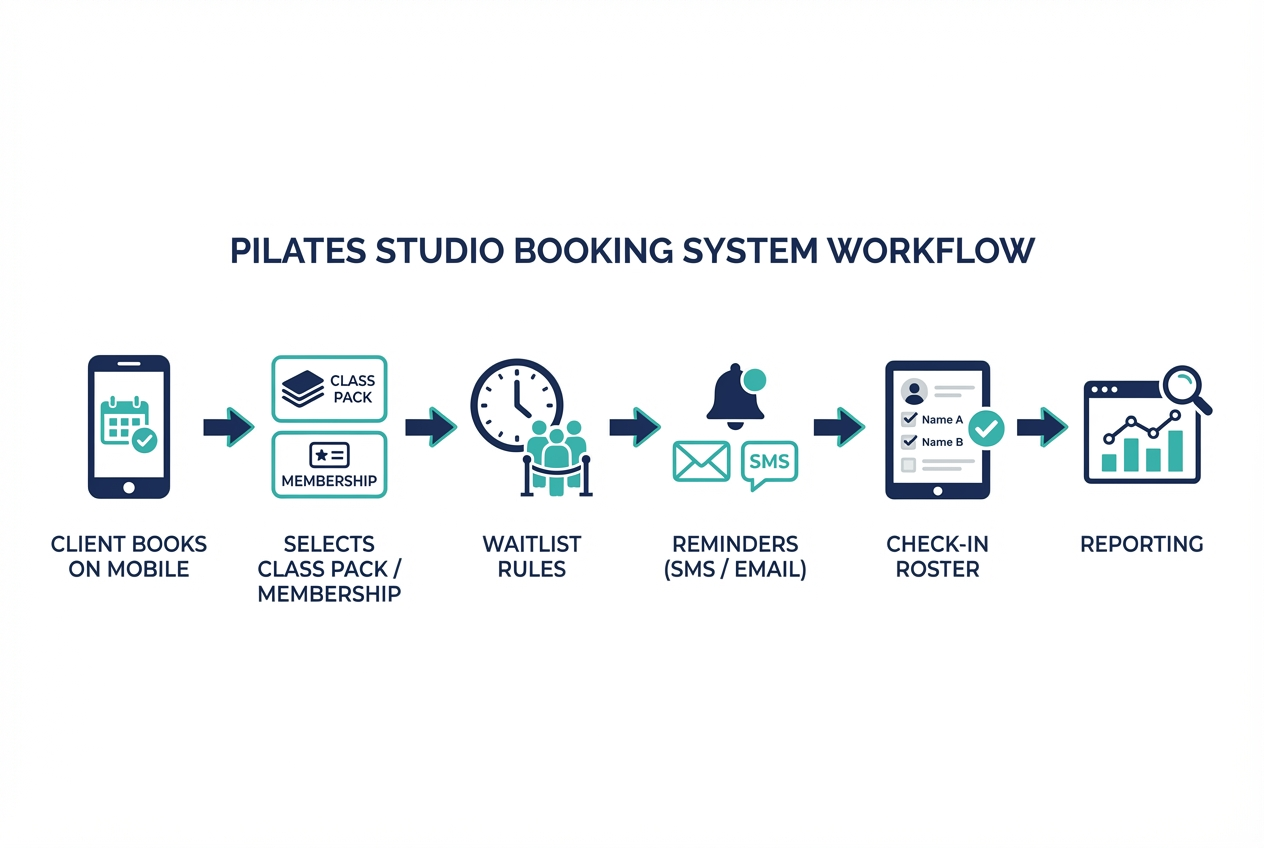
A booking system fails when it forces your studio to operate like the software, instead of the other way around. Map your real revenue flows and test them.
The five booking flows to test in every trial
- Class pack: Buy a 10-pack, book a class, reschedule, and see credits adjust correctly.
- Membership: Start membership today, book multiple classes, renew next month, and test a freeze.
- Single session: Book one private, pay, then cancel inside the policy window.
- Intro offer: New client buys intro, books, then tries to buy it again. The system should enforce your “new client only” rule.
- Series: Book a 6-week series where attendance is tracked per week.
Roles and permissions
For a small studio, permissions are less about bureaucracy and more about avoiding expensive errors.
- Owner: Full access, including refunds and policy settings.
- Front desk: Can book, reschedule, comp a class, and view waivers. Limited ability to issue refunds.
- Instructors: Can see their roster, client notes you choose to share, and attendance.
- Contractors: Often need schedule visibility without customer financials.
This is basic least-privilege thinking, and it aligns with small-business security guidance that emphasizes identifying what data you have and limiting access accordingly (see the FTC’s guide for protecting personal information). If you want a practical model for where automation should sit (and where it should not), Quantum Byte’s AI receptionist guide is a good companion.
Front-desk realities you should simulate
- Late arrivals: Can you mark “late” or “no show” quickly?
- Drop-ins: Can staff sell a single class on the spot without breaking the roster?
- Comp spots and holds: Can you reserve a reformer for a VIP or teacher training?
- Manual overrides: Can you move a client into a full class with an admin override (and still keep reporting accurate)?
Also test both sides: client experience (booking and checkout) and admin experience (changes and exceptions). Many studios accept a great client UX and then suffer a clunky backend. Don’t.
Edge cases that quietly create churn and admin work
These are the “death by a thousand cuts” problems. If your system can’t handle them cleanly, your policies either don’t get enforced or they get enforced inconsistently.
Waitlists and cancellation enforcement
- Late-cancel/no-show fee logic: Verify fees can trigger automatically based on a cutoff window.
- Time zone handling: If you travel or teach workshops, confirm the policy clock uses the studio time zone.
- Waitlist offer windows: Confirm the system can require confirmation within a set time and then move to the next person.
Membership nuances
- Freezes/holds: Verify you can pause billing and pause booking eligibility if you want.
- Prorations: If you start mid-cycle, confirm the system either prorates or enforces your chosen policy.
- Upgrade/downgrade paths: Confirm a member can change tiers without losing credits.
- Autopay failure handling: Verify retries, notifications, and an easy “update payment method” flow.
Package rules
- Expirations: Confirm fixed and rolling expirations are supported.
- Shared credits: If you allow family/shared packs, confirm how identity and credit ownership works.
- Cross-modality usage: If a pack covers mat and reformer, confirm caps and rules can differ.
Equipment and resource scheduling
If you have reformers, the system should treat equipment constraints as first-class, not an afterthought.
- Reformer count: Confirm a class cannot exceed equipment capacity.
- Instructor-to-equipment rules: If semi-private is 1 instructor to 2 reformers, confirm caps reflect that.
- Room scheduling: If you run mat in one room and reformer in another, confirm conflicts are prevented.
Multi-instructor complexity
- Substitutes: Confirm you can swap instructors without breaking payroll reports.
- Rate variants: Confirm different rates by class type, time, or seniority.
- Co-teaching: If you ever do it, confirm the roster and payroll logic don’t collapse.
Integrations: the minimum stack and the “future growth” stack
Your booking system is the system of record for attendance and revenue events. Everything else should either sync cleanly or stay out of the way.
Native vs integration: a simple decision rule
- Keep it native when reliability and support boundaries matter: payments, credits, attendance, waivers.
- Integrate when specialization matters: email marketing, analytics, advanced SMS, accounting.
Ask vendors who owns support when something breaks. If a client didn’t receive a reminder, is it the booking system, the SMS provider, or your configuration? If you are considering conversational scheduling for DMs or website chat, Quantum Byte’s booking chatbot guide breaks down the workflow decisions you need to get right.
Minimal single-location stack
- Booking + memberships + packages: Core platform.
- Payments: A processor that handles tokenization and refunds.
- Email/SMS reminders: Built-in is fine if deliverability is good and logs are visible.
- Accounting export: At minimum, clean exports for reconciliation.
Future growth stack
- Accounting sync: Automated mapping of payouts, refunds, and taxes.
- Dedicated SMS provider: More control over deliverability, sender ID, and two-way messaging.
- Marketing automation: Drip sequences for intro-offer conversion and win-back campaigns.
- Analytics/BI: Cohorts, retention, and source attribution.
Demo questions that reveal integration maturity
- Is there a documented API? If yes, ask for examples you can read.
- What’s native vs Zapier-only? Zapier can be fine, but it is not the same as a supported integration.
- How do refunds and chargebacks sync? You need a clean audit trail.
- Can we track UTM/source for bookings? If not, you’ll be guessing what marketing works.
Security, privacy, and accessibility requirements
You are collecting payment information and personal data. That raises your standard of care, even as a small studio.
Payments and card data handling
Prefer systems that minimize your exposure to cardholder data. The PCI DSS standard applies to entities that store, process, or transmit cardholder data, and the safest practical path for a studio is to use a booking system that relies on a PCI-compliant payment processor with tokenization so your studio never handles raw card details.
Web app security baseline
Even if you are not a security expert, you can require basics that map to known web risks. The OWASP Top 10 is a widely used framework for common application vulnerabilities, and it supports why you should insist on:
- Strong authentication: Multi-factor authentication (MFA) for admins.
- Role-based access control: Prevent staff from accessing data they don’t need.
- Secure password resets: No weak reset links or indefinite token validity.
- Audit logs: Track refunds, policy changes, and admin overrides.
For governance, a lightweight approach aligned to the NIST Cybersecurity Framework 2.0 small business guidance is enough: identify what data you have, protect it, and have a response plan.
Data protection practices you should standardize
The FTC guidance for businesses is practical and studio-friendly: keep only what you need, restrict access, and dispose of data you don’t need.
That translates into:
- Data minimization: Don’t collect “extra” health info unless you truly use it.
- Retention policy: Decide how long you keep waivers and notes.
- Access reviews: Remove staff access when instructors leave.
Accessibility for booking and checkout
A booking flow is a financial and data submission flow. Accessibility is not optional if you want fewer drop-offs and fewer support requests.
The Web Content Accessibility Guidelines (WCAG) 2.2 includes criteria directly relevant to booking and checkout, including preventing errors on important submissions and reducing redundant data entry. Practically, require:
- Clear labels and error messages: If a phone number is invalid, say why and how to fix it.
- Keyboard navigation: Booking should work without a mouse.
- Error prevention at payment: Confirm before charging, and make changes easy before final submission.
Security questions to ask vendors
- Do you support MFA and/or SSO?
- Do you provide audit logs for admin actions?
- What is your backup and recovery approach?
- What breach notification timeline do you commit to?
- Can we export our data in a usable format if we leave?
Pricing expectations and cost drivers for a single-location studio
To compare pricing fairly, you need the total cost of running your studio, not the headline monthly number.
Common pricing models you’ll see:
- Per location: Simple for single studios, but watch for add-ons.
- Per staff login: Can punish you for adding instructors.
- Per active client: Scales with success.
- Per booking: Looks cheap until volume grows.
- Add-ons: SMS usage, branded app, advanced reporting, extra admin roles, or marketing modules.
What to ask for in a quote:
- Total monthly platform fees: Base plan plus required add-ons.
- Payment processing fees: Rates, payout timing, refunds.
- SMS fees: Per message or per bundle.
- Onboarding and migration support: Especially if you have complex packs and memberships.
A low sticker price often becomes expensive when you pay extra for basics like texting, waivers, reporting, or multiple staff accounts. Make vendors price the configuration you actually need.
Alternatives and when each category makes sense
Instead of obsessing over one “best” tool, shortlist by category and verify the edge cases.
- All-in-one fitness platforms: Best if you want booking, payments, marketing, and reporting in one place. Common gap: you may overpay for features you do not use.
- Appointment-first schedulers: Best if your business is mostly privates. Common gaps: memberships, waitlists, and class pack logic.
- Boutique studio specialists: Best if they deeply understand packs, policies, and instructor workflows. Common gap: limited customization when your studio model is unusual.
- Website-first platforms: Best if your website and content are the product. Common gaps: operational depth (check-in, payroll reporting, strict policy enforcement).
If you want a concrete reference point for what “good” looks like in another service business category, Quantum Byte’s breakdown of a med spa booking app is a helpful parallel for thinking about policies, reminders, and conversion.
Red flags to test in every trial:
- “Waitlist exists” but no rules: Ask for auto-fill and offer windows.
- Migration is vague: If they can’t explain data import and exports clearly, expect pain.
- Admin feels slow: If staff struggle in the demo, it will be worse at 6:00pm.
Switching systems: migration checklist and “don’t break bookings” plan
This is where most studios lose money: broken links, confused members, and mismatched credits. Treat switching as a project, not a weekend task.
Pre-migration inventory
Export or document:
- Clients: Names, emails, phone numbers, tags/segments.
- Products: Packs, memberships, intro offers, gift cards.
- Balances: Remaining credits, expiration dates, freeze status.
- Policies: Cancellation windows, fees, and exceptions.
- Waivers: Whether you can export them or need re-sign.
- Staff: Instructor profiles, pay rules, and permissions.
- Schedule templates: Class types, durations, equipment caps.
Data mapping decisions
- Credits: Will you recreate exact balances or convert to “comp credits”?
- Expirations: Keep original expirations or reset with a grace policy?
- Intro offers: Prevent existing clients from rebuying in the new system.
- Gift cards: Decide whether to honor in the new system and how you track remaining value.
Cutover plan
- Parallel run window: Keep the old system read-only while the new one takes bookings.
- Staff training: One short session for front desk, one for instructors, one for the owner.
- Client communications: Announce the switch, explain how to log in, and set expectations for app downloads or password resets.
- Update every booking link: Website buttons, Google Business Profile, Instagram link-in-bio, email templates, and QR codes in-studio.
SEO and link hygiene note: don’t leave old booking URLs alive in public places. Replace them everywhere you’ve posted them so clients don’t land on dead ends.
Post-launch checks
- Payment reconciliation: Confirm totals match deposits.
- Attendance accuracy: Check roll call vs actual attendance.
- Policy fees: Confirm late-cancel/no-show fees trigger correctly.
- Reminder deliverability: Confirm messages are sent and logged.
- Support escalation: Know exactly how to reach the vendor when something breaks.
Build vs buy: when a custom booking system wins
Buying is the right move when you want speed, standard workflows, and vendor support. If your studio runs like most studios, you should start there.
Building a custom system can win for a single-location studio when:
- Your equipment rules are unusual: Mixed reformer ownership, complex caps, or teacher training blocks.
- Your membership model is unique: Credits that roll in a nonstandard way, family sharing, or hybrid plans.
- You offer hybrid products: In-person sessions plus video libraries, programs, or assessments.
- You want full control of client experience: Without marketplace constraints or “one-size-fits-most” checkout.
A custom build still needs the boring essentials: booking UX, admin portal, payment integration, reminders, reporting, roles and permissions, waivers, and audit logs.
If you are in the “build” camp, Quantum Byte is a practical middle path. It helps you create a tailored booking experience quickly using app templates and natural-language setup, without the months-long build cycle you’d expect from traditional software development. It is most compelling when your studio has specific rules that off-the-shelf tools keep fighting.
Implementation timeline: 14 days to a stable booking operation
Here is a realistic rollout that avoids the “big bang” disaster.
Days 1 to 3: Requirements and trials
- Lock your policies (cancellation windows, fees, expirations).
- Run the five booking flow tests (pack, membership, single, intro, series).
- Score vendors using the rubric.
Days 4 to 7: Configuration
- Set up class types, equipment caps, and instructor availability.
- Configure memberships, packs, and intro rules.
- Configure waitlist rules and policy enforcement.
Days 8 to 10: Data import and payments
- Import clients and balances.
- Connect payments and run refund tests.
- Set up reminder templates and logs.
Days 11 to 12: Staff training and acceptance tests
Ask staff to run these acceptance tests:
- Book a class on mobile.
- Buy a pack and confirm credit decrement.
- Join a waitlist, cancel, and confirm auto-fill.
- Trigger a late-cancel fee in a test scenario.
- Run an instructor payout report.
Days 13 to 14: Soft launch then full launch
- Soft launch with a small group of members.
- Fix friction points.
- Go live and update every public booking link.
Single-location studio checklist
Booking UX
- Mobile booking flow: Find, pay, book, reschedule without confusion.
- Clear class info: Instructor, modality, level, equipment expectations.
- Waitlist rules: Auto-fill, confirmation window, expiration.
Memberships and packages
- Membership renewals: Autopay, upgrades/downgrades, freezes.
- Pack rules: Expirations, cross-modality use, shared pack support.
- Intro enforcement: New-client-only rules that actually hold.
Operations
- Fast check-in: Roster, attendance, quick notes.
- Overrides: Comp, holds, manual moves without breaking reporting.
- Instructor management: Substitutes, rate variants, payroll exports.
Integrations
- Payments: Tokenized processor, clean refunds.
- Email/SMS: Logs, deliverability visibility.
- Accounting: Export or sync for reconciliation.
Reporting
- Revenue by product: Membership vs packs vs single sessions.
- Attendance by class type: Capacity planning.
- Churn signals: Inactive members list.
Security and accessibility
- MFA for admins: Required.
- Role-based permissions: Least privilege.
- Audit logs: Refunds, overrides, policy changes.
- Accessible forms: Clear errors, keyboard support, reduced redundant entry.
Migration readiness
- Exportability: Clients, purchases, attendance, waivers.
- Balance mapping: Credits and expirations plan.
- Link update plan: Website, Google, social, emails.
Vendor demo script
- Create a new client.
- Sell an intro offer (new-client only).
- Book a reformer class with capacity constraints.
- Join a waitlist and show auto-fill rules.
- Buy a 10-pack and book two different class types.
- Freeze a membership and show what changes.
- Trigger a late-cancel fee in a test environment.
- Check in a class from a front-desk view.
- Issue a refund and show the audit trail.
- Export a revenue report and an instructor payout report.
Start building: the simplest path to a booking system that fits
If your studio is standard, buy a proven platform and focus on execution. If your studio has specific equipment rules, membership logic, or a client experience you want to fully own, a custom build can be the cleanest long-term move.
Quantum Byte fits when you want that custom system without the typical dev-agency timelines. You can start from ready-made app patterns (booking, payments, admin dashboards) and then tailor policies and workflows to match how your studio actually runs. There is also a clear path from an entry platform tier to an enterprise tier if your needs expand beyond a single operator setup.
Start with Quantum Byte when you’re ready to stop compromising on your studio’s rules and run booking the way you designed it.