
A pilates studio deposit policy should do one thing above all: protect your schedule without creating constant “that’s not what I thought I agreed to” arguments. The fastest path is to match the enforcement lever to the risk of the booking (empty slot vs waitlist, $35 class vs $300 event, tomorrow vs six weeks out) and then automate the mechanics so staff are not negotiating policy in real time.
Quick verdict: when deposits help
Deposits work when you need a clear commitment and you can explain the why in one sentence. They backfire when they add checkout friction for low-risk bookings or when your staff enforce them inconsistently.
Across most studios, you will see three enforcement levers:
- Non-refundable deposits: A partial payment that is forfeited if the client cancels inside your window.
- Card-on-file guarantees: The client books now, you only charge a late-cancel/no-show fee if they break the window.
- Strict cancellation windows with fees: A time rule (12/24/48 hours, 14 days, etc.) tied to a specific fee or loss of credit.
A simple default recommendation by studio maturity:
- Newer studio with open spots: Start with card-on-file guarantees for classes and low-ticket bookings. Use deposits only for high-ticket, high-prep offerings (events, workshops, teacher training).
- Established studio with waitlists: Use prepay or card-on-file + meaningful late fees for classes, and deposits/prepay for workshops and events. If your waitlist routinely clears, you can be stricter because every late cancel has a real opportunity cost.
Next, you’ll choose the lever per offering, write the policy so it is defensible, and set up automation so it is enforced the same way every time.
Policy components checklist
If you want fewer disputes and fewer chargebacks, don’t just publish “24-hour cancellation policy.” Strong policies are explicit about triggers, consequences, and mechanics.
- Clear trigger: Define the cancellation window per offering (example: 12 hours for group classes, 48 hours for privates, 14 days for workshops).
- Clear consequence: State the exact outcome (example: “deposit is forfeited,” “a $25 late-cancel fee is charged,” or “the full session is charged”).
- Clear mechanics: Require a payment method, specify how the fee is charged, and define when a spot is reserved.
- “Spots are not held until payment method is confirmed.”
- “Deposits are collected at booking.”
- Consistency statement: The policy applies across instructors. Define who can grant exceptions and how they are documented.
- Communication points: Put the policy everywhere a client can miss it.
- Booking page
- Checkout
- Confirmation email/text
- Waiver/intake form
If any one of these is missing, your front desk will end up improvising, and that is where resentment and disputes start.
Decision matrix: deposit vs prepay vs card-on-file guarantee
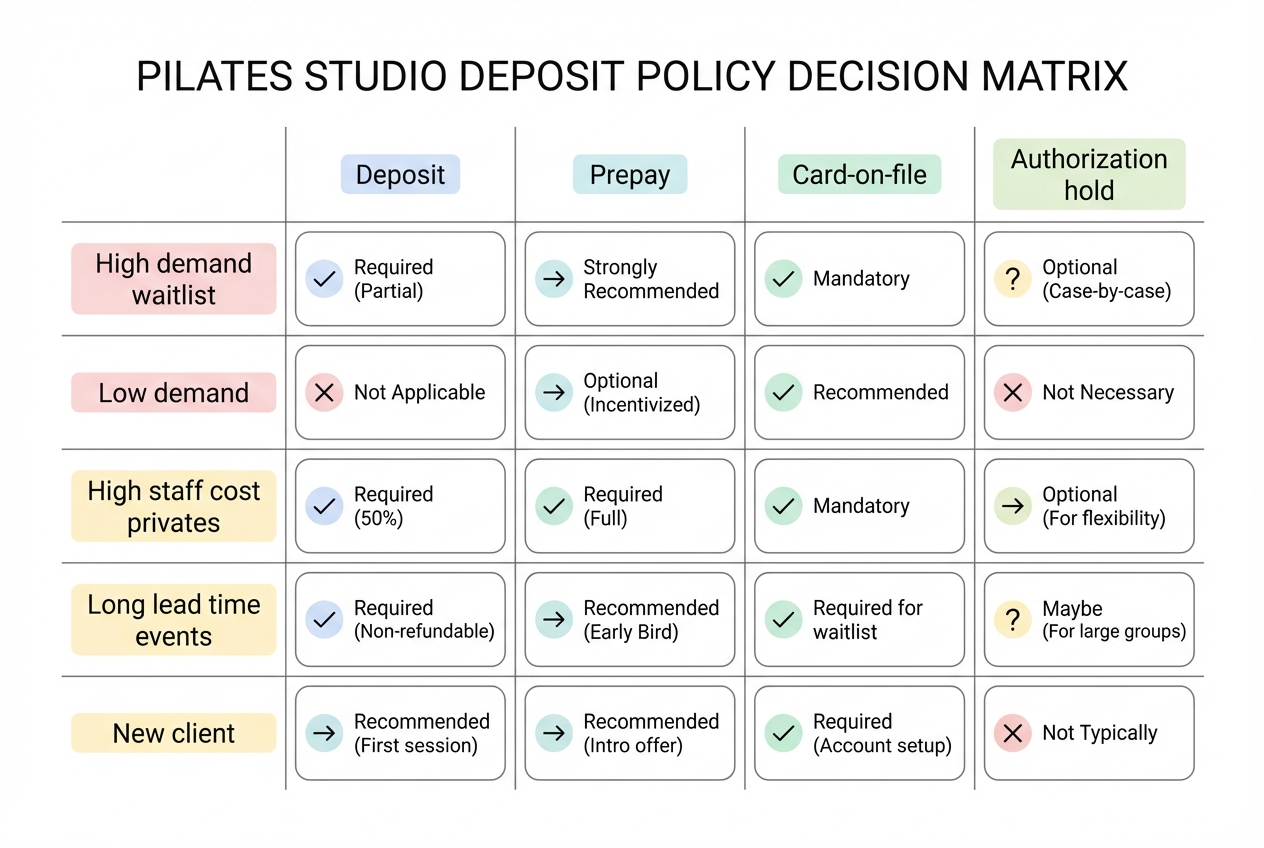
Here is the decision framework most studios never write down. Use it to choose the least aggressive lever that still protects revenue.
Define the four options
- Deposit: Partial payment up front to reserve the spot.
- Prepay: Full payment up front.
- Card-on-file guarantee: Card collected at booking, only charged if they late cancel or no-show.
- Authorization hold (authorize then capture): Temporarily reserve funds now and capture later. This is operationally useful, but it has constraints because authorizations expire and must be captured within network time limits, as described in Stripe.
Use this matrix to choose
| Situation | Best lever | Why it fits | Avoid when |
|---|---|---|---|
| High demand, waitlist likely to fill | Card-on-file or prepay | You are protecting scarce inventory. A predictable late fee is enough. | If your booking tool cannot automate fees reliably. |
| Low demand, lots of open inventory | Card-on-file (light touch) | Reduces friction for new clients while still discouraging no-shows. | If no-shows are chronic and killing instructor utilization. |
| High staff cost to deliver (private, events) | Deposit or prepay | Your downside is real: instructor time, room hold, prep. | When your average ticket is low and checkout friction reduces conversion. |
| Long lead time (weeks/months out) | Deposit with a staged payment schedule | Keeps commitment while allowing flexibility. | If you do not have clear rescheduling rules. |
| New client, unknown reliability | Card-on-file or deposit (depending on ticket size) | You need commitment without a long relationship. | If you are trying to reduce barriers to first booking. |
Make the fee “reasonable” on purpose
If your deposit forfeiture or cancellation fee is meant to compensate you for an expected loss, you want it to look like a reasonable estimate, not a punishment. That logic is aligned with the concept of liquidated damages, where the amount is agreed in advance and is intended to approximate likely damages rather than function as a penalty.
Practically, that means:
- Tie the fee to your real downside: lost slot revenue, instructor pay minimums, admin time.
- Scale by offering: a reformer class and a teacher training deposit should not be treated the same.
Recommended deposit structures by Pilates offering type
Use this as a starting point, then adjust based on demand and how far out clients book.
| Offering type | Best lever | Suggested deposit or fee approach | Suggested cancellation window | Notes |
|---|---|---|---|---|
| Intro private session | Card-on-file guarantee | Charge a fixed late-cancel/no-show fee or forfeit the session credit | 24 hours | Lower friction helps conversion, but you still protect your calendar. |
| Ongoing privates | Deposit or card-on-file | Deposit for first session of a package, then card-on-file after trust is established | 24–48 hours | Privates have higher opportunity cost and harder backfilling. |
| Semi-private / duet | Prepay or card-on-file | Prepay per session or enforce a late fee per person | 48 hours to 7 days | Hard to fill last-minute because it requires a pairing. |
| Reformer group classes | Card-on-file or prepay | Card-on-file late fee or loss of class credit | 12–24 hours | If you have a waitlist, a strict window is easier to justify. |
| Workshops | Deposit or prepay | Deposit at booking; balance due ahead of time (or full prepay) | 7–14 days | Longer window reflects marketing lead time and limited seats. |
| Teacher training | Deposit + staged payments | Non-refundable deposit, remaining balance due by a set date | 14–30 days | High admin load, long lead time, and committed capacity. |
| Private events / buyouts | Deposit (often non-refundable inside window) | Flat deposit to hold date + balance due based on lead time | 14+ days | Clear “date not held until paid” language is critical. |
A common hybrid you’ll hear anecdotally from studio owners and clients is “50% deposit now, remainder day-of” for higher-ticket private blocks. Treat that as a norm you can choose, not a rule you must follow.
Write it like you mean it: ready-to-copy policy language
These templates are designed to be pasted into your policy page, booking flow, and confirmation messages. Edit the brackets.
1) Deposit terms
Deposits reserve your appointment time and are applied to your total.

If you cancel or reschedule within [X hours/days] of your session, your deposit is [non-refundable / converted to account credit valid for X days].

Your appointment time is not reserved until the deposit is paid and your payment method is confirmed.
2) Cancellation and no-show fee terms
We require a payment card on file to book.

Cancellations within [X hours] of the start time and no-shows are subject to a [fixed fee / full session charge]. Fees are charged automatically to the card on file.

If we are able to fill your spot from the waitlist, we may waive the fee at our discretion.
3) Workshops, events, and training payment schedule
Workshops/events/trainings require [a deposit / full payment] to reserve your spot.

For cancellations made more than [X days] before the start date, we will [refund / issue credit] minus [any non-refundable deposit amount].

For cancellations within [X days], payments are [non-refundable / non-refundable but transferable to a future date if offered].

Spots are not held until payment is received.
Exceptions clause
Exceptions are rare and must be approved by [Owner/Studio Manager]. Approved exceptions are documented on the client account notes.
Policy acknowledgment
By booking, you acknowledge and agree to our cancellation and deposit policy.
Staff scripts for enforcement
These are short on purpose. Your team should be able to say them verbatim.
- New client booking
- Script: “To hold the spot, we take a card on file. You won’t be charged today, but late cancels inside [X hours] trigger a [fee]. It keeps things fair in small classes.”
- Late cancel/no-show follow-up
- Script: “We missed you today. Per the policy you accepted at booking, a [fee/forfeited credit] applies for cancellations within [X hours]. I can help you rebook now so you get back on track.”
- One-time courtesy exception
- Script: “I’m going to waive this once as a courtesy. Going forward, the [X-hour] policy will apply automatically, so you’re never surprised.”
- Policy reminder while rescheduling
- Script: “Happy to move you. Because we’re inside the [X-hour] window, the fee applies. If you’d like, we can keep the original time and I can add you to a waitlist for another slot.”
- Instructor cancellation response
- Script: “We’re so sorry, we had to cancel due to [reason]. You won’t be charged, and we can either reschedule or refund your deposit immediately.”
A micro-process for staff so enforcement stays consistent:
- Step 1: Check client notes for prior courtesy waivers.
- Step 2: Apply the policy exactly as written.
- Step 3: Offer next steps (rebook link, waitlist, credit rules) without negotiating the fee.
Automation playbook: what to set up in your booking and payments stack
Your policy is only as strong as your system configuration. If staff have to remember rules, you will get uneven enforcement.
Must-automate items:
- Card on file at booking: Collect a payment method before a spot is reserved.
- Service-specific rules: Different cancellation windows for classes vs privates vs events.
- Reminder messages: Automated email/text reminders before the cancellation window closes.
- Auto-charging: Late-cancel and no-show fees charged automatically when the rule triggers.
Modern scheduling tools support these mechanics. For example, Square Appointments describes requiring a payment card for booking and setting cancellation windows with reminders and enforcement options. If you use Mindbody, Mindbody’s guidance covers automating late cancel and no-show fees using autopay with the client’s card on file.
One rule that prevents chaos:
- Discretion without chaos: Allow waivers only for defined reasons (studio-caused cancellation, verified emergency, first-time courtesy). Require staff to log the reason in account notes.
Chargeback-proofing and payment compliance basics
Chargebacks usually happen when clients feel surprised. Your job is to make the policy obvious and provable.
Operationally, your best defense is:
- Clear disclosure: Same language at booking and in confirmation.
- Timestamped acceptance: A record that they agreed.
- Consistent enforcement: Apply the same rule across instructors.
Payment compliance basics you should follow even as a small studio:
- Do not store card numbers yourself: Avoid spreadsheets, notes fields, or emailed card details.
- Never store sensitive authentication data: The PCI Security Standards Council explicitly flags not to store data like CVV, even if you think it is “just for backup,” in its PCI Data Storage Do’s and Don’ts.
- Use tokenized card-on-file: Let a compliant payment processor store the card and give you a token to charge fees.
If you plan to use authorization holds (reserve funds now, charge later), make sure your staff understand the constraint: holds can expire. Stripe’s documentation on placing a hold explains the authorize-then-capture flow and that authorization validity is time-limited.
Evidence checklist to keep for disputes:
- Policy acceptance record: Date/time and policy version.
- Booking confirmation: Service, date/time, amount.
- Reminder logs: Email/SMS send timestamps.
- Cancellation timestamp: When the client canceled relative to the window.
- Staff notes: If a waiver was granted, why and by whom.
Transition plan: rolling out deposits to existing clients
Tightening policy is where studios accidentally create churn. Roll it out like a product change, not a surprise.
A simple rollout timeline:
- Week 1 announcement: Email + in-studio signage explaining what’s changing and why.
- Grace period: Apply the new policy to new bookings starting on a specific date.
- Effective date: Enforce consistently from day one.
Segmentation that reduces backlash:
- Members vs non-members: Keep member rules slightly more flexible, but still automated.
- Long-time clients: Offer one courtesy waiver or a one-time credit conversion, then move them onto the same system.
Update every touchpoint before you enforce:
- Website policy page
- Booking flow (most important)
- Confirmation templates
- Staff scripts
Success metrics to track for 30 days:
- No-show rate by service
- Late cancel volume
- Admin time spent chasing fees
- Revenue leakage from unfilled slots
Build vs buy: implement the policy fast without being boxed in
Off-the-shelf scheduling is often enough when your operation is simple.
- Buy (off-the-shelf) when: You have one location, standard class types, and only a few cancellation rules.
- Build (custom workflow) when: You need different rules by location, client segment, or package type, plus approvals and reporting that your booking tool can’t handle.
If you’re in the second camp, the real unlock is building a lightweight “policy enforcement layer” around your scheduler:
- Centralized policy acceptance: One intake flow that stores acknowledgment.
- Exception approvals: A simple manager approval step for waivers.
- Daily review queue: A staff dashboard for “fees to review” so nothing falls through.
This is a good use case for Quantum Byte: you can create a small internal app that ties together intake forms, exception logging, and staff workflows without hiring a developer. For studios that are growing, it is often faster than trying to force every edge case into a rigid booking tool.
Implementation timeline
A deposit policy only helps when it ships.
- Day 1: Choose the lever per offering (deposit vs prepay vs card-on-file) and set cancellation windows.
- Day 2: Paste in the policy language and add a booking acknowledgment checkbox.
- Day 3: Configure automation in your booking tool and test end-to-end (book, cancel inside window, confirm fee behavior).
- Day 4: Train staff on the scripts and the exception process.
- Day 5: Launch, monitor disputes, and adjust once based on patterns (not one-off complaints).
Key takeaways checklist
Use this as a go-live gate. If you cannot check an item, you are not ready to enforce consistently.
- Decision lever chosen per offering: You picked deposit, prepay, or card-on-file based on demand and ticket size.
- Cancellation windows are explicit: Every service type has a defined window.
- Consequences are specific: The exact fee or forfeiture rule is stated with no ambiguity.
- Mechanics are defined: You state when a spot is reserved and how fees are charged.
- Policy appears in the booking flow: Clients see it before they confirm.
- Acknowledgment is recorded: You can prove acceptance if a dispute happens.
- Automation is configured: Reminders and auto-charging are enabled where possible.
- Card data is handled safely: You are not storing card numbers or CVV, consistent with PCI guidance.
- Staff scripts are trained: Your team uses the same language every time.
- Exceptions are controlled: Only approved roles can waive, and reasons are logged.
- Rollout plan is communicated: Existing clients get notice and a clear effective date.
If you want the simplest version of “set it up once and stop arguing about it,” build the policy into the system. Whether you do that through your booking platform alone or add a custom workflow layer (where Quantum Byte can help) depends on how many exceptions and edge cases you actually have.
Start building
If your policy keeps breaking at the exception-handling step, build the enforcement workflow directly into the system.
Start with Quantum Byte to:
- Launch fast: Use plug-and-play templates for booking, client portals, and common studio workflows.
- Customize without a long dev cycle: Adjust policies, packages, and flows by describing what you want.
- Scale like a real product: You are not locked into someone else’s roadmap.