
A pilates studio intake form template should do three jobs at once: collect the info you need to teach safely, set expectations (policies and consent), and give you a clean path to follow up when someone flags a risk. Below is a modular, copy/paste template you can drop into Google Docs, Word, or rebuild as an online form in under an hour.
Copy/paste Pilates studio intake form template
How to use this:
- Copy into Google Docs/Word, customize the placeholders, then export to PDF.
- Or recreate it in your form tool and add conditional logic (recommended).
Notes:
- Replace placeholders like [Studio Name], [Phone], [Email], [Policy Link], [State/Country].
- Mark fields as Required/Optional exactly as written to launch quickly.
- This template is not medical or legal advice. Have local counsel and your insurer review your waiver/policy language.
[Studio Name] | New Client Intake Form
[Studio Phone] | [Studio Email] | [Studio Website]
Last updated: [MM/DD/YYYY]

MODULE 1 (Required): Client information
- Full legal name (Required): ___________________________
- Preferred name (Optional): ____________________________
- Date of birth (Required): ____ / ____ / ______
- Phone (Required): ___________________________
- Email (Required): ___________________________
- Preferred communication (Optional): [ ] Text  [ ] Email  [ ] Call
- Address (Optional unless needed for billing): ___________________________
- Preferred pronouns (Optional): ___________________________
- Occupation (Optional): ___________________________
- How did you hear about us? (Optional): ___________________________

MODULE 2 (Required): Emergency contact
- Name (Required): ___________________________
- Relationship (Required): ____________________
- Phone (Required): ___________________________

MODULE 3 (Required): Goals and Pilates background
1) What are your top goals? (Check all that apply)
[ ] Reduce pain or stiffness
[ ] Improve posture
[ ] Core strength
[ ] Mobility/flexibility
[ ] Balance/coordination
[ ] Return to exercise after time off
[ ] Athletic performance
[ ] Stress reduction
[ ] Pre/postnatal support
[ ] Other: _______________________

2) In one sentence: what would “success” look like in 12 weeks? (Required)
____________________________________________________________________

3) Pilates experience (Required)
- Have you done Pilates before? [ ] Yes  [ ] No
- If yes, what type? [ ] Mat  [ ] Reformer  [ ] Tower  [ ] Chair  [ ] Cadillac  [ ] Other: _______
- How often recently? (Optional): ___________________________
- What frequency are you aiming for with us? (Optional): [ ] 1x/week  [ ] 2x/week  [ ] 3x/week  [ ] Not sure

4) Current movement routine (Optional)
- What do you do most weeks? (walking, gym, yoga, sports, PT exercises, etc.)
____________________________________________________________________
- Your “healthiest period” routine (Optional): what did it include and when was it?
____________________________________________________________________
- Biggest barrier to your goals (Optional): ___________________________

5) Pilates-specific programming notes (Required)
- Movements you love (Optional): ___________________________
- Movements you dislike or that tend to flare symptoms (Required): ___________________________

MODULE 4 (Required): Injuries, surgeries, pregnancy/postpartum, and limitations
1) Injury map (Add rows as needed) (Required if you have any pain/injuries)
- Area (e.g., low back, neck, shoulder, hip, knee, wrist): ______________________
- Side: [ ] Left  [ ] Right  [ ] Both
- Onset date/approx: ______________________
- Current status: [ ] Improving  [ ] Stable  [ ] Flare-ups  [ ] Unsure
- What aggravates it? ______________________
- What relieves it? ________________________
- Movements to avoid (if any): ______________________

2) Surgeries or joint replacements (Optional)
- Procedure + date + current restrictions: _____________________________________

3) Pregnancy/postpartum (Optional)
- Are you currently pregnant? [ ] Yes  [ ] No
- If yes: trimester (Optional): [ ] 1st  [ ] 2nd  [ ] 3rd
- Are you postpartum? [ ] Yes  [ ] No  If yes, weeks/months postpartum (Optional): __________
- Do you want us to consider diastasis recti / pelvic floor support? (Optional) [ ] Yes  [ ] No

4) Bone/joint considerations (Optional)
[ ] Osteoporosis or osteopenia
[ ] History of compression fracture
[ ] Hypermobility concerns

5) Working with a clinician (Optional)
- Are you working with a PT/MD/other clinician? [ ] Yes  [ ] No
- If yes, what are you working on? ___________________________
- Any exercises you have been told to avoid? ___________________

6) Medications/allergies (Optional)
- Medications that may affect exercise (Optional): ___________________________
- Allergies (Optional): ___________________________
- Do you carry an EpiPen? (Optional) [ ] Yes  [ ] No

MODULE 5 (Required): PAR-Q+-style pre-participation screening
Please answer honestly. These questions are based on the same safety concepts used in the official PAR-Q+ screening form.

In the past, has a doctor ever said that you have a heart condition OR high blood pressure? (Required)
[ ] Yes  [ ] No

Do you feel pain in your chest at rest, during daily activities, OR when you do physical activity? (Required)
[ ] Yes  [ ] No

Do you lose balance because of dizziness OR have you lost consciousness in the last 12 months? (Required)
[ ] Yes  [ ] No

Have you ever been diagnosed with another chronic medical condition (other than heart disease or high blood pressure)? (Required)
[ ] Yes  [ ] No

Are you currently taking prescribed medications for a chronic medical condition? (Required)
[ ] Yes  [ ] No

Do you have a bone, joint, or soft tissue problem that could be made worse by becoming more physically active? (Required)
[ ] Yes  [ ] No

Has your doctor ever recommended medically supervised physical activity? (Required)
[ ] Yes  [ ] No

If you answered YES to any question above, please provide details (Required if any YES)
- Which question(s)? ___________________________
- Condition/symptom: ___________________________
- When diagnosed / when it occurred: ___________________________
- How it is currently managed: ___________________________
- Have you been medically cleared to exercise? [ ] Yes  [ ] No  [ ] Not sure

MODULE 6 (Required): Studio policies acknowledgment
I have read and agree to the studio policies (initial each).
- Cancellation window and no-show fees: ________
- Late arrival policy: ________
- Package expiration (if applicable): ________
- Refund policy: ________
- Studio etiquette (hygiene, socks, equipment use): ________
Full policy link (optional): [Policy Link]

MODULE 7 (Required): Informed consent, assumption of risk, and scope
By signing below, I acknowledge and agree:
- Pilates involves physical effort and may include muscle soreness, strain, falls, and other injuries.
- I will tell my instructor about pain, dizziness, numbness, shortness of breath, or any concerning symptoms during sessions.
- I understand instructors are not physicians and do not diagnose conditions or provide medical advice.
- I am responsible for choosing an appropriate level of activity and following modifications.

MODULE 8 (Optional but common): Release of liability (high-level)
I release and hold harmless [Studio Name], its owners, contractors, and instructors from claims arising from participation, except where prohibited by law. (Have legal counsel review this language for [State/Country].)

MODULE 9 (Optional): Photo/video and marketing release
- I allow [Studio Name] to use photos/video of me for marketing: [ ] Yes  [ ] No
- If yes, preferred name for caption (Optional): ___________________________

MODULE 10 (Optional): Virtual sessions consent
If participating online, I understand the instructor cannot physically assist and I am responsible for a safe space, stable internet, and appropriate equipment.

MODULE 11 (Required): Privacy and recordkeeping acknowledgment
I consent to [Studio Name] collecting and storing my intake information for safety, programming, and service delivery. I can request updates/corrections.

Client signature (Required): ___________________________   Date (Required): ____ / ____ / ______
Printed name (Required): _______________________________

If client is a minor (Optional as needed)
Parent/Guardian name: _________________________________
Parent/Guardian signature: _____________________________  Date: ____ / ____ / ______
Client info and emergency contact fields to include
If you only do one thing, make these fields clean and consistent. They are what you search later when a client texts you mid-flare or you need to confirm who to call.
Recommended required fields in an online form:
- Full legal name: Matches billing and releases.
- Date of birth: Helps you sanity-check age-related risk factors without asking for unnecessary medical detail.
- Phone and email: Use both. Text is often the fastest for schedule changes.
- Emergency contact name, relationship, and phone: Non-negotiable for in-studio sessions.
Recommended optional fields:
- Address: Optional unless your payment processor, insurance, or invoices require it.
- Preferred pronouns: Improves client experience with minimal effort.
- Preferred communication: Reduces missed messages.
Operational tip: In a digital workflow, require phone/email and keep address optional. You can always collect address at checkout if you truly need it.
Goals, Pilates background, and session preferences
Your first session goes better when you treat the intake form like a programming brief, not paperwork.
Include these prompts because they produce usable coaching decisions:
- Goals checklist: Gives you the “why” quickly and makes it easier to recommend private vs class.
- “Success in 12 weeks”: Forces a concrete outcome. You can refer back to it at week 4 and week 8.
- Pilates equipment experience: A reformer beginner needs different cueing, pacing, and spring choices than a long-time client.
- Current routine and “healthiest period” routine: This is a pattern pulled from strong studio forms because it reveals what has worked before and what is realistic now.
- “Movements that flare symptoms”: Pilates-specific gold. It tells you what to regress and what to test carefully (spinal flexion, loaded rotation, kneeling work, overhead work, etc.).
If you want one extra question that reduces churn, add:
- Schedule reality check (Optional): “What days/times are you most likely to stick to?”
Injuries, surgeries, pregnancy, and contraindications
The goal is not to run a medical intake. It is to avoid guessing.
The “injury map” structure matters because it captures what instructors actually need:
- Body area + side: “Left shoulder” is already better than “shoulder issues.”
- Onset and current status: Old injury vs active flare changes everything.
- Aggravates/relieves: This is where clients tell you which ranges, loads, and positions to be careful with.
- Movements to avoid: If a PT gave a restriction, you want it written down.
For Pilates studios, add structured prompts for:
- Osteoporosis/osteopenia and compression fracture history: Because it directly affects flexion/rotation choices and loading.
- Joint replacements: Range restrictions and long-term precautions vary.
- Pregnancy/postpartum: A simple trimester/postpartum field lets you tailor breath, pressure management, and exercise selection without being invasive.
- Clinician collaboration: “Working with a PT/MD?” plus “exercises told to avoid” helps you stay in your scope while still personalizing the plan.
Keep medications/allergies optional. You are collecting it for safety context, not to interpret it.
PAR-Q+-style pre-participation screening
A PAR-Q+-style block raises your safety baseline and gives you a defensible workflow when someone flags risk. The official PAR-Q+ is designed as a first-pass screen for physical activity readiness, and you can access the current official forms via the ePARmed-X repository.
The seven questions in the template above mirror the themes and structure used in the official PAR-Q+ (2025 fillable PDF), including heart/blood pressure history, chest pain, dizziness/fainting, chronic conditions, medications, musculoskeletal problems, and medically supervised activity.
What makes this practical is the follow-up block. If a client answers YES, you are not stuck. You ask:
- Which item triggered the YES
- What the condition/symptom is and when it occurred
- How it is managed now
- Whether they have been medically cleared for exercise
Referral logic you can use (simple and consistent):
- If the client reports concerning symptoms or an unstable condition: pause high-intensity or provocative work and request medical clearance before progressing.
- If they are unsure about clearance: treat it as “not cleared” until you have clarity.
This aligns with the decision style used in the Exercise is Medicine preparticipation screening questionnaire, which emphasizes symptoms, known disease, and appropriate escalation.
Instructor-facing workflow (put this in your staff SOP, not on the client form):
- Hold for review: Flag the submission as “Needs instructor review.”
- Request clarification: One short text/email is usually enough.
- Request a clearance note when needed: Especially if symptoms are current or the client is starting at an intensity that does not match their history.
- Modify session plan: Start with conservative ranges, slower transitions, and more check-ins.
Consent, assumption of risk, and studio policy agreement
Studios that run smoothly make policies explicit before the first session. The template includes common policy areas you can keep, delete, or rewrite:
- Cancellation window and no-show fees: Put the exact hours and fee amount in your final version.
- Late arrival policy: Be clear whether the session ends at the scheduled time.
- Package expiration and refunds: Remove ambiguity.
- Hygiene and etiquette: Socks, fragrance sensitivity, phone use, equipment care.
Consent blocks you should keep modular:
- Informed consent: Client acknowledges Pilates is physical and can cause soreness/injury.
- Assumption of risk: The client accepts inherent risk.
- Scope statement: You are not diagnosing or treating.
- Release language: This is jurisdiction-specific. Do not copy/paste without review.
Optional modules that are worth having ready:
- Media release: Make it an explicit Yes/No.
- Minors/guardian signature: Use only when relevant.
- Virtual sessions consent: Different risk profile than in-studio.
Also: many older PDFs still include COVID-era waivers. Unless your counsel/insurer still requires it, remove outdated clauses rather than carrying them forward.
Privacy and recordkeeping module for health-related intake data
Even if your studio is not a HIPAA “covered entity,” clients will treat health-related answers as sensitive. A short privacy module increases trust and forces good internal habits.
Why this matters: health information linked to identifiers can be considered protected health information in some contexts. The U.S. definition of PHI includes individually identifiable health information, as described in 45 CFR § 160.103.
Practical guardrails for a studio:
- Collect less: Only ask for what you will actually use for safety and programming.
- Limit access: Instructors and admin who need it, not everyone.
- Store securely: Avoid emailing unencrypted PDFs around. Centralize storage.
- Set a retention rule: Decide how long you keep forms after a client becomes inactive, then follow it.
- Make updates easy: Add “I confirm my info is current” at reactivation or every 6 to 12 months.
How to digitize the intake form
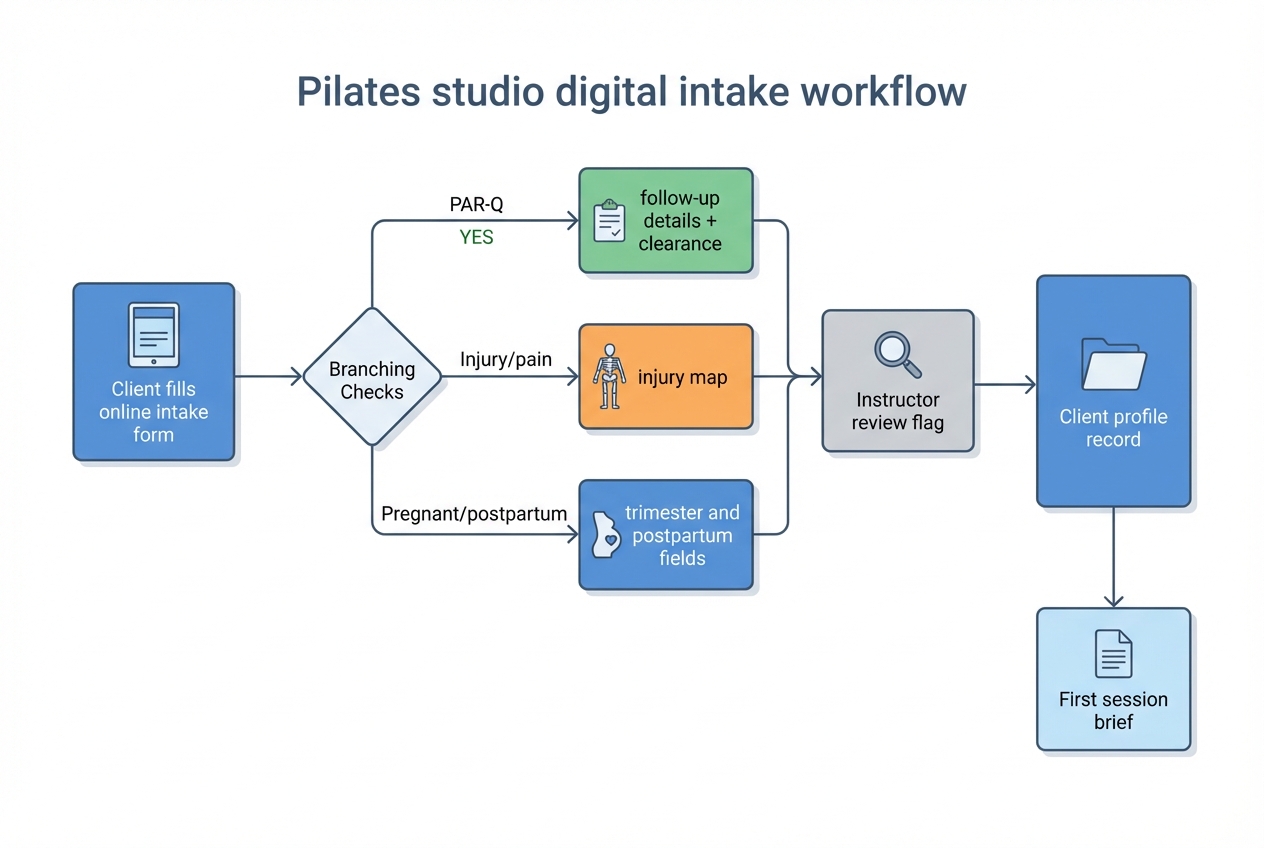
Digitizing is where you get your time back. The win is conditional logic: the form only asks follow-ups when needed, and your team gets clean, structured data.
Conditional-logic map (copy this into your build notes):
- If any PAR-Q answer = YES: show “details” follow-up block and a “medically cleared?” question.
- If injury/pain is mentioned: show the injury map rows (area, side, onset, aggravates/relieves).
- If pregnant = YES: show trimester and “any clinician restrictions?” prompt.
- If postpartum = YES: show “weeks/months postpartum” and “diastasis/pelvic floor considerations?”
- If media release = NO: hide any marketing-related consent fields.
- If working with PT/MD = YES: show “exercises to avoid” and optional file upload for a note.
Recommended field model:
- Required: name, DOB, phone, email, emergency contact, goals, “flare movements,” PAR-Q items, signature/date.
- Multi-select checkboxes: goals, equipment experience, bone/joint considerations.
- Paragraph text: 12-week success prompt, aggravates/relieves, clinician restrictions.
- Optional file upload: medical clearance note (only if you truly plan to manage files securely).
Minimum viable digital intake (small studio):
- Use a basic form tool with sections and logic.
- Export submissions to a secure folder.
- Manually flag “needs review” submissions.
Upgrade digital intake (less admin, cleaner records):
- Add e-signature, PDF export, and a way to create a client record automatically.
If you operate in the U.S., it is worth knowing that the ESIGN Act establishes that electronic signatures and records cannot be denied legal effect solely because they are electronic. You still need proper consent, clear presentation of terms, and good recordkeeping.
Implementation timeline
Pick the path that matches your current bandwidth.
Same day (about 1 hour): Quick PDF
- Paste the template into a doc.
- Customize placeholders.
- Export PDF and start using it.
1 to 2 days: Online form with basic logic
- Build the modules as sections.
- Add conditional logic for PAR-Q YES answers and injury detail.
- Test on mobile.
Up to 1 week: Integrated onboarding
- Connect intake to your client database.
- Route flagged submissions to the right instructor.
- Standardize staff follow-up messages.
Before you launch, make sure:
- Policies are final and consistent with what your front desk actually enforces.
- Your waiver language is reviewed for your jurisdiction.
- Staff know what to do when someone flags a risk (review, clarify, request clearance, modify).
First-week QA loop:
- Watch where clients abandon the form.
- Track the top 3 questions clients ask.
- Tighten wording, reduce optional fields, and reorder sections for clarity.
Alternatives and competitors
If you do not want to maintain your own template, you have three common options:
- Form-builder templates: Fast to launch and good UX, but often generic. A category example is Jotform, which can be a solid starting point if you still add Pilates-specific prompts and a real policy/consent pack.
- Borrowing another studio’s PDF: Usually looks “complete,” but it is risky if it includes outdated clauses, the wrong jurisdiction language, or policies you do not enforce.
- Marketplace templates: Often polished, but you still need to validate legal fit and adapt the questions to your teaching style.
If safety and operations matter, the template in this article is the middle ground: Pilates-specific prompts plus a standardized screening flow.
Build vs buy: turn your intake into an onboarding system
A static PDF is fine until you want consistency at scale. The moment you have multiple instructors, packages, flags, and follow-ups, intake stops being a form and becomes a workflow.
What “buy” usually looks like:
- A PDF or basic form tool that stores submissions.
- Manual copying of key details into notes.
- No consistent way to flag risk, route to review, or track updates.
What “build” unlocks:
- A client profile database with searchable injuries, goals, and flags.
- Automatic routing when a PAR-Q answer is YES.
- A “first session brief” sent to the assigned instructor.
- Reminders to re-confirm intake every 6 to 12 months.
This is a spot where Quantum Byte is genuinely useful. Instead of stitching together a form tool, a spreadsheet, and manual emails, you can use Quantum Byte to turn this intake into a simple internal app: intake form to client record, automated review tasks, and a dashboard your team actually uses.
If you want to start small, you can begin with a basic digital intake today and later migrate the same question model into a custom onboarding app without rebuilding everything from scratch.
Start building
If you want your intake to do more than collect PDFs, build a lightweight onboarding system that flags risk, creates client profiles, and routes follow-ups automatically.
Start building with Quantum Byte.
You get founder-friendly templates you can plug in immediately, plus the flexibility to customize fast when your studio’s workflow is not “standard.” That is the difference between a form that sits in a folder and an intake system your team can run every day.