
Pilates studio membership management works when you treat it like a system, not a software purchase: clear membership rules, reliable recurring billing, and staff-ready SOPs for the moments that create churn (failed autopay, freezes, plan changes, and cancellations). If you want a deeper framework for turning repeatable admin into software, Quantum Byte’s guide on how to automate business processes is a helpful companion.
Quick setup map: what “good membership management” includes
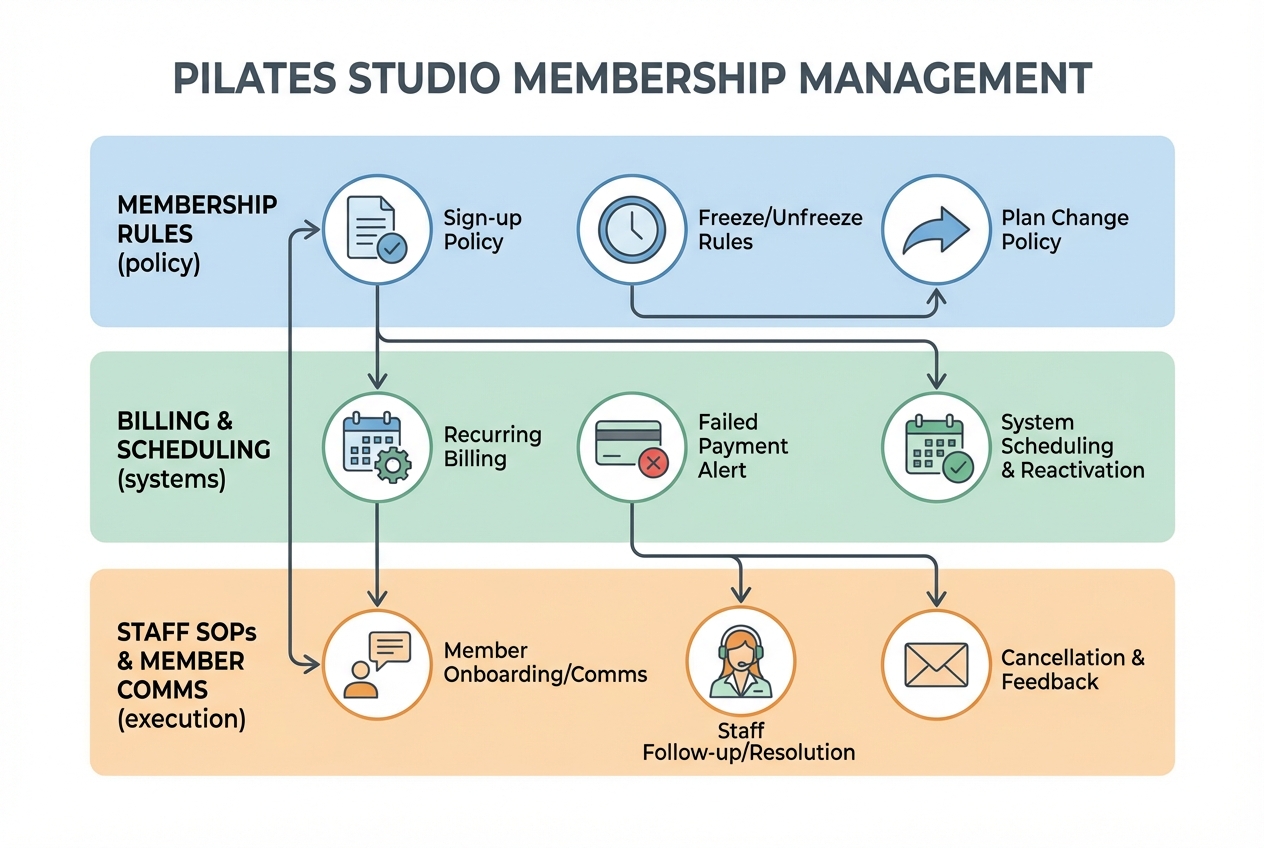
A clean setup has three layers. If any one is weak, you will feel it daily at the front desk.
- Membership rules (policy layer): What you sell and what happens when life happens. Billing date, cancellation window, freeze rules, upgrade timing, late cancel fees.
- Billing + scheduling (systems layer): Where memberships live, payments run, and booking rules get enforced.
- Staff SOPs + member comms (execution layer): The steps your team follows every time, plus the exact messages you send.
Design for the membership events that always occur:
- Sign-up (terms accepted, payment method vaulted, membership starts)
- Recurring billing (renewal, receipts, accounting sync)
- Failed payment (retry, notifications, access rules)
- Freeze/hold (eligibility, dates, access during freeze)
- Upgrade/downgrade (timing, proration, credit handling)
- Cancellation (notice window, final billing, access end date)
- Reactivation (winning someone back without messy exceptions)
This guide gives you both sides: templates and SOPs you can implement, plus a quick way to evaluate whether your current tools can actually enforce your policies.
Quick verdict: best approach by studio stage
The “right” stack depends less on your studio style and more on your complexity drivers.
Solo studio
If your memberships are straightforward (one or two plans, minimal exceptions), a strong off-the-shelf studio platform is usually enough. Prioritize:
- Autopay reliability (recurring billing + payment update links)
- Simple freezes (start/end dates, automatic resume)
- Late cancel/no-show automation (so you are not negotiating at the desk)
Growing studio
Once you add equipment constraints, intro offers, multiple membership levels, and more staff, your bottleneck becomes consistency.
Add a lightweight “ops layer” even if you keep your booking software:
- A single queue for failed payments
- A freeze request form that routes to approval
- A plan-change workflow with proration rules baked in
This is where a custom workflow tool can pay for itself in reduced admin and fewer billing disputes, especially if you already have a playbook and just need software to enforce it.
Multi-location
At this stage, you need governance:
- Permissions and auditability
- Consistent policy enforcement across locations
- Clean reporting (churn, failed-pay recovery, utilization)
If your “exceptions” are frequent, off-the-shelf settings alone rarely match your exact rules. A small custom internal app can enforce policy logic and keep staff actions consistent. Quantum Byte fits here as a practical “membership operations layer” you can build fast, without rebuilding your entire booking stack.
Membership policy blueprint
Write the policy first. Then configure software to match. Otherwise, staff will improvise, and members will compare notes.
Non-negotiable elements to document
- Billing cadence: monthly, every 4 weeks, annual
- Billing date logic: fixed calendar date vs “date of purchase”
- Auto-renewal: yes/no, and whether there is a minimum term
- Cancellation window: required notice (and how cancellation is submitted)
- Freeze/hold rules: eligibility, minimum/maximum length, fees
- Attendance policy: late cancel/no-show fees, cutoff times
- Plan changes: when upgrades/downgrades take effect and how proration works
- Receipts and records: what you store in the member profile
Compliance mini-checklist for recurring memberships
If you sell recurring memberships, assume regulators expect “easy to understand, easy to stop.” The Federal Trade Commission’s amended Negative Option Rule guidance emphasizes clear disclosure of material terms and simple cancellation, including cancellation through the same medium used to sign up, and retaining proof of consent for at least three years as described in the FTC’s business guidance on the amended Negative Option Rule. The FTC also announced a final “Click-to-Cancel” rulemaking aimed at making cancellation for recurring subscriptions easier and stopping recurring charges when a consumer cancels, in its press release.
Practical implication for your studio:
- Disclose the material terms up front: price, billing frequency, how to cancel, any notice window.
- Make cancellation path simple: if sign-up is online, allow online cancellation (or a comparably easy method).
- Store proof of consent: time/date, plan selected, the terms shown, and how they consented.
Membership Terms Sheet
Copy/paste this into a doc and finalize it before you touch settings.
- Membership name(s):
- Included access: (classes/month, unlimited, private sessions, retail discounts)
- Billing amount + frequency:
- Start date rules: (immediate vs next cycle)
- Renewal rules:
- Cancellation rules: (notice window, cancellation method, final bill date)
- Freeze/hold rules: (eligibility, length, fee, how to request)
- Late cancel/no-show rules: (cutoff time, fee, exceptions)
- Plan change rules: (upgrade timing, downgrade timing, proration model)
- Recordkeeping fields you will store: (plan, consent timestamp, last payment date, next bill date, freeze status)
Autopay SOP: failed payment (dunning) workflow that reduces churn
Failed payments are inevitable. What matters is how fast you recover them without creating resentment.
Recurring billing platforms commonly support automated retry logic, where a subscription can have retries before becoming “past due” and can continue retry attempts after a “past due” state. You can see an example of how this is modeled in Braintree’s recurring billing advanced settings.
Below is a studio-friendly 14-day cadence you can implement in most systems (or enforce with an ops layer).
14-day failed payment cadence
- Day 0 (payment fails): Email immediately. Keep access for now.
- Day 2 (retry #1): Auto-retry, then email if it fails again.
- Day 5 (retry #2): Auto-retry, add SMS if available.
- Day 7 (policy enforcement): Restrict future bookings until payment is updated.
- Day 14 (final outcome): Cancel membership or switch to manual pay arrangement.
Key rule for trust: every message should state the next attempt date/time and the amount, so members are not surprised.
What changes operationally at each stage
- Day 0–6 outcome you want: Member updates payment method through a link, and you recover revenue without staff involvement.
- Day 7 outcome: You protect capacity. Members can attend what they already booked (optional), but cannot book new spots until resolved.
- Day 14 outcome: You stop carrying indefinite AR. Either the member pays, pauses, or cancels.
Staff checklist
- Verify member status: active plan, next bill date, freeze status.
- Check contact details: email and phone are correct.
- Confirm message delivery: bounced email? no SMS consent?
- Offer a fix, not a lecture: payment update link, quick call, alternate card.
- Log the resolution: updated card, manual payment taken, cancellation processed.
Copy-ready message templates
Use these as-is, then adjust your tone.
Template 1: Friendly heads-up (Day 0)
Subject: Quick billing issue with your membership
Hi [First name],
Your membership payment didn’t go through today. This happens for simple reasons like an expired card.
To keep your membership active, please update your payment method here: [link]
We’ll automatically try again on [date] for [amount]. If you need help, reply to this message and we’ll take care of it.
Template 2: Payment update request + reminder (Day 5)
Subject: Action needed to keep booking classes
Hi [First name],
We still couldn’t process your membership payment. Please update your card here: [link]
Next attempt: [date/time] for [amount].
If payment isn’t updated by [date], your account will be unable to book new classes until it’s resolved.
Template 3: Final notice (Day 14)
Subject: Final notice before membership is canceled
Hi [First name],
We haven’t been able to process your membership payment after multiple attempts. To avoid cancellation, please update your payment method by [deadline]: [link]
If you’d rather switch plans or take a short hold, reply and we’ll help you pick the cleanest option.
Freeze/hold SOP: rules, fees, and a simple request template
Freezes are where “membership management” becomes real life: injuries, travel, pregnancy, life events. If you do not document rules, staff ends up negotiating.
Decision rules to pick
- Eligibility categories: injury/medical, pregnancy/postpartum, travel/work assignment, other
- Notice period: how far in advance a freeze must be requested
- Minimum duration: e.g., 7 or 14 days
- Maximum per year: cap months frozen to prevent chronic pausing
- Fee model:
- True pause: billing stops, access stops
- Hold fee: small monthly charge to keep the spot (clear and optional)
- Access during freeze: can they book? attend? buy drop-ins?
Operational steps
- Intake: member submits a request with start/end date.
- Approval: staff confirms eligibility and checks billing cycle.
- Set freeze: apply dates in software, confirm access rules.
- Confirm new renewal date: the member should know exactly when billing resumes.
- Audit: make sure they cannot book if your policy says no.
Freeze request form fields
- Member name
- Email + phone
- Current plan
- Freeze reason category (dropdown)
- Requested freeze start date
- Requested freeze end date
- Acknowledgements (checkboxes):
- I understand my membership will resume on [date]
- I understand booking rules during freeze: [policy]
- I understand holds are not backdated (unless explicitly approved)
Freeze confirmation email
Subject: Your membership hold is confirmed
Hi [First name],
Your membership is on hold from [start date] through [end date]. Your next billing date will be [resume bill date].
During the hold, your booking access is: [can/cannot] book classes.
If you need to adjust the dates, please email us before [deadline].
Edge cases that prevent disputes
- Mid-cycle freezes: decide whether you freeze immediately (and extend the cycle) or start the freeze next billing cycle. Put it in writing.
- Medical exceptions: you can be flexible, but route approvals through one role (owner or studio manager) so policies don’t splinter.
- Backdating: most studios should avoid backdating freezes. It is the easiest loophole to abuse.
Upgrades, downgrades, and proration: pick one rule set and document it
Plan changes create chargebacks when the member’s mental math doesn’t match your receipts. Your goal is a rule set your staff can explain in one sentence.
Three proration models
- Immediate upgrade with prorated charge: member gets higher access now, pays the difference for the remainder of the cycle.
- Upgrade next cycle: no mid-cycle charges; changes apply on next renewal.
- Downgrade next cycle only: avoids the “refund negotiation” trap.
Most studios do best with:
- Upgrades: immediate (with proration) or next cycle (if you want simplicity)
- Downgrades: next cycle only
Credit handling rules
- Unused classes on an 8-pack style membership: choose whether they carry over (with a cap) or expire at cycle end.
- Hybrid plans (membership + retail perks): spell out what happens to perks when downgrading.
Mini decision matrix
| Plan type | Best proration model | Why it works |
|---|---|---|
| Unlimited memberships | Upgrade immediate, downgrade next cycle | Access is binary; immediate upgrades feel fair and are easy to explain. |
| X classes/month | Upgrade immediate or next cycle | Proration is workable, but next-cycle reduces confusion if you have many tiers. |
| Class packs (not recurring) | No proration, no downgrades | Treat as a product, not a subscription. |
Plan Change Policy language
- Upgrades take effect [immediately / next billing date]. If immediate, you will be charged a prorated amount for the remaining days in your current billing cycle.
- Downgrades take effect on your next billing date.
- Unused monthly classes [do/do not] roll over. If they roll over, the maximum carryover is [X classes] and they expire after [Y days].
Staff script for common objections
- “I didn’t use my classes, can I downgrade today?”
- Answer: Downgrades start next billing cycle. If you want to reduce your monthly spend now, we can freeze your membership starting [date] if you qualify.
- “Why did I get charged today?”
- Answer: Your upgrade was applied immediately, so the charge is the prorated difference for the remainder of your billing cycle. Your full new membership rate begins on [next bill date].
Scheduling and attendance automation that directly impacts membership value
Memberships feel “worth it” when booking is predictable and policy enforcement is consistent. If you want to extend your scheduling experience with automation, Quantum Byte’s guide on how to build a booking chatbot is a solid starting point for reducing back-and-forth.
Rules that should be consistent across all memberships
- Booking window: how far out members can reserve
- Cancellation cutoff: e.g., 12 hours before class
- Waitlist autofill timing: how close to class you allow auto-fills
- Access limits by plan: e.g., 8 classes/month should not allow 12 bookings
Pilates-specific capacity logic
If you run reformer sessions, decide whether people reserve:
- A generic spot in class, or
- A specific reformer/equipment slot
This impacts everything: waitlist behavior, instructor setup time, and member expectations.
Launch-day settings checklist
- Frozen members cannot book (if that’s your policy)
- No-show fees don’t trigger during medical holds (if you offer exceptions)
- Late cancel fees are consistent across membership tiers
- Waitlists don’t auto-fill after your cutoff (or members get “surprise” charges)
Integrations and data security: payments, waivers, accounting, messaging
A studio stack usually includes:
- Payments: card vaulting, recurring billing, receipts
- Scheduling/booking: class and equipment reservations
- E-waivers: signed policy and liability forms
- Messaging: email and SMS for dunning and schedule changes
- Accounting: deposit reconciliation, tax categories
- Reporting: churn, utilization, retention by cohort
Payment security basics
Do not store card numbers in spreadsheets or notes. PCI DSS (Payment Card Industry Data Security Standard) applies to entities that store, process, or transmit cardholder data, as defined by the PCI Security Standards Council. Visa also summarizes PCI DSS as part of its Security & Compliance guidance, including the idea that validation expectations vary. For a practical perspective on tightening permissions and auditability in internal apps, Quantum Byte’s security hardening guide is useful reading.
For most studios, the practical move is:
- Use a payment processor that stores cards in a secure vault (tokenization)
- Keep only a token/reference in your studio software
- Ensure your dunning workflow can prompt members to update their payment method securely
Tie integrations back to your SOPs
Your SOPs require a few member profile fields to exist somewhere:
- Membership status (Active, Past Due, Frozen)
- Next bill date
- Freeze start/end
- Consent timestamp / agreement version
If your booking software can’t hold those fields cleanly, that is a strong signal you need an ops layer.
Pricing expectations and cost drivers
Studios tend to underestimate total cost because they only compare monthly subscription fees.
Common cost buckets:
- Base platform subscription: varies by feature depth and studio size
- Per-location fees: common for multi-site setups
- Staff seats/permissions: can add up as you grow
- SMS fees: especially if you use text for failed payments and waitlists
- Payment processing: usually separate from your software fee
- Add-ons: marketing automation, branded app, advanced reporting
- Onboarding/migration: either a vendor fee or your time
Hidden operational costs you should factor in:
- Manual reconciliation of failed payments
- Ad-hoc freeze exceptions handled differently by different staff
- Reporting gaps that make retention work reactive instead of planned
If you find yourself buying add-on after add-on just to approximate your policies, building a small custom workflow can be cheaper than permanent admin overhead.
Alternatives and competitors: which tools fit which studio
Most studios end up shortlisting the same categories of tools.
| Tool | Best for | Membership ops notes |
|---|---|---|
| Mindbody | Studios that want a broad, established ecosystem | Strong general platform; you still need clear SOPs for exceptions (freezes, proration). |
| Zen Planner | Boutique fitness businesses wanting all-in-one management | Good membership and billing foundation; confirm how you will handle plan-change edge cases. |
| Walla | Studios focused on modern client experience and automation | Often strong on attendance automation like late cancel/no-show; validate freeze and plan-change workflows. |
| StudioBookings | Budget-conscious studios that want core scheduling + billing | Good for basics; you may need external workflows as you add complexity. |
| WellnessLiving | Studios wanting a single vendor for many functions | Useful all-in-one approach; validate equipment booking and membership policy enforcement. |
| Mariana Tek | Premium branded experiences and boutique fitness scaling | Great for highly branded studios; plan for process rigor around billing exceptions. |
| Acuity Scheduling | Appointment-heavy studios (privates) needing simple scheduling | Scheduling-first; recurring membership policy enforcement may require additional tools. |
The consistent gap across vendor content is not features. It’s execution: the day-to-day SOPs and templates that make billing and policy enforcement feel fair.
Build vs buy: when to add a custom membership ops layer
Buy a platform for what it’s good at: booking, payments, basic membership objects. Build a workflow layer when your rules create constant exceptions. If you want a more general decision framework you can reuse, Quantum Byte’s guide on custom business software development maps the tradeoffs clearly.
Complexity triggers that justify custom workflows
- Multiple locations with different staff and inconsistent enforcement
- Several membership products (unlimited, limited, hybrid perks)
- Unique freeze rules (hold fees, medical exceptions, caps)
- Corporate billing or family memberships
- Instructor pay rules that depend on attendance types
- Custom reporting needs (recovery rate, churn reasons, cohort retention)
What a “membership ops layer” can handle
- A failed-payment queue with status, next retry date, and message templates
- Freeze request intake with approvals and an audit log
- A plan-change wizard that calculates proration and updates dates correctly
- Exception queues so staff know exactly what to do next
Quantum Byte is a good fit when you like your booking software but you need your real policies enforced consistently. You can start with templates and prompt your way into a working internal tool that mirrors your SOPs without waiting months for custom development.
If you build only one thing first, build the failed-payment workflow. It pays back immediately.
Implementation timeline: launch in 14 days without chaos
You can do this in two weeks if you sequence work correctly.
Days 1–3: finalize policies
- Complete your Membership Terms Sheet
- Decide your freeze rules and plan-change rule set
- Write the three failed-pay messages and freeze confirmation email
Days 4–7: configure software
- Create membership products and billing cadence
- Set booking windows, cancellation cutoffs, and waitlist rules
- Configure late cancel/no-show fees
Days 8–10: migrate and QA
Migration checklist:
- Active members and plan type
- Next billing dates
- Stored payment methods (tokenized)
- Remaining credits
- Current freeze/hold status
QA tests (do them with a staff member who will spot edge cases):
- Simulate a failed payment and confirm retries + messages
- Apply a freeze and confirm booking and billing behavior
- Execute an upgrade and confirm proration and receipts
- Process a cancellation and confirm billing stops cleanly
Days 11–14: staff training + member comms
- Train staff on the SOPs and where to log actions
- Send two emails to members:
- Announcement: what’s changing, why, and what they need to do
- Reminder: payment update steps and how to cancel if they choose
Make cancellation instructions unmissable and simple. FTC guidance on making cancellation easier and aligned with the sign-up medium is a useful benchmark, as described in the FTC’s Click-to-Cancel announcement and practical requirements in its business guidance.
Key takeaways: your membership management checklist
Use this as your punch list.
- Policies
- Membership Terms Sheet is finalized: billing date, cancellation window, freeze rules, plan-change rules.
- Cancellation is simple and documented: online instructions are clear if sign-up is online.
- Autopay and failed payments
- Retry cadence is defined: Day 0 notice, retries, Day 7 restrictions, Day 14 resolution.
- Messages are ready: friendly heads-up, action-needed reminder, final notice.
- Freeze/hold
- Eligibility and caps are clear: reasons, max months/year, backdating policy.
- Request intake exists: form fields + confirmation email.
- Upgrades/downgrades
- One proration model chosen: staff can explain it in one sentence.
- Credit rules are explicit: carryover or expiration is not negotiable at the desk.
- Scheduling rules
- Cutoffs and fees enforced automatically: late cancels/no-shows are consistent.
- Equipment capacity logic is set: generic spots vs specific reformers.
- Integrations and security
- Card data is not stored manually: use tokenized payment methods and keep records minimal.
- Member status fields exist: Active, Past Due, Frozen, next bill date.
- Reporting
- You can answer basic questions weekly: churn, failed-pay recovery, utilization by membership tier.
Start building
If your studio is already using a booking platform but you’re stuck doing “membership management” in spreadsheets, build the ops layer that enforces your policies automatically.
Start with three workflows: failed-payment queue + messages, freeze request approvals, and a plan-change wizard that applies your proration rules consistently.
Quantum Byte is designed for founders and business owners who want speed without giving up control. You can start from plug-and-play templates, customize what matters, and ship in days. If you want a repeatable way to describe workflows so an app builder can implement them, Quantum Byte’s AI app builder prompts guide will help you get cleaner, more buildable output.
Aziz Ansari used Quantum Byte to create an app for his movie “Good Fortune” within minutes, despite having no prior app-building experience.
Start building with Quantum Byte.