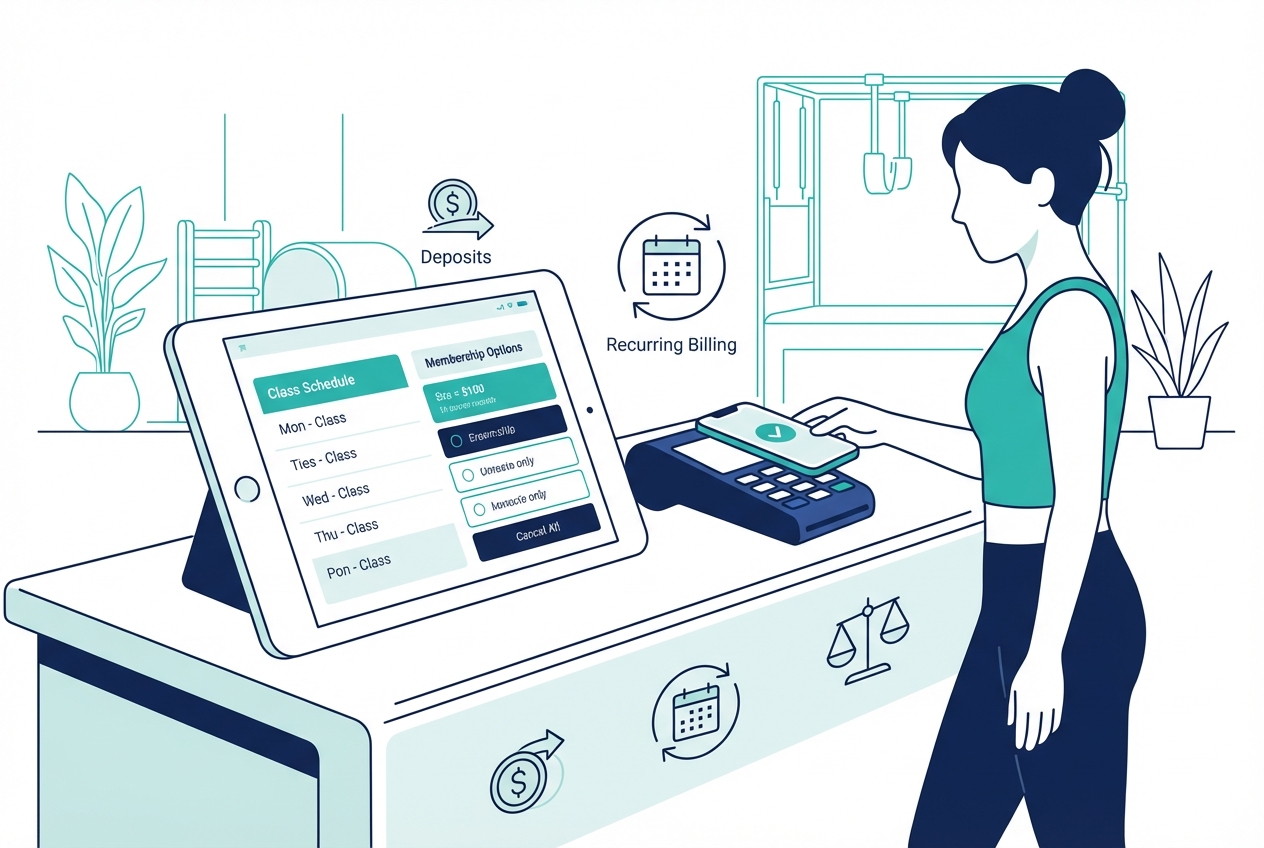
Pilates studio payment processing software should do more than run cards. It needs to sell packs and memberships, take deposits for privates, enforce late-cancel policies automatically, and still make your monthly reconciliation clean enough that you do not dread payouts.
This guide is a Pilates-specific blueprint you can bring into demos. It focuses on what actually breaks in the real world: deposits, freezes, proration, failed payments, disputes, and reporting.
Quick verdict: what to buy based on your studio model
Pick based on your operating model, not on a 0.2% rate difference.
- Single-location boutique (mostly classes + packs): Buy an all-in-one studio platform where booking and payment rules are inseparable. “Good” means: stored payment method on file, automated late-cancel fees, easy pack expiry rules, and exports that tie sales to payouts.
- Privates-heavy studio (reformer privates, semi-privates, limited series): Prioritize deposits, partial payments, and staff override controls. “Good” means: deposit is automatically applied to the final charge, reschedules follow policy, and refunds have an audit trail.
- Multi-instructor studio with splits (and retail add-ons): Prioritize item-level reporting and permissions. “Good” means: instructor attribution, SKU-level sales, clean refunds/credits tracking, and a way to reconcile tips (if you take them).
- Multi-location or hybrid (in-person + VOD + merch): Prioritize multi-entity reporting, taxes, and data portability. “Good” means: location-based payout visibility, unified client profiles, and exports your bookkeeper will not rewrite.
Across all models, the core requirement is this: payments must be integrated with booking, policies, and client profiles. Otherwise you end up with manual enforcement, inconsistent exceptions, and more disputes.
Feature checklist: non-negotiables for Pilates payments
Use this as your minimum bar when comparing vendors.
- Card-present and card-not-present: You want an EMV-capable reader at the front desk and online checkout for bookings. EMV matters because chip transactions generate a one-time code per transaction, which is a key part of modern card-present security as described by EMVCo.
- Digital wallets: Apple Pay and Google Pay support, especially for mobile checkout, improves conversion and reduces “forgot my wallet” friction.
- Card-on-file vaulting: The system should tokenize and vault card data through a compliant provider, not store raw card numbers. PCI DSS applies to any entity that stores, processes, or transmits cardholder data, which is why reducing your exposure (no raw card storage) is the goal (PCI DSS).
- Failed payment handling (dunning): Automatic retries, email/SMS notices, and a self-serve “update card” flow.
- Membership billing controls: Start dates, proration rules, freeze/hold options, cancellation effective date, and clear retry logic after a failure.
- Deposits and fees: Fixed deposits, and automated late-cancel/no-show fees that only fire when your policy conditions are met.
- Refunds and adjustments: Partial refunds, credits, and a visible audit trail of who changed what.
- Reporting and exports: Payouts, fees, refunds, chargebacks, and taxes, with exports that tie back to products (packs, memberships, retail SKUs).
Best practice 1: Model your “payment catalog” before you pick software
If you skip this step, every demo looks good. The fastest way to choose the right system is to write down what you sell and the rules behind it, then force vendors to show you those exact scenarios.
Start with a simple catalog:
- Intro offers (ex: “3 reformer classes in 14 days”)
- Class packs (5, 10, 20)
- Memberships (4x/month, unlimited)
- Privates and semi-privates
- Limited-capacity series (ex: “6-week beginner reformer series”)
- Workshops
- Retail (grip socks, bands)
- Gift cards
- Deposits (for privates or equipment reservations)
Then define three things per item:
- Payment type: One-time, subscription, installment, deposit + remainder.
- Fulfillment rules: Expiry, booking limits, what happens on late cancel.
- Policy rules: Cancellation window, no-show fee, refund rules.
Here is a compact “offers-to-payments mapping” you can copy into a doc before demos.
| Offer type | One-time | Recurring billing | Stored payment method | Deposit support | Proration / start-date control | Refunds / credits | Tax setting |
|---|---|---|---|---|---|---|---|
| Intro offer | Yes | No | Optional | No | No | Partial credit helpful | Usually no (varies) |
| Class pack | Yes | Optional (autorenew) | Yes (for late fees) | Optional | No | Credits and expiry rules | Usually no |
| Membership | Optional (initiation) | Yes | Yes | No | Yes | Credits on cancellation policy | Usually no |
| Private session | Yes | Optional (subscription) | Yes | Yes | Optional | Partial refund required | Usually no |
| Series / workshop | Yes | No | Optional | Yes (if holding spot) | No | Refund window enforcement | Sometimes (jurisdiction) |
| Retail | Yes | No | No | No | No | Standard refunds | Often yes |
| Gift card | Yes | No | No | No | No | Policy-driven | Varies |
What you are buying is not “payment processing.” You are buying whether your rules can be represented as actual payment objects in the system.
Best practice 2: Get deposits right for privates and limited-capacity series
Deposits reduce no-shows, but only if they are configured as a first-class workflow. If your system treats deposits as a manual workaround, your front desk becomes a refund department.
Use one of these deposit patterns:
- Fixed deposit now + remainder later: Best for higher-ticket privates and series. Client commits, but you do not force full prepay.
- Full prepay: Best when your cancellation policy is strict and consistent.
- Authorization hold vs capture: A hold validates funds but does not fully capture the payment. A capture collects immediately. In software terms, you need the ability to either place a hold (where supported) or take a deposit and then apply it to the final invoice cleanly.
Configuration requirements to demand in demos:
- Deposit application: Deposit should automatically apply to the final charge, not require manual math.
- Forfeiture window: Define exactly when the deposit becomes non-refundable.
- Reschedule rules: If a client reschedules within policy, the deposit should follow the booking.
- Partial refunds and credits: If you make an exception, staff should be able to refund part of the deposit or convert it into studio credit with an audit trail.
Edge cases to test live:
- Instructor changes after the deposit is taken.
- Client switches to a different service of different price.
- Series rollover (client misses week 2, you move them to a later cohort).
- Crediting the deposit to a different purchase (ex: retail or a pack) without “losing” the trail.
Vendor evaluation questions:
- Automation: Is the deposit triggered by the booking rule, or only by staff action?
- Overrides: Can managers override without giving every employee refund powers?
- Audit log: Can you see who changed deposit status and why?
Best practice 3: Make memberships compliant and easy to cancel
Your membership flow needs to be designed for clarity and cancellation. If clients feel trapped, you invite chargebacks and complaints.
The FTC’s amended Negative Option Rule guidance emphasizes clear disclosures, express informed consent, and making cancellation as easy as sign-up (FTC “Click to Cancel” guidance). Translate that into concrete software requirements.
What to require in your membership software:
- Self-serve cancellation: Clients can cancel from the same environment where they signed up (mobile and desktop).
- Confirmation receipts: A cancellation confirmation that includes the effective date.
- Accessible plan terms: Price, billing cadence, renewal terms, and cancellation/freeze rules available before purchase and in the client portal.
- Consent capture: A timestamped record of what the client agreed to.
Practical billing controls you should insist on:
- Freeze vs pause vs cancel: “Freeze” should preserve membership status without charging. “Pause” should defer billing. Your software should reflect the difference.
- Proration policy: If a client upgrades mid-cycle, the system needs predictable proration rules. If you do not prorate, your software should clearly enforce “changes effective next cycle.”
- Credits on cancellation: Decide what happens to unused class credits (if your membership includes them). The system should implement that policy consistently.
Demo test script (do not skip):
- Sign up on mobile.
- Cancel on mobile.
- Cancel on desktop.
- Cancel after a failed payment.
- Reactivate and confirm the next billing date.
Best practice 4: Offer ACH for memberships when it improves unit economics
ACH (bank debit) is not mandatory, but it can be a smart option for long-term members. It can reduce card expiration churn and, depending on your setup, can lower processing costs. It also comes with operational differences, including returns (NSF) and different dispute dynamics.
If you offer ACH, treat authorization as a real compliance artifact. NACHA’s rules updates on authorization and verification are a useful anchor for standing and recurring authorizations, including clear terms and retaining authorization records (NACHA “Meaningful Modernization”).
ACH controls to require:
- Authorization capture and storage: The system should store the mandate language and the client’s acceptance.
- Receipts and notifications: Clients should receive proof of authorization and payment.
- Return handling: If an ACH debit returns, your software should mark the membership as past-due, trigger retries (if you allow them), and notify staff.
Decision rule that works in practice:
- Steer ACH to: Long-term, stable members who want “set it and forget it.”
- Keep cards for: Drop-ins, tourists, and short-term clients where speed and wallet pay are higher leverage.
Best practice 5: Reduce chargebacks with policy automation and evidence
Most studios think chargebacks are a payments issue. They are usually a policy and evidence issue.
Preventive requirements:
- Card on file at booking: If your policy includes late-cancel/no-show fees, you need a stored payment method tied to the client profile.
- Policy acknowledgment: Require a checkbox at checkout that references the exact policy terms.
- Automatic enforcement: The system should enforce cancellation cutoffs automatically, so staff are not pressured into inconsistent exceptions.
- Timestamped communications: Booking confirmations, cancellations, and fee receipts should be stored.
Evidence requirements (what you want one click away):
- Attendance logs and check-in history
- Cancellation logs with timestamps
- Signed policies and waivers
- Itemized receipts and invoices
- Message history (email/SMS confirmations)
Operational playbook when a dispute hits:
- Collect artifacts immediately: Screenshot or export the booking record, policy acceptance, and attendance/cancellation history.
- Respond on time: Your payment provider will have deadlines.
- Document the outcome: Mark the client record so staff can handle future bookings appropriately.
Best practice 6: Prioritize reconciliation and tax reporting from day one
If your payouts do not match your sales reports, you will lose hours every month. Your payment system should make it obvious how gross sales became net deposits.
On tax reporting, set expectations early. Payment processors can issue Form 1099-K, and the IRS notes it can be sent based on payment card transactions and other reportable payments depending on the situation (IRS “Understanding your Form 1099-K”). If you also take payments through third-party networks, the IRS explains Form 1099-K filing thresholds for third-party settlement organizations (TPSOs) as well (IRS 1099-K FAQs).
Reconciliation requirements to demand:
- Payout cadence and holds: Clear view of when funds settle and why something is held.
- Fee breakout: Processing fees separated from sales.
- Refunds and chargebacks separated: Do not accept a “net only” report.
- Export format: CSV exports with payout IDs, dates, product/SKU, tax, and location.
Monthly close checklist (simple, but it saves you):
- Match gross sales by product: Packs, memberships, retail.
- Reconcile processor fees: Confirm fees align to transaction types.
- Reconcile refunds and credits: Ensure refunds appear in both sales and payout views.
- Reconcile deposits: Deposits collected vs deposits applied to final invoices.
- Confirm tax settings: Retail vs services, and any local rules you follow.
Integrations that matter for Pilates studios
Integrations are only valuable if the data flows support your policies and reporting.
- Booking and client profiles: Test that the payment method is attached to the client, not just a single transaction. Then test that your late-cancel policy can actually charge that stored method.
- Accounting exports: In a demo, ask for a sample export file and verify it includes what your bookkeeper will ask for (product name/SKU, tax, payout ID, location, date).
- E-sign and waivers: Waiver and policy acceptance should be retrievable. That is part of your dispute evidence.
- POS hardware: Require an EMV reader for in-studio swipes. EMV chip transactions use a one-time code per purchase, which is a core security advantage for card-present acceptance (EMVCo).
- Data portability: Ask how migration works. In many systems, payment tokens are not portable. You might need clients to re-enter cards on your next platform.
Pricing expectations and cost drivers
The “cheapest” system is the one that reduces admin time, failed payments, and reconciliation chaos.
Compare total cost across these buckets:
- Software subscription: Base platform fees.
- Payment processing: Card and wallet acceptance, and any minimums.
- POS hardware: Readers, stands, and replacements.
- Chargeback and dispute fees: What you pay when a client disputes.
- ACH fees: Per-transaction fees or monthly add-ons.
- Messaging add-ons: SMS reminders, two-way texting.
- Branded app fees: If you want a client app.
Demo worksheet (ask every vendor):
- Show me a sample month statement: Gross sales, refunds, fees, and net payout.
- What is the payout timing: When do funds actually hit the bank?
- What is the effective rate for my mix: Membership-heavy vs drop-in-heavy can look different.
Alternatives and competitor categories
Most options fall into one of four buckets. This framing keeps you out of feature-list purgatory.
- All-in-one studio platforms with integrated payments: Typically the simplest operational fit for scheduling plus billing. Examples include Mindbody, Mariana Tek, and WellnessLiving.
- Tradeoff: You get speed and integrated workflows, but you may accept fixed logic around deposits, exports, or custom policies.
- Booking-first tools that bolt on payments: Often better calendars, sometimes lighter reporting.
- Tradeoff: Payments can feel “attached” rather than “designed,” which shows up in policies and reconciliation.
- Generic POS systems: Great for retail and front desk workflows, weaker for memberships, packs, and Pilates-specific booking policies.
- Tradeoff: You may need separate systems, which creates duplicate client records.
- Custom-built stack: Best when your studio has unique deposit rules, multi-location reporting needs, or membership logic that is part of your brand.
- Tradeoff: Historically slower and expensive, unless you have a faster build path.
If you are choosing between these, the deciding question is: do you mostly need a standard studio workflow, or do you need your own rules enforced by software?
Build vs buy: when to use Quantum Byte for a payments-first studio system
Buy off-the-shelf when your studio fits the default model. Build when the default model costs you money.
Quantum Byte is a good fit when you want a payments-first studio system with custom workflows, without waiting months for a traditional build. You describe what you need, and the platform assembles a working app quickly using templates plus natural-language prompting.
Use cases where building wins:
- Unique deposit logic: Different deposits by instructor, equipment type, or time of day.
- Custom membership policies: Freeze limits, proration rules, or “convert unused credits” logic that your current system cannot represent.
- Owner reporting: Multi-location rollups, instructor splits, and deposit liability tracking in one dashboard.
- Bespoke reconciliation exports: File formats that match your accountant’s workflow.
A custom system can include:
- Checkout tied to booking rules
- Membership management screens (freeze, cancel, reactivate)
- Failed-payment workflows
- Admin dashboards for payouts and reconciliation
- Integrations to your existing tools
Implementation timeline: 14-day rollout plan for payments, packs, and memberships
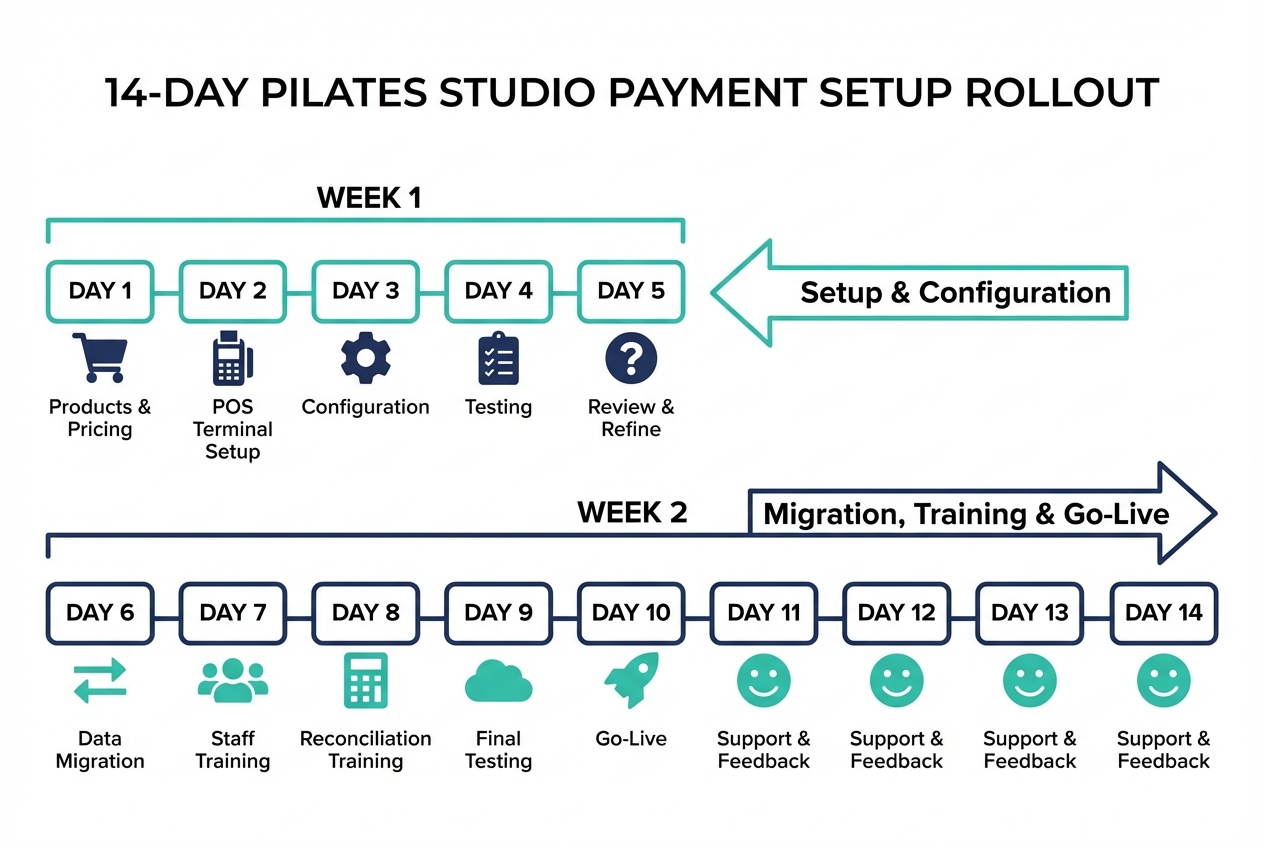
Move fast, but do it in order.
Week 1 (setup and configuration):
- Day 1 to 2: Finalize your payment catalog and policies (late cancel, refunds, expiry, deposits).
- Day 3: Configure products (packs, memberships, privates, retail) and tax settings.
- Day 4: Set up POS hardware and test EMV transactions.
- Day 5: Run sandbox tests for each scenario: pack purchase, membership signup, deposit booking, refund.
Week 2 (migration, training, go-live):
- Day 6 to 7: Client migration plan. Decide how you will handle saved cards if tokens cannot migrate.
- Day 8: Configure dunning (retries, notifications, grace periods).
- Day 9: Train staff on overrides, refunds, and deposit exceptions.
- Day 10 to 11: Parallel run. Take a small set of real transactions and reconcile payouts.
- Day 12 to 14: Go-live, then do a first-week reconciliation review.
Highest-risk steps:
- Membership migration (billing dates, remaining credits)
- Deposit logic (application, forfeiture windows)
- Reconciliation mapping (gross vs net vs timing)
Demo test script checklist (run it in every vendor trial):
- Buy an intro offer on mobile.
- Buy a pack, then late-cancel and confirm the fee fires correctly.
- Book a private with deposit, reschedule inside the window, then outside it.
- Trigger a failed membership payment and confirm the retry and notification flow.
- Issue a partial refund and confirm the audit log.
- Export a payout report and confirm you can tie net deposit back to transactions.
Key takeaways: what to verify in every demo
Bring this list to every call, and insist on seeing it live.
- Deposits: Automatic capture, application to final charge, and override controls.
- Freezes and cancellations: Self-serve, clear effective dates, and confirmation receipts aligned with the FTC’s expectations that cancellation should be as easy as sign-up (FTC guidance).
- Proration rules: Predictable outcomes for upgrades/downgrades.
- Dunning: Retries plus self-serve card update.
- Audit logs: Who did what, especially on refunds, credits, and deposit changes.
- Exports and reconciliation: Payout IDs, fees, refunds, taxes, and SKU-level sales.
- EMV support: Real chip acceptance at the studio (EMVCo).
- PCI posture: Tokenization and vaulting via compliant providers, so you avoid raw card storage exposure (PCI DSS).
The real win is buying a configured payment system that enforces your studio’s rules. “Integrated payments” is just the checkbox.
Start building
If you have deposit rules, membership edge cases, or owner reporting requirements that off-the-shelf studio platforms cannot model cleanly, build the workflow you actually run.
Start building with Quantum Byte.
You get founder-friendly setup, plug-and-play templates for common studio flows (booking, packs, memberships), and the flexibility to customize the parts that make your studio unique, without a long build cycle.