
Pilates studio scheduling software should let clients book classes and privates without you babysitting the calendar, while still enforcing the rules that keep reformers, instructors, and policies from colliding.
This guide helps you shortlist the right tool fast, then actually configure capacity rules (equipment, instructors, and eligibility) so your schedule stays clean even when you add new teachers, new class types, and new membership tiers.
Quick verdict: the best pilates studio scheduling software by studio type
Pick your scenario and start there. You can always switch later, but the fastest win is choosing the software that matches your operational complexity today.
- Reformer-heavy studios with true equipment constraints: Mindbody, WellnessLiving, Walla, bsport. Best when you need “spots” that map to actual machines.
- Solo instructor or very small studio (simple privates + a few small classes): Acuity Scheduling, Setmore, Bookeo, Setmore. Best when speed and simplicity matter more than deep studio ops.
- Growth-focused studios that want modern member experience and marketing: Momence, Arketa, Mariana Tek. Best when you care about conversion flows, client comms, and reporting.
- Budget-first, want core scheduling with fewer moving parts: TeamUp, Vagaro, StudioBookings. Best when you want predictable basics and can live without deep customization.
- Studios with unusual rules (eligibility gates, shared inventory across brands, internal ops dashboards): keep a mainstream booking engine, then build a custom “rules + ops” layer (see Build vs buy).
| Tool | Best for | Biggest strength | Main tradeoff | Typical cost drivers |
|---|---|---|---|---|
| Mindbody | Established studios with mixed modalities | Mature ecosystem and studio management breadth | Complexity and add-ons can sprawl | Seats, locations, add-on modules, branded app |
| WellnessLiving | Studios wanting an all-in-one suite | Broad platform with equipment booking options | More platform than you may need early on | Modules, marketing tools, branded apps |
| Walla | Boutique fitness workflows | Clean UX and studio-first scheduling | May be less flexible for edge-case rules | Staff seats, locations, messaging |
| Momence | Growth + modern purchase/booking flow | Strong commerce and member experience | Equipment-level constraints vary by setup | Messaging, marketing automation, add-ons |
| Arketa | Modern boutique studios | Brand-forward client experience | May require workarounds for complex inventory | Branded app, automations |
| Mariana Tek | Enterprise-style boutique ops | Deep operational tooling | Usually heavier implementation | Locations, enterprise features |
| Acuity Scheduling | Privates-forward, simple scheduling | Straightforward appointments and availability | Weak for machine-level capacity modeling | Users, reminder volume, integrations |
| TeamUp | Budget-friendly studio basics | Simple class + membership management | Less “custom rules engine” feel | Members, staff, add-ons |
Feature checklist that matters for Pilates
Most tools can “take bookings.” Pilates studios need scheduling that respects equipment and progression, not just time slots.
Non-negotiables for most studios:
- Self-booking that supports both classes and appointments: Clients should book a reformer class and a private session without staff intervention.
- Packages and memberships: Credits, class packs, recurring memberships, and expiration rules.
- Waitlists with automation: Auto-promote from waitlist and notify quickly.
- Instructor management: Availability, substitutions, and role-based access.
- Payments and refunds: Card-on-file, deposits, recurring billing, and clean refund workflows.
- Reporting you will actually use: Attendance, revenue by service, retention, and no-show tracking.
- Automated reminders: Email plus SMS is ideal for reducing no-shows (more on evidence in Integrations and compliance).
Pilates-specific must-haves that many “fitness booking” comparisons skip:
- Equipment or spot booking: A reformer class is not just “12 slots.” It is 12 machines that may have different constraints.
- Mixed modality scheduling: Mat, reformer, tower, chair, pre/postnatal, intro series, workshops.
- Eligibility gates: “Intro required” rules, level requirements, and instructor approval for certain classes.
- Instructor-to-equipment constraints: Some sessions are 1:1 equipment-per-client; others allow shared apparatus or alternating.
Nice-to-haves (pick based on maturity):
- Lead capture and follow-ups: New lead to intro booking without manual texting.
- Branded app: Useful when you’re competing on member experience.
- On-demand/streaming support: If hybrid is part of your revenue mix.
- Payroll/commission rules: Especially for multi-teacher studios.
How Pilates scheduling actually breaks: classes + privates + equipment
Pilates scheduling breaks when your software cannot model the objects you actually run.
In practice you schedule three things:
- Group classes: Fixed time, fixed capacity, often equipment-bound.
- Private appointments: One client (sometimes two), one instructor, usually one room or specific equipment.
- Semi-privates / small groups: Appointment-like structure with limited seats and stricter policy rules.
And you have three layers of constraints:
- Inventory constraints (equipment/rooms): Reformers, chairs, towers, studio rooms, or even “quiet room” vs “music room.”
- People constraints (instructors): One teacher cannot teach a 9:00 private and a 9:00 reformer class.
- Policy constraints (your rules): Booking windows, cancellation cutoffs, eligibility gates, package requirements.
Common failure modes you should actively design against:
- Double-booked instructors: A private sneaks into an instructor’s class block.
- Oversold equipment: The system tracks “capacity 12” but not “machine #7 is broken.”
- Waitlist chaos: People get promoted too late to attend, or promotions feel unfair.
- Package disputes: A client books a premium class on a basic credit and your staff eats the awkward conversation.
Capacity rules playbook
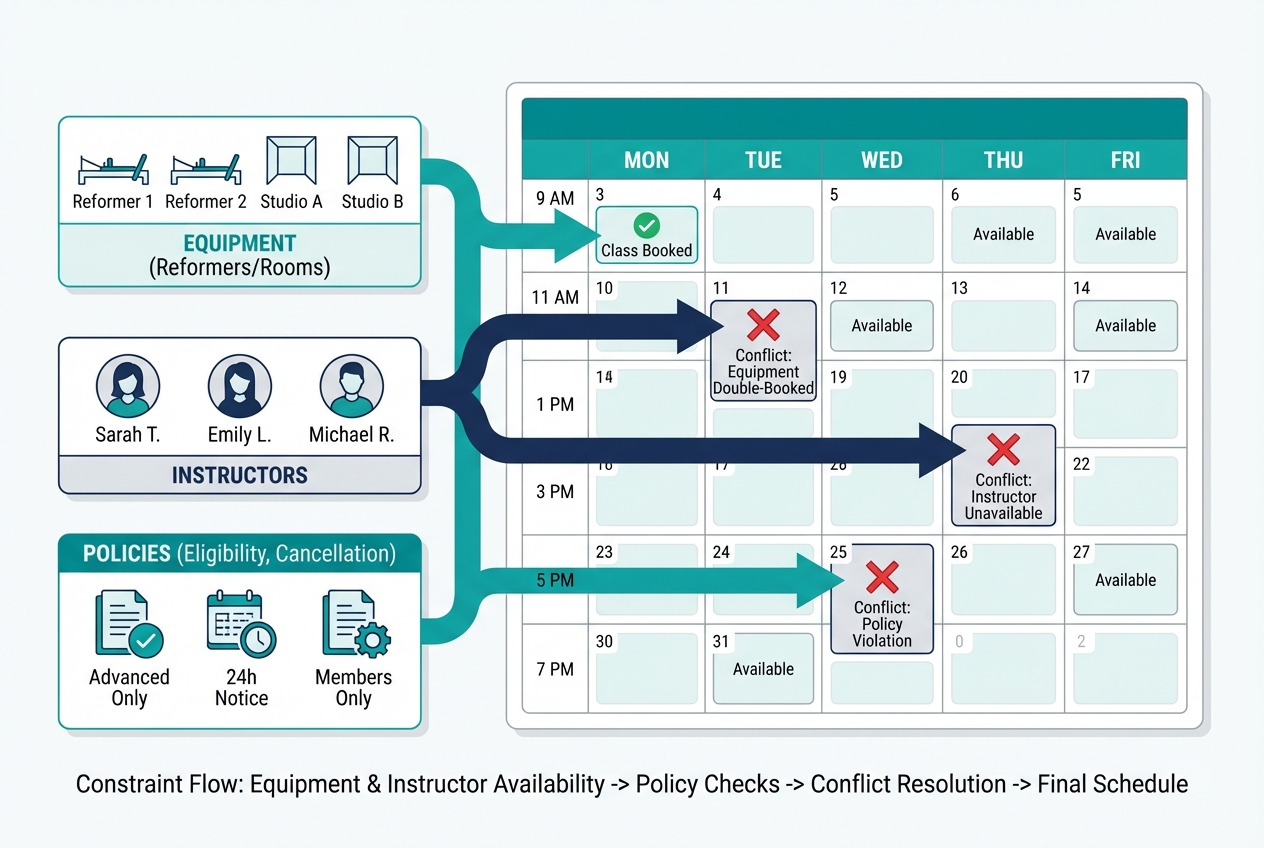
These rule “recipes” are the difference between “online booking” and a schedule you can trust. Most platforms can implement some version of these with resource settings, service types, booking restrictions, and staff permissions.
Rule recipe 1: One reformer per client
- What you’re enforcing: A reformer class can never exceed the number of available machines.
- How to configure it: Create the class as a “resource-limited” service (or spot-booking class) and set capacity equal to active machines, not your maximum room size.
- What to test: Mark one machine out of service (or reduce capacity) and confirm bookings, waitlist behavior, and reporting reflect the change.
Rule recipe 2: Reserve specific machine numbers
- What you’re enforcing: Clients can pick a specific reformer number, or staff can assign it.
- How to configure it: Model each reformer as a “spot” or sub-resource inside the class. If your tool cannot do true machine selection, approximate with “zones” (front row/back row) or staff-only assignment.
- What to test: Two clients try to pick the same spot; one should be blocked, not silently overwritten.
Rule recipe 3: Limit intro clients per class
- What you’re enforcing: Only a small number of first-timers can join a given group class so the class stays safe and teachable.
- How to configure it: Create a separate “Intro spot quota” using one of these approaches:
- Add a dedicated “Intro” class type with its own capacity.
- Use a booking restriction: only clients tagged “Intro eligible” can book, and cap total intro enrollments via a separate class offering.
- What to test: An experienced client should still be able to book even when intro quota is full, and vice versa.
Rule recipe 4: Block privates during teaching windows
- What you’re enforcing: Instructors cannot be booked for privates during their class teaching blocks.
- How to configure it: Use staff schedules that explicitly block time, not “assumed availability.” If you allow admin overrides, restrict that permission.
- What to test: Book a private that overlaps by 5 minutes. The system should reject it, including for clients using self-book.
Rule recipe 5: Prevent double-booking across modalities
- What you’re enforcing: A client cannot book a 6:00pm mat class and a 6:00pm private, even with different instructors.
- How to configure it: Enable “client booking conflict” rules where available. If not available, implement it as a policy: staff must approve overlapping bookings, or require a buffer.
- What to test: Try overlapping bookings via client portal and via admin view.
Rule recipe 6: Package-required gates per class type
- What you’re enforcing: Premium class types (reformer, tower) require the right credit type or membership.
- How to configure it: Map services to products, not just prices. Create distinct credit buckets (for example: “Reformer credit” vs “Mat credit”) and attach eligibility to class types.
- What to test: A client with the wrong credit should be prompted to purchase the correct option, not allowed to slip through.
Rule recipe 7: Cancellation and late-cancel enforcement
- What you’re enforcing: Late cancels and no-shows are charged consistently, without staff debate.
- How to configure it: Set cancellation windows by service type (privates often stricter than group), and decide whether the penalty is “lose credit,” “fee charged,” or both.
- What to test: Cancel just inside and just outside the window. Confirm receipts, credit returns, and staff override permissions.
Rule recipe 8: Waitlist auto-promotion with a realistic acceptance window
- What you’re enforcing: When a spot opens, the next person gets notified and must accept quickly so spots do not go empty.
- How to configure it: Turn on auto-promotion and define a “hold window.” The key is matching your community behavior (morning classes need a shorter window than weekend workshops).
- What to test: Open a spot close to class time. Confirm the system promotes, times out, and moves to the next person.
Rule recipe 9: Hold a small number of spots for new clients
- What you’re enforcing: Your schedule stays welcoming to new members without punishing loyal regulars.
- How to configure it: Use either a separate “New Client Intro” class, or a controlled release rule (spots open to everyone at T-minus X hours).
- What to test: Existing members cannot grab held spots early, but can book them once released.
Rule recipe 10: Staff override rules with an audit trail
- What you’re enforcing: Staff can fix edge cases without creating invisible mess.
- How to configure it: Roles and permissions: who can override capacity, who can waive fees, who can move clients off waitlists. If available, enable booking change logs.
- What to test: A front desk user should not be able to “force book” past capacity unless you intentionally allow it.
Quick testing checklist
- Create fake clients: One intro, one member, one unlimited.
- Book edge cases: Overlaps, wrong package, last-minute cancellation.
- Test waitlist promotion: Including near class start time.
- Verify time zones and calendar sync: Especially if instructors travel.
- Confirm staff permissions: What clients can do vs what staff can do.
Integrations and compliance you should not skip
Scheduling is the center of your studio stack. The best tool is the one that plays nicely with how you collect money, manage waivers, and keep everyone informed.
- Payments and PCI scope: If your platform stores, processes, or transmits cardholder data, you are in the world of payment security requirements. The PCI DSS (Payment Card Industry Data Security Standard) is the baseline standard published by the PCI Security Standards Council. Practically: prefer tools that use established payment providers and support tokenized card-on-file, deposits, and refunds.
- Calendar interoperability (ICS/iCal): When a tool offers ICS export or iCal sync, it is typically using the iCalendar event format standardized in RFC 5545. This matters because it reduces “my calendar didn’t update” disputes for both clients and instructors.
- Waivers and e-sign: Online waivers are normal, but you still want proper consent and record retention. In the U.S., the ESIGN Act establishes that electronic signatures and records generally cannot be denied legal effect solely because they are electronic.
- Reminders (email + SMS): Automated reminders are not just convenience, they are attendance protection. A systematic review in BMC Health Services Research found appointment reminders consistently improve attendance across settings, and a randomized controlled trial reported a lower no-show rate with text reminders (23.5% vs 38.1%) in the intervention vs control group in JMIR. You do not need to copy healthcare workflows, but the operational principle translates: reminders reduce forgotten appointments.
Typical integration targets to validate before you commit:
- Website and landing pages: Embedded booking widget, SEO-friendly schedule pages.
- Email/CRM: Lead capture, nurture sequences, win-back campaigns.
- Accounting: Clean payouts, reconciliation, and refund tracking.
- Messaging: SMS provider support and opt-in handling.
- Analytics: Attribution and cohort tracking if you run ads.
Pricing expectations and the cost drivers that change your bill
“Starts at” pricing is rarely what a Pilates studio actually pays, because your bill moves with messaging volume, staff complexity, and add-on modules.
Think in cost drivers, not sticker price.
| Cost driver | When it matters | How to estimate | Questions to ask sales |
|---|---|---|---|
| Staff seats/users | Multi-teacher studios, front desk teams | Count instructors + admins needing logins | Does every instructor require a paid seat? |
| SMS volume | Studios using text reminders heavily | Estimate messages per booking and per month | Is SMS billed per message or bundled? |
| Locations | Multi-location or shared inventory | Count locations and shared resources | Can locations share clients and packages? |
| Branded app/white-label | You want app-based retention | Decide if app is a must-have or later upgrade | Is the app included or an add-on? |
| Advanced reporting | You manage performance by metrics | Identify reports you need weekly | Are reports exportable and filterable? |
| Marketing automation | You want automated follow-ups | List automations: abandoned booking, win-back | Which workflows are included vs paid? |
| Payment processing approach | You care about payout timing and fees | Compare integrated processing vs bring-your-own | Can you use your existing processor? |
| POS hardware | You sell retail or in-studio checkout | List hardware needs | Is hardware required or optional? |
Negotiation checklist (even for self-serve plans):
- Trial length and sandbox access: You need time to test edge cases.
- Implementation support: Who helps with setup and rules?
- Migration assistance: Can they import clients, credits, and bookings?
- Contract term and cancellation: Month-to-month vs annual, and how to exit cleanly.
Workflow fit: solo instructor vs multi-teacher studio
Solo instructor: prioritize speed, then add guardrails
Your goal is simple: self-booking with payments and reminders that prevent no-shows.
Configuration priorities:
- Service catalog: Keep it tight (privates, duets, a few class types).
- Packages: One or two packs, one membership. Avoid a product maze.
- Reminders: Turn on email and SMS where possible.
- Basic policies: Cancellation window, booking window, and a waitlist if you run full classes.
Watch-outs if you are growing:
- Permissions: Many simple tools are not built for multiple instructors with different permissions.
- Equipment constraints: If you add reformer classes, you may need true spot booking.
Multi-teacher studio: prioritize roles, resources, and auditability
Once multiple instructors and class types are in play, scheduling is an internal system, not just a client-facing calendar.
Configuration priorities:
- Roles/permissions: Front desk vs manager vs instructor access.
- Instructor schedules: Teaching blocks, availability, and substitution workflow.
- Capacity rules: Equipment constraints, intro caps, eligibility gates.
- Commission/payroll rules: If your tool supports it, define it early to avoid shadow spreadsheets.
- Change logs/audit trail: You want to know who changed what when a dispute happens.
A day-in-the-life flow your software should handle smoothly:
- New lead submits interest.
- Waiver is completed before first visit.
- Intro booking is available only in eligible classes.
- Package purchase happens at booking or right after.
- Recurring bookings are easy without creating overlaps.
- Waitlist promotion happens automatically with a hold window.
- Late cancel triggers the right fee/credit rule consistently.
Alternatives and competitors
The market is crowded. Here is the practical way to think about common options without getting lost in feature grids.
- Momence: Best for studios that care about modern checkout and member experience. Limitation: may need workarounds for complex equipment allocation.
- WellnessLiving: Best for studios wanting an all-in-one platform feel. Limitation: can be heavier than needed for a small studio.
- Walla: Best for boutique studio workflows with a clean UI. Limitation: edge-case policy logic may require careful testing.
- Acuity Scheduling: Best for appointment-first businesses and simple privates. Limitation: not built around reformer inventory constraints.
- Mindbody: Best for mature studios that want breadth and ecosystem. Limitation: complexity and add-ons can increase operational overhead.
- TeamUp: Best for budget-friendly class + membership management. Limitation: less native depth for complex rules.
- Arketa: Best for brand-forward boutiques and a modern feel. Limitation: may not cover every studio ops edge case.
- Bookeo: Best for straightforward bookings across services. Limitation: Pilates-specific equipment logic may be limited.
- Vagaro: Best for price-sensitive teams that want a broad business platform. Limitation: fitness-specific rule depth varies.
- StudioBookings: Best for studios that want core studio management without enterprise weight. Limitation: still requires careful capacity setup for reformer-heavy operations.
- Setmore: Best for simple scheduling and a low barrier to start. Limitation: not Pilates-specific for equipment and packages.
- bsport: Best for premium boutique experiences and studio operations. Limitation: typically fits studios ready for a more robust system.
- Mariana Tek: Best for scaling, enterprise-grade boutique ops. Limitation: implementation and cost tend to be heavier.
Shortlists that work in the real world:
- Equipment booking heavy: Mindbody, WellnessLiving, Walla, bsport.
- Budget-first and simple: TeamUp, StudioBookings, Setmore, Acuity.
- Growth and member experience: Momence, Arketa, Mariana Tek.
Build vs buy: when you need custom rules that off-the-shelf tools won’t model
Off-the-shelf software is great until your studio becomes policy-heavy. That is when you either compromise your rules, or you build a small custom layer that enforces them.
A practical middle path is “build on top of”:
- Keep a proven booking and payment engine.
- Add a custom layer for rules, staff ops, reporting, and client experience where your scheduling tool falls short.
Build-worthy use cases (you will feel these daily):
- Bespoke memberships and eligibility: For example, dynamic rules like “unlimited members can book reformer X times per week, but only after completing intro series.”
- Complex equipment allocation: Shared rooms, machine maintenance states, or multi-room inventory that changes by day.
- Multi-brand operations: Two studio brands sharing inventory but with different cancellation windows, pricing, and access rules.
Where Quantum Byte fits (without forcing a full rip-and-replace):
- Custom internal dashboards: Staff views for waitlist triage, instructor substitutions, equipment status, and policy exceptions.
- Non-standard booking flows: Eligibility checks, deposits for specific client segments, or special events.
- Fast customization: Quantum Byte uses templates plus natural-language prompting so you can build the layer you need quickly, without a long dev cycle. Aziz Ansari used Quantum Byte to create an app for his movie “Good Fortune” within minutes, despite having no prior app-building experience.
Implementation timeline: a setup order that prevents booking chaos
A realistic rollout is about sequencing. Build the rules first, then let clients touch it.
Days 1–3: Export, inventory, and service catalog
- Export clients, memberships/packs, upcoming bookings, staff list, and (if possible) waiver status.
- Define your services: class types, privates, semi-privates, workshops.
- Define resources: rooms, equipment counts, and any “out of service” states.
Days 4–6: Capacity rules and policies
- Implement the capacity recipes that match your studio.
- Set booking windows, cancellation policies, and eligibility gates.
- Create products (packs/memberships) and map them to services.
Days 7–9: Staff roles, payments, waivers, notifications
- Set roles and permissions.
- Configure payments (deposits, card-on-file, refunds).
- Configure waiver flow and record retention.
- Turn on email and SMS reminders.
Days 10–12: Website embed + testing
- Embed booking on your website.
- Run the testing checklist with fake clients.
- Train staff on edge cases: waitlist overrides, late cancels, substitutions.
Days 13–14: Soft launch, then cutover
- Soft launch to a small group of friendly clients.
- Cut over fully once you trust the rules.
Cutover checklist:
- Freeze window: Decide when you stop taking bookings in the old system.
- Client comms: What changes, how to log in, how to buy packages, new policies.
- Rollback plan: If something breaks, will you take bookings by phone for 24 hours, or revert temporarily?
What to do next
Use this selection path to move fast without creating a messy schedule you regret later:
- Shortlist 2–3 tools based on your studio type.
- Confirm your capacity recipes are supported (or can be approximated safely).
- Validate integrations for payments, waivers, and calendar sync.
- Model the cost drivers that will change your real bill (seats, SMS, locations, add-ons).
- Run a pilot week with real staff and a small client cohort.
During the pilot, deliberately test the uncomfortable stuff: waitlist promotion timing, late cancels, wrong packages, instructor substitutions, and equipment outages.
Frequently Asked Questions
Pilates studio scheduling software free
Free plans can work if you are appointment-first and you do not need deep packages, equipment allocation, or multi-staff permissions. The hidden cost is usually operational: more manual enforcement of policies, more admin time, and more room for booking disputes. If you choose free, pick the simplest service catalog you can and be explicit about cancellation rules.
Acuity Scheduling
Acuity Scheduling is a strong fit when your business is mostly privates and you need clean availability management. It is usually a weaker fit for reformer-heavy studios because it is not designed around machine-level capacity and “spot booking” the way studio-first platforms are. If you run both classes and equipment-bound sessions, test your capacity recipes before committing.
Pilates studio app
A “Pilates studio app” can mean two things: a branded client app, or an internal app your staff uses to manage rules and operations. Branded apps help retention and ease of booking. Internal apps solve harder problems: equipment status, exception handling, custom eligibility, and reporting workflows. Decide which problem you are solving before paying for white-label.
Fitness studio booking software
Generic fitness studio booking software usually covers scheduling, payments, and memberships. Pilates studios tend to break generic tools when they need equipment-level constraints, intro gating, and nuanced class eligibility. If a vendor cannot explain how to prevent overselling equipment and double-booking instructors, treat it as a warning sign.
Start building
If your main blocker is custom rules, not basic booking, consider building a lightweight “rules + ops” layer with Quantum Byte while keeping your preferred scheduling and payment foundation.
- Founder-friendly: You can design the workflow you actually run, without a long dev cycle.
- Plug-and-play templates: Start from proven templates for common business features, then customize what your studio needs.
- Speed plus flexibility: You get the benefits of off-the-shelf tools without being trapped by their limits.
Start here: Quantum Byte pricing