
Pilates studio software is worth switching only when it reliably fills classes, collects payments, and reduces admin without breaking your memberships, reminders, or reporting. The “best” choice depends on your class mix (reformer vs private), how complex your billing is, and how much you need open integrations and clean exports.
Quick verdict: the “best” pilates studio software by studio type
Use this to get to a shortlist fast, then validate with the scorecard later.
-
New studio or budget-sensitive (simple scheduling + basic packages): Acuity Scheduling, Vagaro
- Decision triggers: You do not need advanced capacity rules, you want a simpler learning curve, you are fine with lighter reporting.
-
Growth studio that wants marketing automation and retention tooling: Momence, Mindbody
- Decision triggers: You rely on intro offers and automated follow-ups, you want segmentation, you care about lifecycle messaging.
-
Reformer-capacity heavy (spot or equipment booking matters every day): Mariana Tek, WellnessLiving, Walla
- Decision triggers: You need “pick a reformer/spot,” you run waitlists that must autofill correctly, you want utilization reporting.
-
Private-session heavy (recurring sessions + notes + packages): Acuity Scheduling, TeamUp
- Decision triggers: You sell session packs, recurring appointments, and you need a smooth instructor workflow for notes and client history.
-
Multi-location or HQ-style governance (permissions + reporting across sites): Mindbody, WellnessLiving, Mariana Tek
- Decision triggers: You need role-based permissions, cross-location reporting, standardized policies, and auditability.
Directories like Software Advice are good for discovery. But for the final decision, you want a Pilates-specific workflow scorecard that forces vendors to show how the messy parts actually work.
Feature checklist that actually matters for Pilates operations
Below is a comparison checklist you can use in demos and trials. Focus on “must-haves” first. Nice-to-haves are only worth paying for if they remove real weekly pain.
Scheduling and capacity
- Must-have: Equipment or spot capacity controls
- Can you book by reformer/tower/chair or assigned “spots,” not just headcount?
- Must-have: Waitlist rules that autofill correctly
- Autofill window, notifications, confirmation requirements, and what happens to late cancellations.
- Nice-to-have: Workshop and series scheduling
- Multi-date series, single purchase, attendance tracking.
Packages, memberships, and intro offers
- Must-have: Packs and memberships that match how you sell
- Packs, unlimited, monthly credits, class passes, private packs, intro offers, gift cards.
- Must-have: Clean freeze, cancel, and proration rules
- If this is clunky, you will bleed hours and create client frustration.
- Nice-to-have: Household or shared credits
- Useful for couples or family plans.
Payments and POS
- Must-have: Tokenized payments and safe handling of card data
- You want a processor-led model that avoids storing raw card data in your studio system. PCI DSS is the baseline standard for entities that store, process, or transmit cardholder data, and it is the reference most vendors align to when they talk about secure payment handling and scope reduction (PCI DSS).
- Must-have: Refunds, chargebacks, and failed payment retries
- Test real scenarios, not just “it supports refunds.”
- Nice-to-have: Retail POS with inventory
- Only matters if retail is meaningful for you.
Client experience
- Must-have: Fast self-booking on mobile
- A slow booking flow silently costs you repeat visits.
- Must-have: Accessible booking and client portal
- At minimum, expect WCAG-aligned basics like labels, keyboard navigation, and readable contrast. WCAG 2.2 is the current W3C accessibility standard and the best reference for what “accessible” means in practice (WCAG overview).
- Nice-to-have: Branded app
- Useful when you have strong retention and want to reduce marketplace dependence.
Instructor and staff operations
- Must-have: Sub coverage, time-off, and role permissions
- If permissions are flat, you will end up sharing admin logins.
- Must-have: Payroll-ready exports
- Pay models vary: per head, per class, per hour, tiered, hybrids.
- Nice-to-have: Teaching notes and client history in the same workflow
- Especially important for private sessions.
Reporting and admin
- Must-have: Revenue and utilization reporting you can reconcile
- You want to tie bookings to payments to payouts.
- Must-have: Data export and integration access
- Export formats, frequency, API/webhooks, audit logs. If these are weak, you are accepting lock-in.
- Nice-to-have: Forecasting
- Helpful, but only after you trust the core numbers.
Workflow fit: map the software to your class mix and staffing model
A demo can look perfect while still failing your Tuesday reality. Map your weekly schedule and staffing model to specific system behaviors.
Reformer-heavy group class studios
What you are really buying is capacity logic.
- Spot assignment: Clients should be able to pick a reformer (or you can assign it), and that assignment needs to persist across changes.
- Waitlist backfill: You need predictable autofill rules, with a clear cutoff. If waitlists are messy, instructors get surprise overcapacity and front desk gets angry emails.
- Utilization reporting: You want to see empty equipment slots by time block, not just “attendance.” That is how you decide where to add classes.
Private-heavy studios
What you are really buying is recurrence and context.
- Recurring sessions: Standing weekly appointments, easy reschedules, and package decrement rules that do not break.
- Notes that fit the workflow: Instructors need client notes without digging through multiple screens.
- Schedule gap minimization: Your system should make it easy to fill cancellations and keep your prime blocks tight.
Hybrid studios
Hybrid is where many tools get brittle.
- Unified client wallet: A client buys an intro pack, then transitions to membership, then adds privates. Your system must handle all three cleanly.
- Policy consistency: Cancellation windows and fees should be consistent by class type, without manual exceptions every week.
Staffing and payroll reality check
Before you commit, test these with real data:
- Sub workflows: How does a sub get paid, and how is it recorded?
- Pay calculations: Can you export attendance, class type, and instructor rate inputs in a payroll-friendly format?
- Permissions: Front desk should not be able to change payout settings. Instructors should not be able to edit pricing. These boundaries prevent “accidental chaos.”
Integrations architecture: how booking, payments, and accounting should connect
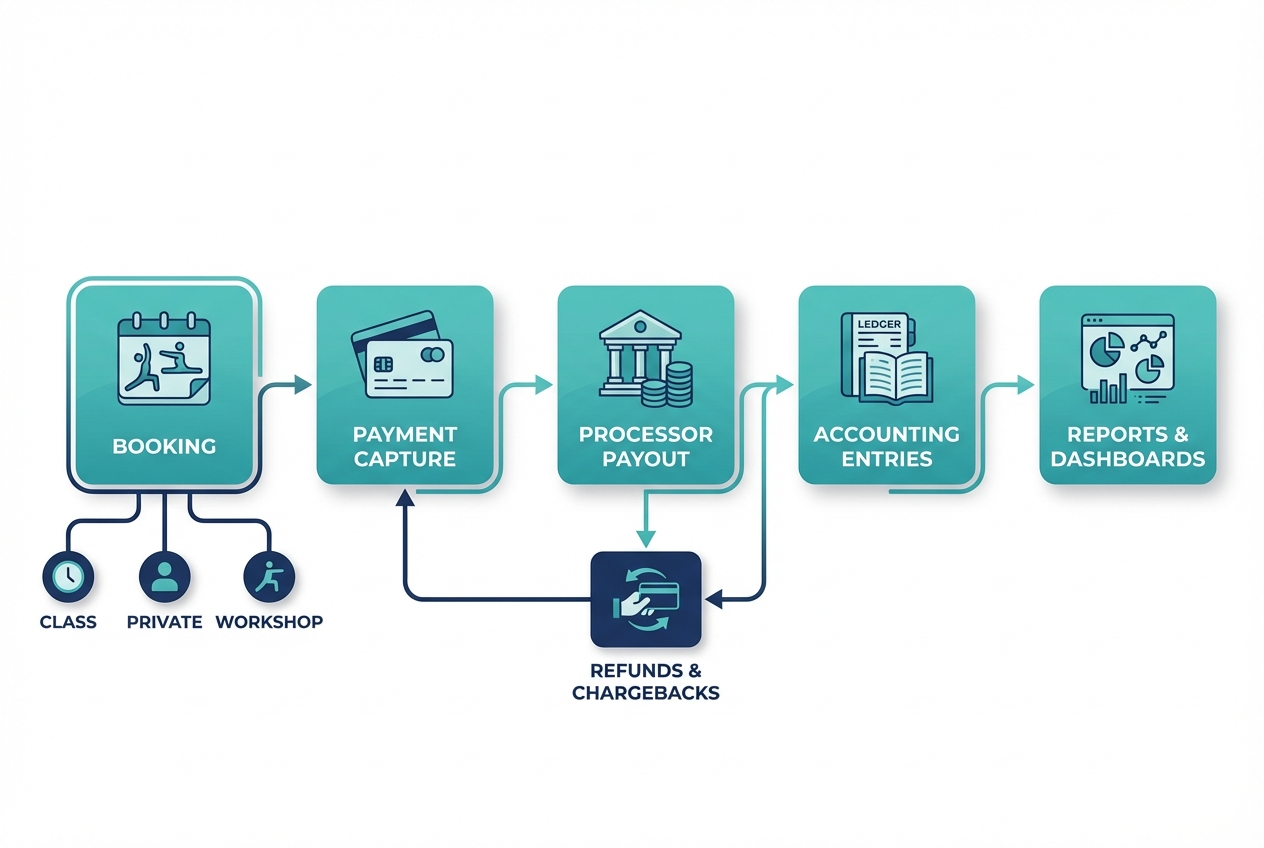
Most studio owners only discover integration problems when month-end hits. Your goal is a clean chain from booking to reconciliation.
A reference flow you can test in any trial
- Booking event is created (class, private, workshop).
- Payment capture happens (membership, pack decrement, drop-in charge, fee charge).
- Processor payout lands in your bank.
- Refunds/chargebacks are recorded and tied back to the original sale.
- Accounting entries match payouts and sales categories.
- Reporting matches what your bank and accounting show.
What “good” payment reconciliation looks like
Ask the vendor to walk through these scenarios live:
- Partial refunds: Can you refund a portion of a pack or a single item within a mixed cart?
- No-show and late-cancel fees: Are they a separate line item you can report on?
- Chargebacks: Do you see dispute status, fees, and outcomes inside the system?
- Multi-location deposits: If you run multiple locations, can you separate deposits and reporting by site?
Integration questions most vendors avoid
- Data export: What formats (CSV, JSON), how often, and can it be automated?
- API and webhooks: Is there an API? Are there webhooks for bookings, payments, membership changes?
- Sandbox/testing: Is there a test mode for payments and messaging?
- Security controls: Single sign-on (SSO), audit logs, and role-based access.
Payments security: reduce your scope on purpose
You want a setup where the payment processor, not your studio app, handles sensitive card data. PCI DSS exists to define security requirements for the payment ecosystem, and it is a strong reason to avoid any setup that stores raw card data in your studio systems (PCI DSS). In practice, this usually means tokenization and processor-hosted payment fields.
Policies and compliance settings most studios overlook
Your policies are not just “rules.” They are software settings that decide whether you leak revenue, frustrate clients, or take on avoidable risk.
Cancellation and no-show fees
- Must decide: Cutoff window per class type
- Reformer group classes may need a different cutoff than privates.
- Must configure: Grace rules and exception handling
- One free late cancel per quarter? Instructor override with notes? Decide now.
- Must test: Waitlist backfill logic
- If a client cancels inside the window, do you automatically offer the spot to the waitlist and enforce a confirmation deadline?
SMS and marketing consent
SMS drives attendance, but only if you do it correctly.
- Operational requirement: Consent capture with proof
- Store consent source, timestamp, and what the client agreed to.
- Policy requirement: Separate transactional vs marketing
- Appointment reminders are different from promotions.
The U.S. Telephone Consumer Protection Act (TCPA) rules around robotexts and consent have tightened, including expectations around consent being tied to a specific seller and clear authorization for marketing messages (Federal Register TCPA rulemaking). If your software cannot track consent and opt-outs cleanly, do not build your growth engine on it.
Memberships and recurring billing
Studios get into trouble when recurring billing is easy to start and hard to stop.
- Require: Clear disclosures before collecting billing info
- Require: Affirmative consent for the recurring program
- Require: Simple cancellation mechanisms
These expectations are explicitly addressed in the Federal Trade Commission’s updated Negative Option Rule requirements for recurring subscription programs (FTC Negative Option Rule). Even if you are not thinking like a regulator, this is a retention play. Clear terms reduce disputes and chargebacks.
Accessibility of booking flows
If your booking flow is not accessible, you lose bookings. It is also a reputational risk.
Use WCAG 2.2 as your baseline checklist for the client portal and checkout flow (WCAG overview). In a trial, test keyboard-only booking and screen zoom at 200%. You will find issues quickly.
Pricing expectations and true cost drivers
The sticker price is rarely the real price. Compare total cost of ownership.
Common cost drivers
- Base subscription: Often tiered by features.
- Staff seats and permissions: Some tools charge per staff login.
- Locations: Multi-location support is usually a higher tier.
- Branded app: Typically an add-on.
- SMS volume: Messaging costs add up if you send reminders and campaigns.
- Marketing modules: Automations and CRM features can be paid add-ons.
- POS hardware: Readers, registers, and receipt printers if you sell retail.
- Payment processing: Often the biggest variable.
- Onboarding and migration: Setup fees, implementation packages, data import.
How to compare processing without getting lost
Keep it practical:
- Ask for effective rate examples: Have the vendor model three real carts you sell (intro offer, membership renewal, private pack).
- Ask about payout timing: Funding speed affects cash flow.
- Ask about dispute fees and handling: Chargeback fees and workflow matter.
- Ask how refunds work: Especially partial refunds and pack adjustments.
A quick pricing worksheet
Write these down before you talk to sales:
- Monthly client visits: ______
- Active clients: ______
- Membership renewals per month: ______
- Private sessions per month: ______
- SMS reminders per month: ______
- Locations: ______
Then compare vendors using the same inputs.
Alternatives and competitors: how the common options differ
This table is not a ranking. It is a map.
| Tool | Pilates capacity booking | Memberships/packs | Marketing automation depth | Multi-location controls | Integration openness (API/webhooks) | Typical studio fit |
|---|---|---|---|---|---|---|
| Mindbody | Strong (varies by setup) | Strong | Strong | Strong | Medium | Established studios, multi-location, broad fitness ops |
| Momence | Medium | Strong | Strong | Medium | Medium | Growth-focused studios that want marketing + community |
| WellnessLiving | Strong | Strong | Medium | Strong | Medium | Studios needing equipment booking + all-in-one ops |
| Mariana Tek | Strong | Strong | Strong | Strong | Strong | Premium boutiques, capacity-based scheduling, HQ governance |
| Walla | Strong | Medium | Medium | Medium | Medium | Pilates-centric scheduling with equipment capacity needs |
| TeamUp | Medium | Strong | Medium | Medium | Medium | Studios that want straightforward management + memberships |
| Vagaro | Light to Medium | Medium | Medium | Medium | Light | Budget-sensitive studios needing broad small-business features |
| Acuity Scheduling | Light | Medium | Light | Light | Medium | Private-heavy studios with simpler needs |
| Arketa | Medium | Strong | Medium | Medium | Medium | Boutique studios prioritizing modern client experience |
If you want to expand the list, use a directory for discovery, then narrow to 2–3 finalists using the scorecard and a real trial.
Information gain: a Pilates-studio requirements scorecard
Use this in every demo. It is designed to prevent “looks good in a sales call” decisions.
Weighted scorecard template
Copy/paste this into a doc and score each item 1–5.
PILATES STUDIO SOFTWARE SCORECARD (1–5)

A) Scheduling + capacity (weight: 25 reformer-heavy / 15 private-heavy)
- Spot/equipment booking works end-to-end (book, reschedule, swap)
- Waitlist auto-fill rules are configurable and predictable
- Workshops/series supported (if needed)

B) Memberships + packs (weight: 20 reformer-heavy / 25 private-heavy)
- Packs, memberships, intro offers match our pricing model
- Freeze/cancel/proration rules are clear and self-serve
- Failed payments retry logic is configurable

C) Payments + reconciliation (weight: 20)
- Refunds (partial + full) are clean
- Chargebacks/disputes are visible and trackable
- Payout reports tie back to sales categories and locations

D) Client experience + accessibility (weight: 10)
- Mobile booking is fast
- Portal is usable with keyboard-only navigation and zoom

E) Staff ops + payroll (weight: 10)
- Subs/time-off flow works
- Payroll export supports our pay model

F) Integrations + data access (weight: 15)
- Self-serve export exists and is complete
- API/webhooks available (or documented alternatives)
- Audit logs and permissions support accountability

RED FLAGS (any one is a blocker)
- No meaningful export or vendor refuses a sample export
- No audit logs or weak permissions
- SMS consent cannot be proven (timestamp/source/opt-out)
- Refunds/chargebacks are manual or opaque
- Payment setup implies storing raw card data in the studio app
10 demo questions
- How does spot/equipment booking behave on reschedule? Good: spot persists or you can force re-selection with rules.
- Show me a waitlist auto-fill flow. Good: clear time windows, confirmation steps, and notifications.
- How do you handle a failed membership renewal? Good: configurable retries, dunning messages, and clean status states.
- Show me a partial refund. Good: line-item control and correct reporting.
- How do chargebacks appear in the system? Good: visible status, linked to the original sale.
- Can I export bookings, clients, and payments today? Good: immediate export access and a sample file.
- Do you have an API or webhooks? Good: docs, event list, and a clear support path.
- What permission levels exist? Good: role-based permissions with admin boundaries.
- How is SMS consent captured and stored? Good: timestamp, source, opt-out tracking.
- What does migration look like for memberships and packages? Good: a defined process with a conversion plan and post-launch checks.
Build vs buy: when a custom stack beats off-the-shelf studio software
Buy off-the-shelf when your workflow is standard: schedule, sell memberships/packs, send reminders, run basic marketing.
Consider building (or adding a custom layer) when your studio has non-standard rules that create weekly friction:
- Custom intro funnels: Multi-step intake, prerequisites, or conversion journeys that do not fit a standard CRM.
- Unique reformer assignment logic: Rules like “client always gets the same reformer unless X” or equipment constraints by injury notes.
- Multi-brand experiences: Different pricing and policies under the same operator.
- Specialized reporting: Utilization and revenue views that your owners and managers actually use.
A practical middle ground is a hybrid approach:
- Keep a core booking platform.
- Build a lightweight internal ops tool for what the booking platform will never prioritize (exception handling dashboard, lead routing, instructor payroll calculator, cancellation fee review queue).
This is where Quantum Byte can be a fit. If you know what you need but cannot find it off-the-shelf, you can use an AI app builder to ship a custom internal tool quickly, starting from templates and then refining the logic with plain-language prompting.
Be honest about tradeoffs. Custom means ownership: integrations need maintenance, data practices need attention, and someone must own the system long-term.
Implementation timeline: a low-risk migration plan
A clean migration is less about “moving data” and more about preserving trust. Clients notice the first failed autopay and the first confusing reminder.
Week-by-week plan
- Week 1: Requirements and policy decisions
- Finalize cancellation/no-show windows, membership terms, and consent language.
- Week 1–2: Data cleanup
- Clean duplicate clients, normalize packages, decide what history you will import.
- Week 2–3: Configuration and roles
- Build your schedule, services, equipment, pricing, permissions.
- Week 3: Payments setup and testing
- Test membership renewals, failed payments, refunds, and fee charges.
- Week 3–4: Waivers and e-sign strategy
- Decide whether to re-collect waivers or import waiver status.
- Week 4: Staff training and a parallel run
- Run real bookings in the new system while the old system remains your source of truth.
- Week 5: Cutover
- Freeze new purchases in the old system, move clients, go live.
- Week 5–6: Post-launch fixes
- Reconcile payouts, handle edge cases, refine templates and reminders.
Launch readiness checklist
- Bookings: New client booking, returning client booking, reschedule, cancel.
- Capacity: Spot assignment, waitlist autofill, workshop purchase.
- Money: Membership renewal, pack purchase, partial refund, fee charge.
- Reconciliation: Payout report matches bank deposits.
- Messaging: Reminder timing, opt-out behavior, staff notifications.
Add automated reminders at go-live. Reminders are one of the simplest ways to reduce non-attendance, and evidence across studies shows SMS and phone reminders can improve attendance outcomes (systematic review).
Key takeaways: how to choose with confidence
- Start with your studio type and class mix, not brand popularity.
- Use a checklist that includes Pilates-specific capacity and membership realities.
- Pressure-test the integration chain from booking to payout to accounting.
- Treat policy settings as software requirements, especially SMS consent and cancellation flows.
- Compare total cost, not just monthly subscription.
- Pick 2–3 finalists and run a 7–14 day trial using real staff and real scenarios (refunds, waitlists, failed payments).
Start building the pieces you can’t buy off-the-shelf
If you are close to choosing a core pilates studio software platform but you already see gaps (custom intro funnel, exception dashboards, payroll calculators, or unique capacity rules), build the missing layer instead of settling.
Start building with Quantum Byte.
Quantum Byte is founder-friendly, comes with plug-and-play templates you can customize, and helps you move fast without locking you into a rigid system. It is the same speed-to-working-app approach that let comedian Aziz Ansari create an app for his movie “Good Fortune” within minutes, without prior app-building experience.