
Pilates studio software pricing is usually not “just the monthly subscription” — the real number you pay is your software plan plus payment processing, plus usage add-ons (SMS, email), plus seats/locations, plus any setup or migration fees. If you budget using only the headline price, you will almost always underestimate your all-in monthly cost.
Quick verdict: what Pilates studios actually pay
Think in bands based on operational complexity, not just “how many clients you have.” Here’s the quickest way to sanity-check your budget before you start demos:
- Starter / solo studio (simple scheduling): You’re mostly booking privates or a small set of weekly classes, with basic memberships, minimal automations, and no branded app. Your deciding factor is usually whether you get the booking rules and policies you need without paying for a full “all-in-one.”
- Growing studio (more automation + staff controls): You have multiple instructors, a mix of privates and group reformer classes, waitlists, intro offers, freezes, and you need tighter permissions, reporting, and marketing tools.
- Multi-location or “ops-heavy” studio (enterprise patterns): You have multiple locations or sub-brands, cross-location packs, centralized reporting, more complex staff compensation, and higher expectations for support and reliability.
Two realities to hold in your head at once:
- The base subscription can be very low (even a flat monthly fee) or tiered “all-in-one.” That spread is real in the market.
- At higher revenue, payments fees can exceed your software fee. Credit card processing fees commonly average 1.5%–3% of the transaction amount, which is why payments often becomes your biggest variable cost once you’re moving meaningful volume, as explained in a Federal Reserve FEDS Notes breakdown.
Feature checklist to map pricing to what you need
Use this as a pre-demo requirements list. The goal is to avoid overbuying on day one and also avoid underbuying and getting hit with add-ons later.
- Scheduling for group + private sessions: If you run both, ask if the platform supports different booking rules per service type (e.g., “privates can be recurring,” “group classes require preregistration,” “late cancel triggers a fee automatically”).
- Reformer and equipment capacity: You need capacity-aware scheduling. For Pilates, this is not a nice-to-have.
- Pricing implication: Advanced resource scheduling (equipment allocation, per-class capacity rules, complex waitlist logic) is often reserved for higher tiers.
- Memberships and class packs: Unlimited, limited, hybrid packs, intro offers, expirations, freezes, and family accounts.
- Pricing implication: “Membership engine” depth is a common tier separator.
- Waitlists and cancellation automation: Waitlist rules, auto-promotion windows, late-cancel/no-show penalties, and “credit back” policies.
- Pricing implication: Basic waitlists are common; policy automation is frequently gated.
- Staff permissions and audit trail: Front desk vs instructor vs owner permissions, plus visibility into who changed what.
- Pricing implication: Role-based access and logs often appear in mid to upper tiers.
- Instructor management (contractor-friendly): Availability, substitution workflows, and exports for payouts.
- Pricing implication: You may pay by seat, or you may need a higher tier for advanced permissions.
- Client CRM notes and pipeline: Intake, goals, injury notes, session notes, tags/segments.
- Pricing implication: Deeper CRM features can live behind “marketing” modules.
- Marketing automations: Win-back campaigns, intro offer sequences, no-show follow-ups.
- Pricing implication: Email may be included; SMS is often usage-based.
- POS and retail: Grip socks, props, gift cards, split payments.
- Pricing implication: Retail, inventory, and gift cards can be add-ons.
- Reporting: Cohort retention, revenue by service, instructor performance.
- Pricing implication: Advanced reporting is a classic upsell.
- Branded client app: Push notifications, saved favorites, premium client experience.
- Pricing implication: Branded apps are commonly an add-on or enterprise tier.
- Multi-location: Shared client profiles, cross-location packs, centralized reporting.
- Pricing implication: Multi-location is often a tier trigger.
How studio software pricing is structured
Most Pilates studio platforms follow common Software as a Service (SaaS) patterns. If you can decode the pricing structure quickly, you’ll spot the “gotchas” before you sign.
The core models to recognize:
- Tiered plans: Feature bundles by tier (starter, pro, enterprise). This is one of the most common approaches described in Maxio’s overview of SaaS pricing models.
- What to ask: “Which tier includes waitlist rules, memberships, and staff permissions?”
- Per-user (per-seat) pricing: You pay per staff login, instructor, or admin account, another model Maxio covers in the same guide.
- What to ask: “Does each instructor need a paid login, or can they be ‘free staff’ with limited access?”
- Usage-based add-ons: SMS volume, email volume, transaction count, stored client profiles.
- What to ask: “How is SMS billed, and can you cap it?”
- Add-on modules: Branded app, advanced marketing, websites, premium reporting, premium support.
- What to ask: “What modules are optional now but become necessary once we grow?”
Common surprise fee buckets to pin down in writing:
- Onboarding/setup and data migration
- Extra locations
- Branded or white-label apps
- Premium support tiers
- Certain integrations (accounting, email providers, advanced analytics)
- Payment “connection” or gateway fees (sometimes separate from the % processing fee)
Quote hygiene rule: ask for a written 12-month estimate that includes your best guess for variable fees (payments, SMS) and any one-time fees.
The all-in cost model
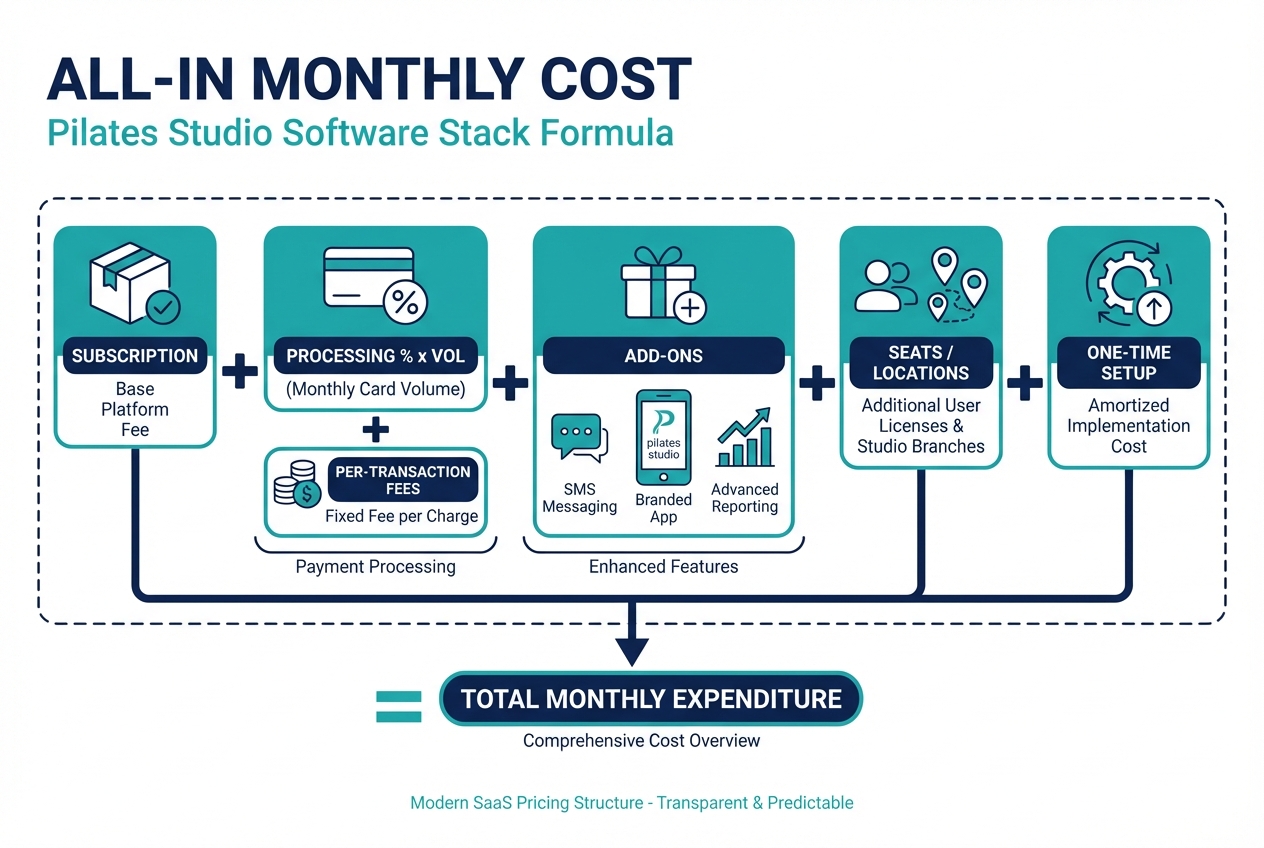
Here’s the budgeting equation that makes Pilates studio software pricing comparable across vendors:
Monthly total cost =
- Subscription
- (Processing % × monthly card volume)
- Per-transaction fees (if any)
- Add-ons (SMS, email, branded app, advanced marketing/reporting)
- Seats/locations
- One-time setup and migration amortized over 12 months
Scenario mini-models
-
Scenario A: New studio doing $8,000/month in card volume
- If processing averages 1.5%–3%, you’re looking at $120–$240/month in processing costs on $8,000 volume, before you count any fixed transaction fees. That 1.5%–3% range is cited in the Federal Reserve note.
- Translation: payments can be a meaningful line item even when your software is “cheap.”
-
Scenario B: Growing studio doing $40,000/month
- At 1.5%–3%, that’s $600–$1,200/month in processing costs.
- Translation: you should negotiate, compare effective rates, and avoid optimizing purely for the lowest software subscription.
-
Scenario C: High-volume studio doing $120,000/month
- At 1.5%–3%, that’s $1,800–$3,600/month.
- Translation: payment economics can dominate your total “software + payments” stack. This is why owners who only compare base plan pricing get surprised.
The demo calculator
Bring these fields to every demo so you can get an all-in quote:
- Monthly processed revenue: (card + ACH)
- Transaction count: average number of payments per month
- Average ticket size: (helps estimate per-transaction fees)
- # of paid staff logins needed: owners, front desk, instructors
- # of locations and whether clients can book across them
- SMS volume: reminders, waitlist notifications, campaigns
- Branded app requirement: yes/no, and why
- Migration complexity: memberships, packs, client credits, waivers
Pilates-specific cost drivers most pricing pages ignore
Pilates operations have a few “silent complexity” drivers that push you into higher tiers or add-ons faster than generic fitness advice suggests.
-
Reformer and equipment capacity: If you need equipment-specific booking (e.g., reformer, chair, tower) and you want the system to prevent overbooking, you’ll often need more advanced scheduling rules.
- Likely pricing impact: tier uplift for resource scheduling, advanced waitlists, and reporting.
-
Private vs group mix: Privates add recurring appointment patterns, instructor availability constraints, and more complex commission logic.
- Likely pricing impact: add-on reporting, staff permissions, or a per-seat cost exposure if every instructor needs full access.
-
Membership and class pack complexity: Intro offers, rollover rules, expiration and freezing, family accounts, and “hybrid” products are where basic tools break.
- Likely pricing impact: membership engine depth, automated billing, and policy automation in higher tiers.
-
Staff model (employee vs contractor): Contractors usually require tighter permissions, different payout exports, and an audit trail.
- Likely pricing impact: per-seat pricing and admin features.
-
Multi-location and sub-brands: Centralized reporting, shared client profiles, and cross-location packs quickly become “enterprise patterns.”
- Likely pricing impact: location-based pricing, enterprise tier, and implementation support.
-
Branded client app: Worth it when push notifications and a premium client experience materially improve retention, and when your brand is already driving repeat bookings.
- Likely pricing impact: a separate add-on fee plus ongoing maintenance expectations.
If you’re unsure: prioritize workflow correctness over fancy marketing features. A clean booking experience and reliable policy automation usually beats a bloated toolset.
Payments fees, compliance, and why they matter to your margins
Payments are not a footnote. They are a core part of the total cost.
The Federal Reserve summarizes card fee economics and notes that credit card processing fees commonly average 1.5%–3% of the transaction amount, with fees flowing through components like interchange, network assessment fees, and acquirer/processor/gateway costs in a typical card transaction flow (Federal Reserve FEDS Notes).
Visa adds an important clarification: interchange reimbursement fees exist within the system, and merchants usually pay a negotiated merchant discount rate (MDR) to their financial institution rather than paying “interchange” as a standalone line item (Visa Small Business).
Practical rule: compare platforms using your effective rate on your real mix.
- If you run mostly memberships on cards, your mix may differ from a studio that sells larger private-session packages.
- Ignore “as low as” language and request a written example using your average ticket size and monthly volume.
Compliance matters, too. If your studio stores, processes, or transmits cardholder data, you’re in the Payment Card Industry Data Security Standard (PCI DSS) universe. The PCI Security Standards Council explains merchant responsibilities and the fact that many small merchants validate compliance using Self-Assessment Questionnaires (SAQs), depending on how payments are handled and what your acquirer requires.
Payment questions to ask in every demo:
- Effective rate: What would our effective rate be on our average ticket size and monthly volume?
- Payout timing: Daily, weekly, or net terms?
- Chargebacks: Who handles dispute workflows, and what are the fees?
- Saved cards: How are cards vaulted, and who is responsible for PCI scope?
- Refunds and partial refunds: How does it work operationally?
- ACH/pay-by-bank: Is it offered, and how are fees structured?
Implementation costs and disruption minimization
Implementation is where “cheap” becomes expensive if you lose revenue during a messy switch.
Capterra reports that two-thirds of software buyers experience implementation disruptions, purchase regret, or both, and that 89% of buyers who regret their purchase experienced implementation disruptions (Capterra 2026 Software Buying Trends Report). For a studio, disruption can look like missed bookings, confused clients, failed autopays, or staff reverting to text messages and spreadsheets.
Implementation tasks that drive time and cost:
- Data migration: clients, passes, memberships, credits, waivers
- Policy setup: late cancel/no-show rules, waitlist policies, intro offers
- Staff onboarding: roles, permissions, instructor availability
- Payments setup: processor approval, payout settings, saved cards
- Client comms: email templates, SMS reminders, “what’s changing” messaging
- Website embed: booking widget styling and flow testing
A simple rollout timeline you can adapt:
- Week 0–1: Configure services, schedule types (private vs group), basic policies
- Week 2: Import clients and memberships, set up waivers and automations
- Week 3: Train staff, run internal testing, fix edge cases
- Week 4: Soft launch with a subset of clients, then full cutover
Disruption prevention best practices:
- Parallel run: keep the old system live for reference during the first weeks.
- Beta cohort: move a small, friendly client segment first.
- Blackout planning: avoid switching during promo pushes or challenge weeks.
- Contingency comms: prewrite “booking link changed” messages and front desk scripts.
Alternatives and competitors: how to shortlist without getting stuck in directories
Directories and review sites are useful for discovery, but they often fail at the exact question you care about: what you will pay all-in.
Use directories for:
- Finding the universe of options
- Validating review volume and common complaints
- Identifying feature categories you might miss
Do not use directories as your pricing source of truth. Many listings funnel you into “Get Price,” which makes it hard to compare.
A simple 2-step shortlist method:
- Pick 3–5 tools that match your Pilates workflow (equipment capacity, waitlists, privates + groups, memberships).
- Request all-in quotes using the cost model (subscription + payments + add-ons + seats/locations + amortized setup).
Comparison table blueprint (fill this in as you research):
| Tool | Pricing model type | Base plan transparency | Common add-on categories | Payments option | Best for |
|---|---|---|---|---|---|
| Option A | Tiered / per-seat / hybrid | Clear / partially clear / opaque | SMS, branded app, extra locations, premium support | Integrated / bring-your-own | Solo / growing / multi-location |
| Option B | Tiered / per-seat / hybrid | Clear / partially clear / opaque | SMS, marketing, reporting, onboarding | Integrated / bring-your-own | Solo / growing / multi-location |
| Option C | Tiered / per-seat / hybrid | Clear / partially clear / opaque | Branded app, websites, advanced permissions | Integrated / bring-your-own | Solo / growing / multi-location |
One more rule: vendor-run “best software” lists can be biased. Your defense is a written quote plus clear cancellation and renewal terms.
Build vs buy: when custom software is cheaper than another monthly subscription
Buying is usually the fastest path. Building becomes attractive when the pricing model and workflow constraints keep punishing you as you grow.
Signals you should consider building:
- You need unique booking rules (equipment allocation, complex waitlists, multi-service constraints).
- You run multiple brands or locations with shared clients and cross-location packs.
- You are getting crushed by per-seat or per-location pricing creep.
- You need custom internal workflows beyond scheduling (lead qualification, instructor onboarding, multi-step client intake).
Quantum Byte is a fit when you want the speed of templates but you still need customization. You can start from booking and scheduling building blocks, then adapt policies and workflows by describing what you want in plain English. If you want to write prompts that reliably produce buildable workflows, use these AI app builder prompts as a starting point. A public example of speed: Tech in Asia reported that a screening app for Aziz Ansari’s film “Good Fortune” ran on Quantum Byte and could be prototyped in about 15 minutes (Tech in Asia).
Mini decision matrix:
- Buy off-the-shelf if: your workflow is standard, you want proven defaults, and you are comfortable with the vendor’s pricing model long-term.
- Build if: you need differentiated client experience and operations, or you want to avoid paying forever for features you do not use while still missing the ones you actually need.
Implementation timeline for each path
Time-to-value depends less on the vendor and more on how disciplined you are about scoping.
Buy path (typical sequence):
- Demo and requirements confirmation
- Written quote (all-in estimate)
- Configuration (services, policies, staff roles)
- Migration (clients, memberships, waivers)
- Payments setup and testing
- Staff training
- Go-live and client comms
Build path (typical sequence):
- Write requirements as workflows (not features)
- Choose a starting template or MVP scope
- Configure booking rules and data model
- Connect payments and notifications
- Internal testing (edge cases)
- Launch to a small cohort
- Expand to full studio offerings
Low-risk rollout plan for either approach:
- Start with private sessions only.
- Add group classes and waitlists.
- Then add memberships and packs once the booking flow is stable.
What to do next
If you want to make a decision quickly, do this in order:
- Write your requirements using the feature checklist above.
- Calculate your all-in monthly cost using the cost model.
- Shortlist 3–5 tools and force an apples-to-apples written quote.
- Choose based on workflow fit first, then optimize payments and add-ons.
That sequence prevents the most common mistake: picking a platform because the base subscription looked cheap.
Frequently Asked Questions
Is there free Pilates studio software pricing?
Some tools offer a free plan or a free trial, but “free” rarely stays free once you need memberships, staff permissions, SMS reminders, or integrated payments. Even if the software subscription is $0, you will still pay payment processing fees if you take cards. Use the all-in cost model to compare options honestly.
Do I need a Pilates studio app?
Only if it materially improves retention or reduces front desk workload. A branded app can help when you want push notifications, a premium client experience, and easier rebooking. If most clients already book from mobile web and you do not need push, a clean mobile booking page is often enough.
What is the best studio booking software?
The best studio booking software is the one that matches your workflow without forcing you into constant add-ons. For Pilates, prioritize equipment-aware capacity, private and group scheduling rules, memberships and freezes, and reliable staff permissions. Then compare total cost, including payments and SMS.
What should I look for in Pilates booking software specifically?
Look for booking rules that reflect how Pilates studios actually operate: reformer capacity limits, waitlist automation, late cancel and no-show policies, packages for privates, memberships with freezes, and clean instructor availability management. Those needs are what usually push you into higher tiers, so validate them before you negotiate price.
Start building: get a pricing plan that matches your studio
If you want to stop paying for bloated plans and start with a workflow that actually matches your studio, prototype your booking, policies, and client experience in Quantum Byte.
Start building with Quantum Byte.
What you get is practical, not theoretical:
- Founder-friendly setup: You can move fast without hiring a developer.
- Plug-and-play templates: Start from proven building blocks (booking, scheduling, landing pages), then tailor them.
- Speed with customization: Describe your rules in plain English and iterate until the workflow matches how your studio runs.
Your next step: use the cost model worksheet above, then either (1) request apples-to-apples all-in quotes from vendors, or (2) build a lightweight MVP in Quantum Byte and expand it as you grow.