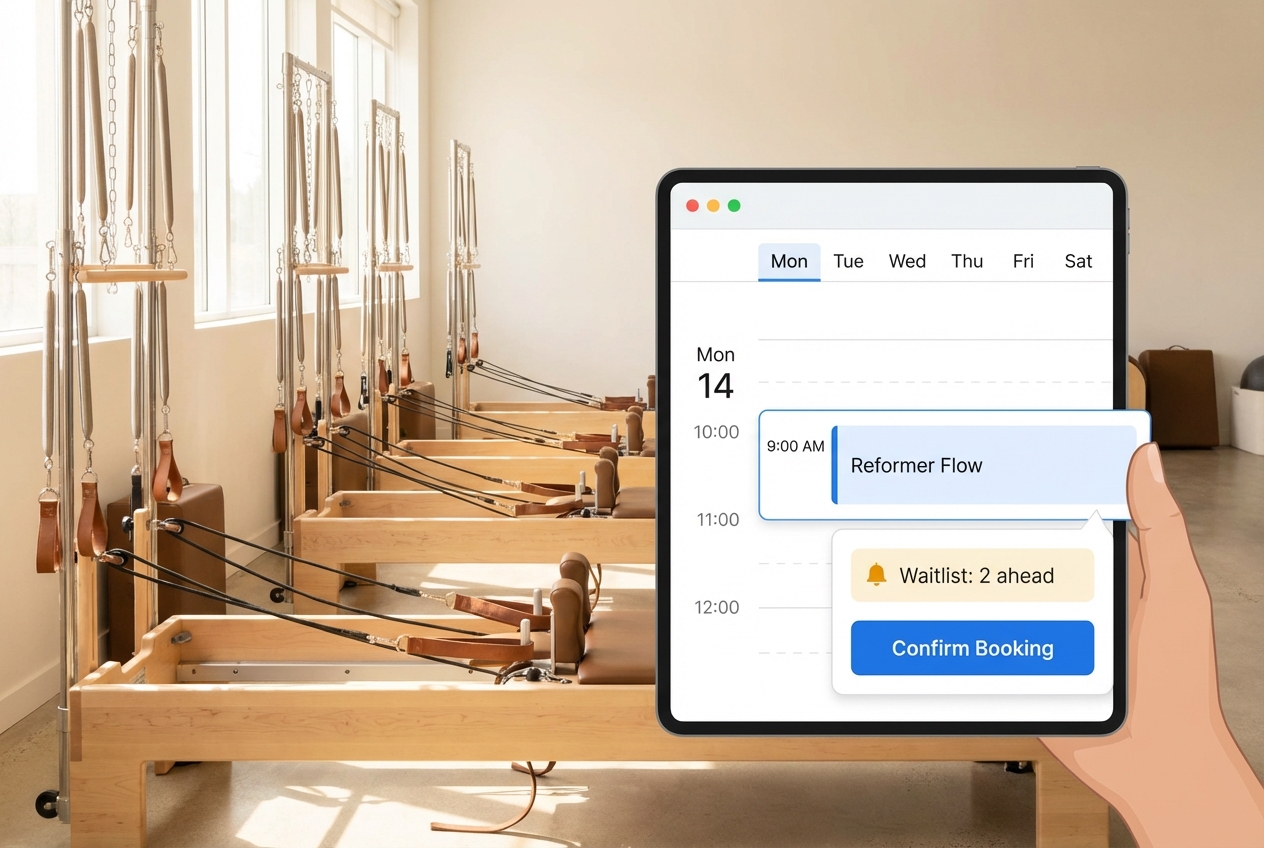
A pilates studio waitlist system that actually increases fill rate has three non-negotiables: clear eligibility (so the waitlist is “real”), a confirm-or-expire offer flow (to prevent silent pulls), and cutoffs that match your staffing reality (so you are not texting people at 9:52 a.m. for a 10:00 class). This guide gives you a ruleset you can copy, the message templates to run it, and the weekly metrics to tighten it without annoying members.
Quick verdict: the simplest ruleset that increases fill rate
If you want a default configuration you can implement this week, start here.
- Cutoff time: Automatically offer waitlist spots until 12 hours before class. Inside 12 hours, switch to assisted offers only (staff-initiated) unless you have strong automation and strict confirmation rules.
- Confirmation window: Every offer must be confirm-or-decline with an expiry of 30 minutes. If they do not confirm, the system offers the spot to the next person.
- Eligibility gating: To join a waitlist, a member must have a valid class credit/package or card-on-file authorization (your choice). No “free holds.”
- One booking per time slot: No overlapping reservations. If a member tries to join a waitlist that overlaps an existing booking, the system blocks it or forces them to cancel the other booking first.
- Notification channels: Send offers by SMS + email when possible. SMS gets faster responses, but you must do consent correctly.
- Messaging cadence: Offer (immediate) → reminder at 15 minutes (if not confirmed) → confirmation receipt (when confirmed) → class-day reminder.
- Penalties: Once someone confirms from the waitlist, they inherit your standard cancellation deadline and penalties. Keep penalties strict only when your offer flow is reliable.
- Staff override: Allow staff to override in edge cases, but require a reason code (injury, travel, first-timer, service recovery) so fairness stays defensible.
Best for:
- Single-location boutique studio: The rules above with a 12-hour cutoff is the lowest-chaos setup.
- Multi-location studio: Keep the same offer/expiry mechanics, but add location-aware logic (do not offer a spot at the wrong studio) and stronger audit trails.
- High-demand reformer schedule: Use shorter confirmation windows (15 to 30 minutes) and consider deposits or credit-forfeit rules to prevent last-minute ghosting.
This article is operator-focused (how you design the system), but there is a member-facing mini-policy you can paste into your website in the implementation section.
What a Pilates studio waitlist system needs to control
Most “waitlist features” fail in Pilates studios because they only manage a queue. You also need rules around payment, timing, confirmations, and accountability.
A complete waitlist system should control:
- Capacity: How many spots exist (and whether certain spots are reserved for intro sessions, teacher training, or comps).
- Queue: Who is waiting, in what order, and for which class instance.
- Eligibility: Who can join (credits, membership status, card on file, account standing).
- Prioritization: How the system decides who gets the next offer.
- Offer → accept flow: Whether the system “silently adds” someone or requires a confirm step.
- Cutoff rules: How late the system can offer spots, and whether auto-offers stop inside a window.
- Notifications: Which channels, how many messages, and what happens if someone opted out.
- Payment and penalties: Fees, credit forfeits, deposits, and how they are enforced.
- Audit log: A defensible record of offers sent, confirmations, expiries, and staff overrides.
The baseline flow is simple: a class fills, clients join a queue, a spot opens, the next eligible person is offered or added, and notifications go out. The difference between “simple” and “chaos” is how well your rules handle the failure modes:
- Silent pulls: Clients get added without clearly accepting.
- Last-minute no-shows: You filled the spot on paper but not in the room.
- Double-booking: People join multiple waitlists for the same time.
- Manual texting: Staff becomes a human notification system.
- Fairness disputes: “Why was I skipped?” becomes a weekly argument.
The rules engine blueprint
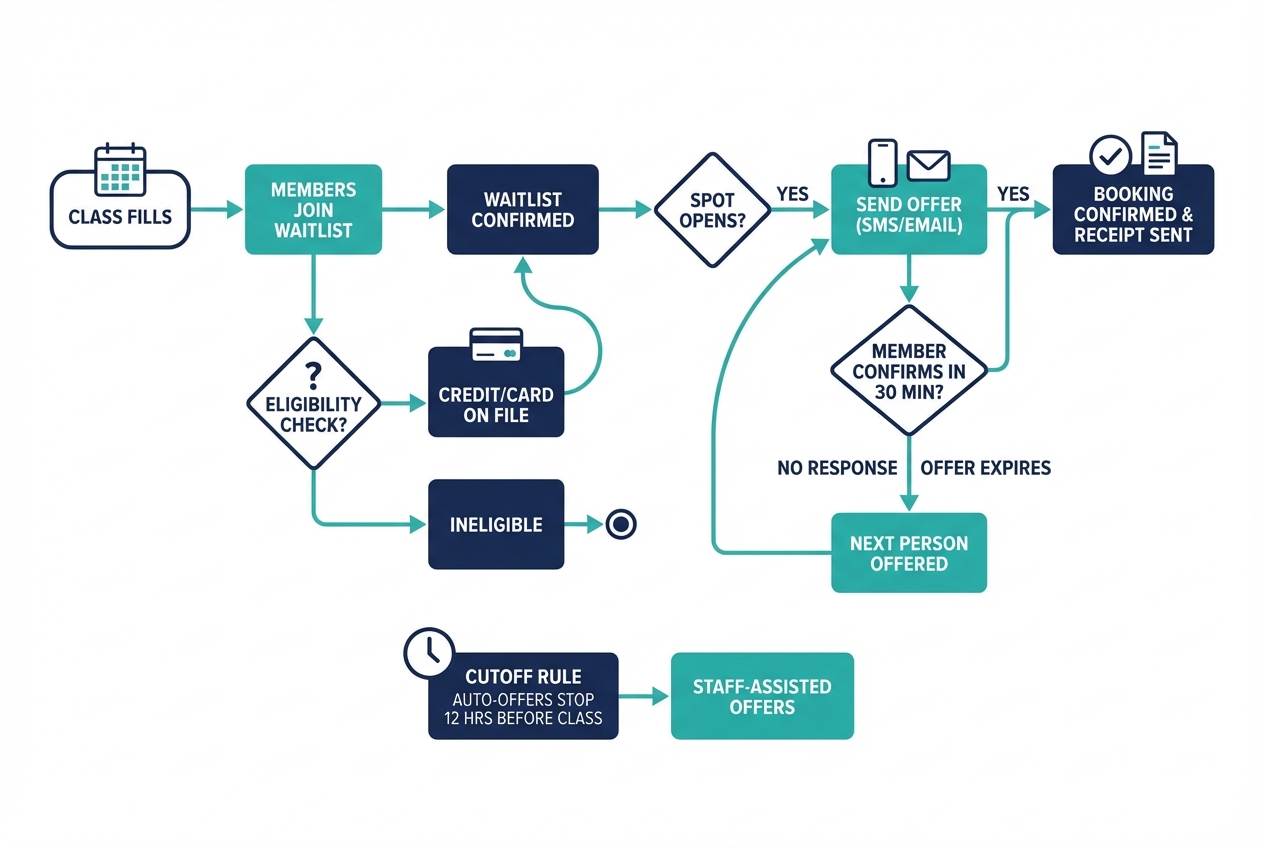
Use this as your studio’s internal configuration document. If your software cannot support these rules, that is a tooling problem, not a policy problem.
| Rule category | Recommended default | Why it works | Edge cases to decide now |
|---|---|---|---|
| Eligibility | Must have credit/package or valid card-on-file authorization | Prevents “free holds” and reduces non-serious waitlisting | New clients, comped sessions, staff/instructors |
| Prioritization | First-come, first-served among eligible clients | Easiest to explain, perceived as fair | Membership priority vs drop-in priority |
| Confirmation window | Offer expires in 30 minutes if not confirmed | Prevents silent pulls; keeps the queue moving | Overnight offers; clients in meetings |
| Cutoff time | Auto-offers stop 12 hours before class; assisted offers inside 12 hours | Stops last-minute chaos while preserving fill | Early-morning classes; front desk coverage |
| Cancellation penalties | After confirming, client inherits standard cancellation deadline and penalties | Keeps rules consistent and enforceable | Medical exceptions; weather events |
| Messaging cadence | Offer → reminder before expiry → confirmation receipt → class-day reminder | Increases response rate and reduces forgetfulness | SMS opt-out, email deliverability |
| Payments/credits | Credit applied at confirmation; optional deposit for peak classes | Makes the commitment real | Membership “unlimited” accounting |
| Staff override | Allow override with reason code + auto-receipt to client | Humane exceptions without favoritism | VIP clients, service recovery |
| Audit/receipts | Log: spot opened, offer sent, accept/decline, expiry, staff actions | Ends “he said/she said” disputes | Data retention period |
What to change if…
| If you see this problem | Change this lever first | Expected outcome |
|---|---|---|
| Chronic last-minute cancellations | Stop auto-offers inside 12 hours; require confirmation always | Fewer late additions and fewer angry clients |
| High no-show on waitlist conversions | Shorten confirmation window; add class-day reminder; add deposit/credit forfeit for peak slots | More serious confirmations and higher attendance |
| Low waitlist conversion (few offers accepted) | Send offers via SMS (with consent); include expiry time; extend expiry to 60 minutes for daytime classes | More people see and act on offers |
| Staff overwhelmed | Tighten eligibility; reduce message volume; add clearer “why skipped” receipts | Less manual triage and fewer disputes |
Eligibility rules that prevent ‘free holds’ and reduce no-shows
Eligibility is your first filter. It is also your biggest lever for reducing admin work.
Recommended eligibility defaults:
- Credit required (simple model): Clients can only join the waitlist if they already have a class credit or active package.
- Card-on-file allowed (growth model): Clients can join without a credit, but must have a valid payment method on file, and agree that the credit or drop-in will be charged when they confirm.
If you take deposits or store card-on-file data in any custom build, do it safely.
- Use tokenization, not raw card storage: The PCI Security Standards Council defines tokenization as replacing a card’s Primary Account Number (PAN) with a surrogate “token,” and notes it can reduce the amount of cardholder data in your environment and simplify PCI DSS scope when properly implemented via a tokenization solution from your payment processor (for example Stripe) (PCI SSC tokenization guidelines).
- Never store CVV: PCI guidance is explicit that “sensitive authentication data must never be stored after authorization,” including the 3 to 4 digit card validation code (CVV) (PCI SSC data storage do’s and don’ts).
Operationally, add one more rule that prevents a lot of downstream mess:
- One active booking per time slot: A member can hold only one spot (booked or waitlisted) per overlapping time window. If they try to waitlist a 9:00 a.m. class while booked at 9:00 a.m. elsewhere, the system blocks it or asks them to choose.
Keep policies humane without turning them into Swiss cheese:
- Staff exception workflow: Allow staff to bypass eligibility only with a tagged reason and a one-time note. Examples: injury recovery, travel delay, first-time client you do not want to lose, or service recovery after a schedule change.
Prioritization: first-come-first-served plus fairness controls
Default queue logic should be boring. Boring is good because it is explainable.
Start with:
- First-come, first-served among eligible members
Then layer fairness controls that protect your community when demand is high:
- Max pulls per week: Cap how many waitlist confirmations a single member can receive in peak hours. This spreads access without needing a complex priority algorithm.
- Deprioritize repeat offenders (optional): If someone has a pattern of late cancels or no-shows, you can temporarily move them lower in the queue for peak classes.
- New member boost (use sparingly): For intro series or foundations classes, consider prioritizing new members once. Do not do this silently. Tell members.
Memberships vs drop-ins is where many studios get accused of favoritism. Choose one and write it down:
- Option A (revenue protection): Members get equal priority, but drop-ins must prepay to confirm.
- Option B (member-first): Members get priority in peak hours because they are your retention engine.
- Option C (pure fairness): Everyone is equal. The only priority is join time.
Whatever you choose, require an audit trail.
- Audit trail requirement: Staff should be able to see exactly why someone was skipped: no credit, no consent for SMS, did not confirm in time, had overlapping booking, or hit their weekly cap.
Confirmation windows and cutoff times
Cutoffs and confirmations are the difference between a waitlist that fills classes and a waitlist that creates angry emails.
Three patterns that work in real Pilates operations:
-
12-hour auto-offers, assisted inside 12 hours
- Use when: You have limited front desk coverage, early-morning classes, or a lot of clients who cannot pivot last minute.
- Outcome: Higher predictability, fewer same-day disputes.
-
3-hour auto-offers with strict confirmation
- Use when: Your members are highly flexible (downtown professionals, walkable studio), and you regularly get late cancellations.
- Outcome: Better last-minute fill, but you must enforce confirmations and penalties.
-
No auto-pulls inside X hours (X = 6 or 12), but allow staff-triggered offers
- Use when: Your system cannot do true confirm-or-expire offers, or you are protecting instructor workload.
- Outcome: You avoid silent pulls and last-minute confusion.
Two rules matter more than the exact cutoff number:
- Offers must expire: Give each offer a 15 to 60 minute confirmation window. If they do not confirm, the system immediately moves on.
- No silent pulls: Never “auto-add” someone and assume they saw it. That is how you get empty reformers and furious clients.
Staffing constraints should set your cutoff, not another studio’s Instagram policy.
- If you have front desk coverage, you can run tighter cutoffs because someone can handle exceptions.
- If you are instructor-managed, you need fewer last-minute changes. Your instructors should not be negotiating attendance via text.
Notification cadence that actually gets responses
Your messages are part of the system. If they are vague, late, or missing the right details, people will not respond.
A practical cadence for waitlist offers:
- Offer message (immediate): “A spot opened. Confirm by X:XX.”
- Expiry reminder (15 minutes before expiry): Only if they have not responded.
- Confirmation receipt (immediate once confirmed): Includes cancellation deadline.
- Class-day reminder: A short reminder the day of class.
Reminders are not just a nice-to-have. In healthcare settings, automated reminders are associated with lower non-attendance. A systematic review found pooled estimates where automated reminders reduced non-attendance by about 29% of the baseline non-attendance rate (BMC Health Services Research systematic review). Another randomized trial reported a significantly lower no-show rate when text reminders were added (23.5% vs 38.1% in the control group) (Journal of Medical Internet Research trial). Your studio is not a clinic, but the operational lesson transfers cleanly: timely prompts plus a clear call to action improves follow-through.
Every message should include:
- Class name, date/time, and location
- Confirm/decline CTA (or a link/button)
- Expiry time for the offer
- Cancellation deadline once confirmed
- A way to reach you for exceptions
Copy-paste message templates
- Waitlist joined confirmation
- Subject/first line: You are on the waitlist for {ClassName}
- Body: You have been added to the waitlist for {ClassName} on {Date} at {Time}. If a spot opens, we will send you an offer to confirm. To keep waitlists fair, please do not join overlapping classes.
- Spot available offer
- SMS/email: A spot opened for {ClassName} on {Date} at {Time} ({Location}). Reply YES to confirm or NO to decline. Offer expires at {ExpiryTime}.
- Expiry reminder
- SMS/email: Reminder: your waitlist offer for {ClassName} expires at {ExpiryTime}. Reply YES to take it.
- Confirmed reminder
- SMS/email: You are confirmed for {ClassName} on {Date} at {Time} ({Location}). Cancellation deadline: {CancelDeadline}. We cannot wait to see you.
- Skipped due to no credit/payment issue
- SMS/email: We tried to offer you a spot for {ClassName}, but your account needs a class credit or payment method on file. Update your account and rejoin the waitlist if you still want the spot.
Compliance basics for SMS waitlist texts
If you automate texting, treat consent as product functionality, not legal fine print.
In the US, the Telephone Consumer Protection Act (TCPA) and FCC rules affect automated calls and texts. The FCC has also codified that National Do-Not-Call protections apply to text messages (FCC DA-24-910A1).
Practical rules for studios:
- Get explicit opt-in for texts: Use a checkbox during sign-up or in your booking portal (do not bundle it invisibly into a generic terms screen).
- Log consent: Store timestamp, source (web, in-studio, form), phone number, and what they agreed to receive.
- Include opt-out language: Add “Reply STOP to opt out, HELP for help” to your first message and periodically thereafter.
- Honor revocation quickly: The FCC has proposed codifying that consumers can revoke consent through any reasonable means and that requests must be honored within a reasonable time not to exceed 24 hours (Federal Register TCPA consent proposal). Build your system so STOP suppresses future texts fast.
- Separate transactional from marketing: Waitlist offers are transactional. Promotions are marketing. Do not mix them in the same thread unless your consent language clearly covers it.
Vendor or custom-build checklist:
- Consent logs: Can you export them?
- Suppression list: Do STOP requests immediately block future sends?
- Frequency limits: Can you cap messages per day per member?
- Audit view: Can staff see why someone did not receive an SMS?
Penalties, late cancels, and deposits: make them enforceable
Penalties work when they are consistent, predictable, and tied to actions the member controlled.
Three models that studios can enforce cleanly:
-
Fee model:
- Rule: Late cancel or no-show triggers a flat fee.
- Best for: Drop-in heavy studios.
- Watch out: Members will argue fairness if you silently pulled them in.
-
Credit forfeit model:
- Rule: Late cancel or no-show forfeits the class credit.
- Best for: Package-driven studios.
- Watch out: Requires clear receipts and deadlines.
-
Deposit model (peak classes):
- Rule: A small deposit is required to confirm from the waitlist; it is applied to the class if attended.
- Best for: Peak reformer slots with chronic churn.
- Watch out: Do not store card data yourself. Use processor tokenization.
Tie penalties to your cutoff discipline:
- Inside your reliable window: You can be stricter because members had a clear chance to confirm.
- Outside your reliable window: Be gentler or add courtesy forgiveness, because timing may be the problem, not intent.
Make waitlist conversions explicit:
- Rule: “Once you confirm from the waitlist, you are treated like any other booking and subject to the same cancellation deadline.”
Add a fairness-safe override:
- One courtesy per X months: Track it in the system. If you do not track it, it becomes favoritism by accident.
Measure what matters: the 4 waitlist metrics to track weekly
If you do not measure your waitlist, you will keep changing rules based on the loudest complaint.
Track these four metrics every week, by class type (reformer vs mat, peak vs off-peak):
-
Cancellation recovery rate
- Formula: (Spots filled from waitlist) / (Spots lost to cancellations)
- What it tells you: Whether your waitlist is actually offsetting churn.
-
Waitlist conversion rate
- Formula: (Offers accepted) / (Offers sent)
- What it tells you: Whether your offer timing and messaging are working.
-
Time-to-fill
- Formula: Minutes from “spot opened” to “offer accepted”
- What it tells you: Whether you are filling fast enough to avoid empty equipment.
-
No-show rate for waitlist conversions
- Formula: (No-shows from waitlist confirmations) / (Total waitlist confirmations)
- What it tells you: Whether you are confirming the wrong people too late.
Instrumentation requirements (non-negotiable if you want to improve):
- Event log: spot opened, offer sent, accepted, declined, expired, booking created, cancelled, late cancel, no-show, attended.
Iteration loop:
- Pick one lever: cutoff, confirmation window, eligibility gate, or penalty.
- Run it for 2 weeks: Do not change three things at once.
- Review the trend: Look for directional improvement, not a “perfect number.”
Tooling and integrations checklist
Your rules are only as good as the platform can enforce.
Must-have capabilities:
- Configurable waitlist per class type: Different rules for reformer vs mat, peak vs off-peak.
- Offer with confirm-or-expire: Not just “you are in.”
- SMS + email automation: With opt-in and opt-out handling.
- Credit/payment gating: Join rules and confirm rules.
- Cutoff windows: Auto-offers can stop at a defined time.
- Audit log: Staff can explain what happened.
- Role-based overrides: Staff can fix exceptions without breaking the system.
Integrations to require:
- Payments: Stripe or equivalent.
- Messaging: SMS provider with compliance tooling.
- Reporting: Export to CSV or connect to analytics.
- Accounting export: If you reconcile packages, fees, and deposits.
One caution: some scheduling tools do not support native waitlist automation. If your tool cannot do confirmation offers, expiry, or cutoff logic, you will end up with manual workarounds and inconsistent enforcement.
Alternatives and competitors
Studios commonly evaluate these options. Treat this as a shortlist, not a ranking.
- Mindbody: Best for studios that want an established ecosystem. Verify: can you require confirmation offers and control cutoffs by class type?
- Momence: Best for modern UX and growth features. Verify: does the waitlist support confirm-or-expire and messaging logs?
- TeamUp: Best for simpler studios that want straightforward operations. Verify: how granular are waitlist rules and penalties?
- Walla: Best for boutique fitness operations with strong scheduling needs. Verify: can you enforce payment gating before waitlist join?
- Mariana Tek: Best for high-scale, premium studio operations. Verify: can you get the event-level reporting you need for time-to-fill?
- OfferingTree: Best for studios that want an all-in-one site plus scheduling. Verify: does waitlist messaging support SMS consent logging?
- Arketa: Best for consumer-friendly booking experiences. Verify: can you stop auto-offers inside a cutoff window?
- Sprintful: Best for appointment-heavy studios. Verify: does the waitlist behave like a class waitlist with offers and expiry?
- Acuity + workaround: Best only if you do not rely on waitlists. Verify: what happens when a spot opens, and how many manual steps are required?
Your evaluation question for every platform is the same:
- Can it enforce my rules without staff babysitting the schedule?
Build vs buy: when a custom waitlist app is worth it
Buying a scheduling platform is usually the right move. Building becomes worth it when your studio needs rules and reporting that off-the-shelf tools cannot match.
Buy when:
- Your rules are standard: first-come-first-served, basic cutoffs, basic penalties.
- Reporting is “good enough”: you can see offers, conversions, and attendance.
- Speed matters most: you want to be live fast.
Build or extend when:
- You need custom fairness logic: caps, deprioritization rules, membership tiers.
- You run multi-location complexity: cross-location restrictions, different cancellation windows.
- You want real metrics: time-to-fill and conversion funnels by class type.
- You need unique deposit logic: peak-hour deposits, dynamic penalties, exception tracking.
A practical build scope (what “custom” should actually mean):
- Member portal: join waitlist, see position (optional), confirm/decline offers.
- Offer engine: confirm-or-expire logic, cutoffs per class type.
- Consent log: opt-in checkbox, timestamp, source, STOP suppression.
- Payments: Stripe-backed tokenized payments for deposits or card-on-file.
- Admin dashboard: rules editor, override reasons, and weekly metrics.
If you want this without hiring engineers, Quantum Byte is a strong fit because it is designed for founders and operators who need software quickly, but still need real control. You can start from plug-and-play booking and admin templates, then customize your exact waitlist rules and dashboards by describing them in plain English.
Implementation timeline: from policy draft to live system in 7–14 days
You do not need a 3-month “systems project” to fix your waitlist. You need a controlled rollout.
Days 1–7 (Week 1): rules and setup
- Draft rules: Use the rules matrix above and decide your cutoffs, confirmation window, and penalties.
- Configure tooling or build: Implement eligibility gating, confirm-or-expire, and cutoffs.
- Set up SMS consent: Checkbox, consent logging, STOP handling.
- Write templates: Use the copy-paste messages in this guide.
- Train staff: One page: what to do when someone disputes fairness, how to override, how to tag exceptions.
Days 8–14 (Week 2): soft launch and iterate
- Soft launch: Start with 1 to 2 class types (for example peak reformer only).
- Monitor metrics and complaints: Especially conversion rate and waitlist no-show rate.
- Adjust one lever: Usually confirmation window or cutoff.
Launch checklist:
- Website policy update: Publish the mini-policy below.
- In-app consent capture: No consent, no SMS.
- Instructor script: “If you are on the waitlist, you must confirm to get added.”
- Front desk exception process: Reasons, courtesy tracking, and receipts.
Member-facing mini-policy
- Waitlists are first-come, first-served for eligible clients.
- You must confirm when a spot opens. If you do not confirm before the expiry time, the offer goes to the next person.
- Do not join overlapping classes. You can only hold one booking per time slot.
- You need a credit or payment method on file to join or confirm from the waitlist.
- Once confirmed, standard cancellation rules apply (including late cancel/no-show penalties).
- Text notifications are optional. Reply STOP to opt out at any time.
Key takeaways
- A waitlist increases revenue only when it is built around confirmations, cutoffs, and eligibility.
- “Silent pull” waitlists create no-shows and fairness disputes. Remove them.
- Treat SMS as a system feature: consent logging and opt-out suppression are part of the product.
- Measure weekly and adjust slowly. The best studios do not guess. They iterate.
Frequently Asked Questions
What happens if someone does not respond to a waitlist offer?
The offer should expire automatically (15 to 60 minutes). If they do not confirm, the system moves to the next eligible person. This single rule prevents silent pulls and keeps your queue moving.
How late is too late to pull from the waitlist?
It depends on your member behavior and staffing. Many studios stop auto-offers 12 hours before class to reduce chaos, then allow staff-triggered offers inside the window. If you do offer within a few hours of class, require strict confirmation and consider tighter penalties because timing is compressed.
Do I need permission to send waitlist texts?
Yes as a best practice, and in many scenarios as a compliance requirement. Build explicit opt-in, store consent records, and include STOP/HELP handling. The FCC has also clarified that Do-Not-Call protections apply to texts (FCC DA-24-910A1).
Does Acuity Scheduling have a waitlist?
Some studios use Acuity for appointments, but many owners report needing workarounds for true class-style waitlist automation. Your decision point is simple: can your tool do confirm-or-expire offers, cutoffs, and messaging logs without manual texting?
How do I keep the waitlist fair for memberships and packages?
Pick a priority rule and make it explicit. If members get priority in peak hours, write it down. If everyone is equal, write that down too. Then back it with an audit trail so staff can explain skips and overrides consistently.
Start building
If you want a waitlist that follows your exact rules (confirmation offers, cutoffs by class type, fairness caps, consent logs, tokenized deposits, and a dashboard that shows time-to-fill), you do not need to cobble together five tools or hire a full dev team.
Quantum Byte lets you build a custom waitlist workflow fast using templates plus natural-language prompting, then refine it as your studio grows. It is founder-friendly (built for operators, not engineers), business-friendly (plug-and-play templates you can customize), and designed to balance speed with flexibility. Aziz Ansari used Quantum Byte to create an app for his film “Good Fortune” within minutes, without prior app-building experience.
Start building with Quantum Byte.
If you want more context on the platform first, start with the Quantum Byte homepage.