
A pilates studio waiver form online should do two jobs at once: clearly explain the risks and release terms your client is agreeing to, and run as a reliable workflow that proves who signed, what they saw, and when they signed.
Quick verdict: the simplest online waiver setup that actually holds up
If you want a clean default setup that works for most Pilates studios in the US, use this:
- Booking-gated waiver: The client must complete the waiver before their first class booking is confirmed.
- QR code backup at check-in: A printed QR code at the front desk links to the same waiver for walk-ins and “I forgot” situations.
- Automatic storage and retrieval: Every signed waiver is saved to a client record with timestamp, waiver version, and a downloadable copy.
- Renewal cadence: Re-sign annually, and immediately re-sign when you materially change the waiver or policies.
This is operational guidance, not legal advice. Waiver enforceability varies by state and facts. Also, a waiver is not a force field. It reduces risk, it does not eliminate it.
What an online Pilates waiver can and can’t do
A Pilates waiver typically combines several legal concepts into one document:
- Assumption of risk: The client acknowledges Pilates has inherent risks and chooses to participate anyway.
- Release of liability: The client agrees not to hold the studio, instructors, and related parties liable for certain claims.
- Indemnification: The client agrees to cover certain costs if their actions create claims against the studio.
- Informed consent and disclosures: The client confirms they understand the activity and will communicate conditions or limitations.
What it generally cannot do is just as important. Courts often refuse to enforce overly broad exculpatory language, and clauses attempting to waive gross negligence or intentional misconduct are commonly treated as unenforceable or against public policy. That baseline limitation is reflected in Cornell Law’s overview of an exculpatory clause.
Drafting quality matters. If your waiver is vague, hidden, or reads like a wall of fine print, you are weakening it. The Florida Bar Journal emphasizes that the intent needs to be clear and unequivocal, and that conspicuous presentation and explicit language (often including clear reference to negligence) can be critical.
What to include in a Pilates studio waiver
Below is a practical clause-by-clause checklist you can hand to your attorney, insurer, or compliance-minded admin. It’s also the easiest way to sanity-check a template before you use it.
- Parties covered: Your studio entity, instructors/contractors, owners, employees, landlords (if required), and anyone else you reasonably need covered.
- Scope of activities: Spell out what you actually offer so the waiver matches reality.
- Mat, reformer, chair, tower, barrels, props: Include equipment-based modalities.
- Group classes, private sessions, workshops: Different settings can change risk.
- Manual adjustments: If instructors provide hands-on cueing, state that physical contact may occur.
- Assumption of risk (Pilates-specific): Keep it plain-English and specific. A short risk list is better than a generic “all risk.”
- Musculoskeletal strain or injury: Sprains, strains, aggravation of prior injuries.
- Falls or loss of balance: Mounting/dismounting equipment, transitions.
- Cardiovascular events: Rare, but mention that exertion can be stressful.
- Equipment-related risk: Springs, straps, moving carriages, props.
- Communicable disease exposure (if relevant): Especially for close-contact environments.
- Health representations and client responsibilities: This is where you set expectations.
- Client is fit to participate: They confirm they are able, or will seek medical guidance.
- Disclosure duty: They will disclose pregnancy, injuries, surgeries, chronic conditions, dizziness, etc.
- Follow instruction: They agree to follow cues, stop if pain occurs, and ask questions.
- Release of liability: The core release language, written so a normal person can understand what rights they are giving up.
- Indemnification: Use carefully, and make sure it is consistent with your insurer’s expectations.
- Medical treatment authorization: Permission to obtain or provide emergency assistance when appropriate.
- Emergency contact: Name + phone (and optionally relationship).
- Policies module (high leverage): Studios lose money and create conflict when policies live “somewhere else.” Consider having the client sign that they read and accept:
- Cancellation and late-cancel rules
- No-show policy
- Arrival time / late arrival handling
- Waitlist behavior
Optional modules (add only if you need them):
- Media release: Photos/video in studio and for marketing.
- Privacy notice / communications consent: Especially if you are texting.
- Minors: A separate guardian/parent signature path (and a studio policy on minimum age, supervision, and appropriate class types).
Online-first additions most templates miss
If you teach livestream or on-demand classes, your waiver should acknowledge that remote instruction changes the risk profile. Add language that makes the client responsible for their home setup and choices.
- At-home environment safety: The client confirms they have adequate space, safe flooring, and appropriate equipment.
- Tech limitations: Video lag and camera angles can limit your ability to correct form.
- Stop-if-pain rule: The client agrees to stop and seek appropriate help if they experience pain, dizziness, numbness, or unusual symptoms.
Then make the acceptance mechanism unambiguous.
- Use real clickwrap: A checkbox labeled “I have read and agree to the waiver” plus access to the full text.
- Never pre-check the box: Consent should be affirmative.
- Tie acceptance to identity: Collect name, email, and signature or typed name, and ensure the system timestamps it.
Finally, plan for updates.
- Version updates: State that the studio may update the waiver/policies.
- Re-acknowledgment trigger: If you make material changes, require clients to sign the updated version before their next session.
E-sign legality, translated into practical requirements
Studios hesitate to go digital because they worry electronic signatures “won’t count.” At a high level, US law says they do.
The federal E-Sign Act provides that a signature or contract cannot be denied legal effect “solely because it is in electronic form,” reflected in 15 U.S. Code § 7001. At the state level, the Uniform Electronic Transactions Act (UETA) supports the idea that electronic records and signatures satisfy writing and signature requirements when parties agree to transact electronically.
In practice, “defensible” is less about buzzwords and more about record quality. Guidance discussing E-Sign operational expectations emphasizes that electronic records should remain accurate, accessible, and reproducible, and that electronic consent and retention matter. Those operational themes are described in the FDIC Consumer Compliance Examination Manual’s E-Sign section.
Translate that into a studio-ready checklist:
- Affirmative consent: The client takes an intentional action to agree.
- Accurate retention: You can show the exact waiver text they agreed to.
- Accessible copy: You can provide a copy later (ideally automatically).
- Reproducible record: You can download/export a human-readable record (PDF) if needed.
- Audit trail basics: You can show who signed, when they signed, and what version they signed.
Design the actual Pilates studio waiver form online
A good online waiver is fast to complete on a phone and still defensible later.
Required fields most studios should collect:
- Legal name
- Date of birth (or at least confirmation they are an adult)
- Email (this becomes your delivery channel for the signed copy)
- Mobile phone (optional, but useful for ops)
- Emergency contact name and phone
- Acknowledgment checkboxes (short, specific statements)
- Signature or typed name
- Date/time stamp (system-generated)
Structure that reduces friction:
- Start with a short summary: 3 to 5 bullets of what they are agreeing to.
- Use grouped acknowledgments: For example: “Risks,” “Health,” “Policies,” “Media (optional).”
- End with a final acknowledgment: A clear statement that they are giving up certain legal rights.
Waiver vs health intake: keep them distinct, but you can collect them in one flow.
- Waiver: Legal terms and policies.
- Health intake: A few readiness questions (PAR-Q style) plus a “consult a physician if unsure” statement.
If you collect detailed health information, treat it as sensitive data. Only collect what you will actually use to coach safely.
Operational SOP: how to collect signatures every time
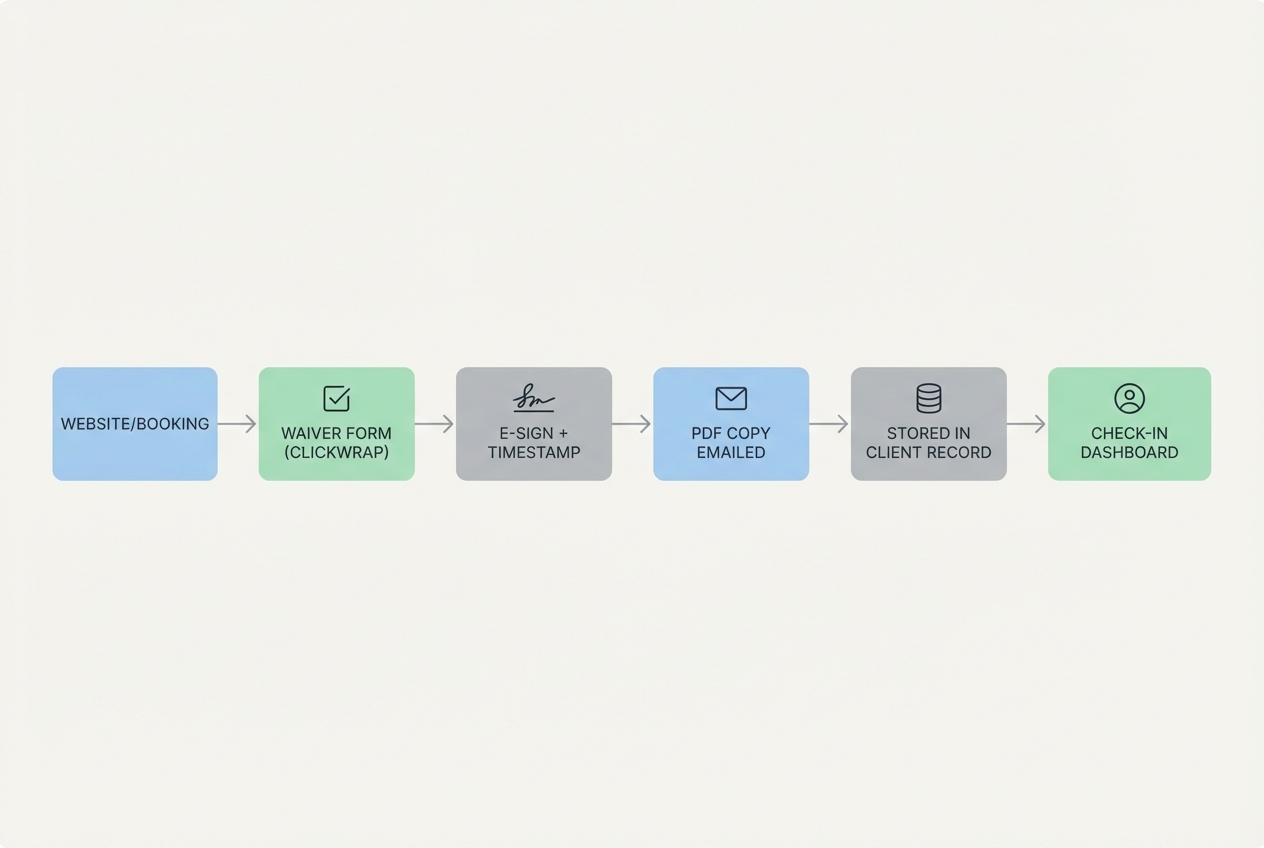
Most waiver failures are not legal failures. They are operational failures. Someone shows up, the class is starting, the front desk is busy, and the waiver is “handled later.” Later never comes.
Here is a simple SOP that closes the gap.
Booking gate
Place the waiver step where it cannot be skipped:
- Website or social link → booking page
- Client creates a profile
- Client completes waiver and required acknowledgments
- Only then: first class booking is confirmed
Expected outcome: you can look at a booking list and know every first-timer is already covered.
Front-desk QR flow
Set up a “sign-in station” backup:
- Printed QR code: Links directly to the waiver.
- Staff checks status: Before letting the client enter class.
- One-device friendly: The form must be mobile-first and fast.
Expected outcome: you still capture signatures when someone books through a friend, calls in, or walks in.
Edge cases to decide now
- Private clients: Require the waiver before the first session, not after.
- Workshops and pop-ups: Use a separate event-specific waiver link or version.
- Corporate classes: Decide whether the company signs something plus individual participants sign.
- Minors: Do not “just have them sign.” Use a guardian flow.
The enforcement rule
Make it black-and-white:
- No waiver, no class.
Staff script you can train:
- “Before you can join, we need your waiver on file. It takes about two minutes. Scan this QR code, and I’ll confirm it went through.”
Renewal cadence
- Annual re-sign: Clean and easy to explain.
- Immediate re-sign on material updates: If you change risk language, policies, or covered activities, treat it like a new agreement.
Storage, retention, and versioning
A waiver only helps if you can retrieve the exact signed copy quickly.
Set up three things:
- Retention policy: Decide how long you keep waivers, and align it with your insurer and local legal advice. Do not guess.
- Versioning: Store a waiver version ID and preserve prior versions. You need to be able to prove what text was presented at the time of signature.
- Access controls: Limit who can view or export waivers. Log access where possible, and borrow a few basics from how teams think about security risks and hardening when they are storing sensitive records.
Client copies are not just a nice touch. They support the idea that the electronic record is accessible and reproducible, consistent with operational expectations discussed in E-Sign compliance guidance like the FDIC’s E-Sign manual section.
Minimum viable approach:
- Send an automatic email confirmation with a PDF copy (or a secure link) immediately after signing.
Tooling options: form builder vs waiver software vs custom app
There is no single “best” tool. The right tool is the one that reliably gates attendance, preserves the signed record, and fits your studio’s workflow.
| Approach | Best for | Strengths | Tradeoffs |
|---|---|---|---|
| Generic form builder (examples: Jotform, Google Forms) | Solo instructors, very small studios | Fast to launch, flexible fields | Often weak on gating, audit trail, and versioning; staff may struggle to verify status quickly |
| Booking platform with integrated waivers (examples: Momence, Xplor) | Studios that want fewer tools | Natural fit with booking and check-in | Template limitations; versioning and exports vary by platform |
| Dedicated e-sign tool | Higher-risk offerings, complex agreements | Strong signature logs and document controls | Can feel “separate” from booking unless integrated |
| Custom app workflow | Growing studios, multi-location, conditional logic | Total control: gating, versions, permissions, dashboards | Requires initial build and ongoing ownership |
No matter what you choose, your minimum viable defensibility bar is the same:
- Clear consent + timestamp + preserved text + retrievable copy.
Integrations that make the waiver automatic
Integrations are what turn a waiver from a form into a system.
- Booking integration: Show waiver status at check-in, and block first-time bookings until signed.
- Payments integration: Trigger the waiver after a first purchase or membership signup.
- CRM/email integration: Automatically send the signed copy, send renewal reminders, and request re-acknowledgment when you publish a new version.
- Staff operations: A simple “Unsigned today” view prevents awkward surprises at the studio door.
Pricing expectations and cost drivers for an online waiver workflow
Costs vary widely, so it’s better to think in cost drivers rather than dollar amounts.
- Volume: More clients and signatures usually increases plan requirements.
- Audit trail and exports: Better records and easier retrieval often sit in higher tiers.
- Multi-location: Permissioning and reporting complexity goes up.
- Staff seats: Front desk and instructors may need access.
- Integration needs: Booking and payment connections can add complexity.
- Branding and UX: Custom domains, embedded flows, and polished mobile UX can push you toward more flexible tools.
A practical path:
- Start lean: Launch a booking-gated waiver with automatic email copy and QR backup.
- Upgrade when the pain shows up: If staff spends time chasing signatures, if you cannot easily verify status, or if you are expanding locations, invest in a more integrated or custom workflow.
Alternatives and competitors
Studios typically land in one of these camps:
- Booking platforms with waivers: Best when you want one system for scheduling, payments, and forms.
- Standalone e-sign tools: Best when you want strong signature evidence and document controls.
- Generic form builders: Best when you are bootstrapping and can enforce the process manually.
- Paper or hybrid: Best only when you have no other option.
Paper and hybrid setups are risky operationally. Missed signatures happen, and retrieval is slow when you actually need a signed copy.
Build vs buy: when a custom waiver + intake + booking flow is worth it
Buy is usually right when your booking platform already:
- Gates first attendance on a completed waiver
- Shows waiver status at check-in
- Stores a copy you can export quickly
- Handles version changes without chaos
Build becomes worth it when you need conditional logic and clean operations, such as:
- Conditional waiver modules: Different terms for reformer vs mat, online vs in-studio, workshops vs standard sessions.
- Minors and guardian signatures: Separate flows and permissions.
- Injury flags and prenatal disclosures: A branching intake that informs instructor notes.
- Multi-location policies: Different cancellation windows or studio rules by location.
- A staff dashboard: “Signed before attending” status without digging through emails.
If you want that custom workflow without hiring a dev team, Quantum Byte can be a practical middle path. You describe what you want (waiver + intake + client profile + staff check-in view), start from templates, and customize the flow as your studio grows. That is the whole point: speed plus control, instead of choosing one.
Implementation timeline: go live in 1 day, then harden in 2 weeks
Day 1: MVP
- Choose your tool (or booking platform flow).
- Create the waiver with the core clauses and policies.
- Configure the confirmation email that includes a copy.
- Generate and print a QR code for the studio.
- Train staff on the “no waiver, no class” enforcement script.
Expected outcome: you stop missing signatures immediately.
Week 1: Harden the workflow
- Integrate with booking and payments where possible.
- Add a waiver version ID field and track it.
- Add renewal reminders.
- Tighten staff permissions and retrieval process.
Expected outcome: fewer front-desk exceptions and faster retrieval.
Week 2+: Review and refine
- Review language with your insurer and legal counsel.
- Add specialized modules (minors, prenatal, workshops, media).
- Improve UX based on actual drop-off points.
Expected outcome: a waiver flow that scales with your studio.
Wrapping up: your waiver is a workflow, not a document
A strong online waiver is not just “good wording.” It’s (1) complete clauses that match what you actually do, (2) online-ready acceptance language, (3) a defensible e-sign record, (4) enforced collection before class, and (5) versioned storage you can retrieve fast.
If you do only two things this week, gate bookings on the waiver and store versioned copies automatically. Those moves eliminate the most common failure mode: the missing signature.
Frequently Asked Questions
Pilates studio waiver form online free: is a free template good enough?
A free template can be a fine starting point for clause coverage, but the bigger risk is usually workflow failure. If you use a free template, focus on turning it into a system: booking-gated signing, a QR backup, a confirmation email with a copy, and version tracking. Also consider having your insurer or attorney review the final language, especially if you offer higher-risk services or multiple modalities.
Pilates studio waiver form online California: do the rules change?
Yes. Waiver enforceability and drafting expectations vary by state and by the facts of a specific incident. The safest approach is to keep the waiver clear and conspicuous, avoid overreach, and run a recordkeeping process that can prove what the client agreed to and when. If California is your market, run your final waiver language by California counsel and align it with your insurer’s guidance.
Club Pilates waiver template: can I copy what a franchise uses?
You can learn from it, but you should not copy a competitor’s waiver text. What you can take from a scaled studio approach is the structure: include key studio policies in the same signed flow, make the release language obvious, and ensure the process is consistent across every client.
Pilates studio liability release form: does it protect me if someone gets hurt?
It can help, but it is not absolute protection. Waivers generally aim to document assumption of risk and limit certain claims, but they may not cover gross negligence or intentional misconduct, and courts can reject overly broad or unclear language. Cornell Law’s summary of an exculpatory clause is a useful high-level explanation of those limits.
Start building a waiver flow that runs itself
If your biggest problem is not the waiver text but the constant admin around collecting it, consider building a lightweight, automated flow instead of duct-taping forms and spreadsheets.
Start building with Quantum Byte to create a waiver + intake + check-in workflow that is founder-friendly, template-driven, and still customizable. You get fewer front-desk headaches, consistent enforcement, and a clean record for every client when it matters.