
If you want a pilates studio website with online booking live quickly, the “fastest stack” is the one that matches your real workflow: classes plus privates, packages/credits, waivers, and clear cancellation rules. Pick the wrong stack and you will still launch, but you will spend the next 90 days untangling overbookings, payment edge cases, and confused clients.
Quick verdict: the fastest stacks
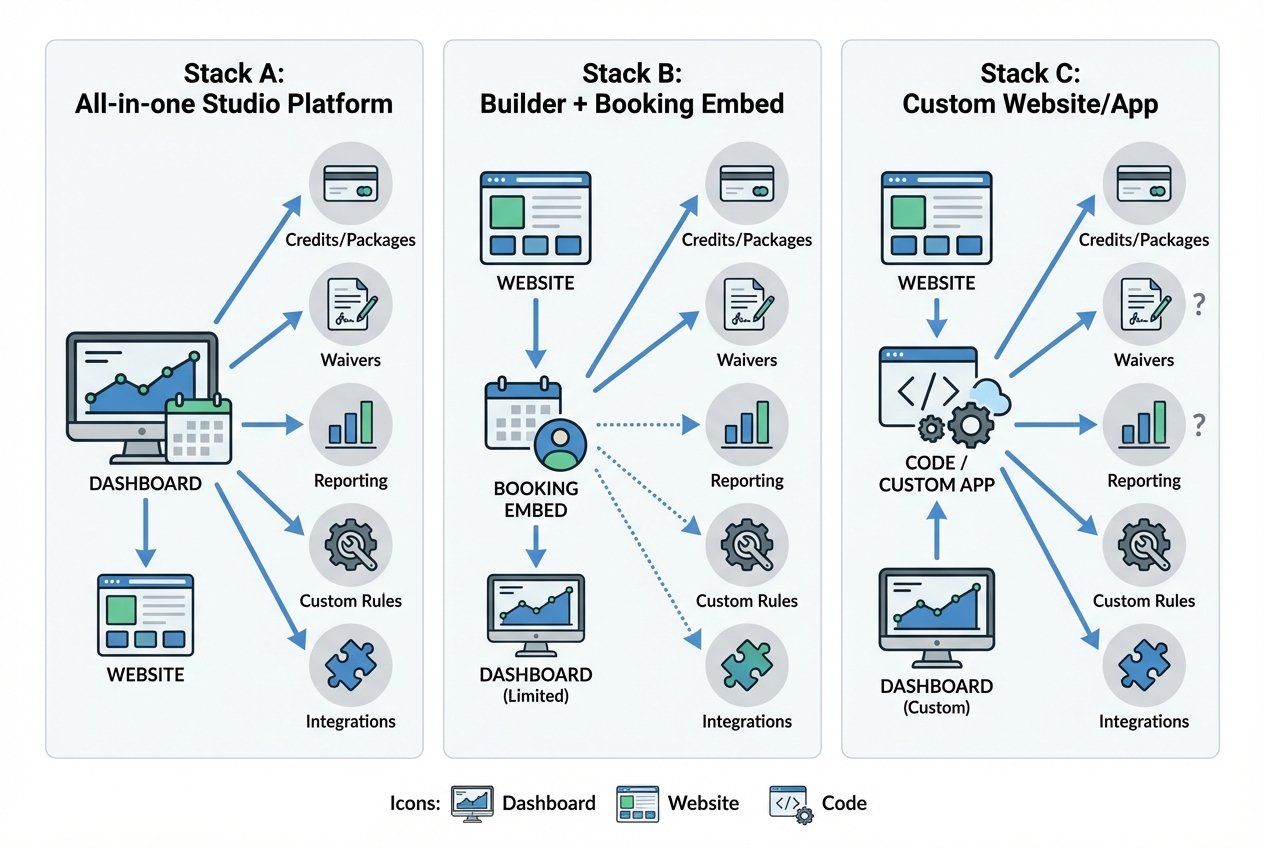
Here are the three fastest, lowest-regret approaches.
-
Stack A: All-in-one studio platform (fastest for operations)
- Best for: studios that sell packages/credits, memberships, and need waivers + reporting from day one.
- Tradeoff: less design/control over the marketing site and the booking UX.
-
Stack B: Website builder + booking embed (fastest for “simple scheduling”)
- Best for: studios that mainly need a clean marketing site and straightforward class/private booking.
- Tradeoff: packages/credits, intro-offer logic, and reporting often get clunky as you grow.
-
Stack C: Custom website/app (fastest long-term when you have custom rules)
- Best for: multi-location studios, unique intro funnels, complex credit rules, or you need to connect booking to your existing systems.
- Tradeoff: you must define requirements clearly, or “custom” becomes slow and expensive.
A quick decision rule:
- If you sell credits/passes, need waivers, and care about attendance + revenue reporting, choose an all-in-one.
- If you want “Book now” on your site and your needs are basic, an embed wins.
- If your studio has non-standard flows (multi-location rules, custom onboarding, integrations), custom is justified.
Feature checklist: what Pilates studios actually need
Most schedulers can book an appointment. Pilates studios need a scheduling system that handles capacity, credits, and real-world exceptions without staff babysitting it.
Booking and scheduling essentials:
- Class capacity and waitlists: you need hard caps per class, plus a predictable waitlist flow.
- Private sessions: instructor availability, session durations, buffers between sessions, and equipment considerations.
- Packages/credits and memberships: define what a credit can be used for (group vs private vs semi-private), expirations, and rollover rules.
- Intro offers: an “Intro 3-Pack” or “First Class Special” must be easy to find and hard to abuse.
- Instructor substitutions: swap instructors without breaking bookings or confusing clients.
- Time zone handling: critical if you have traveling clients or multiple locations.
- Automated confirmations and reminders: email is baseline; SMS is valuable if you enforce late-cancel policies.
- Cancellation/reschedule rules: deadlines, fees, and how waitlists are handled when a spot opens.
- Basic reporting: attendance, revenue, new vs returning clients, and package liability at minimum.
Website-side essentials (even if your booking tool is great):
- Location pages: address, parking, transit info, hours, and a location-specific “Book” CTA.
- Instructor bios: credibility and fit matter in Pilates.
- Class types: plain-language descriptions (avoid insider names without explanation).
- Pricing and memberships: make the next step obvious.
- Policies: late cancel/no-show, refunds, and class expiration.
- Contact: phone, email, and a frictionless “questions” form.
Booking CTA placement standard (do this regardless of stack):
- A Book button in the header
- A Book module above the fold on Home
- A sticky Book button on mobile for schedule-heavy pages
Workflow fit: map your client journey end-to-end
Studios lose bookings when they design only the “schedule grid,” not the full journey. Map this before you pick tools:
- Discovery: a client lands on Home, a location page, or “New Client” offer.
- Schedule: they view availability without friction.
- Purchase: they buy a drop-in, intro pack, or membership.
- Waiver: they sign once, and the system remembers it.
- Reminders: they receive confirmations and timely reminders.
- Reschedule/cancel: they can self-serve inside policy.
- Check-in: attendance is captured consistently.
- Reporting: you can see what is working without manual spreadsheets.
What can be manual at launch:
- Lead follow-up: a personal reply is fine early on.
- Content updates: updating instructor bios or class descriptions can be manual.
What should not be manual at launch:
- Waiver chasing: if it is not enforced in the flow, it will become a weekly fire drill.
- Late-cancel enforcement: manual enforcement creates inconsistency and disputes.
- Capacity policing: overbooking undermines trust immediately.
Where conversion usually breaks:
- The client cannot see availability until they create an account.
- The intro offer is hidden behind “Pricing” or confusing plan names.
- Payment and waiver are in the wrong order, or split across multiple tabs.
The 3 fastest stacks
Below are “stack recipes” you can implement, plus the minimum site map that keeps your studio usable and conversion-focused.
Stack A: All-in-one studio platform
This is the simplest operational setup. Your “website” is either fully hosted by the platform or a marketing site that pushes clients into the platform’s schedule and member portal.
When this is the fastest path:
- You need memberships, packages, and liability waivers tied to accounts.
- You want built-in reporting and fewer moving parts.
Example of the category: StudioBookings positions itself as a studio operating system with scheduling, memberships, waivers, communications, and reporting.
Recommended architecture:
- Marketing pages (either on the platform or a simple site)
- “Book” takes users directly to the hosted schedule/member portal
Minimum page map:
- Home
- Schedule / Book
- Pricing / Memberships
- New Client / Intro Offer
- Policies
- About / Team
- Locations (if applicable)
- Contact
Stack B: Website builder + booking embed
This is the fastest way to get a polished brand site while outsourcing scheduling complexity to a dedicated booking tool.
Pattern:
- Build the marketing site on Squarespace/Wix/WordPress
- Add a booking widget or “Book now” button that opens the scheduler
Example of the embed-first approach: Setmore explicitly promotes adding a booking button to your website and supports payments integrations for selling sessions.
Why studios love it:
- You can launch the marketing site quickly.
- The booking experience is “good enough” for many studios.
Where it breaks as you grow:
- Credit rules get complicated (what counts as a credit, what expires, what upgrades).
- Reporting ends up split across your site, payments, and booking tool.
- You need more control over onboarding (intro offer limits, waiver gating, segmentation).
Minimum page map and CTA placement:
- Home: above-the-fold Book module
- Schedule: embedded widget or a clean “View schedule” panel
- Pricing: link each plan to the exact purchase path
- New Client: one clear path, not five options
- Policies: placed before booking, not buried in the footer
Stack C: Custom website/app
Custom is justified when your rules are your advantage. If you have multiple locations, differentiated offerings, or want a branded onboarding flow that converts better than generic widgets, you will eventually want control.
Custom is worth it when:
- You run multi-location scheduling with location-specific policies.
- You sell hybrid products (in-studio + online + events) with shared credits.
- You need a tighter funnel (ads to intro offer to booking) with fewer steps.
- You want deeper integrations (CRM, email/SMS, accounting, data warehouse).
Where Quantum Byte fits (without the agency timeline): Quantum Byte is an AI app builder that can generate a working scheduling and booking experience quickly, then let you refine it by describing changes in plain language. It is a practical middle ground when off-the-shelf tools feel rigid but custom development feels like a six-month project.
Minimum “custom” feature scope (do not skip these):
- Admin schedule management
- Payments through a provider (do not handle raw card data)
- Waiver capture and enforcement
- Automated confirmations/reminders
- Exportable reporting
Integrations that matter: payments, waivers, CRM, email/SMS
Integrations should reduce risk and reduce manual work. If you add five tools “because you can,” you will end up with brittle workflows and duplicate client records.
Payments: keep card data out of your hands
Payment Card Industry Data Security Standard (PCI DSS) exists to protect cardholder data and is maintained by the PCI Security Standards Council (PCI SSC). The practical takeaway for a Pilates studio is simple: avoid building anything that stores or processes card data directly.
If you use Stripe:
- The Stripe integration security guide explains PCI as a shared responsibility and notes Stripe’s certification as a PCI Level 1 Service Provider.
- In practice, hosted checkout and well-scoped integrations reduce your exposure compared to custom card handling.
Waivers: enforce before the first session
Treat the waiver like a gate, not a document you chase later.
Rules that prevent headaches:
- Must block booking for new clients until waiver is signed: do not rely on staff to “remember.”
- Must be tied to a client profile: avoid “waiver PDFs in email.”
- Must be visible at check-in: your front desk should not hunt for it.
CRM and lead capture: keep it simple
At launch, you mainly need:
- One lead form for general questions
- One lead form for intro-offer interest
- A predictable destination (email list or CRM) so inquiries never disappear
Notifications: confirmations, reminders, and change alerts
Automations that matter most:
- Confirmation immediately after booking
- Reminder before class
- Alerts when a class is canceled, moved, or instructor changes
For SMS, ensure you have explicit opt-in and an easy stop mechanism. This is as much about deliverability and trust as it is about compliance.
Pricing expectations and cost drivers
Your cost is driven by operational complexity, not by “having a website.”
Cost drivers by stack:
-
All-in-one platform:
- Staff and instructor count: more staff seats typically means higher tiers.
- Memberships and packages: advanced billing logic often sits behind higher plans.
- SMS reminders: usually metered or add-on.
- Branded app: often a premium add-on.
-
Website builder + embed:
- Website plan: hosting, templates, and basic ecommerce.
- Booking tool plan: higher tiers for staff accounts, payments, deposits, or advanced rules.
- Hidden cost: time spent working around limitations as offerings expand.
-
Custom build:
- Build scope: onboarding, credits, reporting, and integrations.
- Ongoing maintenance: bug fixes, changes, and improvements.
- Payment processing fees: you will pay these either way, because they come from your payment provider.
A “free plan” reality check:
- Free often excludes key studio needs like multiple staff accounts, SMS, packages/memberships, advanced reporting, or removing vendor branding.
Pitfalls
Most studio booking issues are preventable if you configure rules, policies, and UX before you drive traffic.
| Pitfall | What it looks like | Prevention |
|---|---|---|
| Time zone errors | Clients show up an hour early or late | Test booking from multiple devices and verify confirmation times match your studio’s time zone |
| Overbooking | Too many clients for reformers or instructor bandwidth | Hard capacity limits plus buffers for privates and transitions |
| Credit confusion | Clients buy a pack then cannot redeem it for the class they want | Define credit applicability per class type and show it on the purchase screen |
| Intro offer abuse | The same person keeps using new-client pricing | Limit one per identity (email/phone) and require an account to redeem |
| Late-cancel disputes | “I didn’t know the policy” arguments | Clear policy + automated confirmations that include the cancellation cutoff |
| Buried booking UX | Users read the site but never book | Persistent booking CTAs and a schedule that is visible without extra steps |
| Account creation too early | Users bounce before seeing availability | Let them browse the schedule first, then require login at checkout |
| Too many class types | Clients cannot tell what to book | Rename and group classes with plain-language descriptions |
| Duplicate client profiles | One person has multiple accounts and credits disappear | Single source of truth for client identity and staff permissions |
| Reporting doesn’t match reality | Attendance/revenue reports are off | Standardize check-in and require staff to mark attendance consistently |
Trust and compliance basics for booking flows
Trust is part of conversion. Clients will not enter payment details on a site that feels insecure, broken on mobile, or hard to use.
Accessibility: treat booking as a core experience
The Web Content Accessibility Guidelines (WCAG) 2.2 are a W3C Recommendation that defines how to make web content more accessible to people with disabilities. You do not need to become an expert, but you should spot-check the booking flow:
- Form labels and error messages: fields should be labeled and errors should be readable.
- Keyboard navigation: can a client tab through the booking widget?
- Focus states: the active element should be visually obvious.
- Color contrast: do not rely on color alone to show availability or errors.
Performance: booking pages cannot be slow
Google’s Core Web Vitals focus on loading, interactivity, and visual stability. The metrics are Largest Contentful Paint (LCP), Interaction to Next Paint (INP), and Cumulative Layout Shift (CLS). For studios, the practical point is that your Schedule page should load quickly, respond instantly, and not jump around when widgets render.
HTTPS: non-negotiable for bookings and payments
Use HTTPS everywhere, especially on booking and payment pages. SSL/TLS provides encryption, authentication, and data integrity, and HTTPS indicates a site is using SSL/TLS as described in Cloudflare’s explainer on SSL/TLS.
This is not legal advice. Confirm local requirements for waivers, refunds, and consumer policies in your region.
Build vs buy: when to embed a tool vs build a custom booking experience
“Buy” means using an all-in-one studio platform or embedding a scheduler into your website. “Build” means owning the booking experience end-to-end, including your onboarding, policies, and data model.
Buy is usually right when:
- You want the fewest moving parts.
- Your offerings are standard and you do not need custom rules.
- You prefer vendor upgrades over your own roadmap.
Build is worth it when:
- You have multi-location or complex resources (reformers, rooms, instructors).
- Your packages/credits need non-standard logic.
- You want a differentiated onboarding flow (especially for intro offers).
- You need integrations with your existing systems.
Quantum Byte is a strong “build” option when your studio wants a custom booking experience without hiring an agency. You can start from proven templates (landing pages, scheduling patterns) and then customize quickly through natural prompting.
Implementation timeline: a 7-step setup path from zero to launch
Use this sequence to launch quickly without missing the hard parts.
1) Choose your stack and lock in your domain
- Pick Stack A, B, or C based on your feature checklist.
- Connect your domain and ensure HTTPS is active.
Expected outcome: you have a live site URL where booking will ultimately live.
2) Set up services, class types, and instructors
- Define each class type and duration.
- Add instructors and availability.
- Add locations if needed.
Expected outcome: the schedule can be generated without manual edits.
3) Configure rules
- Set capacity per class.
- Add buffers for privates.
- Define cancellation windows and late fees.
- Configure waitlists and notifications.
Expected outcome: the system can enforce policies automatically.
4) Connect payments and taxes
- Connect a payment provider.
- Decide what is sold online: drop-ins, intro packs, memberships, gift cards.
Expected outcome: clients can pay and receive confirmation without staff intervention.
5) Add waivers and policies
- Waiver must be required for new clients.
- Policies must be visible before checkout.
Expected outcome: you can confidently enforce late cancels and no-shows.
6) Embed booking and build the key pages
- Place Book CTAs in header and above the fold.
- Create: Pricing, New Client, Policies, Contact, Locations, Team.
Expected outcome: a client can go from landing to booked in a straight line.
7) QA and launch
Test these scenarios end-to-end:
- New client booking: intro offer, waiver, payment, confirmation
- Returning client booking: login, redemption of credits, confirmation
- Package purchase + redemption: buy pack, apply to correct class type
- Waitlist behavior: join waitlist, get notified, claim spot
- Cancel/reschedule: inside policy and outside policy
- Email/SMS reminders: timing and content correctness
- Mobile UX: schedule readability and sticky booking CTA
- Accessibility spot checks: labels, keyboard navigation, focus states
- Speed spot checks: schedule page loads smoothly
Analytics (tool-agnostic):
- Track Book button click
- Track Booking completed
Alternatives and competitors
You will likely compare a few categories.
- Simple booking embeds: tools like Setmore can be a fast fit when you want a booking button on your site and do not need deep membership logic.
- Studio operating systems: platforms like StudioBookings tend to be better when you need memberships, waivers, staff management, and reporting in one place.
- Website builders: Squarespace/Wix/WordPress are excellent for marketing pages, SEO content, and local discovery. They do not solve booking logic by themselves.
If you are unsure, decide based on where you feel the pain today: operations (Stack A), speed-to-launch marketing (Stack B), or a differentiated workflow you want to own (Stack C).
Key takeaways before you launch
- Choose a stack based on your real workflow, not on “who has a nicer homepage.”
- Make waivers and policies part of the booking flow, not a follow-up task.
- Treat performance, accessibility, and HTTPS as conversion features, because they are.
Frequently Asked Questions
Can I build a Pilates studio website with online booking free?
You can often start with free tiers for either a website builder or a booking tool, but “free” usually breaks as soon as you need multiple staff accounts, SMS reminders, packages/memberships, or branding removal. If you want to validate demand, start lean. If you are already running a real schedule, plan to pay for the features that prevent admin work and client disputes.
What is the best Pilates studio website with online booking?
The best option is the one that matches your operating model:
- If you run memberships, packages, and want waivers and reporting tightly integrated, an all-in-one studio platform is usually best.
- If you need a strong brand site and simple scheduling, a website builder plus a booking embed is usually the fastest.
- If you need custom rules or a differentiated onboarding experience, a custom build is often the best long-term choice.
What is different about a reformer Pilates studio website with online booking?
Reformer studios have more resource constraints. You are not just booking time, you are booking equipment and often a specific room layout. Prioritize:
- Hard capacity limits per class
- Buffers between sessions
- Clear class level descriptions to reduce mismatched bookings
- Policies that are visible before checkout
Start building: a fast path to a custom booking experience
If you have outgrown embeds, but do not want the cost and timeline of an agency build, Quantum Byte is designed for this exact middle ground. It is founder-friendly, starts from plug-and-play templates, and lets you customize quickly by describing changes in natural language.
Aziz Ansari used Quantum Byte to create an app for his movie “Good Fortune” within minutes, with no prior experience building apps. That is the level of approachability you want when you are running a studio and do not have time for a long software project.
Start building with Quantum Byte.