
Proposals are where deals either close or get stuck. You've probably sent one that was "almost ready", a mix of copied sections, last-minute pricing, and a PDF that went out without everyone signing off. When the client comes back with questions or scope changes, you're left digging through email and old versions to figure out what was actually agreed.
Proposal software is built for that mess. It gives you templates that stay consistent, a clear path from draft to signed, and a record of who approved what, so you spend less time hunting for the right file and more time closing.
What proposal software should do for you
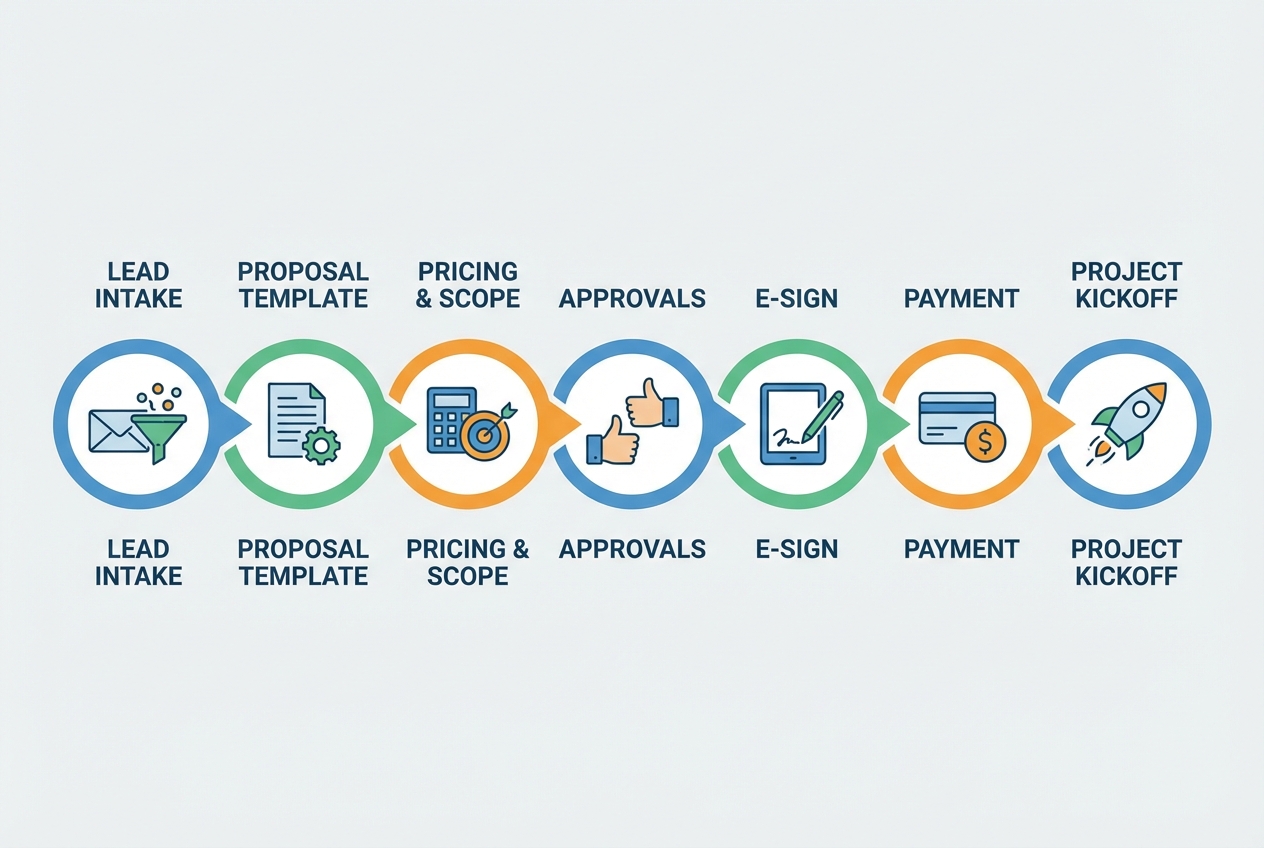
Proposal software is any system that helps you create, send, track, and close proposals in a consistent workflow. At a minimum, it should cover:
- Reusable templates: So every proposal starts from a proven structure, not a blank page.
- Accurate pricing and scope blocks: So the numbers, inclusions, and exclusions stay consistent.
- Approvals and version control: So you can prove what was agreed, when, and by whom.
- E-signature or sign-off: So acceptance is unambiguous and enforceable.
- Status tracking: So you know what is "draft," "sent," "viewed," "negotiating," and "signed."
- Hand-off automation: So a signed proposal triggers onboarding, invoicing, and project kickoff.
If your current stack is a word processor + PDF + email, you are not "doing it wrong." You are just paying for it with delays, scope creep, and missed follow-ups.
Best practices
1) Standardize your proposal structure before you automate anything
Automation won’t fix a messy offer. Standardization will.
- Do: Build one "core proposal skeleton" for each service line (for example: Strategy, Implementation, Retainer).
- Don’t: Let every salesperson or project lead invent their own headings.
A strong default structure usually includes:
- Outcome summary: One paragraph that states the result you will deliver.
- Scope: What’s included, what’s not, and what "done" means.
- Timeline: Milestones and dependencies.
- Pricing: Line items, bundles, or tiers.
- Assumptions: Client responsibilities and constraints.
- Terms: Payment terms, change control, confidentiality.
If you sell expertise, treat your proposal like a product. This is the same logic behind productizing consulting: reduce custom writing and increase repeatable value.
2) Separate “sales language” from “legal truth”
Many proposals fail because the words are persuasive but not precise. Proposal software is most effective when it enforces clarity.
- Do: Put the legally meaningful parts in fixed sections (scope, deliverables, exclusions, payment terms).
- Don’t: Hide critical commitments inside fluffy narrative paragraphs.
Example
- Better scope line: "Design and build a booking flow with up to 3 service types and 2 staff roles."
- Worse scope line: "We’ll improve your scheduling experience end-to-end."
3) Treat approvals as a stage-gated workflow, not an email thread
Email approvals create ambiguity. You end up with "Looks good" in one inbox and a different PDF attached somewhere else.
- Do: Require explicit approval actions (Approved, Needs changes, Approved with exceptions).
- Don’t: Accept verbal approvals or informal DMs for scope and price.
This is where purpose-built approval portals win. If you want a concrete model for how to structure this, the workflow patterns in client review and approval software translate directly to proposals: one version, clear actions, and an audit trail.
4) Make pricing “configurable,” not editable
If pricing is editable, it will be edited. If it’s configurable, it stays consistent.
- Do: Use a pricing table that pulls from a controlled list (packages, add-ons, discounts with limits).
- Don’t: Let reps type numbers into freeform text every time.
A practical approach is to define:
- Packages: Fixed bundles with clear deliverables.
- Add-ons: Optional line items with guardrails.
- Discount rules: Who can discount, by how much, and when extra approval is required.
If you already run a pipeline, align pricing rules to deal stages so you know when discounts are introduced. A simple CRM pipeline with a "Proposal sent" stage helps keep this disciplined, as described in CRM pipeline stages.
5) Build for fast “proposal-to-next-step” execution
A signed proposal is not the finish line. It’s a trigger.
- Do: Define what happens within 5 minutes of signature (invoice creation, onboarding form, project board, kickoff scheduling).
- Don’t: Depend on someone to remember the hand-off.
You can model this as a quote-to-invoice workflow, including follow-up automation for proposals that stall. The quote-to-invoice follow-up example is a strong pattern: detect, draft, approve, send.
6) Use e-signature with clear consent and retention
Most teams adopt e-signature for convenience and forget the operational details: consent, retention, and auditability.
- Do: Keep a timestamped record of the final proposal version and the acceptance event.
- Do: Store an authoritative copy and prevent silent edits after acceptance.
- Don’t: Treat a typed name in an email as equivalent to a signed acceptance if your risk level is non-trivial.
In the United States, the Electronic Signatures in Global and National Commerce Act (ESIGN Act) establishes that a contract cannot be denied legal effect solely because it is in electronic form or signed electronically.
7) Lock down proposal access like you would a customer database
Proposals often contain personal data, pricing strategy, and confidential commercial terms. Handle them accordingly.
- Do: Enforce role-based access control and least privilege.
- Do: Audit who viewed, edited, approved, and exported.
- Don’t: Share proposals via public links with no authentication for high-value deals.
Security frameworks consistently emphasize access control as a foundational control family. NIST’s catalog of security controls, NIST SP 800-53, includes an "Access Control" family that maps cleanly to proposal permissions.
If you sell into regulated markets or handle EU personal data, your proposal workflow may also fall under privacy obligations that GDPR summaries often group under privacy by design and security expectations, outlined in the EUR-Lex General Data Protection Regulation (GDPR) overview.
8) Track the few metrics that actually improve close rate
Proposal software becomes valuable when you use its data to change behavior.
Start with:
- Time to send: How long from qualified lead to proposal delivery.
- Time to sign: How long from send to acceptance.
- Revision count: How many loops it takes to reach signature.
- Discount frequency: How often discounts are applied and when.
- Drop-off stage: Where proposals get stuck.
Then turn metrics into rules:
- Do: Trigger a follow-up task if a proposal is viewed but not responded to within your normal buying cycle.
- Don’t: Spam follow-ups without context or a next-step option.
A practical framework for deciding what to automate is outlined in automation opportunity mapping: prioritize repetitive, time-consuming, and error-prone steps.
Choosing proposal software that fits your business
There is no single "best" proposal software for every company. There is a best fit for your workflow maturity and how custom your process is.
When an off-the-shelf proposal tool is enough
Choose a standard proposal platform if:
- Your offer is already standardized: Same few packages, minimal variations.
- You mainly need e-sign and tracking: Not custom logic.
- You can live with their workflow: Their approvals, their data model, their limitations.
Tools like PandaDoc, Proposify, and Qwilr can work well when your process matches theirs.
When you should build a custom proposal workflow
Build (or assemble) your own proposal software if:
- You need multi-step approvals: Finance, legal, delivery lead, and client sign-off.
- Pricing is rules-based: Product configuration, usage tiers, complex discounts.
- You want a real portal: Not just a PDF link, but a client-facing experience.
- The hand-off must be automated: Signed proposal triggers onboarding, billing, provisioning.
We designed our platform for exactly this scenario: when you want speed without giving up control. With our Packets, you can describe the proposal workflow you want (templates, approvals, and a client portal), then iterate quickly using pre-built building blocks rather than starting from scratch. We have seen non-technical founders go from idea to a working app in minutes, and the same speed applies to proposal workflows.
For larger teams that need cross-functional hand-offs across departments, our Enterprise tier is the more appropriate tier because we designed it for automated workflows that link teams once an order is placed.
Implementation plan: go from chaos to repeatable in 30 days
A clean rollout avoids the common trap: buying proposal software and then recreating your old habits inside it.
Week 1: Define the “one true” proposal format
- Do: Choose 1 service line and build the standard structure.
- Do: Write scope language that delivery teams can defend.
- Don’t: Try to standardize every service at once.
Week 2: Build pricing rules and approval gates
- Do: Define discount thresholds and who can approve exceptions.
- Do: Create a revision loop that always results in a final signed version.
- Don’t: Allow untracked edits after internal approval.
Week 3: Connect the hand-off
- Do: Decide what signature triggers (invoice, kickoff scheduling, onboarding).
- Don’t: Rely on a Slack message as your system of record.
If you want inspiration for how pipeline stages and "proposal sent" should connect to follow-ups, the workflow described in sales automation for closing faster is a practical reference.
Week 4: Train, enforce, and measure
- Do: Train on what must never change (scope, exclusions, terms).
- Do: Review 10 recent deals and identify where proposals slowed.
- Don’t: Let top performers opt out "because they have their own way."
Common proposal software mistakes to avoid
- No single owner: If nobody owns templates, they degrade fast. Assign an accountable owner.
- Too many templates: Ten mediocre templates are worse than two excellent ones. Start small.
- Weak exclusions: If you don’t say "not included," clients will assume it is. Write exclusions clearly.
- Uncontrolled discounting: Discounts without approvals train buyers to negotiate.
- Proposal sent too late: If you only propose after every detail is perfect, you slow deals down.
A useful example of disciplined stages comes from industries with renewal cycles. In insurance, "Proposal sent" is treated as a defined stage with a clear recommendation and decision deadline, as described in renewal tracking workflows.
A founder-friendly way to operationalize proposals
If you are a founder or operator, the real win is turning proposals into a system your team can run consistently.
That means:
- A predictable process: So deals do not stall because one person is busy.
- A consistent client experience: So your brand feels tight even as you scale.
- A faster hand-off: So delivery starts cleanly and scope stays protected.
If your needs are simple, choose a solid off-the-shelf tool and keep it disciplined.
If your needs are specific, and your current workflow lives across docs, email, and spreadsheets, consider building a tailored proposal workflow. We are a strong fit when you want that custom flow quickly, with templates that act like plug-and-play internal tools but still let you change what matters.
To see what a custom proposal portal could look like for your business, start with our Packets.
Frequently Asked Questions
What is the difference between proposal software and quoting software?
Proposal software focuses on the full narrative plus scope, terms, approvals, and acceptance. Quoting software is usually narrower, focused on line items, configuration, and pricing. Many teams use quoting inside their proposal workflow.
Do I really need e-signature for proposals?
If your proposals include meaningful financial commitments or delivery scope, e-signature is typically worth it because it creates a clear acceptance record and reduces ambiguity. In the U.S., the ESIGN Act supports enforceability of electronic signatures in commerce.
What features matter most for small teams?
Prioritize:
- Templates: To reduce writing time.
- Simple approvals: So pricing and scope are checked.
- Tracking: So you know what is stuck.
- Hand-off triggers: So signed proposals become real work immediately.
When should I consider a custom-built proposal workflow?
Consider it when your approvals, pricing rules, or post-signature operations do not fit standard tools, or when you want a client portal experience that matches your brand and process. That is often when an AI app builder approach becomes more efficient than stitching together multiple tools.
Best-practices checklist
Use this as your implementation punch list.
- Do: Standardize one proposal structure per service line before automating.
- Do: Put scope, exclusions, pricing, and terms in fixed sections that are hard to “accidentally” change.
- Do: Use explicit approval actions and keep an audit trail for every revision.
- Do: Make pricing configurable with packages, add-ons, and controlled discount rules.
- Do: Treat signature as a trigger for onboarding, invoicing, and kickoff.
- Do: Store an authoritative final version and prevent edits after acceptance.
- Do: Enforce role-based access control and audit who can view and edit.
- Do: Track time-to-send, time-to-sign, revision count, and discount frequency.
- Don’t: Accept “looks good” emails as a substitute for formal approval on high-risk deals.
- Don’t: Let every rep invent templates, pricing language, or terms.
- Don’t: Roll out software without a template owner and a governance process.