
Reformer booking software is only “double-booking proof” if it treats each reformer as a reservable resource (not just a headcount) and checks conflicts in real time across equipment, instructors, and rooms.
Quick verdict: what actually stops double-booking
If you want double-bookings to stop for good, look for these non-negotiables:
- Reformers are modeled as individual resources: Each machine has its own availability, like reserving shared assets in enterprise calendars (Microsoft even models shared assets as equipment resources with conflict-aware scheduling via a dedicated resource mailbox and availability checking in Scheduling Assistant in Microsoft 365). If a tool only caps “spots” but can’t block a specific reformer, edge cases will leak.
- A single source of truth: One system owns availability. Everything else reads from it, which is the same design principle behind how you automate business processes without creating conflicting “masters” across tools.
- Real-time conflict checks at the moment of booking: The system must re-check availability right before confirming, not just when the page loads.
- Class caps tied to equipment count (and equipment pools): Your “6-person reformer class” should be impossible to book past six reformers, and your “privates” should consume a reformer from the same inventory unless you intentionally separate pools.
What to avoid: any scheduler that only blocks time on an instructor calendar and calls that “no double-booking.” That prevents one instructor from being booked twice at 6:00pm, but it does not prevent reformer #3 from being used in two sessions in the same time slot.
The rest of this guide shows how to configure an equipment-first model, handle privates vs group conflicts, keep multi-channel booking reliable, and run a test script that tries to break your schedule before clients do.
Feature checklist for equipment-aware scheduling
Use this as your demo and trial checklist. It’s intentionally biased toward features that reduce conflicts, not marketing fluff.
Must-have
- Per-reformer resources: Each reformer can be reserved, blocked for maintenance, and reported on independently.
- Multi-resource booking: One booking can reserve an instructor + a reformer + (optionally) a room in the same transaction.
- Equipment-based class caps: Capacity is derived from available reformers (or a defined reformer pool), not a manually typed headcount.
- Waitlist that respects equipment: When a spot opens, the waitlist should only fill if a reformer is actually available.
- Buffers and transition rules: Cleaning/setup time between sessions, plus instructor transitions, enforced automatically.
- Hold/lock during checkout: If two people try to book the last reformer, one should be prevented before payment completes.
- Clear cancellation and reschedule flows: When a booking is canceled, the reformer and instructor availability are released exactly once.
- Payments that can fail safely: If a payment fails, the hold expires and the reformer returns to inventory.
Nice-to-have
- Client self-booking with guardrails: Self-serve booking reduces staff workload, but only if rules are enforced consistently.
- Client-select reformer (optional): Useful for advanced clients with preferences, but higher risk for misconfiguration.
- Automated confirmations and reminders: Reminders measurably improve attendance and reduce missed appointments; a systematic review in BMC Health Services Research found reminders improve appointment attendance across studies, which helps you avoid “phantom occupancy” where a slot is technically booked but functionally wasted.
- Memberships, packs, and passes: Critical if you sell packages, unlimited memberships, or intro offers.
- Permissions and audit trails: You want to know who overrode a rule and why when a conflict happens, and role-based access control is the cleanest way to keep overrides intentional instead of accidental.
- API / webhooks: If you need custom logic, reporting, or deep integrations, APIs keep you out of manual exports, and strong AI app builder prompts help you specify those workflows clearly when you’re building anything custom.
The equipment-first scheduling model
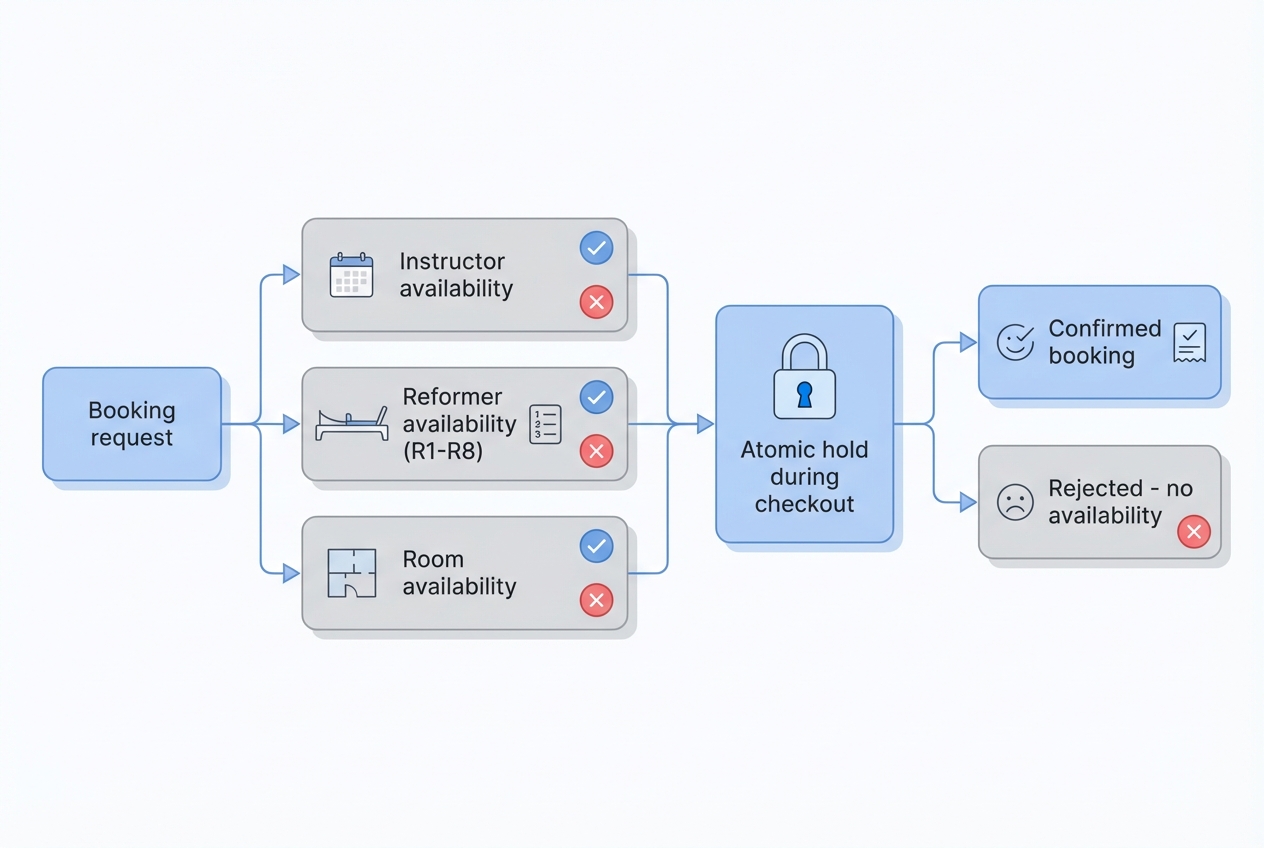
Most studios fix double-bookings by switching tools. The bigger win is modeling your reality correctly.
The core idea: reformers are resource calendars
Treat each reformer as its own schedulable asset, similar to how enterprise systems schedule rooms and shared equipment using resource identities and conflict-aware availability views in Microsoft 365.
That model gives you three big advantages:
- A reformer can be reserved by any session type (private, semi-private, group) without special casing.
- Maintenance blocks become first-class. You don’t “remember” a machine is down. The system enforces it.
- Reporting becomes meaningful (utilization per machine, not just per class).
If you want a parallel example outside fitness, the same resource logic shows up in equipment rental software where double-booking prevention is literally the business model.
Choose your reformer assignment policy
Pick one policy per session type. Mixing policies without rules is a common source of conflicts.
- Auto-assign reformer (recommended default): The system assigns any available reformer from a pool. Best for group classes and most privates.
- Staff-assign reformer: Front desk or instructor selects the machine during booking or check-in. Useful if you match clients to specific setups.
- Client-select reformer (use sparingly): Works when clients care deeply about preferences, but it increases the chances of “selection collisions” if your UI or locking isn’t robust.
Build class templates that consume resources
Think in templates, not one-off bookings.
- Group reformer class: Consumes 1 instructor + N reformers from a pool + (optional) 1 room.
- Semi-private: Consumes 1 instructor + 2 reformers (or a defined subset) + (optionally) room.
- Private: Consumes 1 instructor + 1 reformer + (optionally) room.
- Workshops: Often room-first (capacity) with optional reformer allocation if machines are involved.
Add buffer rules that reflect studio reality
Buffers are not “nice.” They are what make conflicts stop during busy blocks.
- Cleaning/setup buffer: Add time after sessions so you never schedule back-to-back on the same machine.
- Instructor transition buffer: Add time between instructor sessions when you know handoffs create delays.
- Maintenance blocks: Create a “down for maintenance” event on the reformer resource so it cannot be booked.
Diagram to keep in mind:
Booking request → checks instructor availability + reformer availability + room availability → confirms one atomic booking (or rejects)
Workflow fit: privates, group classes, and hybrid schedules
Double-bookings often show up in the gaps between “how the software thinks” and “how your studio runs.” These patterns cover the usual edge cases.
Prevent private vs group overlaps
Pick one of these strategies and configure it explicitly:
- Dedicated reformer pools: Reserve a subset of reformers for privates during peak class times. This avoids the “last reformer got used by a private” situation.
- Hard room locks: If a group class uses the whole space operationally, treat the room as a required resource so a private cannot be booked in the room during that block.
- Priority rules: If you allow both, define which booking wins when contention happens (and ensure the system enforces it automatically, not via staff judgment).
Handle instructor constraints correctly
A reliable system should:
- Block an instructor from being booked into two sessions at the same time.
- Apply instructor buffers (especially if you teach in multiple rooms or locations).
- Make instructor substitution safe: changing the instructor should re-check conflicts and not silently overbook.
Model rooms when space is the real bottleneck
If you have one room with eight reformers, equipment is the cap. But sometimes the room is the cap (noise, layout, shared props).
In those cases, book both:
- Room as a resource (one booking at a time)
- Reformers as resources (N machines)
This prevents a “space collision” even when machines are technically free.
Late cancels and no-shows: tie policy to inventory release
Your cancellation policy should match how inventory is released:
- If a client can reschedule up to 12 hours before, inventory should reopen instantly when they cancel.
- If you charge late cancel fees, the booking can still be removed while the fee is processed. The key is not keeping the reformer blocked “because billing is pending.”
Multi-channel booking and reliability pitfalls
Many double-bookings are not configuration problems. They’re reliability problems.
Why “sync” still fails
Studios often have multiple booking entry points:
- Website widget
- Branded app
- Front desk manual bookings
- Marketplaces or aggregators
If each channel can create bookings independently, you get stale availability. Someone sees an opening that’s already gone.
If you’re adding conversational entry points (SMS, WhatsApp, web chat), a booking chatbot can reduce admin, but only if it writes into the same system of record.
Enforce a single source of truth
Decide which system owns availability. Then audit everything else:
- Website/app should read availability from the owner system.
- Marketplaces should be read-only (ideally) or tightly controlled.
- Manual overrides should still write into the same system, not a side list.
Concrete mitigations that stop “last reformer” races
- Real-time availability check at confirmation: Don’t rely on cached availability.
- Short-lived holds: When a client clicks “Book,” hold a reformer for (say) a few minutes while they pay.
- Atomic booking creation: Create the booking only if all resources are still free.
- Retry-safe operations: If a request is retried due to a timeout, you must not create duplicate bookings or duplicate charges. Stripe’s guidance on idempotent requests is the cleanest example of how to make retries safe: the same idempotency key returns the same result instead of creating a second object.
What to ask in a demo
Ask these verbatim and watch whether the vendor can answer concretely:
- If two clients try to book the last reformer at the same time, what happens?
- Do you create a temporary hold while the client is in checkout?
- If payment fails or the client closes the browser, how and when is the reformer released?
- Can a staff member override a conflict, and does the system log who did it?
Integrations that matter: payments, CRM, and calendar free/busy
Integrations are only valuable when they reduce operational inconsistency.
Payments: make failures release inventory
Payments and booking must be coordinated:
- If you require prepayment or a deposit, confirm whether the reformer is held during checkout.
- If the payment fails, the hold should expire and availability should return automatically.
- If you support memberships/passes, make sure redemption happens at booking time so “unpaid but booked” doesn’t linger.
Calendar: free/busy is the correct abstraction
If instructors also use Google Calendar or Outlook, you need free/busy checks, not fragile “event syncing.”
Free/busy is a standard scheduling concept in iCalendar, including the VFREEBUSY component and FREEBUSY property defined in RFC 5545. In practice, many systems implement this by querying busy intervals over a time range, like Google Calendar’s freebusy.query method.
What you’re looking for: if an instructor is busy elsewhere, your booking software should detect it before confirming the session.
CRM/client profiles: reduce last-minute reshuffles
Client profiles matter for scheduling consistency:
- Medical notes and contraindications (so you don’t swap in an instructor who isn’t appropriate)
- Preferences (so you don’t create avoidable “move this booking” churn)
- Session history (so instructors prepare without back-and-forth messages)
If you’re trying to centralize client history, policies, and self-serve changes, a lightweight customer portal often reduces reschedule chaos.
Notifications: reduce confusion when changes happen
Confirmations and reminders help. Change alerts matter even more.
If a class time changes or an instructor is swapped, your system should notify clients in the same channel they used to book, plus email as a backstop.
If you run most bookings via phone and messages today, an AI receptionist guide can help you map the intake workflow before you automate it.
Pricing expectations and cost drivers for reformer booking software
Most reformer booking software pricing falls into a few patterns:
- Per location: Common for multi-studio operators.
- Per staff member: Scales with instructors.
- Per active client: Can be cost-effective early, expensive later.
- Tiered feature plans: Equipment/resource management and API access are often gated.
- Payment processing fees: Usually separate from the software subscription.
If you’re budgeting for custom workflows instead of a fixed vendor plan, QuantumByte pricing is a useful reference point for what it costs to get a working booking product live without a full dev team.
Cost drivers that correlate with fewer double-bookings:
- Resource management: Per-reformer scheduling is sometimes locked behind higher tiers.
- Two-way integrations: Real-time calendar, marketplace, or multi-channel sync tends to cost more.
- Advanced permissions and audit logs: Important when you have multiple front desk staff.
- Multi-location support: Resource pools and instructors across locations complicate rules.
Contract gotchas to watch:
- Limits on resources/calendars: Some tools cap the number of “assets” you can create.
- Overage fees: Especially for clients, SMS notifications, or transactions.
- Support tiers: If you’re migrating, onboarding support can be the difference between “configured” and “correct.”
Alternatives and competitor categories
Instead of a top-10 list, shortlist by category. Then demo only the two that match your needs.
Category comparison
| Category | Typical strengths | Typical double-booking weakness |
|---|---|---|
| Pilates-specific studio suites (e.g., Mindbody, WellnessLiving) | All-in-one ops (classes, memberships, client profiles) | Can be complex; equipment modeling varies by configuration |
| Generic appointment schedulers (e.g., Acuity Scheduling) | Simple, fast setup for privates | Often time-slot focused; may not model each reformer |
| Class-first fitness platforms (e.g., Eversports) | Strong class publishing and multi-channel reach | Equipment constraints can be secondary or shallow |
| Simpler SMB schedulers (e.g., Bookedin) | Easy booking pages, reminders | May prevent time conflicts but not per-machine conflicts |
Red flags for generic schedulers
- No concept of equipment as a bookable resource
- Capacity is just a number, not tied to actual reformers
- No buffers per resource
- No hold/lock during checkout
If you see these, assume you will still double-book in edge cases.
Build vs buy: when custom software is the right answer
Buy an off-the-shelf tool if your rules are standard: “N reformers, one room, typical class types, typical cancellation policies.” Most studios fit here.
Consider custom software if any of these are true:
- You need unusual assignment rules (specific reformer matching, rotating maintenance schedules, instructor-specific equipment constraints).
- You sell across multiple channels that don’t reliably sync.
- You need real-time holds, custom checkout logic, or stricter audit trails than vendors provide.
- You want the booking flow to match your studio’s exact policy, not the other way around.
A minimum viable custom build typically includes:
- Resource calendars for instructors, rooms, and each reformer
- Free/busy availability checks (calendar and equipment)
- Holds during checkout and retry-safe booking creation (idempotency patterns like Stripe idempotent requests)
- Admin override logs and “why was this blocked?” explanations
This is where Quantum Byte fits naturally. If you’ve hit the ceiling of off-the-shelf scheduling, you can build a tailored booking flow on Quantum Byte using booking and payments templates, then customize the hard parts (equipment pools, overlap rules, checkout holds) without a months-long dev cycle. The platform is designed for founders, and it’s built for speed without trapping you in a rigid template. It’s how Aziz Ansari built an app for his film “Good Fortune” within minutes despite having no prior app-building experience.
Tradeoff to be honest about: custom means you own the rules. That’s a benefit if you’re scaling, and a burden if you want “set it and forget it.”
If you’re operating multiple studios or need governance, QuantumByte Enterprise is the clean path when you want more control over security, integrations, and rollout management.
Implementation timeline: from trial to “no double-bookings”
A realistic rollout is short if you focus on the resource model first.
- Week 0–1: Model resources and rules
- List every reformer as its own resource
- Define reformer pools (privates vs classes, if needed)
- Set buffers (cleaning, transitions)
- Create class templates that consume equipment
- Week 1–2: Configure channels and integrations
- Turn on payments and confirm failure behavior releases holds
- Connect instructor calendars with free/busy checks
- Set cancellation and reschedule policies
- Week 2: Test, train, soft-launch
- Run the testing script below
- Train front desk on overrides and exceptions
- Soft-launch with a subset of classes
- Go-live: Monitor and tune
- Review conflict attempts and override logs
- Adjust buffers and pools based on real throughput
A testing script to try to break your schedule
Run these tests before you trust your schedule. If the vendor can’t pass them in a trial, don’t assume it will “work itself out.”
-
Concurrent booking test (two devices, last reformer)
- Open the same class on two phones.
- Both attempt to book the last available spot at nearly the same moment.
- Expected outcome: only one booking succeeds; the other gets a clear “no longer available” message.
-
Private vs group overlap test (equipment pool behavior)
- Book a private that should consume a reformer from the same pool used by a group class.
- Then attempt to book the group class.
- Expected outcome: capacity decreases correctly or the booking is blocked, depending on your rules.
-
Cancellation propagation test (every channel)
- Create a booking.
- Cancel it as staff, then as the client, and then from any connected channel you use.
- Expected outcome: the reformer becomes available exactly once, and the waitlist (if enabled) behaves predictably.
-
Buffer enforcement test (cleaning/setup)
- Try to book back-to-back sessions on the same reformer with no gap.
- Expected outcome: the second booking is blocked or forced to start after the buffer.
-
Audit trail test (support reality check)
- Trigger a conflict intentionally.
- Expected outcome: staff can see which rule blocked it (equipment unavailable, instructor busy, buffer, room locked), so client support is fast.
Start building a booking flow that can’t double-book
If you’re still seeing conflicts after trying “normal” scheduling tools, stop fighting your software and make the rules explicit.
Start building with Quantum Byte.
Quantum Byte is a strong fit when you need founder-friendly speed plus real customization. You can start from plug-and-play booking templates, then enforce equipment pools, holds during checkout, and the exact overlap rules that match how your studio operates.
Frequently Asked Questions
Reformer booking software free: is it realistic?
For a single instructor doing only privates, a free or low-cost scheduler can be workable. For a studio with multiple reformers, free plans often break down because equipment resources, buffers, and multi-channel controls are usually paid features. If double-booking is costing you refunds and trust, “free” gets expensive fast.
Reformer booking software download: do I need an app?
Most modern booking systems are web-based, with optional mobile apps for staff and clients. What matters is not whether you “download” something, but whether every booking channel uses the same availability rules. A great web flow beats a weak native app.
Acuity Scheduling: can it prevent double-booking reformers?
Acuity is strong for appointment-based scheduling, especially one-on-one services. It’s less ideal when you need per-reformer resource constraints, equipment pools, and class templates that consume machines. If your studio is equipment-first, validate that the tool can reserve specific reformers, not just time.
Mind Body pass: how do passes interact with equipment caps?
Passes and memberships should never override equipment constraints. A pass can determine whether a client is allowed to book, but it should not create capacity. The class should still cap at available reformers, and waitlists should only fill when a reformer is truly free.
Pilates studio software: do I need an all-in-one suite?
All-in-one suites make sense when you want scheduling, payments, memberships, and client profiles in one place. If your main pain is double-booking, evaluate suites primarily on resource modeling, holds/locks during checkout, buffers, and multi-channel consistency. If a suite can’t express your studio’s rules, you may be better off with a custom booking flow that can.