
Reformer pilates studio scheduling software only works when it can enforce your capacity rules, not just display a calendar. If your reformers sit empty because of last-minute cancellations, or your instructors get double-booked because privates and group classes share the same room, the fix is usually rule design and policy enforcement: machine-aware capacity, buffers, smart waitlists, and credits that behave predictably.
Quick verdict: what to buy if reformer capacity is your bottleneck
If you run group reformer plus privates or semi-privates, you should buy for two things first: (1) equipment-aware capacity (pick-a-spot or per-machine inventory), and (2) policy enforcement (waitlists, cutoffs, credits, and late-cancel fees).
Here are the most common “best for” paths:
- Boutique studio platforms (best for equipment rules + multi-location): If you need pick-a-spot, instructor coverage constraints, and standardized policies across locations, start with boutique platforms like Mariana Tek (explicitly supports capacity-based scheduling for reformers/towers/chairs and built-in pick-a-spot).
- All-in-one studio suites (best for broad operations + visible pricing): If you want a full operations stack (billing, waitlists, reminders, POS) and you like self-serve tiers, WellnessLiving is one of the clearest about equipment reservation (Book-A-Spot) and automatic waitlists.
- Marketplace-led platforms (best for acquisition channels): If you care most about discovery and lead flow, Mindbody is strong on marketplace exposure and an integrations ecosystem, but you still need to confirm it can express your specific reformer rules.
- Lightweight appointment schedulers (best for “mostly privates,” not reformer classes): If you are appointment-heavy and don’t need true waitlists or equipment logic, tools like Acuity Scheduling can work. But Pilates-specific reviewers regularly call out gaps like missing native waitlists for class-style operations, which becomes painful for peak-time reformer utilization (see the platform comparisons in PilatesBridge).
This guide is configuration-first. The goal is to help you define capacity “rule primitives” and then copy proven rule templates into whatever platform you choose.
The non-negotiable feature checklist for reformer studios
Before you look at UI polish or marketing features, make sure your scheduling software can do these things without workarounds:
- Equipment-level booking: You need either pick-a-spot (reserve reformer #6) or at minimum equipment capacity per class with a way to take a machine out of service.
- Mixed modality support: Your studio likely sells both classes and appointments. Some tools are “class-forward” and make appointments clunky, while others do appointments well but break down on classes and waitlists (a key theme in PilatesBridge).
- Waitlist with auto-promotion: You want configurable cutoffs, notifications, and predictable behavior for credits and payments when someone is auto-added.
- Turnover buffers: You need time blocks for setup/cleanup and instructor transition, not a calendar that assumes classes can touch back-to-back.
- Credits and memberships: Class packs, memberships, intro offers, and automated late-cancel/no-show rules should be native, not “manual notes.”
- Payments and security posture: If you accept card payments, ask how the platform reduces your exposure and how it handles PCI compliance. The PCI Security Standards Council defines PCI DSS as baseline technical and operational requirements for protecting payment account data environments.
- Calendar interoperability: “Calendar sync” should mean iCalendar-compatible events (including recurring rules) so it plays nicely with Google Calendar and Apple Calendar. iCalendar is standardized in RFC 5545.
- Transactional reminders (email/SMS): You need automated reminders and waitlist confirmations that are clearly transactional. Marketing SMS is a separate compliance and consent problem (covered later).
If a vendor can’t answer these quickly and concretely, that’s a buying signal to move on.
Capacity rule primitives: the 7 building blocks you’ll configure in any system
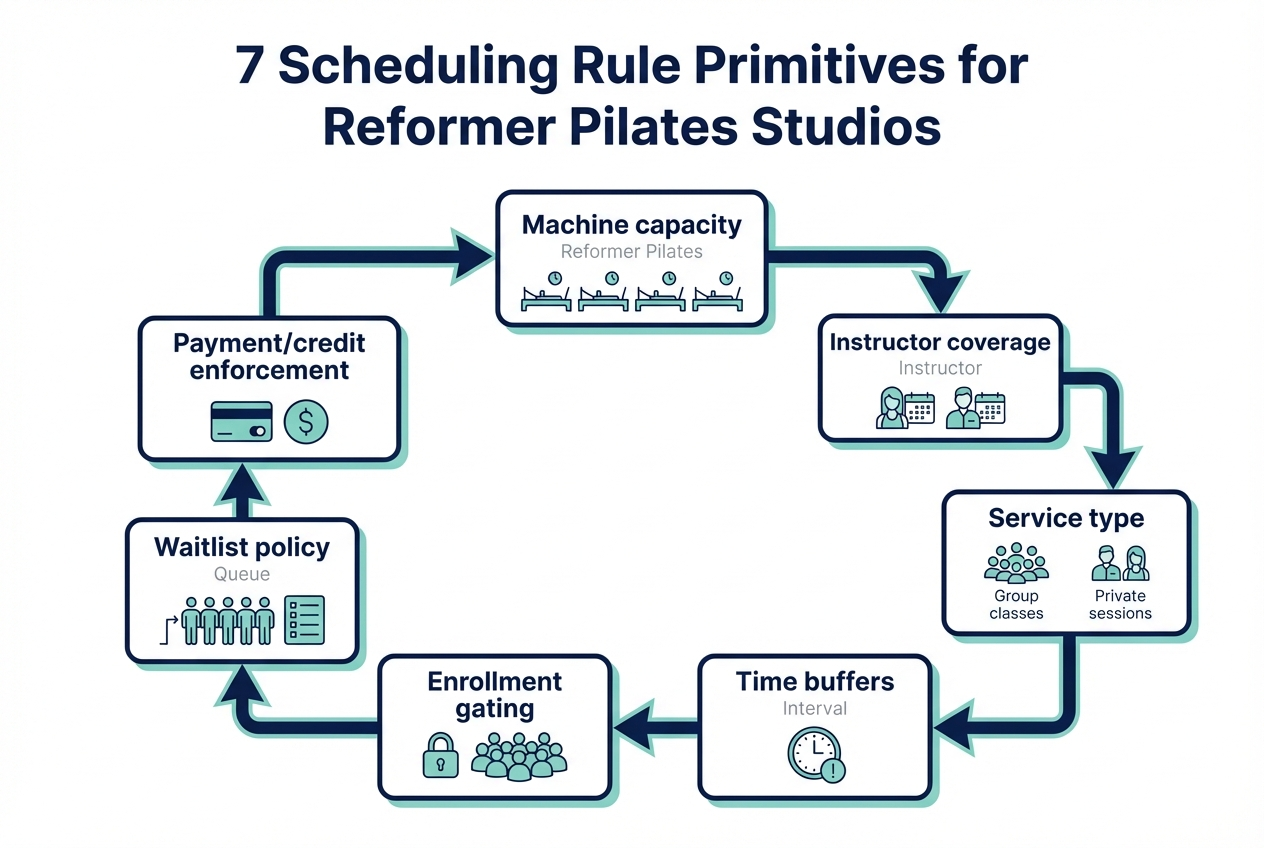
Most platforms bury settings under different labels, but almost every “reformer scheduling problem” maps to seven primitives. Write yours down first. Then configure.
- Machine capacity: How many reformers (and other stations) exist, and what happens when one is down.
- Instructor coverage: The maximum number of clients one instructor can safely coach for each service type.
- Service type: Group reformer, semi-private, private, tower/chair specialty, intro offers, “new to reformer,” etc.
- Time buffers: Setup/cleanup and instructor transition time, by service type and by room.
- Enrollment gating: Prerequisites and restrictions (intro required, levels, first-timer caps, injury notes that require approval).
- Waitlist policy: Cutoffs, auto-promotion timing, and confirmation windows so last-minute moves don’t create front desk chaos.
- Payment/credit enforcement: When credits are consumed, when cards are charged, and what happens on late cancel, no-show, or auto-promotion.
A good buying test: ask the vendor to map these seven primitives to exact settings in their product, using one of your real classes as an example.
Rule templates that actually work
These templates are intentionally written in “rule language” so you can implement them in Mindbody, WellnessLiving, Mariana Tek, or any system that supports the underlying primitives.
Template 1: Peak-time group reformer
Use this when your 6–9am or 5–7pm slots are always full.
- Machine capacity: Capacity equals number of working reformers. If any machine is down, reduce class capacity immediately (do not “overbook and shuffle”).
- Instructor coverage: Cap enrollment at what one instructor can coach safely. If your studio uses different ratios for intro vs intermediate, make separate class types.
- Buffer rules: Add a fixed post-class buffer for cleanup and reset. Treat it as non-negotiable inventory.
- Waitlist policy: Auto-promote until X hours before class (common starting point: 6–12 hours). Inside that window, stop auto-promotion and require manual add with explicit client confirmation.
- Late cancel: If a client cancels inside your window, consume the credit (or charge a fee) but allow the credit to be “reused” only if you refill the spot from the waitlist within the cutoff.
Validate it by checking:
- Your calendar shows buffers as real blocked time.
- A machine-down event reduces sellable spots immediately.
- Waitlist promotions stop at the cutoff and do not create unpaid enrollments.
Template 2: Intro offer funnel
Use this to avoid first-timer overwhelm and protect your retention.
- First-timer cap: Set a maximum number of first-timers per intro class (often lower than total capacity).
- Longer buffers: Add extra pre-class buffer for setup and client intake.
- Prerequisite enforcement: Intro offer clients can only book intro classes. After completion, unlock Level 1.
- Waitlist policy: No same-day auto-promotion for intro. New clients need predictability, and your staff needs time to prep.
Validate it by checking:
- A new client cannot book Level 1 without completing intro.
- Your roster clearly marks first-timers.
Template 3: Mixed privates + group in the same room
This is the classic “shared room, shared equipment, different booking modes” problem.
- Resource model: Treat the room and the machines as bookable resources.
- Overlap prevention: A private session books one instructor plus one machine plus the room. A group class books one instructor plus N machines plus the room.
- Instructor transitions: Add a transition buffer between any appointment and any class that uses the same instructor.
- Preference handling: If clients insist on “reformer #3,” allow spot selection only when it doesn’t break capacity. If your tool can’t handle per-machine preferences, handle it as a note, not a promise.
Validate it by checking:
- You cannot accidentally schedule a private in the room during a group class.
- Instructors do not appear in two places at once.
Template 4: Semi-private as the margin engine
Semi-privates can become your most profitable hour or your biggest scheduling mess.
- Define it as its own service type: Do not treat it as a “private with 2 people.”
- Instructor coverage: Set the maximum clients per semi-private explicitly.
- Inventory guardrails: Protect private availability by limiting how many semi-private slots exist per week per instructor, or by restricting semi-privates to specific time blocks.
- Credit mapping: Make semi-private credits distinct from private credits. Otherwise clients will consume the wrong inventory and create constant exceptions.
Validate it by checking:
- A private credit cannot book a semi-private (and vice versa).
- Your schedule still has guaranteed private openings.
Template 5: Equipment downtime and substitutions
This is where generic schedulers fail.
- Preferred: Mark a specific machine as out of service, and the system automatically reduces capacity and prevents that spot from being chosen.
- Acceptable fallback: Reduce class capacity manually and notify affected clients.
- Bad: Keep capacity the same and “shuffle people” on arrival. That creates refund requests and destroys trust.
Validate it by checking:
- Capacity reduces the moment downtime is flagged.
- The booking widget never offers unavailable spots.
Waitlists and reminders: how to fill empty reformers without refund drama
A waitlist is only useful if it produces filled spots without last-minute payment fights.
A safe auto-promotion policy
Start with a simple, enforceable loop:
- Promote until cutoff: Auto-promote only up to a cutoff (for example, 6–12 hours before class). That cutoff is where “automatic” ends and “human confirmation” begins.
- Confirmation window: When a spot opens, notify the next client and require confirmation within a short window (for example, 30–90 minutes). If they do not confirm, release the spot to the next person.
- Payment behavior: Decide one rule and keep it consistent:
- Hold-and-capture: Store a card on file and capture payment on confirmation.
- Credit reservation: Reserve a credit on promotion and release it if they decline.
If your software cannot support a clear confirmation step, you will end up with accidental enrollments and policy exceptions.
Reminders reduce no-shows
Automated reminders are not a “nice to have” when your unit economics depend on filled reformers.
A systematic review and meta-analysis found reminders reduced non-attendance with a weighted mean relative reduction of 34% compared to baseline in the included studies (The effect of reminders on attendance). And a randomized controlled trial of SMS reminders reported a lower no-show rate in the intervention group (23.5%) compared to control (38.1%) (Text Message Reminders for Pediatric Clinic Appointments). Your studio is not a clinic, but the operational lesson transfers: timely, automated reminders reliably improve attendance.
Transactional vs marketing texts
Keep these separate in your settings and your copy:
- Transactional: booking confirmations, reminders, waitlist confirmations.
- Marketing: promos, new class announcements, reactivation campaigns.
In the US, marketing texts trigger stricter consent expectations under TCPA-related rules. The FCC’s recent rulemaking emphasizes prior express written consent requirements for marketing robotexts, including “one seller at a time” consent concepts (Federal Register TCPA implementation). If you are unsure, treat promos as opt-in marketing and keep reminders purely transactional.
Workflow fit: what changes if you run 1 studio vs 3 locations
Features matter, but operating model matters more.
- Single location: You want fast front-desk workflows and minimal configuration overhead. Pick the system that makes day-to-day exceptions easy: instructor swaps, machine downtime, and quick refunds when policy allows.
- Multi-location (2–3+ sites): You need HQ controls with local flexibility, consistent policies, and consolidated reporting. Platforms like Mariana Tek explicitly position multi-location governance, which becomes important when you are standardizing late-cancel rules and intro pathways.
Also evaluate two “experience layers”:
- Instructor experience: mobile schedule access, substitution workflows, and attendance that can feed payroll.
- Client experience: pick-a-spot vs generic capacity, speed of checkout, and friction around prerequisites.
If you plan to scale, buy for the version of your studio you are building, not just the one you have today.
Integrations that matter
Integrations decide how much admin you keep doing manually.
- Payments: If the platform processes payments (often via Stripe or an embedded processor), understand what data touches your systems. PCI DSS is the baseline standard for protecting payment card environments where account data is stored, processed, or transmitted (PCI SSC standards). Also note that compliance expectations evolve; PCI DSS v4.0 is positioned as an evolution of the standard (PCI SSC v4.0 overview).
- Waivers: Waivers should gate the first booking. If “waiver not signed” requires staff to chase clients, you will chase them forever.
- Accounting: You need clean exports for revenue recognition realities: memberships vs class packs, refunds, late-cancel fees, and payment processing fees.
- Access control: If you use door locks for early entry or self-check-in, check whether your platform has a supported integration.
- Calendar sync: Expect iCalendar-based feeds and recurring event rules (RRULE) if the system is doing this correctly, because that is how calendaring interoperability is standardized (RFC 5545).
- Video and on-demand: If you sell livestream or on-demand, make sure purchases and entitlements sync so clients don’t message you for access every week.
Pricing expectations and the cost drivers studios miss
Pricing is rarely just “monthly fee.” The real cost is what you pay for rule enforcement, messaging, and scale.
Common cost drivers:
- Active clients and staff seats: Many platforms price on client count, instructor count, or both.
- Locations: Multi-location often pushes you into higher tiers.
- Branded app: Usually an add-on.
- SMS volume: Reminder success is real, but SMS is rarely free at scale.
- Payments: Processing fees plus any platform payment add-ons.
- Advanced automation: Marketing journeys, segmentation, or advanced reporting.
What to ask on a call or trial (save this list):
- Waitlist rules: Can we set cutoffs, confirmation windows, and auto-promotion behavior?
- Spot selection: Can clients reserve a specific reformer, and can we take one machine out of service?
- Buffers: Can buffers vary by service type and resource (room/instructor)?
- Downtime: What happens to existing bookings if a reformer is marked unavailable?
- Credits: Can we separate private, semi-private, and group credits cleanly?
- Fees: Can late-cancel and no-show fees be automated without staff intervention?
Alternatives and competitors
Use this as a shortlist filter. Then trial the top two.
| Tool | Equipment or pick-a-spot support | Waitlist maturity | Mixed modality (classes + privates) | Multi-location readiness | Best for |
|---|---|---|---|---|---|
| Mariana Tek | Explicitly supports capacity rules + pick-a-spot | Strong | Strong | Strong | Boutique Pilates brands and multi-location groups |
| WellnessLiving | Book-A-Spot for reformer/tower/chair | Strong | Strong | Moderate to strong | Studios that want equipment booking with self-serve tiers |
| Mindbody | Depends on configuration | Strong | Moderate to strong | Strong | Studios that value marketplace-driven acquisition |
| Momence | Limited (varies by setup) | Moderate | Moderate | Moderate | Modern UX for classes and communities |
| Walla | Limited (varies by setup) | Strong | Mixed | Moderate | Class-forward studios that care about app polish |
| Acuity Scheduling | No | Weak for classes | Strong for appointments | Weak to moderate | Private-heavy studios that can live without native waitlists (a known critique in PilatesBridge) |
| TeamUp | Limited | Moderate | Moderate | Moderate | Lean studios wanting simple membership + scheduling |
| Arketa | Limited | Moderate | Moderate | Moderate | Wellness businesses blending booking and marketing automations |
| Bookeo | Limited | Limited to moderate | Moderate | Moderate | Budget-friendly booking for mixed appointment needs |
| Vagaro | Limited | Moderate | Moderate | Moderate | Broad service businesses that include fitness |
| StudioBookings | Limited | Moderate | Moderate | Moderate | Studios wanting familiar studio-management workflows |
The key is not which logo you pick. It’s whether the platform can express your seven primitives without constant exceptions.
Build vs buy: when custom scheduling rules beat any off-the-shelf platform
Buy off-the-shelf when your rules are standard and you want speed. Build when your rules are your advantage.
Build (or extend) your own scheduling rules when you have any of these triggers:
- Unique credit logic: for example, “semi-private uses 1.5 credits,” or credits roll differently by tier.
- Shared resources across modalities: same instructors and same room across privates and group classes with strict buffers.
- Nuanced intro pathways: multiple intro tracks with gating, caps, and time-bound eligibility.
- Custom waitlist confirmations: multi-step confirmation, deposit capture, or different cutoffs by class type.
- Bespoke reporting: you need decision-ready metrics like reformer utilization by machine, not just class attendance.
Off-the-shelf still wins if you want a marketplace, a bundled marketing suite, or you have simple rules and want to be live this week.
If you are hitting the ceiling of what your platform can express, Quantum Byte is a practical build path because you can define your scheduling logic in plain language and turn it into a working app without a long development cycle. It’s also a good fit if you want a founder-friendly starting point with plug-and-play booking templates, then progressively customize the edge cases that make reformer studios hard.
Implementation timeline: a realistic rollout plan
A clean rollout is mostly policy clarity, not technical skill.
- Week 0: decide policies before settings
- Finalize buffers, late-cancel/no-show, prerequisites, waitlist cutoffs, and how credits behave on auto-promotion.
- Week 1: configure your primitives
- Create service types, machine capacity rules, instructor coverage rules, credits/memberships, payment and waiver gating.
- Week 2: parallel run and edge-case testing
- Run a soft launch with staff and a small client segment.
- Test machine downtime, instructor illness, last-minute swaps, and refunds.
- Week 3: go live and monitor the right KPIs
- Watch fill rate, waitlist conversion, no-show rate, and staff admin time. Adjust one rule at a time.
Troubleshooting signals to catch early:
- Double-booked instructors: buffers or resource constraints are not modeled correctly.
- Capacity leakage: class capacity is not tied to machine availability.
- Clients “stuck” by prerequisites: your gating is correct, but your messaging is unclear. Add clearer transactional reminders.
Key takeaways: the rules are the product
If you remember one thing, make it this: your scheduling tool is only as good as the capacity rules it can enforce.
Pick software that can represent your seven primitives, then implement one template (peak-time reformer or intro funnel) this week. When it works, copy the pattern to the rest of your schedule.
Start building: a scheduling system that matches your studio
If you want scheduling that truly fits your studio, build the rule set first, then choose whether you buy or build the software around it.
Start with this next action:
- Write down your seven primitives (machines, instructor coverage, service types, buffers, gating, waitlist policy, credit enforcement).
- Choose one rule template above and implement it end-to-end.
When off-the-shelf tools cannot express your rules cleanly, you can build a custom booking and scheduling system with Quantum Byte using ready-made scheduling templates and fast customization.
Start building with Quantum Byte.