
Walk-ins are unpredictable. No-shows are expensive. And your front desk should not be stuck playing calendar Tetris all day. The right salon appointment scheduling software fixes that by turning bookings, reminders, deposits, staff calendars, and client history into one clean system you can trust.
What salon appointment scheduling software should do
Good scheduling software goes beyond a calendar view. It should run the logic of how you sell time, protect capacity, and enforce policies automatically.
Here is what matters most for salons, studios, and spas.
- Fast online booking: Your clients should be able to book in under a minute, on mobile, without calling.
- Service rules that match reality: You need support for durations, buffers, prep time, cleanup time, and add-ons (for example, "blow dry" after "color").
- Team scheduling: Staff availability, breaks, double-booking rules, and room or chair constraints should be enforceable.
- Automated confirmations and reminders: Email and Short Message Service (SMS) reminders reduce no-shows and stop the constant back-and-forth.
- Deposits and payments: Card-on-file, deposits, cancellation fees, tipping, and checkout should be built for service businesses.
- Client profiles: Notes, allergies, formulas, preferences, visit history, and rebooking prompts should be easy to access.
- Multi-location support: If you are growing, you will want location-level inventory, staff rosters, and performance reporting.
- Integrations that do not break: Calendar sync, marketing tools, point of sale (POS), and accounting should not require duct tape.
How salon appointment scheduling software works end to end
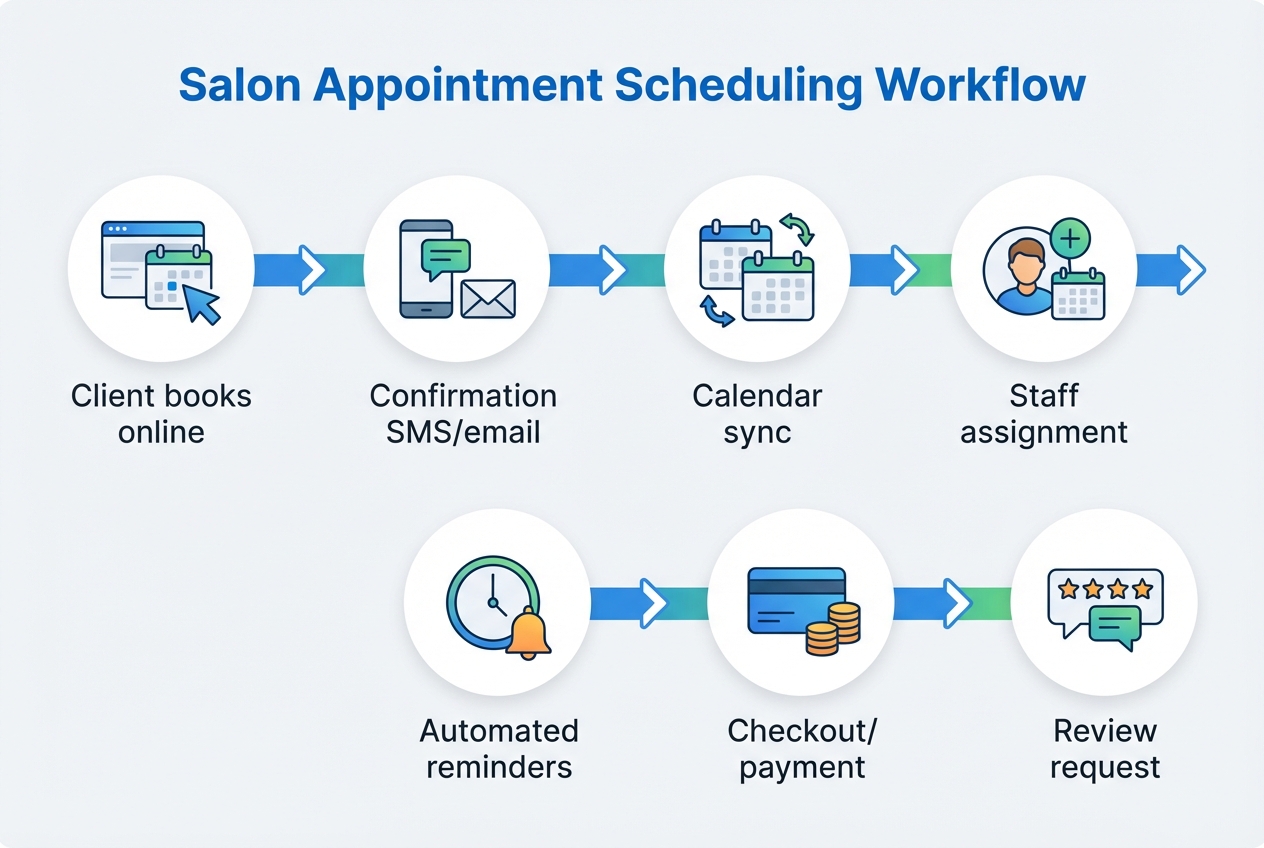
At a practical level, most salon booking systems follow the same sequence:
- A client chooses a service, a staff member (optional), and a time slot.
- The system checks availability rules (duration, buffers, staff hours, room capacity).
- The client confirms, often with a deposit or card-on-file.
- The system sends a confirmation and adds the appointment to the business calendar.
- Reminders go out automatically based on your policies.
- At arrival, the appointment moves into "in progress," then "completed."
- Checkout records payment, tip, products sold, and optionally triggers a rebooking or review request.
If any one of these steps is manual, that is where errors pile up.
Choose the right setup for your salon
Before you compare tools, decide what you are actually trying to optimize.
- If your problem is no-shows: Prioritize deposits, card-on-file, cancellation windows, and reminder automation.
- If your problem is front-desk overload: Prioritize self-serve booking, intake forms, and tight service rules.
- If your problem is growth: Prioritize multi-location controls, reporting, permissioning, and a system you can extend. If you are building toward more advanced governance, it can help to understand what an enterprise build option typically adds (roles, auditability, and deeper custom logic).
Off-the-shelf vs custom
In my experience, most salons start with an off-the-shelf scheduler, and that is usually the right move when you need results fast.
Where it gets tricky is when your business model has real logic: memberships, packages, tiered deposits, room constraints, and workflows you want to automate. Off-the-shelf tools can handle a lot, but they still force you into their shape.
A practical rule of thumb I recommend:
- Off-the-shelf: Choose this when your services are standard and you want speed with minimal setup.
- Custom: Choose this when your business model is unique and you keep bending the tool to fit.
If you are already maintaining workarounds in spreadsheets, that is a signal that your "source of truth" is split. At that point, it is worth stepping back and documenting your rules as a system (even if you still pick an off-the-shelf tool).
Quick comparison of popular scheduling options
This practical shortlist focuses on tools salon owners commonly evaluate.
| Option | Best for | Strengths | Trade-offs |
|---|---|---|---|
| Square Appointments | Small salons already using Square | Simple payments + scheduling in one ecosystem | Less flexible for complex service logic and multi-location nuance |
| Fresha | Consumer discovery + marketplace exposure | Strong booking user experience and marketplace reach | Marketplace dynamics can reduce control over customer relationships |
| Vagaro | All-in-one salon management | Solid feature breadth (booking, marketing, memberships) | Setup can feel heavy; customization is still bounded by the platform |
| Mindbody | Studios and multi-service wellness brands | Mature features, reporting, ecosystem | Often more complex and costlier as you scale |
| Custom build (app builder) | Salons with unique rules and workflows | You can model your services, policies, and operations exactly, then iterate | You must define your rules clearly and maintain your own system ownership |
If you are exploring the "custom build" path, it helps to understand what modern tools can generate quickly and where you still need clear inputs. We have an overview of AI app builder tools for 2026 if you want a deeper look at the landscape.
How to implement salon appointment scheduling software
A calm rollout beats a rushed migration. The goal is to get to bookings you trust, then optimize.
Step 1: Map your services like a product catalog
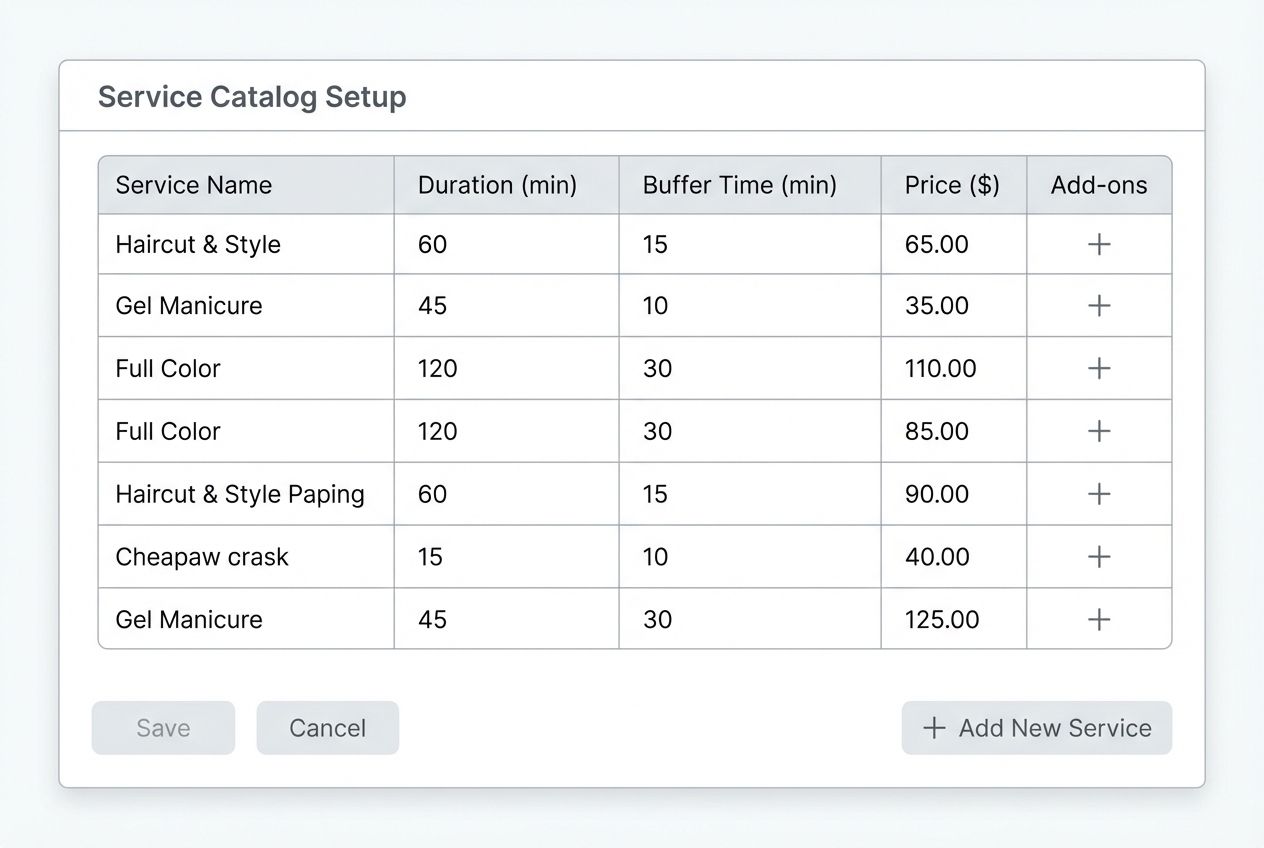
Start with a service list that is operationally accurate, not just marketing-friendly.
- Service duration: Include average time, not best-case time.
- Buffers: Add setup and cleanup time so you do not chain appointments unrealistically.
- Add-ons: Define add-ons that extend duration (and price) without creating separate appointments.
- Constraints: Decide what must be true for the service to happen (specific staff, room, equipment).
The goal is your schedule stops breaking the moment a client books something "non-standard."
Step 2: Define booking policies you will actually enforce
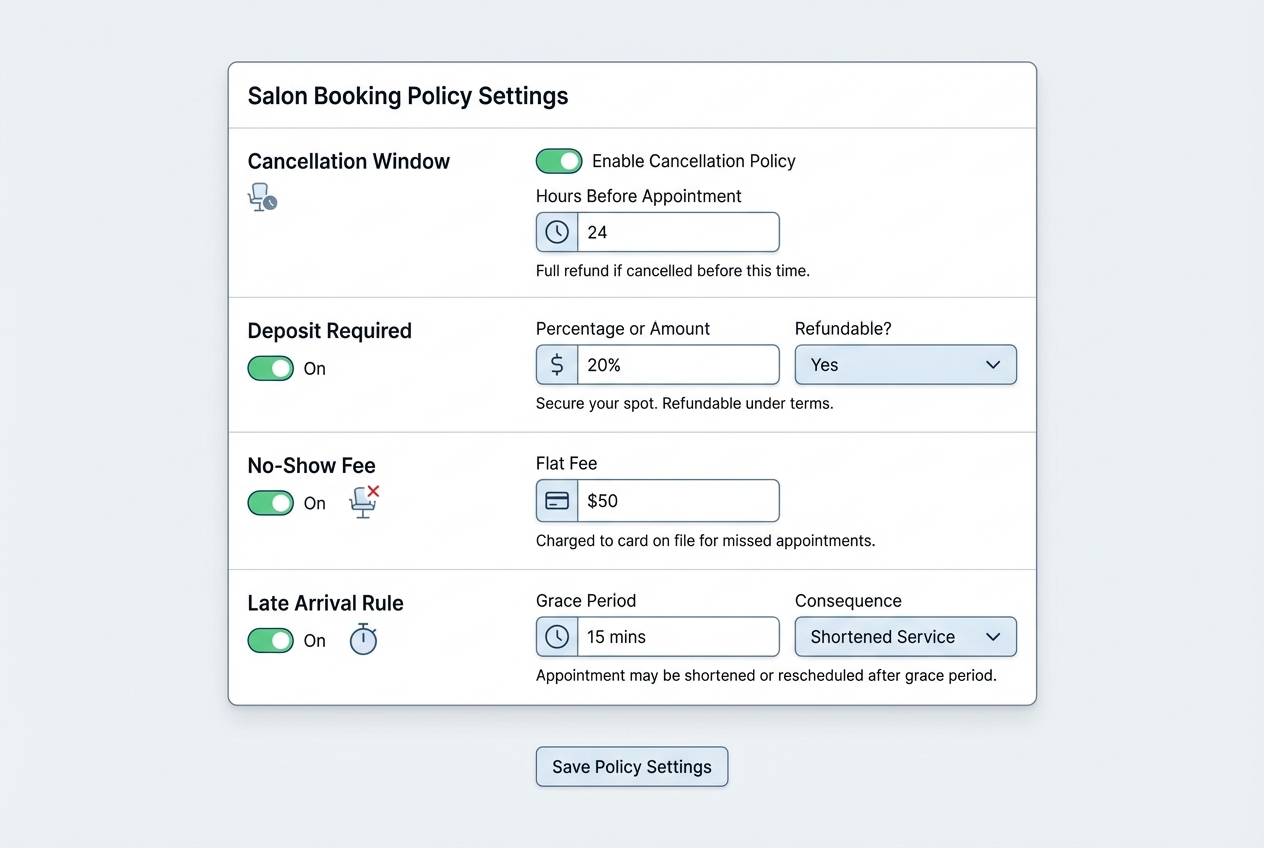
This is where many salons get stuck. They write policies, but the system does not enforce them.
- Cancellation window: Decide how many hours before the appointment clients can cancel without penalty.
- Deposit rules: Choose which services require deposits and how much.
- No-show handling: Decide whether you charge a fee, require prepay, or block repeat offenders.
- Late-arrival policy: Decide when you shorten the service vs reschedule.
The goal is the software enforces policies automatically so your staff does not have to.
Step 3: Set up staff schedules and permissions
Treat your roster like a capacity plan.
- Working hours and breaks: Build realistic blocks so "available" means truly available.
- Skill matching: Only show staff who can perform the service.
- Permissions: Limit who can override rules, issue refunds, or edit past appointments.
The goal is fewer double bookings and fewer "how did this get scheduled?" moments.
Step 4: Configure confirmations and reminders
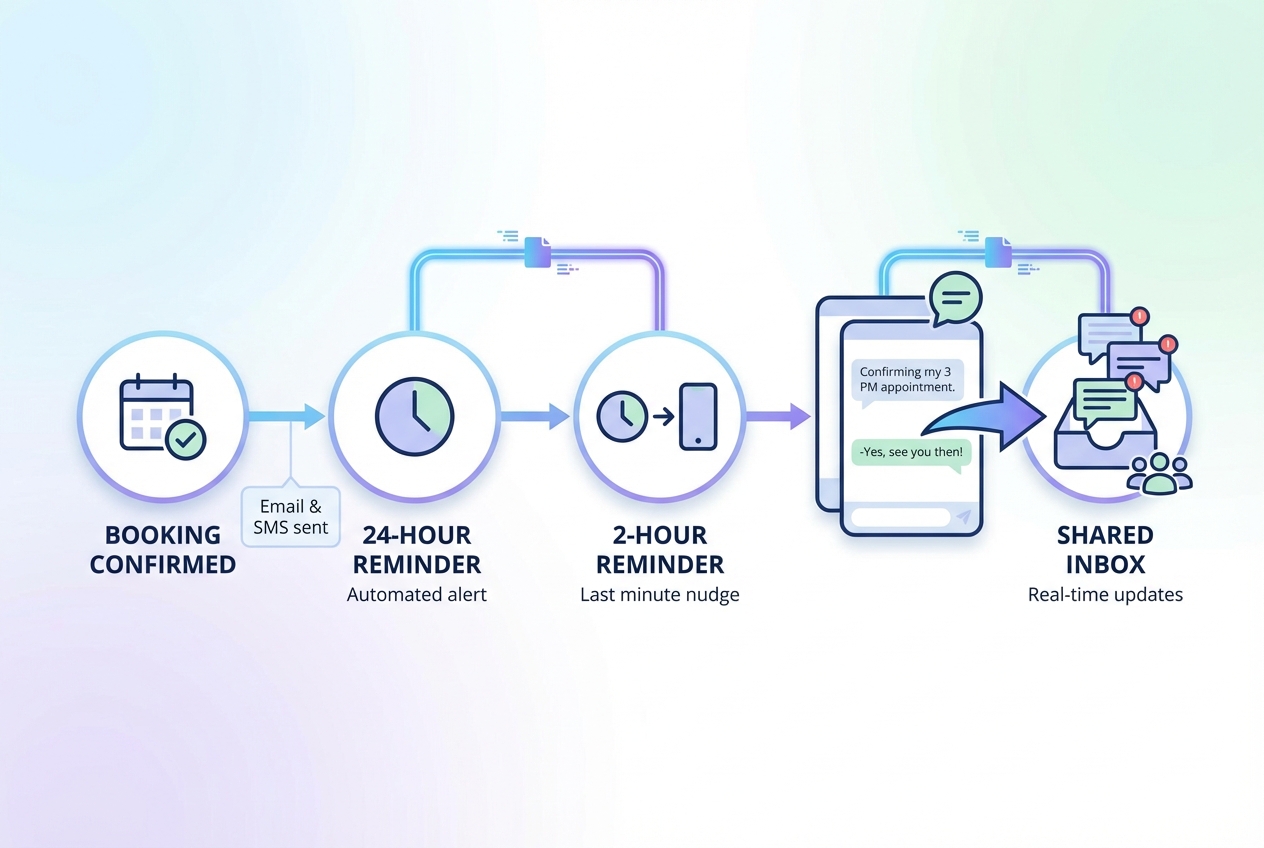
Reminders do more than reduce no-shows. They also cut inbound questions, because clients already have what they need.
- Confirmation message: Include service, time, location, parking notes, and your change policy.
- Reminder timing: Common patterns include 24 hours before and 2 to 3 hours before.
- Two-way messaging: If you enable replies, route them into a single inbox so they do not get lost.
The goal is fewer calls and fewer "I forgot" cancellations.
Step 5: Add payments in a compliant way
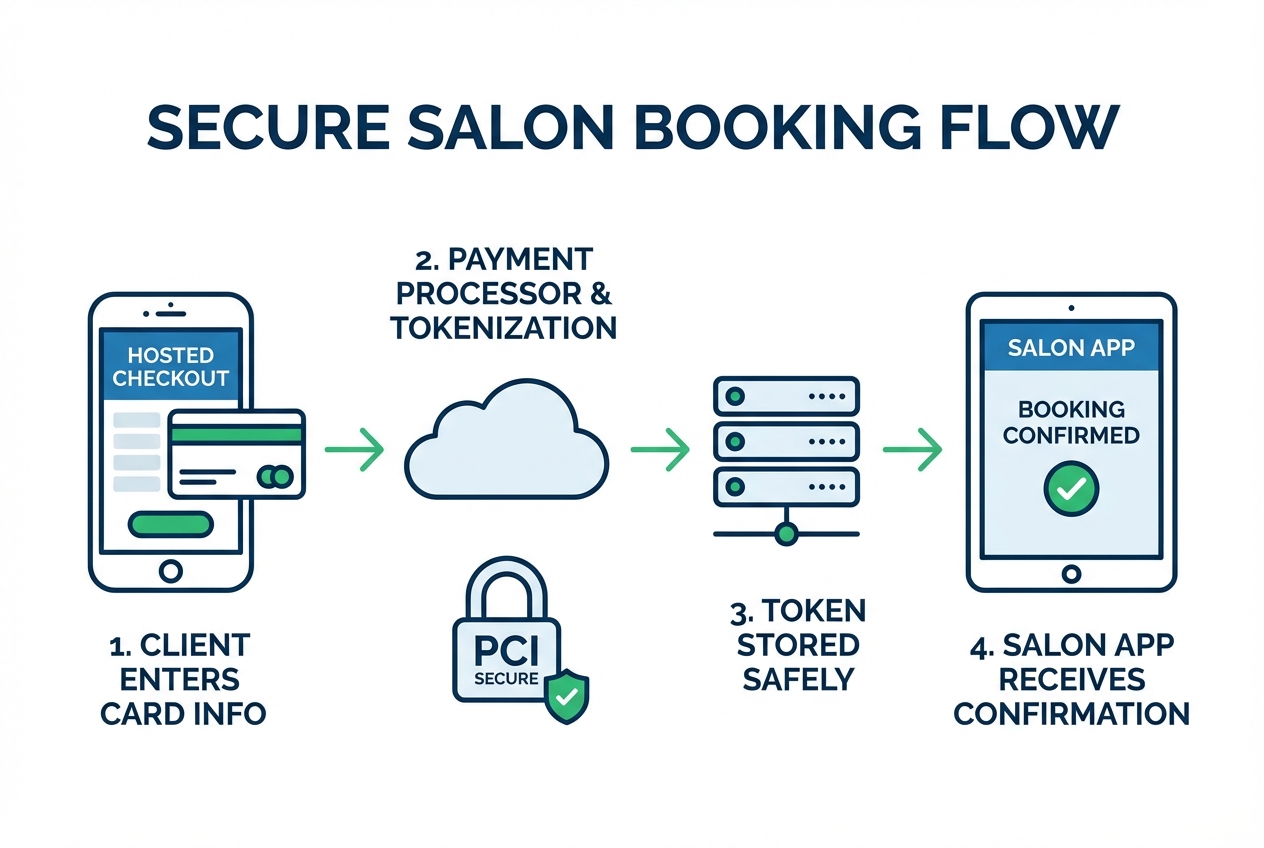
If you take deposits or store card-on-file, keep your system architecture clean.
Stripe’s security guide explains that PCI DSS compliance is a shared responsibility for any business that stores, processes, or transmits card data. The practical takeaway for salons is simple: use hosted or low-risk payment integrations when possible so sensitive data does not touch your servers.
The goal is you collect deposits reliably without creating avoidable security risk.
Step 6: Make your salon discoverable where clients already search
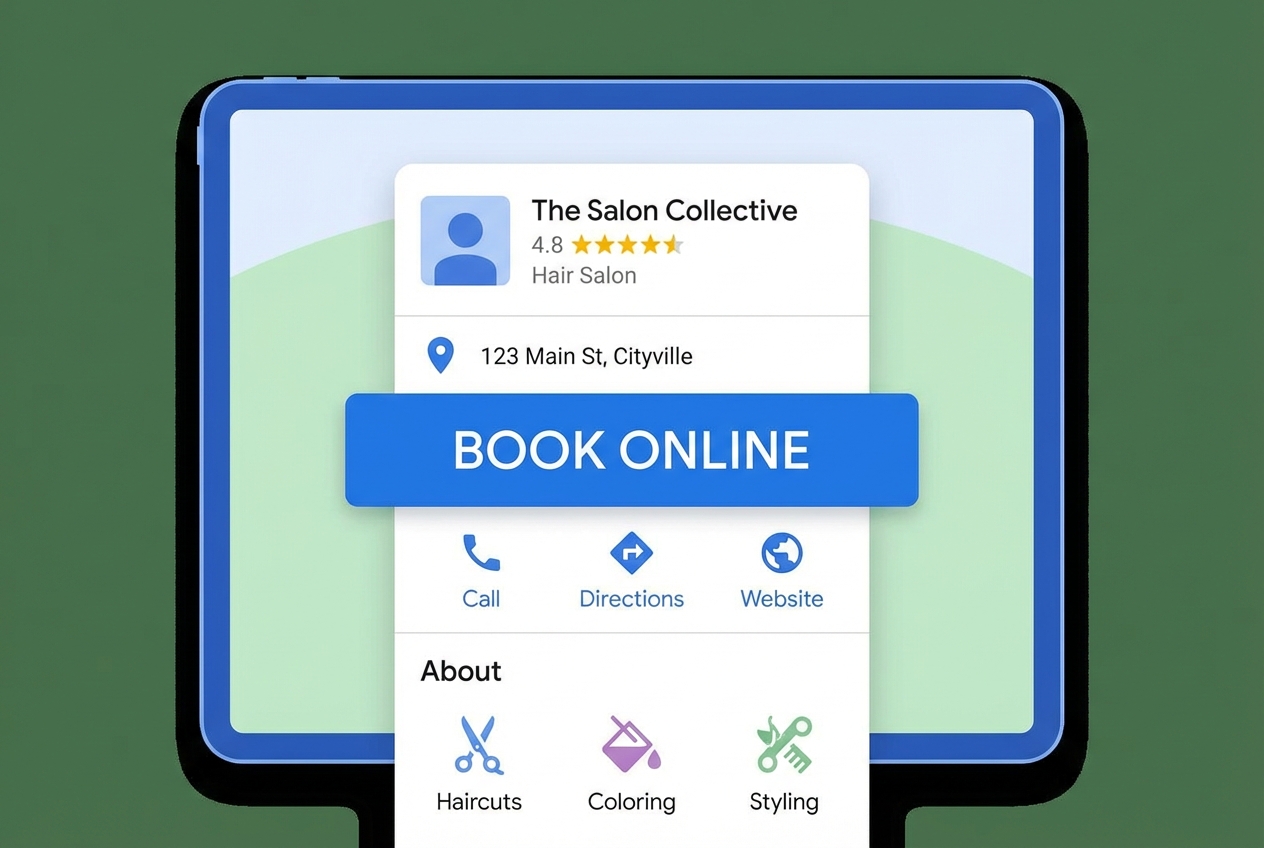
A scheduler is only useful if clients can reach it.
Google Business Profile posts can include an action button that links to a booking page. Google confirms these posts appear directly on Search and Maps and can include a "make a booking" action.
The goal is clients can go from "search" to "book" with fewer steps.
Step 7: Migrate data without bringing old mess into your new system
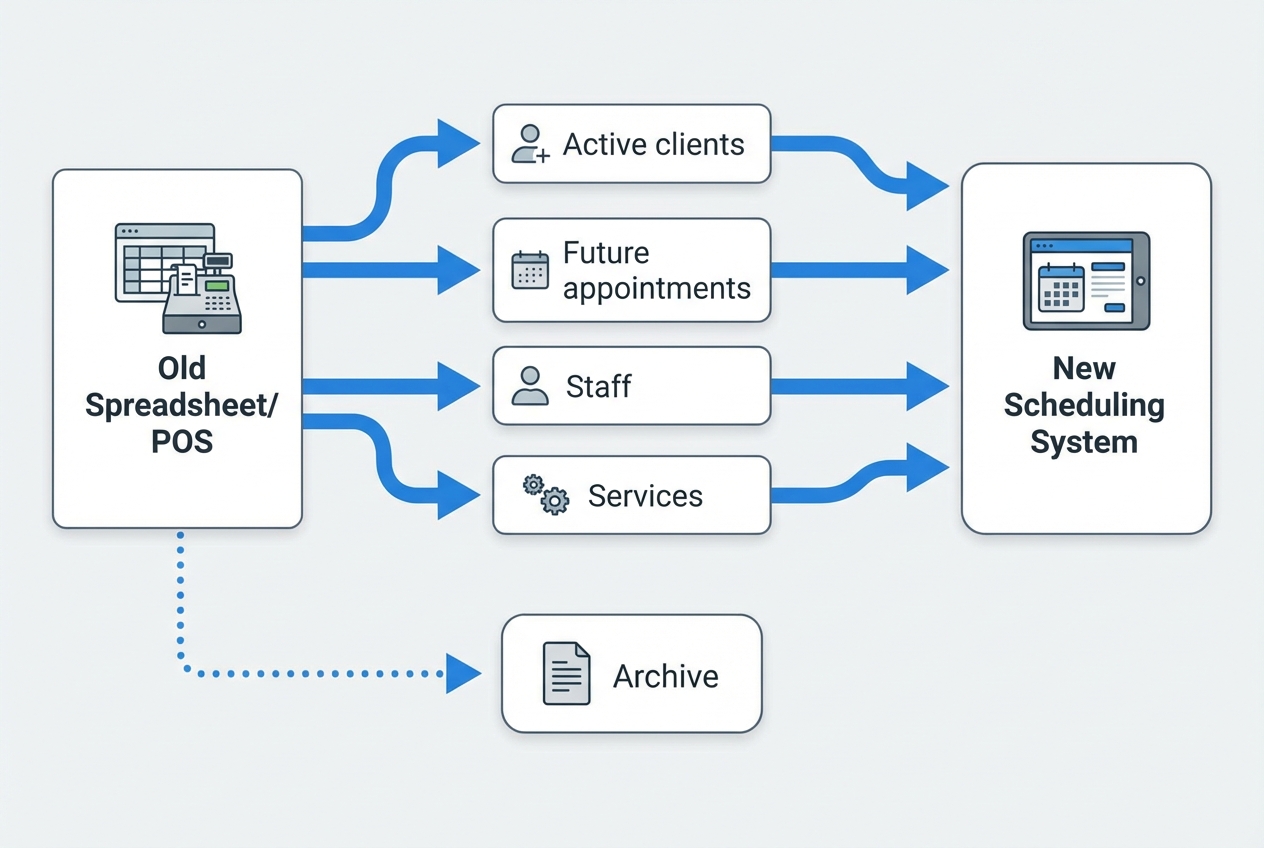
Move only what you need.
- Bring forward: Active clients, future appointments, staff profiles, and service catalog.
- Clean up: Duplicate client entries, outdated services, old pricing.
- Archive: Past appointments can be exported and stored for reference without clogging your new database.
The goal is a clean launch and better reporting from day one.
Step 8: Run a controlled go-live
Do not flip everything at once.
- Soft launch: Start with online booking for selected services or specific staff.
- Staff training: Train on edge cases, not just basic booking.
- Client education: Update your booking link everywhere and set expectations about deposits and cancellation policies.
The goal is minimal disruption, with real bookings flowing quickly.
When a custom scheduling system is the smarter move
If your salon’s rules are your competitive advantage, generic scheduling software can eventually feel like a ceiling.
Common reasons founders and operators go custom:
- Membership and packages: You need credits, entitlements, and renewal logic that matches your pricing model.
- Complex intake: You want consultation forms that dynamically change what can be booked.
- Multi-branch operations: You want consistent policies, but local autonomy per location.
- Workflow automation: You want tasks triggered automatically (prep, room reset, inventory checks, stylist notes).
This is the point where an AI app builder can be more practical than stacking plugins. With QuantumByte, you can start from a plain-English description of your booking rules, generate a working admin system, then iterate until it matches how your salon actually runs. If you want context on how these systems get built and maintained, start with the AI app builder platform.
If you want the fastest way to see what a tailored booking experience could look like for your salon, start with our basic plans.
If you are also building related client-facing workflows (like service intake, consent forms, or post-visit plans), this guide on building a customer portal is a helpful pattern to borrow.
Data privacy basics for salons
Even if you are "just a salon," you handle personal data: names, phone numbers, appointment history, and sometimes sensitive notes.
If you serve clients in the European Union (EU) or market to them, the European Commission’s overview clarifies that the General Data Protection Regulation (GDPR) applies based on processing personal data and can apply even to organizations outside the EU.
Operationally, keep it simple:
- Data minimization: Only collect what you need to deliver the service.
- Access control: Staff should only see what they need for their role.
- Retention: Do not keep sensitive notes forever unless you have a reason.
- Auditability: Be able to answer "who changed what" when disputes happen.
Common rollout mistakes to avoid
These mistakes are fixable, but they are expensive.
- Ignoring buffers: If you do not model prep and cleanup, your schedule will run late and you will blame the tool.
- Letting everyone override rules: Your policies become optional in practice, and your best staff carries the chaos.
- Going live without reminders: When reminders are missing, teams end up confirming appointments manually and no-show risk rises.
- Over-migrating: Importing years of messy records pollutes your new reporting.
What you should have after reading this
You now have a clear implementation path for salon appointment scheduling software, plus a decision framework for when off-the-shelf tools are enough and when custom is worth it.
You also have the key setup areas that determine whether the system actually reduces admin: service modeling, policy enforcement, team capacity, reminders, compliant payments, discoverable booking, clean migration, and controlled go-live.
If you decide to prototype a custom workflow later, pressure-test pricing and operational ownership early. QuantumByte’s pricing overview is a straightforward way to compare what you get as you move from a lightweight prototype to a more robust system.
Frequently Asked Questions
What is the best salon appointment scheduling software?
The best option is the one that reliably enforces your booking rules and reduces manual admin. If you want speed and standard features, an off-the-shelf tool can work well. If you need custom policies, workflows, or multi-location controls that reflect how you operate, a tailored system can be a better long-term fit.
Do I need deposits to reduce no-shows?
Not always, but deposits help most when you offer high-demand time slots or long services. A strong reminder setup plus clear cancellation windows can also reduce no-shows. The key is choosing a policy you will enforce and configuring the software to do the enforcement automatically.
How do I set up services with different durations and add-ons?
Create a base service with a realistic duration and buffer, then model add-ons that extend time and price. Avoid creating separate appointments for what is really one visit. This prevents availability errors and keeps reporting clean.
Can I let clients choose a stylist while still protecting the schedule?
Yes. Configure skill matching, working hours, and capacity constraints so the system only shows valid slots. For teams, limit overrides to managers so staff are not forced to make it work manually.
Should my booking system integrate with Google?
If most new clients discover you via Search and Maps, yes. At a minimum, link your booking page from your Google Business Profile so clients can take action immediately.
What should I do if my scheduling software cannot match my business model?
First, list the rules you are trying to enforce (membership credits, complex intake, room constraints, multi-location controls). If those rules are core to how you make money, consider building a tailored scheduling and back-office tool so the system matches how you operate instead of forcing workarounds.