
Setmore vs Acuity is a straight trade: Setmore is usually the fastest way to get a clean, self-booking schedule live, while Acuity is the better choice when your scheduling and policy rules are getting complex (multiple staff/resources, deposits, intake, and compliance).
Setmore vs Acuity: comparison summary
| Category | Setmore | Acuity |
|---|---|---|
| Best for | Solo instructors and tiny teams that want simple setup and a strong free starting point | Instructors and micro-studios that need deeper configuration and stricter policy control |
| Pricing starting point | Free plan available; paid starts at $12/user/month (or $5/user/month billed annually) | Starter $20/month (or $16/month billed annually) |
| Free plan | Yes (up to 4 users) | No (paid plans only) |
| Team size fit | Good for small teams; pricing scales by staff profiles | Scales by calendar count: Starter 1, Standard up to 6, Premium up to 36 calendars |
| Payments | Square supported (Free and Pro) | Stripe, Square, and PayPal supported (all plans) |
| Packages/memberships fit | Best if your packages are simple and you can tolerate some manual tracking | Better if you need more structured booking flows + policy gating tied to appointment types |
| Group classes fit | Works for basic group bookings | Better when group classes collide with staff/resources, time zones, and policy rules |
| Forms/waivers fit | Fine for lightweight intake | Better when intake and conditional logic start to matter |
| Reminders (email/SMS) | Email reminders on Free; SMS reminders on Pro | Email reminders on Starter; SMS/text reminders on Standard and Premium |
| Key integrations | Square-first payment workflow; calendar sync (varies by plan) | Calendar-centric workflow; payments + text reminders are tightly plan-gated |
| Main tradeoff | You may outgrow it when rules multiply | You may pay sooner for “grown-up” features you do not actually need yet |
If you are a solo instructor or a brand-new studio trying to stop the admin bleeding this week, pick Setmore. If you are already juggling staff calendars, deposits, detailed intake, and strict cancellation rules, pick Acuity.
Quick verdict for solo instructors and micro-studios
Your real decision driver is scheduling complexity and policy complexity, not “how many features” the tool advertises.
- Solo 1:1 instructor (lowest complexity): Choose Setmore. The free tier is legitimate for getting to a working system fast, and you can add payments and email reminders without committing up front via Setmore.
- Tiny studio with multiple instructors: If you will stay under a few staff calendars and want predictable, simpler admin, Setmore is the easier default. If you need separate calendars per staff/location with more control, Acuity’s calendar scaling (Starter 1, Standard up to 6, Premium up to 36) is explicit on Acuity Scheduling.
- You rely on SMS reminders to prevent no-shows: Setmore requires Pro for SMS, while Acuity requires Standard or Premium for SMS/text reminders per Setmore and Acuity Scheduling. Decide based on which pricing model you prefer.
- You need HIPAA-enabled scheduling: Acuity is the clear pick because it supports signing a BAA for HIPAA compliance at the right tier per Acuity Scheduling, with detailed operational constraints documented by Squarespace Support.
Feature checklist that actually matters for instructors
Most instructors do not need “more features.” You need fewer mistakes, fewer no-shows, and fewer back-and-forth messages.
- Reduce admin:
- Client self-booking: Class/session selection, real-time availability, and clear time zones.
- Buffers and capacity: Prevent back-to-back burnout and limit seats.
- Reschedule/cancel links: Put the rules in the workflow so you are not negotiating by text.
- Reduce no-shows:
- Automated reminders: Confirmation + 24-hour reminder, then (optionally) a short 2-hour SMS.
- Consistent policy messaging: Put “what happens if you cancel late” in every reminder.
- Collect money upfront:
- Deposits or full prepay: Your schedule is your inventory.
- Payment rails you already use: Square vs Stripe vs PayPal, plus clean reconciliation.
- Keep capacity under control:
- Instructor calendars: Separate calendars per staff member or location.
- Resource constraints: Rooms, equipment, and session types that cannot overlap.
Minimum viable setup (day 1):
- Setmore day-1 setup:
- Turn on payments: If you are Square-first, confirm your payment setup on Setmore.
- Lock policies into confirmations: Put your cancellation window and reschedule rules in the confirmation text.
- Start with email reminders: Upgrade to Pro later if SMS is truly necessary.
- Acuity day-1 setup:
- Model calendars first: Map each instructor or location to a calendar (1/6/36 calendar scaling is shown on Acuity Scheduling).
- Collect payment during booking: Supported providers are listed on Acuity Scheduling.
- Decide early if you need SMS: Because it is plan-gated (Standard+).
Workflow fit: 1:1 sessions vs small-group classes
1:1 sessions
A 1:1 schedule breaks when reschedules and exceptions pile up.
You typically need:
- Discovery or intro sessions: A shorter appointment type with different pricing.
- Recurring clients: Same slot every week, with occasional changes.
- Buffers and travel time: Even if you are not traveling, you need setup time.
Setmore tends to feel cleaner here because you can stay light on rules and keep the booking flow simple. Acuity shines when you start enforcing deposits, strict cancellation windows, and different rules per appointment type.
Small-group classes
Group scheduling breaks for different reasons: capacity and substitutions.
You typically need:
- Seat caps: Avoid overselling a class.
- Series and programs: A 4-week course is operationally different than a drop-in.
- Substitutes: Another instructor takes the class, but the slot stays the slot.
If your “class schedule” is basically a few repeating time slots, Setmore can work. If you have a lot of class types, multiple instructors, and policy differences between them, Acuity’s deeper configuration tends to be worth the higher plan.
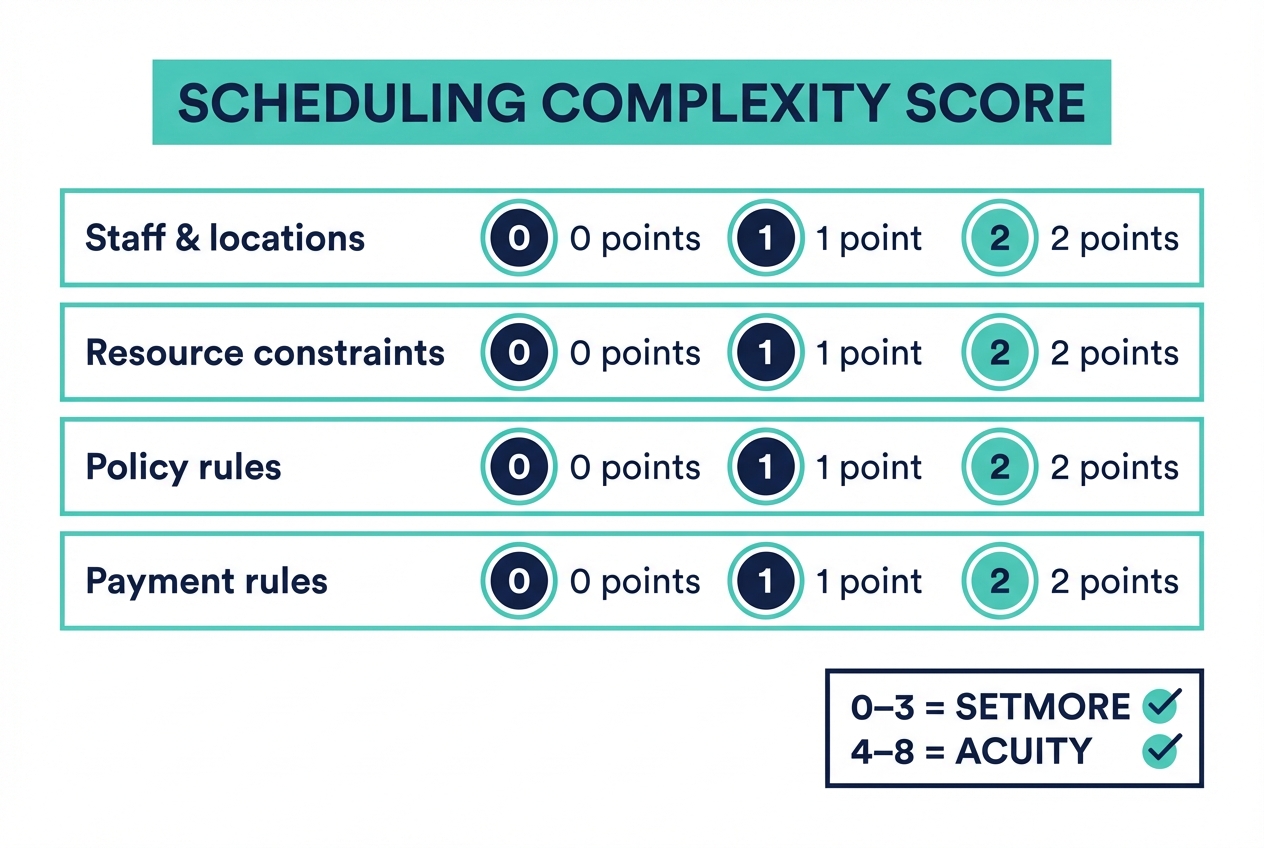
The Scheduling Complexity Score
Use this to decide in 60 seconds:
- Staff and locations: 0 points (just you) / 1 (2–3 staff) / 2 (multiple locations)
- Resource constraints: 0 (none) / 1 (room or equipment matters) / 2 (multiple resources)
- Policy rules: 0 (flexible) / 1 (standard cancellation window) / 2 (different rules per session/class)
- Payment rules: 0 (pay later) / 1 (prepay some) / 2 (deposits, packages, and expiration)
If you score 0–3, Setmore is usually the better fit. If you score 4–8, plan for Acuity.
Selling packages, memberships, and multi-session programs
Packages are where micro-studios quietly lose money, because “what you sold” and “what got booked” drift apart.
Common package needs:
- Multi-session packs: 5-pack or 10-pack with simple redemption.
- Intro offers: First session discounted, then normal pricing.
- Expiration rules: “Use within 90 days” (and what happens after).
- Credit tracking: Remaining sessions should be obvious for you and the client.
Operational risk to watch:
- Package liability: If you sell a lot of future sessions, you owe future time.
- Manual reconciliation: The more you track credits in spreadsheets, the more disputes you will handle.
Practical guidance: if packages are core to your revenue, prioritize a flow where (1) the payment happens reliably, (2) redemption is clear at booking time, and (3) cancellation rules are enforced consistently. In practice, that usually pushes you toward Acuity when your rules get nuanced, and toward Setmore when your packages are simple and you want to keep overhead low.
Forms, waivers, and policies
The best scheduling tool is the one that enforces your boundaries without you having to be the bad guy.
What to compare:
- Intake forms: Can you require answers before a booking is accepted? Can you ask different questions per service type?
- Waivers: Can you ensure the waiver is completed before the first session?
- Policy enforcement: Does your flow support deposits or full prepay so “late cancel” is actually enforceable?
A simple policy template many instructors can copy:
- 24-hour cancellation window: Cancel or reschedule at least 24 hours before.
- One courtesy reschedule: Allowed per month (or per package).
- Late cancel fee: Charged if inside 24 hours.
- No-show handling: Full charge, with a single goodwill exception for true emergencies.
If you know you will run strict policies, pair them with payment collection during booking. Both tools support payments, but plan-gating around reminders and other controls can affect the experience, so validate those tiers on Setmore and Acuity Scheduling.
Integrations that matter: payments, video, and calendars
Integrations are not “nice to have.” They are switching costs.
- Payments:
- Acuity supports Stripe, Square, and PayPal across plans per Acuity Scheduling.
- Setmore supports Square even on Free per Setmore.
- Video sessions: Ensure links are auto-generated, time zones are correct, and reschedules regenerate the right join link.
- Calendar sync: Your baseline expectation is double-booking prevention. If you are in a regulated environment, note that enabling HIPAA mode in Acuity can disable certain calendar sync options and other features per Squarespace Support.
10-minute integration sanity check:
- Create a test service.
- Book it yourself as a client.
- Confirm payment capture works.
- Confirm the appointment lands on your personal calendar.
- Trigger a reschedule and confirm every system updates.
- Read the client email and check it answers the questions clients always ask.
Pricing expectations and the real cost drivers
“Starting at” pricing is misleading because most upgrades are forced by one or two features.
What the official pages show:
- Setmore is Free (up to 4 users) and Pro is $12/user/month (or $5/user/month billed annually) per Setmore.
- Acuity has Starter ($20/month), Standard ($34/month), and Premium ($61/month), with lower effective monthly pricing when billed annually, per Acuity Scheduling.
The real cost drivers for instructors:
- Staff profiles and calendars: Acuity scales by calendar count (1/6/36) per Acuity Scheduling. Setmore charges per “user” staff profile per Setmore.
- SMS reminders: Setmore requires Pro for SMS per Setmore. Acuity requires Standard or Premium for text reminders per Acuity Scheduling.
- HIPAA requirements: Acuity’s “sign a BAA for HIPAA compliance” is positioned at Premium on Acuity Scheduling, and the operational requirements and limitations are detailed by Squarespace Support.
Mini decision table (plan gating to expect):
- If you need SMS reminders:
- Setmore: Pro required (Setmore)
- Acuity: Standard or Premium required (Acuity Scheduling)
- If you need HIPAA/BAA:
- Acuity: Premium (and follow HIPAA enablement steps) (Acuity Scheduling, Squarespace Support)
Reminder automation: what to use (email vs SMS) and why
Reminders are one of the highest-return automations you can turn on, because they measurably improve attendance.
A systematic review and meta-analysis of outpatient appointment reminders found that reminders improved attendance versus usual care with a pooled risk ratio (RR) of 1.11 (95% CI 1.05–1.19) in meta-analysis across reminder types, including SMS and telephone reminders (Journal of Hospital Management and Health Policy). Another evidence synthesis found pooled effects for simple reminders with relative risks commonly in the 1.06–1.10 range, and noted weak but consistent evidence that “reminder plus” messages can outperform simple date/time/place reminders in specific contexts (PMC).
What to use in practice:
- Email reminders are enough when: You have mostly repeat clients, your sessions are at the same weekly time, and you collect payment up front.
- SMS is worth paying for when: You teach early mornings, have lots of first-timers, run high-demand classes, or you see frequent “I forgot” no-shows. In those cases, paying for a tier that includes SMS (Setmore Pro or Acuity Standard+) is usually justified by even a small attendance lift (Setmore, Acuity Scheduling).
“Reminder plus” templates you can copy:
- 24 hours before (policy + prep): “Reminder: you’re booked for {Service} at {Time}. Please arrive 5 minutes early. If you need to reschedule, use this link: {Link}. Late cancellations inside 24 hours are charged.”
- 2 hours before (friction removal): “See you soon at {Time}. Parking tip: {Parking}. Bring: {Shoes/Mat/ID}. If you’re running late, reply to this text.”
- Confirmation (set expectations): “You’re confirmed for {Service}. Please complete your intake form before arrival: {Link}. If you’re new, plan 10 minutes for setup.”
Alternatives if neither Setmore nor Acuity fits
If you are not just scheduling, but also running a studio business end-to-end, you may be in the wrong category.
Consider:
- Calendly-style scheduling: If your needs are mostly 1:1 bookings and you do not sell complex programs.
- Class-first studio platforms: If you need true memberships, attendance tracking, and class rosters as the core workflow.
- CRM suites: If scheduling is only one part of lead capture, pipelines, email, and client management.
- Square-first operations: If you want scheduling tightly coupled with in-person payments and POS.
Rule of thumb: if your biggest headache is “membership and attendance operations,” look class-first. If your biggest headache is “policy rules and payment enforcement,” Acuity tends to be the step up.
Build vs buy: when a custom scheduling flow beats both
There is a point where you stop shopping for a scheduler and start designing your own operating system.
Three common triggers to build:
- Complex package rules: Credits, expirations, rollover rules, and exceptions you want enforced automatically.
- Multi-location resources: Rooms, equipment, and staff substitutes with shared constraints.
- Custom onboarding: Intake, waivers, and eligibility checks that determine what clients can book.
This is where a custom app can beat both tools: a lightweight client portal, an admin dashboard for staff, automated reminders, intake capture, and post-session follow-ups that connect to your internal workflow.
If you are hitting these limits, Quantum Byte can be the faster path to a custom-fit system without a traditional dev project. You describe the workflow, start from plug-and-play templates, then customize what matters. See Quantum Byte pricing.
Implementation timeline: go live in 1 day vs 2 weeks
Solo instructor quick start
- List 1–3 services (intro, standard session, premium session).
- Set availability, buffers, and max daily sessions.
- Add your cancellation window and no-show policy to confirmations.
- Connect payments.
- Turn on email reminders.
- Do 3 test bookings: new client, returning client, reschedule.
Micro-studio setup
- Map each instructor to a calendar/profile.
- Define class types and seat limits.
- Decide deposit vs full prepay per offering.
- Create package rules (and write the policy in plain English).
- Build intake forms and waivers.
- Configure SMS reminders if you need them.
- Run a soft launch: keep old booking links active for a week, but route new bookings to the new system.
What this means for you
- Pick Setmore if you want fast setup, a real free starting point, and your rules are simple today.
- Pick Acuity if you need more structure around calendars, policies, intake, and plan-gated capabilities like SMS and HIPAA mode.
- Consider building if you are stitching together scheduling + packages + onboarding + reporting and the cracks are now costing you time and revenue.
Decision shortcut: Setmore is the better default for minimal rules. Acuity is the better default for deeper configuration you will actually use.
Start building
If scheduling is turning into a bottleneck, you do not have to accept a one-size-fits-most tool forever. Quantum Byte is built for founders who want an app that matches their workflow: start from plug-and-play templates, then customize in plain English.
Start building with Quantum Byte.
- Founder-friendly: You can iterate quickly without hiring a dev team.
- Templates with customization: Start with proven building blocks (booking, client portal, payments, reminders) and adapt what makes your studio different.
- Speed with flexibility: Get to a working version fast, then refine policies, packages, and staff operations as you grow.