Text messages get opened. That's why businesses keep coming back to SMS—it cuts through the noise in a way email and app notifications often don't. But if you're still manually replying to every inquiry, you're trading one bottleneck for another.
An SMS chatbot lets you automate the predictable stuff—qualifying leads, answering common questions, confirming bookings—while routing the rest to a human. Done well, it feels responsive and personal without eating up your day.
What an SMS chatbot is and what it is not
An SMS chatbot is a system that receives text messages, figures out what the person wants, and sends automated replies based on rules, data lookups, or sometimes a language model.
It works best when you can define a clear job:
- Lead qualification: Ask a few questions, capture intent, and hand off hot leads.
- Booking and reminders: Confirm availability, collect details, and reduce no-shows.
- Support triage: Answer frequently asked questions, then escalate with context.
- Internal workflows: Let staff text a keyword to trigger a process (status checks, simple requests).
Where SMS is a poor fit:
- Long, nuanced conversations: SMS is constrained and expensive at scale.
- Rich UI workflows: Complex forms and multi-step configuration usually belong in a web app.
- Unclear ownership of truth: If your pricing, inventory, or policies change often and are not centralized, your bot will drift.
SMS chatbot architecture at a glance
Most SMS chatbots boil down to five components:
- Phone number and messaging provider: A vendor like Twilio or Vonage that receives and sends messages.
- Webhook endpoint: An Application Programming Interface (API) endpoint that receives incoming messages as HTTP requests.
- Bot logic: A rules engine, an LLM, or a hybrid that decides what to do next.
- Data layer: A database and integrations (Customer Relationship Management (CRM), calendar, payments) so the bot can act.
- Human handoff: A queue and dashboard for when automation should stop.
If you want the bot to be dependable, treat the webhook and data layer as the product, and the LLM as a tool inside it.
Before you build: consent, compliance, and deliverability
If you send messages to United States numbers, you need to treat compliance as a build requirement, not an afterthought.
Start with two practical standards:
- Carrier registration: Understand and complete carrier registration requirements for business messaging where they apply.
- Consumer consent and opt-outs: Capture clear opt-in, handle opt-outs immediately, and honor HELP requests with program details.
Twilio’s overview of A2P 10DLC compliance explains the core concept: application-to-person (A2P) messaging over 10-digit long codes (10DLC) requires registration so traffic is verified and consensual.
The CTIA (Cellular Telecommunications Industry Association) industry guidance, Messaging Principles and Best Practices (May 2023), is the clearest reference for how carriers expect you to handle consent and opt-outs.
Build these behaviors into your SMS chatbot from day one:
- Clear opt-in language: Your website, form, or keyword flow should state what users will receive and how often.
- Standard opt-out support: Treat STOP and natural language opt-outs ("unsubscribe," "cancel") as immediate opt-outs.
- A single confirmation message after opt-out: Send one final confirmation, then stop.
- Help keyword: Reply with basic program information and how to contact a human.
Deliverability is also a product decision. If your messages get filtered, your automation quietly becomes a support problem.
Choose an SMS provider and number strategy
Pick an SMS provider based on webhook reliability, compliance tooling, and how well it fits your expected volume.
Common provider options you will run into:
| Provider | Best when | Watch outs |
|---|---|---|
| Twilio | You want strong documentation, webhooks, and broad ecosystem | Compliance setup can be detailed; plan for A2P registration where required |
| Vonage | You need global messaging and a large carrier footprint | Feature parity varies by region |
| MessageBird | You want omnichannel messaging with a single console | Ensure your webhook and deliverability setup is consistent per channel |
| Plivo | You want SMS and voice with competitive routing options | Make sure your compliance and reporting needs are covered |
Number type matters too:
- 10DLC (10-digit long code): Good for conversational and many business programs in the US, typically with registration.
- Toll-free: Useful for higher throughput programs; still has verification requirements.
- Short code: Best for very high volume and brand recognition; longer lead times and higher cost.
If you are early stage, optimize for "get it working, legally, with consistent delivery." Do not optimize for the perfect number type before you have message-market fit.
Design the conversation you actually want to automate
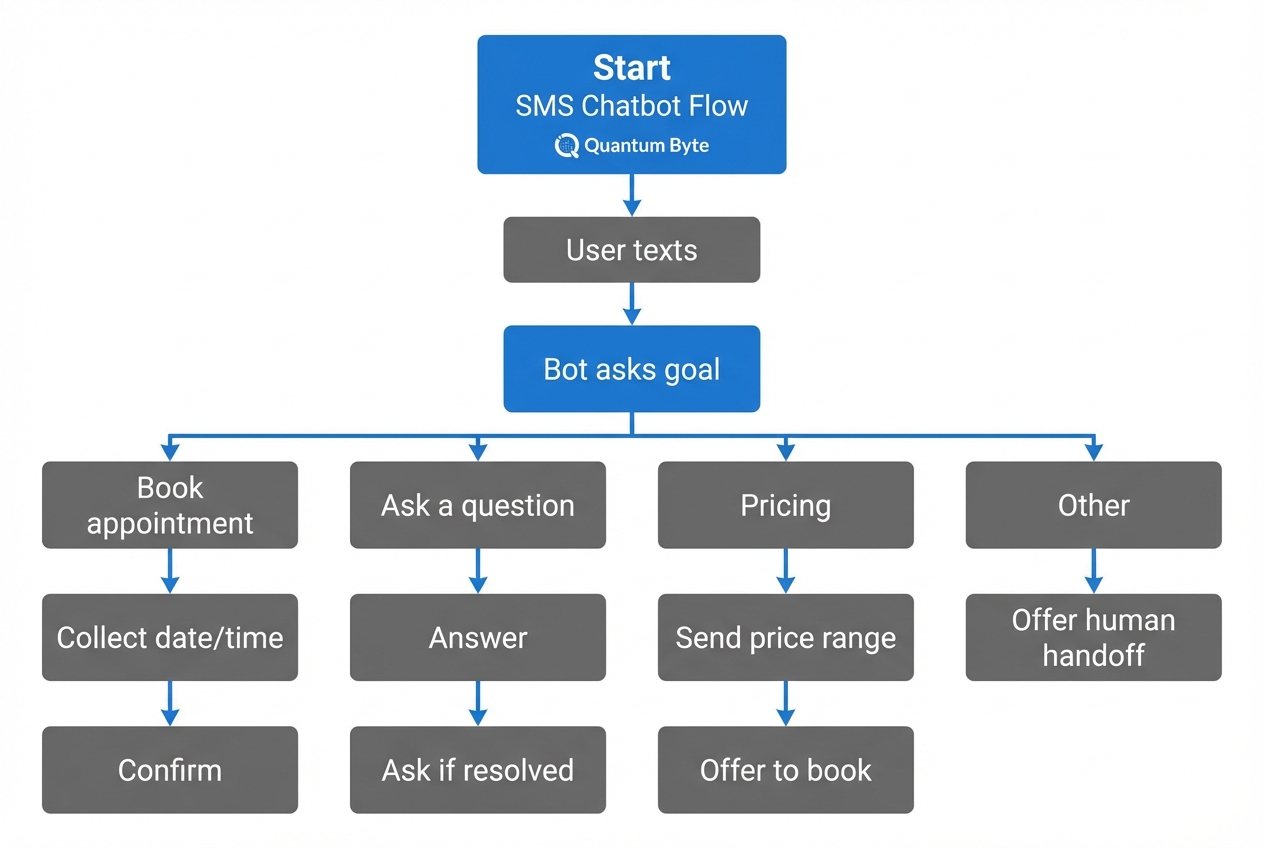
A good SMS chatbot conversation is short, structured, and forgiving.
Start by writing down:
- Primary user intents: "book," "pricing," "hours," "reschedule," "talk to a person."
- Required fields: What you must capture for the bot to take action (email, location, service type).
- Exit points: When the bot should stop and escalate.
Then define your guardrails:
- One question at a time: SMS is linear. Multi-part questions reduce replies.
- Confirm critical info: Repeat back dates, addresses, or appointment times.
- Use constrained choices when possible: "Reply 1 for A, 2 for B" reduces ambiguity.
A practical pattern is "rules first, LLM second." Use rules to route intent and validate fields, then let the LLM handle phrasing and fuzzy user inputs.
If you plan to generate parts of your system from natural language, this AI app builder prompts guide is a strong framework for turning a messy idea into clear roles, data, and workflows.
How to build an SMS chatbot step by step
This is the build path that keeps you shipping while avoiding the classic traps (compliance gaps, no handoff, no data model).
1) Define your job and success criteria
Be specific about what the bot must accomplish.
Examples:
- Fast booking: Book a consultation in under five messages.
- FAQ containment: Answer the top 10 support questions and escalate the rest.
- Lead capture: Collect lead details and push them into your CRM with tags.
Also decide what good looks like:
- Containment: The percent of conversations resolved without a human.
- Conversion: The percent of qualified leads that book.
- Time-to-first-response: SMS users expect immediacy.
If you want a practical spec-writing workflow before you touch code, this guide on how to build a chatbot with AI maps well to SMS because it forces you to define outcomes, boundaries, and fallbacks up front.
2) Set up your messaging provider and webhook
At a minimum, you need:
- SMS-capable number: A phone number that can receive inbound SMS.
- Incoming webhook URL: An endpoint your provider can call when messages arrive.
- Outbound send path: A way to send replies (API call or provider-specific response format).
Twilio’s documentation on Messaging webhooks is the cleanest reference for the flow: Twilio sends your server an HTTP request when a message arrives, and your server returns TwiML (Twilio Markup Language) that tells Twilio how to respond.
Implementation detail that matters: your webhook must be fast and stable. If it times out, users see delays and you lose trust.
3) Create a conversation state model
SMS is stateless by default. Your bot should not be.
Store at least:
- User identifier: Phone number (normalized), plus any internal customer ID.
- Current state: Which step of the flow the user is in.
- Collected fields: Name, email, service, preferred times.
- Consent status: Opted in, opted out, pending.
- Audit trail: Inbound and outbound messages for debugging and disputes.
This is also where you decide how you will handle multiple concurrent threads, for example if a customer texts again a week later.
4) Implement intent routing
Even if you use an LLM, keep routing deterministic.
A simple approach:
- Keyword rules: Hard-code high-importance intents like STOP, HELP, HUMAN, AGENT.
- Classifier: Use LLM intent classification or a lightweight model for everything else.
- Fallback: When confidence is low, ask a clarifying question or escalate.
Make the bot’s behavior predictable. Users will forgive a limited bot. They will not forgive a confident bot that is wrong.
5) Add actions: booking, CRM updates, and notifications
An SMS chatbot becomes valuable when it can do things, not just talk.
Typical actions:
- Calendar operations: Create or reschedule a calendar event.
- CRM operations: Create a lead record, tag it, and assign an owner.
- Payments: Send a payment link and confirm receipt.
- Internal notifications: Alert your team when a lead meets a threshold.
If you are building these internal actions, you will usually end up needing a lightweight admin interface.
This is a spot where QuantumByte is genuinely useful: you can stand up the internal tool layer (conversation inbox, lead table, tags, routing rules) quickly so you are not stitching everything together in spreadsheets. Start small, then iterate based on real transcripts in Packets.
For sales teams, it also helps to align your bot actions with your follow-up system. This breakdown of sales automation processes is a useful reference for what to automate, what to personalize, and where humans should stay involved.
6) Build human handoff as a first-class feature
Escalation is a core feature, because it protects the customer experience when automation should stop.
Define:
- When to escalate: Low confidence, billing disputes, regulated topics, angry sentiment, VIP customers.
- Where it goes: Shared inbox, help desk, Slack, or a dedicated dashboard.
- What context is included: Summary, captured fields, full transcript, recommended next action.
7) Add observability: logs, metrics, and replay
Ship with visibility or you will not know what to fix.
Track:
- Message delivery status: Delivered, failed, filtered.
- Drop-off points: Which question users stop responding to.
- Escalation reasons: Why the bot handed off.
- LLM traces: Inputs, outputs, and safety filters, stored with care.
Replay is especially valuable. When something goes wrong, you want to replay a conversation against a new version of the logic to confirm it is fixed.
Security and abuse protection for an SMS chatbot
An SMS chatbot is an internet-facing system that accepts untrusted input. Treat it like any other production API.
Key protections to implement:
- Webhook signature validation: Validate that requests truly originate from your provider. Twilio recommends using an SDK signature validation library in its webhook request guide.
- Rate limiting: Protect against spam bursts and brute force attempts.
- Prompt injection defenses: If you use an LLM, do not allow inbound text to rewrite system rules. Keep tool access tightly scoped.
- Data minimization: Do not store sensitive data you do not need.
- Role-based access: Your admin dashboard should restrict who can view transcripts and export data.
Testing and iteration that improves outcomes
Testing an SMS chatbot is not just "does it reply." You are testing behavior under messy human inputs.
A simple testing cadence that works:
- Scripted tests: Happy paths for each intent.
- Adversarial tests: Nonsense inputs, long messages, profanity, opt-out language.
- Latency tests: Confirm webhooks respond quickly under load.
- Deliverability checks: Validate that opt-in language, message templates, and registration settings are correct.
Then iterate based on real transcripts. The fastest improvements usually come from:
- Friction reduction: Tightening the first two questions so people can answer quickly without rereading.
- Clarification prompts: Adding one targeted clarifying question for ambiguous requests so the bot does not guess.
- Knowledge coverage: Expanding your known-answers library for the questions that show up every week, so fewer chats need escalation.
If your bot also needs to coordinate back-office steps (refunds, shipping updates, policy-based approvals), this roundup of operations automation use cases is a good way to identify what should become a workflow instead of more chat.
Scaling beyond SMS: when to add web chat, WhatsApp, or Slack
Once your SMS chatbot is stable, you can expand to other channels without rewriting your business logic, as long as you designed a clean separation between:
- Channel layer: SMS, WhatsApp, web chat.
- Bot logic: Routing, policies, safety rules.
- Actions layer: Calendar, CRM, payments, internal notifications.
For larger organizations where the chatbot must connect into multiple departments and systems with stronger governance, QuantumByte’s Enterprise offering is a better fit when you need deeper customization, operational visibility, and cross-functional automation.
Building it faster without painting yourself into a corner
You can build an SMS chatbot with code, no-code tools, or a hybrid. The mistake is choosing a path that cannot evolve once you learn what customers actually ask.
A practical build strategy:
- Start with a tight scope: One use case, one number, one escalation path.
- Ship a real internal dashboard early: It becomes your control plane for quality and handoff.
- Gradually productize: Add routing rules, reporting, and integrations as the conversations demand them.
Wrap-up: what you now have
You now have a clear path to build an SMS chatbot that is useful in the real world:
- Fit and boundaries: What an SMS chatbot should handle (and what it should not).
- Core architecture: A proven setup with provider, webhooks, logic, data, and human handoff.
- Compliance essentials: Consent, opt-out handling, and registration expectations you can build into the flow.
- Build sequence: A step-by-step path that prioritizes stability and outcomes over flashy demos.
- Reliability practices: Security and testing habits that prevent silent failures and trust erosion.
- Scale plan: A channel expansion approach that keeps your logic reusable as you grow.
Frequently Asked Questions
Do I need an LLM for an SMS chatbot?
No. Many high-performing SMS chatbots use rules and structured flows for most intents. An LLM becomes valuable for intent classification, flexible phrasing, and handling messy inputs, but it should sit behind guardrails and deterministic routing.
What is the simplest MVP for an SMS chatbot?
A single use case (like booking), one phone number, a webhook that stores state in a database, and a human handoff path. Avoid trying to automate support, sales, and operations in version one.
How do I handle STOP and opt-outs correctly?
Treat STOP and natural opt-out language as immediate opt-out, send one final confirmation message, and stop messaging for that campaign. The CTIA’s Messaging Principles and Best Practices is the most useful reference for expected behavior.
Do I need A2P 10DLC registration?
If you are sending application-to-person messages to US end users over a 10DLC number, registration is typically required. Twilio’s A2P 10DLC documentation explains what must be registered and why.
What internal tool should I build first alongside the bot?
A conversation inbox with tags, escalation status, and basic customer context. Once you have that, add a simple rules page (routing thresholds, escalation reasons) and lightweight reporting (drop-offs, containment, conversion).