
You do not need another template that looks good but fails the moment a client asks for "just one more thing." The right statement of work software turns scope, pricing, approvals, and signatures into a tracked workflow, so you can protect margin and start delivery without second-guessing what was agreed.
This guide is for contractors, consultants, agencies, and service businesses that want cleaner scope control, faster approvals, and fewer billing surprises, without piling on admin.
Quick verdict on statement of work software
If your work is repeatable, off-the-shelf SOW tools are usually enough. If your workflow is unique (multi-step approvals, change orders, phased billing, client portals), you will get the best results from a system that behaves like your operations.
Best fit by scenario:
- Solo consultant or contractor: You want fast SOW creation, e-sign, and clean version history.
- Agency with multiple stakeholders: You need internal approvals, client approvals, and a clear change-order path before work expands.
- Service business with recurring delivery: You want SOWs tied to onboarding, milestones, and invoicing.
- Ops-led company standardizing delivery: You need governance, permissions, and reporting across teams.
A baseline definition matters here. The Project Management Institute describes a statement of work as "a narrative description of products or services to be supplied under contract," which is exactly why the best tools focus on clarity, traceability, and change control, not just document formatting.
Feature checklist that actually prevents scope creep
Use this checklist to evaluate tools quickly, but read it as a workflow spec, not a shopping list.
| Feature | What it should do | What to verify before you buy |
|---|---|---|
| Structured SOW templates | Standardize sections like deliverables, assumptions, exclusions, and acceptance criteria. | Can you lock required fields and prevent "empty SOWs" from going out? |
| Version control | Keep a clear trail when scope changes. | Can you compare versions and see who changed what? |
| Internal approvals | Route drafts to finance, legal, or a delivery lead before the client sees them. | Can approvals be role-based and conditional (for example, higher price needs CFO approval)? |
| Client approval and e-sign | Capture explicit acceptance, with timestamps and signer identity. | Does the signature method meet your compliance needs? For US e-sign, confirm your vendor supports electronic records and retention aligned with the E-Sign Act framework. |
| Change orders | Turn "new requests" into a formal scope and pricing update. | Can you generate a change order from an existing SOW and keep the audit trail linked? |
| Milestones and acceptance tracking | Tie deliverables to acceptance and billing gates. | Can you mark acceptance per milestone and store evidence (links, files, notes)? |
| Billing alignment | Make sure what was sold can be invoiced cleanly. | Does it support fixed-fee, time-and-materials, retainers, or hybrid pricing? |
| Permissions and client access | Let clients see only what they should see. | Can you separate internal notes from client-visible content? |
| Reporting | Reveal where deals stall and where scope changes happen. | Can you report by client, service line, and approver stage? |
Workflow fit for contractors and agencies
Statement of work software pays off when it matches how you deliver, not just how you sell.
Contractors and consultants
You typically need speed, reuse, and low friction.
- Standardize your "scope spine": Reuse a consistent structure for deliverables, timelines, and assumptions so clients stop negotiating the basics.
- Protect your calendar: Tie SOW approval to scheduling. If it is not approved, the start date should not be reservable.
- Make change orders boring: Aim for a calm, predictable path: request, assess, price, approve, sign, then work.
Agencies
Agencies need internal guardrails as much as client-facing polish.
- Separate sales promises from delivery reality: Route drafts through a delivery lead before client review.
- Force explicit acceptance: Your tool should make acceptance criteria impossible to ignore.
- Link approvals to billing gates: The moment a change request is approved, the billing impact should be visible.
If your agency also struggles with review loops, pair SOW control with a dedicated approval flow. Our guide to approval workflow software is a useful reference point for mapping triggers, conditions, and actions before you implement.
Integrations to prioritize: CRM, accounting, payments, e-sign
Integrations are where SOW tools either become an operating system or stay a document island.
- CRM integration: Your SOW should pull client name, contacts, pricing, and deal notes from your CRM so you do not retype details or introduce errors.
- Accounting integration: You want clean handoff to invoicing and revenue tracking, ideally with line items that match your SOW structure.
- Payments integration: For deposits, retainers, and milestone payments, the most useful setup is "approved SOW triggers invoice or payment request."
- E-sign integration: Ensure signatures, timestamps, and record retention meet your compliance expectations. If you sell to regulated clients, ask how the system stores and exports signed records.
When your workflow is non-standard, integrations can be "built" instead of "bought." If you need a client intake portal that generates an SOW draft, routes it for internal approval, then triggers onboarding, an AI app builder can be the fastest route to a workflow that fits. Our prototype tier approach is designed for turning your requirements into structured documentation that can be used to generate an app.
Pricing expectations and the real cost drivers
Most SOW software pricing is driven by users, feature tiers (approvals, workflows, reporting), and how much you need it to connect to the rest of your stack.
What usually increases cost:
- More complex approval chains: The more roles involved (sales, delivery, finance, legal), the more you need configurable workflow rules.
- Client portals and permissions: External access, granular permissions, and audit trails typically sit in higher tiers.
- Change-order automation: Tools that truly manage change orders as a linked lifecycle, not a separate document, usually charge more.
- Integrations and API access: Native integrations are cheaper than custom, but custom integrations are often where the real leverage is.
- Governance requirements: Single sign-on (SSO), role-based access control, and enterprise reporting tend to push you into enterprise plans.
If you are evaluating whether to build something tailored, it helps to compare against a low-risk prototype path. We publish our prototype tier which can be useful when you want to validate the workflow before committing to a heavier implementation.
Alternatives and competitors to consider
Different categories solve different slices of the SOW problem. The trap is buying a great document tool when you actually need a workflow system.
| Category | Examples | Best for | Tradeoffs |
|---|---|---|---|
| Proposal and document automation | PandaDoc, Proposify | Fast creation of polished SOW-style documents with e-sign. | Can stop at "document sent," leaving approvals, delivery, and change orders elsewhere. |
| Contract lifecycle management | Ironclad, DocuSign CLM | Companies with legal-heavy contracting and audit requirements. | Powerful, but can be heavy for smaller teams and may not map to delivery operations. |
| Project management platforms | Monday.com, Asana, ClickUp | Teams that want SOW-linked delivery tasks and visibility. | Great for delivery, but SOW rigor (versioning, signatures, change orders) may require add-ons. |
| Configure-your-own workflow tools | Airtable, Notion, Smartsheet | Teams that want flexibility and can self-implement. | Flexibility comes with maintenance and quality control risk if not designed carefully. |
Opinion: if you sell custom services, the best "competitor" is often a mixed stack that you already own. A proposal tool plus a project tool can work, but only if you formalize change orders and acceptance. If you do not, the stack will quietly create scope creep.
Build vs buy for statement of work software
Buying is usually right when:
- Your SOW structure is stable: Same sections, same pricing model, same signature flow.
- You can accept the vendor’s workflow: Minimal customization required.
- You mainly need speed: Get something live this week.
Building is usually right when:
- Your approvals are unique: Conditional routing based on deal size, service line, or risk.
- Your SOW is an operational trigger: Approved SOW should start onboarding, provisioning, scheduling, or milestone creation.
- You need a client-facing portal: A shared space for scope, milestones, and change orders that goes beyond emailing a PDF back and forth.
This is where we can fit naturally. Instead of forcing your process into a rigid tool, you can define the workflow you want in plain language, then generate a lightweight internal tool or client portal around it. If you want examples of how to spec this cleanly, our AI app builder prompts are practical, especially for defining roles, screens, rules, and edge cases.
If you are running an ops-heavy organization and need cross-functional workflow automation, we also have an enterprise offering designed for unified operational systems.
Implementation timeline you can follow
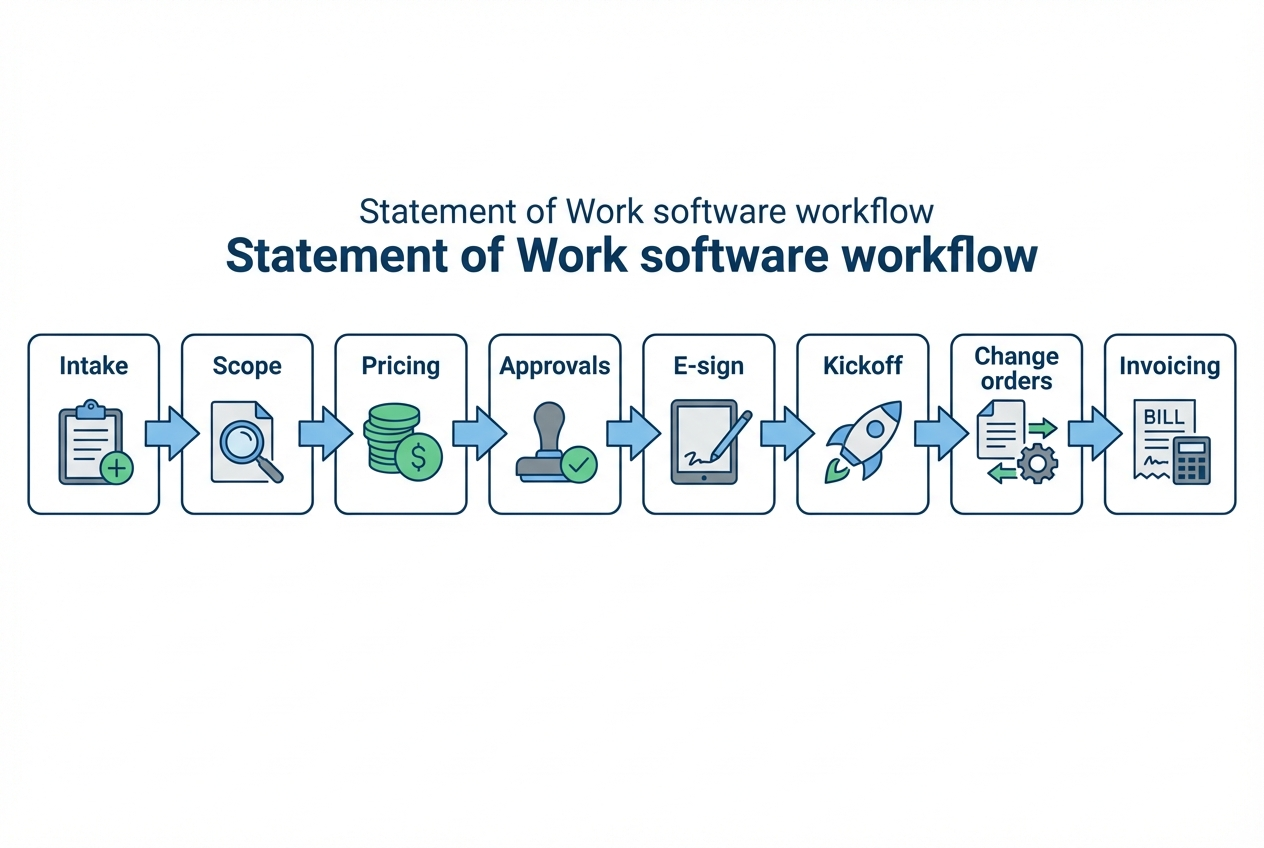
A clean implementation is less about "turning on features" and more about creating a single source of truth for scope.
Step 1: Map your current path from lead to kickoff
Start with the last 5 deals you delivered and replay them from first call to kickoff. You are looking for where the agreement was created, where it was revised, and where the team actually started working from something other than the SOW.
Begin by tracking where scope was defined and refined (proposal doc, email thread, call notes, CRM), then trace where pricing was approved internally. In many teams, the first break happens right here, because sales confirms a number while delivery is still thinking through edge cases.
Next, identify the exact moment the client accepted and how that acceptance was recorded. If acceptance lives in a Slack message like "looks good" or a forwarded email, your software needs to tighten the chain of custody.
Finally, document where changes showed up midstream and how billing drifted from the original agreement. This is usually the clearest signal of whether you need stronger change-order controls or better milestone-to-invoice alignment.
Expected outcome: you will see the exact point where the SOW stops being authoritative. That is the point your software must fix.
Step 2: Define your non-negotiable SOW fields
Most teams lose money because "important details" live in Slack or call notes.
- Deliverables and exclusions: What you will do, and what you will not do.
- Assumptions and dependencies: What must be true for you to deliver.
- Acceptance criteria: What "done" means.
- Timeline and milestones: What ships when.
- Change-order rules: What counts as a change and how it gets priced.
Expected outcome: a draft can be reviewed quickly because it has consistent structure.
Step 3: Set your approval gates before the client sees anything
Approval gates are the easiest place to create leverage.
- Internal approval: Delivery lead confirms feasibility; finance confirms pricing logic.
- Client approval: Client confirms scope and acceptance criteria.
- Signature: Capture the binding acceptance in your e-sign flow.
Expected outcome: you stop discovering "surprises" after delivery has already started.
Step 4: Connect the SOW to delivery and billing
A signed SOW should trigger work the moment it becomes binding. The practical goal is to eliminate manual translation, where someone reads a document and then retypes milestones, dates, and amounts into a project tool and an invoicing tool.
Start by deciding what "kickoff" means in your operation. For some teams, kickoff is a project created with milestones. For others, it is a client onboarding sequence with tasks, provisioning, and calendar holds. Your statement of work software should be the event that starts that machine.
Then align billing to the same structure. If your SOW uses milestones or phases, those same milestones should be the basis for invoices or payment requests. When the structure matches, billing feels obvious to clients and easy for your team.
Finally, make change orders create a new billing event in the same workflow. If the change is approved, the pricing impact should be visible immediately and the next invoice should reflect it. That is how you prevent "approved scope" and "billable scope" from drifting apart.
Expected outcome: billing matches scope, and your team has fewer awkward conversations.
Step 5: Pilot with one service line, then scale
Pick a service you sell often. Run the new system for 2 to 4 weeks.
Expected outcome: you find the missing fields and exceptions early, before rolling it out to every team.
If you want a lightweight way to pilot a custom flow, our prototype path can be a practical approach, especially when off-the-shelf tools cannot model your specific approvals and change-order logic.
What you should have now
You now have:
- Evaluation lens beyond templates: A practical way to evaluate statement of work software beyond surface-level formatting.
- Scope control feature checklist: A clear checklist of the features that actually prevent scope creep.
- Integration priorities: A view of the integrations that turn SOWs into operational triggers.
- Build vs buy framework: A decision framework based on your workflow complexity and governance needs.
- Implementation path: A step-by-step rollout approach that reduces risk while you standardize delivery.
Frequently Asked Questions
What is statement of work software?
Statement of work software helps you create, approve, track, and store SOWs with version history and acceptance records. The best tools also handle approvals, change orders, and downstream triggers like onboarding and invoicing.
Do I need a separate tool for SOWs if I already use a project management platform?
If your project tool cannot handle signatures, structured approvals, versioning, and change orders, you will still need a dedicated SOW workflow or an integrated system. Otherwise the "real agreement" stays fragmented.
How do I prevent change requests from becoming free work?
You need two things: a clear definition of what counts as a change, and a workflow that turns a change request into a priced change order that must be approved before work begins.
Are electronic signatures legally valid in the US?
In general, US law recognizes electronic records and signatures for many transactions under the Electronic Signatures in Global and National Commerce Act (E-Sign Act). Your responsibility is to ensure your process supports proper consent, record retention, and access where required.
When should I use a performance-based approach instead of a method-based SOW?
If you care more about measurable outcomes than prescribing how the work is done, you may prefer a performance-based statement. This distinction is common in procurement best practices and can reduce micromanagement while increasing accountability.
Start building
If your SOW workflow is more than "fill a template and collect a signature," you will move faster by building a system that matches your operations.
We built our platform for founders and business owners who want speed without giving up control. You can start from proven templates, customize the workflow you actually run, and iterate without waiting on a dev queue.
Start building with a validated pricing link: Start building