
Ecommerce ops is a long chain of small decisions: approve or hold, refund or exchange, restock or write-off, ship now or wait, discount or protect margin. Most teams run that chain across spreadsheets, Slack, and vendor dashboards -- which is why the same problems keep resurfacing.
Vibe coding is a practical way to turn those repeat decisions into software without committing to a six-month build. Below are the ecommerce use cases that pay off fastest, plus the simplest architecture to keep your automations reliable instead of "mystery scripts."
Vibe Coding for Ecommerce
Vibe coding is a modern way to build software where you describe the outcome, and AI helps generate the app, workflows, and integrations. You still guide the logic, the data model, and the edge cases. You just skip a lot of boilerplate.
For ecommerce, that matters because the work is repetitive but messy:
-
Order exceptions: Orders arrive with exceptions.
-
Inventory drift: Inventory changes across channels.
-
Refund policies: Refunds and chargebacks have policies.
-
Marketing segmentation: Marketing needs clean segments.
-
Financial reconciliation: Finance needs reconciliation.
Vibe coding shines when you need a custom workflow that is too specific for a template, but not big enough to justify a six-month build.
Key terms:
-
API (Application Programming Interface): A structured way for tools like Shopify, Stripe, or your 3PL (third-party logistics provider) to send and receive data.
-
Webhook: An event message like "order created" that triggers an automation.
-
SKU (Stock Keeping Unit): The identifier you use to track products and variants.
-
ERP (Enterprise Resource Planning): A system that manages inventory, purchasing, accounting, and operations.
If you are new to the idea of AI-generated apps, start with QuantumByte's explanation of how an AI app builder works. It frames the workflow in a way that maps directly to ecommerce operations.
Vibe coding ecommerce use cases that pay off fast
The fastest wins are workflows that (1) touch revenue or cash flow, (2) reduce customer pain, or (3) remove high-frequency manual work.
Here are practical, buildable use cases you can ship as internal tools or lightweight customer-facing utilities.
| Use case | What you build | Why it pays off | What to integrate |
|---|---|---|---|
| Returns and exchanges hub | A portal or internal dashboard that enforces rules and automates steps | Fewer tickets, faster refunds, fewer mistakes | Store platform + shipping + email/SMS |
| Inventory exception monitor | Alerts and a queue for oversells, low stock, and stuck fulfillments | Prevents cancellations and bad reviews | Store platform + warehouse/3PL |
| Pricing and margin guardrails | A rules engine that blocks unprofitable discounts and flags anomalies | Protects margin without slowing marketing | Store platform + cost data |
| Fraud review workspace | A unified view of risk signals with approve/deny flows | Reduces chargebacks and manual review time | Payments + fraud signals + CRM |
| Subscription churn saver | Automated "save offers" based on reason codes and behavior | More retained revenue | Subscription platform + email |
| Customer support copilot | Draft replies from order context and policy, with human approval | Faster replies with consistent policy | Help desk + store + policies |
| Wholesale and B2B ordering | Custom order form with credit limits, tier pricing, and PO (purchase order) fields | Makes B2B smooth without rebuilding your store | Store platform + accounting |
| Sales tax workflow glue | Dashboards and alerts around filings, nexus tracking, exemptions | Fewer compliance surprises | Tax engine + store + finance |
If sales tax is the kind of "everything is almost automated except the hard parts" problem you are living in, we covered sales tax automation software, which is a strong reference for what to automate versus what to delegate to a tax engine.
High-leverage use cases, explained
The list above is broad. This section is where you decide what to build first.
Returns and exchanges hub
Returns are where ecommerce teams lose hours. Not because returns are complex, but because the edge cases are endless.
What a vibe-coded returns hub typically includes:
-
Policy enforcement: A rules layer that checks order age, item type, final sale flags, and condition requirements.
-
Self-serve options: Let customers choose exchange, store credit, or refund when eligible.
-
Exception queue: A single place for "manual review" cases with reason codes and next steps.
-
Automation triggers: Auto-generate shipping labels, notify the warehouse, and update the order timeline.
Start simple: build the internal queue first. If it works, add the customer portal.
Inventory exception monitor
Inventory breaks trust faster than almost anything. Oversells, partial fulfillments, and "label created" shipments that never move create support load and churn.
A small internal app can:
-
Watch key events: Order created, fulfillment created, fulfillment delayed, inventory updated.
-
Score risk: Simple logic like "high-velocity SKU + low stock + backorder not enabled."
-
Route alerts: Slack, email, or a daily digest.
Important design choice:
- Single source of truth: Decide whether your inventory truth comes from your ERP, your warehouse, or your store platform. Then build "sync and reconcile" around that.
Pricing and margin guardrails
Discounts are easy to launch and easy to regret.
A pricing guardrails tool can:
-
Compute real margin: Pull cost, shipping, fees, and discount amount.
-
Block unsafe promos: Prevent discount combinations that drop below a margin floor.
-
Flag anomalies: Catch accidental "90% off" or price mismatches between channels.
This is especially useful when you have multiple discount systems (store promos, bundles, influencer codes, subscriptions).
Fraud review workspace
Fraud tools often show risk scores. What teams need is a decision workspace.
A practical fraud review app includes:
-
Unified context: Order, customer history, shipping mismatch, velocity, and payment signals.
-
Decision flows: Approve, cancel, request verification, hold for review.
-
Audit trail: Who decided what, and why.
Even if you keep your fraud vendor, a custom workspace can remove the "open five tabs" workflow.
Customer support copilot with policy control
Support teams do not need "more AI." They need faster answers that follow your policy.
Build a copilot that:
-
Grounds replies in real data: Order status, tracking, refund eligibility, and recent interactions.
-
Uses your policy text: Shipping windows, refund rules, damaged item rules.
-
Requires human approval: Especially early on.
This is one of the safest ways to use AI because you are drafting, not auto-sending.
For broader automation ideas that cut across your ops, we covered automating business processes, which can help you spot other "repeatable pain" worth turning into software.
The simplest architecture that works
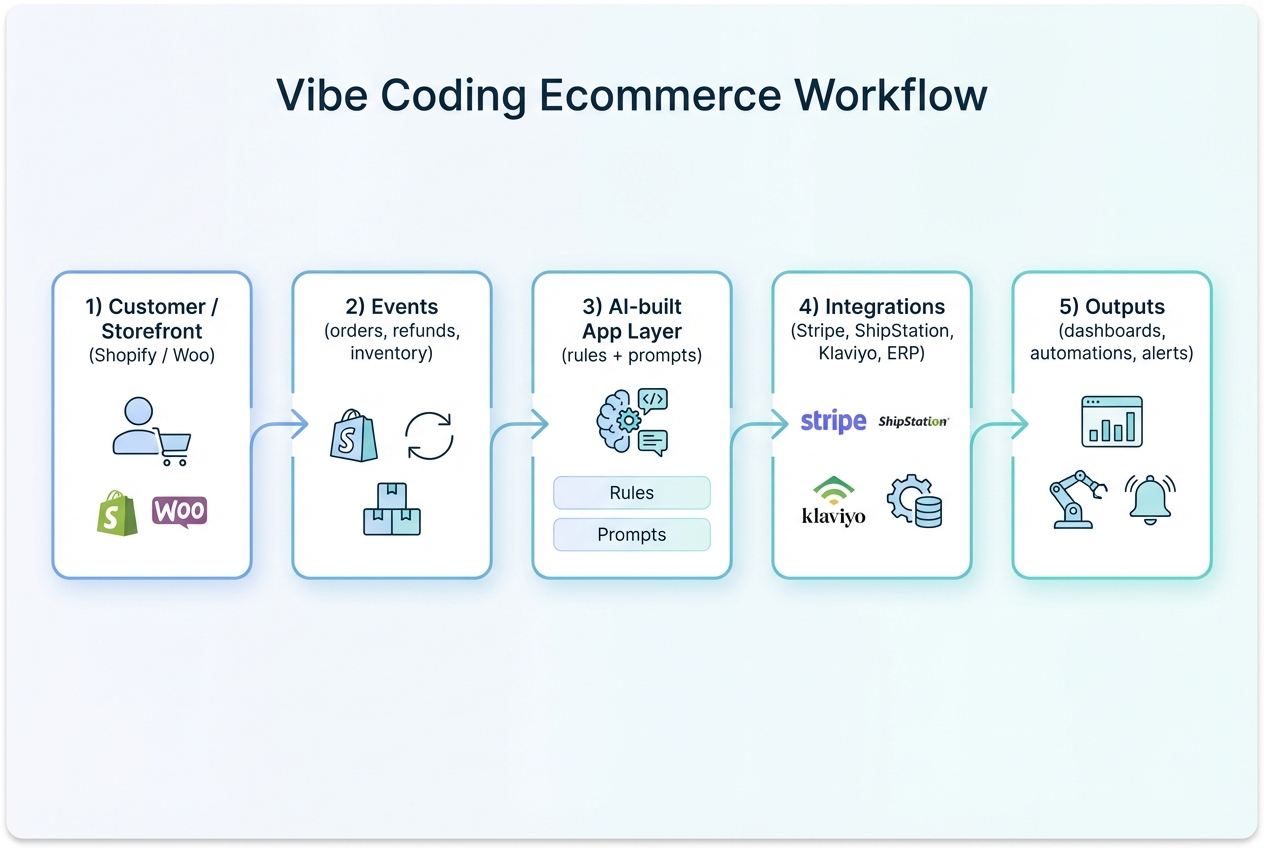
Most vibe coding ecommerce use cases follow the same shape:
- Events: Something happens in your store or systems (order, refund, inventory change).
- Rules: Your business logic decides what to do (approve, hold, alert, enrich data).
- Integrations: The tool updates other systems (warehouse, email, finance).
- Interfaces: A dashboard, queue, or customer portal makes exceptions manageable.
If you keep this structure, you avoid the trap of building a "mystery automation" that nobody trusts.
How to choose the right first build
If you build the wrong thing first, you will blame the method. The method is not the problem. The target is.
Use these filters.
-
High frequency: If your team does it daily, you will see savings immediately.
-
Clear rules: "If X, do Y" is perfect. "It depends on vibes" is not.
-
Owned data: If you already have the data (orders, SKUs, customer records), shipping is faster.
-
Measurable outcome: Faster refunds, fewer oversells, fewer tickets, cleaner reconciliation.
A good first project is usually an internal tool that turns chaos into a queue.
Data and integrations that make or break the build
AI can generate screens and code quickly. Your results depend on the boring parts: data contracts, rate limits, and failure handling.
Model your data before you prompt
Even lightweight ecommerce tools benefit from a simple data model:
-
Entities: Orders, customers, products, inventory locations, returns, tickets.
-
States: Pending, approved, on hold, refunded, restocked.
-
Reasons: Damage, late delivery, wrong item, fraud suspicion.
When you define states and reasons, your automations become predictable.
Design for API limits and retries
Ecommerce platforms throttle traffic. Your tool must expect it.
Shopify, for example, documents API request limits and throttling behavior in API usage limits. This matters when you run bulk jobs like "recalculate margins for 50,000 variants" or "sync inventory across locations."
Practical safeguards:
-
Backoff and retry: When you hit a 429 (too many requests), pause and retry.
-
Idempotency: Ensure retries do not create duplicates. (For example, do not create two refunds.)
-
Batching: Process in chunks and checkpoint progress.
Keep prompts and rules separate
A reliable ecommerce app does not put everything into one giant prompt.
Split responsibilities:
-
Rules engine: Deterministic logic for eligibility, thresholds, and compliance.
-
AI layer: Draft text, categorize free-form reasons, summarize timelines, suggest next steps.
This design is how you get speed without losing control.
Security and compliance guardrails you cannot skip
Vibe coding is still software development. If your app touches orders, customer data, or payments, treat it like production software.
Secure your APIs like you mean it
Most ecommerce automation is API-driven. OWASP's API Security Top 10 is a practical checklist of what goes wrong in real systems.
The risks that show up most in ecommerce workflows:
-
Broken object level authorization: If your portal shows order details, you must ensure a customer can only access their own orders.
-
Broken authentication: Strong session management and short-lived tokens reduce exposure.
-
Unrestricted resource consumption: Rate-limit endpoints so a bot cannot burn your infrastructure.
Do not handle card data unless you must
If your tool stores, processes, or transmits cardholder data, you enter PCI DSS (Payment Card Industry Data Security Standard) territory. The PCI Security Standards Council describes PCI DSS as a baseline for protecting payment account data in its PCI DSS overview.
The practical rule for most teams:
- Hosted payment components: Use a payment provider's hosted components so sensitive card data stays out of your app.
Treat API keys as production secrets
A shocking number of ecommerce "quick builds" fail because keys land in logs, screenshots, or front-end code.
API key best practices from Stripe are relevant even if you are not using Stripe, because the practices are universal.
What to enforce:
-
Least privilege: Give keys only the scopes they need.
-
Secret storage: Use a secure vault, not environment variables pasted into random tools.
-
Rotation: Rotate keys on a schedule and after staff changes.
Build vs buy for ecommerce workflows
Some ecommerce problems have excellent off-the-shelf tools. Others do not.
Use this table to decide.
| Scenario | Buy a tool | Vibe code a custom app |
|---|---|---|
| Common workflow (standard subscriptions, standard email flows) | When best practices are mature and your needs match defaults | Only if you need a unique twist that the tool cannot support |
| Cross-tool glue (store + 3PL + help desk + accounting) | Rarely solved cleanly by one vendor | Best fit, because your stack is unique |
| Internal operations queue (exceptions, approvals, audits) | Tools usually lack your policy and your data | Strong fit, and safer because it is internal first |
| Differentiated customer experience (custom portal, loyalty logic) | Templates look like everyone else | Strong fit if it is part of your brand |
A useful mental model: buy commodity, build advantage.
If you want a deeper scan of the ecosystem, QuantumByte's roundup of vibe coding tools helps you understand where pure AI builders end and where you need a team that can harden the final 10%.
A practical 7-day plan to ship your first use case
You do not need a perfect spec. You need a tight loop.
Day-by-day plan:
- Pick one workflow: Returns queue, fraud approvals, inventory exceptions.
- Write the rules in plain English: Eligibility, thresholds, and who approves.
- List required data: Which systems hold it, and what fields you need.
- Build the internal dashboard: A queue view plus a detail view.
- Add one automation: One trigger that saves real time.
- Log every decision: So you can debug and improve without guesswork.
- Ship to one team: Run it daily, then expand.
The goal is not a giant platform. The goal is a working wedge.
QuantumByte: speed without fragility
There are two common failure modes with ecommerce automations:
-
Template lock-in: You buy a tool and spend months forcing your process to match the template.
-
Fragile scripts: You hack together scripts that work until the next platform update or edge case.
QuantumByte is built for the middle path: ship quickly with AI, then harden what matters with real engineering when you hit scale constraints.
Two practical ways this shows up in ecommerce builds:
-
Structured build plans: QuantumByte turns messy ideas into structured documentation so you can build faster and with fewer reworks.
-
Enterprise-grade hardening: For larger operations that need stronger controls and cross-department automation, QuantumByte's enterprise solutions are designed for reliability, governance, and integration depth.
What you now have
You have a clear set of vibe coding ecommerce use cases that map to real operational pain: returns, inventory exceptions, pricing guardrails, fraud review, support copilots, B2B ordering, and compliance glue.
You also have a simple blueprint for building them safely:
-
Internal start: Start with an internal queue.
-
Logic separation: Separate deterministic rules from AI drafting.
-
Platform resilience: Design for rate limits, retries, and audit logs.
-
Security basics: Follow security basics for APIs, keys, and payments.
Do that, and you can ship meaningful ecommerce software in days, not months.
Frequently Asked Questions
What is vibe coding in ecommerce, in one sentence?
Vibe coding in ecommerce is building store workflows and internal tools by describing outcomes in natural language and letting AI generate the implementation, while you keep control of business rules and exceptions.
Which vibe coding ecommerce use case should I build first?
Start with a high-frequency internal workflow like a returns exception queue or an inventory exception monitor. Internal tools deliver fast wins and carry lower risk than customer-facing changes.
Can I use vibe coding for a customer-facing portal?
Yes, but ship it in phases. Build the internal workflow first, then add a customer portal once you trust the rules, authorization, and audit trail.
Will Shopify or other platforms block my automation?
They will throttle heavy traffic. Design around documented limits, implement retries, and batch bulk jobs. Shopify's API usage limits are a good example of the constraints your app must respect.
How do I keep AI from making policy mistakes in customer support?
Do not auto-send. Use AI to draft responses, ground them in order data, and require human approval. Keep your policy rules deterministic so the app enforces them consistently.
Do I need to worry about compliance if I do not store card data?
Yes, but it is simpler. Avoid handling card data directly, use payment provider components, and treat API keys as production secrets. PCI DSS scope depends on what you store, process, or transmit, according to the PCI DSS standard overview.