
Y Vibe coding for clinics is a practical way to turn the workflows in your head into working software quickly, using natural language and modern Artificial Intelligence (AI), without waiting months for a full build.
Done right, it cuts admin load, reduces repeat work, and gives you systems that match how your team actually operates. Done wrong, it creates compliance headaches and fragile apps. This guide shows you how to do it the right way.
How Can Clinics Leverage Vibe Coding?
For clinics, vibe coding only works when it is paired with real guardrails:
-
Clear workflows: You define what happens at check-in, intake, scheduling, billing, follow-ups, and referrals.
-
Real data rules: You define the data fields, who can see them, and how long you keep them.
-
Security controls: You design for Protected Health Information (PHI) and electronic Protected Health Information (ePHI) from day one.
If you want a simple, clinic-friendly mental model:
-
Prompts create the first draft: Screens, forms, tables, and basic logic.
-
Process design makes it useful: The steps match your real operations.
-
Engineering makes it safe and scalable: Integrations, access control, audit logs, and reliability.
QuantumByte is the platform business owners are using to leverage vibe coding for internal systems that increase the productivity of their businesses. Simply state communicate on the platform the workflow you're trying to improve, and let the builder work for you. Automated medical reports are also readily available via our enterprise solutions, with enterprise partners such as Volkswagen on board.
Where clinics win first with vibe coding
Clinics get the fastest returns by vibe coding small, repeatable workflows that remove friction for staff and patients. Save the "replace the whole Electronic Health Record (EHR)" ambition for later.
Here are high-return clinic workflows that vibe coding can tackle quickly.
-
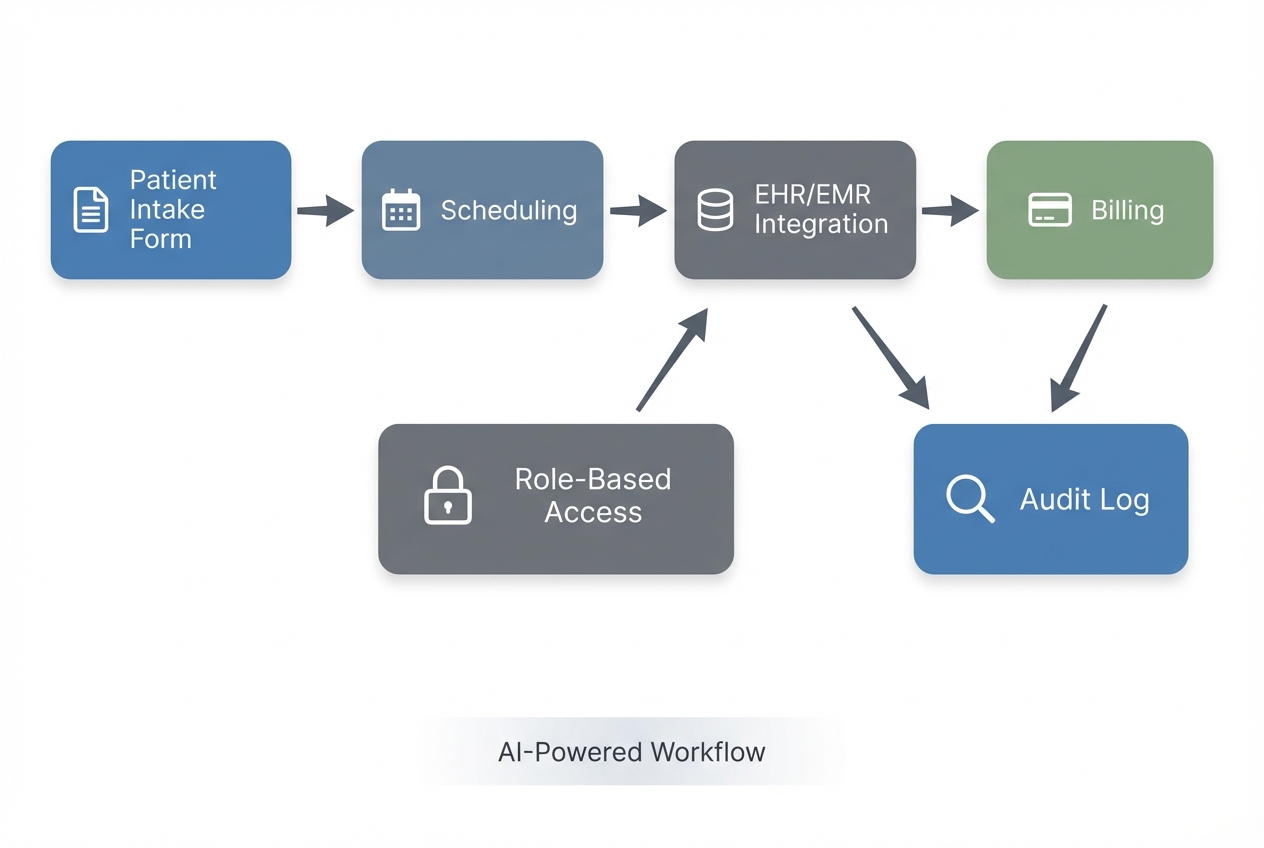
Patient intake and pre-visit triage: Replace clipboards and scattered PDFs with a secure intake form, required fields, and automatic routing to the right staff member.
-
Scheduling and reminders: Reduce phone tag with a self-serve booking flow, waitlist logic, and reminder rules that fit your clinic's schedule blocks.
-
Referral management: Track inbound referrals, required documentation, and follow-up status so nothing falls through the cracks.
-
Prior authorization tracking: Keep a clean pipeline of requests, payer responses, deadlines, and missing items.
-
Billing and claim readiness checks: Create internal checklists that prevent common "missing info" issues before claims are submitted.
-
Inventory and supplies: Track high-velocity items, reorder points, and vendor details in one place.
-
Staff task routing: Turn "did someone do this?" into an assignable, trackable workflow with clear ownership.
A strong rule of thumb: start with a workflow that is already well-defined and repeated daily. If your front desk can explain it on a whiteboard in 10 minutes, it is a good candidate.
Compliance and safety reality for clinic software
If your app touches PHI, treat it like a production system from day one. It must withstand audits, access reviews, and real-world mistakes.
The HIPAA Security Rule sets standards for administrative, physical, and technical safeguards to protect ePHI. It is flexible and technology-neutral, but it is not optional.
You do not need to memorize regulations to make good decisions. You need to bake in the essentials.
The non-negotiables to plan for
-
Risk analysis: The HIPAA requirement to assess where ePHI lives, what threats exist, and what controls you need. HHS is explicit that risk analysis is foundational in its risk analysis guidance.
-
Role-based access control: Only the right roles can see the right data. This is often abbreviated as RBAC (role-based access control).
-
Audit logs: A record of who accessed what, and when. If something goes wrong, logs are your truth.
-
Data minimization: Collect only what you need for the workflow. Less sensitive data stored means less risk.
-
Secure authentication: Strong passwords, ideally multi-factor authentication for staff.
-
Encryption: Encryption in transit (during transfer) and at rest (when stored).
-
Vendor boundaries: If a vendor stores or processes PHI for you, you typically need a Business Associate Agreement (BAA). Your legal counsel should confirm this for your specific scenario.
For a practical implementation guide many teams use as a reference, NIST provides SP 800-66 Rev. 2 to help regulated entities implement the HIPAA Security Rule.
If you are a small or mid-sized practice and want a structured way to document a security risk assessment, the ONC and OCR provide the Security Risk Assessment Tool.
A simple decision filter before you vibe code
Ask these three questions before you build:
- Will the app store PHI or ePHI?
- Will the app send PHI to email, text, or third-party tools?
- Will non-clinical staff use it daily under time pressure?
If the answer is "yes" to any, design for compliance first. Move fast, but do it with guardrails.
A practical build plan for vibe coding clinic-grade applications
1) Pick one workflow with a measurable outcome
Start with something you can measure within two weeks.
Examples:
-
Wait times: Reduce check-in time.
-
Data completeness: Reduce missing intake fields.
-
Referral throughput: Reduce time spent chasing referral documents.
If you try to solve "everything," you will ship nothing.
2) Write your workflow as plain steps, not features
Before you write prompts, write the workflow like this:
-
Intake: "Patient fills intake form."
-
Front desk review: "Front desk reviews missing items."
-
Insurance follow-up: "If insurance is missing, request it."
-
Clinical routing: "If symptoms match criteria, route to clinician."
This becomes your prompt backbone.
3) Define your data model in clinic language
A data model is simply "what information you store" and "how it relates." Keep it basic.
Examples:
-
Patient: Demographic and contact information used across intake, scheduling, and billing.
-
Appointment: Date, time, provider, location, and status for visits.
-
Referral: Source, reason, required documents, and follow-up status.
-
Insurance policy: Payer details and member information needed for eligibility and billing.
-
Authorization request: What was requested, by whom, due dates, and payer responses.
-
Task: A trackable unit of work with an owner, due date, and completion status.
Then list the minimum fields for each object. This is where clinics often over-collect. Do not.
4) Define roles and permissions early
Write out roles like you are onboarding a new hire:
-
Front desk: Staff managing check-ins, scheduling, and initial data entry.
-
Billing: Staff handling claims prep, payment status, and insurance-related updates.
-
Medical assistant: Staff supporting intake, vitals, and pre-visit preparation.
-
Clinician: Providers who need access to clinical workflows and patient context.
-
Office manager: Operations owner who needs oversight, reporting, and exception handling.
-
Admin: System administrator responsible for configuration, users, and security settings.
Then specify who can:
-
View patient demographics
-
View clinical notes
-
Edit insurance info
-
Export reports
This is where clinic-grade apps separate from quick demos.
5) Prompt the app builder with constraints, not just wishes
When you prompt an AI builder, include constraints:
-
Must-have screens: Intake form, appointments list, referral detail page.
-
Validation rules: Required fields, format checks, conditional questions.
-
Permission rules: Who can view and edit each section.
-
Audit requirements: Log edits to sensitive fields.
If you want a repeatable prompt structure, we covered AI app builder prompts with patterns you can adapt.
6) Test like your busiest day, not your calmest day
Your clinic software fails when:
-
Lateness: A patient is late and you need to shift the schedule without breaking the flow.
-
Concurrent edits: Two staff members edit the same record and you need clear conflict handling.
-
Interruptions: A phone call interrupts the workflow and the app must make it easy to resume.
-
Missed steps: Someone forgets a step and the system should prevent silent failure.
Run "busy day" test scripts. Do not rely on happy-path testing.
7) Lock down deployment and integrations
Most clinic workflows eventually touch other systems:
-
EHR or Electronic Medical Record (EMR): Where clinical documentation and patient records often live, even if your new tool only complements it.
-
Billing tools: Systems that manage claim submission, payment posting, and payer workflows.
-
Messaging systems: Platforms for reminders and patient communication, where PHI handling needs strict controls.
-
Accounting: Tools that handle finance reporting and reconciliation, usually downstream from billing.
Plan for integrations as a second phase. Your first phase can be "standalone and internal" if it does not move PHI across uncontrolled channels.
If you want a clear explanation of what happens behind the scenes in an AI build flow, we covered how an AI app builder works, which is a useful baseline.
Build vs buy for clinics
Sometimes the right move is to buy software. Sometimes it is to build. The trap is choosing based on vibes instead of fit.
Use this table as a decision anchor.
| Decision factor | Buy clinic software | Vibe coding for clinics |
|---|---|---|
| Workflow uniqueness | Best when your process matches a standard template | Best when your workflow is a competitive advantage or truly different |
| Speed to start | Fastest for common use cases | Fast for a tailored first version, especially for one workflow |
| Compliance responsibility | Vendor often provides guardrails, but you still own your policies | You must design and document controls, especially for PHI |
| Integrations | Often available out of the box | Possible, but needs planning and sometimes engineering |
| Total cost | Predictable subscription, can grow with seats and modules | Lower cost for a targeted internal tool, higher for full platform |
| Long-term flexibility | Limited by vendor roadmap | High flexibility if the app is built on a maintainable stack |
If you are deciding between no-code and AI-driven builds, QuantumByte's comparison on no-code vs traditional development offers a grounded way to think about trade-offs.
A practical hybrid that works for most clinics
A smart clinic path often looks like this:
-
Buy what is commodity: Keep proven systems for standard needs like baseline scheduling, core EHR, or commodity billing where switching costs are high.
-
Vibe code what is unique: Build the internal workflows that make your clinic faster and more consistent, especially routing, intake logic, and operational handoffs.
-
Add custom engineering when needed: Bring in experienced developers when compliance hardening, integrations, performance, or auditability become the gating factor.
That hybrid approach is also why many teams prefer a platform that can start with AI and still get "finished properly" by engineers.
How QuantumByte fits into clinic vibe coding
If you want to move quickly without painting yourself into a corner, you want two things:
- A fast way to turn a workflow into a working app.
- A clear path to harden it for real clinic use.
QuantumByte is designed for exactly that "days, not months" journey. You can prototype with our AI builder, then bring in expert development for the parts that must be airtight.
We are also one of the few options that explicitly positions itself for industry-specific operational software, including healthcare, on our enterprise solutions.
A realistic starting point that does not overwhelm your team
A good first build with QuantumByte is usually:
-
Internal tool: A secure internal tool for one workflow.
-
Small role set: A small set of roles so permissions stay clear.
-
Data validation: Clean validation rules that prevent bad inputs at the source.
-
Reports: Exportable reports so you can measure impact and spot issues fast.
Then you expand.
If you want to see how QuantumByte frames pricing and what is included in each tier, review the packets and plan details.
A clean next step when you are ready
If you have one clinic workflow in mind and you want to see how quickly it can become a working prototype, start with exploring our AI building platform here.
Common mistakes clinics make with vibe coding
You can save weeks by dodging these.
-
Trying to build an EHR replacement first: Start with one operational workflow. The EHR is not your first vibe coding win.
-
Collecting too much data: Every extra field becomes a liability. Keep it minimal, then expand only when needed.
-
No permission model: If everyone can see everything, you are creating risk. Define roles early.
-
Skipping audit logs: If you cannot trace access and edits, you cannot investigate incidents effectively.
-
Treating prompts as specs: Prompts are a start. You still need requirements, test cases, and ownership.
-
Pushing PHI into consumer tools: Do not route sensitive data through uncontrolled email threads or generic chat tools.
If you are building these systems as a solopreneur product, one more mistake matters:
- Building for "clinics" instead of one clinic type: Pick a niche (physical therapy, dermatology, dental, mental health, imaging). Win one workflow deeply, then expand.
Frequently Asked Questions
Is vibe coding safe for clinics?
It can be, if you treat security and compliance as core requirements. If your app touches ePHI, you need a risk analysis, access controls, audit logs, and secure authentication. The HIPAA Security Rule is a helpful baseline for what "safe" must include.
Can I vibe code a patient portal?
Yes, but start with a narrow version: appointment requests, document collection, and basic status updates. Do not start with full clinical record access unless you have strong role controls, logging, and a clear compliance plan.
Do I need a developer if I use an AI app builder?
For a prototype or internal workflow, often not. For integrations, data migrations, advanced permissions, performance, and compliance hardening, you will eventually want experienced engineering support.
What is the best first clinic workflow to build?
Pick one that is frequent, painful, and measurable. Intake completion, referral tracking, prior authorization pipelines, and task routing are common winners.
How do I avoid building the wrong thing?
Shadow the workflow for one day, write the steps as a checklist, then build only what removes friction. Treat the first version as a pilot with real users and "busy day" test scripts.
Is QuantumByte a no-code tool or a dev agency?
It is intentionally both. You can start with AI-driven app generation to move fast, then use the in-house team to finish what AI cannot yet cover reliably, especially for clinic-grade requirements.