
Real estate runs on workflows.
Leads come in. Showings get scheduled. Listings go live. Deadlines stack up. Messages slip. Tasks repeat. And somewhere between the CRM, inbox, calendar, MLS, spreadsheets, and sticky notes, things get missed. Most teams try to solve this by buying more software. But that usually means another dashboard, another login, and another system that almost fits how you work.
Vibe coding flips that approach.
Instead of adapting your business to generic tools, you describe your actual workflow and an AI builder generates the app structure for you.
This guide breaks down how to use vibe coding in real estate: what to build first, how MLS and RESO standards affect your integrations, which workflows deliver fast wins, and how to add the guardrails that keep your system safe once it becomes mission-critical.
Vibe coding for real estate
Vibe coding for real estate means building software by steering the outcome with natural-language prompts instead of hand-writing every line of code.
You write what the system should do (screens, data, rules, automations). The builder generates an app skeleton, then you iterate by testing and refining prompts.
This works best when you keep the first version tight:
-
One user role to start: Begin with a single persona like an agent, an admin, or a transaction coordinator. Add roles later.
-
One core job: Pick one outcome like "never miss a lead" or "get every listing task done on time."
-
Real data, not "demo" data: If you do not connect the real inbox, calendar, and lead sources, you will not see real value.
If you want a deeper breakdown of how AI builders turn prompts into working software, use our article on how an AI app builder works.
The best real estate workflows to vibe code first
The fastest wins come from workflows that are high-frequency, repetitive, and painful to do by hand.
-
Lead intake and routing: Capture leads from forms, calls, and direct messages (DMs), tag them by intent, and assign them to the right agent in seconds. If you want a concrete structure to copy, start with this vibe coding example.
-
Follow-up that never slips: Create a rule-based sequence: new lead gets a text, then an email, then a call task, then a "no response" drip. For ideas you can adapt, pull from these sales automations.
-
Showing coordination: Turn a new "showing request" into a scheduled slot, reminders, lockbox notes, and a post-showing feedback form.
-
Listing ops checklist: Automatically generate tasks for photography, copy, multiple listing service (MLS) entry, open house setup, sign install, price changes, and status changes.
-
Transaction coordination: Track deadlines (inspection, appraisal, financing, closing), store key docs, and alert the right person when something is late.
-
Investor pipeline tracking: Monitor deal flow, underwriting notes, lender terms, and next actions without living in spreadsheets.
MLS, IDX, RESO, and other systems you can connect connect
Real estate software lives or dies on data. The trick is knowing which data you can use, how to access it, and where people get blocked.
MLS and IDX basics
If your goal is to show listings on a website or app, you usually enter the world of MLS rules and permissions. A common approach is Internet Data Exchange (IDX), which is a policy framework that allows MLS participants to display other participants' listings on their sites under specific rules, according to the National Association of Realtors' IDX background and FAQ.
Practical takeaway: do not design your product around "we will just pull the MLS" until you have a real path to access.
RESO standards are your integration cheat code
When you do integrate listing data, standards matter. The Real Estate Standards Organization (RESO) is the nonprofit standards body behind common real estate data standards, including the Data Dictionary and the Web API, explained on RESO's about page.
If you are working with MLS data feeds or vendors, being RESO-aligned reduces translation work and makes integrations less fragile.
RESO Web API is the modern transport layer
If you are building modern software that needs listing data in an application programming interface (API)-friendly shape, RESO's Web API is the current standard approach for transporting real estate data.
Practical takeaway: if an integration path exists, you want something API-based and well-documented. Anything "custom export" becomes a maintenance trap.
Your highest-leverage data sources are often not the MLS
For internal tools, the "real" data that drives results is usually:
-
Your CRM: Leads, contacts, deal stage, tags. (CRM = customer relationship management.)
-
Your inbox and phone logs: First-touch speed, missed follow-ups, conversation history.
-
Your calendar: Showings, listing appointments, closing milestones.
-
Your forms: Landing pages, open house sign-ins, referral intake.
If you are still defining what your CRM should hold, this guide to a CRM for small business growth is a strong checklist.
A practical blueprint to build time-saving tools
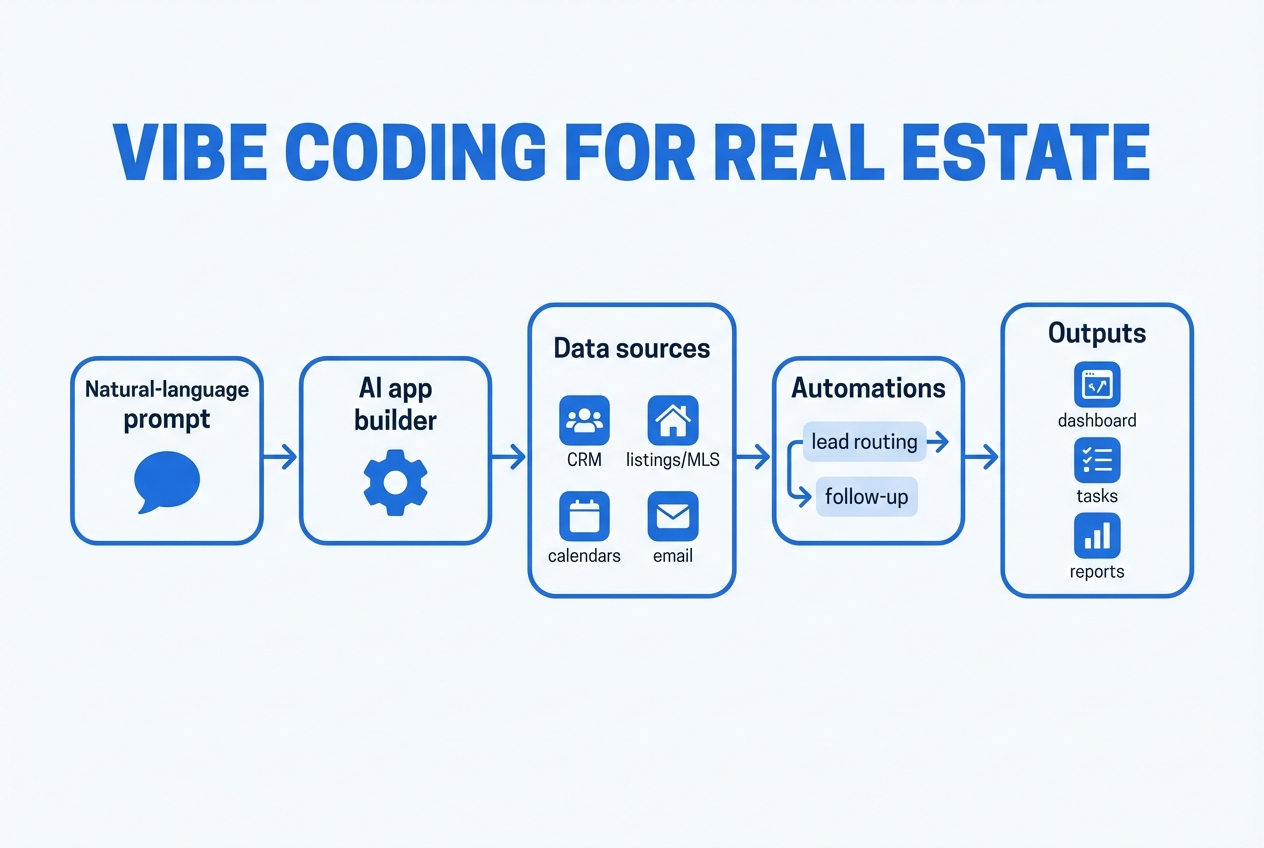
This is a build sequence that keeps the "vibe" speed but still lands in a system you can trust.
Step 1: Write the job-to-be-done in one sentence
Examples:
-
Routing goal: Route every inbound lead to the right agent within 60 seconds.
-
Listing ops goal: Make listing tasks impossible to forget.
Step 2: Define the minimum data model
Keep it small. You can always expand.
-
Lead: name, phone, email, source, intent, assigned_to, status, last_contacted_at
-
Property (optional early): address, city, price_band, notes
-
Task: type, due_date, owner, linked_lead
Step 3: Choose the first screen
Start with one dashboard that answers: "What should I do next?"
-
New leads: View recently submitted inquiries so you can respond fast.
-
Hot leads: See leads that match your intent rules (budget band, area, timeline) so you can prioritize.
-
Overdue tasks: Catch slipped follow-ups and admin work before they become lost deals.
-
Today's showings: Stay on top of what is happening now, not what happened last week.
Step 4: Automate one trigger end-to-end
One trigger. One path. Real notifications.
-
Lead submission: New lead submitted
-
Owner assignment: Assign owner
-
Confirmation message: Send confirmation message
-
Follow-up tasks: Create follow-up tasks
-
Activity logging: Log the timeline
Step 5: Add roles and permissions only after the workflow works
If you add roles too early, you will spend your week debating permissions instead of shipping value.
Step 6: Add an audit trail
If your business depends on this, you need a record.
-
Change tracking: Who changed the lead status?
-
Timeline verification: When was the follow-up sent?
-
Logic transparency: What did the system decide and why?
Step 7: Harden the app for real-world edge cases
This is where most vibe-built apps fall apart.
-
Duplicate leads: Decide whether to merge, block, or link duplicates, and define the rule clearly.
-
Missing phone numbers: Route incomplete leads to a cleanup queue and generate a task to collect the missing fields.
-
Multiple agents touching the same record: Add locking, conflict rules, or clear ownership to prevent messy timelines.
-
Time zones: Normalize time storage and display so reminders fire at the right local time.
-
Do not contact rules: Enforce suppression rules across every automation so you do not create compliance risk.
Prompts that actually work for real estate builds
Good prompts are specific. They include rules, examples, and what "done" looks like.
Use these as templates.
Lead routing prompt
-
Goal: Assign each new lead to the correct agent and start follow-up.
-
Prompt: "Build a lead intake workflow. Inputs: name, email, phone, preferred area, budget band, source (Facebook, Zillow, referral, open house). Rules: if area is Downtown, assign to Agent A; if Suburbs, assign to Agent B; if missing phone, flag as 'incomplete' and create a task 'request phone'. After assignment, create 3 tasks (call in 5 minutes, text in 10 minutes, email in 30 minutes). Log every action in an activity timeline."
Listing checklist generator prompt
-
Goal: Turn a new listing into a full task plan.
-
Prompt: "When a listing record is created, generate tasks: photography, copywriting, MLS entry, sign install, open house plan, price review. Each task has an owner and due date. Add a 'blocking' rule: MLS entry cannot be marked complete until photography and copy are complete."
Showing coordination prompt
-
Goal: Eliminate the back-and-forth.
-
Prompt: "Create a showing request form that offers available time slots pulled from my calendar. When a slot is selected, create a calendar event, send confirmation, and create a follow-up task for feedback 2 hours after showing time."
Transaction milestone prompt
-
Goal: Never miss deadlines.
-
Prompt: "For each accepted offer, create a transaction timeline with milestones: inspection deadline, appraisal date, financing contingency, closing date. Send reminders 3 days before each milestone to the assigned coordinator. If any milestone is missed, flag the transaction 'at risk' on the dashboard."
Investor deal pipeline prompt
-
Goal: Track acquisition deals like a pro.
-
Prompt: "Build a pipeline with stages: new lead, underwrite, offer made, under contract, close, dead. Each deal stores purchase price, rehab estimate, ARV (after repair value), lender, and target close date. Dashboard shows deals by stage and alerts for deals with close date in next 14 days."
Guardrails that keep vibe-coded apps safe and reliable
Speed matters. The risk shows up when a rushed build becomes a system people rely on.
-
Least-privilege access: Give each role only what it needs. For example, agents can view their own leads, admins can view all, and contractors have no access to client data.
-
Data validation rules: Require phone or email for a lead to become "active." Reject invalid emails. Normalize phone formats.
-
Audit logs: Track who changed what and when. This helps with internal disputes and debugging.
-
Backups and export paths: Make sure you can export core data if you ever migrate.
-
Human-in-the-loop approvals: For risky actions like mass email sends or lead deletions, require confirmation.
If your goal is "a system you can run a brokerage on," treat these as non-negotiable requirements, not nice-to-haves.
Fair housing and real estate compliance you cannot ignore
If your software touches leads, marketing, or decisions, you are in compliance territory.
At a minimum, understand what the Fair Housing Act prohibits, including discrimination in sale, rental, and financing based on protected characteristics, as outlined by the U.S. Department of Justice's Fair Housing Act overview.
Practical ways to reduce risk in your app design:
-
Avoid sensitive fields: Do not store or infer protected characteristics unless you have a clear legal reason.
-
Be careful with lead scoring: If you build a model that ranks people, document the rules and keep them tied to behavior and intent, not personal traits.
-
Keep messaging consistent: Automations should not change offers or availability based on who the lead is.
-
Log key decisions: If the system routes or prioritizes leads, store the reason (rules-based) in the activity timeline.
This is not legal advice. It is product hygiene. You build cleaner systems when you plan for compliance early.
No-code vs vibe coding vs custom development in real estate
You are choosing a path, not a tool. Use this as a fast decision table.
| Best fit | No-code tools (Bubble, Glide, Softr) | Vibe coding (AI-assisted build) | Custom development (engineering team) |
|---|---|---|---|
| Speed to first prototype | Fast: Good for simple create, read, update, delete (CRUD) apps | Very fast: Prompts can generate full flows | Slower: Setup and architecture take time |
| Complex integrations | Limited: Often needs plugins or workarounds | Medium: Works well with clear APIs | Strong: Best for tricky data and custom systems |
| Long-term maintainability | Medium: Depends on platform limits | Variable: Great with guardrails, risky without | Strong: Clean codebase and clear ownership |
| When it shines | Simple portals: Forms, directories, basic dashboards | Operational apps: Lead routing, task systems, internal tools | Production SaaS: Multi-tenant, complex permissions, high scale |
A practical approach that works for many teams:
-
Prototype fast: Use vibe coding to get a working flow in front of real users quickly.
-
Validate with real usage: Run it against real leads and real tasks so you find what actually breaks.
-
Harden what matters: Invest in expert development for the integrations, permissions, and reliability that your business depends on.
QuantumByte is built around that hybrid reality: you can move fast with AI-assisted building, then bring in an expert team when the hard parts show up, and enterprise solutions that produce tailored solutions to automate your team's workflows.
How to productize real estate expertise into a sellable SaaS
If you are a solopreneur or operator, your edge comes from the playbook you already run, not from knowing how to code.
Here are product shapes that sell because they remove pain:
-
Niche lead-to-appointment system: Built for one segment like luxury rentals, investor buyers, or new construction.
-
Transaction coordination hub: Deadlines, doc checklists, and reminders for small teams.
-
Listing ops command center: One place to run listing tasks and vendor coordination.
-
Brokerage onboarding system: Training checklists, scripts, compliance docs, and progress tracking.
If your end goal is to sell the software to other teams, plan for white-labeling early. Multi-tenant design, branding, and account separation are not bolt-ons. This guide to a white-label app builder explains what changes when you build for resale.
A simple next step you can take today
If you have a real estate workflow you want to turn into software, start by writing a one-page spec: the job, the data, the triggers, and the first dashboard.
Then convert it into structured build instructions so an AI builder can generate a usable first version.
A clean place to begin is QuantumByte Packets. Use this link to start with UTM tracking: create your first Packet.
What you covered and what to build next
You now have a practical view of vibe coding for real estate, including which workflows deliver fast returns, how real estate data standards (MLS, IDX, RESO) affect your build, and the guardrails that keep an AI-built app safe in production.
Your best next build is the one that removes daily friction:
-
Pick one workflow: Choose the highest-frequency task that drains time every day.
-
Ship one dashboard: Build a single screen that tells you what to do next.
-
Automate one trigger end-to-end: Tie one real event (like a new lead) to one complete outcome (like tasks plus notifications).
-
Add guardrails before you scale: Lock down access, validate data, and log decisions before the tool becomes mission-critical.
Frequently Asked Questions
Is vibe coding safe for client data?
It can be, if you design for safety. Use least-privilege roles, validation rules, audit logs, and clear approval steps for risky actions. Do not treat a quick prototype like a production system.
Do I need MLS access to build real estate software?
Not always. Many high-impact internal apps run on your CRM, inbox, forms, and calendar. MLS access matters when your product needs live listing display or deep listing data.
What is the difference between IDX and RESO?
IDX is a policy framework for displaying MLS listings across participant sites. RESO provides technical data standards and transport protocols that help real estate systems exchange data more consistently.
Can I build a real estate CRM with vibe coding?
Yes, but start narrow. Build the lead inbox, routing rules, follow-up tasks, and a clean activity timeline first. Then expand into deals, properties, and reporting.
When should I stop iterating and bring in developers?
When the app becomes core to revenue or compliance, or when you hit edge cases that keep breaking (permissions, data integrity, integrations, performance). A hybrid approach often wins: keep the speed, then harden what matters.